- Revision History
- Overview
- Feature Summary
- Strategic Workforce Planning Cloud
-
- Features
-
- Certification for Chrome 85-86 and Chromium Edge 85-86 Browsers
- New Sample Application
- New Version of Oracle Smart View for Office
- EPM Automate Updates
- REST API to Copy a File Between Instances
- REST API to Skip Updates
- Updates to Oracle Enterprise Performance Management Cloud Operations Guide
- New Activity Report Generation on Restarting an Environment
- Support for Selecting Dimension Members Based on UDAs in Form Designer
- New System Maintenance Process to Reset Environment in Data Management
- Clear All Data and Setup When Deleting an Application
- Support for Summary Drill with More Than 1000 Descendants in Data Integration
- New Proxy Authentication Support in the EPM Integration Agent
- New Drill Through Options When Drilling to Source from Excel In Smart View
- Task Lists Now Supported in Smart View (Mac and Browser)
-
- IMPORTANT Actions and Considerations
This document will continue to evolve as existing sections change and new information is added. All updates appear in the following table:
| Date | Product | Feature | Notes |
|---|---|---|---|
| 25 NOV 2020 | Created initial document. |
This document outlines the upcoming Strategic Workforce Planning Cloud update.
Column Definitions:
Features Delivered Enabled
Report = New or modified, Oracle-delivered, ready to run reports.
UI or Process-Based: Small Scale = These UI or process-based features are typically comprised of minor field, validation, or program changes. Therefore, the potential impact to users is minimal.
UI or Process-Based: Larger Scale* = These UI or process-based features have more complex designs. Therefore, the potential impact to users is higher.
Features Delivered Disabled = Action is needed BEFORE these features can be used by END USERS. These features are delivered disabled and you choose if and when to enable them. For example, a) new or expanded BI subject areas need to first be incorporated into reports, b) Integration is required to utilize new web services, or c) features must be assigned to user roles before they can be accessed.
| Ready for Use by End Users Reports plus Small Scale UI or Process-Based new features will have minimal user impact after an update. Therefore, customer acceptance testing should focus on the Larger Scale UI or Process-Based* new features. |
Action is Needed BEFORE Use by End Users Not disruptive as action is required to make these features ready to use. As you selectively choose to leverage, you set your test and roll out timing. |
|||||
|---|---|---|---|---|---|---|
| Feature |
Report |
UI or |
UI or |
|
||
Certification for Chrome 85-86 and Chromium Edge 85-86 Browsers |
||||||
Updates to Oracle Enterprise Performance Management Cloud Operations Guide |
||||||
Support for Selecting Dimension Members Based on UDAs in Form Designer |
||||||
New System Maintenance Process to Reset Environment in Data Management |
||||||
Support for Summary Drill with More Than 1000 Descendants in Data Integration |
||||||
New Proxy Authentication Support in the EPM Integration Agent |
||||||
New Drill Through Options When Drilling to Source from Excel In Smart View |
||||||
Strategic Workforce Planning Cloud
Test Environments: Oracle will apply this monthly update during the first daily maintenance that occurs at or after 22:00 UTC on Friday, December 4, 2020.
Production Environments: Oracle will apply this monthly update during the first daily maintenance that occurs at or after 22:00 UTC on Friday, December 18, 2020.
NOTE: Backing up the daily maintenance snapshot and restoring the environment as needed are self-service operations. Oracle strongly recommends that you download the maintenance snapshot every day to a local server.
The Oracle Help Center provides access to updated documentation. The updates will be available in the Help Center on Friday, December 4, 2020.
NOTE: Some of the links to new feature documentation included in this readiness document will not work until after the Oracle Help Center update is complete.
Please Join Oracle Cloud Customer Connect
Please take a moment to join the Cloud Customer Connect forums for EPM Cloud services. Oracle Cloud Customer Connect is a community gathering place for members to interact and collaborate on common goals and objectives. This is where you will find the latest release information, upcoming events, or answers to use-case questions. Joining takes just a few minutes. Join now!
https://cloud.oracle.com/community
NOTE: The Settings and Actions menu now contains a link to Cloud Customer Connect. To access this link, from the Home page, click the down arrow next to the user name (in the upper right-hand corner of the screen), and select Cloud Customer Connect.
Give Us Documentation Feedback
We welcome your comments and suggestions to improve the content of the What's New document and the product documentation.
Please send us your feedback at EPMdoc_ww@oracle.com. In the body or title of the email, state that you are inquiring or providing feedback, and indicate for which EPM Cloud service and the monthly update cycle.
Follow EPM Cloud on YouTube, Twitter, Facebook, and LinkedIn.
These are great resources for the latest updates and information about EPM Cloud.
Defects Fixed and Considerations
Software issues addressed each month and considerations will be posted to My Oracle Support.
This provides visibility into EPM Cloud release contents.
Certification for Chrome 85-86 and Chromium Edge 85-86 Browsers
Oracle Strategic Workforce Planning Cloud now certifies Chrome 85-86 and Chromium Edge 85-86 browsers.
Previously reported issues are now resolved.
A Sample application is now available on Oracle Cloud Customer Connect on the EPM Planning, Sales Planning, and Strategic Workforce Planning Sample Applications Idea Lab post. The Sample application allows customers to learn more about features using training materials provided by Oracle on a common application. The training materials provide step-by-step instructions on how to use features as well as examples of use cases to modify the pre-delivered content to meet your specific requirements within the framework of pre-delivered content.
Business Benefit: The Sample application allows customers to use hands-on training exercises provided by Oracle on their own, Test environment. The training materials provide real-world use cases leveraging pre-delivered content including modifying the pre-delivered content using best practices as recommended by Oracle.
New Version of Oracle Smart View for Office
Oracle Smart View for Office version 20.200 is planned to be available in December 2020.
Business Benefit: This version includes new features and fixed defects.
Steps to Enable
Download and install Smart View. See Downloading and Installing Clients in Getting Started with Oracle Enterprise Performance Management Cloud.
A new version of EPM Automate is available. This version introduces the skipUpdate command.
skipUpdate Command
Sets a skip update request asking Oracle to skip the applying of a monthly update to an environment or removes all skip update requests that were previously made using this command so that the environment is updated to the main code line. You can also use this command to list the skip update requests currently specified for an environment.
You can set skip update requests for a maximum of two update cycles. You cannot skip updates for an environment that is on a one-off patch. Additionally, you cannot skip monthly updates that are more than two months apart from the update that the environment is currently on. For example, if the environment is currently on 20.12, you can skip 21.01 and 21.02, but not 21.03.
Business Benefit: The skipUpdate command allows you to delay updates to a Strategic Workforce Planning Cloud production environment to complete time-sensitive tasks, for example, closing of a quarter, without creating a service request.
Key Resources
- Working with EPM Automate for Oracle Enterprise Performance Management Cloud
REST API to Copy a File Between Instances
Use this REST API to copy a file from one environment (source) to another environment (target). This API is executed on the target environment after details are provided for the source environment from which the file is to be copied.
Business Benefit: Gives you flexibility in copying files from one cloud environment to another.
Key Resources
- Migration REST APIs in REST API for Oracle Enterprise Performance Management Cloud
Role Information
- Service Administrators
Use this REST API to set a skip update request asking Oracle to skip applying a monthly update to an environment. You can also remove all previous skip update requests so that the environment is updated to the main code line. You can list the skip update requests currently specified for an environment.
You can set skip update requests for a maximum of two update cycles. You cannot skip updates for an environment that is on a one-off patch. Additionally, you cannot skip monthly updates that are more than two months apart from the update that the environment is currently on. For example, if the environment is currently on 20.12, you can skip 21.01 and 21.02 updates, but not 21.03.
Business Benefit: This REST API allows you to delay updates to a Strategic Workforce Planning Cloud production environment at times when you need to complete time-sensitive tasks, for example, closing a quarter, without creating a service request.
Key Resources
- Migration REST APIs in REST API for Oracle Enterprise Performance Management Cloud
Role Information
- Service Administrators
Updates to Oracle Enterprise Performance Management Cloud Operations Guide
The Oracle Enterprise Performance Management Cloud Operations Guide has been enhanced with these updated procedures:
- Dealing with Down Environments and Resolving Login Issues sections. These sections have been updated with information on the fields to select in service request so that it is routed properly within Oracle to resolve the issue more efficiently.
- Handling Data Integration Errors. This new section provides instructions to self-diagnose data integration errors.
- Requesting Upgrade Delay for Production Environments. This section is updated with self-service instructions to delay upgrades to an environment.
- Requesting Merge Back of Environments This section is updated with self-service instructions to remove upgrade delays so that the environment can be brought to the main code line.
Business Benefit: The Oracle Enterprise Performance Management Cloud Operations Guide helps you self-diagnose and fix EPM Cloud issues.
Key Resources
New Activity Report Generation on Restarting an Environment
Starting with this update, Strategic Workforce Planning Cloud will generate a new Activity Report each time you run the resetService EPM Automate command to restart an environment. A new Activity Report is also generated during the daily maintenance of the environment and when you create a Provide Feedback submission.
Business Benefit: The Activity Report enables Service Administrators to understand application usage. It also helps streamline application design by identifying calculation scripts and user requests that impact application performance.
Key Resources
- About the Activity Report in Getting Started with Oracle Enterprise Performance Management Cloud for Administrators
Support for Selecting Dimension Members Based on UDAs in Form Designer
When designing forms, administrators can select members for forms based on a common attribute, which was previously defined as a user-defined attribute (UDA).
Before you can associate the UDA with a form, you must create the UDA. To select UDAs for forms, open the form in the form designer, click Layout, and then drag the dimension to the desired Page or row or column axis. Edit the dimension to view the Member Selection window, click Variables, and then expand the UDAs listing to select the UDAs for the form. When a UDA is selected in the form designer, it is preceded by UDA; for example, UDA(New Products).
Business Benefit: When you create forms with UDAs, any members that are assigned to the UDA are dynamically added to the form. For example, if you create a UDA called New Products and assign this UDA to the new products in the Product dimension hierarchy, the form will automatically display the new products at runtime.
Key Resources
- Selecting UDAs as Members in Administering Planning
New System Maintenance Process to Reset Environment in Data Management
A new Reset Environment process now enables you to clear all Data Management setup and data resetting the entire business process environment. You can then reconfigure the integration process as needed.This process accepts a Yes or No confirmation parameter and allows you to specify a reason for the reset. It is available under the System Maintenance Task menu on the Workflow tab in Data Management.
Business Benefit: This feature enables you to reset the entire business process environment. You can then reconfigure the integration process as needed.
Tips And Considerations
Data cannot be recovered when the Reset Environment process has been executed successfully.
Key Resources
- Resetting An Environment in Administering Data Management for Oracle Enterprise Performance Management Cloud
Clear All Data and Setup When Deleting an Application
When an application is now deleted, the system clears all Data Management data and setup artifacts including:
- target application and related artifacts
- data load rules, import format, locations
- staged data in the Workbench
Business Benefit: This feature resets the entire business process environment automatically in Data Management when the application is deleted. You can then reconfigure the integration process as needed.
Tips And Considerations
Data cannot be recovered when the application has been deleted.
Support for Summary Drill with More Than 1000 Descendants in Data Integration
A new Summary Drill Behavior when more than 1000 descendants target option enables you to determine how a summary drill functions with more than 1,000 descendants.
If the number of descendants in summary drill is greater than 1,000 and the Summary Drill Behavior when more than 1000 descendants option is Ignore, then the system ignores the dimension in the filter and returns the drilled data based on filters on the other dimensions. A maximum of three dimensions can be ignored.
If the number of descendants in summary drill is greater than 1,000 and the Summary Drill Behavior when more than 1000 descendants option is Limit, then the system considers only the first 1,000 members for the dimension while returning the data rows.
Business Benefit: When you perform a drill down on source data at a summary level, you can return more than 1,000 members.
Steps to Enable
In addition to the Summary Drill Behavior when more than 1000 descendants target option, to use this feature, enable the Enable Summary Drill option on the Application Options tab. After enabling this option and loading the data with the Create Drill Region option set to Yes, the drill icon is enabled at the summary level.
Key Resources
- Defining Application Detail Options in Administering Data Integration for Oracle Enterprise Performance Management Cloud
New Proxy Authentication Support in the EPM Integration Agent
You can now configure the EPM Integration Agent to use proxy authentication. The system now supports the Basic, Digest, and NTLM authentication methods. You specify the proxy host name, proxy port, proxy username, encrypted password, and domain in the CUSTOM_JAVA_OPTIONS setting.
In addition, if you want to use the NTLM authentication method, set the NTLM_PROXY_AUTH=Y in the agent configuration file.
Business Benefit: Prior to this update, the EPM Integration Agent did not support basic authentication to the EPM Cloud.
Steps to Enable
- Select the Download Agent option on the Actions menu in Data Integration.
-
Unzip the EPMAgent.zip and overwrite your existing agent folder.
Key Resources
- Configuring the EPM Integration Agent Startup Parameters in Administering Data Integration for Oracle Enterprise Performance Management Cloud
New Drill Through Options When Drilling to Source from Excel In Smart View
When you drill through to display drill data directly in Smart View, the system now supports two ways to display the source data:
- Drill through to the source landing page using a hyperlink. In this case when you initiate a source drill, the system launches the source landing page in a browser.
-
Drill through to the source data using an EPM Integration Agent query. In this case the source data is queried and the data is displayed in a new sheet directly in Smart View.
Look for this feature in the upcoming Oracle Smart View for Office version 20.200, planned to be available in December 2020.
Business Benefit: This new option provides the ability to display drill through directly from Smart View. In earlier releases, drill to source was only available in a Web Form.
Steps to Enable
To use this feature, you must first execute a SQL query in the source database and display the results in a pop-window inside Data Integration. For more information, see Creating a Drill Down to a Source System Without a Landing Page in Administering Data Integration for Oracle Enterprise Performance Management Cloud.
Key Resources
- Drill-Through Reports in Working with Oracle Smart View for Office
- Creating a Drill Down to a Source System Without a Landing Page in Administering Data Integration for Oracle Enterprise Performance Management Cloud
Task Lists Now Supported in Smart View (Mac and Browser)
Task Lists for Strategic Workforce Planning are now supported in Oracle Smart View for Office (Mac and Browser).
Task lists guide you through the planning process by listing tasks, instructions, and end dates, helping you to organize, track, and prioritize your workload. For example, a task might help you complete forms, launch business rules, or promote approval units. They can also launch a website or internal company page.
When working with tasks in the Task Lists panel in Smart View, you may:
- Open task lists and individual task
- Open forms related to tasks
- View special task instructions
- Filter tasks
- Execute tasks
- Mark tasks Complete
- Refresh the task list
- Create task list reports based on criteria you specify in an easy-to-use wizard
Service Administrators and Power Users create and manage tasks and task lists.
Business Benefit: With task lists in Smart View (Mac and Browser), you can open and view task lists, execute and complete tasks, and create task list reports.
Steps to Enable
To use task lists in Smart View (Mac and Browser), Service Administrators must create and deploy a new manifest file with the new "Task List" option selected:
- Create a new manifest file and customize it per your requirements.
- In the "Available menu items" section, Workflow group, ensure that the "Task List" option is selected.
- Deploy the manifest file to Smart View (Mac and Browser) users.
Key Resources
- Deploying and Administering Oracle Smart View for Office (Mac and Browser):
- Task Lists in Working with Oracle Smart View for Office (Mac and Browser)
- Administering Task Lists in Administering Planning
IMPORTANT Actions and Considerations
RUNBUSINESSRULE EPM AUTOMATE COMMAND - CHANGE OF BEHAVIOR
Starting with the 21.05 update, the runBusinessRule EPM Automate command will no longer let you run a ruleset against Strategic Workforce Planning applications. Instead, you should use the runRuleSet command to launch business rulesets using EPM Automate.
If you currently use scripts that use the runBusinessRule command to launch rulesets, you must modify them to use the runRuleSet command.
SUPPORT FOR COMPOSITE FORMS
Starting in May 2021, Strategic Workforce Planning plans to stop official support for composite forms. Customers are advised to convert existing composite forms to Strategic Workforce Planning dashboards and log any issues with Support.
NEW “SUPPRESS MISSING NATIVE” OPTION IN FINANCIAL REPORTING WEB STUDIO GRID EDITOR
The new “Suppress Missing Native” option in the “Suppression” panel in the Financial Reporting Web Studio Grid Editor properties is non-functional for 20.12. The desired output of the selection will not be available when the report is executed even if the option is enabled. This will be addressed in an upcoming release.
USABILITY ENHANCEMENTS FOR HORIZONTAL TABS IN NAVIGATION FLOWS
In an update within the next few months, we are introducing a Dynamic Tabs feature within the Redwood theme to open tabs on the fly, both from a list view or from an existing navigation flow tab to perform related actions. Some examples: view drill through from a form in a new temporary tab; view a form in a design mode; open Web ad hoc from a form or dashboard; open forms from right-click menus.
With the Dynamic Tabs feature, navigation flows within the Redwood theme will move to the bottom of the page instead of at the top of the page where they are currently located across themes. With tabs at the bottom of the page, customers will benefit from a clear separation of the Strategic Workforce Planning Cloud horizontal tabs from their browser tabs at the top of the window. Another benefit of this change will be to keep the navigation flow tab names distinct from the name of the artifacts (such as forms and dashboards) rendered within the horizontal tabs. The vertical tabs will stay where they are. Action menus in forms will also be cleaned up to not show items that are already included within the right-click menus in forms.
The Dynamic Tabs feature will be available only within the new Redwood theme introduced in the 20.11 update. The Redwood theme will default with dynamic tabs and there will be no option to turn them off when using the Redwood theme. No other themes will have the dynamic tabs capability.
The effective date of the Dynamic Tabs feature update will be announced in the month prior to the update. The Dynamic Tabs feature in the Redwood theme is expected in the next 3-4 months’ timeframe.
"MEMBERALIAS" AND "MEMBERNAME" TEXT FUNCTIONS IN FINANCIAL REPORTING WEB STUDIO
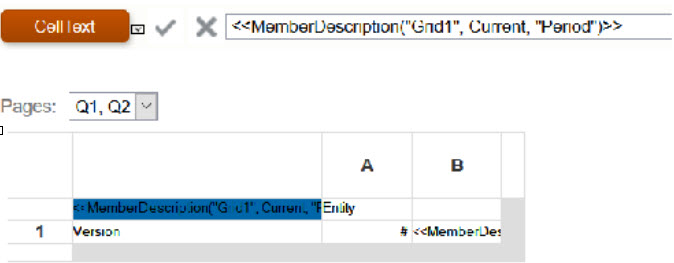
Using the MemberAlias or MemberName text functions in cells that are not part of a row or column will not update when referenced with a Page dimension.
For example: The MemberAlias text function is in the column header, above the row dimensions <<MemberAlias("Grid1", cur, "Entity")>>