
- Revision History
- Overview
- Feature Summary
- Strategic Workforce Planning
-
- Strategic Workforce Planning
- Features
-
- New Video
- OCI Migration: Oracle-Managed Migration Notifications Being Sent and Customer-Managed Migration Program Ends on April 30, 2023
- Support Primary Email Address of User for OCI Deployment
- New Application-Specific Roles for Task Manager
- Updated EPM Books Extension for Smart View
- New Gauge Chart Type in Reports
- New Sumv Function to Exclude Hidden Rows from a Summed Result in Reports
- Fit to Page Width Layout Property for Image Objects in Reports
- New Modes to Migrate Data Management Artifacts
- New Default Import and Export Modes
- Activity Report Enhanced with Maximum Number of Calculation Threads
- Enhanced Event Monitoring Tasks for Task Manager
- Groovy Feature to Write a Log File
- Direct Drill from Summary Members Enabled for Agent Drill Type URLs
- Ability to Delete Insights Comments
-
- IMPORTANT Actions and Considerations
This document will continue to evolve as existing sections change and new information is added. All updates appear in the following table:
| Date | Module | Feature | Notes |
|---|---|---|---|
| 15 FEB 2023 | New Version of Oracle Smart View for Office | Removed feature from February 2023 Update. | |
| 02 FEB 2023 | Created initial document. |
 HAVE AN IDEA?
We’re here and we’re listening. If you have a suggestion on how to make our cloud services even better then go ahead and tell us. There are several ways to submit your ideas, for example, through the Ideas Lab on Oracle Customer Connect. Wherever you see this icon after the feature name it means we delivered one of your ideas.
GIVE US FEEDBACK
We welcome your comments and suggestions to improve the content. Please send us your feedback at oracle_fusion_applications_help_ww_grp@oracle.com.
DISCLAIMER
The information contained in this document may include statements about Oracle’s product development plans. Many factors can materially affect Oracle’s product development plans and the nature and timing of future product releases. Accordingly, this Information is provided to you solely for information only, is not a commitment to deliver any material, code, or functionality, and should not be relied upon in making purchasing decisions. The development, release, and timing of any features or functionality described remains at the sole discretion of Oracle.
This information may not be incorporated into any contractual agreement with Oracle or its subsidiaries or affiliates. Oracle specifically disclaims any liability with respect to this information. Refer to the Legal Notices and Terms of Use for further information.
Column Definitions:
Report = New or modified, Oracle-delivered, ready to run reports.
UI or Process-Based: Small Scale = These UI or process-based features are typically comprised of minor field, validation, or program changes. Therefore, the potential impact to users is minimal.
UI or Process-Based: Larger Scale* = These UI or process-based features have more complex designs. Therefore, the potential impact to users is higher.
Features Delivered Disabled = Action is needed BEFORE these features can be used by END USERS. These features are delivered disabled and you choose if and when to enable them. For example, a) new or expanded BI subject areas need to first be incorporated into reports, b) Integration is required to utilize new web services, or c) features must be assigned to user roles before they can be accessed.
| Ready for Use by End Users Reports plus Small Scale UI or Process-Based new features will have minimal user impact after an update. Therefore, customer acceptance testing should focus on the Larger Scale UI or Process-Based* new features. |
Customer Must Take Action before Use by End Users Not disruptive as action is required to make these features ready to use. As you selectively choose to leverage, you set your test and roll out timing. |
|||||
|---|---|---|---|---|---|---|
| Feature |
Report |
UI or |
UI or |
|
||
New Sumv Function to Exclude Hidden Rows from a Summed Result in Reports |
||||||
Fit to Page Width Layout Property for Image Objects in Reports |
||||||
Activity Report Enhanced with Maximum Number of Calculation Threads |
||||||
Direct Drill from Summary Members Enabled for Agent Drill Type URLs |
||||||
Test Environments: Oracle will apply this monthly update during the first daily maintenance that occurs at or after 22:00 UTC on Friday, February 3, 2023.
Production Environments: Oracle will apply this monthly update during the first daily maintenance that occurs at or after 22:00 UTC on Friday, February 17, 2023.
NOTE: The monthly update will not be applied to any environment for which this monthly update is requested to be skipped using the EPM Automate skipUpdate command or service request to Oracle.
NOTE: Backing up the daily maintenance snapshot and restoring the environment as needed are self-service operations. Oracle strongly recommends that you download the maintenance snapshot every day to a local server.
The Oracle Help Center provides access to updated documentation. The updates will be available in the Help Center on Friday, February 3, 2023.
NOTE: Some of the links to new feature documentation included in this readiness document will not work until after the Oracle Help Center update is complete.
Documentation Updates Available One Week After Readiness Documents
Updated documentation is published on the Oracle Help Center on the first Friday of each month, coinciding with the monthly updates to Test environments. Because there is a one week lag between the publishing of the readiness documents (What's New and New Feature Summary) and Oracle Help Center updates, some links included in the readiness documents will not work until the Oracle Help Center update is complete.
https://docs.oracle.com/en/cloud/saas/epm-cloud/index.html
Fixed Issues and Considerations
Software issues addressed each month and considerations are posted to a knowledge article on My Oracle Support. Click here to review. You must have a My Oracle Support login to access the article.
NOTE: Fixed issues for EPM Cloud Common components (Smart View for Office, EPM Automate, REST API, Migration, Access Control, Data Management/Data Integration, Reports, Financial Reporting, and Calculation Manager) are available in a separate document on the My Oracle Support “Release Highlights” page.
This provides visibility into EPM Cloud release contents.
Give Us Documentation Feedback
We welcome your comments and suggestions to improve the content of the What's New document and the product documentation.
Please send us your feedback at EPMdoc_ww@oracle.com. In the body or title of the email, state that you are inquiring or providing feedback, and indicate for which EPM Cloud service and the monthly update cycle.
Please Join Oracle Cloud Customer Connect
Please take a moment to join the Cloud Customer Connect forums for EPM Cloud services. Oracle Cloud Customer Connect is a community gathering place for members to interact and collaborate on common goals and objectives. This is where you will find the latest release information, upcoming events, or answers to use-case questions. Joining takes just a few minutes. Join now!
https://cloud.oracle.com/community
NOTE: The Settings and Actions menu now contains a link to Cloud Customer Connect. To access this link, from the Home page, click the down arrow next to the user name (in the upper right-hand corner of the screen), and select Cloud Customer Connect.
Follow EPM Cloud on YouTube, Twitter, Facebook, and LinkedIn.
These are great resources for the latest updates and information about EPM Cloud.
The following new video is available:
Managing Approvals with Approval Groups in Cloud EPM
Learn how to set up approval groups and manage approvals with approval groups.
Business Benefit: Videos provide 3-5 minute overviews and step-by step instructions to perform tasks and achieve an outcome.
OCI Migration: Oracle-Managed Migration Notifications Being Sent and Customer-Managed Migration Program Ends on April 30, 2023
One of Oracle's latest advancements, Oracle Cloud Infrastructure (OCI), is the foundation of Oracle's second generation cloud. OCI, a purpose-built, best-in-class platform for running enterprise applications, is engineered from the ground up to run mission-critical databases, workloads, and applications while providing end-to-end security. Oracle's data centers around the globe are standardizing on the new OCI architecture which will deliver even greater performance and reliability. There are a lot of Strategic Workforce Planning Cloud features that are available only in OCI. See Features Available only in OCI EPM Cloud Environments in Getting Started with Oracle Enterprise Performance Management Cloud for Administrators.
Over time, Oracle plans to migrate Strategic Workforce Planning Cloud environments currently hosted in Classic commercial data centers to OCI. Two migration options are available:
Oracle has started sending notifications for Oracle-managed migrations. When your environments are scheduled for migration, you will get notification specifying the migration schedule. Follow the instructions in the notification.
If you plan to use customer-managed migration, you should start this process as soon as possible. Customer-managed migration program is available until April 30, 2023. Oracle will not accept any service request for customer-managed migration starting May 1, 2023.
NOTE: At this time, the environments hosted in US-Gov and UK-Gov data centers are not eligible for migration to OCI.
Business Benefits: OCI provides you a purpose-built, best-in-class platform that is engineered from the ground up to run mission-critical databases, workloads, and business processes while providing end-to-end security. This new architecture delivers greater performance and reliability, and a number of Strategic Workforce Planning Cloud features that are not available in Classic Strategic Workforce Planning Cloud.
Key Resources
- EPM Cloud Classic to Oracle Cloud Infrastructure (OCI) Migration in Oracle Enterprise Performance Management Cloud Operations Guide
- Features Available only in OCI EPM Cloud Environments in Getting Started with Oracle Enterprise Performance Management Cloud for Administrators
Support Primary Email Address of User for OCI Deployment
Starting with this update, only the primary email address of the user is displayed in all Strategic Workforce Planning Cloud business processes. EPM Automate and REST API can only update this primary email address. Recovery email address of the user, if any, is only displayed and updated using Oracle Cloud Identity Console.
Business Benefit:
Customers will now have a common email address flowing from identity domain to all business processes.
Key Resources
- Getting Started with Oracle Enterprise Performance Management Cloud for Administrators
New Application-Specific Roles for Task Manager
New Task Manager roles are now available. You can assign these application-level roles to users who do not get them by default. For example, a user can update organizations if assigned the Task Manager - Manage Artifacts role.
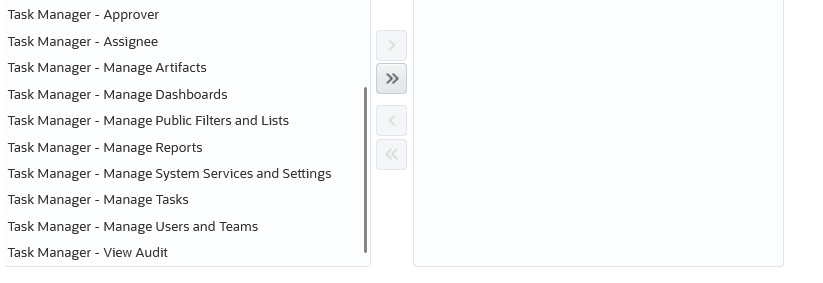
Task Manager Roles
Business Benefit:
Customers can provide granular-level permissions to use Task Manager.
Key Resources
- Administering Access Control for Oracle Enterprise Performance Management Cloud
Updated EPM Books Extension for Smart View
An updated EPM Books extension for Oracle Smart View for Office is now available to download and install. This update includes defect fixes and support for Microsoft Office themes.
Office themes can be enabled from the Options menu of your Microsoft Office application. Though the support for Office themes is present for the EPM Books Extension from 23.02, it can be used only with Oracle Smart View for Office 23.100, which will be generally available soon. You will be able to apply Dark Gray, Black, and White themes, in addition to the default Colorful theme, while using the EPM Books extension in Smart View.
Business Benefit: Downloading and installing the latest EPM Books extension for Smart View gives you access to the latest features, improvements, and defect fixes.
Steps to Enable
To take advantage of the features, improvements, and defect fixes in the EPM Books extension:
- From within Smart View, in the Options dialog, Extensions tab, click the Check for Updates, New Installs, and Uninstalls link.
- Select your business process instance, then follow the prompts.
Key Resources
- Installing the EPM Books Extension in Working with Oracle Smart View for Office
New Gauge Chart Type in Reports
A gauge chart type enables you to display whether the data values fall within an acceptable range or not. You can set the minimum and maximum values, the range maximums.
By default, the gauge chart uses Red, Yellow, and Green traffic lighting that enables you to quickly assess a current value and identify problems in important data points or measures. You can select circular, horizontal, and vertical gauge types. For the gauge markers, you can either use thresholds, reference lines, or no markers.
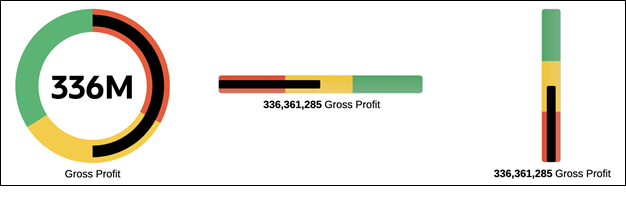
Gauge Chart Type
Business Benefit: This new gauge chart enables you to identify the data values within the specified range; you can compare data values to fall under the maximum or minimum range.
Key Resources
- Designing with Reports for Oracle Enterprise Performance Management Cloud
New Sumv Function to Exclude Hidden Rows from a Summed Result in Reports
SumV is a mathematical function that returns the summation of a group of numeric values, rows, columns, or cells that are in visible, and not hidden, rows and columns.
Business Benefit: This feature enables you to exclude the rows/columns that are hidden and perform the sum of a group of numeric values.
Key Resources
- Mathematical Functions in Designing with Reports for Oracle Enterprise Performance Management Cloud
Fit to Page Width Layout Property for Image Objects in Reports
In this update, you can enable the Fit to Page Width property for an image object, which allows you to stretch the width of the image object to fit the width of the report. By default, this property is disabled.
NOTE:
- This property is not applied if there is another object next to the image.
- Only the image object width is affected by this property, the image object height is not affected.
Business Benefit: You are now allowed to set the image object properties to fit the width of the report.
Key Resources
- Report Properties in Designing with Reports for Oracle Enterprise Performance Management Cloud
New Modes to Migrate Data Management Artifacts
In this update, the Lifecycle (LCM) snapshot process has been enhanced to include two additional LCM modes in Data Management. Customers can now export and import snapshots for setup artifacts or all data.
To select a desired LCM Mode, in Data Management System Settings, choose from one of the following options:
- Individual Artifact – Setup Only: standard LCM process using XML files
- Single Snapshot – Setup Only: LCM using a Data Management snapshot in Setup Mode
- Single Snapshot and Data – LCM using Data Management Snapshot in All Data Mode
A single snapshot for setup artifacts or all data will be run in incremental mode, which requires that you first create a baseline snapshot export file.
Business Benefit: The new LCM Mode processes enable customers to create a snapshot of setup artifacts and Workbench data. In addition, customers are no longer required to run a separate Data Management Snapshot process to back up data.
Key Resources
- In Administering Data Management for Oracle Enterprise Performance Management Cloud, see:
- In Administering Migration for Oracle Enterprise Performance Management Cloud, see:
New Default Import and Export Modes
Customers can now set the default import and export modes when they execute a data load rule in Data Management or run an integration in Data Integration.
To enable this feature, two new settings have been added in Applications Options in Data Management and Data Integration: Default Import Mode and Default Export Mode.
These options default only when you execute jobs from the user interface.
Business Benefit: Customers can set the default export and import modes based on their specific business needs. Prior to this update, the import mode defaulted to “Replace” and the export mode defaulted to “Merge” when customers executed a data load rule in Data Management or ran an integration in Data Integration.
Key Resources
- Setting Application-Level Profiles in Administering Data Management for Oracle Enterprise Performance Management Cloud
Activity Report Enhanced with Maximum Number of Calculation Threads
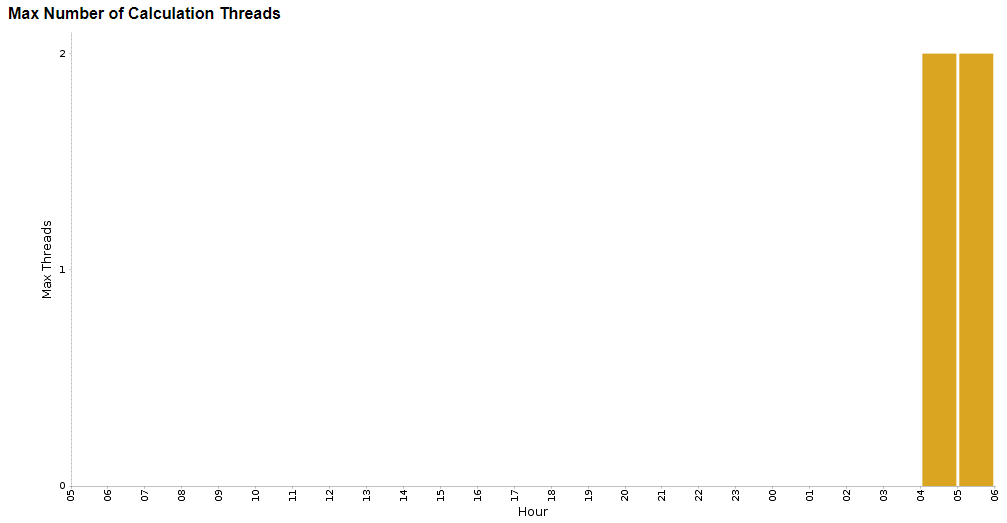
Starting with this update, the Activity Report displays maximum number of Essbase calculation threads during any given hour to help troubleshoot performance issues by analyzing the concurrency in the environment.
Maximum Number of Calculation Threads
This chart displays the maximum number of Essbase calculation threads during any given hour.
Business Benefit
This chart can be helpful for customers in self-diagnosis of performance issues.
- Maximum Number of Calculation Threads - Determine if there was concurrency on the environment when a performance issue occurred.
Key Resources
- In Getting Started with Oracle Enterprise Performance Management Cloud for Administrators, see
Enhanced Event Monitoring Tasks for Task Manager
Event Monitoring tasks have been enhanced to capture additional task execution details for the business event being monitored.
You can use the following new parameters to update information for the event monitoring tasks:
- Message
- LogLocation
- ReportLocation
Business Benefit: These enhancements provide customers greater event monitoring reporting within their business process executions.
Key Resources
-
Update Task Status for Event Monitoring in REST API for Oracle Enterprise Performance Management Cloud
Groovy Feature to Write a Log File
You can now create and write to a file using PrintWriter from Groovy scripts by calling the following methods:
- public PrintWriter createFilePrintWriter(String fileName) throws UnsupportedEncodingException, FileNotFoundException
- public PrintWriter createFilePrintWriter(String fileName, String charsetName, boolean forceBomIfPossible) throws FileNotFoundException, IOException
For details, see EPM Script in EPM Cloud Groovy Rules Java API Reference.
These features can be used by any application that has access to Groovy.
Business Benefit: This allows you to view the log file when using and troubleshooting Groovy business rules.
Steps to Enable
You don't need to do anything to enable this feature.
Tips And Considerations
To get a quick introduction to Groovy business rules, watch the Learning Groovy in EPM Cloud video.
Key Resources
- Learning Groovy in EPM Cloud video
- Creating a Groovy Business Rule in Designing with Calculation Manager for Oracle Enterprise Performance Management Cloud
- Introduction to Groovy Business Rules
- Groovy Tutorials
- EPM Cloud Groovy Rules Java API Reference
Role And Privileges
- Calculation Manager Business Rule Designer
Direct Drill from Summary Members Enabled for Agent Drill Type URLs
When using Direct Drill to drill down to source data using an EPM Integration Agent query, customers can now drill down from summary members in a data form or report and Smart View to the detail source data that makes up the number.
Business Benefit: When defining a direct drill from summary members, descendants are now passed back in the query.
Key Resources
- Defining the Direct Drill Definition in Administering Data Integration for Oracle Enterprise Performance Management Cloud
Ability to Delete Insights Comments
You can now delete comments for Insights, from the Insights dashboard and from the Analyzer view.
To delete a comment, click the Comments box  on the Insights dashboard, hover over a comment, and then click
  . In the Analyzer view for an insight, hover over a comment, and then click
  .
.
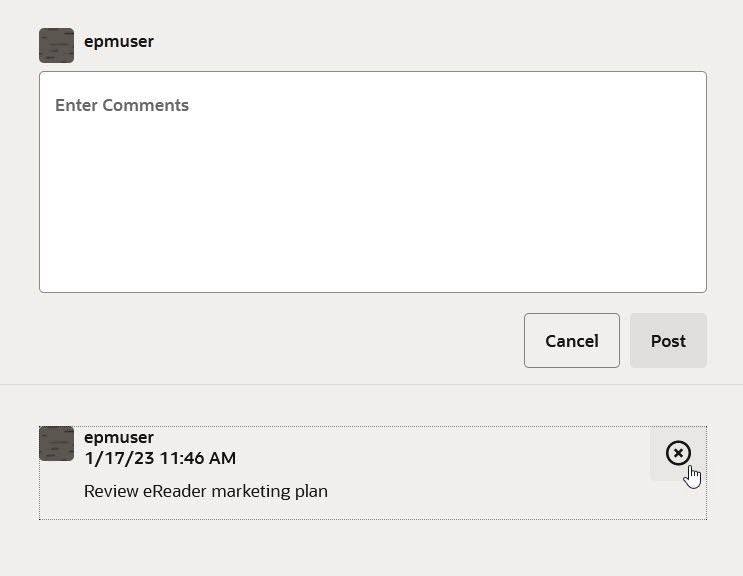
Delete Insights Comments
Business Benefit: The Insights delete comments functionality now aligns with the delete comments functionality available in forms.
Tips And Considerations
Users can delete comments they have entered. Administrators can delete comments entered by any user.
Key Resources
- Working with Planning
IMPORTANT Actions and Considerations
One-Week Lag Between Readiness Documents Live and Help Center Live
Because Oracle readiness documents (What's New and New Feature Summary) are live one week before the monthly update is applied to Test environments, some links to documentation included in the readiness documents will not work until after the Oracle Help Center update is complete when the monthly update is applied to Test environments.
Disallow Starting Certain Scheduled Jobs During the Daily Maintenance Process
Starting in the March (23.03) update, to prevent automatic backup from failure due to scheduled jobs, Strategic Workforce Planning Cloud will disallow certain scheduled jobs to start while the daily maintenance process is running.
The following jobs will be prevented from starting during the daily maintenance:
- Import Data
- Import Metadata
- Export Data
- Export Metadata
- Refresh Database
- Clear Cube
- Restructure Cube
- Compact Outline
- Merge Data Slices
- Optimize Aggregation
If the system prevents a job from starting, the reason will be stated in the Job Details. If you've enabled email notifications for the Job Console, you'll receive an email notification when a job does not start. If you have a job that is scheduled to start during the daily maintenance process, it is recommended that you reschedule your job to start outside of the daily maintenance window.
Calculation Manager Errors and Warnings Enforcement
In a future update, Calculation Manager will enforce the execution of the Errors & Warnings diagnostic tool for any rule being launched, validated, or deployed from it. If there are errors that result from this new process, Calculation Manager will not execute, validate, or deploy the rule. This new process will apply to all new applications once released. Existing applications will have a finite period of time to bypass this new process to allow you to modify the rules that violate the new Errors & Warnings diagnostic analysis. In all cases, existing rules that are already deployed will continue to run as-is without any change in behavior.
Valid Intersection and Cell-level Security Import & Export File Format Update
In a future update, both Valid Intersection and Cell-level Security Import and Export files in .XLSX format will include new columns for each dimension in the Sub Rules worksheet. These new columns to support excluding all instances of members by name will apply to each dimension and will be positioned after each dimension’s “Exclusion” column. If you use these exported files for integration with other systems and the order of columns is fixed, you may need to modify your process to account for these new columns in these export files. The release of these new columns will coincide with the planned release of this enhancement for Valid Intersections and Cell-Level Security.
Change in Behavior for Grids Created from Groovy and REST APIs for ASO Cubes
In a future update, the suppression behavior for grids created via Groovy DataGridDefinitionBuilder and the exportdataslice REST API for ASO cubes will be made consistent with that of the run time data grids created using the Form Designer. Previously, if a grid was built for an ASO cube in Groovy or REST API, then the system used the NON EMPTY MDX clause to suppress missing rows when the suppressMissingBlocks flag was true. Now, when a grid is built for an ASO cube, it will use the NON EMPTY MDX clause when suppressMissingRows is true, and suppressMissingBlocks will be ignored. This means that ASO grids with suppressMissingRows true and suppressMissingBlocks false will now start using MDX. Likewise, ASO grids with suppressMissingRows false and suppressMissingBlocks true will no longer use MDX. Grids where the suppressMissingRows and suppressMissingBlocks flags had the same value will not be impacted. These changes may result in a change in behavior or performance for some ASO grids. If this happens and is undesirable, consider toggling the value of suppressMissingRows from the builder or the JSON payload in case of the REST API.
Mandatory Steps Required to Make the Explore Repository Artifacts Accessible to Users
Prior to the 22.07 update, Strategic Workforce Planning used the WORLD pre-seeded group to grant access to Explore Repository artifacts such as reports and folders. Starting with the 22.07 update, the WORLD group was removed. If you previously used the WORLD group to grant access to repository artifacts, complete these steps to ensure that users can access Repository artifacts:
- Create a group in Access Control with all Strategic Workforce Planning Cloud users as its members.
- In Explore Repository, grant access privileges to the group you created in the preceding step.
For detailed steps, see Granting Access Permissions to Document Repository Users in Working with Financial Reporting for Oracle Enterprise Performance Management Cloud.
Task Manager Email Notification Settings
Starting in the 22.04 update, the service changed the handling of Task Manager’s Email Notification settings during a migration. The target service’s Task Manager Email Notification settings were updated with the settings from the source service. If a customer wants to retain the target service’s Task Manager Notification settings, they can generate an LCM export with the notification settings from the target service, perform the source migration, then import the LCM file with the notification settings.
See LCM Export and LCM Import in REST API for Oracle Performance Management Cloud.
Data Maps with Mapping or Cross Applications
Data Maps with mapping or cross applications are not supported in this update. If the Data Map has mapping or is a cross application, it needs to be attached to a form or included in the Groovy rule and run as a Smart Push.
Internet Explorer 11 End of Support and Smart View
Microsoft has announced end of support of Internet Explorer 11 by June 15, 2022.
Do not uninstall Microsoft Internet Explorer, even after the end-of support date of June 15, 2022. Instead, you may securely disable Internet Explorer following Microsoft’s guidelines. In situations where the Internet Explorer browser would be called, the Edge browser will be launched instead.
Oracle Smart View for Office does not require the Internet Explorer browser specifically. However, Smart View depends on Windows components (for example, WinInet APIs) that may have dependencies on Internet Explorer. Microsoft recommends keeping Internet Explorer installed on the machine since uninstalling may cause other applications that are dependent on it to work incorrectly. Microsoft also recommends updating to the latest security patches as they become available.
For more information, Oracle Support Document 2877741.1 (Impact on Smart view with Microsoft decommissioning Internet Explorer 11 on June 15, 2022) can be found at: https://support.oracle.com/epmos/faces/DocumentDisplay?id=2877741.1.
Updated Smart View Browser Extension Required for Chrome and Edge
An updated Smart View browser extension for Google Chrome and Microsoft Edge is available. This extension is required for Oracle Smart View for Office to interact with supported browser-based Strategic Workforce Planning Cloud business processes in these ways:
- Starting in a form or ad hoc grid in Smart View, use drill-through to launch an application web page in a browser.
- Starting in a web application, launch a form or ad hoc grid in Smart View for Excel.
- Starting in a Task List in Smart View, opening a task in a browser.
This update is required only if your default browser is Chrome or Edge. If your default browser is Mozilla Firefox, then this update does not affect you.
The extension is available in the Chrome Web Store from either the Chrome or Edge browser. In the Chrome Web Store, search for "smart view" to locate the extension update. the version number is 22.200. Then follow the instructions for Google Chrome or Microsoft Edge in Installing Browser Add-ons in the Oracle Smart View for Office Installation and Configuration Guide.
Note that after January 1, 2023, the current browser extension will no longer work with Chrome or Edge. You must update your extension by that date in order to continue interactions between Smart View and browser-based business processes in Strategic Workforce Planning Cloud.
Office 365 Add-ins Command Change by Microsoft to Impact Buttons in Smart View (Mac and Browser)
To improve security in Office Add-ins, Microsoft Office 365 will be making changes to its ExecuteFunction add-in command from October 30, 2022. Since Smart View for Office (Mac and Browser) uses this command in its ribbon buttons and menus, some buttons may stop working from October 30. For example, buttons such as Undo, Redo, or Refresh on the Smart View and provider ribbons. This issue is resolved in the latest Smart View update of 22.11. As the changes are limited to server update, you are not required to create and deploy a new manifest file again for resolving this issue.
For more information on Microsoft’s announcement, see Announcing changes to Office Add-ins’ ExecuteFunction commands.
Oracle Financial Reporting Statement of Direction
Please refer to the Statement of Direction for Oracle Financial Reporting:
Oracle Support Document 2910806.1 (EPM Cloud Financial Reporting Statement of Direction)
Oracle Financial Reporting “Expand All” Feature Statement of Direction
Please refer to Statement of Direction for Oracle Financial Reporting “Expand All” feature:
Oracle Support Document 2920293.1 (EPM Cloud Financial Reporting: Expand All Feature Statement of Direction)