This document will continue to evolve as existing sections change and new information is added. All updates appear in the following table:
| Date | Product | Feature | Notes |
|---|---|---|---|
| 23 DEC 2020 | Created initial document. |
This document outlines the upcoming Strategic Workforce Planning Cloud update.
Column Definitions:
Report = New or modified, Oracle-delivered, ready to run reports.
UI or Process-Based: Small Scale = These UI or process-based features are typically comprised of minor field, validation, or program changes. Therefore, the potential impact to users is minimal.
UI or Process-Based: Larger Scale* = These UI or process-based features have more complex designs. Therefore, the potential impact to users is higher.
Features Delivered Disabled = Action is needed BEFORE these features can be used by END USERS. These features are delivered disabled and you choose if and when to enable them. For example, a) new or expanded BI subject areas need to first be incorporated into reports, b) Integration is required to utilize new web services, or c) features must be assigned to user roles before they can be accessed.
| Ready for Use by End Users Reports plus Small Scale UI or Process-Based new features will have minimal user impact after an update. Therefore, customer acceptance testing should focus on the Larger Scale UI or Process-Based* new features. |
Customer Must Take Action before Use by End Users Not disruptive as action is required to make these features ready to use. As you selectively choose to leverage, you set your test and roll out timing. |
|||||
|---|---|---|---|---|---|---|
| Feature |
Report |
UI or |
UI or |
|
||
Additional Data Formatting Options in Smart View (Mac and Browser) |
||||||
Strategic Workforce Planning Cloud
Test Environments: Oracle will apply this monthly update during the first daily maintenance that occurs at or after 22:00 UTC on Friday, January 1, 2021.
Production Environments: Oracle will apply this monthly update during the first daily maintenance that occurs at or after 22:00 UTC on Friday, January 15, 2021.
NOTE: Backing up the daily maintenance snapshot and restoring the environment as needed are self-service operations. Oracle strongly recommends that you download the maintenance snapshot every day to a local server.
The Oracle Help Center provides access to updated documentation. The updates will be available in the Help Center on Friday, January 1, 2021.
NOTE: Some of the links to new feature documentation included in this readiness document will not work until after the Oracle Help Center update is complete.
Please Join Oracle Cloud Customer Connect
Please take a moment to join the Cloud Customer Connect forums for EPM Cloud services. Oracle Cloud Customer Connect is a community gathering place for members to interact and collaborate on common goals and objectives. This is where you will find the latest release information, upcoming events, or answers to use-case questions. Joining takes just a few minutes. Join now!
https://cloud.oracle.com/community
NOTE: The Settings and Actions menu now contains a link to Cloud Customer Connect. To access this link, from the Home page, click the down arrow next to the user name (in the upper right-hand corner of the screen), and select Cloud Customer Connect.
Give Us Documentation Feedback
We welcome your comments and suggestions to improve the content of the What's New document and the product documentation.
Please send us your feedback at EPMdoc_ww@oracle.com. In the body or title of the email, state that you are inquiring or providing feedback, and indicate for which EPM Cloud service and the monthly update cycle.
Follow EPM Cloud on YouTube, Twitter, Facebook, and LinkedIn.
These are great resources for the latest updates and information about EPM Cloud.
Defects Fixed and Considerations
Software issues addressed each month and considerations will be posted to My Oracle Support.
This provides visibility into EPM Cloud release contents.
Daunted by your source system integration requirements? Want a more streamlined data integration process? With the EPM Integration Agent, you can reduce unnecessary complexity and directly connect to any data source, anywhere. Watch this video, updated to reflect the latest user interface and capabilities, to learn more.
Overview: Leveraging Source System Data With the EPM Integration Agent
Business Benefit: This video provides an overview to help you perform your related business activities.
New Version of Oracle Smart View for Office
Oracle Smart View for Office version 20.200 is planned to be available in December 2020.
Business Benefit: This version includes new features and fixed defects. See the Readme for the list of new features.
Steps to Enable
Download and install Smart View. See Downloading and Installing Clients in Getting Started with Oracle Enterprise Performance Management Cloud.
Additional Data Formatting Options in Smart View (Mac and Browser)
Oracle Smart View for Office (Mac and Browser) provides two new data formatting options for forms and ad hoc grids: Use Thousands Separator and the Number of Decimal Points.
- Select the Use Thousands Separator to use a comma or other thousands separator in numerical data. Note that # or $ should not be used as the thousands separator in Excel International Options.
- In Number of Decimal Points, specify a decimal scale for data values. For example, in Smart View, assume the decimal option selected is "1". All values will change one decimal place to the right. If the original value is 50.56, then after refresh the value will be displayed as 50.6. Similarly, if the option selected is "3", then the displayed value will be 50.560. Note that decimal settings in the form definition are lost when you open the form in Smart View. This is because Excel formatting only accepts a single value fixed decimal length value for precision and does not support the minimum, maximum value defined in the web application. This is the default behavior of Excel formatting and this is the behavior in Smart View as well. In Smart View, users must set the Number of Decimal Points option (precision length) to be able to view the decimal value in cell.
These settings are found on the Formatting tab in the Options panel and they settings override the settings in the form definition and in user preferences set either in the web or in Smart View.
Business Benefit: The new Use Thousands Separator and Number of Decimal Points options provide you greater formatting capabilities on your forms and ad hoc grids.
Steps to Enable
To use the formatting options in Smart View (Mac and Browser), Service Administrators must create and deploy a new manifest file.
- Create a new manifest file and customize it per your requirements.
- Deploy the manifest file to Smart View (Mac and Browser) users.
Key Resources
- Deploying and Administering Oracle Smart View for Office (Mac and Browser):
- Formatting Options in Working with Oracle Smart View for Office (Mac and Browser)
IMPORTANT Actions and Considerations
REDWOOD USER EXPERIENCE
As part of the new Redwood experience, we are introducing the Dynamic Tabs feature only within the Redwood theme in the 21.02 update. Dynamic Tabs will allow you to open tabs on the fly, both from a list view or from an existing navigation flow tab to perform related actions. Some use case examples: view drill through from a form in a new temporary tab; view a form in design mode; open Web ad hoc from a form or dashboard; open forms from right-click menus; open dimensions on the fly to view how members are calculated.
With the new Redwood experience in 21.02, navigation flows within the Redwood theme will move to the bottom of the page instead of the top of the page where they are currently located. With tabs at the bottom of the page, you will benefit from a clear separation of the Strategic Workforce Planning Cloud horizontal tabs from their browser tabs at the top of the window. Another benefit of this change will be to keep the navigation flow tab names distinct from the names of the artifacts (such as forms and dashboards) rendered within the horizontal tabs. The vertical tabs will stay where they are.
Also within this new Redwood experience, starting in 21.02, action menus in forms will also be cleaned up to not show items that are already included within the right-click menus in forms.
In 21.03, to reflect these new and future Redwood-only experiences, the Redwood theme will be shown as a 'Redwood Experience' toggle switch that application administrators can turn on in the 'Appearance' page. Existing Redwood theme applications will default into the Redwood experience while other theme experiences will stay as is.
NEW WEB AD HOC EXPERIENCE
With the 21.03 release, we will introduce the new Web ad hoc experience for all users across all themes. This replaces the existing Web ad hoc with a new user experience when using ad hoc over the Web. This will provide the benefit of fast snappy grids with several Smart View ad hoc capabilities over the Web, all within a newly defined interface for Web ad hoc. Users can start with a cube slice from scratch or traverse from their Web forms or dashboards into these new ad hoc sheets for a whole new ad hoc experience. Users within the Redwood theme can leverage the benefit of the dynamic tabs to work in tandem with form or dashboards or reports alongside these new ad hoc grids. This solves many multi-tasking use cases within Strategic Workforce Planning. Within Smart View ad hoc, with 21.03, we will also support multi-parent zoom in capabilities in ad hoc when used within the 'Standard’ ad hoc mode.
RUNBUSINESSRULE EPM AUTOMATE COMMAND - CHANGE OF BEHAVIOR
Starting with the 21.05 update, the runBusinessRule EPM Automate command will no longer let you run a ruleset against Strategic Workforce Planning applications. Instead, you should use the runRuleSet command to launch business rulesets using EPM Automate.
If you currently use scripts that use the runBusinessRule command to launch rulesets, you must modify them to use the runRuleSet command.
SUPPORT FOR COMPOSITE FORMS
Starting in May 2021, Strategic Workforce Planning plans to stop official support for composite forms. Customers are advised to convert existing composite forms to Strategic Workforce Planning dashboards and log any issues with Support.
NEW “SUPPRESS MISSING NATIVE” OPTION IN FINANCIAL REPORTING WEB STUDIO GRID EDITOR
The new “Suppress Missing Native” option in the “Suppression” panel in the Financial Reporting Web Studio Grid Editor properties is non-functional for 21.01. The desired output of the selection will not be available when the report is executed even if the option is enabled. This will be addressed in an upcoming release.
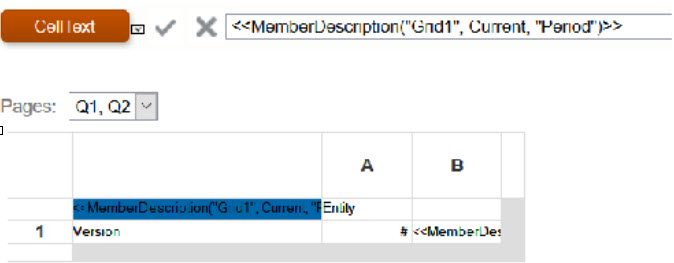
"MEMBERALIAS" AND "MEMBERNAME" TEXT FUNCTIONS IN FINANCIAL REPORTING WEB STUDIO
Using the MemberAlias or MemberName text functions in cells that are not part of a row or column will not update when referenced with a Page dimension.
For example: The MemberAlias text function is in the column header, above the row dimensions <<MemberAlias("Grid1", cur, "Entity")>>