
- Revision History
- Overview
- Feature Summary
- Strategic Workforce Planning Cloud
-
- Features
-
- New Topics in EPM Cloud Operations Guide
- Operations Guide Links in the Provide Feedback Utility
- New Version of Oracle Smart View for Office
- EPM Automate Updates
- Add and Remove Groups Using REST APIs
- REST API to Run Integrations/Data Load Rules by Period Name and Override Source Filters
- Support for Groovy Templates in ASO Cubes for Strategic Workforce Planning Cloud Applications
- Convert ASO Graphical Rules to Groovy Script
- Consistent Column Labels and Search in Access Control
- EPM Integration Agent Write-Back
- New Clear Region Option in Data Integration
- New System Setting for Migration of Data Load Mappings in Data Management
- Oracle Financial Cloud Source System Type Name Changed to Oracle ERP Cloud
- New Time Balance Properties Let You Customize or Disable Data Spreading Behavior on Forms
- Audit Will Now Retain Records for Up to 365 Days
- New Data Map Option - Prioritize Smart List Entry Names When Moving Data
- APIs Deprecated from the EPM Cloud Groovy Rules Java API Reference
- Update to the Exception Response in REST APIs
- New Groovy Rules to Run Pre-Defined Workforce Data Maps
-
- IMPORTANT Actions and Considerations
This document will continue to evolve as existing sections change and new information is added. All updates appear in the following table:
| Date | Product | Feature | Notes |
|---|---|---|---|
| 29 JUN 2020 | Created initial document. |
This document outlines the upcoming Strategic Workforce Planning Cloud update.
Column Definitions:
Features Delivered Enabled
Report = New or modified, Oracle-delivered, ready to run reports.
UI or Process-Based: Small Scale = These UI or process-based features are typically comprised of minor field, validation, or program changes. Therefore, the potential impact to users is minimal.
UI or Process-Based: Larger Scale* = These UI or process-based features have more complex designs. Therefore, the potential impact to users is higher.
Features Delivered Disabled = Action is needed BEFORE these features can be used by END USERS. These features are delivered disabled and you choose if and when to enable them. For example, a) new or expanded BI subject areas need to first be incorporated into reports, b) Integration is required to utilize new web services, or c) features must be assigned to user roles before they can be accessed.
| Ready for Use by End Users Reports plus Small Scale UI or Process-Based new features will have minimal user impact after an update. Therefore, customer acceptance testing should focus on the Larger Scale UI or Process-Based* new features. |
Action is Needed BEFORE Use by End Users Not disruptive as action is required to make these features ready to use. As you selectively choose to leverage, you set your test and roll out timing. |
|||||
|---|---|---|---|---|---|---|
| Feature |
Report |
UI or |
UI or |
|
||
REST API to Run Integrations/Data Load Rules by Period Name and Override Source Filters |
||||||
Support for Groovy Templates in ASO Cubes for Strategic Workforce Planning Cloud Applications |
||||||
New System Setting for Migration of Data Load Mappings in Data Management |
||||||
Oracle Financial Cloud Source System Type Name Changed to Oracle ERP Cloud |
||||||
New Time Balance Properties Let You Customize or Disable Data Spreading Behavior on Forms |
||||||
New Data Map Option - Prioritize Smart List Entry Names When Moving Data |
||||||
APIs Deprecated from the EPM Cloud Groovy Rules Java API Reference |
||||||
Strategic Workforce Planning Cloud
Test Environments: Oracle will apply this monthly update during the first daily maintenance that occurs at or after 22:00 UTC on Friday, July 3, 2020.
Production Environments: Oracle will apply this monthly update during the first daily maintenance that occurs at or after 22:00 UTC on Friday, July 17, 2020.
The Oracle Help Center provides access to updated documentation. The updates will be available in the Help Center on Friday, July 3, 2020. Some of the links to new feature documentation included in this readiness document will not work until after the Oracle Help Center update is complete.
NOTE: Backing up the daily maintenance snapshot and restoring the environment as needed are self-service operations. Oracle strongly recommends that you download the maintenance snapshot every day to a local server.
Please Join Oracle Cloud Customer Connect
Please take a moment to join the Cloud Customer Connect forums for EPM Cloud services. Oracle Cloud Customer Connect is a community gathering place for members to interact and collaborate on common goals and objectives. This is where you will find the latest release information, upcoming events, or answers to use-case questions. Joining takes just a few minutes. Join now!
https://cloud.oracle.com/community
NOTE: The Settings and Actions menu now contains a link to Cloud Customer Connect. To access this link, from the Home page, click the down arrow next to the user name (in the upper right-hand corner of the screen), and select Cloud Customer Connect.
Give Us Documentation Feedback
We welcome your comments and suggestions to improve the content of the What's New document and the product documentation. Please send us your feedback at EPMdoc_ww@oracle.com. In the body or title of the email, state that you are inquiring or providing feedback, and indicate for which EPM Cloud service and the monthly update cycle.
For the latest updates and information about EPM Cloud, follow us on YouTube, Twitter, Facebook, and LinkedIn at Hyperion EPM Info.
Defects Fixed and Considerations
Software issues addressed each month and considerations will be posted to My Oracle Support.
New Topics in EPM Cloud Operations Guide
The EPM Cloud Operations Guide has been enhanced with additional topics.
New topics include the following:
- Diagnosing REST API Issues
- Handling Issues Related to Large Data Exports
Key Resources
Operations Guide Links in the Provide Feedback Utility
The Provide Feedback Utility in EPM Cloud now contains links that connect you to different types of troubleshooting information published in the Oracle Enterprise Performance Management Cloud Operations Guide. These links provide you information to self-diagnose your issue. Additionally, they list the mandatory information that you must submit to Oracle when you seek help for an issue that you cannot solve yourself. The information that you must submit to Oracle is tailored for each issue explored in the guide so that Oracle can expeditiously diagnose the issue and suggest corrective actions. Similarly, the link for requests explores various EPM Cloud-related requests you can make and the information you must provide while making such requests. Additionally, the link for questions point to some available information sources that you can explore and the information that you must include while asking a question.
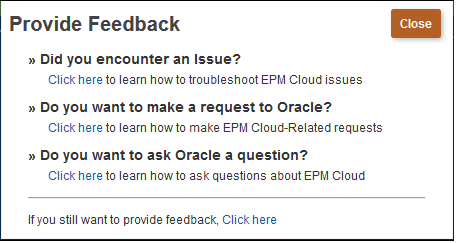
Provide Feedback Screen Displaying Troubleshooting Links
New Version of Oracle Smart View for Office
Oracle Smart View for Office 20.100 is now available. This version includes a new connection URL mapping tool; a new VBA function, HypUpdateConnection; HypSetCustomHeader support for basic authentication, and several performance enhancements.
- Migrate Connections with New URL Mapping Tool
The new URL Mapping dialog allows you to quickly and easily migrate connections from one environment to another environment.
An administrator configures a mapping that replaces an old connection URL with a new URL.You access the mappings from the Private Connections drop-down menu, selecting the Manage URLMappings option.
See Managing Connection URL Mapping in the Working with Oracle Smart View for Office.
- New VBA Function, HypUpdateConnection
A new VBA function, HypUpdateConnection, allows you to update existing connections.
See HypUpdateConnection in Developing Applications for Smart View for Office.
- HypSetCustomHeader Now Supports Basic Authentication
The HypSetCustomHeader function now supports Basic Authentication via Oracle Enterprise Performance Management Cloud for Planning, Planning Modules, Financial Consolidation and Close, and Tax Reporting.
See HypSetCustomHeader in Developing Applications for Smart View for Office.
- Performance Improvements
This release includes several performance improvements related to refresh. To take advantage of these performance improvements, you must ensure that your version of Office (2010, 2013, 2016, 2019, or 365 client) has the latest updates from Microsoft.
These areas were addressed:
- Refresh performance on Office 2016 when compared to Office 2007
- Refresh All performance on Office 2016 when compared to Office 2010
- Refresh performance when sheets contain Excel formulas
This release also fixes a number of defects.
The Smart View 20.100 Readme, available on the Help Center, contains a complete list of features and defects addressed in this version. Install this version to ensure access to the new features.
Key Resources
- See Installing Smart View in the Oracle Smart View for Office Installation and Configuration Guide.
A new version of EPM Automate, which contains the createGroups and deleteGroups commands, is now available. Other changes in this version include changes to the use of IDENTITY_DOMAIN as a required parameter in the login command.
createGroups Command
Adds groups to Access Control using an ANSI or UTF-8 encoded CSV file that was uploaded to the environment. This command applies to all business processes except Account Reconciliation.
deleteGroups Command
Removes groups from Access Control based on the information available in an ANSI or UTF-8 encoded CSV file that was uploaded to the environment. This command applies to all business processes except Account Reconciliation.
login Command Usage Change
The login command usage has been changed to not require IDENTITY_DOMAIN name as a required paramter. Instead, it has been made an optional parameter, which is ignored even if you specify it. Instead, the command now calculates the name of your identity domain from the URL.
Key Resources
- Working with EPM Automate for Oracle Enterprise Performance Management Cloud:
Add and Remove Groups Using REST APIs
You can now use REST APIs to add and remove a batch of groups listed in an ANSI or UTF-8 encoded CSV file that was uploaded to the environment. Use the Upload REST API to upload the file. This gives you the freedom to manage groups outside of the user interface.
Key Resources
- Managing Users in REST API for Oracle Enterprise Performance Management Cloud
Role Information
- Service Administrators
REST API to Run Integrations/Data Load Rules by Period Name and Override Source Filters
The Jobs REST API has been enhanced to accept period name and source filter parameters.
The period name parameter enables you to run integrations/data load rules based on:
- period names provided to Planning
- Planning substitution variables
- global POVs
- existing period ranges
The source filter parameters enable you to override source filters at runtime without modifying the integration definition when changing the source filter.
Key Resources
- Integration JobType in REST API for Oracle Enterprise Performance Management Cloud
Support for Groovy Templates in ASO Cubes for Strategic Workforce Planning Cloud Applications
Groovy templates are now supported in ASO cubes for Strategic Workforce Planning Cloud applications.
Key Resources
- Creating a Groovy Template for a Planning ASO Cube in Designing with Calculation Manager for Oracle Enterprise Performance Management Cloud.
Convert ASO Graphical Rules to Groovy Script
You can now convert ASO graphical rules to Groovy script.
Key Resources
- Editing a Business Rule in Script Mode in Designing with Calculation Manager for Enterprise Performance Management Cloud
Consistent Column Labels and Search in Access Control
Access Control now uses a consistent, intelligent search function across screens that supports search for artifacts such as users and groups. You now can enter a search string to search all searchable attributes. Previously, you had to select an attribute; for example First Name, from a drop down list before running a search. Additionally, Access Control now uses consistent artifact names and labels across screens.
Exception: In the Users tab of the Create Groups screen, you can search only for User Names. Search for other attributes is not currently supported.
Key Resources
EPM Integration Agent Write-Back
The EPM Integration Agent, which provides connectivity between EPM Cloud and on-premises sources, now provides write-back functionality where data from EPM Cloud can be loaded back to the on-premises database.
To support this feature, a new data export application allows you to export data to the on-premises database. There are two modes in which you can load data to the target table. To use the simple mode, you register the application and specify the table name and include all the columns from the table in the application. The system generates the INSERT statements automatically and loads the data. To use the advanced mode, you provide an INSERT statement with the appropriate source value and any SQL expressions in an INSERT query.
In addition, the agent can execute two event scripts during the write-back execution: BefExport and AftExport. Using a BefExport event, you can perform any action before inserting data to the table or you can override the default insert processing. Using an AftExport event, you can do any post processing cleanup after inserting data to the table.
The write-back feature is supported for agents running in both SYNC and ASYNC modes.
Steps to Enable
Download the EPMAgent.zip from the Download Agent option on the Actions menu in Data Integration. Unzip the EPMAgent.zip and overwrite your existing agent folder. There is no further action. You don’t need to update the ini file or certificate.
Key Resources
- Writing Back with the EPM Integration Agent in Administering Data Integration for Oracle Enterprise Performance Management Cloud
New Clear Region Option in Data Integration
A new Clear Region option in Data Integration lets you select the slice of data to be cleared before loading data in Replace mode to a Planning module application. In addition, when loading budgets to the Oracle General Ledger, you can optionally clear prior budgets before loading a new budget. This feature can only be used with Oracle Financials Cloud 20C or higher.
You define the clear region by specifying member selection criteria for dimensions such as a static list of members, member function selections, and members derived from the data. By default, the system defines a default clear script based on Entity, Scenario, Version, Year, and Period values included in the data load.
- For Planning, the Period, Year, and Scenario dimensions are derived automatically based on the data and you do not have to specify any filters for these dimensions.
- For Fusion, the Ledger, Scenario, and Accounting Period dimensions are derived automatically based on the data and you do not have to specify any filters for these dimensions.
The Clear Region option is available on the Options page in Data Integration.
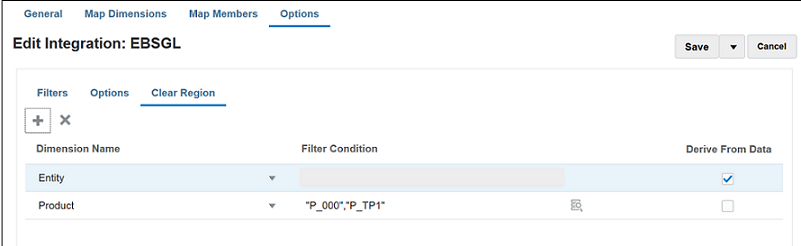
Clear Region Tab
The Clear Region option is only available for the Planning module and Oracle Fusion General Ledger (Fusion release 20c or higher required) target applications.
Key Resources
- Defining a Clear Region in Administering Data Integration for Oracle Enterprise Performance Management Cloud
New System Setting for Migration of Data Load Mappings in Data Management
A new Map LCM Format profile option in Data Management System Settings enables you to export individual data load mappings by location or combine mappings by all locations for Migration (lifecycle management activities).
If you select “Individual Data Load Mapping by Location,” maps are exported individually for each location and imported individually for each location. If you have a large number of maps for each location, use this method since it allows loading of maps in smaller sets by location. This method is also useful to migrate maps for certain locations selectively. With this method, existing maps are deleted and replaced by new maps in the snapshot.
If you select “Combine Data Load Mapping for All Locations,” maps are exported in a single artifact for all locations. With this method, maps from the snapshot are merged to the existing maps in the target system. This is the default setting.
The new Map LCM Format setting is available on the Data Management System Settings page as shown below:
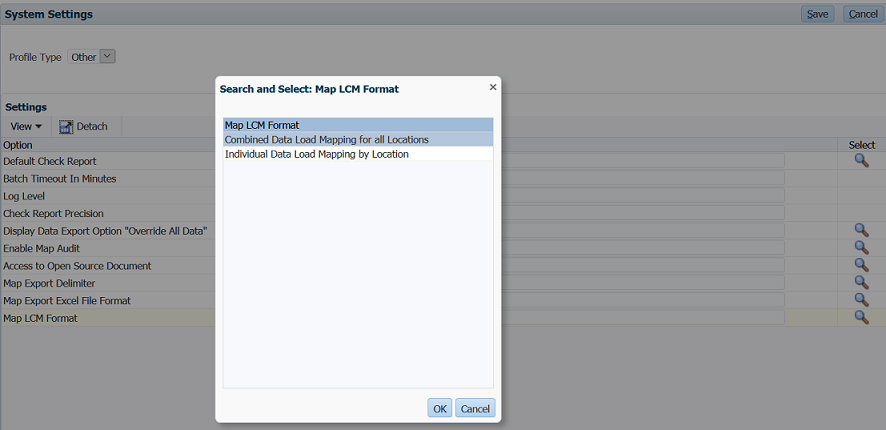
System Settings Page
Key Resources
- Setting System-Level Profiles in Administering Data Management for Oracle Enterprise Performance Management Cloud
Oracle Financial Cloud Source System Type Name Changed to Oracle ERP Cloud
In Data Management on the Source System page, the name of the source system type “Oracle Financials Cloud” has been changed to “Oracle ERP Cloud.” All pre-existing “Oracle Financials Cloud” source system type names now show with the “Oracle ERP Cloud” source system type name. This is a name change only and you do not need to take any action.
For your reference, the Oracle ERP Cloud source systems include:
- Oracle General Ledger
- Fusion Budgetary Control
- All ERP Cloud Adapters
The file source system type name remains “File.” The Oracle Human Capital Management Cloud source system type name remains “Oracle HCM Cloud.” The NetSuite source system type name remains “NetSuite.”
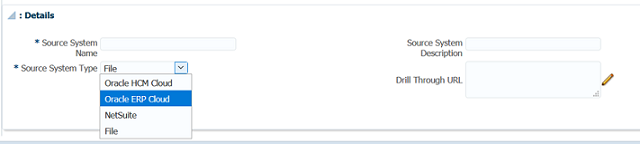
Detail section of the Source System Page
New Time Balance Properties Let You Customize or Disable Data Spreading Behavior on Forms
You can now customize or disable data spreading on forms using two new time balance properties: Custom and Disable.
These new properties give you the ability to control the spreading behavior at the Account level. If you select the Custom time balance property, the application designer is expected to apply customized spreading if desired (for example, using a Groovy rule), and data entry input is allowed on a parent time period. If the Disable time balance property is selected, no spreading will occur and the summary time periods are read-only.
Note that these new time balance properties only affect how spreading works on the client, be it Planning Web or Smart View. They do not affect how data is stored nor do they affect other rollups defined on the member. For example, if the consolidation operators call for the Children to rollup into the Parent, then once the data is saved and recalculated that is the behavior that will occur. Also, all current form settings are respected such as locked cells, and so on.
Key Resources
- How Spreading Data Works in Working with Planning
- Account Types in Administering Planning
Audit Will Now Retain Records for Up to 365 Days
Audit information is now retained for up to 365 days from the current system date.
To enable auditing, click Tools, then Audit, and then click Enable Auditing. To view audit details, click Tools, then Audit, then select filter criteria for Audit Types, Date Range, and User Name. Audit details can be exported to Excel by clicking Export. To export more than 180 days of audit records, you can use export tools like EPM Automate and REST APIs.
Key Resources
- Auditing Tasks and Data in Administering Planning
New Data Map Option - Prioritize Smart List Entry Names When Moving Data
A new data map option, called Prioritize Smart List Entry Names When Moving Data, requires the data map and Smart Push operations to use Smart List entry names instead of aliases in cases where the target cube has duplicate aliases.
If duplicate aliases are detected at the target cube for data map and Smart Push operations, the operation will fail and the user will be prompted to either remove the duplicate aliases or select this data map option.
Steps to Enable
You don't need to do anything to enable this feature.
Key Resources
- Defining Data Map Options in Administering Planning
APIs Deprecated from the EPM Cloud Groovy Rules Java API Reference
When using EPM Cloud Groovy Rules, be aware that the following APIs are deprecated from the EPM Cloud Groovy Rules Java API Reference:
- TimeZone.setDefault(TimeZone zone)
- Locale.setDefault(Locale.Category category, Locale newLocale)
- Locale.setDefault(Locale newLocale)
Tips And Considerations
To get an introduction to the EPM Cloud Groovy Rules, watch the Learning Groovy in EPM Cloud video
Key Resources
- Learning Groovy in EPM Cloud video
- Creating a Groovy Business Rule in Designing with Calculation Manager for Oracle Enterprise Performance Management Cloud
- Introduction to Groovy Business Rules
- Groovy Tutorials
- EPM Cloud Groovy Rules Java API Reference
Role Information
- System Administrators
Update to the Exception Response in REST APIs
When working with REST APIs, be aware that Oracle has removed the internal package and class names from the following fields in the exception response in REST APIs:
- message
- localizedMessage
Key Resources
Role Information
- System Administrators
New Groovy Rules to Run Pre-Defined Workforce Data Maps
New Groovy rules are available in Strategic Workforce Planning when Workforce is enabled to execute pre-defined Workforce data maps with runtime prompts for Entity, Scenario, and Version. Additionally, these new Groovy rules use the Years and Periods defined in the Planning and Forecast Preparation configuration task per Scenario. Conversely, the data maps execute for all Entities, all Versions, all Scenario, and all Years.
The new Groovy rules are:
- Compensation Data for Reporting
- Non Compensation Data for Reporting
- Headcount Data for Reporting
Only service administrators can execute these Groovy rules. The ability to focus the scope of the data pushed through the runtime prompts for Entity, Scenario, Version, and Years and Periods by using the Planning and Forecast Preparation configuration task should improve the performance of the data movement.
Key Resources
- Workforce Groovy Rules in Administering and Working with Oracle Strategic Workforce Planning Cloud
IMPORTANT Actions and Considerations
DEPRECATION OF THE IDENTITY_DOMAIN PARAMETER FROM THE LOGIN COMMAND
In an upcoming release, Oracle will deprecate the use of IDENTITY_DOMAIN as parameter for the login EPM Automate command. Instead, the name of the identity domain will be calculated automatically from the URL. Existing scripts that contain this value have to be updated after this parameter is deprecated.
This change is expected to be implemented in the 20.10 update. If you have any concerns about this change, please contact Oracle Support.
USABILITY ENHANCEMENTS FOR HORIZONTAL TABS IN NAVIGATION FLOWS
In an update within the next few months, we are introducing a few usability enhancements to the horizontal tab feature within navigation flows. As part of these usability improvements, we will be placing the horizontal tabs at the bottom of the page instead of at the top of the page where they are currently located. The vertical tabs will stay where they are.
Customers will benefit from a clear separation of the Strategic Workforce Planning Cloud horizontal tabs from their browser tabs at the top of the window. Another benefit of this change will be to keep the navigation flow tab names distinct from the name of the artifacts (such as forms and dashboards) rendered within the horizontal tabs.
These changes will be the default for all customer environments where horizontal tabs are being used within navigation flows. The effective date of the release will be announced in the month prior to the release. It is expected in the next 2-4 months’ timeframe.
NEW SETTING TO ENABLE INCREMENTAL IMPORT OF DATA USING MIGRATION FOR STRATEGIC WORKFORCE PLANNING APPLICATIONS
In an upcoming update, Oracle will create a new application setting for Strategic Workforce Planning Cloud applications to enable incremental import of data using Migration. The default setting will be set to disable incremental import of data using Migration. As a result, you cannot use the daily maintenance snapshot or any extract created using Migration for incremental import of data if this new setting remains in the default configuration; you must import a full snapshot to load data using Migration as a full Clone where the target environment does not have an existing application.
Service Administrators will be able to change this setting with warnings prompting that doing so may lead to data corruption if subsequent incremental import of data using Migration are not done properly. Examples of potential data corruption include, but are not limited to, incremental data migration from a different source other than the target application where underlying Smart List values may be different.
Existing Strategic Workforce Planning Cloud subscriptions who have already upgraded to the newer version of Essbase will not be impacted by this upcoming change since incremental data loads are not allowed on this version of Essbase. Thus, this new application setting will not appear for those subscriptions already using the newer version of Essbase.
This change is being implemented to address customer feedback. If you have any concerns about this change, please contact Oracle Support.
INTERNET EXPLORER BROWSER SUPPORT
For Internet Explorer browser users, Microsoft recommends using the new Microsoft Edge as your default browser. With this guidance in mind, the 20.08 update will be the last release to support Internet Explorer. Strategic Workforce Planning Cloud will no longer support Internet Explorer starting with the 20.09 update. If you have any questions regarding de-support, please create a Service Request. For additional guidance on Internet Explorer Lifecycle, please reach out to Microsoft.
CALCULATION MANAGER DE-SUPPORT FOR FLASH
By the end of 2020, Oracle will disable Flash in Calculation Manager, and options to enable it will be removed. This change is in response to Adobe’s decision to stop updating and distributing Flash at the end of 2020. See https://theblog.adobe.com/adobe-flash-update/.
REMOVAL OF INSTANCE NAME FROM PREDEFINED ROLE NAMES
Currently, the predefined role names displayed in the Access Control screens of Strategic Workforce Planning Cloud environments prefix the instance name to the role name in INSTANCE_NAME ROLE_NAME format. They are also stored in this format in the snapshots, making it difficult to migrate snapshots from one instance to another.
To facilitate the migration of security across Strategic Workforce Planning Cloud environments, Oracle plans to rename predefined role names displayed within Strategic Workforce Planning Cloud applications by removing the instance name prefix. For example, if the instance name is Planning1, predefined role names are Planning1 Service Administrator, Planning1 Power User, Planning1 User, and Planning1 Viewer, the new role names will be Service Administrator, Power User, User, and Viewer.
NOTE: This change does not affect how the role names are displayed in the MyServices customer portal.
This change won't impact customers who currently use predefined roles for managing application-level provisioning and access to artifacts. Oracle will ensure that all application role assignments and artifact security assignments are automatically updated after the roles are renamed. This change makes it easy to migrate Strategic Workforce Planning Cloud artifacts across environments.
This change is being implemented to address customer feedback. If you have any concerns about this change, please contact Oracle Support.
PLANNER ROLE TO BE RENAMED AS USER
In an upcoming update, Oracle will rename the Planner Strategic Workforce Planning Cloud predefined role as User. This change will have no functional effect.
Subscriptions that were provisioned prior to the May 2016 update used the Planner role, which has been maintained in subsequent updates to provide continuity. In subscriptions that were activated after May 2016, the Planner role was already replaced by the User role.
EPM MOBILE APP STATEMENT OF DIRECTION
EPM Mobile App is a downloadable application for the phone that is purpose built to perform approval actions for iOS and Android based phone devices. It was purpose built to help users perform Approval and Workflow activities. It is currently only supported for Oracle EPM Cloud for the Planning business process.
The terminal release of EPM Mobile App is September 2020. EPM Mobile App will not be available for download in the Apple and iOS App Stores effective October 2020. Oracle’s strategic direction is to have customers use the Approval and workflow capabilities using the mobile browser interface on mobile devices.
Oracle will continue to support Oracle EPM Mobile App in its current supported versions until September 2020. Oracle recommends that users using Oracle EPM Mobile App prepare to instead use the approval functionality using supported mobile browser in tablet devices.