
- Revision History
- Overview
- Feature Summary
- Strategic Workforce Planning Cloud
-
- Features
-
- Strategic Workforce Planning Rules and Forms Support Different Planning Years for Plan and Forecast Scenarios
- New Topics in EPM Cloud Operations Guide
- EPM Automate Updates
- Change in Email Address for Outgoing Emails
- Manage Dimensions with Admin Extension in Smart View (Mac and Browser)
- Set User Preferences in Smart View (Mac and Browser)
- Use HsGetValue and HsSetValue to Retrieve Data in Smart View (Mac and Browser)
- Flash Disabled by Default in Calculation Manager
- Simplified Search in Access Control
- Connecting Directly from Oracle Analytics Cloud to Strategic Workforce Planning Cloud
- REST API to Sort Members
- REST API to Review Rejected Data After Import
- New Applications Option in Data Integration
- Registering Applications for Cubes in Data Integration
- Replace Mode for All Data Type with Security Load Method Now Supported
- LCM Migration of Data Load Mappings in Data Management
- Ability to Write to Upper-level Members Using Groovy
- Suppress Missing Rows When Building Grids Using Groovy
- New Audit Type Tracks Changes to Variables
- Display of Long Alias Names Within Member Selector
- Manage Applications with Admin Extension in Smart View (Mac and Browser)
- New Planning Formula Expression in Calculation Manager
-
- Upcoming Changes
This document will continue to evolve as existing sections change and new information is added. All updates appear in the following table:
| Date | Feature | Notes |
|---|---|---|
| 28 MAY 2020 | Created initial document. |
This document outlines the upcoming Strategic Workforce Planning Cloud update.
Column Definitions:
Features Delivered Enabled
Report = New or modified, Oracle-delivered, ready to run reports.
UI or Process-Based: Small Scale = These UI or process-based features are typically comprised of minor field, validation, or program changes. Therefore, the potential impact to users is minimal.
UI or Process-Based: Larger Scale* = These UI or process-based features have more complex designs. Therefore, the potential impact to users is higher.
Features Delivered Disabled = Action is needed BEFORE these features can be used by END USERS. These features are delivered disabled and you choose if and when to enable them. For example, a) new or expanded BI subject areas need to first be incorporated into reports, b) Integration is required to utilize new web services, or c) features must be assigned to user roles before they can be accessed.
| Ready for Use by End Users Reports plus Small Scale UI or Process-Based new features will have minimal user impact after an update. Therefore, customer acceptance testing should focus on the Larger Scale UI or Process-Based* new features. |
Action is Needed BEFORE Use by End Users Not disruptive as action is required to make these features ready to use. As you selectively choose to leverage, you set your test and roll out timing. |
|||||
|---|---|---|---|---|---|---|
| Feature |
Report |
UI or |
UI or |
|
||
Manage Dimensions with Admin Extension in Smart View (Mac and Browser) |
||||||
Use HsGetValue and HsSetValue to Retrieve Data in Smart View (Mac and Browser) |
||||||
Connecting Directly from Oracle Analytics Cloud to Strategic Workforce Planning Cloud |
||||||
Replace Mode for All Data Type with Security Load Method Now Supported |
||||||
Manage Applications with Admin Extension in Smart View (Mac and Browser) |
||||||
Strategic Workforce Planning Cloud
Test Environments: Oracle will apply this monthly update during the first daily maintenance that occurs at or after 22:00 UTC on Friday, June 5, 2020.
Production Environments: Oracle will apply this monthly update during the first daily maintenance that occurs at or after 22:00 UTC on Friday, June 19, 2020.
The Oracle Help Center provides access to updated documentation. The updates will be available in the Help Center on Friday, June 5, 2020. Some of the links to new feature documentation included in this readiness document will not work until after the Oracle Help Center update is complete.
NOTE: Backing up the daily maintenance snapshot and restoring the environment as needed are self-service operations. Oracle strongly recommends that you download the maintenance snapshot every day to a local server.
Please Join Oracle Cloud Customer Connect
Please take a moment to join the Cloud Customer Connect forums for EPM Cloud services. Oracle Cloud Customer Connect is a community gathering place for members to interact and collaborate on common goals and objectives. This is where you will find the latest release information, upcoming events, or answers to use-case questions. Joining takes just a few minutes. Join now!
https://cloud.oracle.com/community
NOTE: The Settings and Actions menu now contains a link to Cloud Customer Connect. To access this link, from the Home page, click the down arrow next to the user name (in the upper right-hand corner of the screen), and select Cloud Customer Connect.
Give Us Documentation Feedback
We welcome your comments and suggestions to improve the content of the What's New document and the product documentation. Please send us your feedback at EPMdoc_ww@oracle.com. In the body or title of the email, state that you are inquiring or providing feedback, and indicate for which EPM Cloud service and the monthly update cycle.
For the latest updates and information about EPM Cloud, follow us on YouTube, Twitter, Facebook, and LinkedIn at Hyperion EPM Info.
Defects Fixed and Considerations
Software issues addressed each month and considerations will be posted to My Oracle Support.
Strategic Workforce Planning Rules and Forms Support Different Planning Years for Plan and Forecast Scenarios
In Workforce and Strategic Workforce Planning, rules, templates, and forms have been updated to allow different planning years for the Plan and Forecast scenarios in each module.
Previously, the Planning and Forecast Preparation configuration task for Workforce set the &OEP_YearRange substitution variable for both Plan and Forecast scenarios based on the configuration settings for the Plan scenario only. This configuration also applied the same configuration setting to both modules. References to this substitution variable are discontinued. Instead, both modules have updated all business rules and templates to use methods that read the start year and end year from the Planning and Forecast configuration separately for each scenario and module.
Forms are modified to display based on the start and end periods for the scenario using valid intersections. A new valid intersection, OWP_SWP_ScenarioYears, is created for Strategic Workforce Planning to support the different year ranges possible between the two modules. The existing valid intersection, OWP_ScenarioYears, remains but is altered to support Workforce only. New, alternate hierarchies in the Account dimension are created to facilitate these updated and new valid intersections.
When the update is applied:
- Predefined business rules and templates are updated
- Predefined forms are updated
- New alternate hierarchies are created in the Account dimension to support differences in each module
- A new valid intersection is created, if Strategic Workforce Planning has been enabled, and existing valid intersections are updated
If you’ve modified rules or templates that rely on &OEP_YearRange substitution variable, update the rules and templates to use these functions:
- [[PlanningFunctions.getModuleStartYear(“WORKFORCE”,{Scenario})]]
- [[PlanningFunctions.getModuleEndYear(“WORKFORCE”,{Scenario})]]
- [[PlanningFunctions.getModuleStartYear(“SWP”,{Scenario})]]
- [[PlanningFunctions.getModuleEndYear(“SWP”,{Scenario})]]
For any forms you’ve customized, use ILvl0Descendants of “All Years” instead of &OEP_YearRange and ensure the form properties to Suppress Invalid Data for Rows and Columns are selected. Valid intersections are configured for the valid Scenario, Year, and Account combinations per module based on the Planning and Forecast Preparation configuration task and the appropriate, alternate Account hierarchies.
Key Resources
Administering and Working with Oracle Strategic Workforce Planning Cloud:
New Topics in EPM Cloud Operations Guide
The EPM Cloud Operations Guide has been enhanced with additional topics.
New topics include the following:
- Making EPM Cloud-Related Requests
- Requesting Design Comparison for On-Premises Planning Application Migrated to EPM Cloud
- Submitting an Enhancement Request
- Requesting an Increase in Financial Consolidation and Close Dimension Governor Limits
- Requesting Root Cause Analysis (RCA) for a Resolved Issue
- Requesting an Old Backup Snapshot of an Environment
- Requesting an Increase in Capacity
- Requesting a Health Check for an Environment
- Requesting EPM Cloud Roadmap Information
- Making Other Requests
- Asking How-to Questions
Key Resources
A new version of EPM Automate, which contains the runRuleset command, which runs a business ruleset, is available.
Key Resources
- Working with EPM Automate for Oracle Enterprise Performance Management Cloud
Change in Email Address for Outgoing Emails
Emails originating from EPM Cloud applications will now use no.reply@oraclecloud.com instead of oraclecloudadmin_ww@oracle.com as the from address.
Emails from other Oracle Cloud sources, for example, New Account email sent from the Identity Domain, will continue to use the current From email addresses, for example, oraclecloudadmin_ww@oracle.com.
Manage Dimensions with Admin Extension in Smart View (Mac and Browser)
Service Administrators can now use the Admin Extension in Oracle Smart View for Office (Mac and Browser) to import and edit dimension and member metadata in a Smart View grid.
You access the Admin Extension functionality by deploying a manifest file with the Dimension group options selected. Upon deployment, you see the following interface elements in Smart View (Mac and Browser):
- In the tree list in the Smart View Home panel, the Dimension and Attribute folders; expand the folders to view the dimensions
- In the Smart View ribbon, the Dimension group with the Update button; other ribbon options supported by the Admin Extension are Member Selection, Refresh, Zoom In (Next, All, and Bottom are all supported), and Zoom Out (only Next Level is supported)
- At the bottom of the Smart View Home panel, the Refresh Database option
Importing dimensions into a Smart View grid refers to selecting a dimension or attribute dimension in the tree list in the Smart View Home panel, which places the dimension and its members, and their respective properties, on the grid in preparation for editing. By importing a dimension or attribute dimension into Smart View (Mac and Browser), you can rapidly add, edit, move,and delete the members of the dimension. You can also designate shared members.
Once you've made changes to dimension metadata, or added or deleted members, refresh the grid, and submit the changes using the new Update button in the Dimension group of the Smart View ribbon. Then use the new Refresh Database command in the Smart View Home panel to update the database with the metadata changes. The Refresh Database makes the changes available to your business process users.
Steps to Enable
To access the dimension management features of the Admin Extension in Smart View (Mac and Browser), Service Administrators must create and deploy a new manifest file.
- Create a new manifest file and customize it per your requirements
- Ensure that you select the Dimension Editor option group, including the Update option
- Deploy the manifest file to EPM Cloud Service Administrators
See these topics in Deploying and Administering Oracle Smart View for Office (Mac and Browser):
- Creating and Saving the Manifest File
- Customizing the Manifest File (optional)
- Sideloading and Logging In or Deploying the Manifest File to Office 365 Users
Key Resources
- Using Smart View to Import and Edit Application Metadata in Administering Planning
Set User Preferences in Smart View (Mac and Browser)
You can now set user preferences in Oracle Smart View for Office (Mac and Browser). The changes you make in Smart View (Mac and Browser) are saved to the Strategic Workforce Planning Cloud business process and are remembered the next time you log in to either the web interface or Smart View.
User preferences control many aspects of function and display:
- Application settings include email notification and display options, alias settings, and options for approvals.
- Display settings include number formatting, remember page member selections, allow a search if the number of pages exceeds a number you specify, member indentation, consolidation operator, perform partial grid fetch, specify number of members on each Dimensions Page, display specified record on each Assign Access Page, and set date formatting.
- User variables help you navigate large forms and grids.
You access the User Preferences panel in Smart View (Mac and Browser) by selecting User Preferences in the Smart View ribbon.
Steps to Enable
For users to access the User Preferences panel in Smart View (Mac and Browser), Service Administrators must create and deploy a new manifest file.
- Create a new manifest file and customize it per your requirements
- Deploy the manifest file to Office 365 users
See these topics in Deploying and Administering Oracle Smart View for Office (Mac and Browser):
- Creating and Saving the Manifest File
- Customizing the Manifest File (optional)
- Deploying the Manifest File to Office 365 Users
Key Resources
- User Preferences in Working with Oracle Smart View for Office (Mac and Browser)
Use HsGetValue and HsSetValue to Retrieve Data in Smart View (Mac and Browser)
You can use now the HsGetValue and HsSetValue functions in Smart View (Mac and Browser) functions to retrieve and send data in specific cells in Excel worksheets.
If you are familiar with the contents of your database, you can use Smart View functions to perform operations on specific data in Excel cells. The HsGetValue function can be used to create static reports which can then be formatted as required by retrieving application data into specific cells. The HsSetValue function allows sending a data value from a worksheet to a data source based on selected members of dimensions.
To implement these functions for Smart View (Mac and Browser) users, administrators deploy a new manifest file with the "Include Functions support" option enabled.
In Smart View (Mac and Browser), users enter these functions manually into cells on the sheet, providing a connection name and the POV, and then retrieve data upon refresh.
Steps to Enable
To use the HsGetValue and HsSetValue functions in Smart View (Mac and Browser), Service Administrators must create and deploy a new manifest file.
- Create a new manifest file and customize it per your requirements
- Ensure that you select the "Include Functions support" option
- Deploy the manifest file to Smart View (Mac and Browser) users
Key Resources
- Deploying and Administering Oracle Smart View for Office (Mac and Browser):
- Functions in Working with Oracle Smart View for Office (Mac and Browser)
Flash Disabled by Default in Calculation Manager
Flash is now disabled by default in Calculation Manager. You can still enable Flash temporarily, if desired.
By the end of 2020, Oracle will disable Flash in Calculation Manager, and options to enable it will be removed. This change is in response to Adobe’s decision to stop updating and distributing Flash at the end of 2020. See https://theblog.adobe.com/adobe-flash-update/.
Key Resources
-
"Enabling/Disabling Flash" in Designing with Calculation Manager for Oracle Enterprise Performance Management Cloud
Simplified Search in Access Control
Access Control now uses a simplified, intelligent search function across screens that supports search for artifacts such as users and groups. This search function, unlike the previous version, does not use wildcard characters with partial search strings. Instead, it searches using a partial string from one of the user (user name, first name, last name, and email ID) or group (group name) attributes to retrieve all artifacts that contains the search string. For example, using the string st to search for groups displays groups such as Test, Cast, Analysts, and so on. Similarly, using the search string Fr displays user names of Frank, Freddy, Alfred, and so on.
Connecting Directly from Oracle Analytics Cloud to Strategic Workforce Planning Cloud
With this release, you can connect directly from Oracle Analytics Cloud Enterprise Edition or Professional Edition 5.6 to Strategic Workforce Planning Cloud, provided you have both services. When you've configured the connection, you can visualize data from Strategic Workforce Planning Cloud in Oracle Analytics Cloud. You no longer have to model Strategic Workforce Planning data in a metadata repository (RPD) file to create visualizations and dashboards in Oracle Analytics Cloud.
Key Resources
- Connecting Environments in EPM Cloud in Administering Planning
You can now use a REST API to sort members. For example, you can alphabetize a list of child members by sorting in descending order to help users quickly locate members in hierarchies in the dimension editor. You can't sort dense dimensions.
Key Resources
- Manage Jobs in REST API for Enterprise Performance Management
Role Information
- Service Administrators
REST API to Review Rejected Data After Import
While using a REST API to import data, you can now review the errored out records. To do this, you specify an error file that captures the data records that are not imported for each dimension. If an error file is specified, a separate error file is created for each dimension. The error files are then zipped together and the zip file is stored in the Outbox where you can download the file using Inbox/Outbox Explorer or tools like EPM Automate or REST APIs.
Tips And Considerations
In April, 2020, we introduced the ability for you to review the rejected metadata after import. With this update, you can now review rejected metadata as well as data.
Key Resources
- Import Data in REST API for Oracle Enterprise Performance Management Cloud
Role Information
- Service Administrators
New Applications Option in Data Integration
You can now use Data Integration's simplified user interface to register source and target applications using a new Applications option.
The Applications option shares the existing functionality of the Target Applications option in Data Management and enhances your experience with a more modern look and feel and responsive design. It is named "Applications” because it is used as the primary gateway to integrate data between different source systems and target applications.
The Applications page allow you to register various applications so it can be used as source and target when defining integrations.
The Applications option is available on the Actions drop-down on the Data Integration home page for administrators only.
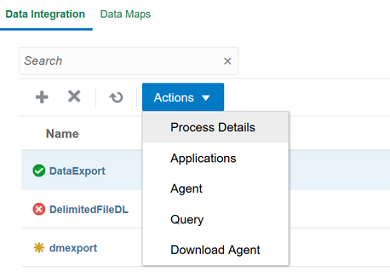
Actions drop-down on Data Integration home page.
After you select the option, an Applications page displays allowing you to register new applications, or you can select an existing application and update application options, delete it, or refresh application definitions.
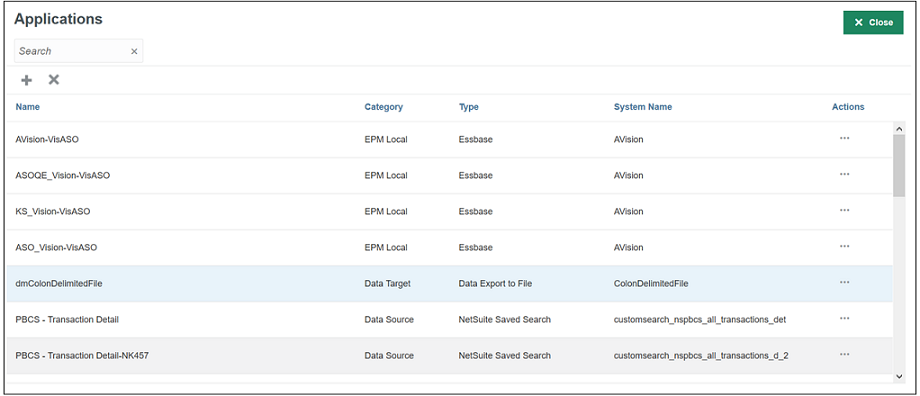
Applications page
You can use an Actions drop-down next to each row of applications to select different application related tasks associated with the application type including:
- View Dimensions
- Change/Select Applications Options
- Add/Update/Deleted values for Data Source applications.

Actions drop-down options
Key Resources
- Registering Applications in Administering Data Integration for Oracle Enterprise Performance Management Cloud
Registering Applications for Cubes in Data Integration
In Data Integration, you can now register a custom cube as a separate application with no limit to the number of custom cube applications that can be registered. This enhancement allows you to load data to an unlimited number of custom cubes. Prior to this release, you could only load data to six input cubes.
Key Resources
- Registering EPM Local Applications in Administering Data Integration for Oracle Enterprise Performance Management Cloud
Replace Mode for All Data Type with Security Load Method Now Supported
When loading data to Planning or Essbase target applications using the All Data Type with Security load method, the Replace mode is now supported for administrator users only. In Replace mode, the system first clears any existing data in the application for those referenced in the dataload file. Then the system performs the data load in Merge mode.
Key Resources
- Defining Target Options in Administering Data Integration for Oracle Enterprise Performance Management Cloud
LCM Migration of Data Load Mappings in Data Management
In order to improve the performance of export and importing large data load mappings, Data Management now exports the mapping by individual locations. When importing the mappings to the target environment, the existing mappings are completely replaced with mappings from the source environment. Prior to this update, data load mappings from the source were merged into the target environment.
Ability to Write to Upper-level Members Using Groovy
Using Groovy’s new setForcedEditable() method, you can now write to upper level members that are dynamic Calc in both ASO and BSO cubes within an application. You can then use custom allocation logic in Groovy to push data to lower level members.
Steps to Enable
Follow the steps to create a Groovy business rule in Creating a Groovy Business Rule in Designing with Calculation Manager for Oracle Enterprise Performance Management Cloud. For a step-by-step tutorial on creating Groovy business rules, see Introduction to Groovy Business Rules and the other Groovy tutorials. For the technical specification of the new feature, see the EPM Cloud Groovy Rules Java API Reference.
Tips And Considerations
To get a quick introduction to Groovy business rules, watch the Learning Groovy in EPM Cloud video.
Key Resources
- Learning Groovy in EPM Cloud video
- Creating a Groovy Business Rule in Designing with Calculation Manager for Oracle Enterprise Performance Management Cloud
- Introduction to Groovy Business Rules
- Groovy Tutorials
- EPM Cloud Groovy Rules Java API Reference
Role Information
- Calculation Manager Business Rule Designer
Suppress Missing Rows When Building Grids Using Groovy
You can now use Groovy to apply row suppression at the Essbase level when building grids using DataGridDefinitionBuilder. This benefits you by reducing the amount of data on the Planning side and eliminating the impact on query thresholds.
Steps to Enable
Follow the steps to create a Groovy business rule in Creating a Groovy Business Rule in Designing with Calculation Manager for Oracle Enterprise Performance Management Cloud. For a step-by-step tutorial on creating Groovy business rules, see Introduction to Groovy Business Rules and the other Groovy tutorials. For the technical specification of the new features, see the EPM Cloud Groovy Rules Java API Reference.
Tips And Considerations
To get a quick introduction to Groovy business rules, see Learning Groovy in Oracle EPM Cloud.
Key Resources
- Configuring Smart Push for a Simple Form in Administering Planning
- Learning Groovy in Oracle EPM Cloud video
- Creating a Groovy Business Rule in Designing with Calculation Manager for Oracle Enterprise Performance Management Cloud
- Introduction to Groovy Business Rules tutorial
- Groovy Tutorials
- EPM Cloud Groovy Rules Java API Reference
Role Information
- Calculation Manager Business Rule Designer
New Audit Type Tracks Changes to Variables
There is now an audit type, called Variables, that tracks changes, additions, and deletions to user and substitution variable definitions and values.
Enabling the Variables audit type lets you track who is making the changes to variables and what the values were before and after the change, in case of mistakes or accidental changes. Because substitution variable values can change at different points each month, it's also beneficial to know when the changes were completed for each substitution variable and what the values were before the change.
Once enabled, audit details can be exported to Excel by clicking Export.
Steps to Enable
- Click Tools, and then click Audit.
- Click Enable Auditing.
- From the list of audit types, select Variables.
Key Resources
- Auditing Overview in Administering Planning
Display of Long Alias Names Within Member Selector
You can now see full alias names within member selector in the Web interface without these values being truncated.
Key Resources
- Making Selections in Administering Planning
Manage Applications with Admin Extension in Smart View (Mac and Browser)
Service Administrators can now deploy and use the Admin Extension in Oracle Smart View for Office (Mac and Browser) to create and manage applications in Planning and Planning Modules.
You access the Admin Extension application management functionality by deploying a manifest file with the Dimension group options selected. Upon deployment, you see the following interface elements in Smart View (Mac and Browser):
- Before an application is created: At the bottom of the Smart View Home panel, the Create New Application and Download Template options
- After an application is created: At the bottom of the Smart View Home panel, Application Management and Download Template options
Using a downloadable Excel application template workbook, you can quickly create, model, and manage application sin Smart View. By modifying the worksheets within the application template workbook, you can define application properties, dimension and member properties, security (access permissions), and substitution variables to fit your needs. You can also load data from the template.
Once the application is created, it's available to users from both Smart View (Mac and Browser) and the web application.The application can be further updated and refreshed in Smart View as needed. You can also delete the application from Smart View.
Application management in Smart View (Mac and Browser) is a quick and easy way to get an application up and running in your business process environment.
Steps to Enable
To access the application management features of the Admin Extension in Smart View (Mac and Browser), Service Administrators must create and deploy a new manifest file.
- Create a new manifest file and customize it per your requirements
- Ensure that you select the Dimension Editor option group, including the Update option; this is required to get the application creation functionality for the Admin Extension
- Deploy the manifest file to EPM Cloud Service Administrators
See these topics in Deploying and Administering Oracle Smart View for Office (Mac and Browser):
- Creating and Saving the Manifest File
- Customizing the Manifest File (optional)
- Sideloading and Logging In or Deploying the Manifest File to Office 365 Users
Key Resources
- Using Smart View to Manage Applications in Administering Planning
New Planning Formula Expression in Calculation Manager
Calculation Manager now supports a new Planning Formula Expression to leverage the Module Plan Start Year setting. The following Planning Formula Expression has been added for use with pre-delivered Workforce content but is available to all customers using the Planning Modules:
isPlanStartYearSameAsCurrentFiscalYear
This Planning Formula Expression returns an integer value of 1 in case of Current Fiscal Year and 0 in case of Next Fiscal Year for the Plan Start Year setting in the Planning and Forecast Preparation configuration interface.
NEW SETTING TO ENABLE INCREMENTAL IMPORT OF DATA USING MIGRATION FOR STRATEGIC WORKFORCE PLANNING APPLICATIONS
In an upcoming update, Oracle will create a new application setting for Strategic Workforce Planning Cloud applications to enable incremental import of data using Migration. The default setting will be set to disable incremental import of data using Migration. As a result, you cannot use the daily maintenance snapshot or any extract created using Migration for incremental import of data if this new setting remains in the default configuration; you must import a full snapshot to load data using Migration as a full Clone where the target environment does not have an existing application.
Service Administrators will be able to change this setting with warnings prompting that doing so may lead to data corruption if subsequent incremental import of data using Migration are not done properly. Examples of potential data corruption include, but are not limited to, incremental data migration from a different source other than the target application where underlying Smart List values may be different.
Existing Strategic Workforce Planning Cloud subscriptions who have already upgraded to the newer version of Essbase will not be impacted by this upcoming change since incremental data loads are not allowed on this version of Essbase. Thus, this new application setting will not appear for those subscriptions already using the newer version of Essbase.
This change is being implemented to address customer feedback. If you have any concerns about this change, please contact Oracle Support.
INTERNET EXPLORER BROWSER SUPPORT
For Internet Explorer browser users, Microsoft recommends using the new Microsoft Edge as your default browser. With this guidance in mind, the 20.08 update will be the last release to support Internet Explorer. Strategic Workforce Planning Cloud will no longer support Internet Explorer starting with the 20.09 update. If you have any questions regarding de-support, please create a Service Request. For additional guidance on Internet Explorer Lifecycle, please reach out to Microsoft.
APIS BLACKLISTED FROM THE EPM CLOUD GROOVY RULES JAVA API REFERENCE
In an upcoming update in mid-2020, the following APIs are being blacklisted from the EPM Cloud Groovy Rules Java API Reference:
- TimeZone.setDefault(TimeZone zone)
- Locale.setDefault(Locale.Category category, Locale newLocale)
- Locale.setDefault(Locale newLocale)
- EPM Cloud Groovy Rules Java API Reference
EPM Cloud Groovy Rules Java API Reference
CALCULATION MANAGER DE-SUPPORT FOR FLASH
By the end of 2020, Oracle will disable Flash in Calculation Manager, and options to enable it will be removed. This change is in response to Adobe’s decision to stop updating and distributing Flash at the end of 2020. See https://theblog.adobe.com/adobe-flash-update/.
REMOVAL OF INSTANCE NAME FROM PREDEFINED ROLE NAMES
Currently, the predefined role names displayed in the Access Control screens of Strategic Workforce Planning Cloud environments prefix the instance name to the role name in INSTANCE_NAME ROLE_NAME format. They are also stored in this format in the snapshots, making it difficult to migrate snapshots from one instance to another.
To facilitate the migration of security across Strategic Workforce Planning Cloud environments, Oracle plans to rename predefined role names displayed within Strategic Workforce Planning Cloud applications by removing the instance name prefix. For example, if the instance name is Planning1, predefined role names are Planning1 Service Administrator, Planning1 Power User, Planning1 User, and Planning1 Viewer, the new role names will be Service Administrator, Power User, User, and Viewer.
NOTE: This change does not affect how the role names are displayed in the MyServices customer portal.
This change won't impact customers who currently use predefined roles for managing application-level provisioning and access to artifacts. Oracle will ensure that all application role assignments and artifact security assignments are automatically updated after the roles are renamed. This change makes it easy to migrate Strategic Workforce Planning Cloud artifacts across environments.
This change is being implemented to address customer feedback. If you have any concerns about this change, please contact Oracle Support.
PLANNER ROLE TO BE RENAMED AS USER
In an upcoming update, Oracle will rename the Planner Strategic Workforce Planning Cloud predefined role as User. This change will have no functional effect.
Subscriptions that were provisioned prior to the May 2016 update used the Planner role, which has been maintained in subsequent updates to provide continuity. In subscriptions that were activated after May 2016, the Planner role was already replaced by the User role.
UPDATE TO THE EXCEPTION RESPONSE IN REST APIS
Oracle will remove the internal package and class names from the following fields in the exception response in REST APIs in an upcoming update in early 2020:
- message
- localizedMessage
EPM MOBILE APP STATEMENT OF DIRECTION
EPM Mobile App is a downloadable application for the phone that is purpose built to perform approval actions for iOS and Android based phone devices. It was purpose built to help users perform Approval and Workflow activities. It is currently only supported for Oracle EPM Cloud for the Planning business process.
The terminal release of EPM Mobile App is September 2020. EPM Mobile App will not be available for download in the Apple and iOS App Stores effective October 2020. Oracle’s strategic direction is to have customers use the Approval and workflow capabilities using the mobile browser interface on mobile devices.
Oracle will continue to support Oracle EPM Mobile App in its current supported versions until September 2020. Oracle recommends that users using Oracle EPM Mobile App prepare to instead use the approval functionality using supported mobile browser in tablet devices.