
- Revision History
- Overview
- Feature Summary
- Strategic Workforce Planning Cloud
-
- Features
-
- New Video
- Updates to Getting Started with Oracle Enterprise Performance Management Cloud for Administrators for OCI (Gen 2)
- Audit and User Reports Available in OCI (Gen 2)
- REST APIs for Strategic Workforce Planning Cloud Now Support OAuth 2 on OCI (Gen 2)
- REST API for Get Applications Now Shows the Application Login Level
- Removal of Some Migration Options
- Update to EPM Automate Guide
- Dashboards 1.0 Enhancements
- New EPM Integration Agent Diagnostic Mode
- Importing Data from Files in the EPM Integration Inbox
-
- IMPORTANT Actions and Considerations
This document will continue to evolve as existing sections change and new information is added. All updates appear in the following table:
| Date | Product | Feature | Notes |
|---|---|---|---|
| 28 MAY 2021 | Created initial document. |
This document outlines the upcoming Strategic Workforce Planning Cloud update.
Column Definitions:
Report = New or modified, Oracle-delivered, ready to run reports.
UI or Process-Based: Small Scale = These UI or process-based features are typically comprised of minor field, validation, or program changes. Therefore, the potential impact to users is minimal.
UI or Process-Based: Larger Scale* = These UI or process-based features have more complex designs. Therefore, the potential impact to users is higher.
Features Delivered Disabled = Action is needed BEFORE these features can be used by END USERS. These features are delivered disabled and you choose if and when to enable them. For example, a) new or expanded BI subject areas need to first be incorporated into reports, b) Integration is required to utilize new web services, or c) features must be assigned to user roles before they can be accessed.
| Ready for Use by End Users Reports plus Small Scale UI or Process-Based new features will have minimal user impact after an update. Therefore, customer acceptance testing should focus on the Larger Scale UI or Process-Based* new features. |
Customer Must Take Action before Use by End Users Not disruptive as action is required to make these features ready to use. As you selectively choose to leverage, you set your test and roll out timing. |
|||||
|---|---|---|---|---|---|---|
| Feature |
Report |
UI or |
UI or |
|
||
REST APIs for Strategic Workforce Planning Cloud Now Support OAuth 2 on OCI (Gen 2) |
||||||
REST API for Get Applications Now Shows the Application Login Level |
||||||
Strategic Workforce Planning Cloud
Test Environments: Oracle will apply this monthly update during the first daily maintenance that occurs at or after 22:00 UTC on Friday, June 4, 2021.
Production Environments: Oracle will apply this monthly update during the first daily maintenance that occurs at or after 22:00 UTC on Friday, June 18, 2021.
NOTE: Backing up the daily maintenance snapshot and restoring the environment as needed are self-service operations. Oracle strongly recommends that you download the maintenance snapshot every day to a local server.
The Oracle Help Center provides access to updated documentation. The updates will be available in the Help Center on Friday, June 4, 2021.
NOTE: Some of the links to new feature documentation included in this readiness document will not work until after the Oracle Help Center update is complete.
Fixed Issues and Considerations
Software issues addressed each month and considerations will be posted to My Oracle Support.
This provides visibility into EPM Cloud release contents.
Please Join Oracle Cloud Customer Connect
Please take a moment to join the Cloud Customer Connect forums for EPM Cloud services. Oracle Cloud Customer Connect is a community gathering place for members to interact and collaborate on common goals and objectives. This is where you will find the latest release information, upcoming events, or answers to use-case questions. Joining takes just a few minutes. Join now!
https://cloud.oracle.com/community
NOTE: The Settings and Actions menu now contains a link to Cloud Customer Connect. To access this link, from the Home page, click the down arrow next to the user name (in the upper right-hand corner of the screen), and select Cloud Customer Connect.
Give Us Documentation Feedback
We welcome your comments and suggestions to improve the content of the What's New document and the product documentation.
Please send us your feedback at EPMdoc_ww@oracle.com. In the body or title of the email, state that you are inquiring or providing feedback, and indicate for which EPM Cloud service and the monthly update cycle.
Follow EPM Cloud on YouTube, Twitter, Facebook, and LinkedIn.
These are great resources for the latest updates and information about EPM Cloud.
A new video is available.
Overview: Embedding Content Using Direct Links
Wish you could insert functionally tailored artifacts from Strategic Workforce Planning Cloud in your other systems? You can with direct links! Use direct links to enrich your planning, financial close, and reporting processes with forms, reports, and dashboards all within one, unified interface.
Business Benefit: Videos provide 3-5 minute overviews and step-by step instructions to perform tasks and achieve an outcome.
Updates to Getting Started with Oracle Enterprise Performance Management Cloud for Administrators for OCI (Gen 2)
The Getting Started with Oracle Enterprise Performance Management Cloud for Administrators Guide has been enhanced with topics that help you work in Strategic Workforce Planning Cloud environments supported on Oracle Cloud Infrastructure OCI (Gen 2).
Updated and newly added topics include the following:
- Activating a Strategic Workforce Planning Cloud Subscription (for First-time Customers and Reorders)
- Key Terms and Concepts
- Accessing My Services
- Accessing Oracle Cloud Identity Console
- Sample Strategic Workforce Planning Cloud URLs
- URL Syntax for Smart View Connections
- Creating Users
- Assigning Roles to Users
- Setting up Secure Access
- Using Vanity URLs
- Retrieving Data after Service Termination
Business Benefit: These new or updated topics help customers to use My Services (OCI) and Oracle Cloud Identity Console to manage Strategic Workforce Planning Cloud users and security.
Key Resources
Audit and User Reports Available in OCI (Gen 2)
In Stategic Workforce Planning Cloud on OCI (Gen 2) architecture, Identity Cloud Service provides you audit and login reports generated for preset ranges of 30, 60 or 90 days. Additionally, you can generate these reports for a custom date range. You can also download these reports as CSV files. The available reports include Application Access Report, Application Role Privilege Report, Successful Login Attempts Report, Unsuccessful Login Attempt Report, and Dormant Users Report.
- Application Access Report shows which users accessed which applications and when.
- Application Role Privilege Report shows which users got assigned or unassigned to predefined roles in an environment. It also shows who assigned or unassigned them and when.
- Successful Login Attempts Report lists the users who successfully signed in and the providers they used to authenticate.
- Unsuccessful Login Attempt Report lists the users who failed to login, and the reasons why the failures occurred.
- Dormant Users Report lists the users who have not logged in since a predefined date.
You can also get these reports through IDCS REST APIs.
Business Benefit: These reports are highly requested by customers for accurate audit reporting.
Key Resources
- Accessing Audit and User Reports in Identity Cloud Service (for Oracle Cloud Infrastructure only) in Getting Started with Oracle Enterprise Performance Management Cloud for Administrators
REST APIs for Strategic Workforce Planning Cloud Now Support OAuth 2 on OCI (Gen 2)
You can now use OAuth 2 with REST APIs for Strategic Workforce Planning Cloud on Oracle Cloud Infrastructure (OCI).
Business Benefit: Using OAuth lets you use an OAuth token to log in to a Strategic Workforce Planning Cloud environment, obviating the need for basic authorization (using passwords).
Key Resources
- Authentication in REST API for Oracle Enterprise Performance Management Cloud
Role Information
- Service Administrators
REST API for Get Applications Now Shows the Application Login Level
The Get Applications REST API now displays the login level. The response now includes a field called adminMode. This parameter returns a Boolean value:
- true indicates that the login level for the application is set to Administrators
- false indicates that the login level is set to All Users.
Business Benefit: The adminMode feature lets you quickly determine the application login level.
Key Resources
- Get Applications in REST API for Oracle Enterprise Performance Management Cloud
Role Information
- Service Administrators
Removal of Some Migration Options
Oracle has removed some unused or rarely used options from the Import Options screen in Migration.
The Essbase Application options are no longer used in Migration. Default values are used instead of the Data Management - Skip Validation and Groups and Membership - Max Threshold options, as indicated in the following table:
Deleted Import Options and Default Replacement Values
| Migration Option | Import Default Value |
|---|---|
| Data Management - Skip Validation | False |
| Essbase Application - Overwrite Artifacts | N/A |
| Essbase Application - Restructure Cube | N/A |
| Groups and Membership - Max Error Threshold | 100 |
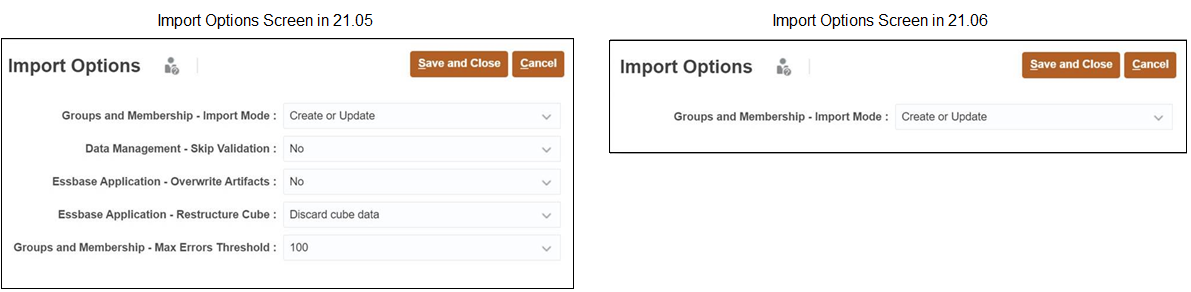
Changes in Import Options Screen
Business Benefit: The removal of these options streamlines the import process by removing unused settings.
Key Resources
- Setting Import Options in Administering Migration for Oracle Enterprise Performance Management Cloud
The Working with EPM Automate for Oracle Enterprise Performance Management Cloud guide has been enhanced by adding new sample scripts that help customers leverage Oracle Object Storage to copy the daily snapshots directly from Strategic Workforce Planning Cloud, and copy it back to Strategic Workforce Planning Cloud as needed.
Business Benefit: The new scripts help you automate the backing up of snapshots from Strategic Workforce Planning Cloud environments to Oracle Object Storage and the restoring of backup snapshots to Strategic Workforce Planning Cloud environments.
Key Resources
- Copying a Snapshot to or from Oracle Object Storage in Working with EPM Automate for Oracle Enterprise Performance Management Cloud
Enhancements were made to Dashboards 1.0 to make form instructions directly accessible from the dashboard, to make the handles and borders that resize objects in flexible dashboard layouts more prominent, and to expand the amount of text allowed in commentary dashboard objects to up to 2000 characters.
Some dashboard forms include instructions describing for users how to work with the form. Previously, the link to view dashboard form instructions was only accessible if the form was maximized. Now if a form has instructions configured for it, the instructions icon is accessible from the dashboard form's hover toolbar.

Dashboard Object Hover Icons
For 1.0 Dashboards that use a Flexible layout, we've enlarged the handles you use to expand and restore the dashboard object. We've also made the borders you drag to resize an object more prominent.
Lastly, for Commentary Dashboards 1.0 objects, we've expanded the text limit to 2000 characters. The 2000 character limit includes any formatting tags that are added for rich text.
NOTE: These enhancements are applicable only to Dashboards 1.0 and not to Dashboards 2.0.
Business Benefit: Improved usability for Dashboards 1.0.
Key Resources
- Creating Dashboards 1.0 in Administering Planning
New EPM Integration Agent Diagnostic Mode
The EPM Integration Agent now enables you to run a set of validations against the parameters in the agent startup file.
In diagnostic mode, the agent is not registered to the Strategic Workforce Planning Cloud but runs these validations:
- SSL certificates
- Agent connectivity to the Internet. Includes making a test call to the oracle.com from the agent.
- Agent connectivity to the Strategic Workforce Planning Cloud URL within the agent.
- Proxy type (basic, digest, or NTML) when proxy is enabled in the customers environment
- Double quotes are used in Linux/Mac OS startup parameter file entries. Double quotes enable the shell to interpret dollar sign ($), backtick(`), backslash(\) and exclamation mark(!)
- Password is encrypted in the agent parameter file.
- Checks any whitespaces before or after parameters. If whitespaces are encountered, the system trims them and updates the startup parameter file.
Business Benefit: Diagnostic mode provides a way to identify any issues with the EPM Integration Agent startup parameters or network connectivity.
Key Resources
- Starting the EPM Integration Agent in Diagnostic Mode in Administering Data Integration for Oracle Enterprise Performance Management Cloud
Importing Data from Files in the EPM Integration Inbox
Customers can now import data from a file in a local EPM Integration Agent inbox folder and then have the agent upload and process the file.
This feature requires that a customer create an inbox in the EPM Integration Agent Data folder and then stage the file. Additionally, the customer must specify the location of the inbox in the startup parameters file and then update the integration definition in Data Integration.
Business Benefit: Prior to this update, a customer had to use an EPM Automate command to import data from a file to the EPM Integration Agent.
Key Resources
- Administering Data Integration for Oracle Enterprise Performance Management Cloud:
IMPORTANT Actions and Considerations
Redwood Experience as Default Theme
Within the next few months, the Redwood experience will be the default theme upon creation or recreation of a Strategic Workforce Planning Cloud service, or upon creation or recreation of a business process/application for all POD instances (existing as well as new). Existing active services/business processes/applications will not be impacted. All migrations (i.e., LCM import/reimports of existing cloud applications) will honor the theme from the source/import file. You will be able to switch to an alternate non-Redwood experience theme from the Appearance page in the Tools cluster.
Support for Composite Forms in Strategic Workforce Planning Cloud
As of the May update (21.05), Oracle Strategic Workforce Planning Cloud no longer officially supports composite forms. As has been announced for several months, customers are required to use Strategic Workforce Planning Cloud dashboards instead. Customers can continue to use their composite forms without support.
Loaner Program for Cloud Infrastructure Generation 2 Testing
Oracle Strategic Workforce Planning Cloud is now live on Oracle Cloud Infrastructure (OCI) Gen 2 environments. If you are interested in testing your application performance on an OCI Gen 2 environment, open a service request following the process at https://docs.oracle.com/en/cloud/saas/enterprise-performance-management-common/tsepm/op_procs_loaner_envs.html and request for a loaner environment in an OCI Gen 2 data center for a duration of 30 days with the business justification as “Want to test application performance in an OCI Gen 2 data center”.
After you have performed the testing, submit Provide Feedback from the loaner environment. Create a service request using the normal support process, if you have any issues or feedback for the OCI Gen 2 environment.
For more information, see What is a Gen 2 Cloud?
Upcoming Change to Smart View Ad Hoc Behavior Setting
Starting with the August update (21.08), all new applications and all recreated applications will use “Standard” as the Smart View ad hoc behavior.
For existing applications and migrated applications, “Native” will remain as the default Smart View ad hoc behavior, with “Standard” being an option. Existing and migrated applications will not experience any change in behavior. Currently selected ad hoc behavior will be persisted.
Please note that "Native" mode in Smart View ad hoc behavior will eventually be phased out (timeline is yet to be determined). We recommend that all customers plan on switching their applications to "Standard" mode ad hoc behavior soon.
Skills Assessment FTE Data Load Change in Behavior
In an upcoming release, Oracle will be enhancing the Skills Assessment functionality, which currently requires the FTE data to be manually loaded to the Workforce Reporting (OEP_REP) cube. As part of this proposed change, customers will no longer need to load FTE data separately into the Workforce Reporting cube. The Headcount Data for Reporting data map will be renamed and enhanced to include moving the FTE base data already required to be loaded into the application. After this change is implemented and the update is applied, existing customers should execute the renamed Headcount and FTE Data for Reporting data map to ensure the FTE data required for Skills Assessment calculations is in the correct intersection in the Workforce Reporting cube. Customers who have modified the existing Headcount Data for Reporting data map should consider including FTE in the their modified version to ensure the FTE data is mapped to the new, expected intersection as part of this proposed enhancement.