
- Revision History
- Overview
- Feature Summary
- Strategic Workforce Planning
-
- Strategic Workforce Planning
- Features
-
- New Tutorial
- Updates to the Oracle Enterprise Performance Management Cloud Operations Guide
- EPM Automate Updates
- REST API for Report Bursting
- New Version of Oracle Smart View for Office
- Customization of Logout URL in SSO-Enabled Strategic Workforce Planning Cloud (OCI Gen 2)
- Formalization of Snapshot States
- Task Manager Integration with Oracle Cloud ERP
- Dynamic Excel Sheet Names for Excel Report Export
- Ability to Delete the First Sheet in Reports
- Ability to Control Chart Label Positioning by Element in Reports
- Groovy Update for Suppression Options
- Drill Landing Page in Data Integration/Data Management
- Plot Missing Values as Zero in Dashboards 2.0 Charts
-
- IMPORTANT Actions and Considerations
This document will continue to evolve as existing sections change and new information is added. All updates appear in the following table:
| Date | Product | Feature | Notes |
|---|---|---|---|
| 27 MAY 2022 | Created initial document. |
 HAVE AN IDEA?
We’re here and we’re listening. If you have a suggestion on how to make our cloud services even better then go ahead and tell us. There are several ways to submit your ideas, for example, through the Ideas Lab on Oracle Customer Connect. Wherever you see this icon after the feature name it means we delivered one of your ideas.
GIVE US FEEDBACK
We welcome your comments and suggestions to improve the content. Please send us your feedback at oracle_fusion_applications_help_ww_grp@oracle.com.
DISCLAIMER
The information contained in this document may include statements about Oracle’s product development plans. Many factors can materially affect Oracle’s product development plans and the nature and timing of future product releases. Accordingly, this Information is provided to you solely for information only, is not a commitment to deliver any material, code, or functionality, and should not be relied upon in making purchasing decisions. The development, release, and timing of any features or functionality described remains at the sole discretion of Oracle.
This information may not be incorporated into any contractual agreement with Oracle or its subsidiaries or affiliates. Oracle specifically disclaims any liability with respect to this information. Refer to the Legal Notices and Terms of Use for further information.
Column Definitions:
Report = New or modified, Oracle-delivered, ready to run reports.
UI or Process-Based: Small Scale = These UI or process-based features are typically comprised of minor field, validation, or program changes. Therefore, the potential impact to users is minimal.
UI or Process-Based: Larger Scale* = These UI or process-based features have more complex designs. Therefore, the potential impact to users is higher.
Features Delivered Disabled = Action is needed BEFORE these features can be used by END USERS. These features are delivered disabled and you choose if and when to enable them. For example, a) new or expanded BI subject areas need to first be incorporated into reports, b) Integration is required to utilize new web services, or c) features must be assigned to user roles before they can be accessed.
| Ready for Use by End Users Reports plus Small Scale UI or Process-Based new features will have minimal user impact after an update. Therefore, customer acceptance testing should focus on the Larger Scale UI or Process-Based* new features. |
Customer Must Take Action before Use by End Users Not disruptive as action is required to make these features ready to use. As you selectively choose to leverage, you set your test and roll out timing. |
|||||
|---|---|---|---|---|---|---|
| Feature |
Report |
UI or |
UI or |
|
||
Customization of Logout URL in SSO-Enabled Strategic Workforce Planning Cloud (OCI Gen 2) |
||||||
Ability to Control Chart Label Positioning by Element in Reports |
||||||
Test Environments: Oracle will apply this monthly update during the first daily maintenance that occurs at or after 22:00 UTC on Friday, June 3, 2022.
Production Environments: Oracle will apply this monthly update during the first daily maintenance that occurs at or after 22:00 UTC on Friday, June 17, 2022.
NOTE: The monthly update will not be applied to any environment for which this monthly update is requested to be skipped using the EPM Automate skipUpdate command or service request to Oracle.
NOTE: Backing up the daily maintenance snapshot and restoring the environment as needed are self-service operations. Oracle strongly recommends that you download the maintenance snapshot every day to a local server.
The Oracle Help Center provides access to updated documentation. The updates will be available in the Help Center on Friday, June 3, 2022.
NOTE: Some of the links to new feature documentation included in this readiness document will not work until after the Oracle Help Center update is complete.
Documentation Updates Available One Week After Readiness Documents
Updated documentation is published on the Oracle Help Center on the first Friday of each month, coinciding with the monthly updates to Test environments. Because there is a one week lag between the publishing of the readiness documents (What's New and New Feature Summary) and Oracle Help Center updates, some links included in the readiness documents will not work until the Oracle Help Center update is complete.
https://docs.oracle.com/en/cloud/saas/epm-cloud/index.html
Fixed Issues and Considerations
Software issues addressed each month and considerations will be posted to My Oracle Support.
NOTE: Fixed issues for EPM Cloud Common components (Smart View for Office, EPM Automate, REST API, Migration, Access Control, Data Management/Data Integration, Reports, Financial Reporting, and Calculation Manager) are available in a separate document on the My Oracle Support “Release Highlights” page.
This provides visibility into EPM Cloud release contents.
Give Us Documentation Feedback
We welcome your comments and suggestions to improve the content of the What's New document and the product documentation.
Please take our quick survey or send us your feedback at EPMdoc_ww@oracle.com. In the body or title of the email, state that you are inquiring or providing feedback, and indicate for which EPM Cloud service and the monthly update cycle.
Please Join Oracle Cloud Customer Connect
Please take a moment to join the Cloud Customer Connect forums for EPM Cloud services. Oracle Cloud Customer Connect is a community gathering place for members to interact and collaborate on common goals and objectives. This is where you will find the latest release information, upcoming events, or answers to use-case questions. Joining takes just a few minutes. Join now!
https://cloud.oracle.com/community
NOTE: The Settings and Actions menu now contains a link to Cloud Customer Connect. To access this link, from the Home page, click the down arrow next to the user name (in the upper right-hand corner of the screen), and select Cloud Customer Connect.
Follow EPM Cloud on YouTube, Twitter, Facebook, and LinkedIn.
These are great resources for the latest updates and information about EPM Cloud.
A new tutorial is available.
Performing Calc on the Fly in Cloud EPM
In this tutorial, you learn how to perform calc on the fly during ad hoc analysis using member formulas. You can work with calc on the fly within Strategic Workforce Planning in the web or with Smart View.
Business Benefit: Tutorials provide instructions with sequenced videos and documentation to help you learn a topic.
Updates to the Oracle Enterprise Performance Management Cloud Operations Guide
The Oracle Enterprise Performance Management Cloud Operations Guide has been updated with information on managing the export of Smart List textual data during daily maintenance of environments. Export of this data in environments containing a high volume of data can cause the daily maintenance process to exceed the schedule maintenance window. Additionally, the "Getting Help" topic in troubleshooting sections have been enhanced to gather information on whether an issue started after the latest monthly update.
Business Benefit: Information in the EPM Cloud Operations Guide helps you troubleshoot issues and report issues and requests to Oracle.
Key Resources
A new version of EPM Automate is now available. This version introduces the groupAssignmentAuditReport, and runIntegration commands. Additionally, the behavior of commands used to manage users, Access Control groups, and roles (addUsers, addUsersToGroup, addUserToGroups, assignRole, createGroups, deleteGroups, importSnapshot, removeUsers, removeUserFromGroups, removeUsersFromGroup, unassignRole, and updateUsers) have been updated so that the values of User Login, Group Name, and Role Name parameters are now treated as case insensitive.
groupAssignmentAuditReport Command
This command creates a report listing users and groups that were added to or removed from Access Control groups for a specified date range. Each row of the generated CSV file identifies the user or group that was added or removed, the group which the user or group was added to or removed from, the Service Administrator who performed the action, and the date and time when the action was completed.
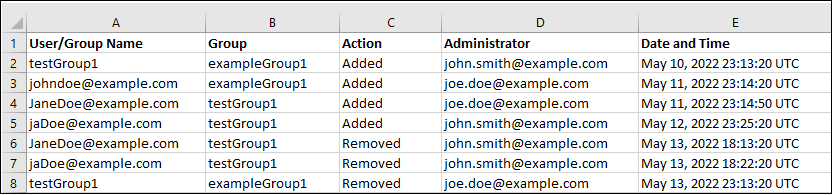
A Sample groupAssignmentAuditReport
runIntegration Command
This command executes a Data Integration job to import data into a Strategic Workforce Planning Cloud business process or export data from a business process to an external system.
Updates to the Behavior of Commands Used to Manage Users, Access Control Groups, and Roles
The following commands have been updated to to ignore the case in which User Login, Group Name, and Role Name values are specified in the input text files. For example, the value of User Login John.doe@example.com is treated as being identical to John.Doe@example.com or any variation in its case.
- addUsers
- addUsersToGroup
- addUserToGroups
- assignRole
- createGroups
- deleteGroups
- importSnapshot
- removeUsers
- removeUserFromGroups
- removeUsersFromGroup
- unassignRole
- updateUsers
Business Benefit:
The groupAssignmentAuditReport command can be used to support security audit operations in conjunction with the roleAssignmentAuditReport command.
Updates to the behavior of Manage Users, Access Control Groups, and Roles commands prevent duplication errors caused during the update of these artifacts.
Key Resources
- Working with EPM Automate for Oracle Enterprise Performance Management Cloud:
- Installing EPM Automate
- groupAssignmentAuditReport
- addUsers
- addUsersToGroup
- addUserToGroups
- assignRole
- createGroups
- deleteGroups
- importSnapshot
- removeUsers
- removeUserFromGroups
- removeUsersFromGroup
- unassignRole
- updateUsers
Customers can now execute bursting for a single report or book for more than one member of a single dimension, and publish a PDF or Excel output for each member.
Business Benefit: This lets you use a REST API to automate bursting.
Key Resources
-
Manage Jobs in REST API for Oracle Enterprise Performance Management Cloud
Role Information
- Service Administrators
New Version of Oracle Smart View for Office
Oracle Smart View for Office version 22.100 will be available later in June 2022.
The following new features are included:
- Show or hide the Documents folder in the EPM Cloud Library
- Set and export default Smart View options in the Options dialog box
- New cell styles for Parent and Child members
- Enhanced Reports functionality, including:
- Create an ad hoc grid based on an imported report
- View properties for a report
- For Narrative Reporting users, Reports functionality no longer requires the Narrative Reporting extension (starting with the 22.06 Narrative Reporting extension update)
- Microsoft WebView2 and Edge support for importing Financial Reporting documents
- Microsoft .NET Framework Version now displayed in the Health Check dialog
Business Benefit: This Smart View release includes new features and fixed defects.
Steps to Enable
Download and install Smart View. See Downloading and Installing Clients in Getting Started with Oracle Enterprise Performance Management Cloud.
Key Resources
- Documentation updates will be available when 22.100 is generally available.
Customization of Logout URL in SSO-Enabled Strategic Workforce Planning Cloud (OCI Gen 2)
Starting with this update, you can use a custom logout URL for SSO-Enabled Strategic Workforce Planning Cloud OCI (Gen 2) environments. This feature allows you to specify a custom page of your choice (usually an identity provider page) as the landing page when you sign out. This custom logout page is maintained even if you recreate your environment.
Business Benefit: Using a custom logout page helps you redirect users to a web page of your choice instead of the default page.
Key Resources
- Customizing Logout URL for SSO-Enabled OCI (Gen2) Environments in Getting Started with Oracle Enterprise Performance Management Cloud for Administrators
Formalization of Snapshot States
Strategic Workforce Planning Cloud now uses standardized snapshot states to identify artifact export and archive operations in progress, for example, during the daily maintenance of the environment. Strategic Workforce Planning Cloud uses the snapshot state to display appropriate messages when you use EPM Automate commands that perform snapshot-related operations (copySnapshotFromInstance, cloneEnvironment, deleteFile, downlodFile, listFiles, and renameSnapshot) and the Clone Environment feature.
For example, if you attempt to clone an environment that is in the process of generating or archiving the current snapshot (Artifact Snapshot) during the daily maintenance, you will receive the File not found error. This error will also be displayed if you use the copySnapshotFromInstance, cloneEnvironment, deleteFile, downlodFile, listFiles, and renameSnapshot command while the daily maintenance of the environment is in progress.
Business Benefit: This update helps identify why a snapshot is not available during certain operations.
Key Resources
- Administering Migration for Oracle Enterprise Performance Management Cloud
- Working with EPM Automate for Oracle Enterprise Performance Management Cloud
Task Manager Integration with Oracle Cloud ERP
Task Manager has improved the current end user integrations with Oracle Cloud ERP. Now, the majority of the Oracle Cloud ERP web pages are displayed inline within the Task. Users no longer are required to click a link to launch the Oracle Cloud ERP web pages within a secondary browser control. The inline display simplifies the user interaction and improves the overall user experience. Additionally, the Oracle Fusion R13 integration applications are renamed to replace Oracle Fusion R13 with Oracle Cloud ERP. For example, Oracle Fusion R13 - General Ledger is now Oracle Cloud ERP – General Ledger.
Business Benefit: This updated capability provides an improved user experience for Task Manager and Oracle Cloud ERP users.
Key Resources
- Administering Financial Consolidation and Close:
Dynamic Excel Sheet Names for Excel Report Export
When downloading a Report to Excel (fully formatted) from the web, or importing a Report in Smart View, the worksheet names will reflect the report name followed by the first POV dimension with Print All Selections, truncating the sheet name as needed to meet Excel’s 31 character limit.
NOTE: "Print All Selections" must be enabled for one or more of the report’s POV dimensions.
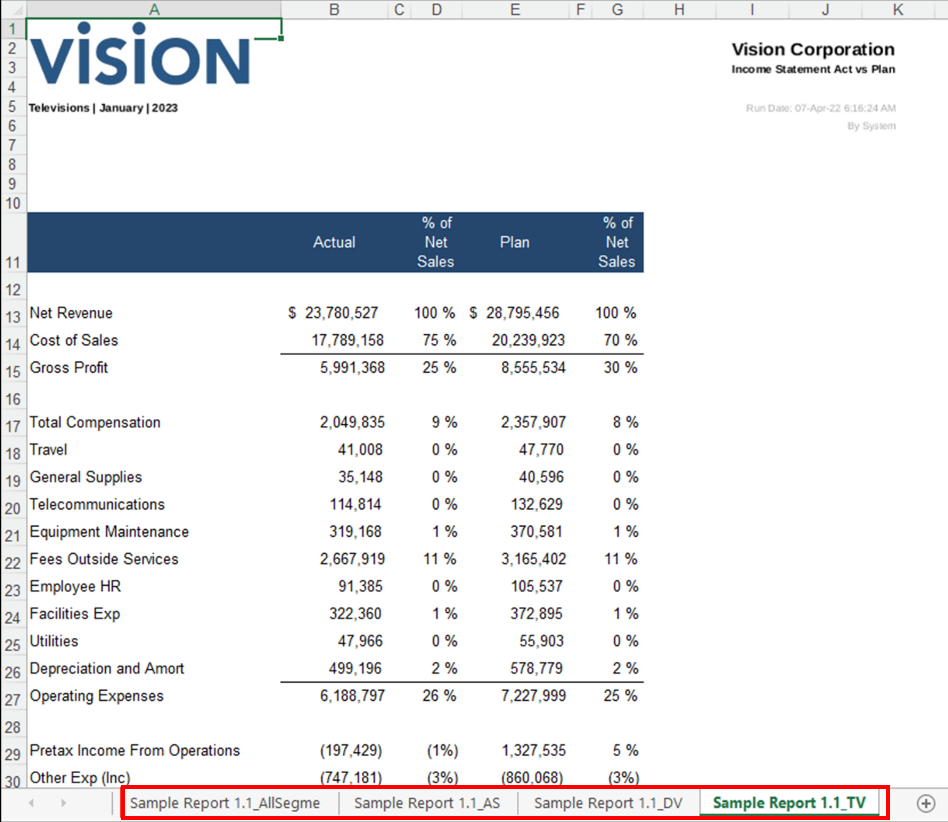
Downloading a Report to Excel
Business Benefit: This feature helps you to retain and differentiate the sheet name based on the POV selection.
Key Resources
- Working with Reports in Smart View in Working with Reports for Oracle Enterprise Performance Management Cloud
Ability to Delete the First Sheet in Reports
You can quickly delete the first sheet if there are at least one or more visible sheets. The body objects are deleted, and the header and footer objects from the first sheet are moved to the second one.
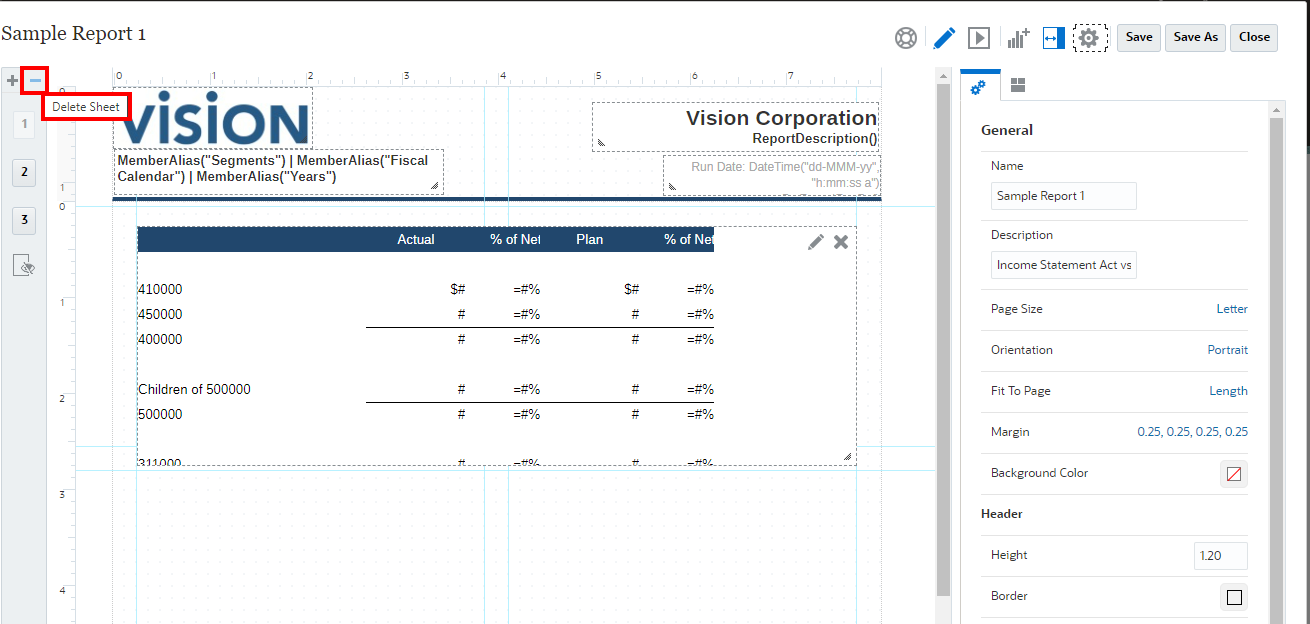
Quickly Delete the First Sheet
Business Benefit: This provides additional flexibility for Report Administrator to delete unwanted sheets with ease.
Key Resources
- Designing with Reports for Oracle Enterprise Performance Management Cloud
Ability to Control Chart Label Positioning by Element in Reports
Previously, you could only set the chart label positioning for all elements in a chart, but not at the chart element level.
In this update, you will be able to optionally set the label location for each individual element in the chart.
NOTE: This feature only applies to the bar, line, and combo charts.
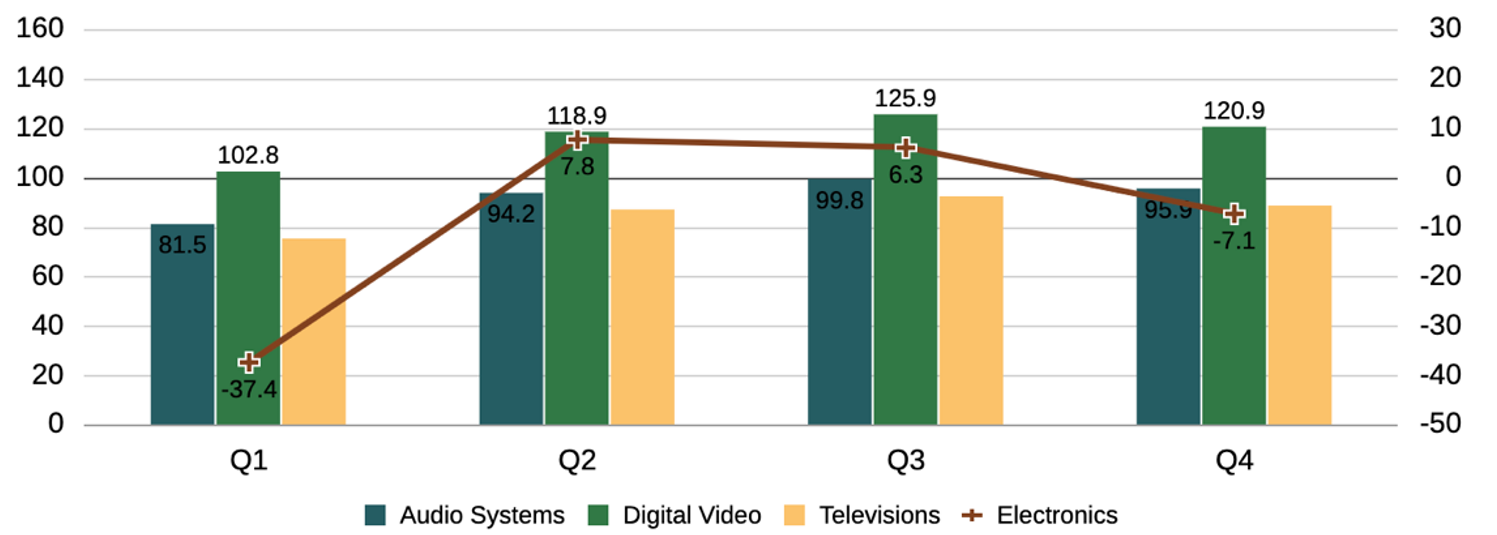
Label Location
Business Benefit: This feature helps you set the Label Location in the Options section, which applies to all data set elements in the chart.
Key Resources
- Chart Properties in Designing with Reports for Oracle Enterprise Performance Management Cloud
Groovy Update for Suppression Options
When using Groovy, you can now use suppression options in DataGridDefinitionBuilder. This feature can be used by any application that has access to Groovy.
Business Benefit: This gives you more options when using Groovy business rules.
Steps to Enable
You don't need to do anything to enable this feature.
Tips And Considerations
To get a quick introduction to Groovy business rules, watch the Learning Groovy in EPM Cloud video.
Key Resources
- Learning Groovy in EPM Cloud video
- Creating a Groovy Business Rule in Designing with Calculation Manager for Oracle Enterprise Performance Management Cloud
- Introduction to Groovy Business Rules
- Groovy Tutorials
- EPM Cloud Groovy Rules Java API Reference
Role Information
- Calculation Manager Business Rule Designer
Drill Landing Page in Data Integration/Data Management
In Data Integration/Data Management, the Enhanced Drill Landing page is now the default starting page.
Starting with the 22.09 update, the option to switch the Drill Type user interface will no longer be available, and the Enhanced version will be the only version available.
Business Benefit: The Enhanced Drill Landing page enables customers to select a custom view of columns without additional configuration.
Key Resources
- Using Drill Through to Source in the Administering Data Integration for Oracle Enterprise Performance Management Cloud
Plot Missing Values as Zero in Dashboards 2.0 Charts
Dashboards 2.0 now supports the Plot Missing Values as Zero setting for certain chart types.
By default, missing or suppressed data is plotted as zeros. For certain chart types (Area, Bubble, Combination, Line, Radar, and Scatter), you can disable this setting by clearing the Plot Missing Values as Zero option in the chart's settings. When this option is cleared, the missing or suppressed data is ignored and is no longer plotted for those chart types.
Business Benefit: Bringing this Dashboards 1.0 functionality into Dashboards 2.0 provides an improved and consistent user experience.
Key Resources
- Concepts in Designing 2.0 Dashboards in Administering Planning
- Using Dashboards to Work with Data in Working with Planning
IMPORTANT Actions and Considerations
One-Week Lag Between Readiness Documents Live and Help Center Live
Because Oracle readiness documents (What's New and New Feature Summary) are live one week before the monthly update is applied to Test environments, some links to documentation included in the readiness documents will not work until after the Oracle Help Center update is complete when the monthly update is applied to Test environments.
Rolling Back Changes Made to Page Title Display for Horizontal tabs
We are rolling back changes that were made in the April 22.04 update to the page title for horizontal tabs. The change was to not display the page title in horizontal tabs while using the Redwood Theme. From the feedback received on this change, we've decided to roll it back. The change will be available in the July (22.07) update.
Loaner Program for Cloud Infrastructure Generation 2 Testing and OCI Migration Assistance Early Adopter Program
Oracle Strategic Workforce Planning Cloud is now live on Oracle Cloud Infrastructure (OCI) Gen 2 environments. If you are interested in testing your application performance on an OCI environment, open a service request following the process at https://docs.oracle.com/en/cloud/saas/enterprise-performance-management-common/tsepm/op_procs_loaner_envs.html and request for a loaner environment in an OCI data center for a duration of 30 days with the business justification as “Want to test application performance in an OCI Gen 2 data center”.
After you have performed the testing, submit Provide Feedback from the loaner environment. Create a service request using the normal support process, if you have any issues or feedback for the OCI environment. For more information, see What is a Gen 2 Cloud?
Additionally, Oracle has instituted a program to assist a limited number of early adopters on Oracle Cloud Classic to migrate to OCI. For more information, see Oracle Cloud Classic to Oracle Cloud Infrastructure (OCI) Migration Assistance Program for Early Adopters.
Alerts Cannot be Migrated to Prior Version
Due to a major upgrade in Alert functionality, any service that has defined Alert Types will not be able to migrate them or the Alerts that are based on them from the 22.04 update to an earlier update. This normally happens if artifacts are moved from Test to Production during the two week period when Test is upgraded to the 22.04 update while Production is still on the 22.03 update. All other objects in the migration are not affected.
Task Manager Email Notification Settings
Starting in the 22.04 update, the service changed the handling of Task Manager’s Email Notification settings during a migration. The target service’s Task Manager Email Notification settings were updated with the settings from the source service. If a customer wants to retain the target service’s Task Manager Notification settings, they can generate an LCM export with the notification settings from the target service, perform the source migration, then import the LCM file with the notification settings.
See LCM Export and LCM Import in REST API for Oracle Performance Management Cloud.
Date Format when Using the EPM Digital Assistant
When using the EPM Digital Assistant, note that the Date format is not taken from User Preferences, and the assistant does not ask which format to use for the date. The assistant attempts to detect the date format based on the user locale set in the browser and other common formats.
Drill Landing Page in Data Integration / Data Management
TThe Enhanced Drill Landing page is the default starting in this update. Starting with the 22.09 update, the option to switch the Drill Type user interface will no longer be available, and the Enhanced version will be the only version.
Upcoming Change to Planning Admin Extension Installation
In a future update, the installation process and file format will change for the Planning Admin Extension for Oracle Smart View for Office (also referred to as the Smart View Add-on for Administrator). This will not impact current and future usage of Admin Extensions that are already installed.
Currently, an MSI file is downloaded from the Downloads page of the supported business process. The new process will utilize an SVEXT file and allow users to take advantage of the extension update feature in the Smart View Options dialog, Extensions tab.
To use the new SVEXT file format when it becomes available, you are required to first uninstall the Planning Admin Extension using Windows Programs and Features. Then, you can install the new Planning Admin Extension SVEXT file in either of these ways:
- Download the SVEXT file to a temporary folder and double-click it.
- Use the "Check for Updates, New Installs, and Uninstalls" feature in the Smart View Options dialog, Extensions tab to automatically detect and install the Planning Admin Extension
Look for this change in the file format and the installation of the Planning Admin Extension in a future update.
Applications That Use a 13-Period Calendar
For applications that use a 13-period calendar, application snapshot files older than 22.07 will no longer work after 22.07 due to changes Oracle plans to make to the application properties for 13-period applications. The change is required to correct the Fiscal Year Start Date option in existing 13-period applications. After the 22.07 update, customers are advised to take a new snapshot of both test and production environments for backup and restore purposes.