
- Revision History
- Overview
- Feature Summary
- Strategic Workforce Planning
-
- Strategic Workforce Planning
- Features
-
- New Videos
- New Tutorial
- Updates to the Getting Started with Oracle Enterprise Performance Management Cloud for Administrators Guide
- Updates to the Oracle Enterprise Performance Management Cloud Operations Guide
- EPM Automate Updates
- REST API for Import Data - Parameter to Stop on Error
- Performing Calculations Without Having to Submit Your Changes (Calc on the Fly)
- Drill View Enhancement
- Use Approval Groups to Manage Submission Phases
- EPM Cloud Filter Members by Security in Reports
- Consolidation of Common Chart Types in Reports
- Data Integration Workbench Enhancements
-
- IMPORTANT Actions and Considerations
This document will continue to evolve as existing sections change and new information is added. All updates appear in the following table:
| Date | Product | Feature | Notes |
|---|---|---|---|
| 25 FEB 2022 | Created initial document. |
 HAVE AN IDEA?
We’re here and we’re listening. If you have a suggestion on how to make our cloud services even better then go ahead and tell us. There are several ways to submit your ideas, for example, through the Ideas Lab on Oracle Customer Connect. Wherever you see this icon after the feature name it means we delivered one of your ideas.
GIVE US FEEDBACK
We welcome your comments and suggestions to improve the content. Please send us your feedback at oracle_fusion_applications_help_ww_grp@oracle.com.
DISCLAIMER
The information contained in this document may include statements about Oracle’s product development plans. Many factors can materially affect Oracle’s product development plans and the nature and timing of future product releases. Accordingly, this Information is provided to you solely for information only, is not a commitment to deliver any material, code, or functionality, and should not be relied upon in making purchasing decisions. The development, release, and timing of any features or functionality described remains at the sole discretion of Oracle.
This information may not be incorporated into any contractual agreement with Oracle or its subsidiaries or affiliates. Oracle specifically disclaims any liability with respect to this information. Refer to the Legal Notices and Terms of Use for further information.
Column Definitions:
Report = New or modified, Oracle-delivered, ready to run reports.
UI or Process-Based: Small Scale = These UI or process-based features are typically comprised of minor field, validation, or program changes. Therefore, the potential impact to users is minimal.
UI or Process-Based: Larger Scale* = These UI or process-based features have more complex designs. Therefore, the potential impact to users is higher.
Features Delivered Disabled = Action is needed BEFORE these features can be used by END USERS. These features are delivered disabled and you choose if and when to enable them. For example, a) new or expanded BI subject areas need to first be incorporated into reports, b) Integration is required to utilize new web services, or c) features must be assigned to user roles before they can be accessed.
| Ready for Use by End Users Reports plus Small Scale UI or Process-Based new features will have minimal user impact after an update. Therefore, customer acceptance testing should focus on the Larger Scale UI or Process-Based* new features. |
Customer Must Take Action before Use by End Users Not disruptive as action is required to make these features ready to use. As you selectively choose to leverage, you set your test and roll out timing. |
|||||
|---|---|---|---|---|---|---|
| Feature |
Report |
UI or |
UI or |
|
||
Performing Calculations Without Having to Submit Your Changes (Calc on the Fly) |
||||||
Test Environments: Oracle will apply this monthly update during the first daily maintenance that occurs at or after 22:00 UTC on Friday, March 4, 2022.
Production Environments: Oracle will apply this monthly update during the first daily maintenance that occurs at or after 22:00 UTC on Friday, March 18, 2022.
NOTE: The monthly update will not be applied to any environment for which this monthly update is requested to be skipped using the EPM Automate skipUpdate command or service request to Oracle.
NOTE: Backing up the daily maintenance snapshot and restoring the environment as needed are self-service operations. Oracle strongly recommends that you download the maintenance snapshot every day to a local server.
The Oracle Help Center provides access to updated documentation. The updates will be available in the Help Center on Friday, March 4, 2022.
NOTE: Some of the links to new feature documentation included in this readiness document will not work until after the Oracle Help Center update is complete.
Documentation Updates Available One Week After Readiness Documents
Updated documentation is published on the Oracle Help Center on the first Friday of each month, coinciding with the monthly updates to Test environments. Because there is a one week lag between the publishing of the readiness documents (What's New and New Feature Summary) and Oracle Help Center updates, some links included in the readiness documents will not work until the Oracle Help Center update is complete.
https://docs.oracle.com/en/cloud/saas/epm-cloud/index.html
Fixed Issues and Considerations
Software issues addressed each month and considerations will be posted to My Oracle Support.
NOTE: Fixed issues for EPM Cloud Common components (Smart View for Office, EPM Automate, REST API, Migration, Access Control, Data Management/Data Integration, Reports, Financial Reporting, and Calculation Manager) are available in a separate document on the My Oracle Support “Release Highlights” page.
This provides visibility into EPM Cloud release contents.
Give Us Documentation Feedback
We welcome your comments and suggestions to improve the content of the What's New document and the product documentation.
Please take our quick survey or send us your feedback at EPMdoc_ww@oracle.com. In the body or title of the email, state that you are inquiring or providing feedback, and indicate for which EPM Cloud service and the monthly update cycle.
Please Join Oracle Cloud Customer Connect
Please take a moment to join the Cloud Customer Connect forums for EPM Cloud services. Oracle Cloud Customer Connect is a community gathering place for members to interact and collaborate on common goals and objectives. This is where you will find the latest release information, upcoming events, or answers to use-case questions. Joining takes just a few minutes. Join now!
https://cloud.oracle.com/community
NOTE: The Settings and Actions menu now contains a link to Cloud Customer Connect. To access this link, from the Home page, click the down arrow next to the user name (in the upper right-hand corner of the screen), and select Cloud Customer Connect.
Follow EPM Cloud on YouTube, Twitter, Facebook, and LinkedIn.
These are great resources for the latest updates and information about EPM Cloud.
Two new videos are available:
Learn how to configure ML model Import for Bring Your Own Machine Learning. You import a fully trained ML model into Planning. You follow the steps in a wizard to map, analyze, and test the model. After saving the model, two Groovy rules are created. To complete the integration process, see the related video for deploying an ML model to Planning.
Learn how to deploy an ML Model to Planning. After configuring the ML Model Import, you integrate the PMML file into your planning application by creating an Action Menu with the Groovy rule generated from the configured ML model. Then you associate the Action Menu with a Planning form. When Planners run the rule from the form, the rule returns the set of predicted values.
Business Benefit: Videos provide 3-5 minute overviews and step-by step instructions to perform tasks and achieve an outcome.
A new tutorial for Data Integration guides you through the different methods to load data using the Data Integration user interface. Specifically, you will:
- Perform a basic numeric data load
- Perform a multi-period load with period data in columns
- Perform a multi-period load with row-based dates
- Perform a data load with multiple accounts in columns with numeric data
- Perform a data load with multiple accounts in columns with all data types
Business Benefit: Tutorials provide instructions with sequenced videos and documentation to help you learn a topic.
Key Resources
Updates to the Getting Started with Oracle Enterprise Performance Management Cloud for Administrators Guide
The Getting Started with Oracle Enterprise Performance Management Cloud for Administrators guide now contains a dedicated chapter on monitoring using Activity Reports, Access Logs, Role Assignment Report, Oracle Cloud applications, and the Oracle Cloud portal. It now contains detailed descriptions of the different metrics displayed in the report
Business Benefit: The new section in the Getting Started with Oracle Enterprise Performance Management Cloud for Administrators guide helps you monitor your Cloud environments using the different reports that Oracle offers. Monitoring your environments will help you find any issues with the environments, in addition to proactive monitoring that Oracle performs on your environments.
Key Resources
-
Monitoring EPM Cloud in Getting Started with Oracle Enterprise Performance Management Cloud for Administrators
Updates to the Oracle Enterprise Performance Management Cloud Operations Guide
The Oracle Enterprise Performance Management Cloud Operations Guide has been updated to provide information on outbound IP Addresses of Oracle Cloud Data Centers to help you troubleshoot issues in the following areas when the target environment has IP allowlist enabled but does not have the outbound IP address of the data center where the source environment is located: Clone Environment User Interface and cloneEnvironment EPM Automate command, copysnapshotfrominstance EPM Automate command Copy Application Snapshot REST API, Navigation Flows, and ERP Integration. The updated guide also contains information on resolving EPMAT-7 Unable to connect as few SSL certificates are missing in the keystore error and EPMAT-7: Unable to connect as above-mentioned SSL certificates are missing in the keystore error.
Business Benefit: Information in the EPM Cloud Operations Guide helps you troubleshoot issues and report issues and requests to Oracle.
Key Resources
A new version of EPM Automate is now available. This version of EPM Automate supports OAuth 2.0-based authentication for OCI (Gen 2) environments. The encrypt command has been modified to encrypt the refresh token and client ID for accessing EPM Cloud OCI environments using OAuth 2.0. The login command has been modified to support signing into an OCI environment using an encrypted file containing an OAuth 2.0 refresh token and client ID. The login command has also been modified to import missing SSL certificate from the proxy server automatically. The replay command has been enhanced to replay REST APIs and EPM Automate activities. Additionally, the Working with EPM Automate for Oracle Enterprise Performance Management Cloud guide has been updated to indicate the predefined roles required to run each command.
Updates to the encrypt Command
This command has been enhanced to encrypt OAuth2.0 refresh token and client ID for accessing OCI (Gen 2) EPM Cloud environments.
Updates to the login Command
This command has been updated to support signing into an environment using an encrypted file containing an OAuth 2.0 refresh token and client ID for accessing OCI (Gen 2) EPM Cloud environment.
Additionally, on Windows computers, the command now automatically identifies missing proxy server intermediate security certificate that may prevent you from establishing a connection and adds it to the JRE installed under C:\Oracle\EPM Automate. This prevents login errors related to security certificates.
On Linux computers, this command now identifies the missing security certificate from the proxy server, downloads it, and display an error. A user with root access can then install the downloaded certificate in the JRE available in the JAVA_HOME identified in the environment variables.
Updates to the replay Command
This command has been updated to replay REST API or EPM Automate activities, in addition to Smart View activities, on an environment to enable performance testing under heavy load to verify that user experience is acceptable when the service is under specified load.
Updates to the Working with EPM Automate for Oracle Enterprise Performance Management Cloud Guide
Each command description in the Working with EPM Automate for Oracle Enterprise Performance Management Cloud guide has been updated with a new section that identifies the predefined roles that can execute the command.
Business Benefit: Changes to the login and excrypt commands support the use of OAuth 2.0 with EPM Automate, a long standing customer request, which obviate the need to use basic authentication.
Changes to the replay command helps you stress test your environment for REST API and EPM Automate activities.
Updates to the Working with EPM Automate for Oracle Enterprise Performance Management Cloud guide helps users other than Service Administrators to identify the commands they can execute within a business process.
Key Resources
- Working with EPM Automate for Oracle Enterprise Performance Management Cloud:
- Installing EPM Automate
- Authentication with OAuth 2 - Only for OCI (Gen 2) Environments in REST API for Oracle Enterprise Performance Management Cloud
REST API for Import Data - Parameter to Stop on Error
When using REST APIs to import data, you can now use an optional stopOnError parameter to stop the import process if an error is encountered during the import. If you specified an error file, you can then review the rejected data record that has the error. The record is included in a ZIP file that is stored in the outbox where you can download it for review. Use this option to continue data load even when an intermediate errors occur, for example, if data load finds an unknown member or invalid data value. This is only applicable when the source type is Essbase.
Business Benefit: This parameter can benefit customers who want to stop the import data process and review data that contains an error before continuing to import the data into their environment. Continuing the import could result in failures in some functionality later on.
Key Resources
- Import Data in REST API for Oracle Enterprise Performance Management Cloud
Role Information
- Service Administrators
Performing Calculations Without Having to Submit Your Changes (Calc on the Fly)
During ad hoc analysis you can perform calc on the fly in Smart View and in Strategic Workforce Planning without having to submit changes to the database.
When this feature is enabled:
- In the web application, when you open an ad hoc grid, you can perform calc on the fly.
- In Smart View, use the Insert Member Formula option in the Planning Ad Hoc ribbon to perform calc on the fly in your ad hoc grid.
You can enter values or change existing values in the data cells and see the cells with formulas refresh immediately with the calculated values. You do not need to submit the changes to see the calculated values. When you have completed all your changes and are satisfied with the calculations, you can then submit the modified values to the database. Or you can close without submitting your updated values.
Business Benefit: You can perform multiple calculations quickly without having to submit the changes to see the results.
Steps to Enable
Administrators must enable calc on the fly in the web application.
- In the web application, click the Navigator, and under Application, click Settings.
- In the Other Options section, select the Yes option from the Enable User Formulas in Ad Hoc list.
- Click Save.
Users can also enable calc on the fly in their user preferences. This user preference setting overrides the application setting.
- In the web application, click the Navigator, and under Tools, click User Preferences.
- In the Preferences page, click the Display tab.
- In the Other Options section, select the Yes option from the Enable User Formulas in Ad Hoc list.
- Click Save.
Tips And Considerations
- In the web application, hover over a cell to see the formula associated with the cell.
- In Smart View, the formulas appear as tool tips in the cells with formulas.
Key Resources
- What Application and System Settings Can I Specify? in Administering Planning
- What Application and System Settings Can I Specify? in Administering and Working with FreeForm
- Setting Your Display Preferences in Working with Planning
- Performing Calculations Without Having to Submit Your Changes (Calc on the Fly) in Working with Oracle Smart View for Office
- Performing Calculations Without Having to Submit Your Changes (Calc on the Fly) in Working with Planning
When drilling into Smart View, Data Integration now uses the last used view on the Drill landing page. If no last used view is found, Data Integration uses the default selection in Application Options.
Business Benefit: Smart View can now view drill data from multiple applications, plan types, and integrations. Prior to this update, only the drill view in Application Options could be used.
Key Resources
- Adding a Custom View to the Drill Through Landing Page in Administering Data Integration for Oracle Enterprise Performance Management Cloud
Use Approval Groups to Manage Submission Phases
Approval groups divide approval units into more granular subsets of data which can then be submitted for approval in phases.
Approval groups enable you to submit a portion of the data for review first, while other data can be reviewed later. During the review process, you can promote each phase of the approval unit rather than the entire approval unit.
Business Benefit: Phased submission using approval groups will enable you to meet different approvals requirements without the need for additional scenarios.
Key Resources
- Managing Submission Phases with Approval Groups in Administering Planning
EPM Cloud Filter Members by Security in Reports
Going forward, in all member selector and POV controls, the member hierarchies and choice lists will be filtered by security for Strategic Workforce Planning Cloud Platform data sources throughout Reports. This is the behavior going forward, there is not a user preference or server setting to enable or disable this behavior.
Business Benefit: This feature respects Strategic Workforce Planning Cloud Platform metadata security when using Reports, instead of displaying all members.
Key Resources
- About Defining Members in Designing with Reports for Oracle Enterprise Performance Management Cloud
- About Previewing a Report in Working with Reports for Oracle Enterprise Performance Management Cloud
Consolidation of Common Chart Types in Reports
Previously in Reports, some of the common charts were split into multiple chart types instead of having individual charts controlled by properties. Now the number of chart types has been consolidated and additional properties are exposed to streamline the number of chart types and provide consistency with the Dashboards 2.0 chart-type presentation. Additional Orientation and Stack properties were also added for the Line and Area chart types.
Business Benefit: This feature provides ease of use when selecting chart types.
Key Resources
- Chart Properties in Designing with Reports for Oracle Enterprise Performance Management Cloud
Data Integration Workbench Enhancements
Data Integration includes a many enhancements to the Workbench in Data Integration.
The enhancements include:
-
Customers can now view member mapping. Member mappings define relationships between source dimension member values and target dimension members in one dimension.
-
Customers can view the source file.
-
A Show option enables customers to filter the type of data to display in the data grid including: Valid Data, Invalid Data, Ignored Data, and All Data.
-
An Export Data option enables customers to export Excel data to a CSV file with a header row. Data can be exported in online or offline mode, and the data can be filtered.
-
A Target View option enables customer to view specific details associated with target data used in the integration such as the dimensions to which data is loaded.Customers can also select a target row and view the source data associated with the item.
-
A File Browser option launches a file browser from which customers can navigate to files in folders, upload, download and delete files.
-
A Delete Import Data option enables customers to delete imported data from data tables for a selected POV period. This option enables you to clear data from the system so that you can start over when loading data.
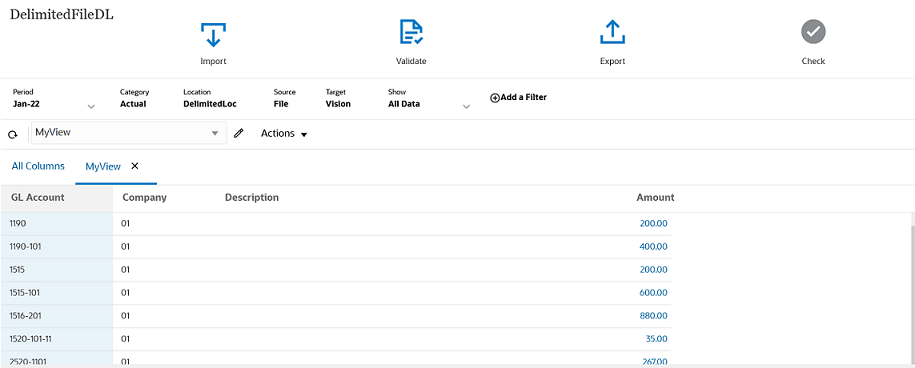
Workbench in Data Integration
Business Benefit: The Workbench in Data Integration now shares many of the same features available in the Data Load Workbench in Data Management but with a more modern look-and-feel and responsive design
Key Resources
- Reviewing the Data Integration Status and Viewing Results in the Workbench in Administering Data Integration for Oracle Enterprise Performance Management
IMPORTANT Actions and Considerations
One-Week Lag Between Readiness Documents Live and Help Center Live
Because Oracle readiness documents (What's New and New Feature Summary) are live one week before the monthly update is applied to Test environments, some links to documentation included in the readiness documents will not work until after the Oracle Help Center update is complete when the monthly update is applied to Test environments.
Loaner Program for Cloud Infrastructure Generation 2 Testing and OCI Migration Assistance Early Adopter Program
Oracle Strategic Workforce Planning Cloud is now live on Oracle Cloud Infrastructure (OCI) Gen 2 environments. If you are interested in testing your application performance on an OCI environment, open a service request following the process at https://docs.oracle.com/en/cloud/saas/enterprise-performance-management-common/tsepm/op_procs_loaner_envs.html and request for a loaner environment in an OCI data center for a duration of 30 days with the business justification as “Want to test application performance in an OCI Gen 2 data center”.
After you have performed the testing, submit Provide Feedback from the loaner environment. Create a service request using the normal support process, if you have any issues or feedback for the OCI environment. For more information, see What is a Gen 2 Cloud?
Additionally, Oracle has instituted a program to assist a limited number of early adopters on Oracle Cloud Classic to migrate to OCI. For more information, see Oracle Cloud Classic to Oracle Cloud Infrastructure (OCI) Migration Assistance Program for Early Adopters.
Default EPM Task Manager Option During Application Creation
In a future update, we're adding a new task flow type to Strategic Workforce Planning called EPM Task Manager. EPM Task Manager helps you define, execute, and report on the interdependent activities of a business process. It provides centralized monitoring of all tasks and provides a visible, automated, repeatable system of record for running a business process. When implemented, you'll see two task flow type options during Strategic Workforce Planning application creation: Task List and EPM Task Manager. EPM Task Manager will be the default option.
Current Task List based Strategic Workforce Planning applications will not be impacted by this new option and default setting in the App creation wizard. There will be no migration from existing Task Lists to the upcoming EPM Task Manager. Customers who wish to continue using the current Task Lists should choose the Task List Option during application creation.