
- Revision History
- Overview
- Feature Summary
- Strategic Workforce Planning Cloud
-
- Features
-
- New Video
- New Topics in EPM Cloud Operations Guide
- New Role Assignment Report Format
- Address for Outgoing Emails
- EPM Automate Updates
- Pre-defined Role Names as EPM Keywords
- REST API to Manage Permission for Manual Access to Database
- New Excel Server Settings in Financial Reporting
- Manage User Point of View
- Ability to Filter Excluded Members from Segment Drop-Down Member Selector
- Run Integration Enhancements in Data Integration
- New EPM Integration Agent SQL Query Conditions
- New Chart Type Setting in Dashboards - Plot Missing Values as Zero
- New Examples for Running Rulesets with Parameters Using REST APIs
- New Capabilities for Creating Groovy Business Rules
- Eight New ASO Functions in Calculation Manager
-
- Upcoming Changes
This document will continue to evolve as existing sections change and new information is added. All updates appear in the following table:
| Date | Feature | Notes |
|---|---|---|
| 23 APR 2020 | Created initial document. |
This document outlines the upcoming Strategic Workforce Planning Cloud update.
Column Definitions:
Features Delivered Enabled
Report = New or modified, Oracle-delivered, ready to run reports.
UI or Process-Based: Small Scale = These UI or process-based features are typically comprised of minor field, validation, or program changes. Therefore, the potential impact to users is minimal.
UI or Process-Based: Larger Scale* = These UI or process-based features have more complex designs. Therefore, the potential impact to users is higher.
Features Delivered Disabled = Action is needed BEFORE these features can be used by END USERS. These features are delivered disabled and you choose if and when to enable them. For example, a) new or expanded BI subject areas need to first be incorporated into reports, b) Integration is required to utilize new web services, or c) features must be assigned to user roles before they can be accessed.
| Ready for Use by End Users Reports plus Small Scale UI or Process-Based new features will have minimal user impact after an update. Therefore, customer acceptance testing should focus on the Larger Scale UI or Process-Based* new features. |
Action is Needed BEFORE Use by End Users Not disruptive as action is required to make these features ready to use. As you selectively choose to leverage, you set your test and roll out timing. |
|||||
|---|---|---|---|---|---|---|
| Feature |
Report |
UI or |
UI or |
|
||
Ability to Filter Excluded Members from Segment Drop-Down Member Selector |
||||||
New Chart Type Setting in Dashboards - Plot Missing Values as Zero |
||||||
New Examples for Running Rulesets with Parameters Using REST APIs |
||||||
Strategic Workforce Planning Cloud
Test Environments: Oracle will apply this monthly update during the first daily maintenance that occurs at or after 22:00 UTC on Friday, May 1, 2020.
Production Environments: Oracle will apply this monthly update during the first daily maintenance that occurs at or after 22:00 UTC on Friday, May 15, 2020.
The Oracle Help Center provides access to updated documentation. The updates will be available in the Help Center on Friday, May 1, 2020. Some of the links to new feature documentation included in this readiness document will not work until after the Oracle Help Center update is complete.
NOTE: Backing up the daily maintenance snapshot and restoring the environment as needed are self-service operations. Oracle strongly recommends that you download the maintenance snapshot every day to a local server.
Please Join Oracle Cloud Customer Connect
Please take a moment to join the Cloud Customer Connect forums for EPM Cloud services. Oracle Cloud Customer Connect is a community gathering place for members to interact and collaborate on common goals and objectives. This is where you will find the latest release information, upcoming events, or answers to use-case questions. Joining takes just a few minutes. Join now!
https://cloud.oracle.com/community
NOTE: The Settings and Actions menu now contains a link to Cloud Customer Connect. To access this link, from the Home page, click the down arrow next to the user name (in the upper right-hand corner of the screen), and select Cloud Customer Connect.
Give Us Documentation Feedback
We welcome your comments and suggestions to improve the content of the What's New document and the product documentation. Please send us your feedback at EPMdoc_ww@oracle.com. In the body or title of the email, state that you are inquiring or providing feedback, and indicate for which EPM Cloud service and the monthly update cycle.
For the latest updates and information about EPM Cloud, follow us on YouTube, Twitter, Facebook, and LinkedIn at Hyperion EPM Info.
Defects Fixed and Considerations
Software issues addressed each month and considerations will be posted to My Oracle Support.
See how to set up and work with flex forms in Strategic Workforce Planning. With flex forms, you can rearrange row dimension members, insert valid row members or aliases that were specified in the original form definition, and sort or move rows while preserving form properties and features.
New Topics in EPM Cloud Operations Guide
The EPM Cloud Operations Guide has been enhanced with additional topics.
New topics include:
- Best practices for designing business rules
- How to avoid functional errors in business rules
- Managing Content Upgrade Issues
- Handling Issues with Cross-Environment Connections
- Troubleshooting ERP Integration Functional issues
- Requesting Merge Back of Environments
- Requesting Oracle to Apply Monthly Update to Production Environments Prior to the Third Friday
Key Resources
New Role Assignment Report Format
The Role Assignment Report has been modified to include additional information such as the user login, first name, last name, email address, pre-defined and application roles of Strategic Workforce Planning Cloud Cloud users, and how these roles are granted. Previously, the Role Assignment Report listed user logins, roles, and how the roles were granted only.
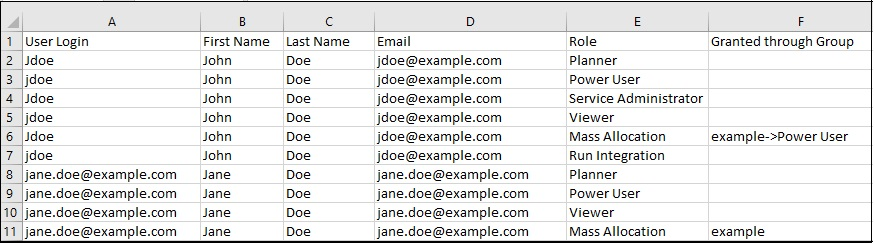
The New Format of the Role Assignment Report
Key Resources
- Generating the Role Assignment Report For Your Environment in Administering Access Control for Oracle Enterprise Performance Management Cloud
Starting with this update, emails originating from Strategic Workforce Planning Cloud applications will use no.reply@oraclecloud.com instead of oraclecloudadmin_ww@oracle.com as the from address.
Emails from other Oracle Cloud sources, for example, New Account email sent from the Identity Domain, will continue to use the current From email addresses, for example, oraclecloudadmin_ww@oracle.com.
A new version of EPM Automate is available. This version includes changes to the Role Assignment Report generated using the roleAssignmentReport command. It also includes a new optional parameter to the replay command to encrypt all passwords included in the replay file.
Key Resources
- Working with EPM Automate for Oracle Enterprise Performance Management Cloud
Pre-defined Role Names as EPM Keywords
Starting with this update, Oracle will treat pre-defined role names as EPM Cloud key words, which cannot be used in the name of any artifacts that you create; for example, as a group name in Access Control.
Pre-defined role names include the following:
- Service Administrator
- Power User
- User
- Viewer
- Planner
- System Administrator
- Application Administrator
- Library Administrator
- Reports Administrator
An error will be displayed if you attempt to use these key words to name artifacts.
If you have any existing artifacts that use these keywords, Oracle will rename them to ensure that there is no impact because of this change. For example, a group named Power User will automatically be renamed as Power User1.
Key Resources
- Modifying Groups in Administering Access Control for Oracle Enterprise Performance Management Cloud
REST API to Manage Permission for Manual Access to Database
You can now use a REST API to manage permission for manual access to database by Oracle. This gives you the ability to allow or disallow Oracle personnel to manually access your database in emergency situations when an environment is unresponsive and you have not yet created a service request to investigate the issue.
Key Resources
- Migration REST APIs in REST API for Enterprise Performance Management
Role Information
- Service Administrator
New Excel Server Settings in Financial Reporting
The following Excel server settings are now available to use in Financial Reporting reports:
- Export to Excel Ignoring Page Breaks
- Export to Excel in One Sheet
- Export Multiple Grids to Excel in Multiple Sheets
Key Resources
- Managing Server Settings in Designing with Financial Reporting Web Studio for Oracle Enterprise Performance Management Cloud
New functionality has been added to Financial Reporting Web Studio that allows administrators to create, view, update or delete the user point of view for one or more users.
Key Resources
- Managing the User Point of View in Designing with Financial Reporting Web Studio for Oracle Enterprise Performance Management Cloud
Ability to Filter Excluded Members from Segment Drop-Down Member Selector
During form definition, Service Administrators can exclude hierarchy members from display in the form grid. Now, Service Administrators can choose to display or filter out the excluded members in the row dimension segment drop-down member selectors on a form. To filter out the excluded members, Service Administrators set the new application configuration option, Filter Out Excluded Members in Segment Drop-down, to Yes (the default). To display the excluded members and allow users to select them from the segment drop-down member selector, set this option to No.
When this option is set to No, users are able to select excluded members from the segment drop-down member selector.
The members displayed in the segment drop-down depend on the user's access permissions to the members. If the user does not have access to a particular member, then they will not see it in the segment drop-down member selector, regardless of how this option is set.
Steps to Enable
A Service Administrator performs these steps from the EPM Cloud web interface to filter out excluded members from the segment drop-down member selector list on row dimensions in forms:
- From the Navigator, under Application, click Settings.
- Set the Filter Out Excluded Members in Segment Drop-down option to No, and then click Save. The default is Yes, meaning that excluded members would be filtered out of the row dimension segment drop-down member selector.
This setting applies to any row dimension segment drop-down member selectors you have specified during form definition.
Tips And Considerations
Suppression option selections do not affect the display of members in the segment drop-down member selector. For example, if a row containing no data is suppressed in the form, and is an excluded member, but the Filter Out Excluded Members in Segment Drop-down option is set to No, then that member can be selected and worked with in the form.
Key Resources
- What Application and System Settings Can I Specify? in Administering Planning
- Using the Member Selector in Administering Planning
- Using the Drop-down Member Selector on Row Dimensions in Forms in Working with Oracle Smart View for Office
Run Integration Enhancements in Data Integration
On the General page, the Run Integration icon has been moved to the right of the integration action sub-menu.
When you execute an Integration, you can now overwrite the Source Filters on the Run Execution window. This feature enable users to easily add or modify filters used to query the data from the data sources.. The changes to the Source Filters are not saved and used only for that execution only. The Options and Filters pages can still be selected using the Data Integration workflow bar or integration actions sub-menu.
The Run Integration Execution pop-up now shows the process flow of the four main integration operations: Import, Validate, Export, and Check Data. These icons provide visual feedback on the status of each submitted process.
Key Resources
- Running an Integration in Administering Data Integration for Oracle Enterprise Performance Management Cloud
New EPM Integration Agent SQL Query Conditions
In this update to the EPM Integration Agent, the SQL Query definition now supports the IN, BETWEEN, NOT IN, and LIKE conditions in the Where clause. When conditions have been specified, users can select the parameters on the Target Application Filters page. Previously, the SQL Query definition supported only the = (equal) condition.
Role Information
- Creating an SQL Query in the Administering Data Integration for Oracle Enterprise Performance Management Cloud
New Chart Type Setting in Dashboards - Plot Missing Values as Zero
There is now a dashboard chart type setting for select chart types, called Plot Missing Values as Zero, that allows you to disable plotting missing or suppressed data as zeros.
By default, missing or suppressed data is plotted in charts as zeros. You can now disable this option by clearing the new Plot Missing Values as Zero option in the chart's settings. To disable this setting for charts, in the Dashboard Designer, edit or create one of the following chart types, and then click Settings for that chart:
- Area
- Bubble
- Combination
- Line
- Radar
- Scatter
When Plot Missing Values as Zero is cleared, the missing or suppressed data is ignored and is no longer plotted for those chart types.
Key Resources
- Designing Dashboards in Administering Planning
New Examples for Running Rulesets with Parameters Using REST APIs
You now have access to additional examples that illustrate how to run rulesets with parameters using REST APIs. Adding parameters gives you greater flexibility, and the examples help you quickly get productive when running this job.
Key Resources
-
Ruleset in REST API for Enterprise Performance Management
Role Information
- Service Administrator
New Capabilities for Creating Groovy Business Rules
When working with Groovy business rules, you can take advantage of new features to execute ASO allocation scripts and custom calculation scripts against a cube. You can also use new utility APIs in EpmScript. This gives your business rules more power and flexibility.
With Groovy business rules for ASO cubes, you can now execute:
- The specified ASO allocation: void executeAsoAllocation(AllocationParameters allocationParameters)
- The specified ASO custom calculation: void executeAsoCustomCalculation(CustomCalcParameters calcParameters)
You can also use new utility APIs that were added to EpmScript:
- Return a string value with each of the specified items flattened, evaluated, and converted to MDX delimited identifiers and separated by a comma: java.lang.String mdxParams(java.lang.Object... items)
- Return the specified text with double quotation removed: java.lang.String stripQuotes(java.lang.String text)
Steps to Enable
Follow the steps to create a Groovy business rule in Creating a Groovy Business Rule in Designing with Calculation Manager for Oracle Enterprise Performance Management Cloud. For a step-by-step tutorial on creating Groovy business rules, see Introduction to Groovy Business Rules and the other Groovy tutorials. For the technical specification of the new features, see the EPM Cloud Groovy Rules Java API Reference.
Key Resources
- Learning Groovy in EPM Cloud video
- Creating a Groovy Business Rule in Designing with Calculation Manager for Oracle Enterprise Performance Management Cloud
- Introduction to Groovy Business Rules
- Groovy Tutorials
- EPM Cloud Groovy Rules Java API Reference
Role Information
- Calculation Manager Business Rule Designer
Eight New ASO Functions in Calculation Manager
Eight new ASO functions are now available in Calculation Manager:
- @FIRSTSIBLING returns the first child of the input member's parent.
- @LAGGEN using the order of members existing in a database outline, returns a member that is n steps behind a given member, along the same generation.
- @LAGLEV using the order of members existing in a database outline, returns a member that is n steps behind a given member, along the same level.
- @LASTSIBLING returns the last child of the input member's parent.
- @LEADGEN using the order of members existing in a database outline, returns a member that is n steps past a given member, along the same generation.
- @LEADLEV using the order of members existing in a database outline, returns a member that is n steps past a given member, along the same level.
- @NEXTLEVMBR using the order of members existing in a database outline, returns the next member along the same level.
- @PREVLEVMBR using the order of members existing in a database outline, returns the previous member along the same level.
Key Resources
- Creating a Point of View Component in Designing with Calculation Manager for Oracle Enterprise Performance Management Cloud
NEW SETTING TO ENABLE INCREMENTAL IMPORT OF DATA USING MIGRATION
In an upcoming update, Oracle will create a new application setting to enable incremental import of data using Migration. The default setting will be set to disable incremental import of data using Migration. As a result, you cannot use the daily maintenance snapshot or any extract created using Migration for incremental import of data if this new setting remains in the default configuration; you must import a full snapshot to load data using Migration as a full Clone where the target environment does not have an existing application.
Service Administrators will be able to change this setting with warnings prompting that doing so may lead to data corruption if subsequent incremental import of data using Migration are not done properly. Examples of potential data corruption include, but are not limited to, incremental data migration from a different source other than the target application where underlying Smart List values may be different.
This change is being implemented to address customer feedback. If you have any concerns about this change, please contact Oracle Support.
INTERNET EXPLORER BROWSER SUPPORT
For Internet Explorer browser users, Microsoft recommends using the new Microsoft Edge as your default browser. With this guidance in mind, the 20.08 update will be the last release to support Internet Explorer. Strategic Workforce Planning Cloud will no longer support Internet Explorer starting with the 20.09 update. If you have any questions regarding de-support, please create a Service Request. For additional guidance on Internet Explorer Lifecycle, please reach out to Microsoft.
APIS BLACKLISTED FROM THE STRATEGIC WORKFORCE PLANNING CLOUD GROOVY RULES JAVA API REFERENCE
In an upcoming update in mid-2020, the following APIs are being blacklisted from the Strategic Workforce Planning Cloud Groovy Rules Java API Reference:
- TimeZone.setDefault(TimeZone zone)
- Locale.setDefault(Locale.Category category, Locale newLocale)
- Locale.setDefault(Locale newLocale)
Strategic Workforce Planning Cloud Groovy Rules Java API Reference
CALCULATION MANAGER DE-SUPPORT FOR FLASH
In an upcoming update, Oracle will disable Flash by default in Calculation Manager. You will still, temporarily, be able to enable Flash, if desired.
By the end of 2020, Oracle will disable Flash in Calculation Manager, and options to enable it will be removed. This change is in response to Adobe’s decision to stop updating and distributing Flash at the end of 2020. See https://theblog.adobe.com/adobe-flash-update/.
REMOVAL OF INSTANCE NAME FROM PREDEFINED ROLE NAMES
Currently, the predefined role names displayed in the Access Control screens of Strategic Workforce Planning Cloud environments prefix the instance name to the role name in INSTANCE_NAME ROLE_NAME format. They are also stored in this format in the snapshots, making it difficult to migrate snapshots from one instance to another.
To facilitate the migration of security across Strategic Workforce Planning Cloud environments, Oracle plans to rename predefined role names displayed within Strategic Workforce Planning Cloud applications by removing the instance name prefix. For example, if the instance name is Planning1, predefined role names are Planning1 Service Administrator, Planning1 Power User, Planning1 User, and Planning1 Viewer, the new role names will be Service Administrator, Power User, User, and Viewer.
NOTE: This change does not affect how the role names are displayed in the MyServices customer portal.
This change won't impact customers who currently use predefined roles for managing application-level provisioning and access to artifacts. Oracle will ensure that all application role assignments and artifact security assignments are automatically updated after the roles are renamed. This change makes it easy to migrate Strategic Workforce Planning Cloud artifacts across environments.
This change is being implemented to address customer feedback. If you have any concerns about this change, please contact Oracle Support.
PLANNER ROLE TO BE RENAMED AS USER
In an upcoming update, Oracle will rename the Planner EPM Cloud predefined role as User. This change will have no functional effect.
Subscriptions that were provisioned prior to the May 2016 update used the Planner role, which has been maintained in subsequent updates to provide continuity. In subscriptions that were activated after May 2016, the Planner role was already replaced by the User role.
MOBILE APP STATEMENT OF DIRECTION
EPM Mobile App is a downloadable application for the phone that is purpose built to perform approval actions for iOS and Android based phone devices. It was purpose built to help users perform Approval and Workflow activities. It is currently only supported for Oracle EPM Cloud for the Planning business process.
The terminal release of EPM Mobile App is September 2020. EPM Mobile App will not be available for download in the Apple and iOS App Stores effective October 2020. Oracle’s strategic direction is to have customers use the Approval and workflow capabilities using the mobile browser interface on mobile devices.
Oracle will continue to support Oracle EPM Mobile App in its current supported versions until September 2020. Oracle recommends that users using Oracle EPM Mobile App prepare to instead use the approval functionality using supported mobile browser in tablet devices.