
- Revision History
- Overview
- Feature Summary
- Strategic Workforce Planning Cloud
- Features
-
-
-
- Removal of Internet Explorer Browser Support
- Support for Vanity URLs
- Information Security in Strategic Workforce Planning Cloud
- EPM Automate Updates
- Defining a Custom View in the Data Integration Workbench
- New Error Messages Output File in Data Integration and Data Management
- New Dimension Property in Form Designer for Row Dimensions - Row Width
- New Dashboard Version - Dashboard 2.0
- Improved Look and Feel in Smart View (Mac and Browser) Interface
- Save Current Options As Default in Options Panel in Smart View (Mac and Browser)
- Member Selection in Smart View Now Defaults to Selected Member in Standard Mode
- Clear Partial Data in ASO Using Groovy Rules
- Excel Financial Functions Supported When Using Groovy Rules
-
-
- IMPORTANT Actions and Considerations
This document will continue to evolve as existing sections change and new information is added. All updates appear in the following table:
| Date | Product | Feature | Notes |
|---|---|---|---|
| 01 SEP 2020 | Created initial document. |
This document outlines the upcoming Strategic Workforce Planning Cloud update.
Column Definitions:
Features Delivered Enabled
Report = New or modified, Oracle-delivered, ready to run reports.
UI or Process-Based: Small Scale = These UI or process-based features are typically comprised of minor field, validation, or program changes. Therefore, the potential impact to users is minimal.
UI or Process-Based: Larger Scale* = These UI or process-based features have more complex designs. Therefore, the potential impact to users is higher.
Features Delivered Disabled = Action is needed BEFORE these features can be used by END USERS. These features are delivered disabled and you choose if and when to enable them. For example, a) new or expanded BI subject areas need to first be incorporated into reports, b) Integration is required to utilize new web services, or c) features must be assigned to user roles before they can be accessed.
| Ready for Use by End Users Reports plus Small Scale UI or Process-Based new features will have minimal user impact after an update. Therefore, customer acceptance testing should focus on the Larger Scale UI or Process-Based* new features. |
Action is Needed BEFORE Use by End Users Not disruptive as action is required to make these features ready to use. As you selectively choose to leverage, you set your test and roll out timing. |
|||||
|---|---|---|---|---|---|---|
| Feature |
Report |
UI or |
UI or |
|
||
New Error Messages Output File in Data Integration and Data Management |
||||||
New Dimension Property in Form Designer for Row Dimensions - Row Width |
||||||
Improved Look and Feel in Smart View (Mac and Browser) Interface |
||||||
Save Current Options As Default in Options Panel in Smart View (Mac and Browser) |
||||||
Member Selection in Smart View Now Defaults to Selected Member in Standard Mode |
||||||
Strategic Workforce Planning Cloud
Test Environments: Oracle will apply this monthly update during the first daily maintenance that occurs at or after 22:00 UTC on Friday, September 4, 2020.
Production Environments: Oracle will apply this monthly update during the first daily maintenance that occurs at or after 22:00 UTC on Friday, September 18, 2020.
NOTE: Backing up the daily maintenance snapshot and restoring the environment as needed are self-service operations. Oracle strongly recommends that you download the maintenance snapshot every day to a local server.
The Oracle Help Center provides access to updated documentation. The updates will be available in the Help Center on Friday, September 4, 2020.
NOTE: Some of the links to new feature documentation included in this readiness document will not work until after the Oracle Help Center update is complete.
Please Join Oracle Cloud Customer Connect
Please take a moment to join the Cloud Customer Connect forums for EPM Cloud services. Oracle Cloud Customer Connect is a community gathering place for members to interact and collaborate on common goals and objectives. This is where you will find the latest release information, upcoming events, or answers to use-case questions. Joining takes just a few minutes. Join now!
https://cloud.oracle.com/community
NOTE: The Settings and Actions menu now contains a link to Cloud Customer Connect. To access this link, from the Home page, click the down arrow next to the user name (in the upper right-hand corner of the screen), and select Cloud Customer Connect.
Give Us Documentation Feedback
We welcome your comments and suggestions to improve the content of the What's New document and the product documentation.
Please send us your feedback at EPMdoc_ww@oracle.com. In the body or title of the email, state that you are inquiring or providing feedback, and indicate for which EPM Cloud service and the monthly update cycle.
Follow EPM Cloud on YouTube, Twitter, Facebook, and LinkedIn.
These are great resources for the latest updates and information about EPM Cloud.
Defects Fixed and Considerations
Software issues addressed each month and considerations will be posted to My Oracle Support.
Removal of Internet Explorer Browser Support
Starting with this update, Strategic Workforce Planning Cloud will not support Internet Explorer based on the Microsoft recommendation that Internet Explorer browser users use the new Microsoft Edge as their default browser. Because Oracle will no longer test Strategic Workforce Planning Cloud using Internet Explorer, existing functionality that currently works with Internet Explorer may no longer work starting this update.
Oracle recommends that you move all users to a supported browser. See Supported Browsers in Getting Started with Oracle Enterprise Management Cloud for Users for a list. For guidance on Internet Explorer Lifecycle, please reach out to Microsoft.
Business Benefit: Updating to a supported browser ensures that Strategic Workforce Planning Cloud works as designed.
You can use custom URLs to access Strategic Workforce Planning Cloud environments from a web browser. You use a third party link shortener, for example, T.ly, Bitly, Rebrandly, TinyUrl, is.gd and so on, or an open source solution, for example, YOURLS, to configure your custom URL. For detailed information on creating vanity URLs, see the documentation from the third party link shortener of your choice.
NOTE: Vanity URLs do not work with Smart View, cross-environment connections (EPM Connect), and Strategic Workforce Planning Cloud tools such as EPM Automate.
Business Benefits: Vanity URLs help you easily remember and enter URLs of Strategic Workforce Planning Cloud environments into a web browser.
Information Security in Strategic Workforce Planning Cloud
Getting Started with Oracle Enterprise Performance Management Cloud for Administrators now includes comprehensive information on the mechanisms that Strategic Workforce Planning Cloud employs to implement, manage, and secure communication channels and security to protect the confidentiality, integrity, and availability of data. This new topic includes information on data and password encryption, data security, access control mechanisms, access auditing, application performance monitoring, security evaluation process, and threat and vulnerability testing and management process.
Business Benefit: This information helps you determine how Strategic Workforce Planning Cloud information security mechanisms align with your organization's information security compliance requirements.
Key Resources
- Understanding EPM Cloud Security Compliance Features in Getting Started with Oracle Enterprise Performance Management Cloud for Administrators
A new version of EPM Automate is available. This version includes the optional parameter errorFile with the importData and importMetadata commands. This version also supports the optional userNames parameter with the exportAppAudit command to help you export the audit data created by specific users.
Business Benefit: Error files are important diagnostic tools that help identify issues in the import and export process. Filtering the audit data by users allows you to quickly identify the changes made to the business process by specific users.
Key Resources
- Working with EPM Automate for Oracle Enterprise Performance Management Cloud:
Defining a Custom View in the Data Integration Workbench
The new Workbench View Definition feature enables you to apply a custom view of the columns active in the Workbench display. Custom views definitions let you rearrange and sort the column order, hide a selected column or rename columns based on your requirements. Administrators can also associate a custom view as private or public.
The following example shows multiple views definitions on the Workbench page.
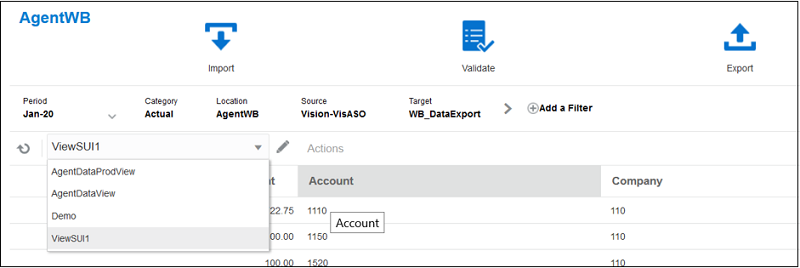
Available View Definitions On the Workbench Page
Business Benefit: Custom view definitions enable you to arrange the columns displayed on the Workbench page according to your requirements.
Key Resources
-
Adding a View Definition in the Workbench in Administering Data Integration for Oracle Enterprise Performance Management Cloud
New Error Messages Output File in Data Integration and Data Management
An error message output file is now available in Process Details when exporting data and the load fails. The error message information provides an easy way to identify any errors without having to scroll through the Process Details log. The error message output file can be downloaded, opened, and saved in your default text editor enabling you to send the output file as an email attachment to your users.
Business Benefit: The error message output file is a valuable debugging tool. You can save or download the output file and send to other users by way of email. Customers can automate the processing of the error file with a custom script.
Key Resources
- Viewing an Error Messages Output File in Administering Data Integration for Oracle Enterprise Performance Management Cloud
New Dimension Property in Form Designer for Row Dimensions - Row Width
There is now a dimension property setting for row dimensions on forms, called Row Width, that allows you to set the width of the columns in form rows.
By default, columns for row dimensions on forms expand to fit the data. With the Row Width setting, you can now set the row width to one of the following options:
- Small—50px
- Medium—100px
- Large—300px
- Size-to-Fit (default)—Column will expand to fit content
- Custom—Specify the number of pixels
To view the Dimension Properties for a row, open the form, click Layout, and then click in a row dimension.
Business Benefit: Because member names can be long, sizing the columns to fit the member names can take up a lot of real estate on forms. The Row Width dimension property enables form designers to resize the columns for improved readability. Setting this property also retains the column sizing if the form is closed and then reopened. If part of the member name is obscured due to the column sizing, hovering the cursor over the cell displays a tool tip with the entire member name.
Key Resources
- Setting Dimension Properties in Administering Planning
New Dashboard Version - Dashboard 2.0
In this release we’re introducing a new dashboard version, called Dashboard 2.0, that enables dashboard designers to create and manage dashboards using Oracle JET technology.
Dashboards are now available in two versions:
- Dashboard—Existing dashboards using Oracle ADF technology
- Dashboard 2.0—New dashboards using Oracle JET technology
Both dashboard versions currently coexist in the same business process at the same time. Existing dashboards use ADF technology and the behavior of the ADF-based dashboards remains unchanged. You can still create and update these dashboards in your business process as you did before. Dashboard 2.0 uses the existing dashboard functionality and enhances it with Oracle JET technology.
Dashboard 2.0 designer features include:
- New Library Palette to choose existing ad hoc and standard forms, chart types, and other objects
- Auto-fit layout manager to create and position components
- New design canvas that enables you to insert new components using search and drag and drop, delete components, and reposition components
- The following chart types: Area, Bar, Bubble, Column, Combination, Doughnut, Funnel, Gauge, Geomap, Line, Pie, Pyramid, Radar, Scatter, Table with Spark Charts, Tile, Waterfall
- Support for Dual Y-Axis, Logarithmic Scale, and more configurability options in supported chart types
- Dashboard general properties: Name, Description, Show/Hide Borders, Show/Hide POV Bars, Enable/Disable Global POV Bar, and Background (colors)
- Chart-specific properties and color series which are the same as those that are currently supported in editable dashboards
- Global toolbar icons: Add, Collapse/Expand Properties pane, Actions (Revert to Saved, Refresh Data, Run Dashboard, POV Bar : Auto-Apply), Save and Close buttons
The Dashboards listing page now displays new icons in front of each dashboard to visually differentiate between the dashboard versions:

Dashboard (1.0) Icon

Dashboard 2.0 Icon
Dashboard 2.0 Runtime updates include:
- Global and Local POV Bar
- Global Refresh
- Maximize and Restore components
- End users can change chart types
To create a version 2.0 dashboard, from the Dashboards listing page, click Create, and then select Dashboard 2.0.
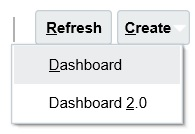
Dashboard Create Options
Business Benefit: Dashboard 2.0 uses Oracle JET technology for faster rendering, sophistication, ease of use, improved flexibility, better visualization, and additional designs.
Key Resources
- Designing Dashboards in Administering Planning
- Analyzing Data Using Dashboards in Working with Planning
Improved Look and Feel in Smart View (Mac and Browser) Interface
The Oracle Smart View for Office (Mac and Browser) interface is improved with a lighter, more streamlined look and feel in panels.
For example, in the Smart View Home panel, improvements include:
- A lighter font set
- A new search field to locate folders, forms, cubes, and other items quickly
- A new Actions button, giving you access to commands that earlier appeared at the bottom of the panel, freeing up space in the panel to list more of the cubes, folders, and other items in the panel. Action menu commands Job Console and Copy Version. For Service Administrators, additional Action menu commands include Refresh Database, Application Management, and Download Template.
Business Benefit: To improve usability, the Oracle Smart View for Office (Mac and Browser) interface is enhanced with a lighter, cleaner look and feel. In order for Smart View (Mac and Browser) users to take advantage of these improvements, Service Administrators should deploy the latest manifest file included with the 20.09 update.
Steps to Enable
- See these topics in Deploying and Administering Oracle Smart View for Office (Mac and Browser):
Key Resources
- Deploying and Administering Oracle Smart View for Office (Mac and Browser)
- Working with Oracle Smart View for Office (Mac and Browser)
Save Current Options As Default in Options Panel in Smart View (Mac and Browser)
To save your current option selections as the default options, use the new Save Current Options as Default button that is displayed at the bottom of the Options panel, Settings tab.
After making changes in the Settings, Data, Members, or Formatting tab, select the Settings tab, and then click Save Current Options as Default. The new default options will be applied to any new content that you import from a data source.
Save Current Options as Default only saves default options for the type of data that is contained on the active sheet at the time when this button is clicked. For example, if you open an ad hoc grid, modify options, and then click Save Current Options as Default, those options will only be used as default options for ad hoc grids.
Use the new Save Current Options as Default command when you want to retain options that differ from the initial defaults and have them automatically applied to all new content imported from a data source. You can still make changes to the options on a per-sheet basis.
Business Benefit: Use the new Save Current Options as Default button in the Options panel in Oracle Smart View for Office (Mac and Browser) to save your current option selections. After saving, your options selections become the default for any new content that you import from a data source.
Steps to Enable
- See these topics in Deploying and Administering Oracle Smart View for Office (Mac and Browser):
Key Resources
- Deploying and Administering Oracle Smart View for Office (Mac and Browser)
- Working with Oracle Smart View for Office (Mac and Browser)
Member Selection in Smart View Now Defaults to Selected Member in Standard Mode
In Smart View, when connected to a Standard mode application, the dimension or member from which you invoke Member Selection is now shown as the selected dimension in the dialog. In Standard mode, there is no need to refresh the grid before selecting a different dimension or member on the grid and invoking Member Selection. The selected dimension will be shown in Member Selection by default.
Note that this behavior applies only to Standard mode applications (Smart View Ad Hoc Behavior = Standard). When connected to Native mode applications, the selected dimension shown in the Member Selection dialog reverts to the default dimension of the application, regardless of the dimension or member selected in the grid, unless you refresh the grid before selecting a different dimension and invoking Member Selection.
Business Benefit: In Smart View, when connected to a Standard mode application, Member Selection is now easier to use as the dimension or member from which you invoke Member Selection is always shown by default as the selected dimension in the dialog.
Steps to Enable
Service Administrators enable applications for Standard mode in the web.
To set an application to Standard mode:
- In the web, click Application, and then click Settings.
- Set the Smart View Ad Hoc Behavior option to Standard.
- Click Save.
Key Resources
- What Application and System Settings Can I Specify? in Administering Planning
- Selecting Members from the Member Selector in Working with Oracle Smart View for Office
Clear Partial Data in ASO Using Groovy Rules
When working with Groovy business rules, you can now clear partial data in ASO. Note: Using this Clear Partial Data API puts Essbase in read-only mode during the clear operation.
Business Benefit: The ability to clear partial data in ASO gives your business rules more power and flexibility.
Steps to Enable
Follow the steps to create a Groovy business rule in Creating a Groovy Business Rule in Designing with Calculation Manager for Oracle Enterprise Performance Management Cloud. For a step-by-step tutorial on creating Groovy business rules, see Introduction to Groovy Business Rules and the other Groovy tutorials. For the technical specification of the new features, see the EPM Cloud Groovy Rules Java API Reference.
Tips And Considerations
If you are new to Groovy business rules, get an introduction by watching the Learning Groovy in EPM Cloud video.
Key Resources
- Learning Groovy in EPM Cloud video
- Creating a Groovy Business Rule in Designing with Calculation Manager for Oracle Enterprise Performance Management Cloud
- Introduction to Groovy Business Rules
- Groovy Tutorials
- EPM Cloud Groovy Rules Java API Reference
Role Information
- Calculation Manager Business Rule Designer
Excel Financial Functions Supported When Using Groovy Rules
You can now call Excel financial functions in Groovy. To learn more about this, go to the EPM Cloud Groovy Rules Java API Reference. On the left side of the window, click Excel. On the right side of the window, click a function, for example, ACCRINT, to view details. While browsing that function, you can scroll down to click the function link under the See Also heading to view details about the Microsoft function.
Business Benefit: The ability to use Excel functions with Groovy rules gives your business rules more power and flexibility.
Steps to Enable
Follow the steps to create a Groovy business rule in Creating a Groovy Business Rule in Designing with Calculation Manager for Oracle Enterprise Performance Management Cloud. For a step-by-step tutorial on creating Groovy business rules, see Introduction to Groovy Business Rules and the other Groovy tutorials. For the technical specification of the new features, see the EPM Cloud Groovy Rules Java API Reference.
Tips And Considerations
If you are new to Groovy business rules, get an introduction by watching the Learning Groovy in EPM Cloud video.
Key Resources
- Learning Groovy in EPM Cloud video
- Creating a Groovy Business Rule in Designing with Calculation Manager for Oracle Enterprise Performance Management Cloud
- Introduction to Groovy Business Rules
- Groovy Tutorials
- EPM Cloud Groovy Rules Java API Reference
Role Information
- Calculation Manager Business Rule Designer
IMPORTANT Actions and Considerations
FUTURE AVAILABILITY OF THE REDWOOD THEME
In a future update, Strategic Workforce Planning Cloud will offer a new Redwood appearance theme, in addition to the existing 13 themes available. The Redwood theme gives an enhanced look and feel in terms of colors and icons and brings consistency across Oracle Cloud.
Redwood will be the default theme for new instances, while existing instances will continue to see the current theme by default. You can switch to the Redwood theme from Tools > Appearance.
IDENTITY_DOMAIN AS A REQUIRED PARAMETER NO LONGER NEEDED FOR THE EPM AUTOMATE LOGIN COMMAND
In an upcoming release, Oracle will remove the IDENTITY_DOMAIN parameter from the EPM Automate login command documentation. However, you can still set a value for this parameter and it will be ignored. Existing scripts that contain this value will not be affected.This documentation change is expected to be implemented in the 20.10 update.
WORKFORCE MODULE FORM NAME CHANGES – JOB ONLY MODELS
In the October 2020 (20.10) update, Oracle will fix a defect for certain forms in the Workforce module of Strategic Workforce Planning with the Job Only level of granularity configuration. These forms currently are not tracked for customer modifications, so they do not appear in the Restore Modified Artifacts lists even if modified. The fix for this and related issues for these specific forms in the Job Only configuration will lead to an overwrite of any customer customizations on these forms with the 20.10 update.
The following four forms in the Workforce module Job Only configuration are impacted by this upcoming change:
- Set Workforce Assumptions
- Identify Invalid Data
- Process Data and Synchronize Defaults
- Process Data and Synchronize Definition
Customers who have enabled the Workforce module with Job Only level of granularity who have modified any of these four forms are advised to create a backup of only the modified forms from this list prior to the 20.10 update to preserve the customizations. After the 20.10 update, customers may import this backup of forms to restore their customizations. These forms will now appear in the Modified Artifacts lists for potential restoration, if desired in the future.
For information on exporting forms, see Backing up Artifacts and Application.
ACCOUNT ALIAS CHANGES
In the October 2020 (20.10) release, the alias for two Accounts will be modified to clarify the intended usage for these accounts as assumptions.
| Account |
Current Alias |
New Alias |
| OWP_FTE |
FTE |
FTE Assumption |
| OWP_Headcount |
Headcount |
Headcount Assumption |
These two accounts are used to drive calculations and should not be used for reporting. There are corresponding, calculated account hierarchies, i.e. Total FTE and Total Headcount, which should be used for reporting instead of these input accounts. Customers who have not modified the alias for these two accounts will have the aliases automatically updated with the 20.10 update. Such customers are advised to change any hard-coded references to the current alias in Calculation Manager rules, Data Management mappings, or other direct references. As a reminder, the best practice is to refer to member names not aliases in rules, mappings, etc. as they are less likely to change than aliases. Customers who have modified the alias for either of these two accounts will not see any change with the 20.10 update for the account they have modified.
REMOVAL OF FLASH SUPPORT IN CALCULATION MANAGER
By the end of 2020, Oracle will disable Flash in Calculation Manager, and options to enable it will be removed. This change is in response to Adobe’s decision to stop updating and distributing Flash at the end of 2020. See https://theblog.adobe.com/adobe-flash-update/.
USABILITY ENHANCEMENTS FOR HORIZONTAL TABS IN NAVIGATION FLOWS
In an update within the next few months, we are introducing a feature within navigation flows to open additional horizontal tabs on the fly to perform related actions; for example, view drill through from a form in a new temporary tab. As part of this new ‘on the fly tab’ feature; the horizontal tabs will move to the bottom of the page instead of at the top of the page where they are currently located. These changes will be the default for all customer environments where horizontal tabs are being used within navigation flows.
With tabs at the bottom of the page instead, customers will benefit from a clear separation of the Strategic Workforce Planning Cloud horizontal tabs from their browser tabs at the top of the window. Another benefit of this change will be to keep the navigation flow tab names distinct from the name of the artifacts (such as forms and dashboards) rendered within the horizontal tabs. The vertical tabs will stay where they are.
The effective date of the update will be announced in the month prior to the update. It is expected in the next 2-4 months’ timeframe.
NEW SETTING TO ENABLE INCREMENTAL IMPORT OF DATA USING MIGRATION FOR STRATEGIC WORKFORCE PLANNING APPLICATIONS
In an upcoming update, Oracle will create a new application setting for Strategic Workforce Planning Cloud applications to enable incremental import of data using Migration. The default setting will be set to disable incremental import of data using Migration. As a result, you cannot use the daily maintenance snapshot or any extract created using Migration for incremental import of data if this new setting remains in the default configuration; you must import a full snapshot to load data using Migration as a full Clone where the target environment does not have an existing application.
Service Administrators will be able to change this setting with warnings prompting that doing so may lead to data corruption if subsequent incremental import of data using Migration are not done properly. Examples of potential data corruption include, but are not limited to, incremental data migration from a different source other than the target application where underlying Smart List values may be different.
Existing Strategic Workforce Planning Cloud subscriptions who have already upgraded to the newer version of Essbase will not be impacted by this upcoming change since incremental data loads are not allowed on this version of Essbase. Thus, this new application setting will not appear for those subscriptions already using the newer version of Essbase.
This change is being implemented to address customer feedback. If you have any concerns about this change, please contact Oracle Support.
REMOVAL OF INSTANCE NAME FROM PREDEFINED ROLE NAMES
Currently, the predefined role names displayed in the Access Control screens of Strategic Workforce Planning Cloud environments prefix the instance name to the role name in INSTANCE_NAME ROLE_NAME format. They are also stored in this format in the snapshots, making it difficult to migrate snapshots from one instance to another.
To facilitate the migration of security across Strategic Workforce Planning Cloud environments, Oracle plans to rename predefined role names displayed within Strategic Workforce Planning Cloud applications by removing the instance name prefix. For example, if the instance name is Planning1, predefined role names are Planning1 Service Administrator, Planning1 Power User, Planning1 User, and Planning1 Viewer, the new role names will be Service Administrator, Power User, User, and Viewer.
NOTE: This change does not affect how the role names are displayed in the MyServices customer portal.
This change won't impact customers who currently use predefined roles for managing application-level provisioning and access to artifacts. Oracle will ensure that all application role assignments and artifact security assignments are automatically updated after the roles are renamed. This change makes it easy to migrate Strategic Workforce Planning Cloud artifacts across environments.
This change is being implemented to address customer feedback. If you have any concerns about this change, please contact Oracle Support.
EPM MOBILE APP STATEMENT OF DIRECTION
EPM Mobile App is a downloadable application for the phone that is purpose built to perform approval actions for iOS and Android based phone devices. It was purpose built to help users perform Approval and Workflow activities.
The terminal release of EPM Mobile App is September 2020. EPM Mobile App will not be available for download in the Apple and iOS App Stores effective October 2020. Oracle’s strategic direction is to have customers use the Approval and workflow capabilities using the mobile browser interface on mobile devices.
Oracle will continue to support Oracle EPM Mobile App in its current supported versions until September 2020. Oracle recommends that users using Oracle EPM Mobile App prepare to instead use the approval functionality using supported mobile browser in tablet devices.