
This document will continue to evolve as existing sections change and new information is added. All updates are logged below, with the most recent updates at the top.
| Date |
What’s Changed |
Notes |
| 06 JUN 2017 |
Oracle Taleo Platform Cloud Service: New Reporting Fields in Recruiting and Performance Management Subject Areas |
New feature delivered in OBI 15B.3 quarterly update. |
| 10 APR 2017 |
Oracle Taleo Performance Management Cloud Service: Talent Profile Measurement Data Model |
New feature delivered in PM 15B.6 quarterly update. |
| 10 APR 2017 |
Oracle Taleo Performance Management Cloud Service: Restrict Access to Report XML Data |
New feature delivered in PM 15B.6 quarterly update. |
| 06 SEP 2016 |
Initial document creation. |
Oracle Taleo Performance Management Cloud drives talent alignment, retention, engagement, and advancement within the modern enterprise. The cloud solution enables talent profiling, peer feedback, goal and development planning, performance reviews and succession planning.
Oracle continues its ongoing investments around intuitive user experience for employees, managers and HR administrators. This includes development of core areas such as modern interfaces with multi-device support, actionable business insights and reporting and alignment of business processes.
This document outlines the information you need to know about new or improved functionality in Oracle Taleo Performance Cloud Release 15B. Each section includes a brief description of the feature, the steps you need to take to enable or begin using the feature, any tips or considerations that you should keep in mind and the resources available to help you.
The Oracle Taleo Performance Cloud What’s New document covers new or improved functionalities for Taleo Performance. For new functionalities related to Taleo Recruiting, Career Section, Sourcing, Onboarding, Reporting, Platform, and Connect Client, please refer to the Oracle Talent Acquisition Cloud What’s New document.
NOTE: These documents can be found on the Oracle Help Center at: https://cloud.oracle.com/saasreadiness/hcm under Human Capital Management Release Readiness, Talent Management.
Bug fixes documentation for the 15B release can be found on the My Oracle Support, on the Taleo Enterprise Documentation Homepage (document ID 1496352.1).
We welcome your comments and suggestions to improve the content. Please send us your feedback at talent_acquisition_doc_feedback_ww_grp@oracle.com.
Some of the new Release 15B features are automatically available to users after the upgrade and some require action from the user, the company administrator or Oracle Taleo.
The table below offers a quick view of the actions required to enable each of the Release 15B features.
| Action Required to Enable Feature |
||||
|---|---|---|---|---|
| Feature |
Automatically Available |
End User Action Required |
Administrator Action Required |
Oracle Service Request Required |
|
|
||||
|
|
||||
|
|
||||
|
|
||||
|
|
||||
|
|
||||
|
|
||||
|
|
||||
|
|
|
|||
| New Reporting Fields in Recruiting and Performance Management Subject Areas |
|
|||

The Talent Pool capabilities have been enhanced to allow HR Administrators and Managers easier management of and insight into Talent Pools and their individual members.
Filters have been added to the Talent Pool List page to enable users to enter search parameters to help narrow their search for specific Talent Pools or information contained within those pools.
Also added to the Talent Pool List page as well as the Talent Pool Members page, is the Results Per Page dropdown. This feature allows users to determine how many search results, Talent Pools or Talent Pool members, are displayed on a single page.

Talent Pool List Page
In 15B Employee has been added as a searchable value to the filters that already existed on the Talent Pool Members page.
Also new to the Talent Pool Members page, is the ability to add members to a Talent Pool or Succession Plan directly from this page. Single or multiple members can be added to plans and pools. If there is more than a single page of members, which will be determined by the selection in the Results Per Page dropdown, a new popup is invoked. This Apply the action to popup gives the option to add either only the selected members or all members to a Succession Plan or Talent Pool.

Talent Pool Members Page

Apply the Action To PopUp Window
IMPORTANT: The Apply the action to popup is only invoked if the number of members in a Talent Pool exceeds a single page. For example, if the Results Per Page is set to 20 and there are only 20 members in a Talent Pool, the popup will not display. However, if the pool contains 21 members (one more member than will fit on a single page) then the popup is invoked and displays.
Users will now also be able to filter their Talent Pools for reporting purposes and when adding members to Talent Pools or Succession Plans directly from People Search. Prior to 15B, when running a report on select Talent Pools, just the list of available pools is displayed. Now, users are able to enter search parameters using the newly added Talent Pool Selector filters to easily find the Talent Pool or pools that they wish to report from. This same set of filters is available when users are adding members to a pool directly from People Search. To access these filters, users click the dropdown arrow next to the employee they wish to report on and select Run Report or they can select multiple employees and select Run Report from the Actions menu.

Run Report from People Search on Single Employee

Run Report from People Search on Multiple Employees
The Talent Pool Selector filters are available from both the Employee and the Talent Pool tabs in the Run a report popup.

Run a Report Popup – Employee Tab
Clicking the lookup icon next to the Talent Pool radio button will invoke the screen below:
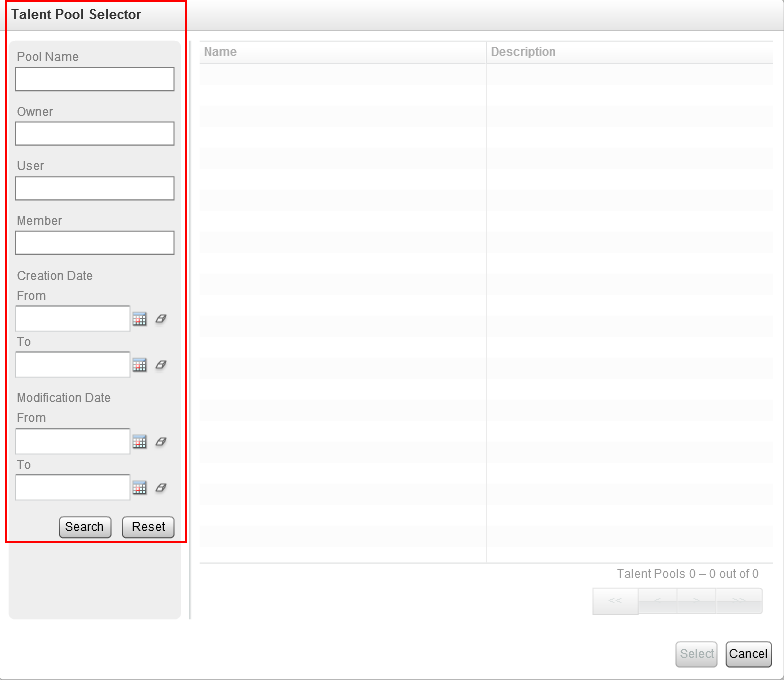
Filters on Talent Pool Selector
Steps to Enable
There are no steps necessary to enable this feature.
Talent Profile Label Harmonization
To provide a better and more cohesive Talent Profile user experience, a configuration option has been added to allow Administrators to determine how the field names and field values in custom sections and sub-sections display on the Talent Profile. There are 3 configuration options:
- Default: The field labels and their values display as they always have prior to 15B.
- Above: The field labels display above the field values.
- Inline: The field labels display next to, or on the same line as the field values.
Talent Profile Layout Configuration – Talent Profile Section Editor Page

Talent Profile – Default Profile Field Label Placement

Talent Profile – Above Profile Field Label Placement

Talent Profile - Inline Profile Field Label Placement
Steps to Enable
There are no steps necessary to enable this feature.
The Performance Review workflow will now display the current task owners for the current step tasks of the workflow to prevent the review from getting held up. Now, if for whatever reason a review gets halted in the workflow, users can identify with whom to follow up with to resolve the issue.

Performance Review Workflow – Current Steps and Task Owners
Steps to Enable
There are no steps necessary to enable this feature.
Field Additions to Native Reporting
To continue enhancing the footprint of reportable fields available in Performance Native Reporting and provide parity with the reportable fields in Business Objects to close the functional gap, over 1,000 reportable fields have been added to most Native Reporting data models spanning across many Performance modules.
Steps to Enable
There are no steps necessary to enable this feature.
Key Resources
For a list of the fields that were added, please refer to:
- Oracle Taleo Enterprise 15A.9 Native Reporting Data Dictionary (My Oracle Support document ID 2017010.1)
Goal and Review Measurement Data Models for Native Reporting
Two new data models, the Review Measurement Data Model and the Goal Measurement Data Model, have been added to Native Reporting that emphasize Review and Goal-centric metrics and are available as new tabs within the Reports module. When either of these two new models is used, the default 5,000 row output restriction typically associated with employee data is lifted and increased to 65,000 allowing for enhanced or aggregated reporting across entire organizations and larger employee populations. While these measurement models do include some of the most essential fields and additional basic data applicable to reviews and goals, they are primarily to be used to obtain metrics across an employee base that exceeds 5,000 records. Additionally, more data can be obtained by joining either of the Measurement Data Models with the Employee Measurement Data Model. If customers want detailed information from reviews or goals for less than 5,000 employees, they should use the Review Data Model or the Goal Data Model, not these measurement models.

New Review Report Tab

New Goal Report Tab
Steps to Enable
There are no steps necessary to enable this feature.
Tips and Considerations
- The Review Measurement Data Model and the Goal Measurement Data Model can be joined only with the Employee Measurement Data Model (this is a private data model) at this time.
Key Resources
For detailed information on the fields contained in these data models and their possible joins, please refer to:
- Oracle Taleo Enterprise 15A.9 Native Reporting Data Dictionary (My Oracle Support document ID 2017010.1)
Feedback Data Model for Native Reporting
With release 15B, a Feedback Data Model is introduced and added to the existing data models allowing the ability to report on user feedback data for all entities and contexts that such data exists. This data model is delivered at upgrade and available for customers to make their desired data model joins, i.e., with the Employee Data Model. The Feedback Data Model is not a base model, but rather can be joined with the other base data models to include feedback information in your reports.

Employee Data Model Joined with Feedback Data Model
Steps to Enable
There are no steps necessary to enable this feature. The Feedback Data Model is delivered at upgrade and can be used immediately to make the desired data joins.
Key Resources
For detailed information on the Feedback Data Model, please refer to:
- Oracle Taleo Enterprise 15A.9 Native Reporting Data Dictionary (My Oracle Support document ID 2017010.1)
Optional User Defined Field Selection in Native Reporting
Prior to 15B, customers could not select which User Defined Fields (UDFs) were included in their custom data models. By default, when you add a new data set to an existing data model, all of its UDFs are also added. While this behavior remains, with 15B, customers now have the ability to deselect UDFs from those data models. After upgrade, if a new custom data model is created, the UDFs will not be included and customers can selectively choose which UDFs to include in their new data model.
This ability to remove unwanted UDFs from existing custom data models and to add only the desired UDFs to new custom data models greatly improves the reporting experience for customers by:
- Increasing runtime performance.
- Reducing the size and complexity of reports and report XML data extraction.
- Allowing more focused reporting and removing extraneous reportable field data information.

Data Model Editor
A warning message displays when users select a UDF to be removed.

Warning Message Prior to Removing Field from Data Model
Steps to Enable
While there are no steps necessary to enable this feature, remember that by default the existing custom data models created prior to upgrading to 15B will include all of the UDFs in the data sets. These UDFs must be manually removed if they are not wanted.
Tips and Considerations
- The data model must be deactivated to remove or add UDFs so that no report definitions are tied to it.
Talent Profile Measurement Data Model
A new standalone Base Data Model, the Talent Profile Measurement Data Model, further enhances the Native Reporting capabilities with 15B.6. This data model gives report users the ability to obtain aggregate level information for metrics across their selected employee base using the fields provided under this new measurement data model.
Users are able to run the Talent Profile Measurement report by selecting the Measurement checkbox in the Employee tab of the Run a Report modal.

Steps to Enable
There are no steps necessary to enable this feature.
Restrict Access to Report XML Data
This feature closes a security gap and eliminates the risk of unauthorized users from accessing employee data via reports.
A new user permission, Access Report Data, controls who can view XML data generated by reports. Only users’ who have this permission granted as well as the Access Reporting permission, will be able to view and select the Download XML link. This prevents unauthorized users from accessing data, especially employee data, from the entire data model.

Steps to Enable
There are no steps necessary to enable this feature; it is automatically available at upgrade. However, Administrators will have to grant new users needing this new permission access.
Tips and Considerations
By default, at upgrade all the existing users that already had Access Reporting permissions will now also have the new Access Report Data permissions. The Access Report Data permission will be disabled by default for new users.
New Reporting Fields in Recruiting and Performance Management Subject Areas
New reporting fields were added to the Recruiting and Performance Management subject areas.
More than 250 fields were added to the Recruiting contemporary subject areas to match the Recruiting legacy subject areas. For the Performance Management legacy subject areas, more than 250 reporting fields were added, mainly succession plan user-defined fields (UDF).
Steps to Enable
There are no steps necessary to enable this feature.
Key Resources
For more information on the new reporting fields added to the Recruiting and Performance Management subject areas, go to the following document on My Oracle Support:
- Oracle Taleo 15B Reporting OBI Contemporary Subject Areas (Document ID 2177225.1)
- Oracle Taleo 15B Reporting OBI Legacy Subject Areas (Document ID 2177225.1)
Steps to Enable
There are no steps necessary to enable this feature.
---

Copyright © 2017, Oracle and/or its affiliates. All rights reserved.
This document is provided for information purposes only, and the contents hereof are subject to change without notice. This document is not warranted to be error-free, nor subject to any other warranties or conditions, whether expressed orally or implied in law, including implied warranties and conditions of merchantability or fitness for a particular purpose. We specifically disclaim any liability with respect to this document, and no contractual obligations are formed either directly or indirectly by this document. This document may not be reproduced or transmitted in any form or by any means, electronic or mechanical, for any purpose, without our prior written permission.
Oracle and Java are registered trademarks of Oracle and/or its affiliates. Other names may be trademarks of their respective owners.
Intel and Intel Xeon are trademarks or registered trademarks of Intel Corporation. All SPARC trademarks are used under license and are trademarks or registered trademarks of SPARC International, Inc. AMD, Opteron, the AMD logo, and the AMD Opteron logo are trademarks or registered trademarks of Advanced Micro Devices. UNIX is a registered trademark of The Open Group.

June2017