
This document will continue to evolve as existing sections change and new information is added. All updates appear in the following table:
| Date | Module | Feature | Notes |
|---|---|---|---|
| 09 NOV 2023 | Created initial document. |
 HAVE AN IDEA?
We’re here and we’re listening. If you have a suggestion on how to make our cloud services even better then go ahead and tell us. There are several ways to submit your ideas, for example, through the Ideas Lab on Oracle Customer Connect. Wherever you see this icon after the feature name it means we delivered one of your ideas.
GIVE US FEEDBACK
We welcome your comments and suggestions to improve the content. Please send us your feedback at oracle_fusion_applications_help_ww_grp@oracle.com.
DISCLAIMER
The information contained in this document may include statements about Oracle’s product development plans. Many factors can materially affect Oracle’s product development plans and the nature and timing of future product releases. Accordingly, this Information is provided to you solely for information only, is not a commitment to deliver any material, code, or functionality, and should not be relied upon in making purchasing decisions. The development, release, and timing of any features or functionality described remains at the sole discretion of Oracle.
This information may not be incorporated into any contractual agreement with Oracle or its subsidiaries or affiliates. Oracle specifically disclaims any liability with respect to this information. Refer to the Legal Notices and Terms of Use for further information.
Column Definitions:
Report = New or modified, Oracle-delivered, ready to run reports.
UI or Process-Based: Small Scale = These UI or process-based features are typically comprised of minor field, validation, or program changes. Therefore, the potential impact to users is minimal.
UI or Process-Based: Larger Scale* = These UI or process-based features have more complex designs. Therefore, the potential impact to users is higher.
Features Delivered Disabled = Action is needed BEFORE these features can be used by END USERS. These features are delivered disabled and you choose if and when to enable them. For example, a) new or expanded BI subject areas need to first be incorporated into reports, b) Integration is required to utilize new web services, or c) features must be assigned to user roles before they can be accessed.
| Ready for Use by End Users Reports plus Small Scale UI or Process-Based new features will have minimal user impact after an update. Therefore, customer acceptance testing should focus on the Larger Scale UI or Process-Based* new features. |
Customer Must Take Action before Use by End Users Not disruptive as action is required to make these features ready to use. As you selectively choose to leverage, you set your test and roll out timing. |
|||||
|---|---|---|---|---|---|---|
| Feature |
Report |
UI or |
UI or |
|
||
The Career Center is the module within Taleo Business Edition Recruit where customers post their open jobs, and job seekers search and apply for jobs. With this release, the Career Center is now fully accessible, following the WCAG 2.1 guidelines.
Accessibility improvements include areas such as a meaningful tab order, accessibility though the keyboard, label and page structure changes, accessible date and multi-select picklist components, and color contrast changes.
By enabling accessibility in your Career Center, you can ensure that job seekers with a wide range of abilities are able to successfully navigate your career site.
Steps to Enable
To enable accessibility for any Career Center:
- Select Administration, then select Customize Recruit.
- In the Manage Career Centers section, click Edit Settings for the desired Career Center.
- Check the option near the bottom of the Settings section called Enable Accessibility.
- Click Save.
You will likely not see any visual difference for your Career Center, as the color changes in the standard themes were very slight. If you fill out a test application, you may notice the difference in the tab order or in some of the components such as the date or multi-select.
Tips And Considerations
Only the standard color themes of Light, Dark, and Default follow the accessibility guidelines, as far as color and fonts. If you have created a custom theme with different fonts and colors, or included any images or HTML links, you are responsible for determining if your color theme and additional information meets the guidelines.
In a future release, the accessibility option will be hidden and always enabled, but for now you have the option to enable or not.
Key Resources
Documents available from My Oracle Support:
Advantages of the Career Center in Taleo Business Edition Recruit (Doc ID 2467724.1)
Moving from the Legacy Careers Website to the Career Center(Doc ID 2493891.1)
Retirement of the legacy Careers Website
The legacy Careers Website (CWS) will be retired with the 24B release next May 17th, 2024. The CWS was succeeded by the modern, highly improved mobile optimized TBE Career Center released to all customers in 2015, and the legacy CWS was disabled for new customers at that time. Older customers may still be posting jobs to the legacy CWS.
Important: If you are still using the legacy CWS in any capacity, you will need to fully configure, test and deploy your TBE Career Center, and update all links from all web properties (such as any corporate web pages) to the Career Center to avoid interruptions in your online career website(s). Completion of this migration must be completed before the May 2024 deadline.
Stay tuned for additional information on this transition via the bullhorn icon in TBE, as well as announcements upon logging in.
How to confirm if you are using the legacy CWS or the Career Center
If you are not sure which career site you are using, first check to see if the CWS is still enabled in your TBE instance.
- Select Administration, then select Customize Recruit.
- Under the Customize Pages section, do you have a section called Manage Careers Websites? If not, you are already using the Career Center, and no action is needed.
- If you do have both a Manager Careers Websites and a Manage Career Centers section, you have a couple options.
- You can click the View link under both sections and compare the data to see which site seems to have your current job postings. You can then link to your postings from your corporate site to compare.
- You can go directly to your corporate job listings. If the look and feel matches the below example, you are already using the Career Center.
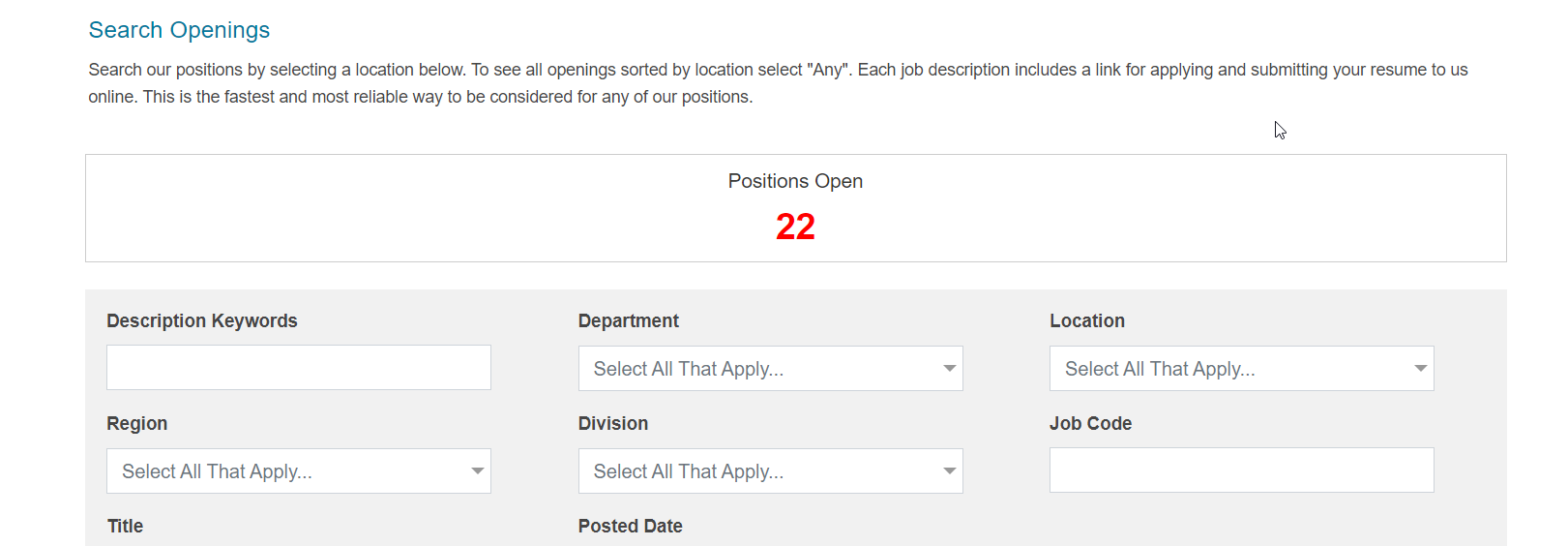
If you are still using the legacy CWS, you will want to migrate to the Career Center as soon as possible. Besides the greatly improved look and feel to the Career Center, it is fully mobile responsive and mobile friendly, while the legacy CWS doesn't work correctly on candidate mobile devices. Candidates are much more likely to drop out of the application process when faced with the older career website, which means fewer candidates for all of your open requisitions.
Besides being state-of-the-art and completely mobile optimized, the Career Center features numerous other functionality improvements, such as the Save Draft option, guest login, social media sharing to Facebook, Twitter and more, all of which are not available in the legacy CWS.
Getting Help Migrating to the Career Center
To get started, you should review the information in the online Help. Choose Help>Help Recruit and expand the Table of Contents. Expand the Administration chapter, and then expand the Career Center section. As you can see, there is a lot of detailed information here that you will want to review. You can also visit the Resource Center (Help>Resource Center) and search for Career Center. There are a few videos as well as a PDF document that will get you started on setting up your Career Center.
Additionally, our Oracle Gold Partner, RecruitingDash, has a comprehensive list of complimentary CWS to Career Center resources available at TBECareerCenter.com. We encourage all TBE customers to review and take advantage of these no-cost informative resources:
- Comprehensive overview of all Career Center features and functionality
- Free checklists detailing what is required to move from CWS to the Career Center
- Free interactive 'Migrating from TBE CWS to Career Center' Webinar and C&A sessions every other Wednesday at 10 AM Pacific. Sign up at TBECareerCenter.com
- Complimentary Career Center readiness assessment, with no obligation, for any TBE customer. Interested customers may learn more and sign up for their free assessment at TBECareerCenter.com