
- Revision History
- Overview
- Feature Summary
-
- CX Activations
-
- Email Hash to Facebook Integration - Controlled Availability
- Oracle Financial Services Analytical Applications (OFSAA) Integration
- Query Optimization by Adding "Any" Operator Within a Conditional Group
- Support Non-English Languages for Segment Names
- Add "Not Between" Operator for Numeric Attributes in the Segmentation Canvas
- Improved UI Response Time on the Segments Page
-
- Data Management
- CX Activations
This document will continue to evolve as existing sections change and new information is added. All updates appear in the following table:
| Date | Product | Feature | Notes |
|---|---|---|---|
| 29 APR 2021 | Created initial document. |
This guide outlines the information you need to know about new or improved functionality in this update.
GIVE US FEEDBACK
We welcome your comments and suggestions to improve the content. Please send us your feedback at omcdocumentation_ca@oracle.com.
Column Definitions:
Report = New or modified, Oracle-delivered, ready to run reports.
UI or Process-Based: Small Scale = These UI or process-based features are typically comprised of minor field, validation, or program changes. Therefore, the potential impact to users is minimal.
UI or Process-Based: Larger Scale* = These UI or process-based features have more complex designs. Therefore, the potential impact to users is higher.
Features Delivered Disabled = Action is needed BEFORE these features can be used by END USERS. These features are delivered disabled and you choose if and when to enable them. For example, a) new or expanded BI subject areas need to first be incorporated into reports, b) Integration is required to utilize new web services, or c) features must be assigned to user roles before they can be accessed.
| Ready for Use by End Users Reports plus Small Scale UI or Process-Based new features will have minimal user impact after an update. Therefore, customer acceptance testing should focus on the Larger Scale UI or Process-Based* new features. |
Customer Must Take Action before Use by End Users Not disruptive as action is required to make these features ready to use. As you selectively choose to leverage, you set your test and roll out timing. |
|||||
|---|---|---|---|---|---|---|
| Feature |
Report |
UI or |
UI or |
|
||
Email Hash to Facebook Integration - Controlled Availability |
||||||
Oracle Financial Services Analytical Applications (OFSAA) Integration |
||||||
Query Optimization by Adding "Any" Operator Within a Conditional Group |
||||||
Add "Not Between" Operator for Numeric Attributes in the Segmentation Canvas |
||||||
Enhancements to Lookup/Static and Concatenation Transformations |
||||||
Email Hash to Facebook Integration - Controlled Availability
You now have the ability to target customers in Facebook by using hashed emails.
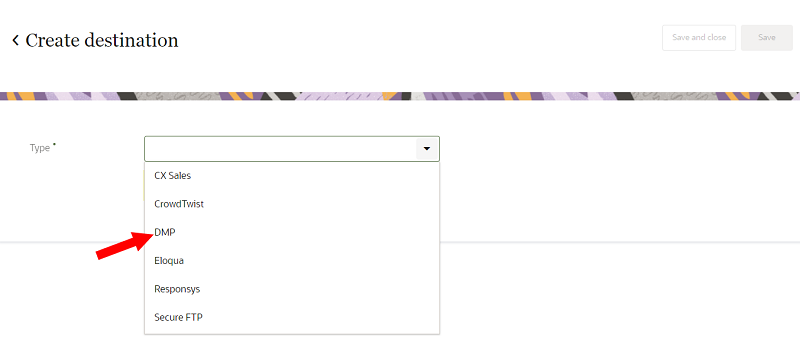
This direct integration allows you to market to customers more quickly inside one of the world's largest social networks.
Previously, there was a long lead time to market to ad channels such as Facebook based on Unity data because there was no direct integration. You were forced to extract the data manually and then upload it directly to Facebook, or to rely on a competitive solution.
Steps to Enable
To enable this feature, the following steps need to be completed:
- You will be invited to adopt this feature, or you can request an invitation from your Oracle representative.
- Your eligibility for the feature will be verified (based on contracting and other operational considerations).
- If approved, Oracle will complete any required additional steps for enabling the feature.
Key Resources
Role Information
This feature is available to Instance Admins or a combination of Data Master and Business User or Data Engineer and Business User.
Oracle Financial Services Analytical Applications (OFSAA) Integration
You can now integrate Oracle Unity with Oracle Financial Services Analytical Applications (OFSAA) to seamlessly send data between the two platforms. OFSAA is a suite of applications that provides enrichments based on financial transaction data.
With this integration, you can now leverage OFSAA first-party sales marketing data and third-party enrichments such as Oracle Data Cloud to create unified profiles in Unity. These enrichments, such as churn propensity, lifetime value, and product recommendations could be used for better segmentation/personalization. OFSAA customers can also leverage the out-of-the-box connectors that Unity offers to export this data to marketing orchestration systems such as Oracle Responsys.
Previously, customers of OFSAA found it difficult to make use of enriched financial transaction data for targeting and personalization.
Steps to Enable
Oracle Financial Services Analytical Applications is required to use this feature.
Key Resources
Role Information
This feature is available to Instance Admins, Data Masters, and Data Engineers.
Query Optimization by Adding "Any" Operator Within a Conditional Group
When creating and managing segments, you can now select to get records that meet "All" conditions or "Any" conditions within a condition group.
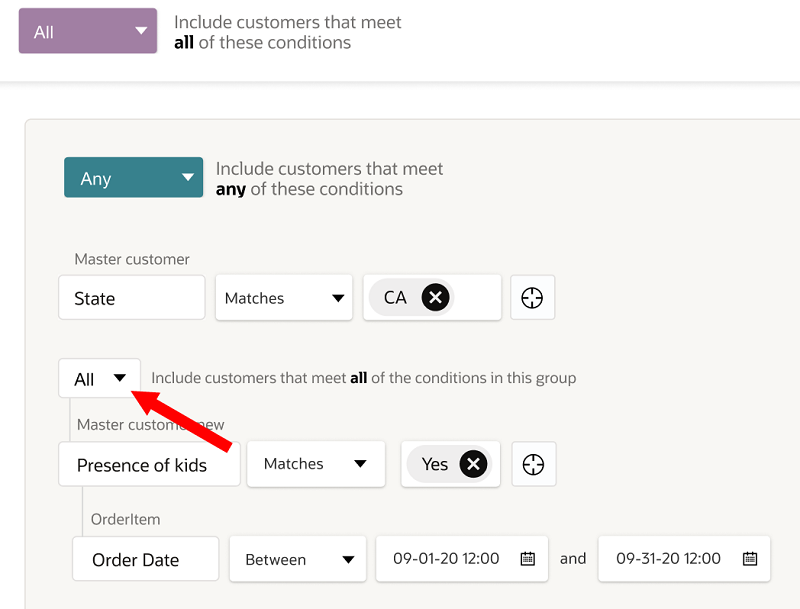
This enhancement allows you to create segments using fewer enclosures in the segmentation canvas, which enhances the logic of conditions groups. This leads to improved query performance and lower costs.
Steps to Enable
You don't need to do anything to enable this feature.
Key Resources
Role Information
This feature is available to Instance Admins and Business Users.
Support Non-English Languages for Segment Names
You can now use characters from the following languages to create segment names: Chinese Simplified, Chinese Traditional, French, German, Italian, Japanese, Korean, Brazilian Portuguese, Russian, and Spanish.
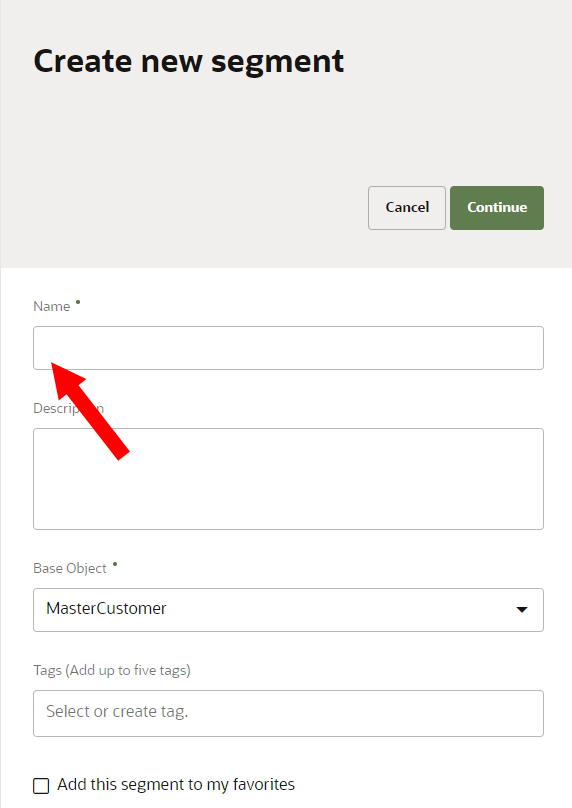
This enhancement gives you more options when creating a segment name by allowing you use your preferred language.
Steps to Enable
You don't need to do anything to enable this feature.
Key Resources
Role Information
This feature is available to Instance Admins and Business Users.
Add "Not Between" Operator for Numeric Attributes in the Segmentation Canvas
You can now use the "Not Between" operator for numeric attributes when creating a condition in the segmentation canvas.
This additional operator allows you to create less complex segment conditions, which helps improve query performance.
Steps to Enable
You don't need to do anything to enable this feature.
Key Resources
Role Information
This feature is available to Instance Admins and Business Users.
Improved UI Response Time on the Segments Page
The response time on the Segments page has improved by loading resources in parallel.
This enhancement improves the segmentation UI user experience by reducing the time required to load pages.
Steps to Enable
You don't need to do anything to enable this feature.
Key Resources
Role Information
This feature is available to Instance Admins and Business Users.
Ingesting Empty/Null Values into Unity
You can now import empty or null values into the Unity data model. This applies to data that is imported in any way, such as batch ingestion using CSV files or through the streaming API.
This enhancement resolves previous syncing issues with the Unity data model and the source system. Previously, existing values in the Unity data model could not be replaced with empty/null data, so these values were not being updated.
Steps to Enable
To enable this feature, you will need to publish changes to your tenant after April 30.
Key Resources
Role Information
This feature is available to Instance Admins, Data Masters, and Data Engineers.
Enhancements to Lookup/Static and Concatenation Transformations
You can now use Lookup/Static and Concatenation data transformations to replace imported empty/null values with custom string values. You also have the option to configure Lookup/Static data transformations to manage data that doesn't match the existing Lookup/Static transformations you have defined.
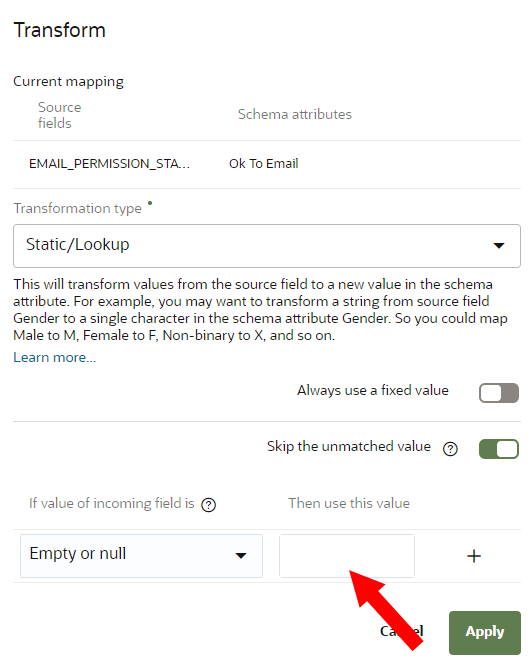
These enhancements give you more options to transform and manage data that is imported into the Unity data model so that this data is processed to the specific needs of your organization.
Steps to Enable
To enable this feature, you will need to publish changes to your tenant after April 30.
Key Resources
Role Information
This feature is available to Instance Admins, Data Masters. and Data Engineers.
Support for Importing Multi-Line Data
You can now use the RFC 4180 CSV parser to import data from CSV files that have multi-line data.
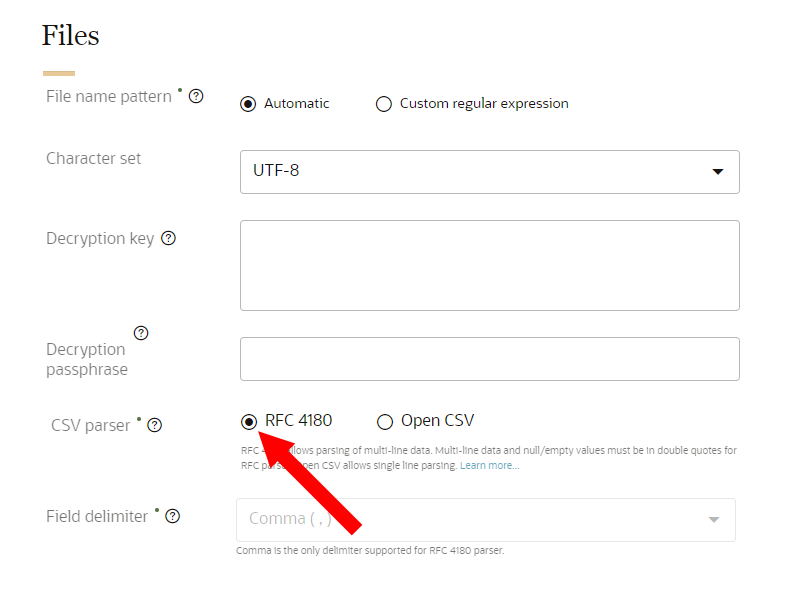
This enhancement gives you more options and flexibility when configuring sources, ingest jobs, and CSV files for data imports from the source system.
Steps to Enable
You don't need to do anything to enable this feature.
Key Resources
Role Information
This feature is available to Instance Admins, Data Masters, and Data Engineers.