
This document will continue to evolve as existing sections change and new information is added. All updates appear in the following table:
| Date | Product | Feature | Notes |
|---|---|---|---|
| 04 MAR 2021 | Important Actions and Considerations | Updated document. Added Important Actions and Considerations | |
| 01 MAR 2021 | Created initial document. |
This guide outlines the information you need to know about new or improved functionality in this update.
GIVE US FEEDBACK
We welcome your comments and suggestions to improve the content. Please send us your feedback at omcdocumentation_ca@oracle.com.
Column Definitions:
Report = New or modified, Oracle-delivered, ready to run reports.
UI or Process-Based: Small Scale = These UI or process-based features are typically comprised of minor field, validation, or program changes. Therefore, the potential impact to users is minimal.
UI or Process-Based: Larger Scale* = These UI or process-based features have more complex designs. Therefore, the potential impact to users is higher.
Features Delivered Disabled = Action is needed BEFORE these features can be used by END USERS. These features are delivered disabled and you choose if and when to enable them. For example, a) new or expanded BI subject areas need to first be incorporated into reports, b) Integration is required to utilize new web services, or c) features must be assigned to user roles before they can be accessed.
| Ready for Use by End Users Reports plus Small Scale UI or Process-Based new features will have minimal user impact after an update. Therefore, customer acceptance testing should focus on the Larger Scale UI or Process-Based* new features. |
Customer Must Take Action before Use by End Users Not disruptive as action is required to make these features ready to use. As you selectively choose to leverage, you set your test and roll out timing. |
|||||
|---|---|---|---|---|---|---|
| Feature |
Report |
UI or |
UI or |
|
||
Oracle Eloqua Integration - Export Segments to Custom Objects |
||||||
You can now enter non-English characters in the segment Description and Tags.
This enables you to use your preferred language when working with segments.
Steps to Enable
You don't need to do anything to enable this feature.
During segment creation, a default object path is now automatically selected. When an attribute is used for the first time in an account, the shortest path will be selected. After the first use, the most recently used path will be selected.
This helps business users build segments without having to know the data model and the relationships between the data objects.
Steps to Enable
You don't need to do anything to enable this feature.
Key Resources
You can now tag a segment as a favorite during segment creation. Previously, segments had to be created and saved, then tagged as favorites.
This provides a more convenient way to favorite a segment.
Steps to Enable
You don't need to do anything to enable this feature.
Key Resources
Oracle Eloqua Integration - Export Segments to Custom Objects
You can now export Unity segments to Eloqua custom objects.
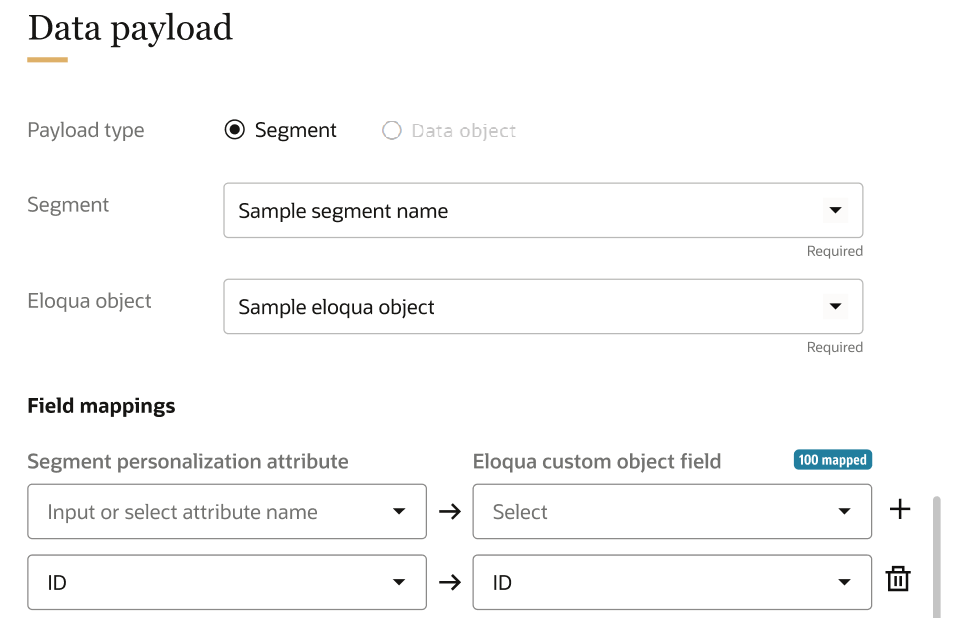
Previously, you were only able to export data to the contact list in Eloqua.
Steps to Enable
Oracle Eloqua is required to use this feature.
Key Resources
- Eloqua-Unity integration documentation
- Eloqua custom objects documentation
- Eloqua custom objects overview video
You are now able to setup a daisy chain for all types of Unity jobs so that they are initiated one after another based on the dependency. This is currently available via our API.
The ability to define the job sequence helps you automate business workflows where a set of jobs can be executed automatically in the preferred order. It's no longer necessary to check your job's status in order to start the next dependent job.
Steps to Enable
You don't need to do anything to enable this feature.
Tips And Considerations
Similar jobs can be grouped together to start and run in parallel, so that the next dependent job can be run after all or any of the jobs in the group are completed.
Key Resources
Role Information
This feature is available to Instance Admins.
IMPORTANT Actions and Considerations
DEFECT FIX FOR SEARCH WITH SPECIAL CHARACTERS
Previously, searches using special characters, such as @, were not generating appropriate results in the Profile Explorer. This affected searches using complete email ID. This issue has been fixed.
To apply the fix, the following configuration must be performed to the versionTS field to update the main customer360 rule.
To update the versionTS field:
- Navigate to the expert config page by going to the following URL: https://[your unity hostname]/?root=expertConfig.
- Make the following selections: GET, api-metadata.
- Enter the following in the input field: /idgraphrules/customer360.
- Click Run.
- Copy the response payload.
- Update the Customer 360 name field:
- "name": "Customer 360 rule to pull customer 360 profiles"
- Make the following selections: PUT, /api-metadata.
- Enter the following in the input field: /idgraphrules/customer360
- Click Run.
- Click Publish changes from the Data model page.
- Run the System – Customer 360 job from the Data feeds page.