
This document will continue to evolve as existing sections change and new information is added. All updates appear in the following table:
| Date | Product | Feature | Notes |
|---|---|---|---|
| 30 OCT 2020 | Created initial document. |
This guide outlines the information you need to know about new or improved functionality in this update.
GIVE US FEEDBACK
We welcome your comments and suggestions to improve the content. Please send us your feedback at omcdocumentation_ca@oracle.com.
Column Definitions:
Features Delivered Enabled
Report = New or modified, Oracle-delivered, ready to run reports.
UI or Process-Based: Small Scale = These UI or process-based features are typically comprised of minor field, validation, or program changes. Therefore, the potential impact to users is minimal.
UI or Process-Based: Larger Scale* = These UI or process-based features have more complex designs. Therefore, the potential impact to users is higher.
Features Delivered Disabled = Action is needed BEFORE these features can be used by END USERS. These features are delivered disabled and you choose if and when to enable them. For example, a) new or expanded BI subject areas need to first be incorporated into reports, b) Integration is required to utilize new web services, or c) features must be assigned to user roles before they can be accessed.
| Ready for Use by End Users Reports plus Small Scale UI or Process-Based new features will have minimal user impact after an update. Therefore, customer acceptance testing should focus on the Larger Scale UI or Process-Based* new features. |
Action is Needed BEFORE Use by End Users Not disruptive as action is required to make these features ready to use. As you selectively choose to leverage, you set your test and roll out timing. |
|||||
|---|---|---|---|---|---|---|
| Feature |
Report |
UI or |
UI or |
|
||
Control Visibility of Data Objects and Attributes in Segments |
||||||
Control Visibility of Data Objects and Attributes in Segments
Instance Admin users can now configure which data objects and attributes are available in segments for business users to use.
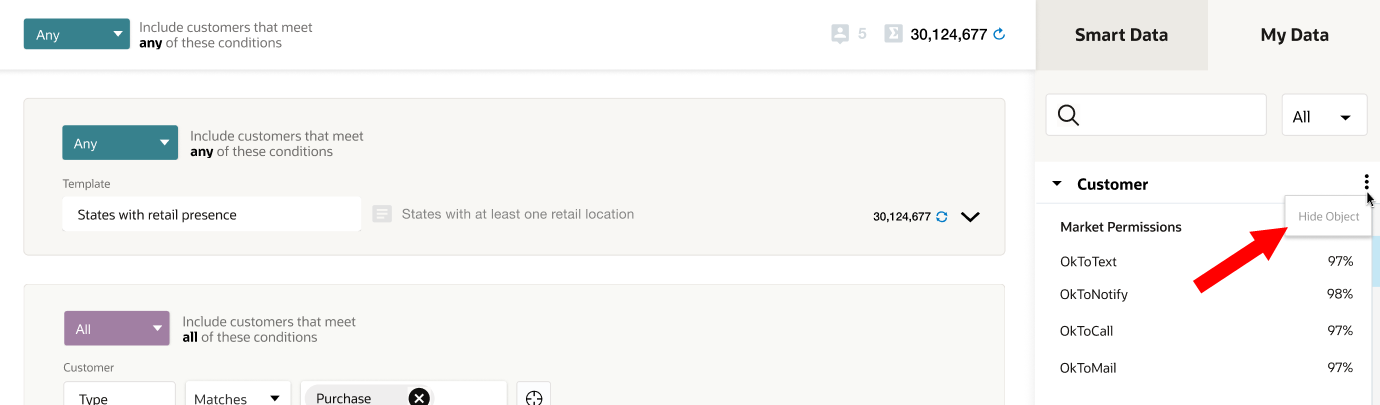
Use this feature to customize the segmentation palette by hiding all irrelevant objects and attributes.
Steps to Enable
You don't need to do anything to enable this feature.
Key Resources
Visit our Help Center to learn more.
Role Information
This feature is available to Instance Admins.
Data User Role for Profile Explorer
The Data User role can now access the Profile Explorer.
Previously, Profile Explorer was available to users with Data Master, Data Engineer, and Instance admin roles. The Data user role now also provides access to Profile Explorer without raising any activation requests.
Steps to Enable
Make the feature accessible by assigning or updating privileges and/or job roles. Details are provided in the Role section below.
Tips And Considerations
Users with Instance Admin, Data Master, and Data Engineer roles will continue to have access to Profile Explorer.
Key Resources
Visit our Help Center to learn more.
Role Information
This feature is now available to Data Users.
Include Static Attributes in Reusable Personalization Lists
Static attributes can now be included in reusable personalization attribute lists.
This allows the personalization attribute list to be reused across a wider range of segments.
Steps to Enable
You don't need to do anything to enable this feature.
Key Resources
Visit our Help Center to learn more.
Role Information
This feature is available to Business Users and Instance Admins.
On the segmentation canvas, attributes can now be added to a specific enclosure by highlighting the enclosure. Previously, attributes could only be added to the most recently used enclosure.
This provides you with additional flexibility in crafting your segments.
Steps to Enable
You don't need to do anything to enable this feature.
Role Information
This feature is available to Business Users and Instance Admins.
Prior to starting a Publish job, you can now review the changes made to any Unity entities (such as Data objects, Jobs, Destination, and so on) that are currently pending publish.
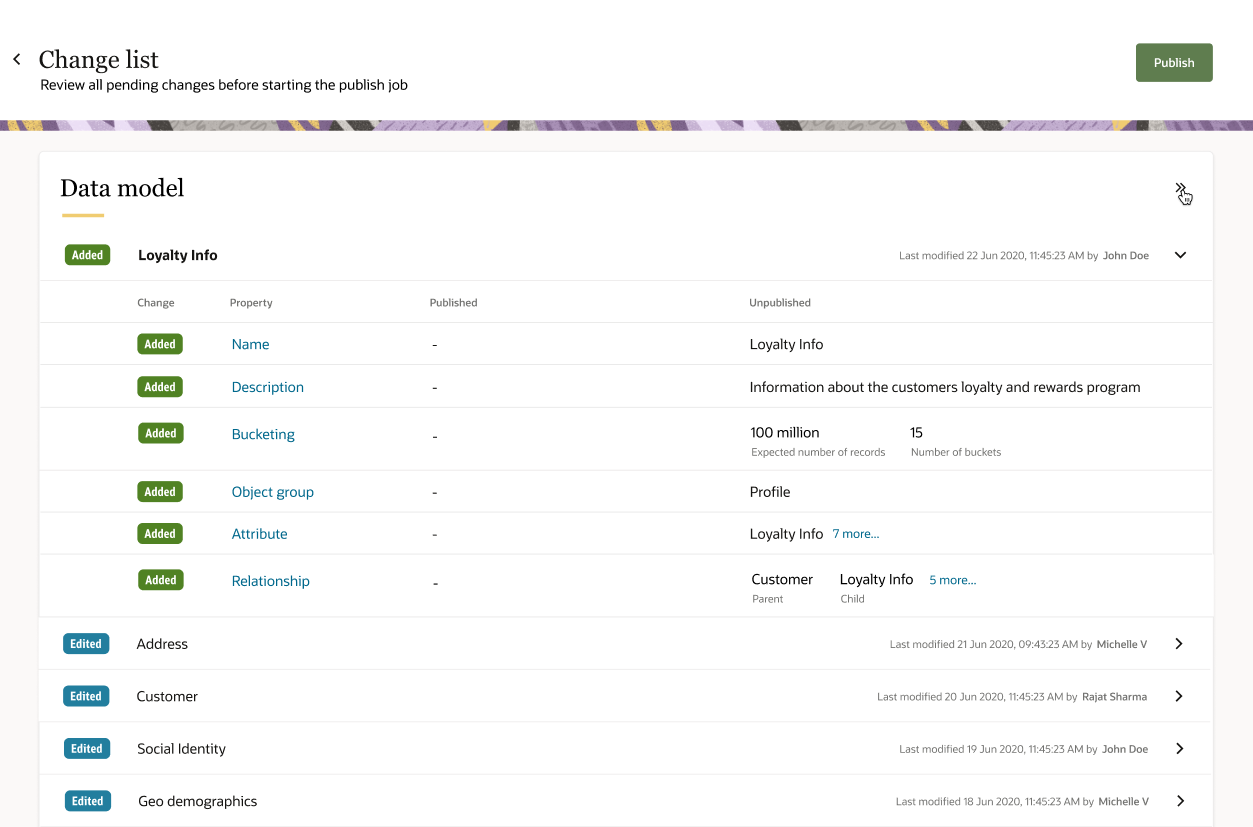
This provides a critical window of opportunity to review and fix mistakes made, before committing the changes.
Steps to Enable
You don't need to do anything to enable this feature.
Tips And Considerations
Change list displays changes made to the data model jobs, intelligent attributes, and profile unification pipeline.
Key Resources
Visit our Help Center to learn more.
Role Information
This feature is available to Data Masters.
Support for Uncompressed Data Format in Export Jobs
Segment and object export jobs now support both compressed and uncompressed formats. Data payloads exported from Unity can be in either format. Previously, all data payloads were compressed by default.
Therefore, you can avoid post-processing if the target system where data is sent from Unity is unable to handle compressed formats.
Steps to Enable
You don't need to do anything to enable this feature.
Tips And Considerations
Users with Instance Admin, Data Master, and Data Engineer roles will continue to have access to Profile Explorer.