
- Revision History
- Overview
- Feature Summary
-
- Customer
- Meter Solution
-
- Initial Measurement Data Header Export
- Meter Insights Investigation User Interface
- Reducing Redundant To Dos
- REST Inbound Web Services for Master Data
- Saving Attachments
- Limit Field Work by Service Point Type
- Enable Field Task Type by Service Point Type in Activity Orchestration
- Support Activity Type Mapping in Inbound Field Activity Sync Request
-
- Operational Device
- Analytics Visualization
- Utilities Application Framework
- Utilities Testing Accelerator
- System Wide
- IMPORTANT Actions and Considerations
This document will continue to evolve as existing sections change and new information is added. All updates appear in the following table:
| Date | Product | Feature | Notes |
|---|---|---|---|
| 20 NOV 2020 | Created initial document. |
Oracle Utilities Customer Cloud Service is a customer care, service order, metering and billing solution for traditional scalar devices and billing processes. The solution is designed to cater for utilities of all sizes, supports one to many utility service types, and handles the complexities associated with a utility's processes.
This guide outlines the information you need to know about new or improved functionality in this update, and describes any tasks you might need to perform for the update. Each section includes a brief description of the feature, the steps you need to take to enable or begin using the feature, any tips or considerations that you should keep in mind, and the resources available to help you.
Column Definitions:
Features Delivered Enabled
Report = New or modified, Oracle-delivered, ready to run reports.
UI or Process-Based: Small Scale = These UI or process-based features are typically comprised of minor field, validation, or program changes. Therefore, the potential impact to users is minimal.
UI or Process-Based: Larger Scale* = These UI or process-based features have more complex designs. Therefore, the potential impact to users is higher.
Features Delivered Disabled = Action is needed BEFORE these features can be used by END USERS. These features are delivered disabled and you choose if and when to enable them. For example, a) new or expanded BI subject areas need to first be incorporated into reports, b) Integration is required to utilize new web services, or c) features must be assigned to user roles before they can be accessed.
| Ready for Use by End Users Reports plus Small Scale UI or Process-Based new features will have minimal user impact after an update. Therefore, customer acceptance testing should focus on the Larger Scale UI or Process-Based* new features. |
Action is Needed BEFORE Use by End Users Not disruptive as action is required to make these features ready to use. As you selectively choose to leverage, you set your test and roll out timing. |
|||||
|---|---|---|---|---|---|---|
| Feature |
Report |
UI or |
UI or |
|
||
CIS Division and Division Synchronization Across Customer and Metering Objects and Entities |
||||||
Attachment Support for Activities, Devices, and Service Points |
||||||
Enable Field Task Type by Service Point Type in Activity Orchestration |
||||||
Support Activity Type Mapping in Inbound Field Activity Sync Request |
||||||
New REST Engine Version Setting for Inbound REST Web Services |
||||||
Test Component Using Conversational Test Data Entry User Interface |
||||||
Hidden Redundant Fields on Field Activity Type
The Field Activity Type administration page will no longer display the following configuration settings that are not applicable to Oracle Utilities Customer Cloud Service implementations or may only have one preset default value defined:
- Field Service Class
- Fieldwork Orchestration
- Eligible for Dispatch
- Appointment Booking
Removing unused fields from the Field Activity Type administration page lessens the need to maintain irrelevant information and provides a coherent user interface experience.
Steps to Enable
You don't need to do anything to enable this feature.
New Self-Service Task Search Filters
The Self-Service Task Query portal provides two additional search filters to refine the self-service operations to retrieve. The Status filter selects tasks in a specific processing state and the options appearing in the drop-down list are dependent on the selected Service Task Type. The Non-Final Status Only filter allows you to retrieve all the self-service tasks initiated by the customer or only the tasks in non-finalized states, and when selected grays out the Status drop-down.
‘The Status and Non-Final Status Only filters help narrow down the search results generated by the Self-Service Task Query portal so you can more easily retrieve the record you are trying to locate.
Steps to Enable
You don't need to do anything to enable this feature.
Standardized Self-Service Task User Interface Experience
The following Self-Service Task portal changes provide you with a consistent user interface experience when reviewing and managing customer-initiated Payment Arrangement, Start/Stop, Charity Contribution Enrollment, Web User Invitation, Account Verification, Automatic Payment Set Up, Bill Due Notification, Bill Ready Notification, Late Payment Notification, Meter Read Creation, Payment Received Notification, and One Time Payment tasks:
- Removal of the Actions zone
- A new Record Actions section in the Self-Service Task zone
- A new Record Information section in the Self-Service Task zone summarizing the task with the following information:
- Service Task ID
- Business Object
- Create Date/Time
- Status Date/Time
Standardizing the layout of the Self-Service Task portal provides you with a user interface experience that is consistent with other portal-based pages.
Steps to Enable
You don't need to do anything to enable this feature.
Standardized Usage Request User Interface Experience
The following Usage Request portal changes provide you with a consistent user interface experience that is consistent with other portal-based pages:
- A two-column layout (previously a one-column layout) that efficiently uses screen real estate to present information with minimal vertical scrolling.
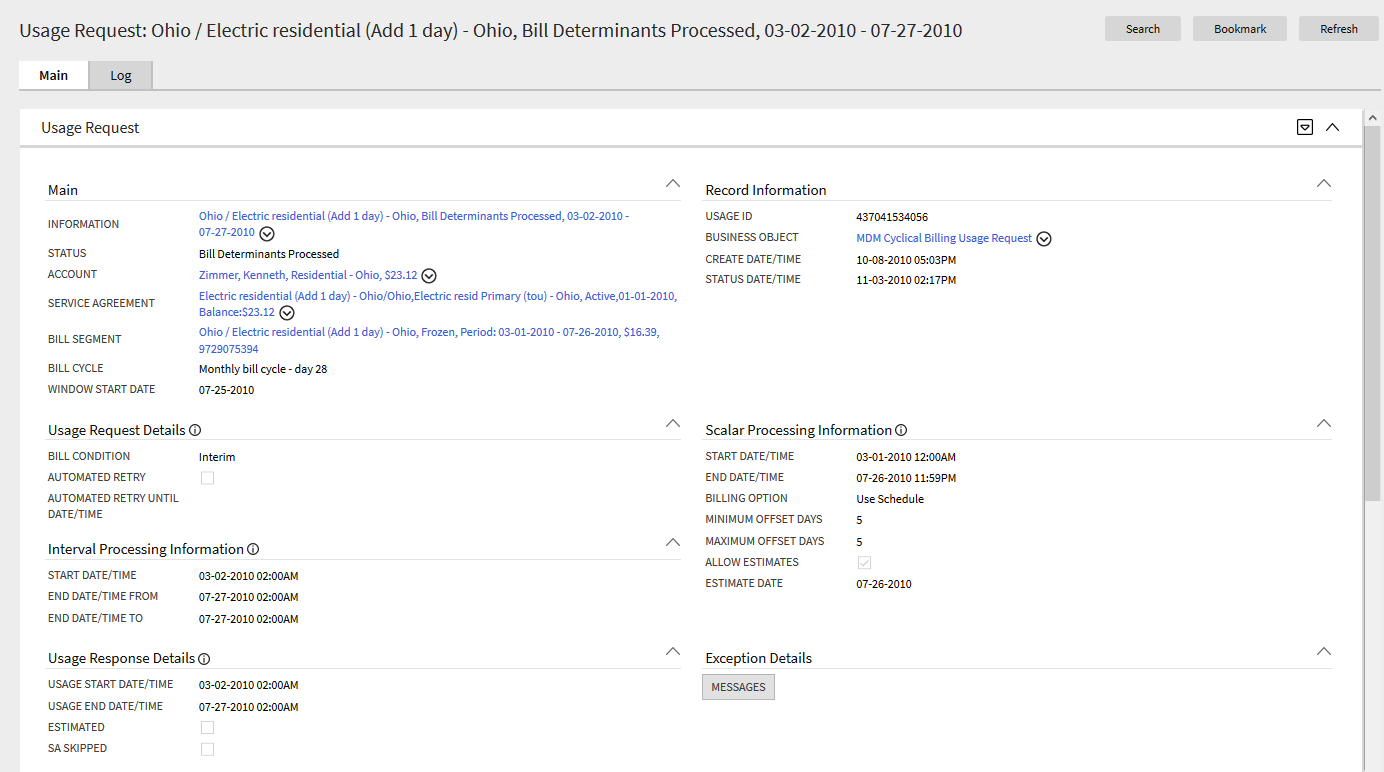
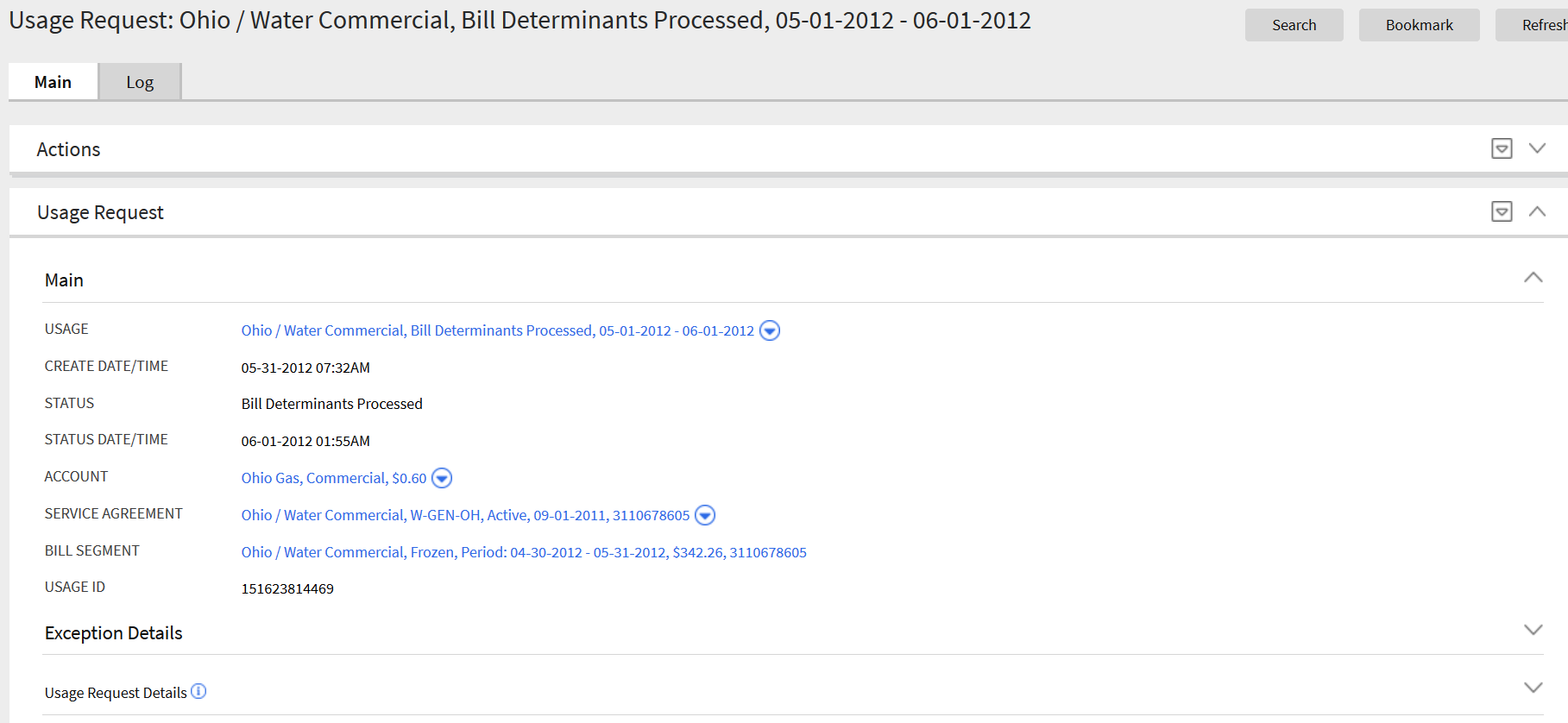
- A new Record Information section summarizing the usage request with the following information:
- Usage ID (removed from the Main section)
- Business Object
- Create Date/Time (removed from the Main section)
- Status Date/Time (removed from the Main section)
- User ID (removed from the Usage Request Details section)
- External Reference ID
- Cancel Reason
- Renaming of field labels in several sections to appropriately and clearly indicate data:
- Main: Usage to Information
- Scalar Processing Information: Cutoff Date/Time to End Date/Time
- Usage Response Details: Estimate to Estimated
- Relocating of Usage Request Details fields to the Main section:
- Bill Cycle
- Window Start Date
- Accounting Date (if applicable)
- Displaying of the Exception Details section with or without information
Standardizing the layout of the Usage Request portal provides you with a user interface experience that is consistent with other portal-based pages.
Steps to Enable
You don't need to do anything to enable this feature.
The Service Provider page has been converted to a portal, leveraging a more flexible and extendable user interface metaphor.
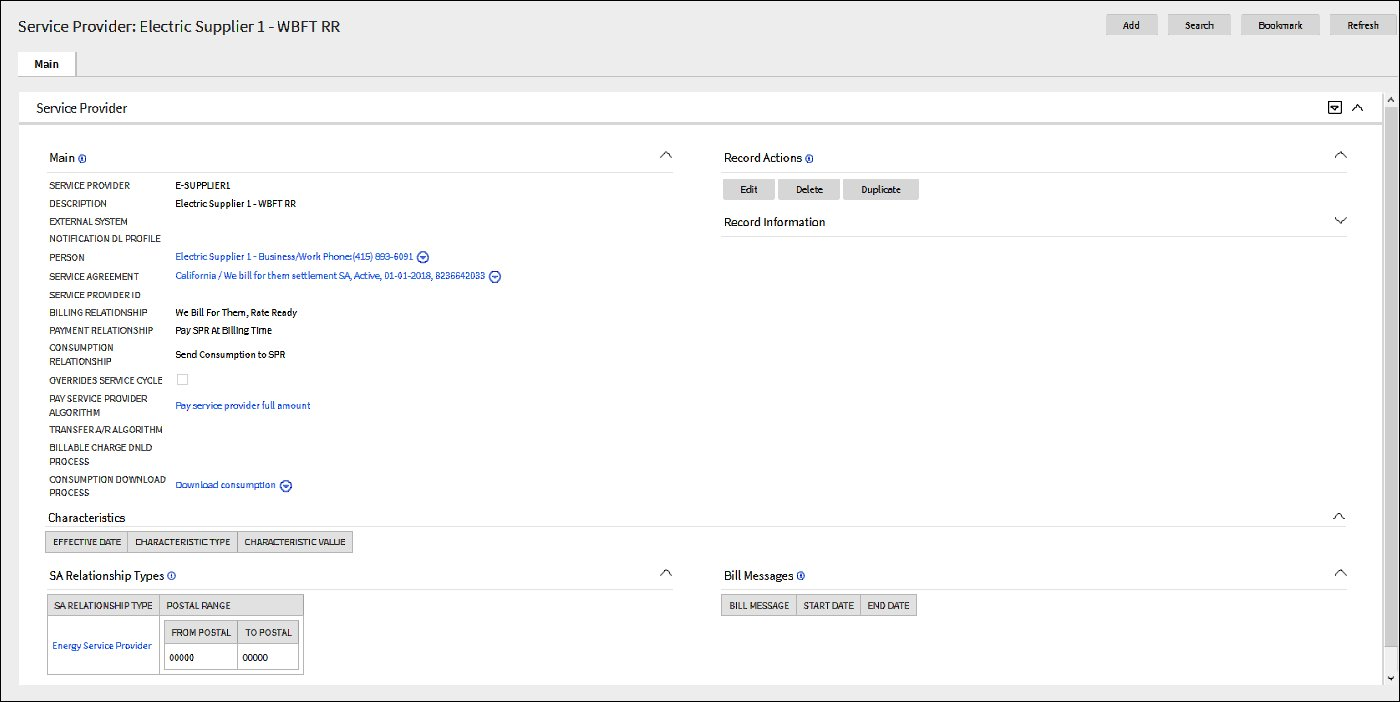
Standardizing the layout of the Service Provider page provides you with a user interface experience that is consistent with other portal-based pages.
Steps to Enable
You don't need to do anything to enable this feature.
New and Updated Customer Data-based Extract Files
The DataConnect extract functionality now includes customer-related, tab-delimited extract files containing the following information;
- Mailing address details of the main person for each account in the file
- Details of service points linked to each service agreement in the file
The Customer Data-based extract file for DataConnect v1+ includes the following changes:
- Exclusion of mailing address details of the account's main person
- Exclusion of service point details linked to a service agreement
- Maximum number of phone numbers to include per account in the extract file is now only three
- Maximum number of email addresses to include per account in the extract file is now only three
The removed mailing address and service point details are now included in dedicated extract files.
Additionally, this release provides the following new batch controls that support data extraction for loading to other on-premises and cloud solutions:
- C1-MADIL (Mail Address Initial Load DataConnect v1+)
- C1-MADTX (Mailing Address Extract DataConnect v1+)
- C1-SSDTX (SA/SP Batch Extract)
The existing C1-CDTIL (Customer Data Initial Load for DataConnect v1+) batch control creates the required service agreement / service point-related synchronization requests, and C1-SSDTX processes the requests for the initial load extract and incremental changes extract.
The DataConnect extract capability allows you to obtain critical information from Oracle Utilities Customer Cloud Service and use the information to accelerate data distribution from Oracle Utilities Customer Cloud Service to other on-premises applications, cloud solutions, or third party vendors.
Steps to Enable
Refer to Defining DataConnect Options in the Oracle Utilities Customer To Meter Administrative User Guide for more information.
Key Resources
CIS Division and Division Synchronization Across Customer and Metering Objects and Entities
In this release, the CIS Division transaction maintains and synchronizes both CIS Division and Division entities, allowing you to define a specific business unit, jurisdiction, or operating company within a large conglomerate of utilities on customer and metering entities. Previously, CIS Division was only specified on customer entities and Division was only specified on metering entities.
Additionally, the system will automatically maintain Division in the background, hide the Division menu item, and hide the User Miscellaneous Information - Edit User Division zone from the User portal.
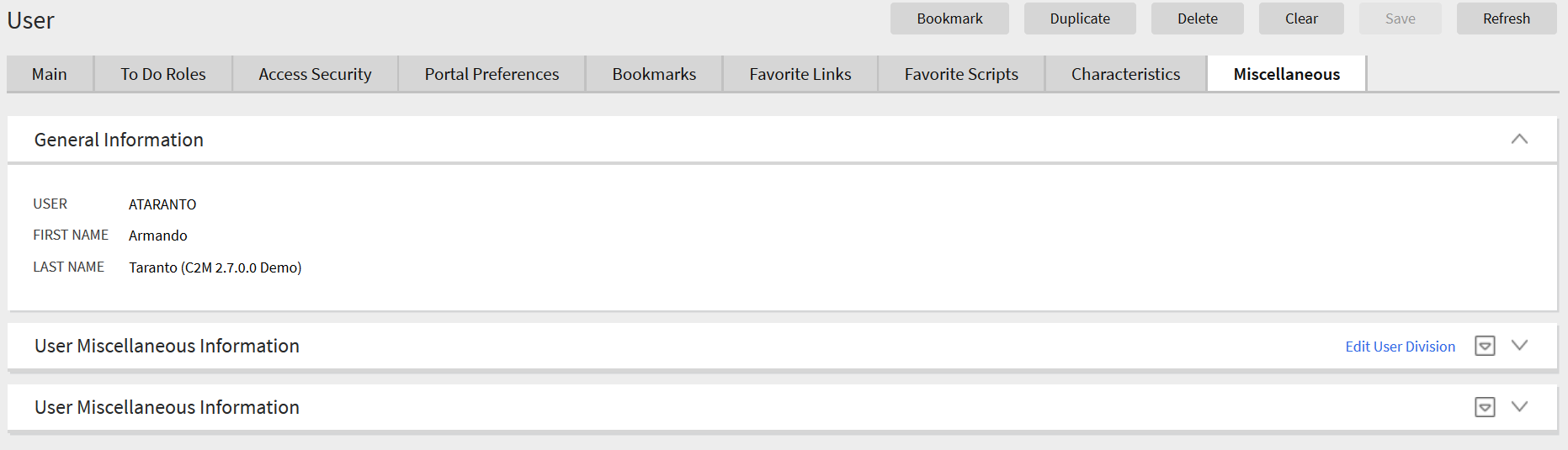
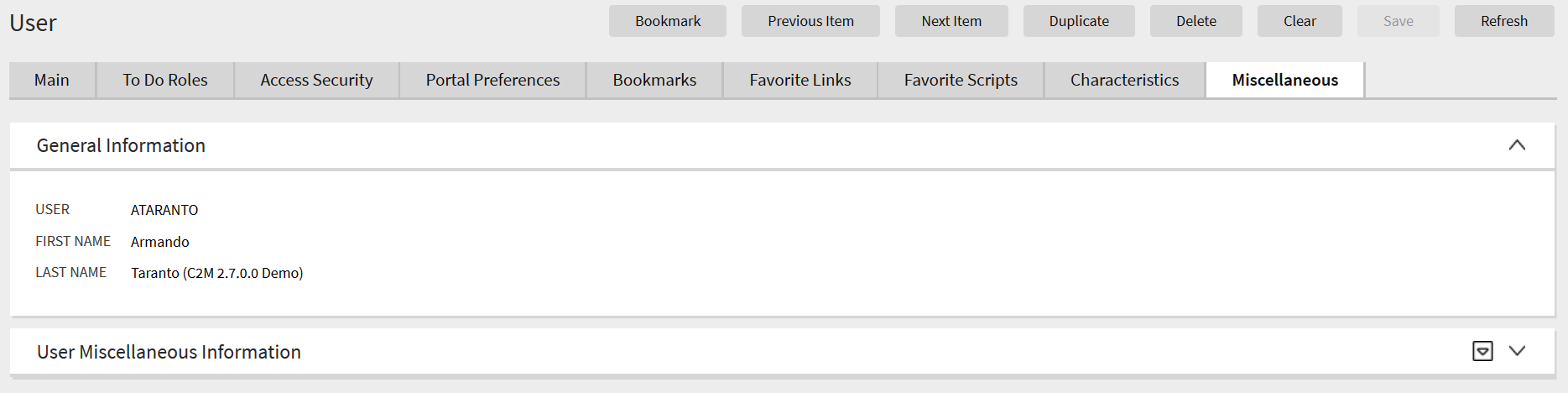
CIS Division and Division synchronization across Customer and Metering entities also enhances the creation and maintenance of the following:
- Service Agreement and corresponding Usage Transaction
- Service Point
- User
Maintaining and synchronizing CIS Division and Division eliminates the need to separately define CIS Division and Division on customer and metering entities.
Steps to Enable
You don't need to do anything to enable this feature.
Tips And Considerations
You can run the X1-PSDPD (Populate SP Division from CCB Premise CIS Division) batch control to populate the Service Point table with application information related to the CIS Divisions of premises.
Digital Self Service Integration
The Web User Summary zone in the Customer Information tab of the Control Central portal allows you to review and manage web users of Oracle Utilities Digital Self Service that are linked to a customer's account. For example, you can provide assistance to a web user attempting to unlink from an account or you can launch Oracle Utilities Digital Self Service in masquerade mode to simulate, troubleshoot, and resolve concerns or problems from the perspective of the customer.
Additionally, you can use the zone to perform the following actions:
- Unlink web users from accounts and remove the associated Account-Person relationships
- Navigate to the Self-Service Task Query portal to select the self-service task you want to view or take further action upon in cases where multiple self-service tasks are open or self-service tasks are in non-final states
- Navigate to the Self-Service Task Display portal to select the self-service task you want to view or take further action upon in cases where one self-service task is open or one self-service task in a non-final state
The Web User Summary zone provides the following information:
- Web users associated with the person in context
- Accounts link to each web user with summary information like the account's current balance
- Lists of web users financially responsible for accounts based on the Account-Person relationship
- Web user's relationship type or role with an account
- Summary of open self-service tasks or self-service tasks in a non-final state for web users and associated accounts
The Web User Summary zone provides you with the ability to review and manage Oracle Utilities Digital Self Service users from within Oracle Utilities Customer Cloud Service.
Steps to Enable
Refer to the Oracle Utilities Digital Self Service documentation for more information.
Oracle Field Service Cloud Integration
Attachment Support for Activities, Devices, and Service Points
You can send pictures, documents, and / or customer signatures linked to an activity from a Field Service Cloud mobile device to create corresponding attachments in Oracle Utilities Customer Cloud Service. Attachments can be linked to the activity, device or service point linked to that activity from the Field Service Cloud mobile device.
Attachments provide additional information about completed field work.
Steps to Enable
Refer to Oracle Utilities Cloud Service Integration to Oracle Field Service Cloud Documentation for more information.
New REST API inbound web services for Account, Person, Service Agreement, Premise, Service Point, Meter, Device, and Installation Event expose the maintenance object schemas and provide the capability to view and manage stored data.
REST API inbound web services for master data entities provide the capability to view and manage stored data.
Steps to Enable
Review the REST service definition in the REST API guides, available from the Oracle Help Center > your apps service area of interest > REST API. If you're new to Oracle's REST services you may want to begin with the Quick Start section.
Tips And Considerations
- The REST web service library requires a new Integration Suite license.
- The REST inbound web service references a service script that requires an Application Service for security purposes.
Role Information
System administrators should grant users submitting the REST service with security access to the application service. System administrator should also set New Inbound Web Services from Inactive to Active.
Initial Measurement Data Header Export
The Initial Measurement Data (IMD) Header Export extracts header information to make IMD IDs available for use in joining other data sets such as VEE Exceptions or measurement data. The IMD Header Export feature generates a .CSV file containing the data.
The IMD Header Export provides the following extract frequencies:
- Daily Current Extract
- Daily Historical Extract
The Daily Current Extract gathers IMD headers within the last 30 days since IMDs are added or changed. This frequency drives the extract using the From Date/Time on the IMD table and further refines the extract with the latest Update Date/Time to only include changes since the last extract.
The Daily Historical Extract gathers IMD headers older than 30 days since IMDs are added or changed. This frequency drives the extract using the General Processing table and is based on change data capture. This extract places a record in the General Processing table if the IMD's From Date/Time is older than 30 days during IMD processing.
The IMD Header Export optimizes data lake storage capacity by only extracting IMD header information.
Steps to Enable
To set up destination location for export results:
- Create a Specialized Data Export Control for the measurement maintenance object.
- Initialize the Export Through Date/Time based on when you will start to export measurements.
- Configure the algorithm parameter Capture Historical Measurement Changes on key algorithms.
- Submit the Specialized Measurement Extract Current and Specialized Measurement Extract Historical to extract measurement data.
Meter Insights Investigation User Interface
The Meter Insights Investigation Viewer portal enables you to view and issue field work based on imported Business Flags from Oracle Utilities Analytics Insights. The portal presents contextual insights along with rich usage, event, and other data available within Oracle Utilities Meter Solution Cloud Service. The portal provides a summary of open investigations wherein you can drill down to a single investigation and review detailed customer information without navigating to a different portal. Additionally, you can perform investigative actions on the portal and complete or send the investigation for field work.
The Meter Insights Investigation Viewer portal supports revenue protection initiatives.
Steps to Enable
To enable this feature:
- Create business flag types using the Service Point Monitor Business Flag Type business object, and the Revenue Protection Insight as the related transaction business object.
- Create a new 360 Event Bar Profile extendable lookup that includes your business flag types as well as other events pertinent to your investigations.
- Create or update an existing To Do Type to plug in the Set Investigation Priority algorithm to the Calculate Priority system event.
- Create a Meter Insight Investigation Type service task type referencing your business flags, extendable lookups, and To Do Type.
See Configuring Meter Insights and Investigations in the Oracle Utilities Meter Solution Administrative User Guide for more information about configuring this feature.
In this release, improvements to the following Meter Data Management objects decrease the number of To Do entries created when the system retries to reprocess failed transactions:
- Initial Measurement Data
- Usage Transactions
- Completion Events
- Activities
- Settlement Transactions
- Device Event
Previously, the retry processes closed outstanding To Do entries associated with errors, recreated To Do entries for the same errors, and skewed To Do Type statistics reporting.
Enhancements to Meter Data Management exception processes reduce storage requirements and increase the accuracy of Oracle Utilities Analytics Visualization's To Do counts.
Steps to Enable
You don't need to do anything to enable this feature.
REST Inbound Web Services for Master Data
In this release, new REST API inbound web services for Service Point, Meter, Device, and Install Events expose the application business object schemas to enable you to view and managed stored data.
The new REST inbound web services for master data reduce project costs and shortens project timelines.
Steps to Enable
Review the REST service definition in the REST API guides, available from the Oracle Help Center > your apps service area of interest > REST API. If you're new to Oracle's REST services you may want to begin with the Quick Start section.
Tips And Considerations
- The REST services in the Integration Suite APIs Web Service Categories require Integration Suite add-on product options.
- The REST inbound web service references a service script that requires an Application Service for security purposes.
Role Information
System administrators should grant users submitting the REST service with security access to the application service. System administrator should also set New Inbound Web Services from Inactive to Active.
You can now attach pictures, documents, and videos as proofs for completed field work activities using new zones in the Device, Service Point, and Field Activity portals. You can affix attachments with .JPG, .TXT, .DOC, .PDF, .MPEG, and .CSV file formats. Additionally, this release adds a new completion event for creating and linking an attachment to a device, service point, and field activity, and updates the Field Activity Inbound Communication Payload schema to include a placeholder for attachments received from the field work application.
Attachments for completed field work provide justification when levying charges on a customer.
Steps to Enable
You don't need to do anything to enable this feature.
Tips And Considerations
Use D1-AttachmentCreation (Create Attachment) completion event business object to configure completion events on field task types, if applicable.
Limit Field Work by Service Point Type
You can now configure Service Point Types with applicable Field Task Types to shorten the list of available Field Task Types when creating field activities manually.
Saves time in manually creating a field activity for utilities with multi-service offerings and only a subset of applicable field task types for a service point type.
Steps to Enable
You don't need to do anything to enable this feature.
Tips And Considerations
You can use the D1-SPFTT (Populate SP Type Field Task Type Table) batch job to populate existing service point types' valid field task types from existing field activities.
Enable Field Task Type by Service Point Type in Activity Orchestration
Activity orchestration algorithms that determine the field task type based on the service point or device condition now include Service Point Type as one of the criteria to determine the field task. Additionally, this release provides the following updates to Activity Type maintenance and administration:
- The Activity Type maintenance object includes a child table that stores existing Service Point, Device, and Service Point Type criteria.
- The Activity Type portal displays the Field Task By Device Condition and/or Field Task By Service Point Condition zones when the activity type is an orchestrator.
Maintenance of service point and device condition values currently configured as mnemonic values in algorithm parameters can be performed through a user-friendly portal.
Steps to Enable
Run the D1-PopAcTFTT (Populate Activity Type Field Task Type Table with Orchestration Algorithm Parameter Values) BPA script select the appropriate Orchestration Type to populate the Activity Type parameter values.
Support Activity Type Mapping in Inbound Field Activity Sync Request
In this release, inbound field activity synchronization requests can directly map orchestration an activity type to an external application's or Oracle Utilities Customer Cloud Service's Field Activity Type and its external Activity Type ID. The mapping option between Oracle Utilities Customer Cloud Service's Field Activity Type and Oracle Utilities Meter Solution Cloud Service's Activity Type enables many-to-many relationship between the two objects. Previously, only one Service Order Management orchestration type could be mapped to Oracle Utilities Customer Cloud Service's Field Activity Type, which resulted in issues if Oracle Utilities Customer Cloud Service had another Field Activity Type that needed to be mapped to another instance of the Enable Service Orchestration of Oracle Utilities Meter Solution Cloud Service.
Activity Type mapping in inbound field activity synchronization request provides flexibility to Service Order Management implementations with customized Orchestrator and Activity Type business objects.
Steps to Enable
For implementations with only one Customer Cloud Service Field Activity Type (orchestrator) mapped to the orchestration type of the base orchestration business object-type business object pair, map the Customer Cloud Service's Field Activity type to the Meter Solution Cloud Service's external Activity Type ID.
For implementations with custom orchestration business object-type business object pair, and orchestration types of the base and custom business object mapped to two different Customer Cloud Service Field Activity Types:
- Create the mapping values in the FA_Type_CD extendable lookup in Customer Cloud Service.
- Configure the Customer Cloud Service's Field Activity Type, external Activity Type ID (Meter Solution Cloud Service value), and Meter Solution Cloud Service's Orchestration Activity Type
Data Security by Owning Organization
Data security relies on the entity's association with an Owning Organization wherein only users with access to the Owning Organization can access the entity. The user's association with an Owning Organization is through the access groups configured on the data access roles of the user's profile.
In this release, data access restriction is always set to restricted regardless of the usage status of the Owning Organization search filters. Previously, enforcement of data security by the Owning Organization was optional, enabling data security by Owning Organization that required several configuration steps, and data access restriction based on Owning Organization search filters.
With the new restricted data security, you can directly secure an entity by populating its Owning Organization attribute or indirectly secure the entity by associating it with another entity that is directly secured to an Owning Organization. For example, you can directly secure the Work Order entity by populating its Owning Organization attribute and its secure indirectly all its activities by associating these with the Work Order. You can also not secure other entities. For example, operation and technical entities not used by business users should not be set to always restricted but rather the system administrator should review all the data unfiltered by Owning Organization to properly address issues and exceptions.
The following business entities directly support security by Owning Organization:
- Asset
- Location - includes all classes of locations stored in the Node maintenance object such as asset locations, storerooms, and so on
- Purchase Order Header
- Purchase Requisition Header
- Template Work Order
- Work Design
- Work Location
- Work Order
- Work Request
The Work Activity business entity indirectly supports security by Owning Organization through Work Order association.
The following administration entities directly support security by Owning Organization:
- Activity Type
- Asset Type
- Business Unit
- Checklist Type
- Cost Adjustment Type
- Cost Center
- Distribution Code
- Labor Earning Type
- Location Type. - includes all classes of location types stored in the Node Type maintenance object such as asset location types, storeroom types, and so on
- Question
- Specification
- Service Category
- Service Class
- Service Code
- Service History Type
- Work Category
- Work Class
Data Security By Owning Organization ensures that business users can only access data associated with organizations to which they have been granted access.
Steps to Enable
To enable this feature:
- Set up user configuration.
- For upgrading implementations, identify primary tables with incorrect Owning Organization values and correct these online or with a custom plugin-driven batch process.
- Run the Apply Access Group VPD Policy batch process.
To set up user configuration:
- Configure access groups and roles to fulfill your business requirements. Define a global access group and link this to all access roles if you are sharing several entities across all owning organizations.
- Configure each online user with a default access group and link the user to valid access roles.
- Do not configure batch and integration users with default access groups but link these to valid access roles.
Tips And Considerations
For upgrading implementations, ensure the Owning Organization field has the correct value for existing records in the primary tables of directly supported maintenance objects. Depending on the volume of each table and number of records with incorrect Owning Organization values, you can update the incorrect values online or use a custom plugin-driven batch process.
Key Resources
Role Information
System administrators should have access to the W1APLVPD Application Service in order to enable this feature through the Apply Access Group VPD Policy batch process.
Mass Asset Disposition Update by Batch
The Change Disposition in Batch button in the Mass Asset Disposition Update portal allows you to perform disposition updates on a large number of assets through a batch job.
This feature allows updating a large number of assets with a click of a single button.
Steps to Enable
You don't need to do anything to enable this feature.
Time Zone Support on Location Objects
Several Location-related objects like asset location, work location, out of service location, and storeroom now include a Time Zone field. The system derives the time zone for new a location from the user's profile but if a time zone is not specified on the user's profile, the system uses the time zone defined on Installation Options. The system can also derive the time zone from the location of the activity and send this as part of the activity message sent to an external system.
The Time Zone field supports time-sensitive processes on systems that use locations with different time zones.
Steps to Enable
You don't need to do anything to enable this feature.
You can use rich prebuilt analytical data models, metrics, and key performance indicators in Analytics Visualization. You can use Analytics Visualization to create your own calculations, visualizations, and filters to analyze the data exposed by the prebuilt data models.
Device event data on maps allows you to answer the questions such as the following:
- What areas have leak events?
- Where are the most theft events occurring?
- What geographical areas have the most device communication failures?
- What geographical areas have the most device diagnostic failures?
Device Event Map Views provides the capability to review high-level geographic and detailed street views.
Steps to Enable
You don't need to do anything to enable this feature.
Key Resources
Device commands on maps allow you to answer the questions such as the following:
- What commands are failing in particular areas?
- What are the customers with pending commands?
Device Event Map Views provides the capability to review high-level geographic and detailed street views.
Steps to Enable
You don't need to do anything to enable this feature.
Key Resources
Service Orders and Field Work Map Views
Service order and field work activities on maps allow you to answer the questions such as the following:
- Where are the customers with open service orders?
- Where are the water leak service investigative orders?
- Where are the customers with outstanding field work?
Service Order and Field Work Map Views provides the capability to review high-level geographic and detailed street views.
Steps to Enable
You don't need to do anything to enable this feature.
Key Resources
Utilities Application Framework
The Access Group page has been converted to a portal, leveraging a more flexible and extendable user interface metaphor.
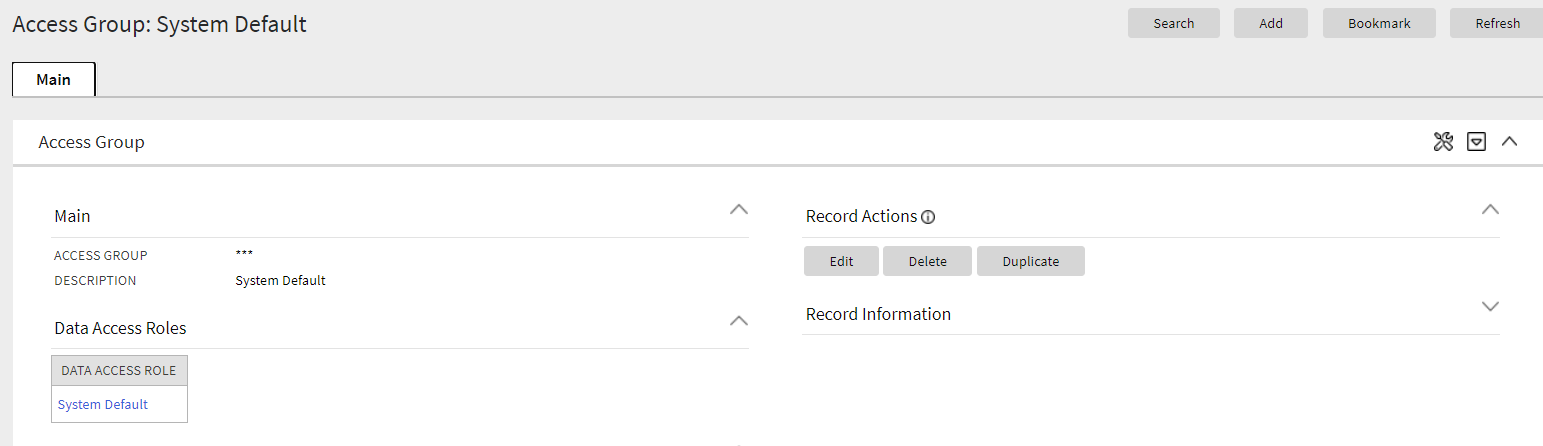
Converting the Access Group page to a portal provides you with a user interface experience that is consistent with other portal-based features or modules.
Steps to Enable
You don't need to do anything to enable this feature.
Tips And Considerations
Upgrade scripts ensure that users with Read access to the existing application service will have access to the new application service associated with the new portal. This table lists the existing and new application services.
| Object | New Application Service | Access Added to Any User Groups With This Application Service/Read Access |
|---|---|---|
| Access Group Query Portal | F1ACGRPQ | CILTASGP |
| Access Group Portal | F1ACGRPM | CILTASGP |
An upgrade script is provided to update the Access Group's FK Reference (F1-ACCGP) with the new query zone (F1-ACCGRPQ).
Note that any existing bookmarks for this page will take the user to the old page. You need to take the following actions to move the bookmark to the new page:
- Click the bookmark. Take note of the Access Group.
- Navigate to the Access Group page.
- Search and select the Access Group from your bookmark. This takes you to the new page.
- Delete the existing bookmark from the Dashboard's Bookmark zone.
- Click the Bookmark page action button to add a bookmark for this record for the new page.
The Application Service page has been converted to a portal, leveraging a more flexible and extendable user interface metaphor.
As part of this change, the Secured Objects zone has been moved to the Main tab from the Application Security tab. The Application Security tab continues to have the zones showing the user groups with and without access.
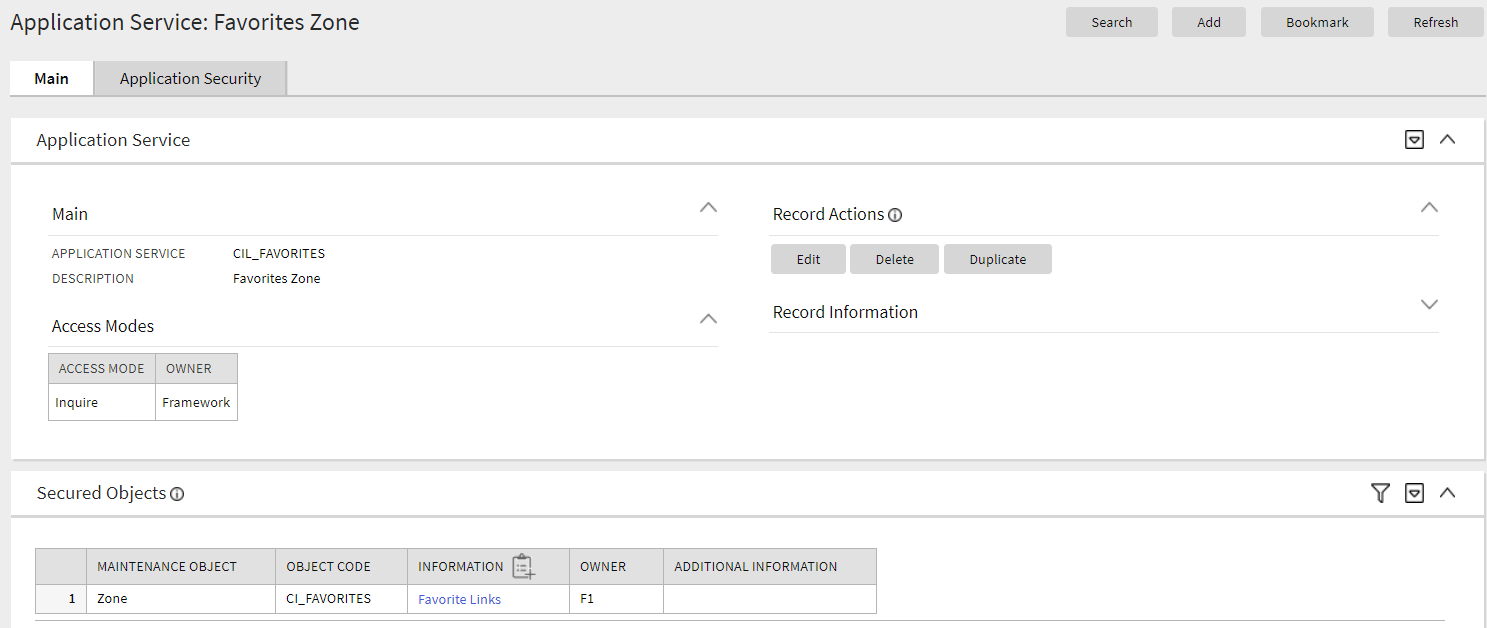
Converting the Application Service page to a portal provides you with a user interface experience that is consistent with other portal-based features or modules.
Steps to Enable
You don't need to do anything to enable this feature.
Tips And Considerations
Upgrade scripts ensure that users with Read access to the existing application service will have access to the new application service associated with the new portal. This table lists the existing and new application services.
| Object |
New Application Service |
Access Added to Any User Groups With This Application Service/Read Access |
|---|---|---|
| Application Service Query Portal |
F1APPSVQ |
CILTAPSP |
| Application Service Portal |
F1APPSVM |
CILTAPSP |
Note that any existing bookmarks for this page will take the user to the old page. You need to take the following actions to move the bookmark to the new page:
- Click the bookmark. Take note of the Application Service.
- Navigate to the Application Service page.
- Search and select the Application Sercice from your bookmark. This takes you to the new page.
- Delete the existing bookmark from the Dashboard's Bookmark zone.
- Click the Bookmark page action button to add a bookmark for this record for the new page.
The Zone page has been converted to a portal, leveraging a more flexible and extendable user interface metaphor.
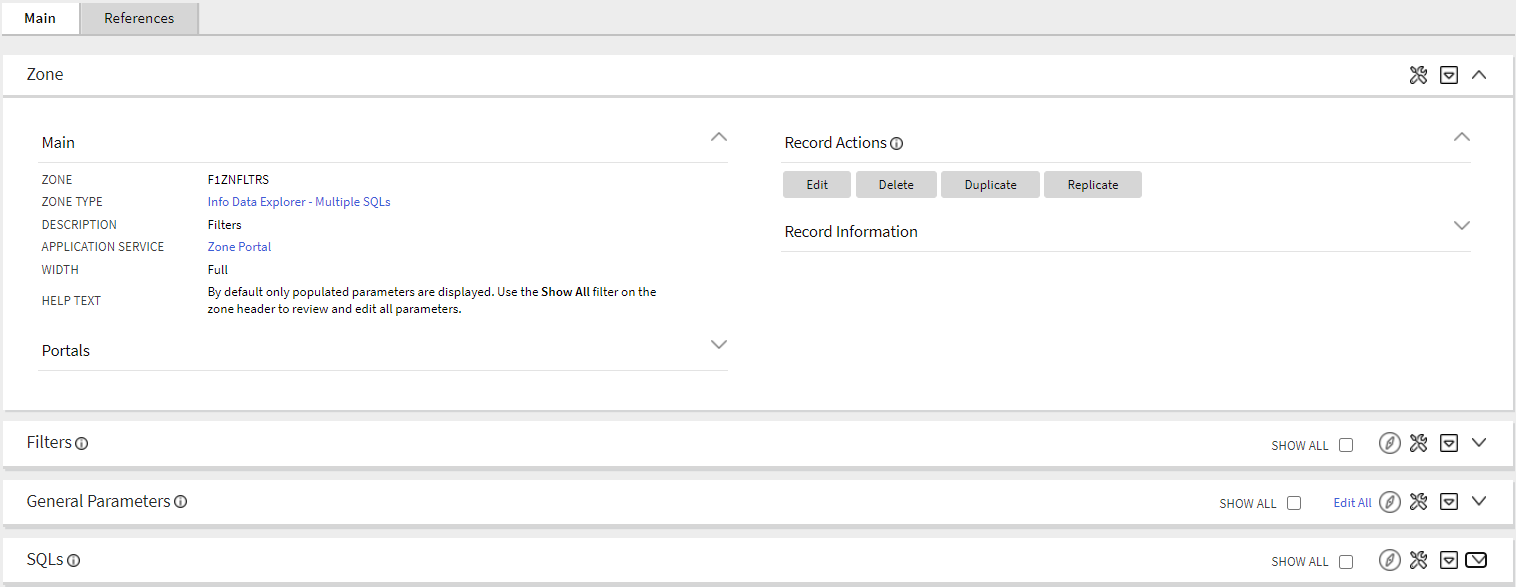
The following highlights key changes to how a zone is maintained:
- The zone's portal links are now viewed and maintained on the main tab.
- To support easier viewing and maintenance, the data explorer zone parameters are shown in three separate groups: Filters, General Parameters, and SQLs. The SQLs zone supports editing of the SQL and its related parameters, including column definitions. In addition, the SQLs zone supports broadcasting to view the related parameters, where each can be edited individually. When editing a Column parameter, the maintenance window has been streamlined by mapping the various mnemonics to separate fields with appropriate labels and search capability for foreign key references.
- A Replicate action has added to the Record Actions section of the new user interface. In the previous zone page, the Replicate action was found in a special Replicate Zone dashboard zone.
- A References tab has been added to quickly show where the zone is referenced throughout the system. The zone in this portal looks for references to the zone in other metadata, such as scripts, business objects, foreign key references, and shows links to the referencing objects.
Converting the Zone page to a portal provides you with a user interface experience that is consistent with other portal-based features or modules.
Steps to Enable
You don't need to do anything to enable this feature.
Tips And Considerations
Upgrade scripts ensure that users with Read access to the existing application service will have access to the new application service associated with the new portal. This table lists the existing and new application services.
| Object | New Application Service | Access Added to Any User Groups With This Application Service/Read Access |
|---|---|---|
| Zone Portal | F1ZONE | CILZZONP |
Note that any existing bookmarks for this page will take the user to the old page. You need to take the following actions to move the bookmark to the new page:
- Click the bookmark. Take note of the Zone.
- Navigate to the Zone page via the menu.
- Search for and select the Zone from your bookmark. This takes you to the new page.
- Delete the existing bookmark from the Bookmark dashboard zone.
- Click the Bookmark page action button to add a bookmark for this record for the new page.
Key Resources
The Portal page has been converted to a portal, leveraging a more flexible and extendable user interface metaphor. More specifically, the new portal provides easier access to other tab portals and context sensitive zones associated with a standalone portal.
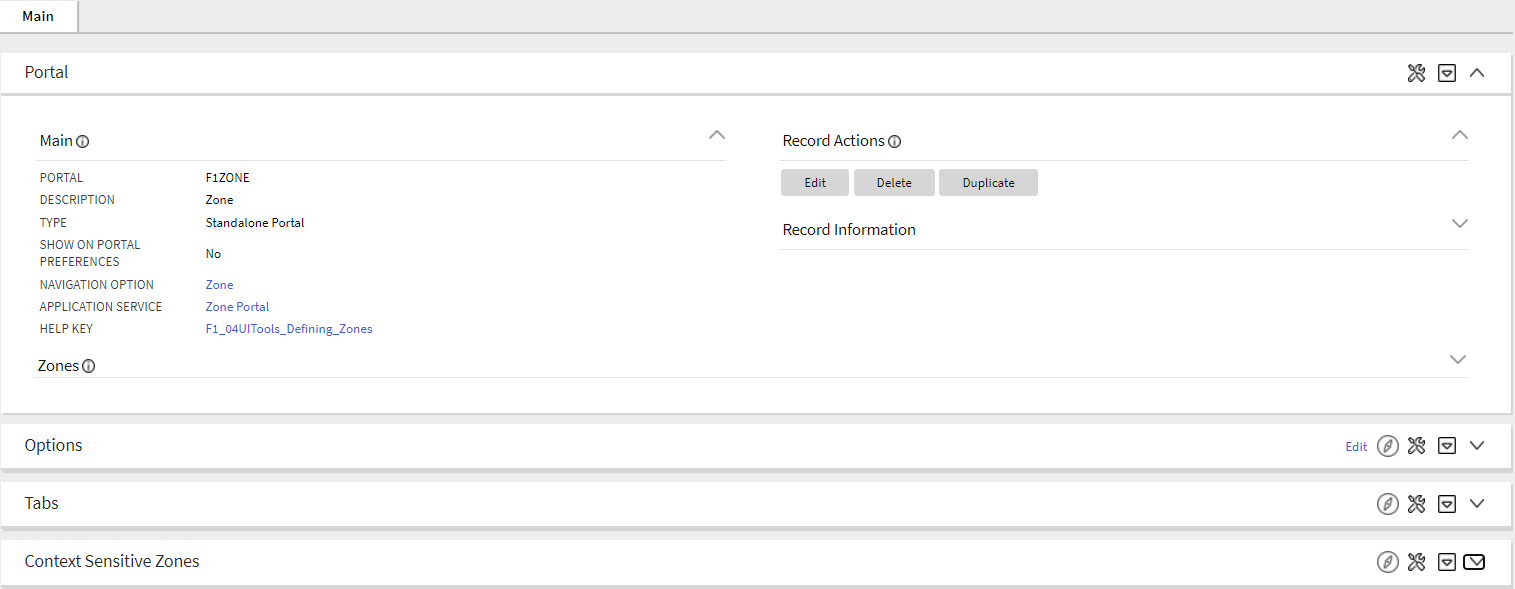
Converting the Portal page to a portal provides you with a user interface experience that is consistent with other portal-based features or modules.
Steps to Enable
You don't need to do anything to enable this feature.
Tips And Considerations
Upgrade scripts ensure that users with Read access to the existing application service will have access to the new application service associated with the new portal. This table lists the existing and new application services.
| Object | New Application Service | Access Added to Any User Groups With This Application Service/Read Access |
|---|---|---|
| Portal | F1PRTL | CILZPORP |
An upgrade script is provided to update the Portal's FK Reference (F1-PORTL) with the portal query zone (F1-PRTLSRCH).
Note that any existing bookmarks for this page will take the user to the old page. You need to take the following actions to move the bookmark to the new page:
- Click the bookmark. Take note of the Portal code.
- Navigate to the Portal page via the menu.
- Search for and select the Portal from your bookmark. This takes you to the new page.
- Delete the existing bookmark from the Bookmark dashboard zone.
- Click the Bookmark page action button to add a bookmark for this record for the new page.
The Characteristic Type page has been converted to a portal, leveraging a more flexible and extendable user interface metaphor.
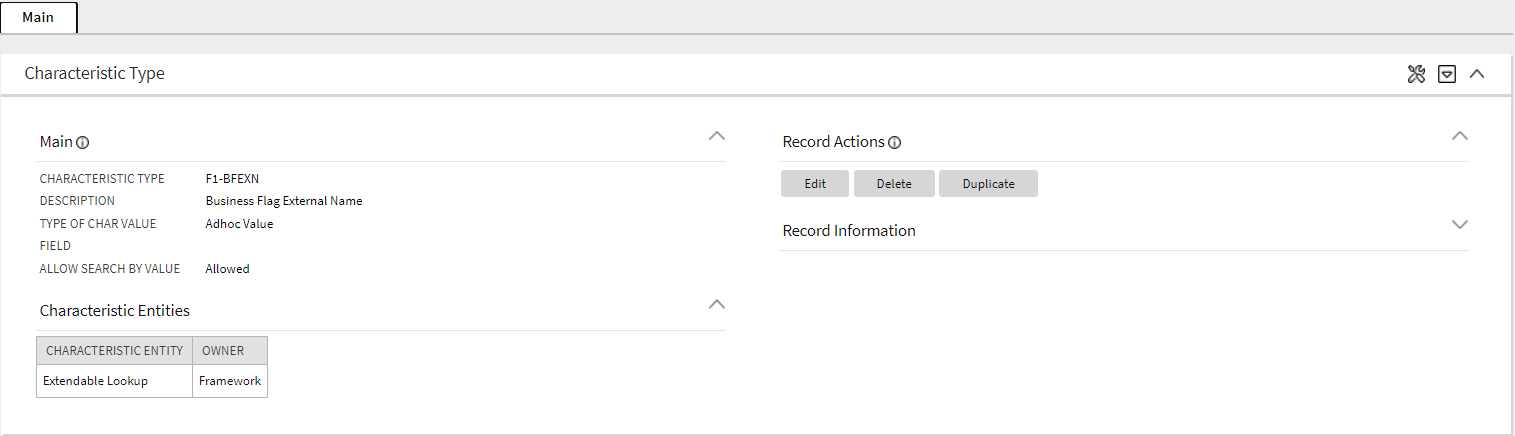
Converting the Characteristic Type page to a portal provides you with a user interface experience that is consistent with other portal-based features or modules.
Steps to Enable
You don't need to do anything to enable this feature.
Tips And Considerations
Upgrade scripts ensure that users with Read access to the existing application service will have access to the new application service associated with the new portal. This table lists the existing and new application services.
| Object | New Application Service | Access Added to Any User Groups With This Application Service/Read Access |
|---|---|---|
| Characteristic Type Portal | F1CHRTYP | CILTCHTP |
Note that any existing bookmarks for this page will take the user to the old page. You need to take the following actions to move the bookmark to the new page:
- Click the bookmark. Take note of the Characteristic Type code.
- Navigate to the Characteristic Type page via the menu.
- Search for and select the Characteristic Type from your bookmark. This takes you to the new page.
- Delete the existing bookmark from the Bookmark dashboard zone.
- Click the Bookmark page action button to add a bookmark for this record for the new page.
This feature increases the size of the following parameters to Varchar2 (32767) to provide more space for defining complex SQL statements to be used by zones or by the Select Records algorithm of a plugin-driven batch program:
- ZONE_PARM_VAL: Parameter Value on the Zone Parameters table (CI_ZONE_PRM).
- ALG_PARM_VAL: Value on the Algorithm Parameters table (CI_ALG_PARM).
The increased parameter size provides more space for defining complex SQL statements for data explorer zones and Select Record algorithms.
Steps to Enable
You don't need to do anything to enable this feature.
User Redirection to Separate Target System
Your implementation may want to support the ability for a customer to authorize a customer service representative (CSR) to view the customer's account information in a customer facing portal. This would allow the CSR see exactly what the end customer is seeing or experiencing.
When the request for the CSR to view the customer information is received, the following steps occur:
- The security server for the customer facing portal is contacted to obtain a temporary grant code.
- The redirection response returns the grant code and the URL of the target customer facing portal.
- The browser redirects to the user to this URL with the grant code which is further authenticated and automatically exchanged for an authorization token, allowing the CSR to log in.
Standard security measures with private/public key encryption using JSON Web Tokens (JWT) ensure that only the implementation's application is allowed to communicate with the implementation's customer facing portal server. The system also provides a plug-in spot to allow for additional information, such as the customer's name and email address, to be included in the call to the security server.
This feature allows customers to authorize a customer service representative (CSR) to view the customer's account information in a customer facing portal and enable the CSR to see exactly what the end customer is seeing or experiencing.
Steps to Enable
Add a master configuration record using the F1-RedirectionTargetsConfig business object and configure the record with the following:
- URL of the target application
- URL of the security server
- Keystore alias for the public / private key stored in the application keystore used for secure communication with the security endpoint
Your product may also provide an algorithm to populate additional context information. If so, that algorithm may also be referenced in this configuration.
Tips And Considerations
Note that this feature works in conjunction with functionality provided by Oracle Utilities Customer to Meter.
Role Information
System administrators should grant access to the F1-REDIRECT (Redirect Service) Application Service to secure the call to this feature.
New REST Engine Version Setting for Inbound REST Web Services
In this release, a new REST Engine Version flag has been added to REST Inbound Web Services. All existing REST Inbound Web Services are marked with a REST Engine Version value of 1.0 for backward compatibility and all new services are assigned version 2.0 as a default. The subsequent sections provide details of how the behavior will differ for each engine version.
ROOT NODE FOR PAYLOAD
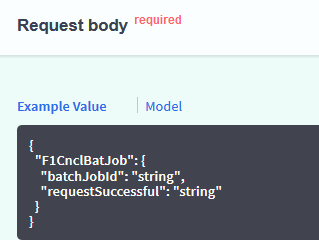
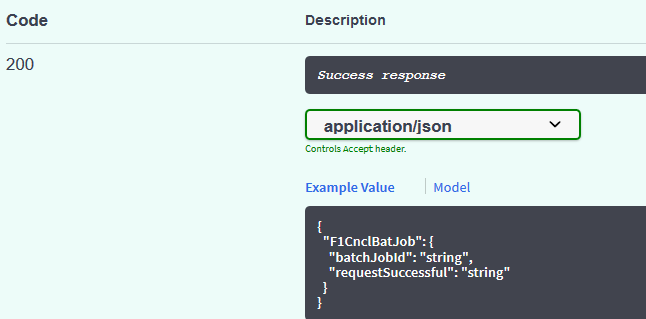
REST Inbound Web Service records with a REST Engine Version value of 2.0 do not have a root node around the payload. The following is an example from the Open API specification for a REST Inbound Web Service that is marked as version 2.0.
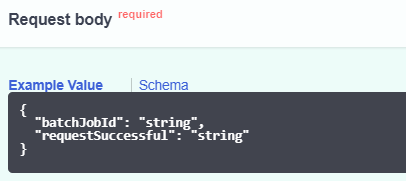
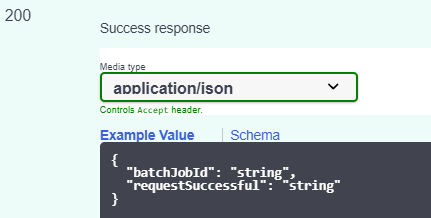
Although the common practice for data that uses JSON is to not include a root node, previously a root node was expected. For backward compatibility reasons, any REST Inbound Web Service records marked as version 1.0 should continue to supply a root node in the request, and responses will continue to return the root node. The following is an example from the Open API specification for a REST Inbound Web Service that is marked as version 1.0.
DEFAULT FORMAT
REST Inbound Web Service records with a REST Engine Version value of 2.0 default to JSON format. If required, this can be overridden by including the 'application/xml' parameter in the Accept header. REST Inbound Web Service records with a REST Engine Version value of 1.0 default to XML format. This is for backward compatibility. If needed, this can be overridden by including the 'application/json' parameter in the Accept header.
FORMAT FOR NUMBERS AND BOOLEANS IN THE RESPONSE
In this release, JSON format returns strings with the value surrounded by quotes while numbers and Booleans do not have quotes. Previously, the system was incorrectly treating numbers and Booleans as strings in the response in JSON format.
BACKWARD CAPABILITY
For Inbound Web Service records marked as REST Engine Version 1.0, the system provides override support to indicate that for specific Inbound Web Service records you would like to continue to receive quotes for numbers and Booleans in the JSON response. This is only applicable if your implementation has existing integrations that have worked around this issue and would fail if the response returns the corrected format. A feature configuration is provided to identify the Inbound Web Service records that fall into this category.
An explicit REST Engine Version setting helps customers account for functional differences between versions when implementing Inbound Web Services.
Steps to Enable
You don't need to do anything to enable this feature.
Tips And Considerations
If your implementation has integrations that have worked around the issue that numbers and Booleans were treated as strings and therefore had quotes in the JSON response, do the following to identify the Inbound Web Service records that should retain the old, incorrect format:
- Select Admin, then General, then Feature Configuration.
- Look for an existing feature configuration with the feature type External Messages. If one does not exist, create one.
- Add an option for the option type IWS JSON Data Type Exceptions.
- In the value, indicate the Inbound Web Service record that is an exception. Note that multiple options for the option type may be added. Additionally, the option value supports a comma delimited list. The following screen shot highlights using a comma delimited list but also using a second option due to space:

JSON Response Correctly Handles Arrays
The REST response correctly returns lists as arrays for JSON format regardless of the number of instances.
Previously, if a list included only one instance, the JSON response returned the single instance as a JSON object rather than a JSON array. If a list included more than one instance, the JSON response returned an array.
Steps to Enable
You don't need to do anything to enable this feature.
Assign To Do Role Based on Access Group
In this release, the Access Group has been enhanced to include To Do Assignment Override configuration. This allows you to define special To Do Roles that you have created for your access groups and use the Assignment Override to indicate which To Do Types should have the To Do entry directed to the special To Do Role. The To Do entry functionality is heavily driven by To Do Role. Users are only allowed to view and work To Do entries that are assigned to a role that a user is in. If your implementation has configured row level security for certain objects using an Access Group, you may want to ensure that only certain users can view To Do entries for those objects.
Defining special To Do Roles for access groups ensure that only certain users can view To Do entries for objects linked to the access groups.
Steps to Enable
When configuring the To Do Roles, determine if To Do entries for objects linked to certain access groups should be directed to specific groups of users.
- Define appropriate To Do Roles based on your To Do Types and your access groups, and link the appropriate users to each role.
- For each To Do Role, configure the To Do Types to which the role is valid.
- On each access group, configure the To Do Type/To Do Role override so that any To Do entry created for the indicated To Do Type will be assigned the indicated To Do Role for objects linked to this access group.
Configure the appropriate To Do pre-creation algorithm. A To Do pre-creation algorithm is needed to check for this override configuration and assign the appropriate role. This algorithm could be plugged in at the To Do Type (if only certain To Do Types require this functionality) or could be plugged in at the Installation level (if a larger number of To Do Types require this type of override). The algorithm needs to identify the object related to the To Do entry that is governed by an Access Group. This object may be the Drill Key or may be related to the To Do Entry via a characteristic. Once the object is identified, the algorithm determines its access group and then checks if there is an override role for the To Do Type for this To Do entry.
Specific cloud services may already provide a To Do pre-creation algorithm to assign a To Do Role based on an identified access group. If one is provided and satisfies your business use case, use that algorithm. Otherwise, an appropriate algorithm needs to be determined.
Key Resources
Support Cancellation of In Progress Batch Job Submission
In this release, you can request to cancel a batch job submission record for a job that is in progress. Previously, you could only cancel a pending batch job submission. The following points highlight additional information regarding this feature:
- The new Pending Cancel status allows you to cancel a Pending or Started batch job submission record. The status transitions to Pending Cancel. This is a signal to the batch processor. For pending jobs, it removes the job from the queue. For in progress jobs, it discontinues the processing. Once the batch processor confirms that all the work or pending work is canceled, it updates the status of the batch job submission record to Canceled.
- In this release, batch job submission records will only transition to Ended if the batch run completed. Previously, when you cancelled a Pending batch job submission record, the status would be changed to Canceled and then once the batch processor removed the job from the queue, the status would be updated to Ended.
- Batch jobs that were initiated by the DBMS scheduler do not support this functionality. An existing business service may be used to cancel a DBMS job.
- The new Cancel operation of the F1-SubmitJob Inbound REST Web Service allows an implementation to request the cancellation of a job from an external system.
You can now cancel a batch job submission record with an In Progress or Pending status.
Steps to Enable
You don't need to do anything to enable this feature.
The Batch Category flag has been enhanced to add two additional values: Upload and Upgrade.
- Upload may be used to categorize batch controls that are responsible for uploading data.
- Upgrade may be used to categorize batch controls that are responsible for upgrading some set of data based on other data.
The new Batch Category options allows you to categorize batch controls used for uploading and upgrading data.
Steps to Enable
You don't need to do anything to enable this feature.
Tips And Considerations
Note that for batch controls delivered with the base package, the Batch Category field should have a base value defined. This value can be overridden by an implementation. For upgrading clients, existing batch controls are not updated to use the new categories. For example, if there are existing batch controls that upload data but were originally delivered with a 'Process What's Ready' category, your data will remain with the "Process What's Ready" category.
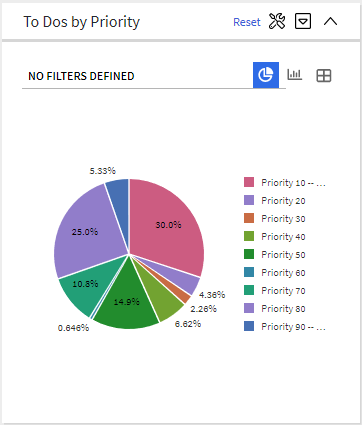
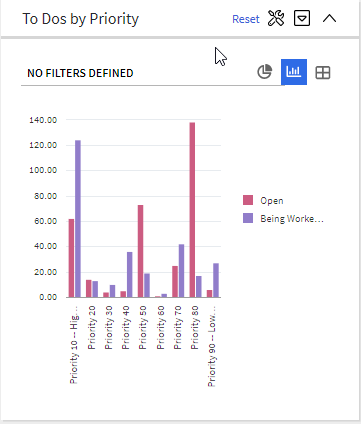
Info Data Explorer - Single SQL and Info Data Explorer - Multiple SQLs zones now include five data visualization option parameters that may be configured to show the zone data in one or more graphical formats. Option types of Grid, Chart and Map are supported. If a zone defines visualization options, the data explorer will provide icon buttons to toggle between the various views. These buttons are presented in the same order they are defined in the parameter list. Note that if more than one visualization option is present, one option must be of type Grid, allowing for a maximum of four graphical options. The graphs support broadcasting of values from the chart to other zones as filters.
The following are examples of a To Do summary zone with graphs.
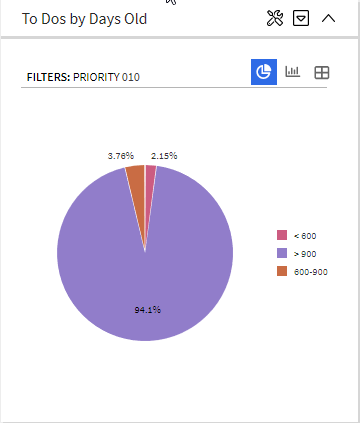
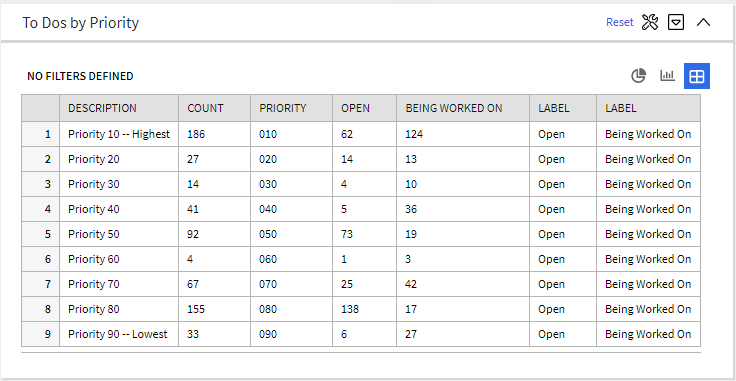
The new data visualization option parameters provide various graphical formats to present zone data.
Steps to Enable
You don't need to do anything to enable this feature.
Key Resources
The Action Method feature provides edge products and implementations the ability to define an object that captures configuration for determining a value, such as an administrative code or an algorithm, based on criteria. For example, the appropriate customer service request type to use for starting service for a customer can be determined based on the account's customer class and the CIS division.
Each use case that takes advantage of this functionality is defined using an Action Method Role, defined via an extendable lookup. In the above example, there is an action method role for Start Service. Each Action Method Role value defines one and only one Action Method record, which is where the criteria is defined along with the values determined by the criteria. In the above example, the Action Method for the Start Service action method role provides configuration for indicating the Customer Service Request Type based on a combination of CIS Division and Customer Class. The action method's business object defines a special algorithm plug-in spot called "Retrieve Action Method Details". The algorithm receives the criteria and returns the details as per the use case. In the above example, the caller would provide the CIS Division and Customer Class, and the algorithm would use that information to return the correct Customer Service Request Type.
The framework provides several components to help your product or your implementation to define its use cases. Your specific product may provide some functionality that uses the Action Method.
The Action Method feature enables implementations to define an object that captures configuration for determining a value.
Steps to Enable
Your implementation must define the appropriate action method records if your product supports one or more action method roles:
- Select Admin, select System, then select Action Method in Add mode. If your product provides more than one action method business object, select the appropriate business object for the use case.
- Identify the appropriate Action Method Role and fill in the details appropriate for your implementation's business requirements.
NOTE: The type of details defined here are dependent on the specific use case. Refer to your product's documentation for more information.
You can design your own action method functionality:
- If your implementation has use cases that require or would benefit from an action method and your cloud service does not already define an Action Method Role
- If your business requirements differ from the supplied functionality
Key Resources
- Refer to Action Method in the Configuration Tools section in the online help for more information.
Enforce Data Type with Ad-Hoc Characteristics
An "ad-hoc" characteristic type may now be explicitly associated with an MD field to enforce data type validation. When characteristics of this type are captured, the system ensures that the entered value complies with the data type of the MD field if specified on the characteristic type record. This validation is performed in addition to existing validation methods such as using a validation algorithm on the characteristic type record or associating a flattened characteristic with an MD field as part of a business object schema.
The system ensures that the captured "ad-hoc" characteristic type complies with with the data type of the MD field.
Steps to Enable
You don't need to do anything to enable this feature.
Tips And Considerations
When associating an existing "ad-hoc" characteristic type with an MD field, make sure existing data complies with the MD field's data type to avoid errors at update time.
Additional SQL Functions Supported
The following functions have been added to the SQL Allowlist:
- CAST
- EXTRACT
- GREATEST
- LEAST
- NUMTODSINTERVAL
In addition, support is provided for the WITH clause, the AT TIME ZONE clause, hierarchical queries, CASE Expressions and Datetime data types.
Steps to Enable
You don't need to do anything to enable this feature.
Content Migration Assistant (CMA)
Test Data Migration and Other Improvements
Various enhancements were made to the Content Migration Assistant tool (formerly known as Configuration Migration Assistant) to better handle migration of selected business entities for testing or other purposes. As such its name has been slightly changed to emphasize that it can be used to migrate any type of content, not just configuration data.
The following points highlight key export related improvements and changes:
- An Entity Summary zone listing how many entities were exported by maintenance object is shown on the Migration Data Set Export portal.
- A new Collect Entity dashboard zone is available to provide an easier way to collect entities to export onto an "Entity List" type of migration request. The zone appears on the dashboard once a migration request is in context, allowing the user to add any entity to the request list while reviewing information on the entity's maintenance portal.
- Entities specified using their prime keys on a Criteria-based migration request are listed in a zone to allow easy navigation to these entities.
- Search by a data set identifier is now supported.
The following points highlight key import related improvements and changes:
- The performance of the Apply Objects batch process is significantly improved when migrating master and transaction entities. This is mainly achieved using a new extendable lookup that guides the tool in processing objects in the order that better reflects their referential dependency on other entities, thus reducing significantly the number of retries needed to successfully import an entity. In addition, migration objects that belong to master and transaction entities inherit part of their system generated key from the migration transaction they are linked to, thus contributing to having all objects that depend on each other be processed by the same batch process thread.
- The Migration Objects In Error zone now lists objects based on their processing order, allowing the user to resolve issues in a more intuitive sequence.
- An Entity Summary zone listing all imported entities by maintenance object and status is shown on the Migration Data Set Import portal. A similar zone is also available at the transaction portal.
- A navigation link to the currently active import related batch process is shown on the data set portal, providing a visual indication as to whether that process is in progress or not.
- Transaction and object related zones are now shown on designated tabs on the migration data set portal, supporting a more intuitive organization of import information.
- Search options by a data set identifier or by migration object are now supported.
Enhancements to the Content Migration Assistant tool provides better migration of business entities for testing and other purposes.
Steps to Enable
You don't need to do anything to enable this feature.
Generic APIs for the Utilities Test Automation (UTA) Tool
The following new Inbound Web Services are introduced to simplify the configuration of UTA test plans:
- Generic Data Explorer (F1-GenericDataExplorer) - This service may be used to call any data explorer zone that returns specific counts or any other type of information before a test is executed and afterwards for the purpose of comparing and evaluating test results.
- Copy Entity (F1-CopyEntity) - This service may be used to duplicate simple test entities.
The F1-GenericDataExplorer and F1-CopyEntity inbound web services simplify the configuration of UTA test plans.
Steps to Enable
Make the feature accessible by assigning or updating privileges and/or job roles. Details are provided in the Role section below.
Role Information
The new UTA application service F1-UTASVC (Automated Testing Service) secures new services. System administrators should only grant access to this service on environments where the UTA tool is allowed to use.
BI Publisher Report Uses External Reference
The algorithm F1-BIPR-INV uses the external report reference to generate the URL. Previously, the algorithm used the internal report code rather than the external reference.
Most sample reports provided by the product populated the same value into the Report Code and the External Reference. Implementations following that pattern will see no impact to this change.
Steps to Enable
You don't need to do anything to enable this feature.
Tips And Considerations
If your implementation uses BI Publisher for reports and uses this algorithm type to generate the URL, be sure that the External Reference on your existing report codes matches the Report Code value to ensure that the URL will continue to be built as before.
In this release, the name of the fact is explicitly captured as part of its definition record.
Previously, the logical name of an analytics fact was incorrectly derived from its description in English.
Steps to Enable
You don't need to do anything to enable this feature.
The following database views are available to support analytics reports that are based on various calendar dimensions, for example reports that summarize information by week, by month, by year, and so on:
| View | Description |
|---|---|
| F1_CAL_WEEK_D | Calendar Week Dimension |
| F1_CAL_MONTH_D | Calendar Month Dimension |
| F1_CAL_QUARTER_D | Calendar Quarter Dimension |
| F1_CAL_YEAR_D | Calendar Year Dimension |
| F1_CAL_FISC_PERIOD_D | Fiscal Calendar Period Dimension |
| F1_CAL_FISC_QUARTER_D | Fiscal Calendar Quarter Dimension |
| F1_CAL_FISC_YEAR_D | Fiscal Calendar Year Dimension |
Analytics reports based on calendar dimensions provide summaries in different periods of time.
Steps to Enable
You don't need to do anything to enable this feature.
Term Allowlist Used for Accepted Artifacts List
Product descriptions and documentation referencing the term 'Whitelist' are updated to use 'Allowlist' instead.
Use inclusive term to identify a list of allowed artifacts.
Steps to Enable
You don't need to do anything to enable this feature.
CM Content Upgrade Support for Integration Flows
Oracle Utilities Testing Accelerator supports integration test flows that verify the integration functionality between two supported Oracle Utilities cloud services or between supported Oracle Utilities cloud services and Oracle Utilities Applications installed on-premises.
The CM Content Upgrade Support for Integration Flows allows you to upgrade test flows that use components from two or more product packs and specify the destination product pack versions for each source product pack version corresponding to the components during the CM Content Upgrade process.
The CM Content Upgrade Support for Integration Flows provides the capability to only upgrade integration flows that are inline with the product packs being upgraded.
Steps to Enable
You don't need to do anything to enable this feature.
Key Resources
- Refer to the Oracle Utilities Testing Accelerator User Guide for more information.
Flow Test Data Sets Selection in Flow Sets
The Oracle Utilities Testing Accelerator Flow Sets are test flow collections that you can run together and sequentially. The Flow Test Data Sets Selection in Flow Sets feature allows you to add a test flow with multiple Flow Test Data Sets to a Flow Set by selecting the Flow Test Data Set of the test flow being added to the Flow Set. You can also add the same test flow to a Flow Set multiple times by selecting different Flow Test Data sets for each Flow Set instance.
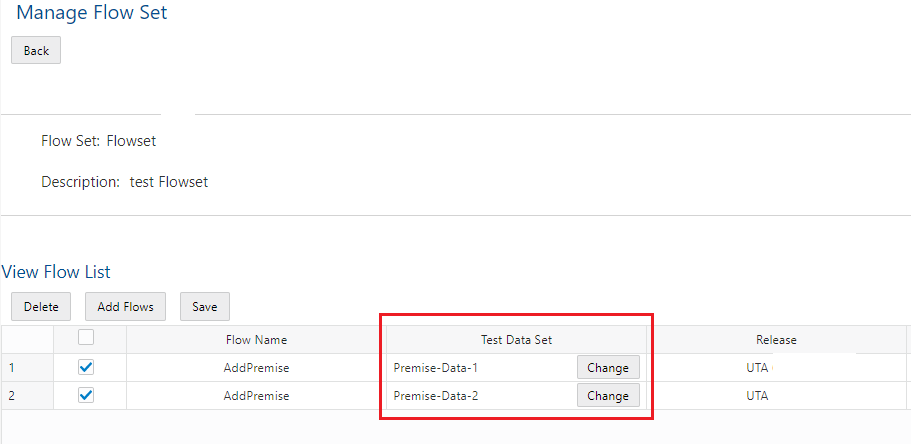
The Flow Test Data Sets Selection in Flow Sets feature reduces the creation of new test flows in cases where only the test data is different by providing the capability to reuse test flows with multiple Flow Test Data Sets in a flow set.
Steps to Enable
You don't need to do anything to enable this feature.
Key Resources
-
Refer to the Oracle Utilities Testing Accelerator User Guide for more information.
Oracle Utilities Testing Accelerator adds a code editor that enables you to create custom Groovy functions or libraries and update the Function Library code within the Oracle Utilities Testing Accelerator workbench. Additionally, you can now export a custom Function Library from one Oracle Utilities Testing Accelerator instance to another instance.
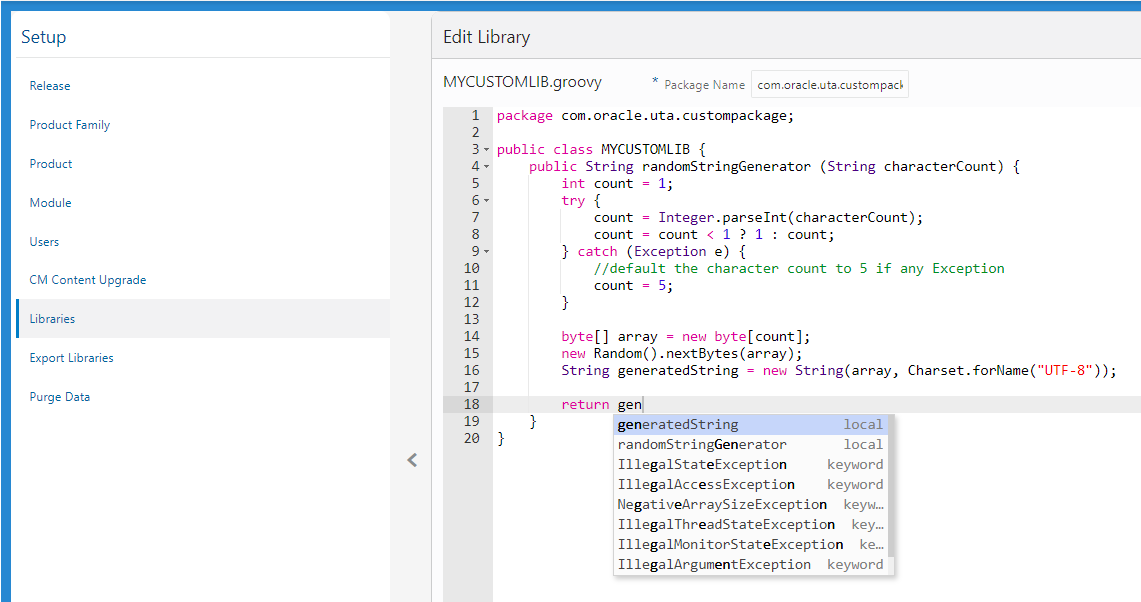
The Function Library enhancements provide the capability to maintain custom library files externally and the flexibility to migrate Function Libraries to other Oracle Utilities Testing Accelerator instances.
Oracle Utilities Testing Accelerator adds these new libraries to enhance the usability of base libraries and replace order libraries in the long term:
- CoreDateTimeLib - Contains functions for generating DateTime for test data
- CoreDataGenLib - Contains functions to generate random numbers and strings for test data
- CoreStoreValues - Contains functions to set values to variables
- CoreFileOps - Contains functions for reading files in test flow attachments
- CoreStringOps - Contains functions to manipulate and control strings
- CoreUTAOps - Contains functions for managing conditional constructs
Steps to Enable
You don't need to do anything to enable this feature.
Tips And Considerations
Use the functions of the new libraries when developing components and test flows.
Key Resources
-
Refer to the Oracle Utilities Testing Accelerator User Guide for more information.
The core component pack of Oracle Utilities Testing Accelerator now includes Generic Search components. The Generic Search component enables Oracle Utilities Testing Accelerator test flows to directly call an Oracle Utilities Enterprise cloud service query zone and retrieve the appropriate query results.
Additionally, you can use the standalone Generic Search component to query results from multiple query zones in Oracle Utilities cloud services and write SQL queries that you can use as part of the Oracle Utilities Testing Accelerator test flows.
The Generic Search component reduces test development efforts by removing the task of creating a new Business Service and Inbound Web Service in Oracle Utilities cloud services and the corresponding Oracle Utilities Testing Accelerator component.
Steps to Enable
Make the feature accessible by assigning or updating privileges and/or job roles. Details are provided in the Role section below.
- Ensure that the "UTA" Application Service is set in the user's application security.
Key Resources
-
Refer to the Oracle Utilities Testing Accelerator User Guide for more information.
Role Information
System administrators should set Application Service: UTA in the appropriate Oracle Utilities SaaS application.
Test Component Using Conversational Test Data Entry User Interface
The Test Component text menu of the Flow Definition tree allows you to immediately navigate to the Conversational Test Data Entry user interface and perform unit testing on the component of a test flow. Additionally, you only need to provide the Web Service Name and Transaction Type to the component's test data.
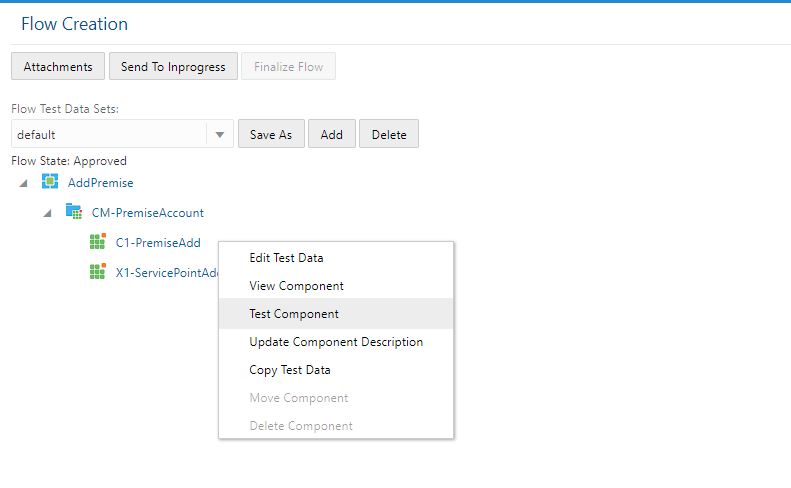
The enhancement to the usability of Conversational Test Data Entry reduces the time needed to complete testing.
Steps to Enable
You don't need to do anything to enable this feature.
Key Resources
-
Refer to the Oracle Utilities Testing Accelerator User Guide for more information.
Test Flow Highlighting on Component Updates
The CM Content Upgrade remaps existing test flows to use components from new Oracle Utilities Testing Accelerator Cloud Service product pack versions. In this release, CM Content Upgrade determines the component changes between the current and new product pack version, and highlights test flows that use components with updated structures. CM Content Upgrade also highlights the components triggering the highlighting of the test flows. The test flow highlighting feature enables you to quickly identify, review, and update test data in the test flows impacted by the new product pack version without the need to first run the test flows. After updating the test data, you can simply right click the highlighted test flow and select the clear highlight option to indicate that you updated the test data. Alternatively, you can clear highlighted test flows at the module or product level by right-clicking the module or product in the test flow tree and selecting the clear highlight option.
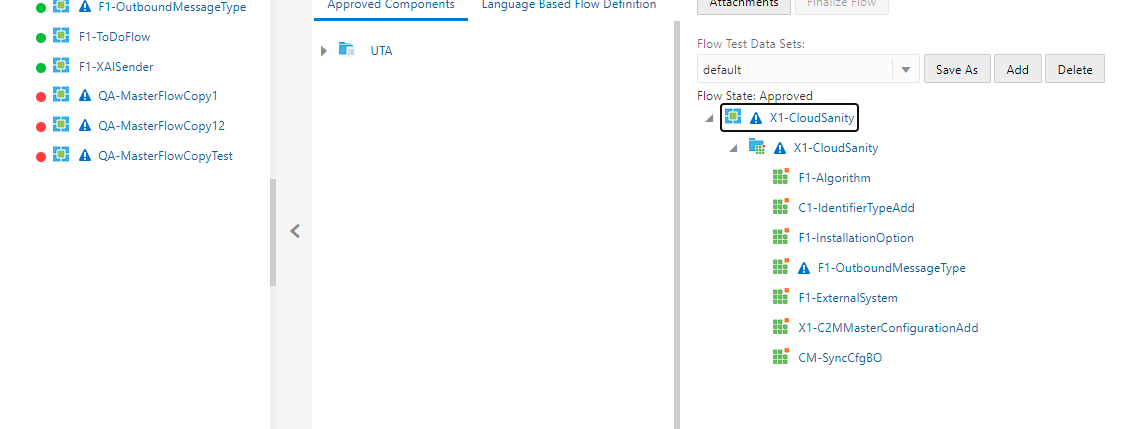
CM Content Upgrade reduces automated test management efforts by automating the processes identifying and assessing the impact of Oracle Utilities cloud service application changes on test flows in Oracle Utilities Testing Accelerator.
Steps to Enable
You don't need to do anything to enable this feature.
Key Resources
- Watch Highlight Flow on Component Structure Change Readiness Training
- Refer to the Oracle Utilities Testing Accelerator User Guide for more information.
See a preview of the database changes coming for 20C in the Oracle Utilities Cloud Services Database Changes Guide.
This includes information about database changes to tables, indexes, views, columns, and so on.
Steps to Enable
You don't need to do anything to enable this feature.
IMPORTANT Actions and Considerations
REPLACED OR REMOVED FEATURES
From time to time, Oracle replaces existing cloud services with new features, or removes existing features. Replaced features may be put on a path to removal. As a best practice, you should use the newer version of a replaced feature as soon as a newer version is available.
This section identifies the features in this Cloud service that have been replaced or removed.
| Product | Removed Feature | Target Removal | Replacement Feature | Replaced In | Additional Information |
|---|---|---|---|---|---|
| Oracle Utilities Application Framework | Xalan Library | 20C | Not applicable | Not applicable | The system now uses the native XSL engine of Java. The changes impacted internal XSLs and XSLs used by implementations that include integration and UI override XSLs if applicable. |
| Oracle Utilities Application Framework |
Batch Parameter Security Value of None | 20C | Not applicable | Not applicable | The Security flag of a batch control parameter is optional and includes the ENCR (Encrypt) and NONE (None) options. The NONE value has been removed because it is redundant given the flag is optional. |
PLAN TO REMOVE UI METADATA RELATED TO CONVERTED PAGES FROM ORACLE UTILITIES APPLICATION FRAMEWORK
The following UI metadata related to fixed pages that were converted to portal will be removed in a future release:
Navigation keys related to the maintenance page:
| Field | Access Group | Application Service | Portal | Zone |
|---|---|---|---|---|
| impFldTabMenu metaDataFieldMainPage metaDataFieldMaint metaDataFieldTableGrid metaDataFieldTablePage Any help keys |
accessGroupMainPage accessGroupMaint accessGroupTabMenu accessGroupDARGrid Any help keys |
applicationServiceMainPage applicationServiceMaintNew Any help keys |
portalTabMenu portalMainpage portalmainPopup portalOptsGrid portalOptsPage Any help keys |
portalZoneTabMenu portalZoneMainPage portalZoneGridPage portalZoneParameterGrid portalZonePortalGrid portalZonePortalPage Any help keys |
Navigation keys related to search:
| Field | Access Group | Application Service | Portal | Zone |
|---|---|---|---|---|
| metaDataFieldSearchData metaDataFieldSearchPage |
accessGroupSearchData accessGroupSearchPage |
applicationServiceSearchData applicationServiceSearchPage |
portalSearchData portalSearchPage |
portalZoneSearchData portalZoneSearchPage |
In addition, the UI program component metadata related to the Field, Access Group, Application Service, Portal, and Zone navigation will be cleaned up in a future release.
PLAN TO INCORPORATE APPLICATION VIEWER TO ORACLE UTILITIES APPLICATIONS
The standalone Application Viewer will be incorporated into the application in a future release and similar to the data dictionary, user interfaces for the tables and fields will be enhanced to provide more information at a glance and a view of the links between tables. In addition, Javadocs and Groovy Javadocs will be viewable within the application instead of the standalone Application Viewer. Information about maintenance objects, batch controls and algorithm types, and algorithms are already viewable in the application.
PLAN TO REMOVE XSLT MANAGED CONTENT TYPE FROM ORACLE UTILITIES APPLICATION FRAMEWORK
The Managed Content table entries related to XSL should use the XSLTC managed content type instead of the XSLT managed content type. Support for the XSLT managed content type will be deprecated in a future release.
PLAN TO REMOVE REST IWS - ORIGINAL REST SERVLET FROM ORACLE UTILITIES APPLICATION FRAMEWORK
The original URL supplied for calling Inbound Web Service-based REST services includes the Inbound Web Service name in its makeup. Support for this will continue for backward compatibility purposes, but will be deprecated in a future release. You should adjust your existing integrations to use the currently supported URL.
PLAN TO REMOVE APPEND SETTING FROM PAGINATION - ORACLE UTILITIES APPLICATION FRAMEWORK
There are several known issues associated with the pagination's Append option. It is recommended that you defer from using this pagination setting.
PLAN TO REMOVE SUPPORT FOR MASTER/SUBORDINATE SERVERS FOR WEB SERVICE CATALOG IN ORACLE UTILITIES APPLICATION FRAMEWORK
The Service Catalog Configuration (Master Configuration) enables you to define subordinate servers. Defining subordinate servers is no longer applicable to Oracle Integration Cloud.
PLAN TO REMOVE SUPPORT FOR SEVERAL BATCH RUN STATISTICS PORTAL FUNCTIONALITY IN ORACLE UTILITIES APPLICATION FRAMEWORK
The Batch Run Statistics portal provides additional information about batch runs, but some functionality on the portal are related to capturing additional information from an external tool. Additional information captured from the external tool is stored in a Fact record. Support for capturing additional information from an external tool will be discontinued in a future release. The captured additional information would still be available to existing customers.
PLAN TO REMOVE MISCELLANEOUS SYSTEM DATA FROM ORACLE UTILITIES APPLICATION FRAMEWORK
The F1-EnvironmentRef (Migration Plan) administrative maintenance object will be removed in a future release as this is associated with a non-supported ConfigLab and Archive. Note that no base migration request references the plan and you should ensure that no custom migration request references the plan. The F1-EnvironmentRefPhysicalBO business object and ENV REF maintenance object will also be removed in a future release.
The following metadata related to legacy LDAP import pages will be removed in a future release:
| Services | Application Service |
|---|---|
| CILTLDIP CILTLDIL CILTLDIS |
CILTLDIP |
The F1-LDAPIMPRT and F1-LDAPPREPR algorithm types and algorithms for the current LDAP import functionality do not include any logic and will be removed in a future release.
The following unused system data will not be supported and deleted in a future release:
| To Do Type | Lookup Value | Scripts | Zone |
|---|---|---|---|
| F1-SYNRQ (Sync Request Error) NOTE: F1-SYNR (Sync Request Monitor) errors are reported using F1-SYNTD (Sync Request Monitor Errors) |
CHAR_ENTITY_FLG / F1SE (Characteristic Entity / Sync Request Inbound Exception) |
F1-BundleInf F1-GENPRINFO F1-MgPlnInf |
F1-IWSSCHS F1-IWSSCHS1 F1-IWSSCHS2 F1-IWSSCHS3 |
PLAN TO REMOVE CONFIGURATION MIGRATION ASSISTANT IMPORT REQUESTS FROM ORACLE UTILITIES APPLICATION FRAMEWORK
The F1-FrameworkAdmin (Framework Admin) and F1-SchemaAdmin (Schema Admin) migration requests are no longer recommended and will not be updated with new administration or control table in a future release.
PLAN TO REMOVE CONFIGURATION MIGRATION ASSISTANT IMPORT ALGORITHM FROM ORACLE UTILITIES APPLICATION FRAMEWORK
The Configuration Migration Assistant Import algorithm plugin spot will be deprecated in a future release. It is recommended that you review any existing algorithms and create the appropriate Pre-Compare algorithms instead.
PLAN TO REMOVE BUSINESS OBJECT READ FROM F1-MAINPROC WHEN PRE-PROCESSING EXISTS
In the original implementation of Configuration Tools, the main framework maintenance BPA (F1-MainProc) does not perform a Read of the business object when a pre-processing script is linked to the business object via options. When F1-MainProc does not perform a Read, the pre-processing script performs the Read of the business object.
In a subsequent release, a business object Read was added to F1-MainProc (with an existing pre-processing script) to resolve a UI Hints issue related to child business objects. Adding a business object Read to F1-MainProc introduced an issue visible only to specific scenarios and a different fix was introduced. The new fix made the business object Read unnecessary in F1-MainProc and many pre-processing scripts are properly performing the business object Read. The business object Read should have been removed from F1-MainProc to prevent multiple reads from being performed. However, pre-processing scripts may have been introduced after the addition of the business object Read to F1-MainProc that do not perform a business object Read in the pre-processing script. As such, the business object Read is still performed as part of the F1-MainProc processing.
When a pre-processing script exists, the business object Read will be removed from the F1-MainProc logic. Review your custom pre-processing scripts that are linked to business object options to ensure that the scripts properly perform reads of your business object.
PLAN TO REMOVE CREATE RELEASE OPTION IN ORACLE UTILITIES TESTING ACCELERATOR
The administration option to create a new release in Oracle Utilities Testing Accelerator is planned to be deprecated. The administration option enables you to create a new release (for example, new root tree node in the component or flow hierarchy) that customer implementations do not create as custom objects are developed under delivered product packs in the component or flow tree hierarchy.
PLAN TO REMOVE CREATE PRODUCT FAMILY OPTION IN ORACLE UTILITIES TESTING ACCELERATOR
The product family creation option to create a new release in Oracle Utilities Testing Accelerator is planned to be deprecated. The administration option enables you to create a product family in the component or flow hierarchy that customer implementations do not create as custom objects are developed under delivered product packs in the component or flow tree hierarchy.
PLAN TO REMOVE ORACLE UTILITIES TESTING ACCELERATOR ECLIPSE IDE PLUGIN SUPPORT FOR FLOW EXECUTION
The latest flow execution features such as iterative execution, test data sets, and so on are available within the Oracle Utilities Testing Accelerator workbench. You can continue to use the workbench for web service-based test flow execution on the cloud.
PLAN TO REMOVE METADATA FOR CREATING USER INTERFACE-BASED TEST COMPONENTS AND FLOWS
The automated testing of Oracle Utilities cloud services is based on web services and does not use any user interface-based components as user interface-based testing cannot be executed within the Oracle Utilities Testing Accelerator workbench. The user interface-based testing is not an efficient way to test as it can be highly prone to issues across upgrades or updates. The base delivered component packs and Utility Reference Model flows are web service-based and do not use any user interface-based component or flow metadata.