
- Revision History
- Overview
- Feature Summary
- Customer
-
- Customer
- Contextual Insights
- Credit and Collections
- Customer Information
- Oracle Utilities Network Management System Integration
- Rate and Billing
- Start/Stop/Transfer Service Request Processing
-
- Enhanced Customer Identification Process Flow Panel for Start Service Requests
- Customer Service Request Maintenance Object
- Start/Stop Date Validation
- Enhanced Deposit Required Algorithm Types
- Initiate Start or Transfer Service Request Process Flow with a Starting Premise
- Postal Code Defaults and Mailing/Seasonal Address Validation
- Review and Submit Panels for Start/Stop/Transfer Service Request Process Flows
- Web Services
- Meter Solution
- Operational Device
- Analytics Visualization
- Utilities Application Framework
- System Wide
- Customer
- Utilities Common
- IMPORTANT Actions and Considerations
This document will continue to evolve as existing sections change and new information is added. All updates appear in the following table:
| Date | Product | Feature | Notes |
|---|---|---|---|
| 02 DEC 2021 | Created initial document. |
Oracle Utilities Customer Cloud Service is a customer care, service order, metering, billing, and credit and collections solution. The solution is designed to cater for utilities of all sizes, supports one to many utility service types, and handles the complexities associated with a utility's processes.
This guide outlines the information you need to know about new or improved functionality in this update, and describes any tasks you might need to perform for the update. Each section includes a brief description of the feature, the steps you need to take to enable or begin using the feature, any tips or considerations that you should keep in mind, and the resources available to help you.
DISCLAIMER
The information contained in this document may include statements about Oracle’s product development plans. Many factors can materially affect Oracle’s product development plans and the nature and timing of future product releases. Accordingly, this Information is provided to you solely for information only, is not a commitment to deliver any material, code, or functionality, and should not be relied upon in making purchasing decisions. The development, release, and timing of any features or functionality described remains at the sole discretion of Oracle.
This information may not be incorporated into any contractual agreement with Oracle or its subsidiaries or affiliates. Oracle specifically disclaims any liability with respect to this information. Refer to the Legal Notices and Terms of Use for further information.
Column Definitions:
Report = New or modified, Oracle-delivered, ready to run reports.
UI or Process-Based: Small Scale = These UI or process-based features are typically comprised of minor field, validation, or program changes. Therefore, the potential impact to users is minimal.
UI or Process-Based: Larger Scale* = These UI or process-based features have more complex designs. Therefore, the potential impact to users is higher.
Features Delivered Disabled = Action is needed BEFORE these features can be used by END USERS. These features are delivered disabled and you choose if and when to enable them. For example, a) new or expanded BI subject areas need to first be incorporated into reports, b) Integration is required to utilize new web services, or c) features must be assigned to user roles before they can be accessed.
Program Enrollment Contextual Insights
The following Insight Types enable you to surface focused alerts about various programs a customer may or may not be enrolled in and to initiate the appropriate actions where required:
- C1-APAYENRL-LIST (Auto Pay Enrollment)
- C1-BUDGENRL-LIST (Budget Billing Enrollment)
- C1-EBILLENRL-LIST (E-Bill Enrollment)
- C1-WEBENRL-LIST (Web Enrollment)
These contextual insights can help you elevate your customer service interactions by increasing your knowledge about the customer in the most appropriate screens.
Steps to Enable
Refer to the Insight Groups section of the Administrative User Guide for more information.
Key Resources
-
Refer to the Contextual Insights section of the Administrative User Guide for more information.
Use SA's Service Type Parameter on COLL EVT SEV Algorithm Type
You can set the Use SA's Service Type (Y/N) parameter in algorithms based on the COLL EVT SEV (Nominate A Single SA To Sever) algorithm type to define the service agreement to sever when different service agreement Service Types are associated with a single service point's Service Type. For example, when water and wastewater service agreements are both associated with a "water" service type. Setting the parameter to "Y" instructs the system to use the service agreement's Service Type. Setting the parameter to "N" instructs the system to use the service point's Service Type and choose the service agreement with the highest balance to sever, regardless of the service agreement's Service Type. Note that when service agreements and service points have the same service type, the setting of the parameter does not have any impact.
The new parameter provides additional flexibility to determine the service agreement to sever as part of collections processing.
Steps to Enable
To enable this feature, complete these steps:
- Update algorithms based on the COLL EVT SEV (Nominate A Single SA To Sever) algorithm type.
- Set the Use SA's Service Type (Y/N) parameter to the value that meets your business requirements.
Key Resources
- Refer to the How To Nominate A Single Service To Sever (Rather Than Sever Everything That's In Arrears) section of the Administrative User Guide for more information.
Customer 360 - Customer Activity History Zone Multi-select Filter
The multi-select filter enables you to choose a subset of activities to display in the Customer Activity History zone of the Customer 360 portal. The filter also allows you to select and display all the activities by clicking one checkbox.
The filter provides an efficient way to select and retrieve appropriate activities and improves zone performance.
Steps to Enable
You don't need to do anything to enable this feature.
Key Resources
-
Refer to the Customer 360 section of the Business User Guide for more information.
Customer 360 - Program Enrollment Zone
The Program Enrollment zone of the Customer 360 portal allows you to review a customer's program-related contextual insights like payment methods, budget billing arrangements, e-billing preferences, and web account availability. Each program is displayed as its own contextual insight and allows you to quickly enroll the customer into a program, if required.
The enhanced Customer 360 portal provides you with a more complete view of the customer, which makes it easier for you to handle account maintenance requests and the most common inquiries.
Steps to Enable
To enable this feature, complete these steps:
- Configure an Insight Group for the Program Enrollment insight class, if one does not exist.
- Configure implementation-specific program enrollment related Insight Types, if required.
- Add applicable program enrollment-related Insight Types to the created Insight Group.
Key Resources
-
Refer to the Customer 360 section of the Business User Guide for more information.
Person ID Usage - Installation Options
You can now specify when you want to capture primary identification details for a person through the Person ID Usage drop-down in the Person tab on the Installation Options portal. You can instruct the system to capture the details if the person is linked to an account, the main customer of the account, or financially responsible for the account's debt. Previously, identification details were captured when the pre-configured option was "Optional" or "Required."
This provides the flexibility to define when to capture primary identification details based on the person's relationship with the account.
Steps to Enable
To enable this feature, refer to the Defining Installation Options section of the Administrative User Guide for more information.
Oracle Utilities Network Management System Integration
Oracle Utilities Network Management System Integration
The Oracle Utilities Customer Cloud Service integration to Oracle Utilities Network Management System ensures a seamless automated flow of outage information and makes relevant outage information visible to you from a single application. The productized integration supports the following key business processes:
- Synchronization of customer data and trouble calls from Oracle Utilities Customer Cloud Service to Oracle Utilities Network Management System.
-
Query job history, trouble call history, and planned outages from Oracle Utilities Customer Cloud Service.
Leveraging a productized integration can lower your project implementation costs, duration, risk, and total cost of ownership.
Steps to Enable
To enable this feature, refer to the Oracle Utilities Customer to Meter Integration to Oracle Utilities Network Management Implementation Guide for more information.
Valid Device Configuration Types Processing for Rate Schedules
Creating or updating a service agreement triggers a validation process to check if the Rate Schedule defined on the service agreement relates to a valid device configuration type (or types) based on the devices installed at the service points to be billed.
The Rate Schedule portal provides a new Device Configuration Type section that allows you to review the list of valid device configuration types. The system only displays the section when you define the rate schedule in the D2-CCBRateScheduleLookup (CCB Rate Schedule) extendable lookup. The list of valid device configuration types is a combination of:
- Device configuration types defined in the extendable lookup with an Override Calculation Usage Group
- Device configuration types for the default Usage Calculation Group defined in the extendable lookup
This feature improves the efficiency of generating and distributing accurate bills to your customers.
Steps to Enable
You don't need to do anything to enable this feature.
Start/Stop/Transfer Service Request Processing
Enhanced Customer Identification Process Flow Panel for Start Service Requests
A number of improvements have been made to the Customer Identification panel on process flows that are based on the application-owned Process Flow Type for start service requests. These can be summarized as follows:
- Allows you to reuse your search information to create a new Person record for the start service request using the Create New Customer button when there is no person in context and Person Search does not return any records. You can specify the Person Contact Type for the phone number, Email Contact Type for the email address, and update the ID Type for the identification details.
- Allows you to perform one of these actions when there is no person in context but Person Search returns records:
- Run a search with updated information if the customer's Person record is not returned
- Use the Create New Customer button to add a Person record
- Select from the results and use an existing Person record
- Advises you if the Person record is without valid primary identification details when there is a person in context or you selected a Person Search result. You can enter these details on the panel and continue progressing the process flow. The Accounts for Service section also displays a message for each account that is ineligible for service if you selected the "Existing" option or a new account is not allowed for a start service request.
- Enables you to review the outcome of various checks or assessments through messages appearing after the following user actions (these are defined in specific configuration settings or plugin spots on the Customer Service Request Type referenced by the process flow):
- Determining if an ID/Credit Check should be performed (triggered by the new Continue button)
- ID/Credit Check (triggered by the existing Verify ID button)
- Determining if a deposit is required (triggered by the new Check Deposit Requirement button)
- Defaults the Customer Class from the Installation Options based on the Person or Business flag set on the process flow.
There are also several changes to the C1-StartServiceRequestType (Start Service Request Type) business object:
- For Primary Identifier Types, the "New" option in the Usage drop-down is now "New and Non-Identifying." You can use this option for ID Types to be used as a primary identifier for new persons but are not considered valid when performing ID/Credit Checks as their values may not be unique for verification purposes.
- You can specify one of these Date of Birth Usage options to indicate when to be prompted for the person's date of birth on the Customer Identification process flow panel:
- Always
- For ID/Credit Check
- For Starting Service
- The Store Date of Birth on Person label replaces the Date of Birth Characteristic Type label to make it clear where the information may be stored.
These features guide you more intuitively and efficiently through the customer identification step of process flows for start service requests.
Steps to Enable
You don't need to do anything to enable this feature.
Key Resources
-
Refer to the Setting Up Start, Stop and Transfer Request Types section of the Administrative User Guide for more information.
Customer Service Request Maintenance Object
You can now capture creation and completion details associated with start, stop, and transfer service requests like Created by User, Final Date/Time, and Final User in new fields on the C1_CSREQ (Customer Service Request) maintenance object.
This feature enables you to extract additional information through the Generalized Data Export for use by external systems.
Steps to Enable
You don't need to do anything to enable this feature.
Tips And Considerations
For upgrading implementations, you can run the C1-UPCSR (Update Customer Service Requests) batch process to populate the new fields in existing customer service request records from information already captured in their respective log entries (if these exist).
Key Resources
-
Refer to the Data Export section of the Administrative User Guide for more information.
A message now appears when the applicable date validation algorithm, based on the C1VALSVCSD (Validate Service Start Date) or C1VALSVCSTD (Validate Service Stop Date) application-owned algorithm type, determines that the start or stop date on a process flow (based on an application-owned Process Flow Type) is not within the predefined range and the algorithm is configured to allow you to still proceed.
This feature provides you with additional information when processing start, stop, or transfer service requests.
Steps to Enable
You don't need to do anything to enable this feature.
Enhanced Deposit Required Algorithm Types
The following algorithm types for processing start or transfer service requests streamline the deposit assessment processes:
- C1REQDEPBACR (Require Deposit Based on Account's Credit Rating) - When the account's credit rating meets or exceeds the threshold, a message is no longer displayed
- C1DEPEXBAGE (Deposit Exemption Based On Age) - If the customer is exempt from a deposit based on age then subsequent algorithms plugged into the same plugin spot are not performed.
- C1DEPEXMPBAH (Deposit Exemption Based On Account History) - When the account does not have an active or recent service, this advises you that a deposit is required.
- C1REQDEPAID (Require Deposit Based On ID and Credit Check) - Indicates whether a deposit is required:
- Since an ID or credit check was not performed
- Since the ID or credit check did not pass
- Since the ID or credit check indicates that the information provided is possibly fraudulent
- Based on an external credit score
These algorithm types provide specific information that helps determine if deposits are required when processing start and transfer service requests.
Steps to Enable
You don't need to do anything to enable this feature.
Key Resources
-
Refer to the Setting Up Start, Stop and Transfer Request Types section of the Administrative User Guide for more information.
Initiate Start or Transfer Service Request Process Flow with a Starting Premise
You can identify a move-to (starting) premise prior to initiating a process flow for a start or transfer service request. A process flow, based on an application-owned Process Flow Type for a start or transfer service request, can receive a Premise ID to prepopulate on the Move-To-Premise Address panel of the flow.
This removes the need to search for a starting premise on the Move-To-Address panel when the Premise ID is a valid identifier.
Steps to Enable
You don't need to do anything to enable this feature.
Postal Code Defaults and Mailing/Seasonal Address Validation
Start, stop, and transfer service request process flows based on the application-owned Process Flow Types now automatically defaults the city, county, and state of the related Postal Code Default administration record if the postal code is changed on the Person and Account Details panel. In addition, if the existing Address Validation capability is enabled, you can use the Validate button(s) on the Person and Account Details panel to validates the mailing and/or seasonal address details.
These features help you to accurately capture address details and send correspondences to these when setting up the customer as part of processing start, stop, or transfer service requests.
Steps to Enable
You don't need to do anything to enable this feature.
Key Resources
-
Refer to the Implementing Address Validation section of the Administrative User Guide for more information.
Review and Submit Panels for Start/Stop/Transfer Service Request Process Flows
The Review and Submit panel replaces the Summary panel on process flows that are based on application-owned Process Flow Types for start, stop, and transfer service requests. The panel allows you to review information captured from previous panels, go back to the appropriate panel to update specific information, and then submit the information to process the service request and create and/or update the appropriate customer records.
This table lists the information appearing on the Review and Submit panel per service request process flow.
| Service Request Process Flow | Section |
|---|---|
| Start | Starting Services Person and Account Details |
| Stop | Stopping Services Person and Account Details |
| Transfer | Starting Services Stopping Services Person and Account Details |
In addition, these Customer Service Request Type business objects have been enhanced to support the Review and Submit panel on process flows:
- C1-StartServiceRequestType (Start Service Request Type)
- C1-StopServiceRequestType (Stop Service Request Type)
- C1-TransferServiceRequestType (Transfer Service Request Type)
The C1-StartServiceRequestType business object allows you to override the Start Services Review section, C1-StopServiceRequestType allows you to override the Stop Services Review section, and C1-TransferServiceRequestType allows you to override the Start Services Review and Stop Services Review sections with your custom replacement UI sections. All three business objects also allow you to override the Person and Account Details Review sections with your custom replacement UI sections, and the Navigation Option and Label so you can choose to navigate to an alternative page instead of Control Central after the process flow finishes.
These panels help ensure accurate collection of the required information prior to further processing of start/stop/transfer service requests.
Steps to Enable
You don't need to do anything to enable this feature.
Key Resources
-
Refer to the Setting Up Start, Stop and Transfer Request Types section of the Administrative User Guide for more information.
Additional and Enhanced REST APIs
The following REST API Inbound Web Services expose various customer-related entities and data, provide capabilities to create, manage, and view data, and leverage new framework features for request and response schemas:
- C1-CXperson (Person Primary Information Synchronization) - Synchronizes characteristics and non-primary person contact details
- C1-WorkQueue (User Work Queue) - Retrieves all To Do Entries assigned to the current user as items to be included in a unified work queue
- C1-Case (Case)- Creates, maintains, and views case information
- C1-CommunicationsPreferences - Manages communication preferences for an account and a specific person
- D1-DeviceConfiguration - Retrieves and maintains a device's configuration details (not applicable to Oracle Utilities Customer Care and Billing Cloud Service)
- D1-MeasuringComponent - Retrieves and maintains a meter device's measuring components and measuring component characteristics (not applicable to Oracle Utilities Customer Care and Billing Cloud Service)
- C1-CustomerActivityHistory - Retrieves a particular customer account's activity history
- X1-ProgramContext (Program Context) - Returns a list of context values to indicate which programs the customer may be enrolled for the account (such as AutoPay, Budget, Charity, and more) (not applicable to Oracle Utilities Customer Care and Billing Cloud Service)
You can use these REST Inbound Web Services to decrease project costs and timelines.
Steps to Enable
Review the REST service definition in the REST API guides, once available from the Oracle Help Center > your utilities application service area of interest > REST API. If you are new to Oracle Utilities REST services, you may want to begin with the Quick Start section.
Smart Grid Gateway AMI Adapter Support
AMI systems now support the Landis+Gyr v8.1 and Itron OpenWay Operation Center v5.3 and v5.4 AMI adapters.
This provides the capability to use the latest AMI system versions.
Steps to Enable
To enable this feature, refer to the Smart Grid Gateway Adapters section of the Administrative Guide for more information.
Post Conversion Estimation Updates
The following updates to the Post Conversion Estimation processes prevent the creation of estimations for prior periods and reduce the overall period estimation runtime:
- Addition of fields to the Interval and Scalar Measuring Component Types that set the maximum number of prior days that periodic estimation will consider.
-
Each periodic estimation run now considers the "No of Hours in Past to Retrieve Last Usable Measurement" Measurement Data Option Feature Configuration option if the Measuring Component Type does not include a preconfigured maximum number of days to estimate.
-
The new D1-IMCDT (Initialize Measuring Component Dates) batch control allows you to initialize key estimation-related dates and times for measuring components prior to the initial periodic estimation run. The batch control initializes the most recent non-estimated date and time based on final measurements, updates the most recent measurement date and time based on final measurements, and updates all measuring components to a supplied last contiguous measurement date and time.
This reduces the overall run time of periodic estimation.
Steps to Enable
To enable the Measuring component maximum number of days to estimate, complete these steps:
- Navigate to the Measuring Component Type.
- Edit the Measuring Component Type and provide the Maximum Days to Estimate.
To enable the Measurement Data Options feature configuration, complete these steps:
- If the Feature Configuration does not yet exist, add a new Feature Configuration for the Feature Type Measurement Data Options.
- Navigate to the Measurement Data Options Feature Configuration.
- Add an option for "No of Hours in Past to Retrieve Last Usable Measurement" and provide the maximum number of hours.
To use the D1-IMCDT (Initialize Measuring Component Dates) batch control, complete these steps:
- If you would like to run on a subset of Measuring Components, create a duplicate of the batch control with a new version of D1-IMCDT-SR (Select Measuring Components for Initialization) that contains a query to identify the Measuring Components to update.
- Add a submission for the batch control, supplying the appropriate values for Most Recent Non-Estimated Measurement Date/Time, Most Recent Measurement Date/Time, and Last Contiguous Measurement Date/Time.
- Supply the appropriate number of threads.
Key Resources
-
Refer to Running Initial Periodic Estimation in the Administrative User Guide for more information.
Throttle Disconnect Commands for Nonpayment
The Throttle Disconnect Commands for Nonpayment feature provides the capability to limit the number of disconnect commands sent per hour. By limiting the of disconnect commands that occur at once, customer call centers will not be overwhelmed with service calls (for example, outage or payment) when processing large numbers of device disconnect activities.
This improves customer service by reducing call wait times and customer outage periods that may occur when large numbers of AMI disconnect commands are issued at the same time.
Steps to Enable
To enable this feature, complete these steps:
- Verify that Cut for Non Payment Orchestration Service is set to "Restricted to Business Hours."
- Configure the Remote Disconnect Activity Type by setting the Throttle Option to "Allowed," the schedule, and the number of requests to process.
- Schedule the D1-CRWTO (Command Request Wait Monitor with Throttle Option) batch job to be inline with the Remote Disconnect Type schedule. Note that you can use this batch job for all commands but should not be used in conjunction with older batch jobs that call commands.
Tips And Considerations
As of this release, throttling is only available with Remote Disconnect smart meter command activities.
Key Resources
- Refer to the Throttle Disconnect Commands training.
- Refer to the Throttling Commands Issued from Service Order Activities section in the Administrative User Guide for more information.
Consumption Extract Type Caching
In this release, caching the Consumption Extract Type details and inputs for flagging an Initial Measurement Data for historical extract limits the number of additional processing needed to enable Configurable Consumption Extracts and DataConnect.
This feature improves the efficiency of identifying Initial Measurement Data for historical extract for enabling Configurable Consumption Extract and DataConnect.
Steps to Enable
You don't need to do anything to enable this feature.
Multi Time Zone Support for Smart Grid Gateway and Service Order Management User Interfaces
The following Smart Grid Gateway and Service Order Management pages now display time in the Service Point's time zone format, making communication with customers simpler by removing the need to convert the central utility's time zone to the time zone of the customer's service point:
- Outbound Communication
- Inbound Communication
- Completion Event
This feature allows you to easily and instantly communicate service times with your customers, resulting to a better user experience.
Steps to Enable
You don't need to do anything to enable this feature.
You can review and analyze asset information through the Asset Disposition tab of Assets portal. This tab displays the Disposition History zone, previously displayed in the Main tab, and provides a new Components History zone that enables you to review components attached to assets.
This tab provides a more complete and intuitive view of the asset's information.
Steps to Enable
You don't need to do anything to enable this feature.
Key Resources
-
Refer to the Maintaining Assets section of the Business User Guide for more information.
Contextual Insights in Assets Portal
The Assets portal enhances your user experience through new Badge Contextual Insights for asset condition rating and asset location criticality.
Contextual insights enhance the user experience by drawing attention to specific asset conditions.
Steps to Enable
To enable this feature, complete these steps:
-
Add and configure the W1-AssetConditionScoreBuckets (Asset Condition Score Bucket Configuration) business object by selecting Admin then B and the Bucket Configuration menu item.
-
Add and configure the W1-AssetCriticalityBuckets (Asset Criticality Bucket Configuration) business object by by selecting Admin then B and the Bucket Configuration menu item.
-
Configure W1ASCNLOCCRT (Asset Condition and Location Criticality) and related badge Insights and Insight Types algorithms.
-
Add an Insight Group to the asset condition by selecting Admin, then I, select Insight Group then Add. Set the Insight Class to "W1AC (Asset Condition)" and Valid Visual Structure to "Badge Insight". Add the created Asset Condition Insight Type to the Insight Type list of the insight group.
-
Add another Insight Group to the asset condition. Set the Insight Class to "W1LC (Asset Location Criticality) and Valid Visual Structure to "Badge Insight". Add the created Asset Criticality Insight Type to the Insight Type list of the insight group
Key Resources
- Refer to the Contextual Insights Configuration section of the Administrative User Guide for more information.
Oracle Utilities Analytics and Visualizations Consumption Analytics
The following Oracle Utilities Analytics Visualization Consumption Analytics allow you to examine aggregated consumption from a variety of dimensions:
- Usage by Distribution Node
- Usage by Region
- Usage by Customer Classifications
You can use Consumption Analytics to look at energy by transformer and feeder for distribution planning purposes, report on energy usage by customer class for management reporting, report on total water usage by region for a regulator, and report on a region's total gas usage for distribution analysis purposes. Previously, the utilities had to go through the difficult of building and testing custom consumption reporting and analytics.
In addition, Unaccounted for Losses" now includes a "Details" canvas and improved data model.
Consumption Analytics allows you to reduce customizations and make consumption data available to business users. For example, you can report on:
- Energy by transformer and feeder for distribution planning purposes.
- Energy used by customer class for management reporting.
- Total water usage by region for a regulator.
Steps to Enable
Consumption Analytics requires pre-aggregation in Meter Data Management as Oracle Utilities Analytics Visualizations only presents pre-aggregated consumption data for performance consideration.
To pre-aggregate consumption analytics, perform the following steps:
- Configure Dynamic Aggregation (refer to Configuring Dynamic Aggregation for Consumption Analytics in the Administrative User Guide for more information).
- Run Dimension Scanning.
- Run Aggregation.
- In Oracle Utilities Analytics Visualization projects, verify the reported data. Note that for performance reasons, only query aggregated measurements.
To enable this feature, refer to the Administrative User Guide for more information.
Key Resources
- Refer to the Consumption Analytics training.
Timeliness Count and Quality Dimension Scanner Batch Control
The Timeliness Count and Quality Analytics and Visualizations uses the Meter Data Management Standard Aggregation processes to pre-aggregate data. The Meter Data Management Standard Aggregation processes now include the D1-MQTDS multi-threaded batch control for Dimension Scanning. Dimension scanning looks for new dimensions to aggregate after adding a new meter system.
This multi-threaded batch control improves the performance of the Timeliness Count and Quality Dimension Scanner. The D2-AGG aggregation batch job will follow.
Steps to Enable
To enable this feature, run D1-MQTDS. Note that the initial run may take a long time to complete since all the dimensions are created.
Key Resources
-
Refer to the Timeliness and Quality Aggregation Processing for Use with Oracle Utilities Analytics Visualization section in the Administrative User Guide for more information.
Utilities Application Framework
REST Service to Get Batch Job Details
The F1-SubmitJob Inbound Web Service is enhanced to have a new operation to Get the details of the batch job. It uses a new business service: F1-GetBatchJobDetails (Batch Job / Batch Run Details).
If the batch job does not have a batch run associated with it, the service returns information about the batch job only. If there is an associated batch run, the service also returns information about the batch run and its threads and instances.
For cases where an external system, such as an external scheduler, requires information about a batch job, you can use this REST service to return the detail of a given batch job ID.
Steps to Enable
You don't need to do anything to enable this feature.
Tips And Considerations
The security for this new operation is the same security for other operations for this inbound web service. Users must have the Execute action for the CILZRBPP (Batch Job Submission) application service.
Key Resources
-
Refer to the Open API Specification for the F1-SubmitJob inbound web service for more information.
When a user encounters an error with the product and submits a service request, information about the environment, release, and configuration of the user is often very helpful in understanding the cause of the problem. The issue collector script can be used to capture the environment details and issue description for reporting purposes. The script is accessed via the Prepare Issue Details item in the Main - Tools submenu. A popup window is provided to display the details that are being captured and allows the user to add additional text describing the specific issue.
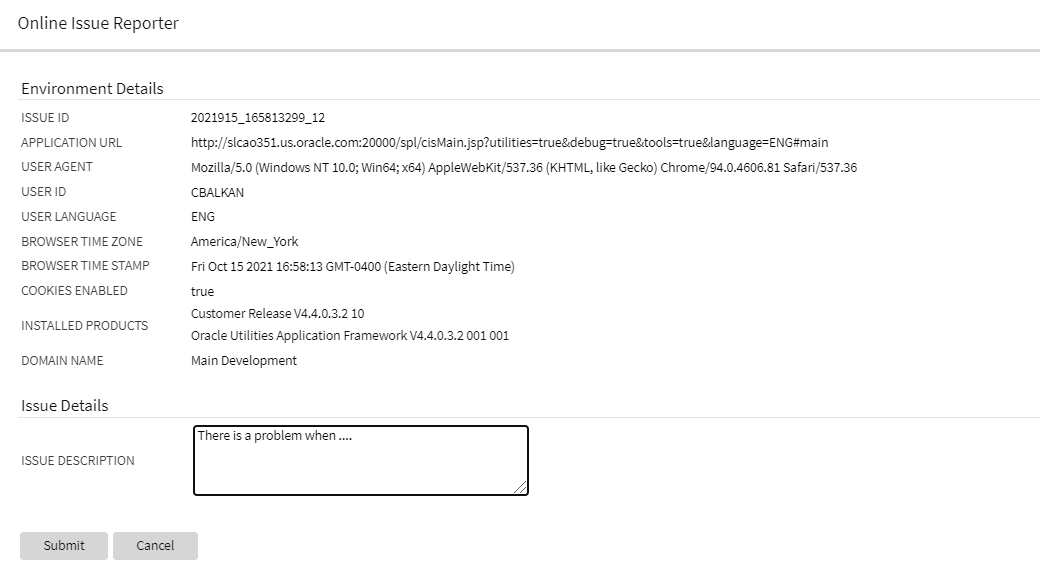
Online Issue Reporter
When the details are submitted, they are added to the system log, together with a unique identifier, so the information can be searched when investigating the problem.
The menu item is secured so that implementations may choose which users have access to this capability.
Redwood Only: Note that for the Redwood user interface, the help menu on the toolbar includes a menu item for launching this window. If you are able to access this option through the Main - Tools submenu, you will also see the option in the Help menu.
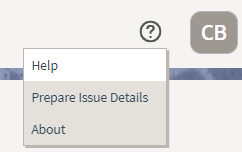
Help Menu
This saves you time from manually collecting information about your environment and standardizes the information in log files for Oracle Support to analyze.
Steps to Enable
Make the feature accessible by assigning or updating privileges and/or job roles. Details are provided in the Role section below.
Role Information
System administrators should set grant users or grant access to the F1-PREPISSUEDTLS application service for the Prepare Issue Details menu item.
The User menu now includes a Switch UI View option that allows users to switch the user interface between the standard look and feel and the Redwood User Experience introduced in a previous release.
The Switch UI View option in the User menu can also be secured using the F1UIVIEW application service.
This option provides an easier method to switch between user experiences than manually changing the environment URL. Implementations may now control which users, if any, have the ability to toggle between the new Redwood look and feel and the standard look and feel.
Steps to Enable
Make the feature accessible by assigning or updating privileges and/or job roles. Details are provided in the Role section below.
Role Information
System administrators should grant access to the F1UIVIEW application service for those users who will be allowed to switch between user experiences.
User Search Shows Enabled Users by Default
The zone-based user search that is used for any portal-based user interface where a user record needs to be selected now shows only enabled users in the result by default. Enabled users are those whose User Enable flag is set to "Enabled". If you want to include inactive users in your search criteria (users whose User Enable flag is set to "Disabled"), you can check the new "Include Inactive Users" filter.
The zone-based search for users shows enabled users by default, helping you to select the user from a more relevant list. If you need to include inactive (disabled) users, that option is still available.
Steps to Enable
You don't need to do anything to enable this feature.
Based Delivered External Systems and Message Senders
In order to support pre-configured integration flows, the External System and Message Sender records are enhanced to be system-owned entities.
The base product can provide fully configured integrations.
Steps to Enable
You don't need to do anything to enable this feature.
Support for Generic Data Synchronization Functionality
There is a new generic mechanism by which an entity can be synchronized with an external system in an ongoing fashion. The solution supports base product fully configured integrations that may be customized and new custom integrations.
The following points describe the new functionality:
- A new Data Synchronization Control extendable lookup defines a data synchronization configuration for a maintenance object and an external system.
- If the status of the record is active the synchronization is enabled.
- A synchronization script is referenced on the record to manage the integration business rules. The script is called in Check mode to determine whether the entity needs to be synchronized upon a change data capture event and it is also called in Process mode to prepare the data and send the outbound message to the external system.
- There could be multiple configuration records for an entity and external system, allowing override by other products and customer where the configuration with the highest sequence is in effect.
- When an entity is changed, a designated Maintenance Object Audit rule consults all enabled integrations for the entity, as defined by the Data Synchronization Control extendable lookup, to determine whether the change should be synchronized or not. If the change should be synchronized, a generic data synchronization request process for each external system is initiated accordingly.
- The processing of a request to synchronize an entity with an external message is managed by a Generic Data Synchronization request business object that is processed later by batch.
Data synchronization integration with external systems is made simpler to implement and configure.
Steps to Enable
Make the feature accessible by assigning or updating privileges and/or job roles. Details are provided in the Role section below.
Tips And Considerations
With this mechanism, introducing a new entity data synchronization involves the following artifacts:
- Implementing a synchronization script.
- Defining standard outbound message configuration including external system and message sender.
- Adding an entry in the Data Synchronization extendable lookup referencing the Maintenance Object, External System and corresponding Synchronization Script. When applicable, use a higher sequence number to override a base product configuration for the same entity and external system.
- Plugging-in the FW generic MO audit to initiate the generic data synchronization request if not already plugged in.
Role Information
System administrators should set grant users or grant access to the F1-GENDATSYNCBOAS application service for the generic synchronization request business object.
New Facility for Invoking Service Scripts or Business Services
The new service invocation function allows a developer to detail specific pieces of a data schema to be sent to the server when invoking a service. It also allows the definition of what needs to be handled when the service is returned. This can greatly reduce the amount of data being handled and therefore can provide a performance boost.
This invocation is also "asynchronous" and therefore will allow other JavaScript processes to continue while the server is processing the request.
This allows you to send only a portion of a data schema in a service request. This streamlines the server calls and improves execution performance.
Steps to Enable
You don't need to do anything to enable this feature.
Tips And Considerations
This is a new function and does not affect any existing service calls. It is only available for use inside a UI Map.
Key Resources
-
Refer to the Oracle JET Developer Cookbook.
This is an Oracle standard JavaScript library that provides many user interface components. It is updated regularly to include new and updated components inline with updated Oracle user interface standards (Redwood).
This upgrade allows access to new components and updated Oracle Redwood user experience standards.
Steps to Enable
You don't need to do anything to enable this feature.
Tips And Considerations
With this release, the former "ojcomponent" bind format is no longer valid. Any usage must be replaced with the newer OJet component code.
Key Resources
-
Refer to the Oracle JET Developer Cookbook.
Script Syntax for Marking Lists in Error
The Edit Data 'terminate with error' syntax is enhanced to support marking an element in a list in error by referencing the variable used to loop through the list.
-
terminate with error( xxxx, yyyy element='$listVar/element_name')
In this case, the $listVar represents the variable used in the 'for' loop. For example, this validation includes a 'for' loop and uses the variable '$key' to keep track of the list entry:
for ($key in "parm/hard/newBusinessObject/relatedBatches/relatedBatch")
if ("string($key/perfRelObjType) != 'F1PB'")
terminate with error (11022, 12104 element='$key/perfRelObjType');
end-if;
end-for;
The syntax resolves an issue with marking an entry in a list that is in error.
Steps to Enable
You don't need to do anything to enable this feature.
Tips And Considerations
Note that in previous releases, the suggested mechanism for marking an element in a list in error was to concatenate the XPath with the list entry, as follows:
move "concat('list[',$count,']/elementName')" to $elementReference;
terminate with error (11000, 11000 element=$elementReference);
However this technique was found to have limitations in certain use cases. As such, it is no longer the recommended technique.
Any scripts that are using the previous technique for marking a list entry in error should be updated to use the new syntax.
Key Resources
- Refer to the Edit Data Syntax section of the Oracle Utilities Application Framework Administrative User Guide for more information.
Additional Elements Added to Installation Options BO
The F1-Installation business object is enhanced to retrieve all the elements on the main table of the Installation Options maintenance object. This provides a performance benefit for any code that needs information from the main table, such as the default currency, but does not require any of the data in the collections linked to the Installation Options maintenance object. Previously, this business object only included the owner flag element.
Additional elements added to the business object for Installation Options allow developers to use this artifact when they need main information from the installation option record.
Steps to Enable
You don't need to do anything to enable this feature.
Bundle Export Copy Feature Improvement
In the Bundle Export object, when you have bundled your metadata, use the Copy to Clipboard action to copy the bundle detail properly, retaining spacing for text like the HTML for a UI map.
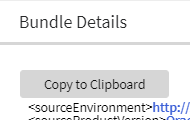
Copy to Clipboard
In previous releases, the Bundle Details zone on the Bundle Export portal provided a "Select All" action to select the bundle details. You then needed to separately use the computer's generic copy function (Ctrl+C) to copy the information to your clipboard. The generic select and copy functionality was not able to retain spacing in objects like the HTML for a UI map. The new Copy to Clipboard action uses specific code to copy the information to the clipboard, retaining spaces.
As part of this feature, the Select All and Deselect All actions were removed. You can still manually select the bundle details manually, if desired.
Action to copy bundle export details retains proper spacing in copied artefacts.
Steps to Enable
You don't need to do anything to enable this feature.
A new set of views, artifacts, and canvases are available in the Oracle Utilities Analytics Visualization environment with prebuilt canvases for history, threading, and capacity planning. This includes Batch Job Workload Analysis, Batch Thread Analysis (including boxplot analysis), and Thread Capacity Planning. The new Batch Subject Area includes these components:
-
A set of database views to collate the data from submission, execution, and threading. Additional views are created to support database level calculations.
-
A set of definitions to define the views and related meta data as analytical objects. This is used to set build analytical definitions to be used by Oracle Utilities Analytics Visualization.
- A set of Oracle Utilities Analytics Visualization projects complete with canvases for trend analysis. distribution analysis, boxplot analysis and capacity planning in three areas:
- Batch Run level analysis. Analyzing historical submissions at the batch run level.
- Batch Thread level analysis. Analyzing historical thread level execution information for trends and data skew detection.
- Batch Thread capacity analysis. Analyzing segments of the physical day for execution focusing upon trends and capacity.
These are delivered in Oracle Utilities Analytics Visualization for use directly or as a basis for custom canvases. For example:
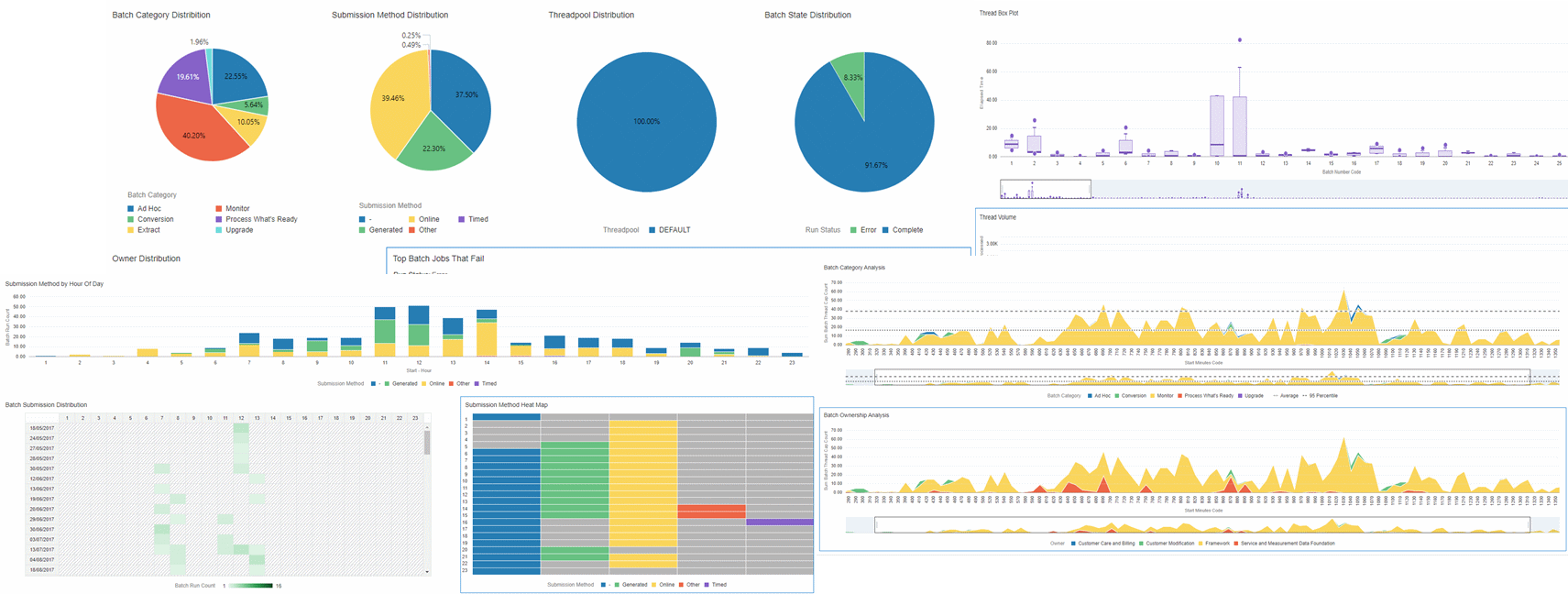
Batch Subject Area Components
The batch subject area allows Oracle partners and utilities to analyze past executions of batch processing to track trends and other metrics for their batch processing. This can help you configure optimizations to the processing to meet customer goals.
Steps to Enable
You don't need to do anything to enable this feature.
Tips And Considerations
The content is delivered ready for use. You may connect the content to your operational system for drill down functionality.
REST Service to Maintain Customer Release Details
The F1-InstallationOptions Inbound Web Service is introduced to provide operations to Get and Patch the release, build number and patch number details on the Customer Release record in the Installation Options installed products list. It uses an existing service script: F1CustRelMSS (F1CustRelMSS).
For cases where an implementation wants to track the version of the custom extensions, you can use this REST service to retrieve and update the Customer Release details. This is particularly useful for Oracle partners and utilities who want to update the customer version from CI/CD tools via curl commands.
Steps to Enable
You don't need to do anything to enable this feature.
Tips And Considerations
The security for these new operations is the same security for the Installation Options - Framework transaction. Users must have the Execute action for the CILTINSP (Installation Options) application service.
Key Resources
-
Refer to the Open API Specification for the F1-SubmitJob inbound web service for more information.
See the database changes coming for 21C in the Oracle Utilities Cloud Services Database Changes Guide. This guide is also available in PDF.
This includes information about databases changes to tables, indexes, views, columns, and more.
Steps to Enable
You don't need to do anything to enable this feature.
HTML Help on Oracle Help Center
Oracle Utilities cloud service documentation is now available in HTML on Oracle Help Center. Previously, only PDF versions of the product documentation was available on Oracle Help Center. As of this release, PDF versions also continue to be available from the "Guides" link on the left side of each product's Oracle Help Center page.
HTML documentation makes it easier for you to search for and navigate to the information you need about Oracle Utilities cloud services.
Steps to Enable
You don't need to do anything to enable this feature.
Key Resources
- Refer to the Oracle Utilities Oracle Help Center page and select a product name to view the HTML documentation for that product.
OAuth Credentials Authorization Support for Oracle Utilities Cloud Service REST API
OAuth-based authorization for utility credentials is now supported and provides an industry-standard integration mechanism for inbound web services of Oracle Utilities Cloud Services REST API. OAuth utility credential authorization is the most used mechanism for server-to-server web service communication.
This feature provides seamless integration with other Oracle and non-Oracle products and simplifies the implementation of the integration.
Steps to Enable
To enable this feature, raise a service request to create or manage the integration of the OAuth Client to your Identity Cloud Service tenancy. Upon receiving the client credentials from the Identity Cloud Service administration console, complete the integration configuration in the Oracle Utilities Cloud Service application.
Key Resources
- Refer to the Setting Up an OAuth Client for REST/SOAP Web Services section of the Oracle Utilities Cloud Services Administration Guide for more information.
Single Submitter Option for Batch Job Submission
The Single Submitter program option on a scheduler program allows you to create a single batch job submission for all of the threads on a batch control. This is particularly useful for implementations that use large numbers of threads in a batch stream.
This option reduces lock contention on the Batch Control table for a multi-threaded batch job.
Steps to Enable
To enable this feature, raise a service request to create or manage the integration of the OAuth Client to your Identity Cloud Service tenancy. Upon receiving the client credentials from the Identity Cloud Service administration console, complete the integration configuration in the Oracle Utilities Cloud Service application.
Key Resources
- Refer to the Setting Up an OAuth Client for REST/SOAP Web Services section of the Oracle Utilities Cloud Services Administration Guide for more information.
Intuitive Test Data User Interfaces
The Test Data user interface holds information for the test automation flow. You can now link test data across components in the flow based on conditions through intuitive screens, prevalidations, and post validations. The updated screens enable you to develop a test flow in a short period and reduce the upfront design time for planning the test data elements to expose through the component's functions.
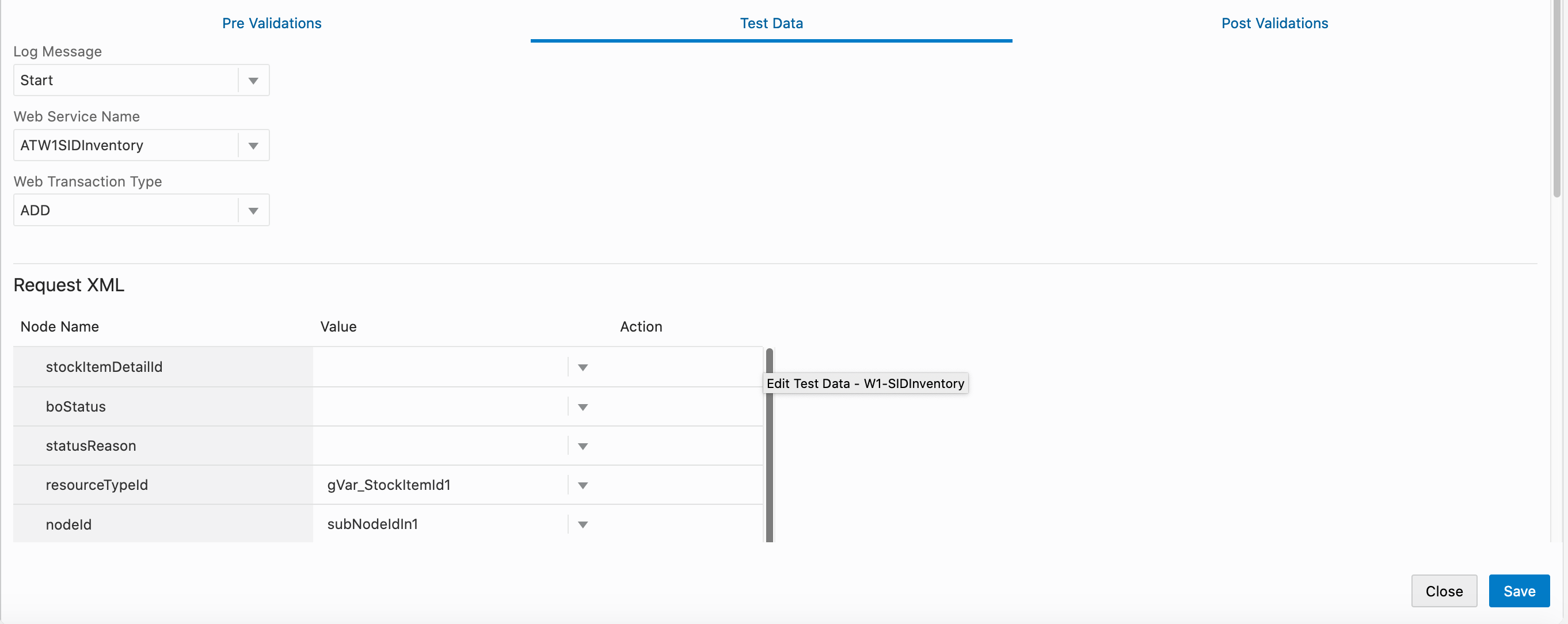
Enhanced Test Data GUI
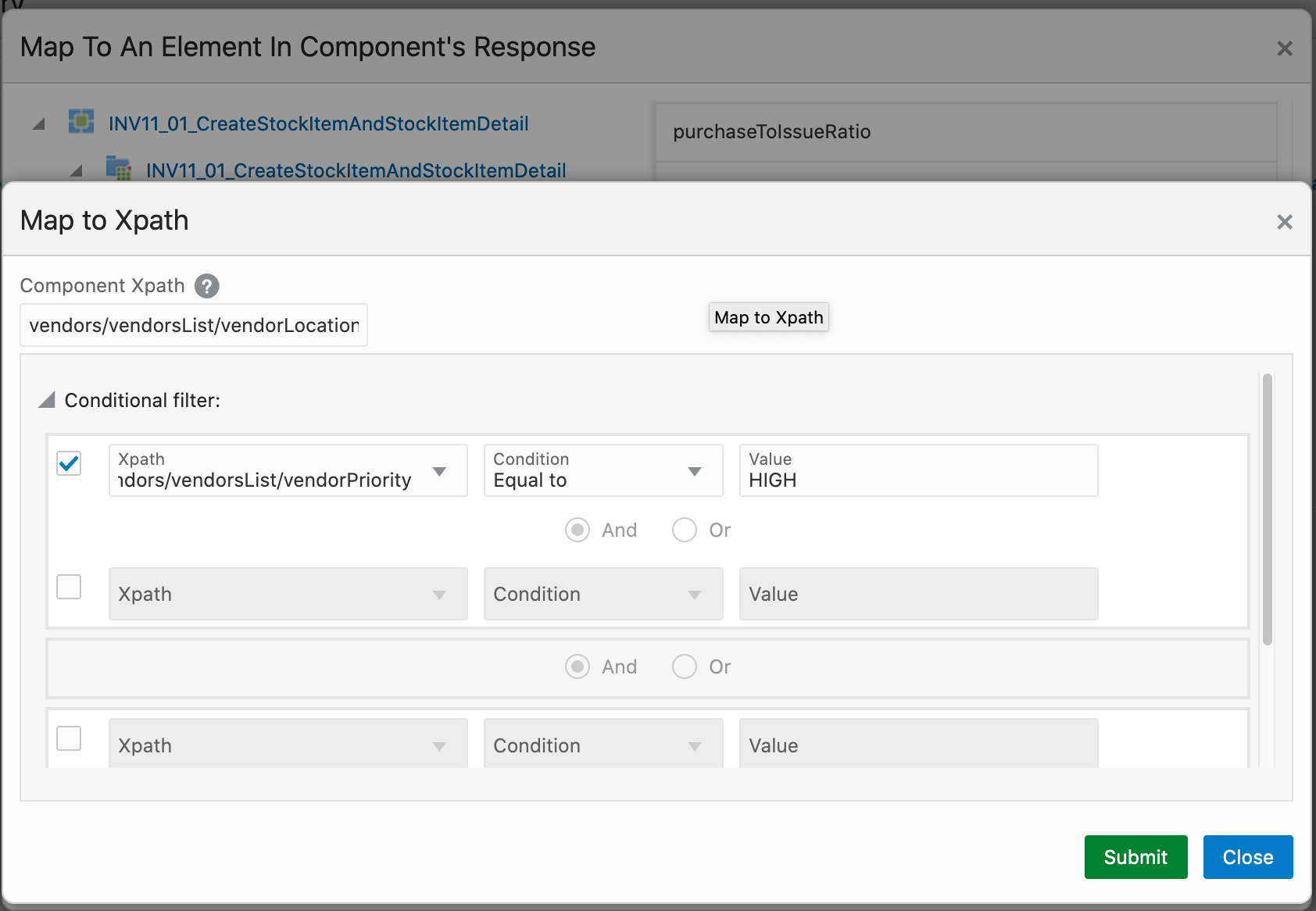
GUI-based Conditional Movement of Test Data Between Components
Previously, test data are passed across component steps through base functions of Oracle Utilities Testing Accelerator that involved spending a significant amount of time using the screens to add test data to a flow.
These intuitive user interfaces reduce the test automation design and development periods, and shortens the time spent to automate tests.
Steps to Enable
You don't need to do anything to enable this feature.
Key Resources
-
Refer to the Creating Test Flows section of the Oracle Utilities Testing Accelerator User Guide for more information.
-
Refer to the Test Data Enhancements training.
Java Script Support for Custom Functions
Oracle Utilities Testing Accelerator provides support for the creation of custom function libraries with JavaScript. This enables you to write custom routines for a custom function and use the function as a plugin for component steps in a flow. Additionally, a rich editor is available for developing your custom JavaScript functions.
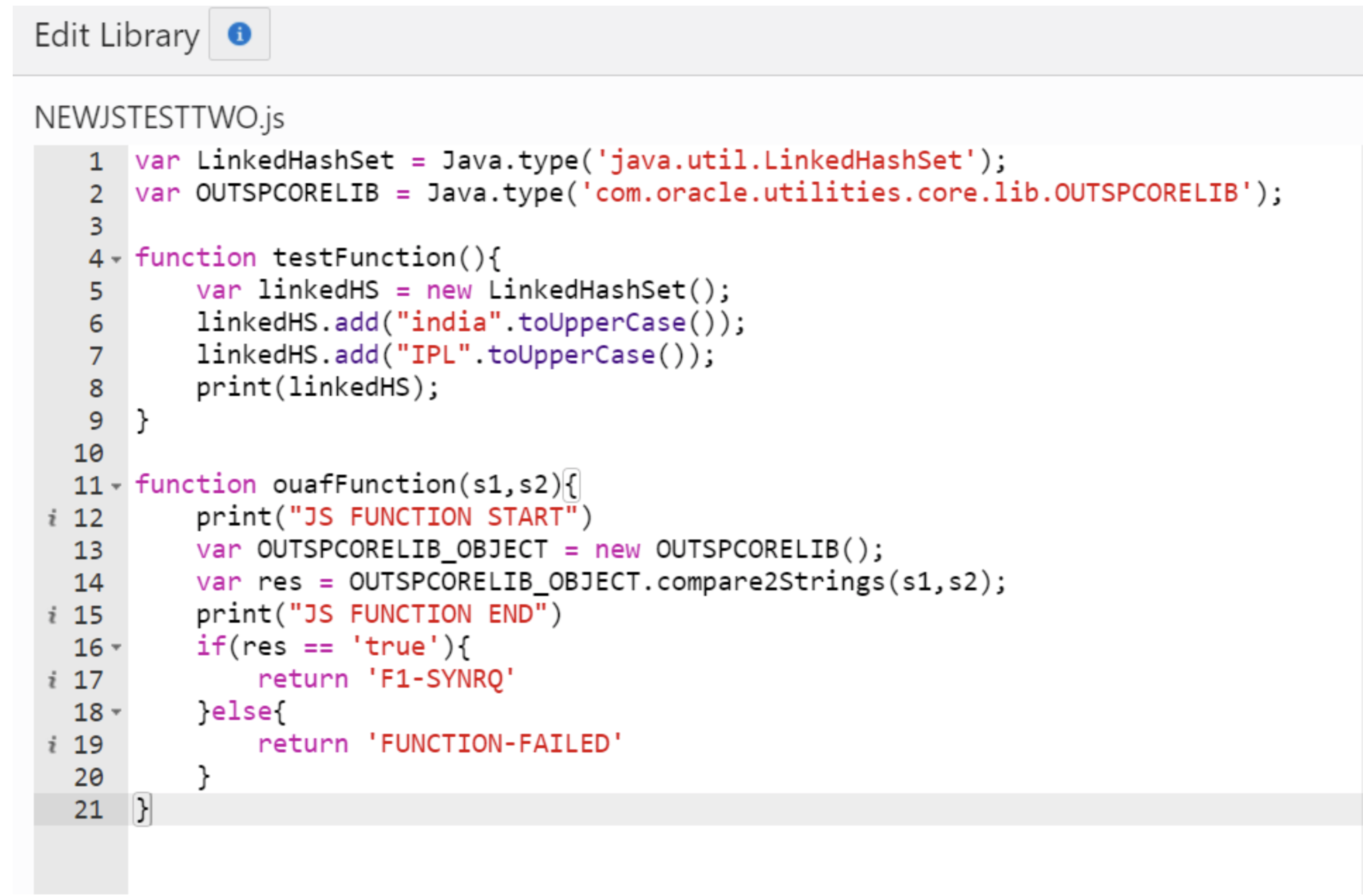
JavaScript-based Custom Function Library Code Editor
Previously, validation of test data results from custom calculation or formatting of web service response was not supported by Oracle Utilities Testing Accelerator's base libraries.
This feature allows you to implement custom test data generation or verification routines when such routines are unavailable in the Oracle Utilities Testing Accelerator's base set of functions.
Steps to Enable
You don't need to do anything to enable this feature.
Tips And Considerations
Creation of Groovy-based custom function libraries is no longer supported. Existing Groovy libraries are still supported.
Key Resources
-
Refer to the Custom Libraries section of the Oracle Utilities Testing Accelerator User Guide for more information.
IMPORTANT Actions and Considerations
REPLACED OR REMOVED FEATURES
From time to time, Oracle replaces existing cloud services with new features, or removes existing features. Replaced features may be put on a path to removal. As a best practice, you should use the newer version of a replaced feature as soon as a newer version is available.
This section identifies the features in this Cloud service that have been replaced or removed.
| Product | Removed Feature | Target Removal | Replacement Feature | Replaced In | Additional Information |
|---|---|---|---|---|---|
| Oracle Utilities Application Framework | OJet Support for Bind Architecture |
21C | Web component architecture | Not applicable | OJet previously supported a "bind" architecture for their components. Example:
The OJet team announced the deprecation of this format in OJet V7 and continued to support it until OJet V11. The newer releases of OJet have been focused on a "Web Component" architecture. Example:
This release of Oracle Utilities Application Framework now uses OJet V11 where the bind architecture is no longer supported. |
| Oracle Utilities Testing Accelerator | Groovy language-based custom function library creation |
21C | JavaScript language-based custom function library creation |
21C | Starting in release 21C, you can only create custom function libraries through JavaScript. Existing Groovy language-based custom function libraries will continue to work in the 21C release. |


Unless otherwise specified below, these notes are for informational purposes and no action is required.
PLANNED REMOVAL
Plan to Remove UI Metadata Related to Converted Pages from Oracle Utilities Application Framework
The UI metadata related to fixed pages that have been converted to portals will be removed in a future release. The tables list the navigation keys related to each maintenance page. The related UI program component data will also be removed. Note that the metadata related to the search pages will not be removed at this time in case these are used on other fixed pages.
| Field Maintenance | Portal Maintenance | Zone Maintenance | To Do Entry Maintenance |
|---|---|---|---|
| impFldTabMenu metaDataFieldMainPage metaDataFieldMaint metaDataFieldTableGrid metaDataFieldTablePage Any help navigation keys |
portalTabMenu portalMainPage portalMainPopup portalOptsGrid portalOptsPage Any help navigation keys |
portalZoneTabMenu portalZoneMainPage portalZoneGridPage portalZoneParameterGrid portalZonePortalGrid portalZonePortalPage Any help navigation keys |
toDoEntryCharGrid toDoEntryDrillKeyValuesListGrd toDoEntrySortKeyValuesListGrid todoentrykeyvalue todoentrymain toDoEntryMaint toDoEntryPopupAdd toDoEntryPopupForward toDoEntryPopupSendBack Any help navigation keys |
| Table Maintenance | Work Calendar Maintenance | Message Maintenance | Time Zone Maintenance |
|---|---|---|---|
| metaDataTableFieldsGrid metaDataTableMainPage metaDataTableCFldsGrid metaDataTableConstPage metaDataTableMaint metaDataTableRefByConstPage metaDataTableFieldPage Any help navigation keys |
workCalendarMaint workCalendarMainPage workCalendarHolidayGrid Any help navigation keys |
msgMaintDetailsPage msgMaintGrid msgMaintPage msgMaintTabMenu Any help navigation keys |
timeZoneMainPage timeZoneTabMenu Any help navigation keys |
Plan to Remove Miscellaneous System Data from Oracle Utilities Application Framework
The following metadata is no longer in use and will be removed in a future release:
| Object | Data | Description/Comments |
|---|---|---|
| Lookup Value |
CHAR_ENTITY_FLG / F1SE |
Characteristic Entity / Sync Request Inbound Exception |
| Script |
F1-TDMgActSS |
To Do Management - Process Actions (Deprecated) / Replaced by F1TDMgActSS |
| Script |
F1AddDebugLg |
Add Log for Monitoring Probe (Deprecated) / Replaced by a BS - F1-MONPRBLOG |
Plan to Incorporate Application Viewer to Oracle Utilities Applications
Many aspects of the Application Viewer are incorporated into the application, including the data dictionary. The user interfaces for the tables and fields have been enhanced to provide more information at a glance and a view of the links between tables. Information about algorithms, batch controls, and maintenance objects are also visible directly in the application. In a future release, Javadocs and Groovy Javadocs will be viewable within the application at which point the standalone Application Viewer will no longer be delivered.
Plan to Remove XSLT Managed Content Type from Oracle Utilities Application Framework
The Managed Content table entries related to XSL should use the XSLTC managed content type instead of the XSLT managed content type. Support for the XSLT managed content type will be deprecated in a future release.
Plan to Remove REST IWS - Original REST Servlet from Oracle Utilities Application Framework
The original URL supplied for calling Inbound Web Service-based REST services includes the Inbound Web Service name in its makeup. Support for this will continue for backward compatibility purposes, but will be deprecated in a future release. You should adjust your existing integrations to use the currently supported URL.
Plan to Remove Append Setting from Pagination - Oracle Utilities Application Framework
There are several known issues associated with the pagination's Append option. It is recommended that you defer from using this pagination setting.
Plan to Remove Support for Master/Subordinate Servers for Web Service Catalog in Oracle Utilities Application Framework
The Service Catalog Configuration (Master Configuration) enables you to define subordinate servers. Defining subordinate servers is no longer applicable to Oracle Integration Cloud.
Plan to Remove Support for Batch Run Statistics Portal Functionality in Oracle Utilities Application Framework
The Batch Run Statistics portal provides additional information about batch runs, but some functionality on the portal is related to capturing additional information from an external tool. Additional information captured from the external tool is stored in a Fact record. Support for capturing additional information from an external tool will be discontinued in a future release. The captured additional information would still be available to existing customers.
Plan to Remove Configuration Migration Assistant Import Requests from Oracle Utilities Application Framework
The F1-FrameworkAdmin (Framework Admin) and F1-SchemaAdmin (Schema Admin) migration requests are no longer recommended and will not be updated with new administration or control table in a future release.
Plan to Remove Configuration Migration Assistant Import Algorithm from Oracle Utilities Application Framework
The Configuration Migration Assistant Import algorithm plug-in spot will be deprecated in a future release. It is recommended that you review any existing algorithms and create the appropriate Pre-Compare algorithms instead.
Plan to Remove Business Object Read from F1-MAINPROC When Pre-processing Exists
In the original implementation of Configuration Tools, the main framework maintenance BPA (F1-MainProc) does not perform a Read of the business object when a pre-processing script is linked to the business object via options. When F1-MainProc does not perform a Read, the pre-processing script performs the Read of the business object.
In a subsequent release, a business object Read was added to F1-MainProc (with an existing pre-processing script) to resolve a UI Hints issue related to child business objects. Adding a business object Read to F1-MainProc introduced an issue visible only to specific scenarios and a different fix was introduced. The new fix made the business object Read unnecessary in F1-MainProc and many pre-processing scripts are properly performing the business object Read. The business object Read should have been removed from F1-MainProc to prevent multiple reads from being performed. However, pre-processing scripts may have been introduced after the addition of the business object Read to F1-MainProc that do not perform a business object Read in the pre-processing script. As such, the business object Read is still performed as part of the F1-MainProc processing.
When a pre-processing script exists, the business object Read will be removed from the F1-MainProc logic. Review your custom pre-processing scripts that are linked to business object options to ensure that the scripts properly perform reads of your business object.
Plan to Remove Custom Groovy Function Support from Oracle Utilities Testing Accelerator
In Release 22A, Groovy language support for custom function libraries will no longer be supported. Custom function libraries written in Groovy language should be re-written using JavaScript.