
- Revision History
- Overview
- Feature Summary
- Utilities Common
- Customer
-
- Customer
- Meter Solution
- Smart Grid Gateway
- Operational Device
- Analytics Visualization
- Utilities Application Framework
- Product Usability
-
- About Box Information Adjusted
- Adjust Menu Sequences
- Entity Tags
- Field References
- Filter Area On Data Explorer Collapses After Search
- Inbound SOAP Web Service Debugging Improvement
- Menu Application Security Portal
- New Hot Keys for Navigation
- New User Experience
- Open API Specification Enhancements
- User Group Services Management - Filter User Groups by Entity Tag
- Batch Processing
- Implementation Tools
- To Do Management
- Data Export
- Miscellaneous
- Application Security
- System Wide
- IMPORTANT Actions and Considerations
This document will continue to evolve as existing sections change and new information is added. All updates appear in the following table:
| Date | Module | Feature | Notes |
|---|---|---|---|
| 16 DEC 2022 | Web Services | Additional and Enhanced REST APIs | Updated document. Revised feature information. |
| 31 MAR 2022 | Created initial document. |
Oracle Utilities Customer Cloud Service is a customer care, service order, metering, billing, and credit and collections solution. The solution is designed to cater for utilities of all sizes, supports one to many utility service types, and handles the complexities associated with a utility's processes.
This guide outlines the information you need to know about new or improved functionality in this update, and describes any tasks you might need to perform for the update. Each section includes a brief description of the feature, the steps you need to take to enable or begin using the feature, any tips or considerations that you should keep in mind, and the resources available to help you.
 HAVE AN IDEA?
We’re here and we’re listening. If you have a suggestion on how to make our cloud services even better then go ahead and tell us by submitting a service request. Wherever you see this icon after the feature name it means we delivered one of your ideas.
DISCLAIMER
The information contained in this document may include statements about Oracle’s product development plans. Many factors can materially affect Oracle’s product development plans and the nature and timing of future product releases. Accordingly, this Information is provided to you solely for information only, is not a commitment to deliver any material, code, or functionality, and should not be relied upon in making purchasing decisions. The development, release, and timing of any features or functionality described remains at the sole discretion of Oracle.
This information may not be incorporated into any contractual agreement with Oracle or its subsidiaries or affiliates. Oracle specifically disclaims any liability with respect to this information. Refer to the Legal Notices and Terms of Use for further information.
Column Definitions:
Report = New or modified, Oracle-delivered, ready to run reports.
UI or Process-Based: Small Scale = These UI or process-based features are typically comprised of minor field, validation, or program changes. Therefore, the potential impact to users is minimal.
UI or Process-Based: Larger Scale* = These UI or process-based features have more complex designs. Therefore, the potential impact to users is higher.
Features Delivered Disabled = Action is needed BEFORE these features can be used by END USERS. These features are delivered disabled and you choose if and when to enable them. For example, a) new or expanded BI subject areas need to first be incorporated into reports, b) Integration is required to utilize new web services, or c) features must be assigned to user roles before they can be accessed.
Oracle's Redwood user experience elevates the application pages of Oracle Utilities Testing Accelerator to a more visually appealing and modern user interface experience. This includes a new compact page header that takes up less vertical space to allow more page content to be displayed, as well as new portal tabs, buttons, background colors, borders, and fonts all updated to match the overall Redwood user experience found in other Oracle applications.
Oracle Redwood provides a consistent user interface experience across Oracle's latest solutions.
Steps to Enable
You don't need to do anything to enable this feature.
The dynamic filters of the Oracle Utilities Testing Accelerator Dashboard allow you to create customizable reports for analyzing test automation run status. Dynamic filters support time-based views of test runs, enabling you to categorize the runs into product or flow modules and provide insights to determine the health of specific functional areas in the application. The custom reports created by these dynamic filters include a drill-down feature that displays individual data points. This provides the flexibility to perform root cause analysis through visualization. You can use the visualized reports to share the status of the test automation runs with concerned stakeholders of an Oracle Utilities Cloud Service and aid in their decision making.
The dashboard's dynamic filters and visualizations ensure better planning and management of test runs and the ability to ascertain the application's health over time.
Steps to Enable
You don't need to do anything to enable this feature.
Support Batch Stream Batch Jobs Submission As a Single Submitter
The scheduler program's Single Submitter option enables you to submit batch jobs in a batch stream as one batch job for all threads. By default, this option creates a single batch job submission record for all threads of the batch control to prevent excessive lock contention on the Batch Control table when processing large numbers of threads.
The Single Submitter option provides the flexibility to submit one batch job for all the batch stream threads instead of submitting one batch job for each thread.
Steps to Enable
You don't need to do anything to enable this feature.
Tips And Considerations
If your implementation requires managing processing work or records in parallel with a few number of threads, set Single Submitter to "false" and use the scheduler program on the batch job stream definition as one of the initial steps before the steps that refer to the batch control. By doing so, the configured option takes effect prior to batch control or job submissions in the job stream.
Support for Digital Communication-related Collection Process Events
The application-owned C1COLLEVTNOT (Collection Event Notification) algorithm type enables you to initiate the creation of template-based notifications to be sent to an external system (for example, Oracle Responsys) for communication delivery. C1COLLEVTNOT-based algorithms can be configured on applicable Collection Event Types, which can then be defined in the required Collection Process Templates, enabling you to include digital collection events as part of your collection processes to trigger outbound notifications to encourage customers to pay their outstanding debt (for example, communication via email and SMS).
This algorithm type lowers your collections costs and increases customers’ likelihood of paying off outstanding debt.
Steps to Enable
To enable this feature, refer to the Setting Up Collection Event Types of the Administrative User Guide for more information.
Customer 360 Portal Zone - Financial Activity (Details) Zone Updates
The Financial Activity (Details) zone tabs of the Customer 360 portal provide a more enriched view of a customer with the following updates:
- Enhanced Usage and Billing tab:
- Cost Graph View:
-
The Bill Summary Cost bar tooltip now includes summary information about cancelled and/or rebilled bill segments that may have occurred after bill completion. Also, the ending balance is no longer displayed.
- The Ending Balance bar tooltip, for bills based on balance forward accounts, now displays various financial summary information for a bill (such as the previous period’s balance, total payments, total adjustments, total billing corrections, total current billing charges, and ending balance).
-
- Table View:
- Related entries automatically expand by default when changing from the Graph view to the Table view.
- Cost Graph View:
- Enhanced Financial History tab:
- Previous and Next buttons replace the previous page navigation options.
- Expandable financial event details without having to go to the next page to see further details.
- Enhanced Payment Agreements tab:
- Indicates if a payment arrangement’s scheduled payment is partially received and remaining amount due. The dates of received payments are also displayed.
- Indicates if a pay plan’s scheduled payment is partially received and the remaining amount due.
The Customer 360 portal enhancements provide a fuller view of your customer's financial details, resulting in better handling of account maintenance requests and most common inquiries.
Steps to Enable
You don't need to do anything to enable this feature.
Template-based Outbound Notifications
You can now initiate template-based outbound notifications to an external system for communication delivery (for example, via email or SMS) and include customer-specific information to provide more personalized interaction. Previously, only message-based notifications were available based on application-owned business objects.
These new application-owned business objects enable you to create Notification Types for template-based notifications:
-
C1-NotifTypeTmplSubscription (Template-Based Subscription Notification Type) - Customers must sign up or subscribe to receive these types of notifications
-
C1-NotifTypeTmplParentPush (Template-Based Parent Push Notification Type) - Customers do not need to sign up to receive these types of notifications
-
C1-NotifTypeTmplIndividualPush (Template-Based Individual Push Notification Type) - Customers do not need to sign up to receive these types of notifications
Notification Types based on the C1-NotifTypeTmplSubscription or C1-NotifTypeTmplIndividualPush business object allows you to:
-
Optionally plug in an Override Delivery Information algorithm to override the logic that retrieves active contact preferences or the default contact information for an account. The application-owned C1OVINVGSTDI (Override Invite Guest Delivery Information) algorithm allows you to only use email as the delivery type if required.
- Plug in one or more Template Data algorithms to retrieve information to include in the outbound template-based notification. These application-owned Template Data algorithms are available for use if these meet your implementation-specific requirements:
- C1GUESTNTFTD (Guest Notification Template Data) - Retrieves guest-related details such as guest name, guest email, and so on
- C1BILLINFTMP (Bill Information Template Data) - Retrieves bill-related details such as Bill ID, due date, amount due, and so on
- C1PAYINFTMPD (Payment Information Template Data) - Retrieves payment-related details such as payment amount
- C1COLLNFTMP (Collection Notification Template Data) - Retrieves collection-related details such as amount due and arrears date
-
Define one or more Template Names for each Delivery Type per Language and use on the resulting outbound notifications
These algorithms now support message- and template-based Notification Types:
- C1-BLDNTFPRF (Build Notifications For Notification Preference) - Used on the Notify state of these service task-related business objects:
- WX-NotifyBillDueTask (Bill Due Notification Task)
- WX-NotifyBillReadyTask (Bill Ready Notification Task)
- WX-NotifyLatePayTask (Late Payment Notification Task)
- WX-NotifyPayReceivedTask (Payment Received Notification Task)
-
The Lead Event Completion algorithm based on the C1-LECNTPF (Create Notification Using Notification Preferences) algorithm type. Used on the C1-LeadEvtTypeUseNotifPref (Notify Customer Using Communication Preferences) business object.
-
Algorithms based on the C1-DETTOPUP (Determine If Top Up Needed) algorithm type. Used on the Determine if Top Up Needed state of the C1-PrepayBillerTask (Prepay Biller Task) business object.
-
Algorithms based on the C1-CHKBSSTAT (Check PPB Bill Segment Status) algorithm type. Used on the Calculating Bill Segment state of the C1-PrepayBillerTask (Prepay Biller Task) business object.
Additionally, a Notification Format filter is available in the Notification Type Search that allows you to search for message- or template-based Notification Types.
NOTE: The application-owned C1-NotificationType business object has been updated to indicate that it is used for message-based notifications. In this release, you can plug in an Override Delivery Information algorithm for subscription and individual push-related message-based Notification Types.
Template-based outbound notifications elevate your customer interactions with more personalized digital communications.
Steps to Enable
To enable this feature, refer to the Setting Up Notification Preference Options section of the Administrative User Guide for more information.
Synchronization of Person’s Life Support/Sensitive Load Information to Metering Contact Record
The system automatically synchronizes the Life Support/Sensitive Load information on a Person record to the related metering Contact record. Note that the metering Contact record is not viewable and editable on the user interface. Previously, the system only synchronized the Life Support/Sensitive Load information on a Premise record to the related metering Service Point record.
The synchronization reduces the extent of implementation-specific extensions required when integrating with an external system like Oracle Utilities Network Management System.
Steps to Enable
You don't need to do anything to enable this feature.
Synchronization of Notification Contact Preference Information
Activating or deactivating an account's push- or subscription-based notification’s contact preference information triggers the creation of a synchronization request to initiate the sending of an outbound message to the edge application (for example, Oracle Utilities Network Management System) that requires or used that notification contact preference information. The Edge Application Notification section of the Notification Preferences master configuration allows you to define the Notification Types and External System related configuration of the other edge applications to be notified after activation or deactivation of the appropriate notification contact preference
NOTE: The C1-NCPIL (Notification Preference Sync Initial Load) batch control creates initial Notification Contact Preference synchronization request records that can be used for initiating the initial loading of notification contact preference information into other Edge applications.
This synchronization will help decrease project implementation costs, duration, and risk.
Steps to Enable
To enable this feature, refer to the Other Edge Application Notification section of the Administrative User Guide for more information.
Oracle Responsys Integration for Transactional Outbound Notifications
The integration to Oracle Responsys enables you to send cloud service initiated transactional notifications and correspondence to customers via email or SMS based on their preferred communication channel(s). This end-to-end solution provides the capability to:
- Define template-based Notification Types for each type of outbound notification or correspondence in the cloud service
- Define algorithms to extract the data required for each type of outbound notification or correspondence in the cloud service
- Configure the corresponding Notification Templates in Oracle Responsys
- Use Notification Hub for notification queues, enrichment, and communication with Oracle Responsys
The Oracle Integration Cloud-based Notification Hub manages the communication between the cloud service and Oracle Responsys.
The integration decreases project implementation costs, duration, risks, and total cost of ownership.
Steps to Enable
To enable this feature, refer to the Configuration Guide related to the integration for more information.
Key Resources
- Refer to the Outbound Notification Integration training.
Batch Processes for Migrating Initial Master Data and Scalar Meter Reads
New data migration related batch processes provide you with the capability to migrate data from specific Oracle Utilities Customer Care and Billing master data objects to specific Oracle Utilities Customer to Meter metering and asset related objects (Oracle Utilities Customer to Meter is the foundation of Oracle Utilities Customer Cloud Service). You can migrate Oracle Utilities Customer Care and Billing data like person, service agreement, meter, item, service point, service point/meter history, service point/item history, and contract option/event to corresponding Oracle Utilities Customer to Meter metering and asset related objects like contact, usage subscription, device (asset), service point (or node), install event, and dynamic option/event.
These initial data migration processes also cater for migrating scalar meter reads to measurements.
This reduces project costs, configuration time, and migration timelines. It also simplifies migration from the Oracle Utilities Customer Care and Billing data model to the Oracle Utilities Customer To Meter data model, which is the foundation of Oracle Utilities Customer Cloud Service.
Steps to Enable
To enable this feature, refer to the Initial Master Data Conversion section of the Administrative User Guide.
Receipt Printing Using Point-of-Sale Printers - Additional Samples
Additional BPA Script and UI Map samples for Payment Event, Payment Quick Add, and Payment Event Quick Add transactions enable you to use additional fields for printing receipts or endorsements when using the sample receipt printer functionality as a starting point. The additional fields include information related to organization, payments, tender, and endorsements.
The new BPA Scripts and UI Maps include the following:
- BPA Scripts
- C1-PyEvtPrt (Payment Event Print)
- C1-PyEvQAPrt (Payment Event Quick Add Print)
- C1-PyQAPrt (Payment Quick Add Print)
- UI Maps
- C1-PaymentEventPrint (Payment Event Print)
- C1-PaymentEventQuickAddPrint (Payment Event Quick Add Print)
- C1-PmtQuickAddPrint (Payment Quick Add Print)
Each BPA Script calls the appropriate sample UI Map to open Print Options. Selecting an option (for example, Endorse, Receipt, or Stub) launches the browser's printer dialog.
In addition, updates to the Point of Sale (POS) Printer Integration master configuration provide the ability to capture the following information used by the BPA Scripts:
- Company Name
- Company Premise
- Payment Receipt and Endorsement Messages
These additional samples reduce the need for implementation-specific extensions.
Steps to Enable
To enable this feature, refer to the Customer Cloud Service Receipt Printing section of the Oracle Utilities Cloud Services Integration Guide for more information.
Tips And Considerations
For upgrading implementations, you can run the C1-UPPSC (Update Point of Sale Integration Config) batch process to update the enhanced Point of Sale (POS) Printer Integration master configuration with the existing Point-of-Sale related configuration from Installation Options.
These existing BPA Scripts and UI Maps are not planned to be enhanced but the descriptions have been updated to indicate for network printer use:
- BPA Scripts
- C1-PEAddPrt (Payment Event Print - for network printers)
- C1-PEQAddPrt (Payment Event Quick Add Print - for network printers)
- C1-PyQAddPrt (Payment Quick Add Print - for network printers)
- UI Maps
- C1-PayEventAddPrint (Payment Event Print - for network printers)
- C1-PayEventQuickAddPrint (Payment Event Quick Add Print - for network printers)
- C1-PaymentQuickAddPrint (Payment Quick Add Print - for network printers)
Enhanced Stepped Service Quantity Calculation Rule Type for Prorated Bill Segments
The Override SQ Algorithm plugin spot allows you to specify an algorithm to override a step service quantity calculated by a step rule on rate calculation rules based on the C1-SteppedSQ (Stepped Service Quantity) business object. This may be useful in billing scenarios, involving a tiered rate schedule with a unit rate change, resulting in applicable service quantities not adding up to a tier's upper limit. Additionally, you can define Step Group values in the STEP_GROUP_FLG (Step Group) Lookup to enable combining step rules for evaluation and adjustment as a group.
You can use the application-owned C1-OVRDSTPSQ (Override Step Service Quantity) algorithm in the plugin spot to ensure that the total calculated step service quantities do not exceed the step limit (prorated due to rate version or value break) and the calculated service quantities sum up to the billable service quantity. If the algorithm does not meet your specific requirements, you can configure a custom implementation-specific algorithm for the plugin spot.
NOTE: This feature only applies to Stepped Service Quantity based calculation rules where the Seasonal attribute is set to "No."
This reduces end customer complaints or calls and frees up your call center agents by ensuring service quantities in a prorated bill are consistent at all levels.
Steps to Enable
To enable this feature, refer to the Detailed Description on the C1-OVRDSTPSQ (Override Step Service Quantity) algorithm.
Rate Calculation Rule - Derive Value Algorithm Types
The following Calculation Rule - Derive Value algorithm types are provided for use in various calculation rules:
-
C1MDMACRED (MDMA Credits) - Creates an appropriate Characteristic Type and Value to handle credits issued to a customer. Issuance of credits is a result of the customer's meter being read by a third-party service provider.
-
C1SEASDAY (Seasonal Days in a Billing Period) - Creates an entry in the service quantity (SQ) array that contains the number of days in the current bill period that fall in a defined season.
-
C1CALCDA (Calculate Characteristic Type/ Value if Service Agreement Relationship Types Exist) - Defines the types of parameters supplied to a service quantity rule that creates an appropriate Characteristic Type and Value.
- C1MOMSCRED (Meter Ownership and MSP Credits) - Returns the number of meters that are not owned by the company.
-
C1BILLCRED (Bill Credits For Electric Consolidated Billing) - Define the types of parameters supplied to a service quantity rule that creates an appropriate Characteristic Type and Value (only applicable to Oracle Utilities Customer Care and Billing Cloud Service)
These algorithm types will help reduce implementation-specific extensions when migrating from the component-based rating engine to the rules-based rating engine.
Steps to Enable
To enable these features, refer to the Detailed Description on the new Calculation Rule - Derive Value algorithm types.
Additional and Enhanced REST APIs
These new REST API Inbound Web Services expose various customer-related entities and data, and provide the capability to create, manage, and view that data:
- C1-Budget (Budget) - View account's budget information
- C1-CollectionProcess (Collection Process) - Creates, maintains, and views collection process information
- C1-CutProcess (Cut Process) - Maintains and views cut process information
- C1-LandlordAgreement (Landlord Agreement) - Maintains and views landlord agreement information
- C1-OverdueProcess (Overdue Process) - Creates, maintains, and views overdue process information
- C1-PayPlan (Pay Plan) - Creates, maintains, and views pay plan information
- C1-SeveranceProcess (Severance Process) - Creates, maintains, and views severance process information
- C1-WriteOffProcess (Write Off Process) - Creates, maintains, and views write off process information
- C1-AccountNotificationPreferences (Account Notification Preferences) - Retrieves notification preferences for a collection of accounts and notification types
- X1-PersonQueries (Business Person Queries) - Retrieves summary information related to business persons (only applicable to Oracle Utilities Customer Cloud Service)
These updated REST API Inbound Web Services also expose various customer-related entities and data, and allow you to manage that data:
- C1-Case (Case) - Retrieves a list of cases based on specific search criteria
- C1-CommunicationsPreferences (Communications Preferences) - Includes new operations for viewing and managing mailing addresses
You can use these REST Inbound Web Services to decrease project costs and timelines.
Steps to Enable
Refer to the Oracle Utilities API documentation.
Asset Activity Type Navigation Link
The Asset Activity Type navigation link now appears on the Field Task Type page if the following conditions are met:
- Operational Device Management is enabled in Customer To Meter
- Eligible for Joint Maintenance on the Field Task Type is set to "Yes"
Otherwise, the navigation link is not displayed.
This provides the ability to navigate to the appropriate Asset Activity Type from the Field Task Type page.
Steps to Enable
You don't need to do anything to enable this feature.
The application-owned Attachments zones in the Portal-related tab pages for the following entities enable you to add, change, view, and delete attachments:
- Person
- Account
- Premise
- Service Agreement
- Service Point (only applicable to Oracle Utilities Customer Care and Billing Cloud Service)
- Meter (only applicable to Oracle Utilities Customer Care and Billing Cloud Service)
These zones reduce the need to integrate with a separate system to store attachments.
Steps to Enable
You don't need to do anything to enable this feature.
Tips And Considerations
If your system has implementation-specific Attachments zones related to these applicable entities:
- Disable the application-owned Attachments zones to continue using your existing implementation-specific zones.
- Disable your implementation-specific Attachments related zones and use the application-owned zones.
Jointly Maintained Disconnect Locations
Disconnect locations are now jointly maintained. You can use the Disconnect Location portal, accessed by selecting Admin, Geographic, and Disconnect Location to maintain disconnect locations. Changes to disconnect locations using this portal are also propagated to the related metering and asset Disconnect Location lookups.
Because disconnect locations are now jointly maintained, there is no need to value map this field in the Customer to Meter master configuration.
Since the disconnect location is shared, there is no need to value map this field in the Customer to Meter master configuration.
Steps to Enable
You don't need to do anything to enable this feature.
Restricting Implementation-Specific Values in Notification Controlled By Lookup
The NTF_CTRL_FLG (Notification Controlled By) Lookup contains specific predefined values that allow a service task, bill route, or quote route to control an outbound notification for a specific Notification Type. The Custom switch is now unchecked so you cannot add implementation-specific values to this lookup.
This restriction reduces the capture of redundant data.
Steps to Enable
You don't need to do anything to enable this feature.
Dimension Scanner and Aggregation Monitor Performance Improvements
In this release, the D1-DSAEM (Dimension Scanner and Aggregation Monitor) batch control provides multi-threading support, which improves batch job performance and results to faster completion time.
This saves time and results in a more efficient process.
Steps to Enable
You don't need to do anything to enable this feature.
Measurement Quality and Timeliness Dimension Scan Batch Control
The D1-MQTDS (Measurement Quality and Timeliness Dim Scan) batch control provides the capability to perform dimension scans for timeliness and quality aggregation. With multi-threading enabled on the batch control, you can expect improved performance and reliability, and you have the ability to save the progress of interrupted batch runs. Additionally, the batch control consolidated the handling of explicit references to Usage Groups and dynamic determination of usage groups on Usage Subscriptions. A single Activity and Activity Type is applicable to both Usage Group determination methods. The batch control also simplifies the calculation of an Initial Measurement Data's timeliness by removing the need to plug in the D2-DET-TML (Determine IMD's Timeliness) algorithm to Initial Measurement Data business objects.
This batch control improves performance and reliability, and saves the current progress of an interrupted batch run.
Steps to Enable
If the implementation uses D2-MsrmtQuantityAggScanner (Measurement Quantity Scanner), additional configurations are not required.
If the implementation uses D2-SubMsrmtQDUCAggScanner (Dimension Scanner - Create Aggregators) and D2-MsrmtQDUCAggScanner (Dimension Scanner - Create Sub Scanner), complete the following steps to enable the feature:
-
Navigate to Activity Type and find the "Measurement Quantity Scanner" entry. If no "Measurement Quantity Scanner" Activity Type exist then create one.
-
Deactivate the Dimension Scanner - Create Aggregators activity type.
-
Deactivate the Dimension Scanner - Create Sub Scanner activity type.
-
Add an activity with a Measurement Quantity Scanner activity type and associate this with the Aggregation Measuring Component Type and Market Relationship Type configured for the Dimension Scanner - Create Aggregators-based activity.
-
Deactivate Dimension Scanner - Create Aggregators-based activities.
-
Deactivate Dimension Scanner - Create Sub Scanner-based activities.
-
Navigate to each Initial Measurement Data business object and remove the D2-DET-TML (Determine IMD's Timeliness) algorithm.
Headers on Specialized Extracts
Optionally include header rows to specialized data extracts to define the data needed for multiple extract versions and assist with data ingest when field changes occur. You can include header records to the following extract batch controls:
- D1-SIMDC - Specialized IMD Header Extract Current
- D1-SIMDH - Specialized IMD Header Extract Historical
- D1-SIMDEC - Specialized Measurement Extract Current
- D1-SMDEH - Specialized Measurement Extract Historical
This helps with the export of data when fields change or there are multiple versions of an extract.
Steps to Enable
To enable this feature, set the Include Header parameter to "Y" on the mentioned extract batch controls.
Oracle Field Service Integration
Multiple Service Histories Support
In this release, multiple service histories (work instructions and questionnaires) for field tasks that are applicable to Meter Solution/Service Order Management and Operational Device are created for devices that are tracked as assets. Meter Solution or Service Order Management serves as a conduit for sending a list of service history types configured in the Operational Device region on activity types and asset types to the field work system (for example, Oracle Field Service Cloud) as part of the Field Activity synchronization request. Upon completion of the field work, Meter Solution or Service Order Management takes the completion information related to service history types and initiates the Operational Device activity completion event that records the service history on the asset.
Multiple service histories is most applicable to scenarios where a shared activity is created directly in Meter Solution or Service Order Management for a tracked device.
This reduces project costs, configuration time, and custom integration work.
Steps to Enable
To enable this feature, update field task types that Meter Solution/Service Order Management and Operational Device share or jointly own to include the enrichment service for Asset System Data Retriever in the Processing Scripts section and set it as X1-AstSysRet.
Tips And Considerations
To enable this feature, update field task types that Meter Solution/Service Order Management and Operational Device share or jointly own to include the enrichment service for Asset System Data Retriever in the Processing Scripts section and set it as X1-AstSysRet.
Oracle Device Cloud Service - Oracle Field Service Cloud Integration
The Oracle Field Service Cloud integration enables the passing of device-related field activities like meter test or device inspection to Oracle Field Service Cloud for scheduling, routing, and completion. The integration supports passing of planned service histories or forms for an activity and valid service histories for each asset linked to the activity that the crew can complete on the field.
The Oracle Device Cloud Service and Oracle Field Service Cloud integration provides the capability to pass a collection of planned service histories for an activity and pass valid service histories for each asset linked to the activity, which field crews can complete.
Steps to Enable
To enable tis feature, refer to the Oracle Utilities Meter Solution Cloud Service Integration to Oracle Field Service Cloud Configuration Guide and Oracle Field Service Cloud Configurations Setup Guide for more information.
Meter and Channel Counts Without a Usage Subscription
The Product Use Metric dashboard provides the ability to calculate meter and channel counts without consideration of usage subscriptions and view master data counts.
This allows you to see meter and channel counts in implementations that are not using the usage calculation functionality.
Steps to Enable
To enable this feature on implementations that require device count independent of Usage Subscription, set the Exclude US Check (Y or N) parameter to "Y" on algorithms with the D1DVCCNTSNP (Create Device Count Snapshot) algorithm type.
To enable this feature on implementation that require channel count independent of Usage Subscription, set the Exclude US Check (Y or N) parameter to "Y" on algorithms with the D1-CHLCNTSNP (Create Channel Count Snapshot D1-CHLCNTSNP) algorithm type.
Service Orders and Field Tasks by CIS Division
Multi-division companies that issue different types of work requests by service type or region are able to configure varying service orders and field tasks by operating division. Examples of these service orders and fields tasks are service order orchestration processes, supporting different work calendars, start/end hours, and crews. Companies can also limit the field task types by division.
This is useful for multi-division companies that issue different types of work requests by service type or region. This reduces build time, build costs, and occurrence of errors.
Steps to Enable
To enable this feature, complete these steps:
-
In Customer Cloud Service implementations, select the Control by Division configuration in Installation Options. In Meter Solution Cloud Service implementations, set the Control by Division to "Yes" in Master Configuration.
-
In the Miscellaneous tab of the User portal, set the user's default division and other divisions.
-
Configure the applicable divisions on applicable service point types.
-
Configure valid Field Task Types and applicable disconnect locations on applicable service point types.
-
Configure the applicable divisions on the Service Order Management activity type. Note that a new Service Order Management Activity Types portal exists to support this.
Capture Field Activity Reschedule Reason
Service Order Management provides the ability to capture the reason for a field activity reschedule of a rebooked appointment or changed service date. In a Customer Cloud Service implementation, the Customer Care and Billing field activity is not exposed and the rescheduling only applies to the Service Order Management field activity. In an implementation where Customer Care and Billing and Meter Solution are separate instances, the reschedule reason of the Customer Care and Billing field activity is automatically synchronized to the corresponding Service Order Management field activity. However, if rescheduling is made directly on the Service Order Management field activity of the Meter Solution instance, the reschedule reason is not automatically synchronized with the Customer Care and Billing field activity.
This reduces project costs, configuration time, and custom integration work.
Steps to Enable
To enable this feature, set up the Meter Solution extendable lookup values for FA Reschedule Reason. For separate Customer Care and Billing and Meter Solution instances, set up the data value mapping between the two instances for the FA Reschedule Reason. If the two instances share FA Cancel Reason Codes, you can disregard setting up the data value maps.
Mirroring Field Activity's Cancel Reason
The system mirrors the reason for cancelling a field activity on Meter Solution or Service Order Management to the corresponding Customer Care and Billing field activity. Previously, the system only assigned the cancel reason to the corresponding Customer Care and Billing field activity.
This reduces project costs, configuration time, and custom integration work.
Steps to Enable
To enable this feature, set up the Meter Solution extendable lookup values for FA Cancel Reason. For separate Customer Care and Billing and Meter Solution instances, set up the data value mapping between the two instances for the FA Cancel Reason. If the two instances share FA Cancel Reason Codes, you can disregard setting up the data value maps.
Sensus Adapter - Unit of Measurement Filtering for On-Demand Reads
The Sensus adapter provides Unit of Measurement (UOM) filtering to exclude irrelevant meter readings from an on-demand read (ODR) request. UOM filtering disregards any units of measure that do not have the corresponding Meter Solution measuring component. Previously, the Sensus ODR process provided all possible units of measure for a device and if the unit of measure is not setup as a measuring component for the device IMD Seeder errors occurred.
The Unit of Measurement filter prevents errors based on unwanted meter readings and reduces manual work.
Steps to Enable
You don't need to do anything to enable this feature.
Sensus RNI version 4.10 is now supported.
This reduces maintenance costs.
Steps to Enable
To enable this feature, refer to the Smart Grid Gateway Adapter Native Implementations section of the Oracle Utilities Meter Solution Administrative User Guide for more information.
Silver Springs Network Adapter Updates
Itron SSN (AMM) version 4.14 is now supported, allowing the use of the latest SSN head-end system version.
The updated SSN adapter reduces maintenance costs and enables the use of the latest SSN head-end system.
Steps to Enable
To enable this feature, refer to the Smart Grid Gateway Adapter Native Implementations section of the Oracle Utilities Meter Solution Administrative User Guide for more information.
Support for Pre-assembled Meter or Electronic Reading Device
Electronic reading devices (ERTs) are meters that are stored as separate assets in order to track the locations of unattached ERTs. However, most meters received from the vendor have pre-attached ERTs that must be reflected in Customer Cloud Service prior to the installation of the meters or ERTs. In this release, you can install an asset with pre-attached component and any changes (such as attaching the device equipment, updating the Attach Date Time of the Device Equipment or deletion of device equipment from the device) to the respective device equipment attachment details do not reflect on the disposition of the related asset in Operational Device.
This allows you to install an asset (pre-assembled meter or electronic reading device) with an attached component.
Steps to Enable
You don't need to do anything to enable this feature.
Enhanced Financial Transaction-related Subject Areas and New Sample Visualizations
Aggregate financial transaction-related data for Oracle Utilities Analytics Visualization using the following batch processes:
- C1-FTMA (Aggregate Financial Transactions Monthly) - Populates the Financial Transaction Monthly Aggregate table
- C1-FTGMA (Aggregate Financial Transaction GLs Monthly) - Populates the Financial Transaction GL Monthly Aggregate table
These batch processes improve the performance of financial transaction summary-related visualizations in Oracle Utilities Analytics Visualization.
Steps to Enable
To enable this feature, refer to the Oracle Utilities Analytics Visualization Administrator Guide for more information.
Service Agreement Arrears Subject Area and Sample Visualizations
The monthly Service Agreement Arrears analytics visualization subject area allows you to answer questions such as the following:
- What is the distribution of arrears by various aged buckets (breakdown by age) by Customer Class, Service Type, and Service Agreement Type?
- What is the trend over the past 15 months of arrears for each aged bucket?
- Who are the top 100 customers with the most amount of arrears (for example, greater than 30 days)?
The C1-SASNM (Capture Monthly SA Arrears Snapshot) batch process captures the monthly service agreement arrears snapshot for the previous month.
Steps to Enable
To enable this feature, refer to the Oracle Utilities Analytics Visualization Administrator Guide for more information
Write Off Process Subject Area and Sample Visualizations
The Write Off Process analytics visualization subject area allows you to answer questions such as the following:
- How many active write off processes exist and what is the amount of outstanding debt that initiated these?
- What is the trend in the effectiveness of write off processes collecting outstanding debt over time?
- What is the trend in the number of write off processes being created over time?
- What is the trend in the amount of outstanding debt initiating write off processes over time?
- What is the trend in the amount of outstanding debt to be written off over time?
- What is the trend in the duration of write off processes being completed or cancelled over time (debt written off or debt collected)?
The Write Off Process analytics visualization subject area provides insights into outstanding debt associated with write off processes.
Steps to Enable
To enable this feature, refer to the Oracle Utilities Analytics Visualization Administrator Guide for more information.
Utilities Application Framework
About Box Information Adjusted
The information displayed in the About box now shows the product version, maintenance pack number, and patch level. For example, the following is displayed if the environment has the 6th maintenance pack for 21B: 21B MP 6 patch 93849302. Previously, the build number (often referred to as the 'sched') was shown.
Your cloud implementation now views the current maintenance pack installed rather then the build number.
Steps to Enable
You don't need to do anything to enable this feature.
The system's menu configuration includes sequence numbers to allow control over the order of menu lines throughout the system. If sequence numbers of one or more entries are the same, the system orders those lines alphabetically. Unless there are special circumstances, the product standard is to use the sequence number 50 for all menu lines that are part of the Main Menu or Admin Menu configuration.
Several Oracle Utilities Application Framework-delivered menu lines have been updated to sequence 50 to align with this product standard. The My Preferences menu entry on the Main Menu has a higher sequence (80) so that its position is always last in that menu.
You can see a more standardized menu configuration to ensure proper sort order.
Steps to Enable
You don't need to do anything to enable this feature.
Tips And Considerations
This sequence number may be customized by an implementation. If your your organization prefers a different configuration, you can adjust it accordingly.
In addition, the update to the sequence number for these menu lines only occurs if the sequence in your environment for each menu line matches the value previously released by the product.
Finally, note that the menu line's sequence number is an attribute of the menu line's language table. This allows organizations finer control over the menu order depending on the language. The product update described here only applies to the English language row.
Entity tagging supports grouping of configuration, demo, and test related entities so they can better describe a logical function. Each group is represented by a "tag" and entities may be associated with multiple tags.
A Tags dashboard zone allows the user to add, remove, and review tags for an entity. The zone is secured by an application service so that it is only available to applicable user roles. The Entity Tag portal lists all entities linked to a tag and supports mass actions for associating configuration entities with a tag.
You can tag entities to provide better mechanisms for finding and maintaining information.
Steps to Enable
Make the feature accessible by assigning or updating privileges and/or job roles. Details are provided in the Role section below.
Role And Privileges
System administrators should grant access to the following application services:
- F1-ENTYTAG application service for the Entity Tag maintenance object.
- F1ENTAG application service for the Entity Tag maintenance portal.
- F1ENTAGS application service for the Entity Tag query portal.
- F1-TAGS application service for the Tags dashboard zone.
A References tab is added to the Field portal to list application components that explicitly reference the field record.
You can review all application references of a field record.
Steps to Enable
You don't need to do anything to enable this feature.
Filter Area On Data Explorer Collapses After Search
The filter area now collapses when searching on data explorer zones in all cases. The Expand Filters button becomes visible, allowing you to adjust your search criteria, if desired.
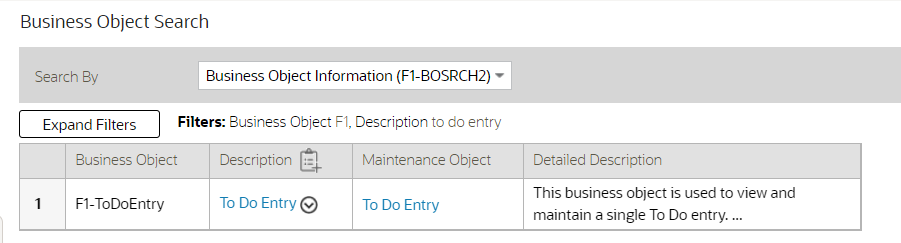
Business Object Search
Previously, this behavior only occurred if the query resulted in more than two records. The behavior is now consistent for all results.
After searching using a data explorer zone, the filter area collapses allowing you to see more information in the results.
Steps to Enable
You don't need to do anything to enable this feature.
Inbound SOAP Web Service Debugging Improvement
If your inbound SOAP web service uses XSL transformation, the debug log now includes the details of the document before and after the XSL transformation.
You now see more information in the debug output for inbound SOAP web services that use XSL transformation.
Steps to Enable
You don't need to do anything to enable this feature.
Menu Application Security Portal
A user may require several application service grants to properly work with the application components associated with a specific menu line. A new Menu Application Security portal is provided to assist with maintaining application security for a user group and the application services associated with a specific menu line. The portal is accessible from a new Menu Links dashboard zone that is available when reviewing the Menu page.
The Application Services Linked and Application Services Unlinked zones now include a filter by entity tag, allowing you to refine the list of application services by logical function.
You can review and adjust the application security a user group has for application components associated with a menu line.
Steps to Enable
You don't need to do anything to enable this feature.
Tips And Considerations
An upgrade script updates all user groups that currently have access to the existing Menu page application service CILEMNUP to have the same access to the new portal application service F1MENU.
Key Resources
- Refer to the Improved Menu Security training.
The new hot key Alt+[ allows you to quickly move the cursor focus to the next major page component. You can use Shift+Alt+[ to reverse the navigation order. The major page components include:
-
The menu or toolbar area

Menu / Toolbar
-
The Dashboard
-
The Page Title area

Page Title
-
The main Page Area, including the tabs for the current page and the display area of the current page
The new hot key Alt+] allows you to quickly move the cursor focus to the next zone. You can use Shift+Alt+] to move the cursor to the previous zone. For portal-based pages, this key navigates through zones in the portal and through the zones in the Dashboard. For fixed pages, the key applies to navigation of zones within the Dashboard portal.
You can use this keyboard navigation to more easily navigate to different sections of the user interface with fewer keystrokes.
Steps to Enable
You don't need to do anything to enable this feature.
The product provides an updated user experience referred to as Redwood. The new experience includes a compact page header that takes up less vertical space to allow more page content to be displayed, as well as new portal tabs, buttons, background colors, borders, icons, and fonts. Previously, this user experience was only available by turning on a URL parameter. This parameter is no longer supported or necessary, and the experience has been enriched.
The following are highlights from the Redwood user experience:
-
Palette and Icons - The color palette and icons reflect a more modern and streamlined user experience.
-
Unified Search - There is a single search box to perform comprehensive searches for data relevant to your application, based on search options supplied by your specific product.
-
Dashboard Controls - The default location for the dashboard is now on the left. User preferences allow you to configure it on the right, as before. In addition, the state of the dashboard (its width and whether it is open or closed) are captured in the user preferences and remain set until changed again.
-
Portal or Zone Configuration - There is advanced configuration for portals and zone layout, including new width options and height options.
-
Domain Name Display - Installation Options allow you to define a domain name for an environment. This information is displayed in the toolbar.
You can use the Switch UI View option in the user menu to revert the user experience to the previous one for the current session. This option is only visible if the user has been granted access to the appropriate application service.
Oracle is transitioning all its products to a new consistent user experience, branded the Redwood experience. The Oracle Utilities Application Framework has implemented this experience to provide a more consistent and modern interface with new design elements including consistent color, layout, fonts, behavior and icongraphy.
Steps to Enable
You don't need to do anything to enable this feature.
Tips And Considerations
Note that to view the underlying HTML for a page, you should use the Inspect option rather than View Source or View Frame Source. With the Redwood user experience, the "view source" options no longer include the underlying HTML source code.
Open API Specification Enhancements
The Open API Specification document generated for an Inbound Web Service complies with up-to-date schema definition standards.
Note that the changes do not impact the request and response schemas used by the web service at run time and therefore should not cause upgrade issues.
The following sections describe the changes introduced in this release:
Schema Reference
The primary changes is to how a schema is referenced using the $ref attribute and how its root node is defined for when XML format is used.
Previously, the $ref definition referenced the "root" element of the request and response schemas using a nested reference within the schema definition. This was needed to ensure that in XML format the same root node was included in the request and response schemas.
"$ref": "#/components/schemas/CREATEPERSON_request/properties/C1-CrePerson"
Schema Definition
"CREATEPERSON_request": {
"type": "object",
"properties": {
"C1-CrePerson": {
"type": "object",
"properties": {
"personId": {
"type": "string",
"maxLength": 10,
"description": "Person ID"
}
This type of nested schema reference is no longer supported. Instead, a designated XML attribute is added to explicitly define the root node.
In this release, the schema reference is changed as follows:
"$ref": "#/components/schemas/CREATEPERSON_request"
Schema Definition
"CREATEPERSON_request": {
"type": "object",
"properties": {
"personId": {
"type": "string",
"maxLength": 10,
"description": "Person ID"
}
}
"xml": {
"name":"C1-CrePerson"
}
Reusing the Schema Definition for the Standard Error Response
Previously, the same error response structure was repeated as a separate schema for each IWS operation. This made the file large for no reason. In this release, a single copy of the error response schema is included in the document to make it smaller and simpler.
Adjusting the "Tags" Attribute Text
The tags attribute is constructed as <Resource Category description> / <IWS description>. The IWS description part was used to include the detailed description of the service if any was defined, but tags should ideally be short and not involve detailed descriptions. In this release, the IWS description part is changed to include only the short description of the service, regardless of any detailed description that may be defined for the service.
You can use the generated Open API Specification to comply with up-to-date schema validation requirements.
Steps to Enable
You don't need to do anything to enable this feature.
User Group Services Management - Filter User Groups by Entity Tag
The User Group Services Management portal provides zones to view the application services linked or unlinked to a chosen user group and the ability to remove or add services.
The Application Services Linked and Application Services Unlinked zones now include a filter by entity tag, allowing you to refine the list of application services by logical function.
This allows you to refine the list of application services by logical function.
Steps to Enable
You don't need to do anything to enable this feature.
DBMS Scheduler Option for Defining Time Zone
If your implementation is in a time zone that is different from the database time zone, set the new DBMS Scheduler Option set_sessiontz option to true to ensure that the Start Date/Time on the Batch Job Submission record is set to the time based on installation time zone rather than the database time zone.
You may control the time zone used for submitting batch jobs from the DBMS scheduler.
Steps to Enable
You don't need to do anything to enable this feature.
Tips And Considerations
Note that the Start Date/Time on the Batch Job Submission record is used as a way to delay the job's execution to a future date. It is not used as a timestamp to indicate when the job was created or executed. If the new option is not set or is set to false, there is no affect if your time zone matches the database time zone or if your time zone is after the database time zone. The setting is only relevant if your time zone is earlier than the database time zone. For those implementations, without this option set, the Batch Jobs are be created with the database time zone, which will cause a delay in the jobs being processed.
DBMS Submission Default Changed to Single Submission
The DBMS scheduler now uses the "single submission" setting as the default. This setting results in the creation of a single Batch Job Submission record for a given job regardless of the number of threads. The resulting records in the Batch Run maintenance object continue to keep track of the multiple threads using the Batch Thread and Batch Instance records. Previously, the default setting was that single submission was turned off.
This setting may be overridden globally or for a specific batch program. Turning off the "single submission" setting results in the creation of a separate Batch Job Submission record for each thread. However, there is no benefit to using this setting. For jobs with a large number of threads, this option results in an unnecessary proliferation of records to manage.
A multi-threaded batch job is submitted by the DBMS scheduler using a single batch job by default. This may provide fewer records to manage.
Steps to Enable
You don't need to do anything to enable this feature.
A new Advanced Show Log Option allows administrative users to fetch logs of other users. By default, a user can only retrieve their own user logs. The following are examples of when this capability is needed:
-
Batch and integration logs are captured by special user codes created for this type of processing. These users typically do not represent a human and therefore would not access logs using "show user log." Instead, someone else would be accessing these logs.
-
Customer administrators would like to retrieve logs for an end user for support reasons An end user might not have technical skills to gather or assess the log, or they might not have the privileges necessary to access the logs for security reasons.
An Administrative (F1SU) access mode has been added to the existing Show User Log application service (F1USERLOG). Only users with access to the administrative access mode can view the logs of other users.
To a user with administrative access, the Advanced Show Log Option is offered as a drop-down button along with the Show User Log option.
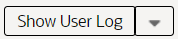
Show User Log
Clicking Show User Log in the drop-down list launches a window allowing you to select the user ID for the desired user logs. You can also adjust the number of log entries. If you realize you want your own logs after all, you can simply click the checkbox.
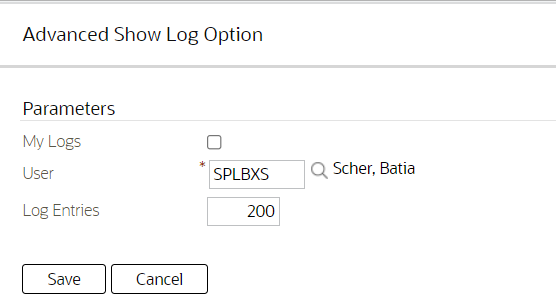
Advanced Show Log Option
A system administrator can view the logs of other user to, for example, provide better support or access special batch and user logs.
Steps to Enable
Make the feature accessible by assigning or updating privileges and/or job roles. Details are provided in the Role section below.
Role And Privileges
System administrators should set/grant users/grant access to the Administrative (F1SU) access mode of the existing Show User Log application service (F1USERLOG).
Explicit Imports in Groovy Scripts
When saving a script, if the system detects that there are classes referenced in the script that are not explicitly defined, it issues a warning and automatically adds import statements for the classes. Previously, you had to opt-in to this functionality using a property. In this release, this is now the standard product behavior.
When the script is executed at run time, the system uses the explicit imports to execute the script. Previously, the system had logic to import all callable classes available to Groovy at run time, which caused issues in certain cases. Because you may have custom scripts that still do not have the explicit imports, the system continues to fall back on the previous behavior to import all callable classes for scripts that do not compile with their explicit imports.
You should review your existing custom Groovy scripts and update the scripts to explicitly declare the imports.
By defining Groovy Imports explicitly in Groovy scripts, you can eliminate ambiguous class references and improves compilation time.
Steps to Enable
You don't need to do anything to enable this feature.
Tips And Considerations
The background process F1-CAGVY that reports all scripts that required the automatic import step to successfully compile. You should run this batch program to identify and fix any scripts missing explicit imports.
Improved Portal Zone Height Control
Zone height configuration is simplified and now supports the following options:
- Content (Unlimited Height) - Allows the the height to be determined by content.
- Content (Limited Height) - Allows the height to be determined by content up to a specified maximum limit.
- Fixed Height - Sets the zone at a specific height regardless of content.
You can use height limit options to achieve a more consistent portal layout, especially when a zone is rendered on long or small devices.
When a height option is not explicitly selected, zone height is unlimited and determined by content. However, for a data explorer zone, the results grid area itself (not the entire zone) is limited by the zone parameter "height of report" (which has a default value of 50%).
The following zone height options are deprecated and replaced as follows:
-
Content - Zones configured with this option along with a maximum height limit are upgraded to reference the Content (Limited Height) option. If no limit is specified, the Content (Unlimited Height) option is used.
-
Full - Zones configured with this option are upgraded to reference the Content (Limited Height) option with a 100% height limit.
-
Half - Zones configured with this option are upgraded to reference the Content (Limited Height) option with a 50% height limit.
You can enhance the configuration of portal zones to better and more simply control zone height.
Steps to Enable
You don't need to do anything to enable this feature.
New Base Display Icon Images Supplied
You can use additional SVG icons in contextual insights, trees, and other user interface features that support SVG icons.
| Icon | ID | Description |
|---|---|---|
 |
F1ACTADD |
Activities - Add |
 |
F1ARWODL |
Arrow - Open - Down - Left |
 |
F1ARWODR |
Arrow - Open - Down - Right |
 |
F1ARWOUL |
Arrow - Open - Up - Left |
 |
F1ARWOUR |
Arrow - Open - Up - Right |
 |
F1ARWSI |
Arrows - In |
 |
F1ARWSO |
Arrows - Out |
 |
F1ASAVE |
Save - Arrows Out |
 |
F1BOX |
Cube |
 |
F1CAL |
Calendar |
 |
F1CALL |
Telephone |
 |
F1CALLA |
Telephone - Add |
 |
F1CAREA |
Area Chart |
 |
F1CBXOFF |
Checkbox - Off |
 |
F1CBXON |
Checkbox - On |
 |
F1CDWNR |
Caret - Down - Right |
 |
F1CHDOWN |
Chevron - Down |
 |
F1CHDWNR |
Chevron - Down - Right |
 |
F1CIRCLE |
Circle |
 |
F1CLEFT |
Caret - Left |
 |
F1CLINE |
Line Chart |
 |
F1CLIST |
Progress List |
 |
F1CLPBC |
Clear List |
 |
F1CONSTD |
Construction Design |
 |
F1CPYTMP |
Copy From Template |
 |
F1CRAGG |
Running Aggregate Chart |
 |
F1CRCLE7 |
Progress Circle |
 |
F1CREATE |
Site - Add |
 |
F1CRIGHT |
Caret - Right |
 |
F1CRPAGE |
Page - Add |
 |
F1DAREA |
Draw Area |
 |
F1DWNLD |
Download |
 |
F1EDIT |
Edit |
 |
F1EDITIN |
Inline Edit |
 |
F1EXACRO |
Export Acrobat |
 |
F1FHAND |
Free Hand Draw |
 |
F1HEXGN |
Polygon - Hexagon |
 |
F1HOUSE |
House |
 |
F1HRGS |
Waiting Hourglass - Start |
 |
F1LAYERS |
Layers |
 |
F1LINEI |
Line - Inclined |
 |
F1LINEST |
Line - Staggered |
 |
F1LOC |
Location |
 |
F1LOCW |
Location Pin - Work |
 |
F1LOCWA |
Location Pin - Work - Add |
 |
F1MENUE |
Expand Menu |
 |
F1MOVE |
Move |
 |
F1MSG |
Message |
 |
F1MULT |
Multiply |
 |
F1NOTIF |
Notification |
 |
F1NUMS |
Numbers |
 |
F1OVAL |
Oval |
 |
F1PINS |
Location Pin - Solid |
 |
F1RECT |
Rectangle |
 |
F1RFRSH |
Refresh |
 |
F1RUNNIG |
Running |
 |
F1SCLOSE |
Close - Circled - Solid |
 |
F1SFILE |
Work Request - File Stage |
 |
F1SHARE |
Share |
 |
F1STPED |
Close - Circled - 2 Colors |
 |
F1TAG |
Tag |
 |
F1TEXT |
Text |
 |
F1TRIUP |
Triangle |
 |
F1VIEW |
View |
 |
F1WRKOA |
Gannt Chart - Add |
 |
F1ZOOMIN |
Zoom In |
Additional icons allow for a richer user experience for displayed information.
Steps to Enable
You don't need to do anything to enable this feature.
You can stay current with the version of Groovy supported by the product.
The product is using Groovy 3.0.7.
Steps to Enable
You don't need to do anything to enable this feature.
Tips And Considerations
Groovy introduced a change in behavior in this newer version. It is unknown whether this change in behavior is intentional or a defect.
Here is one example error:
[Static type checking] - Cannot find matching method com.splwg.base.api.datatypes.Date#addDays(java.math.BigInteger).
Please check if the declared type is correct and if the method exists.org.codehaus.groovy.control.MultipleCompilationErrorsException:
startup failed: C1FATYPALMSG: 47: [Static type checking] - Cannot find matching method
com.splwg.base.api.datatypes.Date#addDays(java.math.BigInteger). Please check if the declared type is correct and if the method exists.
@ line 47, column 35.
Date referenceDate = row.getDateTime("SCHED_DTTM").getDate().addDays(row.getInteger("DAYS_ALERT_NBR"));
In the cases that we have, some simple changes can be made in the groovy scripts to resolve the compile issues.
For example:
Date referenceDate = row.getDateTime("SCHED_DTTM").getDate().addDays(row.getInteger("DAYS_ALERT_NBR").intValue());
Width Option for Contextual Insights
A new CSS helper class is available to the ou-insights web component: card-full-width. Adding class="card-full-width" to the ou-insights web component ensures that the width for a card insight adjusts to the width of the zone that contains it. Card insights that do not set this parameter use a fixed width.
Additional CSS helper class to control the width of a card insight allows better layout possibilities for user interface design.
Steps to Enable
You don't need to do anything to enable this feature.
Improved User Search for Assigning To Do Entries
The search for users provided in the Forward action on the To Do Entry portal now allows you to filter the result list by the user ID and/or user name.
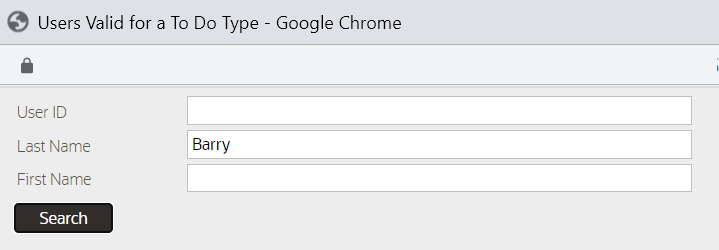
User ID/Name Search Filter
In addition, the results list has been enhanced to display counts of To Do Entries already assigned to this user for the same To Do Type ("Assigned - This Type") and across all To Do Types ("Total Assigned").

Search Result List with To Do Entry Counts
In addition, the To Do Management portal's Assign action has been enhanced. If you are a supervisor using this action, you are prompted to choose the User to assign to. Previously, this prompt used a drop-down. In this release, you now use the same enhanced search. This allows you to filter the search by User ID or user name, and it also provides you with information about each user's current work load.
When assigning a To Do Entry, you can now filter the list by User ID and User Name. You can also see the number of To Do Entries each user already has assigned to them.
Steps to Enable
You don't need to do anything to enable this feature.
General Data Export - File Size Control
Generalized Data Export (GDE) batch processes produce a single file per thread by default. This may result in files that are too large to manage. An optional batch parameter Records in File has been added to the GDE batch processes to limit the number of records exported in a file. When specified, the batch process closes the current file when the number of exported records reaches the specified limit and a new file is opened for exporting the next set of records. This allows for multiple export files to be created for a single thread.
The F1-GEXPI (Generalized Initial Export Initiator) batch process has this limit set to 500,000 records per file but this value may be removed or adjusted by your implementation as needed.
The F1-GEEXO (Generalized Ongoing Export) batch process has been enhanced to better manage situations where the backlog of queued changes has become too large. In this situation, the next batch takes longer to export, which delays the downstream consuming step of the export files. The import step can only start once the manifest file is ready when the batch completes. In this release, the backlog can be cleared in smaller "chunks", allowing the downstream consuming process to import them as they are made available. To support this, an optional batch parameter Thread Processing Limit has been introduced to limit the number of records exported in a single run. Instead of waiting for the next scheduled batch run to process the next set of remaining entries, a new batch process may be automatically submitted if requested by the Automatic Backlog Clearance batch parameter. The batch process has this limit set to 500,000 records and enables automatic backlog clearance. These parameters may be adjusted by your implementation as needed.
This allows you to produce smaller Generalized Data Export (GDE) files.
Steps to Enable
You don't need to do anything to enable this feature.
General Data Export - Ongoing Export Enabled On-Premise
The ongoing export feature of the Generalized Data Export functionality is enabled for on-premise installations.
This provides on-premise installations with the ability to continuously export data as it changes.
Steps to Enable
You don't need to do anything to enable this feature.
General Data Export - Thread Allocation Control
By default, each export batch submitted by the F1-GEXPI (Generalized Initial Export Initiator) batch process uses the number threads defined on the maintenance object's specific batch control record. This allows for a more optimal configuration of the number of threads to allocate to a specific batch based on the size of the corresponding maintenance object.
In this release, an optional batch parameter Override Number of Threads is introduced to override this value. When set to "Y" the default value is overridden with the number of threads the initiator batch is submitted with. This allows for a global number of threads allocation that does not require a specific value on each specific export batch control.
Note that this override capability only applies to master and transaction entities. Admin entities are of low volume and therefore should use their default value, which is typically a single thread.
You can fine tune the number of threads allocated to each initial export batch process when submitted via the F1-GEXPI (Generalized Initial Export Initiator) batch process.
Steps to Enable
You don't need to do anything to enable this feature.
Oracle Guided Learning Integration
This integration provides a mechanism for customers of the Oracle Guided Learning Cloud Service to define their application identifier (to identify their tenancy) in a configuration parameter. This will automatically enable the learning widget to appear on the screen passing in the user details and the context to allow relevant content to appear.

Oracle Guided Learning Cloud Service Widget
NOTE: This integration is to enable the definition of the application identifier and the display of the widget. No prebuilt content is available at this time. Customers using this facility are free to add their own content as necessary using the Oracle Guided Learning Cloud Service.
NOTE: This integration only allows links to procedures and processes stored within Oracle Guided Learning. It does not support active workflow integration to Oracle Utilities products in this release.
The Oracle Guided Learning cloud service allows utilities to provide access to contextual policies, business processes, and training materials from Oracle Utilities products. This integration allows customers to link their Oracle Guided Learning subscription and enables an on screen widget to enable the integration.
Steps to Enable
Work with your Service Delivery Manager to complete the required configuration.
Consolidation of Default Application Services
The product has consolidated the default application services that are required for basic application security.
-
F1-DFLTS now serves as the single 'default' application service. All user groups should have access to this application service and all its access modes.
-
F1-DFLTAPS was previously used for business services and service scripts as the default application service. Going forward, business services and service scripts should use F1-DFLTS as the default.
-
FWLZDEXP was previously used for displaying zones. It is no longer used by base zones. F1-DFLTS is the only application service needed for basic execution of zones.
This consolidation reduces the number of application services required for users to have basic application security.
Steps to Enable
You don't need to do anything to enable this feature.
Tips And Considerations
An upgrade script will proactively update any references in the metadata to F1-DFLTAPS or FWLZDEXP to F1-DFLTS. Implementations should consider if either of these application services are used directly in code and update those references to use F1-DFLTS or a different appropriate application service.
In addition, an upgrade script ensures that all user groups with access to F1-DFLTAPS now have F1EX access to F1-DFLTS.
In a future release, the application services F1-DFLTAPS and FWLZDEXP will be removed from support.
New Application Service for Master Configuration Maintenance Object
The F1-MASTERCONFIG application service is provided to allow you to secure the maintenance of master configuration records separately from the security for the portal used to view master configuration records. This follows the product's standards. Previously, the same application service applied to both the maintenance object and the portal. This prevented you from more granular security configuration.
This allows for more flexible and granular security configuration.
Steps to Enable
You don't need to do anything to enable this feature.
Tips And Considerations
An upgrade script updates all user groups that currently have access to the existing F1MSTCFG application service to have the same access to the new F1-MASTERCONFIG application service.
In addition, any business object that was referencing the F1MSTCFG application service has been updated to reference F1-MASTERCONFIG.
Note that the existing F1MSTCFG application service has been updated to reference only the Inquire access mode. The access modes for Add, Change, and Delete have been removed since they are not applicable for a portal-based application service.
See a preview of the database changes coming for 22A in the Oracle Utilities Cloud Services Database Changes Guide. This guide is also available in PDF.
This includes information about databases changes to tables, indexes, views, columns, and more.
Steps to Enable
You don't need to do anything to enable this feature.
Supported Platforms and Browsers
Oracle Utilities 22A Cloud Services support the following operating system and web browser combinations:
| Operating System |
Web Browsers |
|---|---|
| Windows 10 |
Firefox ESR 91+ Chrome for Enterprise 96+ Microsoft Edge (Chromium-based) 96+ |
| iPad2 iOS 10.x (WACS only) |
Safari (selected flows and portals only) |
Oracle recommends using only supported client platforms and browsers.
Steps to Enable
Use only supported platforms and browsers.
IMPORTANT Actions and Considerations
REPLACED OR REMOVED FEATURES
From time to time, Oracle replaces existing cloud services with new features, or removes existing features. Replaced features may be put on a path to removal. As a best practice, you should use the newer version of a replaced feature as soon as a newer version is available.
This section identifies the features in this Cloud service that have been replaced or removed.
| Product | Removed Feature | Target Removal | Replacement Feature | Replaced In | Additional Information |
|---|---|---|---|---|---|
| Oracle Utilities Application Framework | Field Legacy Page Metadata |
22A | Portal-based User Interface | 21B | Navigation Keys:
Records in the UI metadata program component tables related to the above navigation keys. |
| Oracle Utilities Application Framework | Portal Legacy Page Metadata |
22A | Portal-based User Interface |
21C | Navigation Keys:
Records in the UI metadata program component tables related to the above navigation keys. |
| Oracle Utilities Application Framework | Zone Legacy Page Metadata | 22A | Portal-based User Interface | 21C | Navigation Keys:
Records in the UI metadata program component tables related to the above navigation keys. |
| Service and Measurement Data Foundation | D1-ADS (Aggregation Dimension Scanner Monitor) | 22A | D1-MQTDS (Measurement Quality and Timeliness Dim Scan) | 21C | Business Objects
Algorithm Types
Algorithms
NOTE: D1-ADS is deprecated for Timeliness and Quality Aggregation is still used for other aggregations. |
Unless otherwise specified below, these notes are for informational purposes and no action is required.
PRODUCT CHANGES
BI / Analytics Publisher Changes
The name of Oracle BI Publisher has changed to Oracle Analytics Publisher.
Oracle Analytics Publisher is intended for low-volume, operational reporting. Use of Oracle Analytics Publisher for high volume reporting and extracts such as batch bill printing is not supported in Oracle Utilities Cloud Services.
PLANNED REMOVAL
Plan to Remove Switch UI View from Oracle Utilities Application Framework
The Switch UI View provides the ability to toggle between Redwood User Experience and pre-Redwood User Experience during a session. Support for pre-Redwood User Experience will be deprecated in a future release.
Plan to Remove F1-DFLTAPS and FWLZDEXP Application Services from Oracle Utilities Application Framework
With the consolidation of application services, references to the F1-DFLTAPS and FWLZDEXP application services will be removed in a future release. Secured objects referencing these application services within HTML or Schemas must use F1-DFLTS or a different application service that is appropriate for the business rule.
Plan to Remove Workflow and Notification Metadata and Database Tables from Oracle Utilities Application Framework
The Workflow and Notification function provided a configurable process to receive incoming messages (workflow) and exchange messages with an external system (notification). In the interim years, Outbound Message and Inbound Web Service manage external messages, service scripts handle simple incoming messages processing, and service tasks or business objects handle complicated incoming messages processing. The Workflow and Notification metadata and database tables will be deprecated in a future release.
NOTE: Oracle Utilities Application Framework only manages a portion of the Workflow and Notification function. Oracle Utilities Customer Care and Billing mostly supports the function.
Plan to Remove Mobile Application Framework Metadata from Oracle Utilities Application Framework
Metadata related to the Mobile Application Framework will be removed in a future release.
Plan to Remove Key Ring Validation Scripts, Algorithm Types, and Algorithms from Oracle Utilities Application Framework
The following K1-SignatureKeyRing business object validation scripts, algorithm types, and algorithms will be deprecated in a future release:
- Algorithm
- K1-KRDCKFS
- K1-KRINCKFS
- Algorithm Type
- KRDCKFS
- K1-KRINCKFS
- Message
- 11009 / 1402
- Plugin Script
- K1-KRDCKFS
- K1-KRINCKFS
- Service Script
- K1-ChkCfgExL
These objects are not applicable to the requirements to expand the use of the Signature Key Ring beyond object file storage and other planned use cases. The algorithms have been removed from the Business Object configuration.
Plan to Remove UI Metadata Related to Converted Pages from Oracle Utilities Application Framework
The UI metadata related to fixed pages that have been converted to portals will be removed in a future release. The tables list the navigation keys related to each maintenance page. The related UI program component data will also be removed. Note that the metadata related to the search pages will not be removed at this time in case these are used on other fixed pages.
| Field Maintenance | Portal Maintenance | Zone Maintenance | To Do Entry Maintenance |
|---|---|---|---|
| impFldTabMenu metaDataFieldMainPage metaDataFieldMaint metaDataFieldTableGrid metaDataFieldTablePage Any help navigation keys |
portalTabMenu portalMainPage portalMainPopup portalOptsGrid portalOptsPage Any help navigation keys |
portalZoneTabMenu portalZoneMainPage portalZoneGridPage portalZoneParameterGrid portalZonePortalGrid portalZonePortalPage Any help navigation keys |
toDoEntryCharGrid toDoEntryDrillKeyValuesListGrd toDoEntrySortKeyValuesListGrid todoentrykeyvalue todoentrymain toDoEntryMaint toDoEntryPopupAdd toDoEntryPopupForward toDoEntryPopupSendBack Any help navigation keys |
| Table Maintenance | Work Calendar Maintenance | Message Maintenance | Time Zone Maintenance |
|---|---|---|---|
| metaDataTableFieldsGrid metaDataTableMainPage metaDataTableCFldsGrid metaDataTableConstPage metaDataTableMaint metaDataTableRefByConstPage metaDataTableFieldPage Any help navigation keys |
workCalendarMaint workCalendarMainPage workCalendarHolidayGrid Any help navigation keys |
msgMaintDetailsPage msgMaintGrid msgMaintPage msgMaintTabMenu Any help navigation keys |
timeZoneMainPage timeZoneTabMenu Any help navigation keys |
Plan to Remove Miscellaneous System Data from Oracle Utilities Application Framework
The following metadata is no longer in use and will be removed in a future release:
| Object | Data | Description/Comments |
|---|---|---|
| Lookup Value |
CHAR_ENTITY_FLG / F1SE |
Characteristic Entity / Sync Request Inbound Exception |
| Script |
F1-TDMgActSS |
To Do Management - Process Actions (Deprecated) / Replaced by F1TDMgActSS |
| Script |
F1AddDebugLg |
Add Log for Monitoring Probe (Deprecated) / Replaced by a BS - F1-MONPRBLOG |
Plan to Incorporate Application Viewer to Oracle Utilities Applications
Many aspects of the Application Viewer are incorporated into the application, including the data dictionary. The user interfaces for the tables and fields have been enhanced to provide more information at a glance and a view of the links between tables. Information about algorithms, batch controls, and maintenance objects are also visible directly in the application. In a future release, Javadocs and Groovy Javadocs will be viewable within the application at which point the standalone Application Viewer will no longer be delivered.
Plan to Remove XSLT Managed Content Type from Oracle Utilities Application Framework
The Managed Content table entries related to XSL should use the XSLTC managed content type instead of the XSLT managed content type. Support for the XSLT managed content type will be deprecated in a future release.
Plan to Remove REST IWS - Original REST Servlet from Oracle Utilities Application Framework
The original URL supplied for calling Inbound Web Service-based REST services includes the Inbound Web Service name in its makeup. Support for this will continue for backward compatibility purposes, but will be deprecated in a future release. You should adjust your existing integrations to use the currently supported URL.
Plan to Remove Append Setting from Pagination - Oracle Utilities Application Framework
There are several known issues associated with the pagination's Append option. It is recommended that you defer from using this pagination setting.
Plan to Remove Support for Master/Subordinate Servers for Web Service Catalog in Oracle Utilities Application Framework
The Service Catalog Configuration (Master Configuration) enables you to define subordinate servers. Defining subordinate servers is no longer applicable to Oracle Integration Cloud.
Plan to Remove Support for Batch Run Statistics Portal Functionality in Oracle Utilities Application Framework
The Batch Run Statistics portal provides additional information about batch runs, but some functionality on the portal is related to capturing additional information from an external tool. Additional information captured from the external tool is stored in a Fact record. Support for capturing additional information from an external tool will be discontinued in a future release. The captured additional information would still be available to existing customers.
Plan to Remove Configuration Migration Assistant Import Requests from Oracle Utilities Application Framework
The F1-FrameworkAdmin (Framework Admin) and F1-SchemaAdmin (Schema Admin) migration requests are no longer recommended and will not be updated with new administration or control table in a future release.
Plan to Remove Configuration Migration Assistant Import Algorithm from Oracle Utilities Application Framework
The Configuration Migration Assistant Import algorithm plug-in spot will be deprecated in a future release. It is recommended that you review any existing algorithms and create the appropriate Pre-Compare algorithms instead.
Plan to Remove Business Object Read from F1-MAINPROC When Pre-processing Exists
In the original implementation of Configuration Tools, the main framework maintenance BPA (F1-MainProc) does not perform a Read of the business object when a pre-processing script is linked to the business object via options. When F1-MainProc does not perform a Read, the pre-processing script performs the Read of the business object.
In a subsequent release, a business object Read was added to F1-MainProc (with an existing pre-processing script) to resolve a UI Hints issue related to child business objects. Adding a business object Read to F1-MainProc introduced an issue visible only to specific scenarios and a different fix was introduced. The new fix made the business object Read unnecessary in F1-MainProc and many pre-processing scripts are properly performing the business object Read. The business object Read should have been removed from F1-MainProc to prevent multiple reads from being performed. However, pre-processing scripts may have been introduced after the addition of the business object Read to F1-MainProc that do not perform a business object Read in the pre-processing script. As such, the business object Read is still performed as part of the F1-MainProc processing.
When a pre-processing script exists, the business object Read will be removed from the F1-MainProc logic. Review your custom pre-processing scripts that are linked to business object options to ensure that the scripts properly perform reads of your business object.
Plan to Remove Support for Groovy-based Functions from Oracle Utilities Testing Accelerator
Support for Groovy-based plugin functions and upload test-based plugin functions will be deprecated in a future release. Groovy-based functions must be manually migrated to the supported JavaScript functions.
Plan to Remove Several Features from Oracle Utilities Customer Cloud Service
The following features will be deprecated in a future release:
- Message Number 99901 from Message Category 11 (CIS Payment/EFT)
- Endorse Message Installation Message Type and Payment Receipt Message Installation Message Type from Installation Options - Framework
- Printer IP Address and Printer Port from Tender Source
Plan to Remove Cube View from Oracle Utilities Meter Solution Cloud Service
The Cube View will be deprecated in a future release. Visualization tools like Oracle Utilities Analytics Visualization provide more functionality and is easy to maintain.