
- Revision History
- Overview
- Feature Summary
- Utilities Common
- Customer
-
- Customer
- Meter Solution
- Smart Grid Gateway
- Analytics Visualization
- Utilities Application Framework
- Operational Device
- System Wide
- IMPORTANT Actions and Considerations
This document will continue to evolve as existing sections change and new information is added. All updates appear in the following table:
| Date | Module | Feature | Notes |
|---|---|---|---|
| 10 AUG 2023 | IMPORTANT Actions and Considerations | Updated document. Added "Plan to Remove Customer Service Request Type Related Metadata from Oracle Utilities Billing Cloud Service" under the Planned Removal section. |
|
| 04 AUG 2023 | Created initial document. |
Oracle Utilities Customer Cloud Service is a customer care, service order, metering, billing, and credit and collections solution. The solution is designed to cater for utilities of all sizes, supports one to many utility service types, and handles the complexities associated with a utility's processes.
This guide outlines the information you need to know about new or improved functionality in this update, and describes any tasks you might need to perform for the update. Each section includes a brief description of the feature, the steps you need to take to enable or begin using the feature, any tips or considerations that you should keep in mind, and the resources available to help you.
 HAVE AN IDEA?
We’re here and we’re listening. If you have a suggestion on how to make our cloud services even better, let us know by entering your idea in Oracle Forums. Wherever you see this icon after the feature name it means we delivered one of your ideas.
DISCLAIMER
The information contained in this document may include statements about Oracle’s product development plans. Many factors can materially affect Oracle’s product development plans and the nature and timing of future product releases. Accordingly, this Information is provided to you solely for information only, is not a commitment to deliver any material, code, or functionality, and should not be relied upon in making purchasing decisions. The development, release, and timing of any features or functionality described remains at the sole discretion of Oracle.
This information may not be incorporated into any contractual agreement with Oracle or its subsidiaries or affiliates. Oracle specifically disclaims any liability with respect to this information. Refer to the Legal Notices and Terms of Use for further information.
Column Definitions:
Report = New or modified, Oracle-delivered, ready to run reports.
UI or Process-Based: Small Scale = These UI or process-based features are typically comprised of minor field, validation, or program changes. Therefore, the potential impact to users is minimal.
UI or Process-Based: Larger Scale* = These UI or process-based features have more complex designs. Therefore, the potential impact to users is higher.
Features Delivered Disabled = Action is needed BEFORE these features can be used by END USERS. These features are delivered disabled and you choose if and when to enable them. For example, a) new or expanded BI subject areas need to first be incorporated into reports, b) Integration is required to utilize new web services, or c) features must be assigned to user roles before they can be accessed.
Information Lifecycle Management (ILM) Dashboard
The ILM Dashboard allows you to view and manage ILM-related activities, current ILM configuration, retention periods of maintenance objects, and previous or current run statuses of ILM batch jobs or processes. Additionally, the dashboard provides up to four years of partition data information per maintenance object, as well as compression and sub-partition data information.
With the added convenience of reviewing and managing ILM-related information from one location, it will be easier to reduce database storage costs.
Steps to Enable
You don't need to do anything to enable this feature.
Oracle Utilities Break Glass provides Oracle Utilities Cloud Service administrators with direct control and approval authority over the process of requesting and granting Oracle personnel temporary access to their customer data.
Oracle personnel usually administer Oracle Utilities Cloud Service instances without access to customer data. In some cases, Oracle personnel require access to customer data to do things like troubleshoot customer issues, apply bug fixes, perform application upgrade steps, and run customer-requested data correction activities. For Oracle Utilities Cloud Service deployments that do not leverage Oracle Break Glass, Oracle personnel are granted temporary access to customer data via comprehensive internal controls and approvals based on SOC 1 and 2 principles.
Oracle Utilities Break Glass gives administrators direct visibility and approval authority into this process.
Steps to Enable
To enable this feature, refer to the Oracle Utilities Break Glass section in the Oracle Utilities Cloud Services Live Operations Guide for more information.
Tips And Considerations
Oracle Utilities Break Class is a fee-based service that requires additional subscriptions. Contact your Oracle sales representative to purchase the add-on service.
Key Resources
-
See the Oracle Utilities Break Glass section in the Oracle Utilities Cloud Services Live Operations Guide for more information.
Condition-based Flow Validation
The Condition Based Flow Validation feature allows you to define one or more flow step validations through the user interface without the use of functions. Validations are defined in the Post Validations section of the Test Data page. You can select an element in the response, an entire response, or even a variable that you plan to validate. You can then select a condition for validation, such as "equals" or "contains". You can select the appropriate condition (string, number, or datetime) under the specific category to meet your requirements. You can also specify a value for comparison. In cases where date time comparisons are involved, you can specifying the date time format.
This enables you to quickly and easily define complex validations without the need to analyze and understand the library of functions. It also allows for greater flexibility in validation definitions.
Steps to Enable
You don't need to do anything to enable this feature.
Tips And Considerations
Function-based validation definitions will continue to co-exist with the condition-based validation definition, but they will be marked as "legacy". It is recommended to define post validations using the condition-based validations, which provide greater flexibility while optimizing the flow development effort and time.
Key Resources
- See the Condition-Based Flow Validations in Oracle Utilities Testing Accelerator training.
Insight Types - Account Overview
You can use the following insight types to surface contextual insights for a customer's account in Oracle Customer Experience for Utilities:
- Account Past Due Card (C1-ACCT-PASTDUE-CARD)
- Unpaid Account for Person Card (C1-PER-NONPAY-CARD)
These insights can help elevate customer service interactions by providing additional information about the customer in the most appropriate screens.
Steps to Enable
To enable this feature, refer to the Insight Groups section of the Administrative User Guide.
Key Resources
-
See the Contextual Insights section in the Administrative User Guide for more information.
Customer Activity History Zone – Reported Outage Calls
The Customer Activity History zone on the Customer 360 portal now includes reported outage calls in the list of account-related events to provide a more comprehensive view of your customer's activity.
Additionally, the multi-select filter allows you to include or exclude reported outage calls from the list of events, and the Service Task multi-select filter has been renamed to Self-Service Task to more accurately describe its intended purpose.
This helps to reduce call handling times and allows common account queries to be handled more efficiently.
Steps to Enable
You don't need to do anything to enable this feature.
Key Resources
-
See the Customer 360 section in the Business User Guide for more information.
Bill Segment - Extended Multi-time Zone Support
You can configure multi-time zone sensitive date and time values to be displayed in the customer premise's time zone on a bill segment. This applies to usage period details, calculation / audit usage details, and calculation / usage audit read details.
This aligns multi-time zone support with usage requests and corresponding usage transactions.
Steps to Enable
To enable this feature, complete these steps:
- Select Admin, General, and Feature Configuration.
- Create or find the General System Configuration feature configuration.
- Set the Customer Multi Time Zone Support option to Y.
- Set the Multi Time Zone Support - MDM option to D1YS.
- Save the changes.
Premise and Service Point - Extended Multi-Time Zone Support
If multi-time zone support is enabled and the Time Zone on a premise is not populated, the system will notify you that the Time Zone is required when saving the record. Additionally, service points will adopt the time zone from the related premise.
This tightens multi-time zone support between geographic master records, ensuring accurate billing of a customer's property and reducing billing exceptions.
Steps to Enable
To enable this feature, complete these steps:
- Select Admin, General, and Feature Configuration.
- Create or find the General System Configuration feature configuration.
- Set the Customer Multi Time Zone Support option to Y.
- Set the Multi Time Zone Support - MDM option to D1YS.
- Save the changes.
Tips And Considerations
-
If multi-time zone support is not enabled, the Time Zone on a premise will be defaulted to that defined on the Installation Options - Framework portal.
-
For implementations enabling multi-time zone support, use the Update Premise Time Zone (X1-UPPTZ) batch control to update existing premise records that do not have Time Zone populated. The Time Zone from a premise's latest service point will be used to update the premise.
Multiple Bill Segments Generation Based on Scheduled Meter Reading Dates
When billing a service agreement that contains one or more scheduled meter read dates within the overall billing period (for example, if the customer's meter is read monthly but the account is billed quarterly), you can control whether multiple bill segments are created with the Multiple Bill Segment configuration option in the Billing Configuration master configuration. If this option is configured, there will be one bill segment created for each usage period. Meter reads for each scheduled meter reading date, within an overall billing period, will result in a separate bill segment.
This aligns the service agreement's billing calculations with the scheduled meter reading dates of its premise.
Steps to Enable
To enable this feature, complete these steps:
- Select Admin, General, and Master Configuration.
- Create or find the Billing Configuration master configuration.
- Set the Multiple Bill Segment option to Yes.
- Save the changes.
Tips And Considerations
The following conditions apply to this feature:
- Supports accounts with a single service agreement having a single metered service point or multiple metered service points with the same measurement read cycle. Each metered service point must have a scalar meter installed which is not a daily scalar read meter.
- Does not support summary billed accounts (i.e., accounts with service agreements that cover more than one premise) where the metered service points across a summary billed account’s service agreements span different measurement read cycles and / or have one or more daily scalar read meters installed. Note: Each metered service point related to a summary billed account must have a scalar meter installed.
- Does not support accounts / service agreements that may have bill completion related processing initiated to regenerate a service agreement's bill segments. For example, via algorithms plugged into the following plugin spots:
- Customer Class – Bill Completion
- Customer Class – Post Bill Completion
- Customer Class – Pre Bill Completion
- SA Type – Bill Completion
- SA Type – Pre-Bill Completion
Improved Usage Allocation from Shared Service Points
The Use Percent field on the SA / SP tab indicates the percentage of a metered service point's consumption that is to be billed under that service agreement. This field now provides a consumption percentage accuracy of up to two decimal places.
This improves the allocation of usage to a service agreement, from a shared service point or points, enabling more accurate billing of usage-related charges.
Steps to Enable
You don't need to do anything to enable this feature.
Key Resources
-
See the Customer-Related Database Changes section in the Oracle Utilities Cloud Services Database Changes Guide for more information.
Digital Self Service Integration
Questions and Response Processing for Start/Stop/Transfer Service Requests
The Question tab of the Customer Service Request Type portal enables you to define one or more questions to appear during the flow of self-service initiated start, stop, and transfer service request processing based on the applicability to the customer and/or services being started/stopped. You can also group questions based on where they appear on the user interface. For example, you can distinguish questions for starting service from questions for stopping service when processing a transfer service request.
The responses to these questions can be inputs to service eligibility criteria processing that determines one or more of the following:
- Eligibility of service point-based service agreements for starting or stopping service
- Eligible start options
- Additional non-service point-based service agreements to start or stop
You can also configure the questions to update specific fields or entities on applicable master records (for example, Person, Account, and more) with the captured responses during the processing or completion of a self-service initiated start, stop, or transfer service request.
NOTE: This feature is currently not leveraged by agent-assisted initiated process flows for start, stop, and transfer service requests.
This provides more granular control of the business rules applied during self-service initiated start, stop, and transfer service request processing.
Steps to Enable
To enable this feature, refer to the Questions and Response Processing section of the Administrative User Guide for more information.
Key Resources
-
See the Self-Service Start/Stop/Transfer Overview and Self-Service Start/Stop/Transfer Operations sections in the Administrative User Guide for more information.
Self-Service Initiated Start/Stop/Transfer Service Request Processing
New and enhanced entities are available for self-service initiated start, stop, and transfer service requests, which adds greater flexibility for:
- Third-party ID or credit check integration
- Duplicate customer prevention
- Co-applicant processing
- Individual start service selection
- Questions and answers administration and processing
- Deposit assessment
The following were added to support self-service initiated requests:
- Business Objects for Action Method, Customer Service Request Type, Self-service Task, and Self-service Task Type that define specific configuration and/or behavior for processing service request transactions.
- Algorithms and Algorithm Types to define and apply specific business rules during the processing of service request transactions.
- Inbound Web Services (incoming message objects) to provide for the initiation and processing of New Service, Add Service, Stop Service, and Transfer Service request transactions.
This provides more granular control of the business rules to be applied during self-service initiated start, stop, and transfer service request processing.
Steps to Enable
To enable this feature, refer to the Self-Service Start/Stop/Transfer Overview and Self-Service Start/Stop/Transfer Operations sections in the Administrative User Guide.
Key Resources
-
See the Self-Service Start/Stop/Transfer Overview and Self-Service Start/Stop/Transfer Operations sections in the Administrative User Guide for more information..
Enhanced Toolbar Search for Locating Premises
The toolbar search box allows you to easily search and retrieve Premise records using a wider range of address-related information (for example, apartment number in a complex). The address search now queries by:
- Address Lines
- Address Lines and Postal
- Address Lines, City, and Postal
- Address Lines, City, and State
- Address Lines, City, State, and Postal
This reduces call handling times and provides efficient handling of common account queries.
Steps to Enable
You don't need to do anything to enable this feature.
Key Resources
-
See the Using Unified Search section in the Business User Guide for more information.
Additional and Updated REST APIs
These new REST API Inbound Web Services expose various customer-related entities and data, and provide the capability to create, manage, or view that data:
-
Business Person Queries (C1-PersonQueries): Returns summary information for the provided Person. This summary is intended for business persons that may have multiple active billing accounts and premise service locations
-
Entity References (C1-EntityReferences): Provides summary information for a selected list of entities captured as external references on Oracle Customer Experience for Utilities records, including hierarchical relationship information for presentation purposes.
- Service Point Search (C1-ServicePointSearch): Enables paginated search by premise, account, or person and also provides the following search filters:
- Address Constituents
- Service Type
These updated REST API Inbound Web Services also expose various customer-related entities and data, and allows you to manage and/or view that data:
- Billing Context (C1-BillingContext): Enhanced the Get Person Accounts and Search Account Premise operations.
- Get Person Accounts now indicates whether the persons returned are a Person or Business
- Search Account Premise can query by Account ID or Person ID (main customer for an account) and optionally filter by Address Constituents.
- Person (C1-Person): A new Person Search operation to perform a capped (non-paginated) search based on specific criteria.
- Added the Person Search operation to perform a capped (non-paginated) query based on specific criteria.
- Person Search (C1-PersonSearch): Updated the Person Search operation to:
- Add support for a Legacy Account Number filter that returns all persons associated with accounts that are linked to service agreements stamped with a specific legacy account numbers. For active service agreements, related premise information is also returned.
- Indicate if a returned person is the Main Customer for an account.
- Return vacant premises (not linked to active service agreements) if Geographic-related filters are used.
- SA Data (C1-SAData): Updated the SA UOMs and Financial Statistics operation to include granularity level of usage data available for a service agreement, frequency of the current rate schedule, and number of linked service points.
You can use these REST Inbound Web Services to decrease project costs and timelines.
Steps to Enable
To enable this feature, refer to the Oracle Utilities REST API for Metering and Customer Information documentation.
Tips And Considerations
Implementations must purchase the appropriate subscriptions or license options to use the Inbound Web Services.
Service Order and Meter Health Check Dashboards - Division Code Filter
If you have multiple divisions, you can now see service order operational and health check dashboard data by division code.
The following service order operational/trends and health check dashboards have been enhanced to allow filtering by division code:
- Service Order Operational Dashboard
- In-Flight Activities by Type
- In-Flight Activities with Issues
- In-Flight Activity Trends
- Service Order To Do Summary
- Service Order Trends Dashboard
- Orchestration Issues Trend
- Activity Creation Trend
- Meter Operational Dashboard - Meter Health Check Tab
- IMD Processing Trend Zone
- IMD Quality Trend Zone
This allows you to reduce clutter and only see the data relevant to your division.
Steps to Enable
To enable this feature, set Restrict Division to Yes in the Control by Division section of the MDM master configuration.
Usage Calculation Rules - Support for Multiple Channels
A new multi-channel setup is enabled on the Coincident Peak and Individual SP Demand, and Rolling Demand usage calculation rules, which provides support for solar and co-generation prosumers. This setup allows the creation of custom formulas to filter results. For example, you could exclude solar generation if it is greater than the consumed usage. In addition, you can exclude certain service points associated with the usage subscription.
This reduces implementation and support costs, and shows supplemental invoice or bill information of customers or accounts with special billing arrangements.
Steps to Enable
To enable this feature, complete these steps:
- Select Admin, General, and Extendable Lookup.
- Select the Operand Lookup (D1-CoincidentPeakOperandLookup) extendable lookup.
- Configure the operands to be used in the usage rules, such as "equal to" ("="), "greater than (">"), and so on.
- Create Coincident Peak and Individual SP Demand or Rolling Demand usage rule instances leveraging the appropriate operands.
- Save the changes.
Key Resources
- See Coincident Peak and Individual SP Demand and Rolling Demand in the Administrative User Guide for more information.
- See the Usage Rule to Calculate Rolling Demand training.
Sensus RNI version 4.12 is now supported.
This reduces maintenance costs.
Steps to Enable
To enable this feature, refer to the Smart Grid Gateway Adapter Native Implementations section of the Oracle Utilities Meter Solution Administrative User Guide for more information.
Specialized Data Extracts - Oracle Utilities Analytics Visualization in a Data Warehouse
An enhanced specialized data extract enables you to extract aggregated meter solution data to support to Oracle Utilities Analytics Visualization's consumption analytics in a data warehouse. This feature also supports the change data capture mechanism for the data in D1-AGGMSRMT.
The Oracle Utilities Analytics Visualization data includes the following:
- Interval Measurement Timeliness Count and Quality
- Usage by Customer Classifications
- Usage by Distribution Node
- Usage by Region
- Facility Usage
- Downstream Usage
This exports meter solution data for Oracle Utilities Analytics Visualization dashboards in a data warehouse and allows the use of consumption analytics outside of a cloud environment.
Steps to Enable
You don't need to do anything to enable this feature.
Utilities Application Framework
File Integration Type Writing Multiple Files and Flexibility in File Names
Previously, the plugin-driven extract process was enhanced to allow for the Process Records algorithm to return one or more file names to write the data to. In this release, the capability is extended to File Integration Types. The Extract Process algorithm plug-in spot on the file integration record now also supports returning a file name, allowing for records to be written to a file that differs based on business data, such as CIS Division or service provider. The plug-in spot supports indicating a file name for each schema instance if the use case requires some components of a work unit's information to be written to a separate file.
The ability to indicate that one or more open files should be closed is also supported by the Extract Process plug-in spot. This ensures that batch processes do not cause more than 10 files to be open at a given time for a given thread, which saves on memory allocation.
Plugin-driven extract support for writing data to different files based on business data was extended to extracts using file integration types. There is no impact to existing extensions with this enhancement.
Steps to Enable
You don't need to do anything to enable this feature.
Log Files for Batch Threads Renamed
The batch log files generated for batch threads, which you can download while viewing the results of a batch run on the batch run tree, are produced using the following format:
(Batch control).(run number).(re-run number).THD(n).(datetime).stdout|stderr
The values of the batch control, run number, re-run number, n for thread number, and datetime are substituted at runtime. The new format aligns with the format for the logs generated at the batch run level ((Batch control).(run number).(re-run number).(datetime).stdout|stderr).
Previously, the format of these file names was the following:
(Batch control).(datetime).(pid).THD(n).stdout|stderr
Log files related to batch threads are named to ensure logs for the same batch run are grouped together.
Steps to Enable
You don't need to do anything to enable this feature.
Content Migration Assistant Export by Entity Tag
You can now use entity tags to identify entities to export using Content Migration Assistant (CMA). The criteria based migration request functionality is enhanced to support a tag based export instruction as a way of exporting all entities associated with an entity tag.
This allows developers to collate their extensions in a similar way to bundling, but it harnesses the power of the Content Migration Assistant engine. There is no impact to existing extensions with this enhancement.
Steps to Enable
You don't need to do anything to enable this feature.
Improved Support for Large Numbers of SQLs in Migration Object
When importing an object into an environment using Content Migration Assistant (CMA), the product supports selecting one or more SQLs associated with the object and suppressing them. At the apply stage, these SQLs are not included. This is useful when your object has one or more child rows that you prefer not to include in the target environment. In this release, the steps for selecting and marking records to suppress or unsuppress have been enhanced to support objects that have a large number of child records, and therefore a large number of SQLs. Now, instead of clicking Edit in the Migration Object main display zone, the List of SQL Statements zone now has Suppress and Unsuppress actions. You can use the filters on this zone to narrow down the results, select the appropriate records, and click the desired action.
Additional changes were made to the List of SQL Statements zone to better support a large number of records:
- The zone is now configured for Pagination, showing 500 records for a page.
- Additional filter values have been added. You can now do a likeable search on the SQL statement text. In addition, you can limit to the results to excluded suppressed rows or to only show the suppressed rows.
When a migration object has a large number of SQLs, you can more easily find the record you are looking for and mark the record as suppressed or unsuppressed more efficiently. There is no impact to existing extensions with this enhancement.
Steps to Enable
You don't need to do anything to enable this feature.
Improved Base Product Content Migration Assistant Requests
Previously, some base product migration requests were inefficiently exporting all records of an entity, including many base owned records where the maintenance object did not include fields that could possibly contain customized content. Exporting so many of these entities placed a performance burden on the import step to load, compare, and eventually not apply them.
The following migration requests were enhanced to be more efficient and only export custom-owned entities for maintenance objects that do not contain custom fields:
- F1-SystemConfig
- F1-SecurityConfig
- F1-SecurityConfigWithoutUsers
- F1-Tags
- F1-MigrationAdmin
- F1-IntegrationConfig
These migration requests were enhanced to be more efficient and only export custom-owned entities for maintenance objects that do not contain custom fields.
Steps to Enable
You don't need to do anything to enable this feature.
The Business Object page has been converted to a portal, leveraging a more flexible and extendable user interface metaphor. The portal organizes information in a way that makes it easier to review and understand the configuration that controls business object related functionality.
In addition, the following implementation tasks were simplified by updates in this release:
- When adding a new business object, the schema is automatically generated, along with key UI configuration scripts as needed.
- If the new business object is a subclass of an existing business object, the schema is generated accordingly.
- Introducing a new business object algorithm: This action was available as a context sensitive zone and is now incorporated into the appropriate sections of the portal.
- Deactivating and activating a base product algorithm: This is now a simple action on the algorithms sections of the portal.
- Filtering for algorithms by system event.
- Filtering for options by option type.
This allows for the consolidated maintenance of business objects and improves the user experience, which will help reduce the costs of building and maintaining business object definitions (including subclassing for developers). There is no impact to existing extensions with this enhancement.
Steps to Enable
You don't need to do anything to enable this feature.
Tips And Considerations
A new business object (BO) for Business Object and a new Determine BO algorithm linked to the Maintenance Object were introduced. The base BO includes all the user interface behavior designed for the new portal. If your implementation has introduced your own CM business object and CM Determine BO algorithm, you should review your business object's configuration and merge it into the base business object.
Upgrade scripts ensure that users with Read access to the existing application service will have access to the new application service associated with the new portal. The table below lists the existing and new application services.
| Object | New Application Service | Access Added to any User Groups with this Application Service / Read Access |
|---|---|---|
| Business Object Portal | F1BUSOBJ | FWLTBOJP |
Note that any existing bookmarks for this page will take you to the previous version of the page. You need to take the following actions to move the bookmark to the new page:
- Click the bookmark. Take note of the Algorithm.
- Navigate to the Business Object portal page via the menu.
- Search for and select the Business Object you noted from your bookmark. This takes you to the new page.
- Delete the existing bookmark from the Bookmark dashboard zone.
- Click the Bookmark page action button to add a bookmark for this record for the new page.
Key Resources
- See the Improved Business Object Maintenance training.
Support for Application Variables in Outbound Message Payload
Some products require that "Application ID" and "Tenant ID" values are included with certain API calls, typically as a way to identify the calling application for reporting purposes. These values are provided to the utility at onboarding time and need to be captured in the application in relation to these API configurations.
As of this release, the Message Sender context information was enhanced to also capture the following application details:
- Application ID
- Tenant ID
The new details are not involved in the process of orchestrating and routing the call. They need to be incorporated into the payload by the application logic that composes the message using the new "Get Application Variables (F1MsgVars)" service script.
This adds support for integrations that require application variables as part of the message payload.
Steps to Enable
You don't need to do anything to enable this feature.
Additional Inbound Web Service Query Options
You can search for REST Inbound Web Services by operation information and help text details.
In addition, the Open API spec may also be launched from the Inbound Web Service Operation portal for your convenience.
This provides more flexible search options. There is no impact to existing extensions with this enhancement.
Steps to Enable
You don't need to do anything to enable this feature.
Batch Job Submission Query Portal
The Batch Job Submission search page has been converted to a portal to provide you with a more flexible user experience. The portal includes additional filters to allow more granularity in the search. The search also supports pagination, providing the ability to navigate between sets of search results.
This provides you with more search criteria and additional information in the search results. There is no impact to existing extensions with this enhancement.
Steps to Enable
You don't need to do anything to enable this feature.
Tips And Considerations
Upgrade scripts ensure that the batch job FK reference now navigates to the new query portal and that users who currently have access to the batch job submission application service also have access to the query portal application service.
Enter Menu Name in Search Without Slash
The search widget no longer requires a preceding slash to search for a menu item.

If the keyword for the menu name matches keywords in the unified search results, you will see results mixed in. In this example, the word "market" includes results with "market" in the menu name and "market" in a customer's name or address.
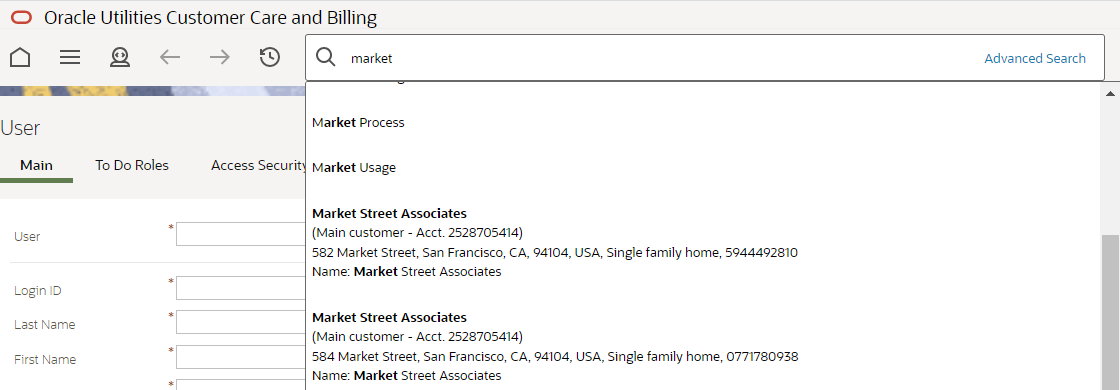
When you enter a slash before the menu item text, it is a signal to the search to only search for the text in menu entries.
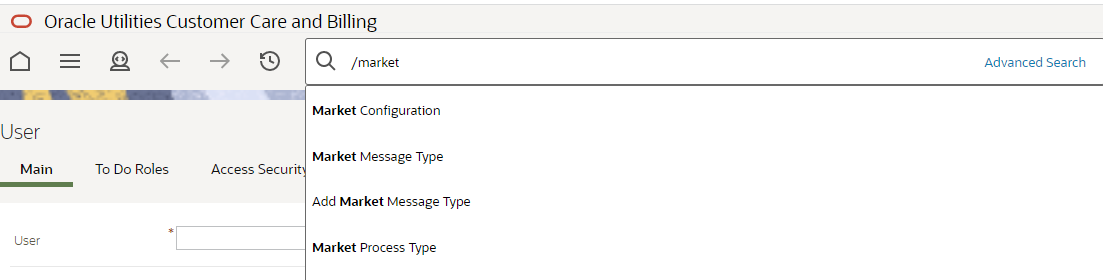
When using the Search widget, no longer requiring the slash improves usability and consistency. There is no impact to existing extensions with this enhancement.
Steps to Enable
You don't need to do anything to enable this feature.
Improvements to Batch Analytics Snapshot Update Processes
Based on volume testing, the queries used to select records for the batch run and batch thread analytics snapshot tables have been optimized. Additional indexes have been added to the tables to support the amended queries. The batch processes now also support selecting records within a range of days, instead of months, to provide more flexibility in the initial population of the snapshot tables.
The processes used to populate the batch analytics table have been amended to improve performance. There is no impact to existing extensions with this enhancement.
Steps to Enable
You don't need to do anything to enable this feature.
The batch analytics views no longer derive data directly from the various batch run related tables. Instead, the views now reference the snapshot tables, which have been designed to simplify the view SQL and to take advantage of specific indices that are not available in the source data.
There is no impact to existing extensions with this enhancement.
Steps to Enable
You don't need to do anything to enable this feature.
Tips And Considerations
The batch run and thread snapshot tables will need to be populated to support analysis using these views. Batch processes F1BRANSN (Batch Run Analytics Snapshot Update) and F1BTANSN (Batch Run Analytics Snapshot Update) are provided to update the snapshots. Both processes support selecting batch runs that fall within a given range of days to allow for doing the initial uptake of batch run data in smaller increments.
Zone SQL and UI Map HTML Editor Improvements
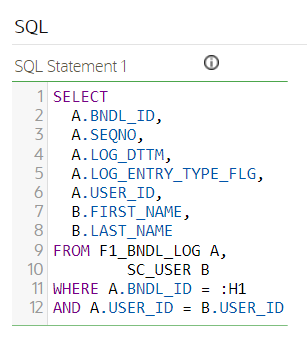
The CodeMirror library is now used to apply syntax highlighting logic to the SQL editor in data explorer Zones. Line sequence numbers were also added.
The same improvements are visible in the HTML Editor for a UI map.
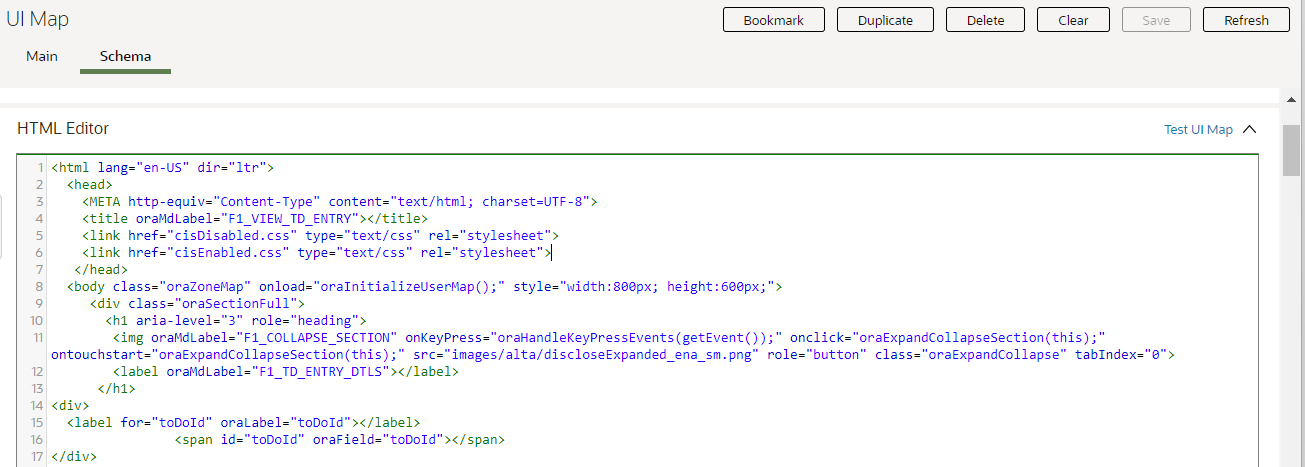
When viewing or editing the SQL definition in zone maintenance and when viewing or editing the HTML for a UI map, readability is improved with syntax highlighting. There is no impact to existing extensions with this enhancement.
Steps to Enable
You don't need to do anything to enable this feature.
To Do Entry Lifecycle Improvements
Several improvements were made to the To Do Entry lifecycle to more accurately reflect the status of a To Do Entry:
- The status Being Worked On was renamed to Assigned to reflect what actually happens in that status. Previously, you could have one or more To Do Entries in the Being Worked On state, but it did not mean that work was being performed yet. Now this status reflects only that the work has been assigned to someone.
- A new status value of In Progress was added. This allows you to explicitly mark which To Do Entry you are actually working on. You can only have one To Do Entry in the In Progress state at a time.
- A new status value of On Hold was added. This allows you to pause the progress of a To Do Entry if you need to wait for some event to occur before continuing to work on a To Do. Putting a To Do in the On Hold status allows for a more accurate accounting of how long it takes to work on a To Do Entry.
The two new status values of In Progress and On Hold are captured in a new Substatus field (TD_SUB_STATUS_FLG) on the To Do Entry. This new field can only be populated if the To Do Entry is in the Assigned status (the status formerly known as Being Worked On). This was done so that any implementation with the existing status field (ENTRY_STATUS_FLG) will continue to work as before.
An implementation needs to opt into using the substatus functionality by giving users that work on To Do Entries access to the new access modes. See the release readiness detail below for directions. Once an implementation has opted into the functionality, you will see these additional capabilities related to To Do Entries:
- When you perform any action that previously automatically assigned a To Do to you, it now also moves the To Do entry to In Progress. This happens if you click the Work action on To Do Entry, To Do Management, or on the To Do Details tab of the To Do Dashboard. Additionally, if you use To Do List and click the hyperlink in the Message column, this functionality applies.
- When you log into the system and have a To Do Entry that is In Progress, it is shown in the Current To Do dashboard zone.
- If you have an In Progress To Do and perform an action that causes a different To Do Entry to become In Progress, the previous To Do Entry is moved to the On Hold status.
- When you view an Open To Do Entry on the To Do Entry Maintenance page or Current To Do zone and you are allowed to work on the To Do, you see a button for Start Progress. This allows you to assign it to yourself and start work on in.
- When you view an Assigned To Do Entry on the To Do Entry Maintenance page or in the Current To Do zone, you also see a button for Start Progress.
- When you view an In Progress To Do Entry on the To Do Entry Maintenance page, you see buttons for Hold Progress and Stop Work. If you click Stop Work, it resets the In Progress state and the To Do will just be Assigned. These buttons are also available in the Current To Do zone. You can also perform any action that you can do in the Assigned state, including reopen, unassign, forward, and Complete the To Do.
- When you view an On Hold To Do Entry on the To Do Entry Maintenance page, you see buttons for Start Progress and Stop Work. You can also perform any action that you can do in the Assigned state, including reopen, unassign, forward, and Complete the To Do.
The To Do log has been enhanced to capture the status of the To Do Entry at the time the log is created as follows:
- A new log type Status Updated has been added and is used for any changes related to the new states of In Progress and On Hold. The existing log types of Assigned, Forwarded and Sent Back will continue to be used for those states for backward compatibility purposes.
- Going forward, log entries created will capture the status of the To Do at the time the log was created. Existing log values that predate the upgrade are not updated.
- A single status field is used and be populated with the substatus value of In Progress or On Hold, if applicable. Otherwise, it is populated with the status value of Open, Assigned, or Completed.
All the places where a To Do status is shown for an existing record, the system will show the substatus of In Progress or On Hold, if populated, otherwise it will show the Status (Open, Assigned or Complete).
The To Do Dashboard > To Dos by Status graph has been enhanced to also break out counts by substatus.
The additional status values allow users and supervisors to distinguish between assigned work and in progress work. You can also put To Do Entries on hold to allow for more accurate calculations of how long they actually worked on the To Do Entry.
Steps to Enable
Provide the required access before using the feature. Details are in the Access #Requirements section.
Tips And Considerations
Regardless of whether an implementation has opted into the functionality, you will see that the additional status values are now available in the filter criteria for Status on the To Do Management and To Do Dashboard > Details pages. The filters for other pages, including To Do Search, To Do List, and Supervisor To Do Assignment have not changed to include the substatus values in the filter criteria. In addition, any page that shows a bar with counts of Assigned or Open To Do Entries have not changed to include counts by the substatus values.
Key Resources
- See the Improved To Do States training.
Access Requirements
System administrators should set/grant users/grant access to the access modes HDPR (Hold Progress), SPWK (Stop Work) and STPR (Start Progress) for the CILQTDEP application service. If you choose to use this functionality, the recommendation is that this security is granted to all users that use To Do Entry (or none).
To Do Entry Supports Both Creation Process and Routing Process
If a To Do Type is configured with a creation process and a routing process, a To Do Entry based on that type now supports both processes. The creation process is stamped for audit purposes and the routing process is stamped so that the To Do Entry is processed the next time the routing process is run. Previously, although the To Do Type supported configuration for both types of processes, the To Do Entry table could only support a relationship to the creation batch process. The routing process functionality was not possible.
To Do Entries created by a batch process may also be marked to be routed to an external system, increasing usability. There is no impact to existing extensions with this enhancement.
Steps to Enable
You don't need to do anything to enable this feature.
Define Default Template User for User Provisioning
The F1-OIMUSR (Populate User Data from a "Template" User) algorithm was enhanced to allow a Template User to be provided as a parameter. The algorithm is used by the User business object F1-IDMUser, which is used to create users from an external source. For example, the LDAP batch process uses this business object to create a user. The algorithm to copy information from a template user allows application configuration, such as user groups, user preferences, To Do roles, and other information not supplied by the external system, to be populated on the new user. Previously, this algorithm relied on the value of the template user to be provided as part of the payload for adding the user, using a characteristic. In this release, the algorithm first checks for a template user provided as a characteristic. If it is not found, it uses the template user provided as a parameter to the algorithm, if populated.
An algorithm is provided to copy configuration details from a Template User when provisioning a new user. The algorithm now supports defining a default Template User. There is no impact to existing extensions with this enhancement.
Steps to Enable
To enable this feature, complete these steps:
- Go to Admin > Security > User in add mode and define the template user whose application configuration should be copied onto any new user.
- Go to Admin > System > Algorithm.
- Search for and select the algorithm F1-OIMUSR.
- Click Edit, and then click the + in the Algorithm Parameter collection.
- Enter an appropriate effective date and the Template User created above.
Improved Handling of Null Values in REST APIs
Date and time elements in requests and response messages require special handling when they contain no value. Unlike a string value, no value for date, time, and date/time elements has to be represented as null and not an empty string. In the same way, a numeric or Boolean element with "no value" should be represented as a null, not an empty string. Previously, the application did not properly accept null values for date and time elements in a JSON request. The application incorrectly represented such values in a JSON response as empty strings. The application correctly handled null values for numeric and Boolean elements except for a few outlier situations that were also fixed as part of this enhancement.
In this release, the Inbound Web Service REST engine v2 is enhanced to properly accept and process null values for elements of all data types.
The following clarifies some differences around request and response processing:
- As part of a request document, any element of any data type can be sent in with a null value, whether via the nil attribute in XML or the null value in JSON.
- As part of a JSON response document, empty node elements would be removed from the response or assigned either a null or empty string based on their data type:
- A string element would always be assigned "" an empty string. This include all types of string data types like lookup, etc. This already works this way, no change in this release.
- A date, date/time, time element would have a null value.
- A number, money element is consistently removed from the response. Previously, this was not the same for some outlying scenarios.
- A Boolean element is consistently removed from the response. Previously, this was not the same for some outlying scenarios.
This provides better support for null values exchanged via REST API. There is no impact to existing extensions with this enhancement.
Steps to Enable
You don't need to do anything to enable this feature.
Improved Message Sender Context Customization
For most integrations supported by the base product, the end point URL and other details may only be provided by the utility at provisioning time. Previously, the entire message sender definition for such integration point had to be defined by the utility along with the configuration of the external system record that references the message sender.
As of this release, partially defined message senders may be released with the base product, allowing utilities to complete the definition with the necessary context information. This also allows the base product to include a more comprehensive configuration that includes the external system record that references the message sender.
Better support is provided for out-of-the -ox message sender definition records. There is no impact to existing extensions with this enhancement.
Steps to Enable
You don't need to do anything to enable this feature.
Support Language in REST Request
The REST engine considers the information populated in the Accept-Language header attribute. If a single value is provided, the system checks if the application has that language as a supported language in the application. If so, it returns translatable text in that language. The system looks for an entry in the Language table where the Locale field matches the value passed in Accept-Language.
If multiple entries are provided in the Accept-Language, the system uses HTTP content negotiation to select one of the provided values.
If no supported language is found for the Accept-Language content, the system returns information in the language of the system user used to make the REST call.
For implementations that support multiple languages, REST calls may return translatable data in a requested language. There is no impact to existing extensions with this enhancement.
Steps to Enable
You don't need to do anything to enable this feature.
User Provisioning Using the SCIM Open Standard
A new REST service, SCIM User Provisioning (F1-SCIMUser), is provided to support adding, changing, or viewing the details of a user where the API follows the SCIM standard.
The following highlights some of the mapping between the SCIM API and the application's user record:
- The user record in the application supports only first name and last name. The SCIM standard supports additional detail such as middle name, suffix, and prefix. These elements are ignored when adding or updating a user.
- The SCIM standard supports a collection of email addresses. The application only supports one email address. As such, only the first email address is used when adding or updating a user.
- A user in the application requires several application specific settings in order to be added properly. When adding a user record via the Create User operation in this new REST service, the integration supports supplying a Template User reference (in the user type element in the API). The system copies application settings from that user to the new user being provisioned.
APIs are provided that follow the SCIM specification for provisioning users, allowing implementations to simplify integrations with multiple third-party systems that follow the same standard. There is no impact to existing extensions with this enhancement.
Steps to Enable
Provide the required access before using the feature. Details are in the Access #Requirements section.
Tips And Considerations
- The inbound REST web service provided is F1-SCIMUser. Refer to its description along with the help text on the various elements for more information on using the REST service.
- You need to define a template user in order to successfully add a User record via this REST service. The template user can be provided in the userType element. Alternatively, you can define the Template User as a parameter to the algorithm F1-OIMUSR (Populate User Data from a "Template" User). Refer to the separate feature "Define Default Template User for User Provisioning" for more information.
Access Requirements
System administrators should set/grant users/grant access to the Execute access mode on the CILTUSEP application service for the web service user that calls the new REST web service.
Adjusted Locale for English Language
As more integrations use the Locale as the standard method to determine a language, the product is adjusting the value defined for the default language row (ENG - English) to use the generic locale "en", instead of the more specific "en-US".
The default record's configuration is now aligned with the typical browser configuration for English. There is no impact to existing extensions with this enhancement as the change is transparent.
Steps to Enable
You don't need to do anything to enable this feature.
Asset Type - Auto-generated Asset or Badge Number
The new Automated Number zone in the Main tab of the Asset Type portal enables you to configure the asset type to automatically generate an asset number and/or badge number for a new asset. For auto-generated numbers, you can assign custom or calendar prefixes and set the length of the numbering sequence. Using a calendar prefix inserts the current year into the auto-generated number and the sequence number resets to zero at the beginning of each calendar year.
These fields facilitate the configuration of an asset type's auto-generated number settings:
- Asset Number
- Asset Number Generation
- Asset Number Prefix
- Asset Number Calendar Prefix
- Asset Number Sequence Length
- Badge Number
- Badge Number Generation
- Badge Number Prefix
- Badge Number Calendar Prefix
- Badge Number Sequence Length
This provides the flexibility to configure the application to assign an intelligent asset and/or badge number per asset type.
Steps to Enable
You don't need to do anything to enable this feature.
Key Resources
- See the Autosequencing of Asset Number and Badge Number training.
See a preview of the database changes coming for 23B in the Oracle Utilities Cloud Services Database Changes Guide. This guide is also available in PDF.
This includes information about databases changes to tables, indexes, views, columns, and more.
Steps to Enable
You don't need to do anything to enable this feature.
Supported Platforms and Browsers
Oracle Utilities 23B Cloud Services support the following operating system and web browser combinations:
| Operating System |
Web Browsers |
|---|---|
| Windows 10 |
Firefox ESR 102+ Chrome for Enterprise 106+ Microsoft Edge (Chromium-based) 106+ |
| iPad2 iOS 10.x (WACS only) |
Safari (selected flows and portals only) |
Oracle recommends using only supported client platforms and browsers.
Steps to Enable
You don't need to do anything to enable this feature.
New Application Services
The following Application Services were added in the 23B release:
| Application Service |
Description |
|---|---|
| F1BUSOBJ | Business Object Portal |
| F1BJSRCH | Batch Job Submission Query Portal |
Changed Application Services
The following Application Services were changed in the 23B release:
| Application Service |
Description |
|---|---|
| CILQTDEP (To Do Entry) | New access modes:
|
| CILTUSEP (User) | New access mode: F1EX - Execute |
Application services provide user access to new features and functions.
Steps to Enable
You don't need to do anything to enable this feature.
Information about bugs fixed in each release, maintenance packs, and hot fix releases is available on the Oracle Utilities Customer Cloud Service Maintenance Pack page on My Oracle Support (Document ID 2616441.1).
Core Release pages provide an overview and summary of the bug fixes and patches included in a release, and indicate the types of changes and impact each can have when applied.
Maintenance pack pages list bugs fixed in each maintenance pack and hot fix release.
Steps to Enable
You don't need to do anything to enable this feature.
Oracle Analytics Server v.6.4 is supported in this release.
This is the same version supported for 23A.
Steps to Enable
If necessary, upgrade using the directions in the Oracle Analytics Server documentation.
Information about known issues in this release is available on the Oracle Utilities Cloud Services - Known Issues page on My Oracle Support (Document ID 2936102.1).
Known Issues pages list known issues and bugs in this release, as well as workarounds related to each issue.
Steps to Enable
You don't need to do anything to enable this feature.
IMPORTANT Actions and Considerations
REPLACED OR REMOVED FEATURES
From time to time, Oracle replaces existing cloud services with new features, or removes existing features. Replaced features may be put on a path to removal. As a best practice, you should use the newer version of a replaced feature as soon as a newer version is available.
This section identifies the features in this Cloud service that have been replaced or removed.
| Product | Removed Feature | Target Removal | Replacement Feature | Replaced In | Additional Information |
|---|---|---|---|---|---|
| Oracle Utilities Customer Cloud Service | V Model Relationships (X1-V-Model-Relationships) inbound web service |
23B | New or enhanced inbound web services:
|
23B | Not applicable . |
| Oracle Utilities Customer Cloud Service | Customer Service Request Type (C1CUSRTY) Portal | 23B | New or enhanced portals:
|
23B | All-in-one portal to Query or Maintenance portal |
| Oracle Utilities Customer Cloud Service | F1-ILMAD | 23C | K1-ILMAD | 23A | Oracle Utilities Cloud Service Foundation provides the K1-ILMAD batch control. The F1-ILMAD batch control was provided by Oracle Utilities Application Framework. |
Unless otherwise specified below, these notes are for informational purposes and no action is required.
PLANNED REMOVAL
Plan to Remove Support for Previous User Experience from Oracle Utilities Application Framework
In the current release, the product provides an option to Switch UI View. This changes the current user experience for the user for that session. Assuming the user is in the latest user experience (referred to as Redwood), this action switches the user experience to the previous look-and-feel.
In the future, the product plans to remove support for the ability to switch that design that preceded Redwood.
Plan to Remove Workflow and Notification Metadata and Database Tables from Oracle Utilities Application Framework
Workflow and notification functionality supported exchanging messages with an external system (notification) and providing a configurable process for acting on incoming messages (workflow). More recently, the functionality for managing external messages is supported using Outbound Message and Inbound Web Service functionality. In addition, there are several features to support processing incoming messages. Service scripts can handle simple use cases. For more complicated processes, the service task or other business object driven objects are available.
The metadata and database tables related to this feature will be removed in a future release. Note that only a portion of the functionality for this feature is managed by Oracle Utilities Application Framework. Most of the functionality is supported in the Oracle Utilities Customer Care and Billing product.
Plan to Remove Mobile Application Framework Metadata from Oracle Utilities Application Framework
Removal of support for the Mobile Application Framework has already been announced in a previous release. However, there is metadata still included in the application related to this functionality.
The metadata will be removed in a future release.
Plan to Remove Key Ring Validation Scripts, Algorithm Types, and Algorithms from Oracle Utilities Application Framework
The product is removing all scripts, algorithm types, and algorithms that performed validation rules on the K1-SignatureKeyRing business object. The algorithms have been removed from the BO configuration. There are requirements to expand the use of a signature key ring beyond the current implementation for object file storage and the existing validations are not applicable to other planned use cases.
The following items will be removed in a future release.
- Algorithm
- K1-KRDCKFS
- K1-KRINCKFS
- Algorithm Type
- K1-KRDCKFS
- K1-KRINCKFS
- Message
- 11009 / 1402
- Plugin Script
- K1-KRDCKFS
- K1-KRINCKFS
- Service Script
- K1-ChkCfgExL
Plan to Remove UI Metadata Related to Converted Pages from Oracle Utilities Application Framework
The UI metadata related to fixed pages that have been converted to portals will be removed in a future release. The tables list the navigation keys related to each maintenance page. The related UI program component data will also be removed. Note that the metadata related to the search pages will not be removed at this time in case they are used on other fixed pages.
| To Do Entry Maintenance |
Table Maintenance |
Work Calendar Maintenance |
Message Maintenance |
|---|---|---|---|
|
|
|
|
| Time Zone Maintenance |
Application Security Portal | Display Icon Portal |
|---|---|---|
|
f1appsecTabMenu |
displayIconRefMaint |
Plan to Remove Miscellaneous System Data from Oracle Utilities Application Framework
The following metadata is no longer in use and will be removed in a future release:
| Object | Data | Description/Comments |
|---|---|---|
| Lookup Value |
CHAR_ENTITY_FLG / F1SE |
Characteristic Entity / Sync Request Inbound Exception |
| Script |
F1-TDMgActSS |
To Do Management - Process Actions (Deprecated) / Replaced by F1TDMgActSS |
| Script |
F1AddDebugLg |
Add Log for Monitoring Probe (Deprecated) / Replaced by a BS - F1-MONPRBLOG |
| Script | F1MgOlmpMnt | Not in use by base functionality. |
| Script | F1MgoSqlPks | Not in use by base functionality. |
| Script | F1MgOlmpPst | Not in use by base functionality. |
| UI Map | F1-MigrObjectImportMaintenance | Not in use by base functionality. |
| Zone | F1-BOMOSRCH |
Not in use by base functionality. |
| Zone | F1-CATCHSCH |
Not in use by base functionality. |
| Zone | F1-MONAVKEY |
Not in use by base functionality. |
| Zone | F1-REVCONQRY |
Not in use by base functionality. |
Plan to Remove XSLT Managed Content Type from Oracle Utilities Application Framework
Entries in the Managed Content table related to XSL should be using the XSLTC managed content type and not the XSLT managed content type. In a future release, the XSLT managed content type will no longer be supported.
Plan to Remove REST IWS - Original REST Servlet from Oracle Utilities Application Framework
The original URL supplied for invoking IWS based REST services included the IWS Service name in its makeup. Support for this will continue for backward compatibility purposes, but it will be deprecated in a future release. You should adjust your existing integrations to use the currently supported URL.
Plan to Remove Append Setting from Pagination - Oracle Utilities Application Framework
There are several known issues with the functionality of the "append" option in pagination. It is recommended that you do not use this pagination setting.
Plan to Remove Support for Master/Subordinate Servers for Web Service Catalog in Oracle Utilities Application Framework
The Service Catalog Configuration (master configuration) enables you to define subordinate servers. Defining subordinate servers is no longer applicable for the Oracle Integration Cloud.
Plan to Remove Support for Batch Run Statistics Portal Functionality in Oracle Utilities Application Framework
The Batch Run Statistics portal provides additional information about batch runs, but some functionality on the portal is related to capturing additional information from an external tool. This information is stored in a Fact record. Support for capturing additional information from an external tool will be discontinued in a future release.
Plan to Remove Business Object Read from F1-MAINPROC When Pre-processing Exists
In the original implementation of configuration tools, the main framework maintenance BPA (F1-MainProc) did not perform a Read of the BO when a pre-processing script was linked to the BO via options. The pre-processing script was responsible for the Read.
In a subsequent release, a BO Read was added in F1-MainProc (even if a pre-processing script existed) to resolve a UI Hint issue related to child business objects. This solution introduced a problem only visible for specific scenarios and a different fix has been introduced. The new fix made the BO Read unnecessary in F1-MainProc. Because there are many pre-processing scripts that are properly performing the Read of the BO, ideally the BO Read should be removed from F1-MainProc so that multiple reads are not performed. However, there may have been pre-processing scripts introduced after the BO Read was included in F1-MainProc that were coded to not perform a BO read in the pre-processing script. Due to this situation, the BO Read is still performed as part of the processing of F1-MainProc.
When a pre-processing script exists, we plan to remove the BO Read from F1-MainProc logic. You should review your custom pre-processing scripts that are linked to your BO options to ensure that they properly perform a Read of your BO.
Plan to Remove Business Person Queries Inbound Web Services in Oracle Utilities Customer Cloud Service
The Business Person Queries (X1-PersonQueries) inbound web service will be removed in a future release.
Plan to Remove Customer Service Request Type Related Metadata from Oracle Utilities Customer Cloud Service
The following metadata is no longer in use and will be removed in a future release:
| Object | Data | Description/Comments |
|---|---|---|
| Field |
CS_REQ_TYPE_REL_UPD_ENT_LBL |
Related Update Entity |
| Field |
CS_REQ_TYPE_PROC_ALG_LBL |
Processing Algorithm |
| Field |
C1_CS_REQ_TYPE_PROC_ALG_LBL |
Processing Algorithm |
| Field |
C1_CS_REQ_TYPE_UPD_DTL_LBL |
Update Details |
| Script |
C1CSRTQRUShw |
CS Request Type Question Related Update Zone Visibility |
| Script |
CSRTQRUpdShw |
CS Request Type Question Related Update Zone Visibility |
| Script |
C1-CSRTRUMnt |
Add/Edit Related Update |
| Script |
C1RUAdEdPre - |
Add/Edit Related Update Preprocessing |
| UI Map |
C1-CSRTRelatedUpdates |
Add/Edit Related Updates |
| Message |
11108, 20805 |
Field is required for %1 related update entity table. |
| Message |
11108, 20806 |
Update Business Object is required for %1 related update entity. |
| Message |
11108, 20807 |
Update Element XPath is required for %1 related update entity. |