
- Revision History
- Overview
- Feature Summary
- Utilities Common
- Customer
- IMPORTANT Actions and Considerations
This document will continue to evolve as existing sections change and new information is added. All updates appear in the following table:
| Date | Module | Feature | Notes |
|---|---|---|---|
| 27 NOV 2023 | Created initial document. |
Oracle Utilities Customer Cloud Service is a customer care, service order, metering, billing, and credit and collections solution. The solution is designed to cater for utilities of all sizes, supports one to many utility service types, and handles the complexities associated with a utility's processes.
This guide outlines the information you need to know about new or improved functionality in this update, and describes any tasks you might need to perform for the update. Each section includes a brief description of the feature, the steps you need to take to enable or begin using the feature, any tips or considerations that you should keep in mind, and the resources available to help you.
 HAVE AN IDEA?
We’re here and we’re listening. If you have a suggestion on how to make our cloud services even better, let us know by entering your idea in Oracle Forums. Wherever you see this icon after the feature name it means we delivered one of your ideas.
DISCLAIMER
The information contained in this document may include statements about Oracle’s product development plans. Many factors can materially affect Oracle’s product development plans and the nature and timing of future product releases. Accordingly, this Information is provided to you solely for information only, is not a commitment to deliver any material, code, or functionality, and should not be relied upon in making purchasing decisions. The development, release, and timing of any features or functionality described remains at the sole discretion of Oracle.
This information may not be incorporated into any contractual agreement with Oracle or its subsidiaries or affiliates. Oracle specifically disclaims any liability with respect to this information. Refer to the Legal Notices and Terms of Use for further information.
Column Definitions:
Report = New or modified, Oracle-delivered, ready to run reports.
UI or Process-Based: Small Scale = These UI or process-based features are typically comprised of minor field, validation, or program changes. Therefore, the potential impact to users is minimal.
UI or Process-Based: Larger Scale* = These UI or process-based features have more complex designs. Therefore, the potential impact to users is higher.
Features Delivered Disabled = Action is needed BEFORE these features can be used by END USERS. These features are delivered disabled and you choose if and when to enable them. For example, a) new or expanded BI subject areas need to first be incorporated into reports, b) Integration is required to utilize new web services, or c) features must be assigned to user roles before they can be accessed.
Test Flows - Test Data Generation Based on Conditions
Test data generation in a test flow run is integral to test automation development. Test Data Generation Based on Conditions enables you to define data generation routines through a simple and easy to use interface. Generation of multiple types (numbers, strings, and dates) of test data is supported, which caters to most of the test data generation requirements in test automation flows. You can specify ranges for numbered test data, formatting for strings, and specific conditions for dates. You can also define the generation conditions against specific elements in the test data GUI of a component in a flow. During the test flow run, Oracle Utilities Testing Accelerator interprets the condition-based definition, generates the test data, and assigns the test data to the element.
This reduces the time to develop a test automation flow and makes it easy to define the appropriate generation routine for test flows.
Steps to Enable
You don't need to do anything to enable this feature.
You can now easily extend Oracle Utilities Testing Accelerator's product-delivered base components by adding custom schema elements through component definition lines. Building a test flow using the extended base component provides test data for both the base and extended schema elements through the same test data user interface in the test flow definition screen. You can easily add or remove the extended schema elements in the component definition lines based on your requirements, across upgrades. By extending the product-delivered base components, the need to create custom components to test the extensions of base objects in supported Oracle Utilities Cloud Services becomes unnecessary.
Any updates to the base components in Oracle Utilities Testing Accelerator are automatically applied to the test automation flows that use your extended components. This also reduces the maintenance effort during upgrades, as the base changes are part of the updates to the base component on which your extension is added.
Steps to Enable
You don't need to do anything to enable this feature.
Components - Workspace Products and Quick Access Buttons
The number of product versions in the Flow Tree Structure of Oracle Utilities Testing Accelerator depends on the number of upgrades you are testing or managing. The Workspace Products tab of the Component Tree section enables you to bring into focus the product versions you are currently working on and easily access their corresponding test components and flows. The workspace eliminates the need to navigate and search for product versions in the component tree or flow tree structure. It is user-specific, which allows you to easily add or remove product versions.
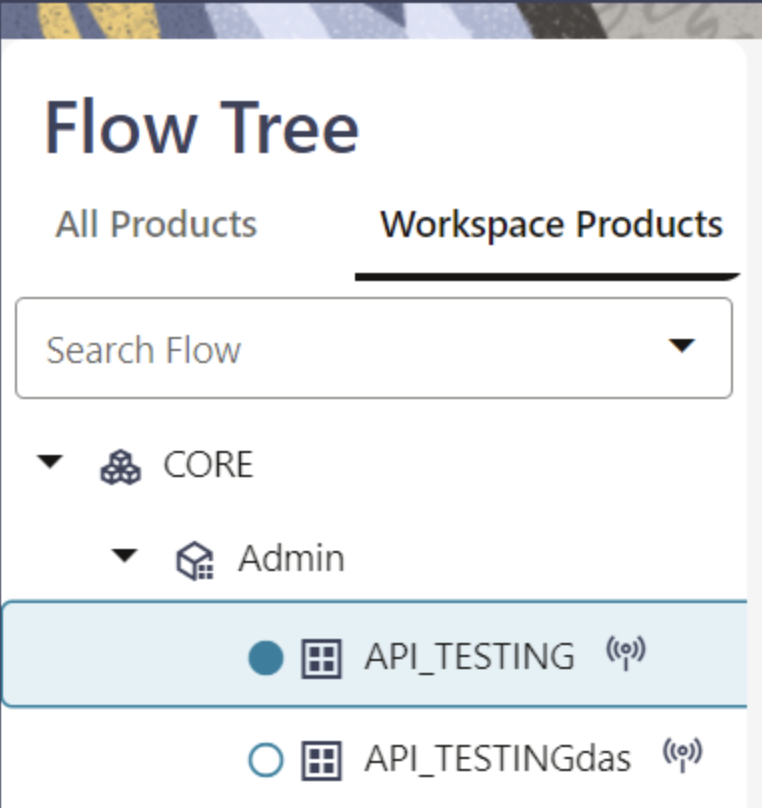
Workspace Products Tab - Quick Access Broadcast Button
The Component Tree panel is now collapsible, providing more space on the user interface to work on flow management or flow definition. This panel is automatically in collapse view when the flow is in any status other than the "In Progress" state. Additionally, new buttons are available to perform operations related to flow definition management and flow runs. These buttons provide the ability to view or edit flows, run test flows, and view flow run history. These replace the action of right-clicking context menus on test flow names.
These improvements reduce flow management, flow run time, and effort while providing intuitive user interface elements to navigate and access components and flows under a product.
Steps to Enable
You don't need to do anything to enable this feature.
Insight Type - Unpaid Account for Person Details Capped
You can use the Unpaid Account for Person Details Capped (C1-PER-NONPAY-CARD-DET) insight type to display a non-payment details contextual insight for a customer in Oracle Customer Experience for Utilities.
This helps elevate customer service interactions by providing additional information about the customer in the most appropriate screens.
Steps to Enable
To enable this feature, refer to the Insight Groups section of the Administrative User Guide.
Key Resources
- See the Contextual Insights section in the Administrative User Guide for more information.
Bill Identifier in DataConnect's Billing-related Data Extracts
The Bill Segment Lines and Bill Segment SQ data extracts now include the Bill Identifier for each record.
The data in these billing-related extracts can now be easily matched or correlated with data in other billing-related extracts.
Steps to Enable
You don't need to do anything to enable this feature.
Tips And Considerations
If your implementation uses these extracts to integrate to other solutions or applications, consider modifying your data mapping or ingest capabilities to take into account the new data.
Key Resources
- Refer to the Defining DataConnect Options section in the Administrative User Guide for more information.
Additional Date Break Information on Usage Requests for Improved Billing Calculations
The Rate Engine Configuration master configuration enables you to instruct the application to evaluate Rate Schedule, Bill Factor, and/or Seasonal breaks, for when pricing changes, to determine the date break information to stamp onto a service agreement's related usage request. Additional date break information will allow usage calculation rules to derive more precise billing determinants to enable bills to be calculated more accurately.
NOTE: The Build Usage Request Date Breaks (C1-BLDDATEBR) business object pre-processing algorithm on the Usage Request (X1-UsageRequest) and MDM Usage Request (C1-UsageRequest) business objects contains the logic to build the above date break list. X1- UsageRequest that applies to Oracle Utilities Customer Cloud Service and Oracle Utilities Billing Cloud Service. C1-UsageRequest applies to Oracle Utilities Customer Care and Billing Cloud Service.
This helps increase customer satisfaction, reduces inquiries and complaints, and improves productivity and meeting service level agreements in the call center.
Steps to Enable
To enable this feature, complete these steps:
- Select Admin, General, and Master Configuration.
- Create or edit the Rate Engine Configuration master configuration.
- Select the applicable break options in the Usage Request Date Breaks section.
- Save the changes.
Tips And Considerations
This only applies to calculation rule-based Rate Schedules and supports the following types of rate calculation rules:
- Service Quantity - based on the C1-ServiceQuantity business object
- Stepped Service Quantity - based on the C1-SteppedSQ business object
Extended Multi-Time Zone Support – Service Agreement
The application enables you to configure multi-time zone sensitive date/time fields, in the SA / SP and Contract Options tabs for a service agreement, to be displayed in the customer premise's time zone (if defined). This enhancement applies to the following date/time fields:
- SA / SP: Start Date/Time and Stop Date/Time
- Contract Options: Effective Date/Time, Expiration Date/Time, and Override Date/Time
NOTE: The application now stores the values of the mentioned multi-time zone sensitive date/time fields in the database based on the time zone defined in Installation Options - Framework.
This aligns multi-time zone support with usage requests, corresponding usage transactions, and bill segments.
Steps to Enable
To enable this feature, complete these steps:
- Select Admin, General, and Feature Configuration.
- Create or find the General System Configuration feature configuration.
- Set the Customer Multi Time Zone Support option to Y.
- Set the Multi Time Zone Support - MDM option to D1YS.
- Save the changes.
Tips And Considerations
For implementations that have already enabled or are enabling multi-time zone support, use the Update SA/SP and Contract Option Date Times (X1-SYNDT) batch control to synchronize a service agreement's multi-time zone sensitive date/time values from its related usage subscription.
Additional and Updated REST APIs
This new REST API Inbound Web Service exposes service point information as follows:
-
Service Points Common (C1-ServicePointCommon): Returns summary information for a provided service point.
These updated REST API Inbound Web Services also expose various entities and data, and allow you to manage and/or view that data:
- To Do Entry (F1-ToDoEntry): The Assign Next To Do Entry operation allocates the next applicable To Do entry for the current user based on custom business rules.
- Work Queue (C1-WorkQueue): Updates the Get Work Queue operation to return the account identifier and main person name for to do entries.
- Premise (C1-Premise): Enhances search and get premise operations.
- Search Premises operation performs a capped query based on an address or meter badge number.
- Updated Get Premise operation returns the service types supplied to a premise.
- Billing Context (C1-BillingContext)
- The Get Billing Account Context operation returns billing account information, including related persons and their relationship to the account, and related premise information.
- The updated Search Account Premises operation returns additional information related to a premise such as service type(s) supplied to a premise, number of service points, and life support information.
- The updated Search Person Accounts operation optionally, returns "inactive' accounts", that is accounts with service agreements, but all service agreements are either canceled or closed.
- Service Agreement (C1-ServiceAgreement)
- Excludes cancelled service agreements when returning inactive service agreements, and an additional option to return closed service agreements only using the updated Search SA for Account operation.
- The updated Get Service Agreement operation returns a service agreement's status.
- Financial Data for Accounts (C1-AccountData): The updated Get Account Financial Details operation returns specific information for inactive billing accounts such as the most recent end date from an account's closed service agreements.
- Account (C1-Account): Includes new operations to create and delete Account Person records as well as get and update Account Person information.
- C1-NotificationPreferencesForAccounts (Notification Preferences for Accounts): Filters and retrieves accounts without active notification preferences for specific notification types.
You can use these REST Inbound Web Services to decrease project costs and timelines.
Steps to Enable
To enable this feature, refer to the Oracle Utilities REST API for Metering and Customer Information documentation.
Tips And Considerations
Implementations must purchase the appropriate subscriptions or license options to use the Inbound Web Services.
Improved Scalar Meter Read Performance
Calculating consumption for subtractive scalar channels uses a more efficient "look back" algorithm to find a previous read, limiting the number of days searched.
This improves performance when processing scalar meter reads.
Steps to Enable
You don't need to do anything to enable this feature.
Information Lifecycle Management - ILM Crawler - IMD Batch Control
The ILM Crawler - IMD (D1-IMDCL) batch control identifies and runs eligibility evaluation for Initial Measurement Data. In this release, D1-IMDCL extends its function to delete Control table records marked as "eligible for archive" from dropped Initial Measurement Data or Usage Transaction partitions.
This ensures the complete removal of orphaned Control table records from dropped Initial Measurement Data or Usage Transaction partitions.
Steps to Enable
You don't need to do anything to enable this feature.
Specialized Data Extracts - File Encryption Support
The following meter read extracts support file encryption:
- Specialized Measurement Initial Extract
- Specialized Measurement Extract Current
- Specialized Measurement Extract Historical
- Specialized IMD Header Initial Extract
- Specialized IMD Header Extract Current
- Specialized IMD Header Extract Historical
This provides additional data security to specialized meter read extracts.
Steps to Enable
You don't need to do anything to enable this feature.
Tips And Considerations
To encrypt files, run specialized extract batch jobs with the Encryption Key Ring and Signature Key Ring parameters.
Oracle Utilities Analytics Visualization - Null Value Support in Calendar Dimensions
Oracle Utilities Analytics Visualization now displays null values in Date and DateTime columns as dash ( - ) characters instead of "Jan 1, 101", which unclearly represented unavailable or undefined data.
This enhances the user experience and speeds up date navigation when using date filters.
Steps to Enable
You don't need to do anything to enable this feature.
Oracle Utilities Analytics Visualization - Oracle Analytics Server 2023
Using Oracle Analytics Server 2023 with Oracle Utilities Analytics Visualization provides the following capabilities:
- Exploring, Dashboarding, and Storytelling
- Addition of custom table headers
- Configuration of grid spacing between visualizations on the canvas
- Customization control of the dashboard filter bar
- Creation of personalized messages for "no data" visualization
- Data filtering with a slider
- Opening of workbooks in view mode
- Data Modeling and Preparation
- Automatic calculation of time durations such as year, month, and day
- Data transformation with "Convert to Date" recommendations
The latest Oracle Analytics Server version includes a variety of platform enhancements that provide you with more flexibility in creating custom headers, conditional formatting, personalized messages, improved insights from the Auto Insights feature, and more.
Steps to Enable
You don't need to do anything to enable this feature.
Key Resources
- Refer to What’s New for Oracle Analytics Server for more information about the latest version.
Service Agreement Dimension - Standard Industrial Classification (SIC) Code
Customer-related subject areas with the Service Agreement dimension can now leverage SIC Code information for analytical purposes.
This enables you to identify service agreements where the SIC Code may be missing, perform an analysis leveraging SIC Codes for a given range, and more.
Steps to Enable
You don't need to do anything to enable this feature.
Bulk Invoice Payment Processing
In this release, the Oracle Customer Cloud Service-Oracle Financial Cloud integration for Accounts Payable Invoice Payments supports batch processing of invoice payments.
This optimizes the account payable invoice payment process.
Steps to Enable
To enable this feature, refer to the Oracle Utilities Customer Cloud Service Integration to Oracle Financial Cloud Implementation Guide for more information.
Customer Synchronization Process - Improved Security and Optimized Integration Flow
The Customer Sync process between Oracle Customer Cloud Service and Oracle Utilities Network Management System now uses a more efficient REST services model, which improves security and optimizes integration flow. Previously, this process relied on database adapter connections.
This adds a security layer to the synchronization process and optimizes performance and efficiency.
Steps to Enable
To enable this feature, refer to the Oracle Utilities Customer To Meter Integration to Oracle Utilities Network Management System Implementation Guide for more information.
Customer Cloud Service to Digital Asset Cloud Service - Data Synchronization
Oracle Utilities Customer Cloud Service initiates master data synchronization for the Person, Service Agreement, and Service Point objects to Oracle Utilities Digital Asset Cloud Service. The synchronization process handles the initial and incremental updates, and creates a tab-delimited flat file with the required attributes to be transferred from Oracle Utilities Customer Cloud Service to Oracle Utilities Digital Asset Cloud Service via Oracle Integration Cloud Service.
Oracle Utilities Digital Asset Cloud Service processes the records from the Person file to create the equivalent Contact records, the Service Point file to create the Metered Service Point records, and the Service Agreement file to create the Metered Service records. Oracle Utilities Customer Cloud Service's initial synchronization handles the first-time load of customer data and the incremental synchronization handles updates to the customer data. Oracle Utilities Digital Asset Cloud Service returns an acknowledgement for incremental updates only. Up-to-date and synchronized customer information in Oracle Utilities Digital Asset Cloud Service correctly determines the customer's program eligibility.
This leverages the Oracle Integration Cloud-based file integration flows to synchronize customer information, which forms a prerequisite for enrolling customers on programs they are eligible.
Steps to Enable
To enable this feature, refer to the Oracle Utilities Customer Cloud Service Integration to Oracle Utilities Digital Asset Cloud Service Configuration Guide for more information.
Utilities Application Framework
The Batch Job Submission page has been converted to a portal, leveraging a more flexible user interface metaphor. The portal organizes information in a way that makes it easier to review and enter key details, such as batch job parameters.
In addition, the following user interactions were changed in the portal:
- The Add dialog now requires the batch control to be entered via a popup map.
- The Duplicate and Queue action is renamed to Duplicate.
- A new action of Rerun has been introduced. This action has the same behavior as Duplicate with the exception that it populates the batch rerun number with the batch number in context. This replaces the current dialog whereby a user must manually enter the batch number to be rerun in the batch rerun number field.
- The action buttons now only appear if the user has "execute" access for the batch control in context and has security access to the "queue" action for the batch job submission application service.
- New searches have been introduced for both the batch control entry, on the add popup, and the batch user on the add, duplicate, and rerun input pages. For batch controls, the results are restricted to batch controls to which the user has access. For users, results are restricted to users who have access to the batch control in context.
- The batch number is now displayed as a link to the batch run tree. This replaces the context menu.
- Several fields have been rearranged to increase the amount of space available for the batch parameters. This includes:
- Moving the submission method to the Record Information section.
- Moving the override and debugging parameters to a collapsed Additional Run Details section under Record Information. Note that this applies to input windows as well.
- Suppressing the submission user field if the batch user and submission user are the same.
- Removing the detailed description column from the batch parameters grid and replacing it with a widget that can be clicked to show the detailed description if needed.
This does not impact any extensions.
The improved user experience when submitting a batch job helps to reduce costs.
Steps to Enable
You don't need to do anything to enable this feature.
Tips And Considerations
A new business object (BO) for Batch Job Submission and a new Determine BO algorithm linked to the Maintenance Object were introduced. The base BO includes all the user interface behavior designed for the new portal. If your implementation has introduced your own CM business object and CM Determine BO algorithm, you should review your business object's configuration and merge it into the base business object.
Upgrade scripts ensure that users with Read access to the existing application service will have access to the new application service associated with the new portal. The table below lists the existing and new application services.
| Object | New Application Service | Access Added to any User Groups with this Application Service / Read Access |
|---|---|---|
| Batch Job Submission Portal | F1BCHJOB | CILZRBPP |
Note that any existing bookmarks for this page will take you to the previous version of the page. You need to take the following actions to move the bookmark to the new page:
- Click the bookmark. Take note of the Batch Job.
- Navigate to the Batch Job Submission portal page via the menu.
- Search for and select the Batch Job you noted from your bookmark. This takes you to the new page.
- Delete the existing bookmark from the Bookmark dashboard zone.
- Click the Bookmark page action button to add a bookmark for this record for the new page.
Key Resources
- See the Improved Batch Submission training.
User Import with Content Migration Assistant
The user record includes a user hash for security reasons. This hash value is calculated using a cryptography key in a given environment. When using Content Migration Assistant to import users from another environment, the process now includes a step to recalculate the user hash value using the target environment's cryptography key.
This update means implementations can import users from one environment to another without getting an error related to the user hash.
Steps to Enable
You don't need to do anything to enable this feature.
Ability to Override Labels in Business Object Configuration
The following language related to a business object status may now be overridden by your implementation:
- Status description. This is the text visible when displaying the current status of a record that is governed by a business object.
- Next Status Action Label for the business object status' next status. This is the text visible on an action button that you may use to transition a record to the next status.
For example, you could change the status "Canceled" for a given business object to use the term "Discarded". You could do this by navigating to the lifecycle definition for that business object and providing an override description for the "Canceled" state. In addition, you can find the states that transition to Canceled and override the Action Label from "Cancel" to "Discard".
The description of any product-delivered business object Status Reason can now also be overridden by your implementation.
NOTE: There are places where a status or a status reason description is captured as an audit of a point in time, such as in a log record. If you change the description of a status on a business object or the description of a status reason, the change will not cascade to any place that has captured the description previously.
This does not impact any existing extensions. The user interface may change if you choose to override descriptions.
This is useful when you decide that alternative terms are more meaningful than the ones provided by the product.
Steps to Enable
You don't need to do anything to enable this feature.
Tips And Considerations
The product delivers two new views:
- F1_BUS_OBJ_STATUS_VW: This view is built from the data in F1_BUS_OBJ_STATUS_L, but it sets the value of the DESCR field to the new override description if populated (otherwise to the description).
- F1_BUS_OBJ_STATUS_RSN_VW: This view is built from the data in F1_BUS_OBJ_STATUS_RSN_L, but it sets the value of the DESCR field to the new override description if populated (otherwise to the description).
If you have any custom zones that retrieve the DESCR field from F1_BUS_OBJ_STATUS_L or from F1_BUS_OBJ_STATUS_RSN_L and you plan to override any business object status description or a status reason description, you should update your custom zone to use the corresponding view instead.
Terminology Change: "Sidebar" Replacing "Dashboard"
The vertical area that stays anchored in the application as a user moves through the system is now referred to as a "Sidebar" instead of a "Dashboard." This change is reflected in documentation, metadata descriptions, and configuration on the User page related to the area (including the Sidebar Width, the Sidebar Location and the Sidebar State). This does not impact any extensions.
This allows the "Sidebar" to be distinguished from other" Dashboards" used to describe portals that display high-level views of a specific subject area. For example, the Batch Day Dashboard and the To Do Dashboard.
Steps to Enable
You don't need to do anything to enable this feature.
Duration Information Added to To Do Portal and Information String
The system now includes the following calculated duration information on the To Do Entry page:
- For a non-complete To Do, the Total Duration from its creation until now.
- For a completed To Do Entry, the Total Duration from its creation until its completion.
- For a To Do Entry that had ever been in the In Progress state, the Time In Progress. If it is currently in the In Progress state, the end duration time is the current date/time.

In addition, the base delivered Information string for a To Do Entry has been updated to include the age for a non-complete To Do and the duration for a completed To Do.
This is an example of a Non-completed To Do Entry:

This is an example of a Completed To Do Entry:

If your implementation uses a To Do information algorithm to override the base delivered information, you will not see any change to your To Do information. This change does not impact any extensions.
When you see the the calculated duration information, it helps you understand at a glance how long a To Do entry took to work on and how long before it was completed.
Steps to Enable
You don't need to do anything to enable this feature.
Related To Do Support Improvements
The zone that displays related To Do entries on the To Do Entry maintenance portal has been enhanced to support actions on the related To Do entries. In addition, the current To Do being maintained is included in the results so that you can perform actions on all To Do entries.
The Related To Do Entries zone supports all the actions available on the To Do Management portal. You can do mass assignment, mass updates to priority, mass addition of a log entry, and mass completion. In addition, you have access to the Work button to push all the related To Do entries into your Worklist. The actions are only available if a user is allowed to work all the related To Do entries.
On the To Do Management zone and the To Do Details zone on the To Do Dashboard portal, the link for the Related To Dos message now brings you to the To Do Entry maintenance portal. Previously, you were brought to the To Do Search page where you could do actions only on the To Do entries related to the one in the results.
This does not impact any extensions.
The ability to action one or more related To Dos on the To Do Entry maintenance portal provides improved support for managing multiple records.
Steps to Enable
You don't need to do anything to enable this feature.
Additional Terms Added to SQL Allowlist
The following terms were added to the SQL Allowlist:
- CHR
- COALESCE
- LAG
- NEXT_DAY
- REGEXP_INSTR
- REGEXP_REPLACE
- REGEXP_SUBSTR
- RPAD
- RTRIM
- XMLQUERY
Note that the terms were also added to the allowlist in previous releases via patches. This does not impact any extensions.
Additional terms included in SQL allowlist provides implementations with more capabilities when writing SQL statements in data explorers.
Steps to Enable
You don't need to do anything to enable this feature.
Business Object Portal Improvements
Business object option types and algorithms system events are now documented in designated extendable lookups, Option Configuration for option types and Algorithm Entity Type for system events. It is noted whether they support single or multiple values. This configuration is for documentation purposes only. Previously, there was no indication as to whether a business object's option type or algorithm system event implemented a single value or supported multiple values.
Using this information, the Business Object portal uses an icon to highlight whether a single value option type or algorithm system event record has been overridden by a higher sequence record. The situation may occur when the business object's option or system event configuration is extended by other products or customers. In the same way, an icon is used to highlight that a business object algorithm has been inactivated. The use of these icons makes it easier to focus on configuration records that are in effect and active.
The detailed description of the option types are presented in a more user friendly and searchable way. Also, as of this release, you can maintain reasons for a specific status directly on the Lifecycle tab where you review and maintain all other status-related configurations.
This does not impact any extensions.
The improved user experience helps to reduce implementation costs.
Steps to Enable
You don't need to do anything to enable this feature.
Tips And Considerations
- If you have introduced custom business object-related option types, it is recommended that you also define them in the Option Configuration extendable lookup to indicate whether the option type assumes a single value or multiple values. By default, the Business Object portal displays an option type that is not defined in the extendable as if it supports a single value.
- In the same way, if you have introduced custom business object related system events, it is recommended that you also define them in the Algorithm Entity Type extendable lookup to indicate whether the system event assumes a single algorithm or multiple algorithms. By default, the Business Object portal displays a system event that is not defined in the extendable as if it supports multiple algorithms.
Extended Tree Node Broadcasting Capabilities
The Populate Node and Override Information tree node algorithms can now optionally set the broadcast fields to use. When this information is not provided, the default primary key field names are used. Previously, when a user clicked on the broadcast icon on a tree node, the broadcasted field names were hardcoded to the node entity's primary key field names. While this was appropriate for most entities, there were use cases where the broadcasted field names should have differed from key names.
In addition, these tree node algorithms can now also determine that for a specific node the broadcast icon is not applicable and therefore should not be displayed. The tree node definition must explicitly allow broadcasting for the icon to appear and the algorithm can only set it to not appear as needed for a specific node.
This does not impact any extensions.
This allows for better support of complex tree node broadcasting requirements and provides more flexible interaction with trees.
Steps to Enable
You don't need to do anything to enable this feature.
Extensions Dashboard Improvements
The Extensions Dashboard portal was enhanced to show all revisions made to an extension entity in descending order in a new Revision Control zone. A Configuration Migration zone was also added to also list all Content Migration Assistant migration objects that applied changes to an extension entity. These zones appear only when an extension entity is selected.
A new Review tab was added to the Extensions Dashboard portal to highlight rare duplicate configuration issues that may arise after an upgrade. Utilities can use this information to adjust their configuration.
This does not impact any extensions.
The new user experience allows utilities and partners to improve the way they track and manage their extensions, which helps to reduce implementation costs.
Steps to Enable
You don't need to do anything to enable this feature.
Maintenance of Lookup Values Improvements
Lookup values can be easily filtered by various criteria and a smaller set of records can be selected for update. This helps handle lookup fields, like algorithm entity, that have too many values to manage as a single list. This does not impact any extensions.
This improved user experience helps to reduce implementation costs.
Steps to Enable
You don't need to do anything to enable this feature.
Object Storage Region Configuration Improvements
The definition of valid cloud object storage regions are now configured using an extendable lookup rather than a lookup. Defining the regions in an extendable lookup allows us to support defining both the region key and the region identifier. Previously, using a lookup to define the region supported only defining the region key. Product code was required to map the region identifier, requiring code change any time a new region was defined.
The product provides base delivered values for all the regions that are provisioned for cloud services. You can define a region for cloud object storage that is not provided by the base produce using the region value in the extendable lookup.
For backward compatibility for upgrading implementations, all regions previously provided in the lookup that are not in the list of those that the product is supplying are provided in the extendable lookup with a "CM" (customer modification) owner.
This does not impact any extensions.
As Oracle Cloud expands the regions it offers, this change allows the services to react to these new regions quickly without changes to the product code.
Steps to Enable
You don't need to do anything to enable this feature.
See a preview of the database changes coming for 23C in the Oracle Utilities Cloud Services Database Changes Guide. This guide is also available in PDF.
This includes information about databases changes to tables, indexes, views, columns, and more.
Steps to Enable
You don't need to do anything to enable this feature.
Supported Platforms and Browsers
Oracle Utilities 23C Cloud Services support the following operating system and web browser combinations:
| Operating System |
Web Browsers |
|---|---|
| Windows 10 |
Firefox ESR 102+ Chrome for Enterprise 106+ Microsoft Edge (Chromium-based) 106+ |
| iPad2 iOS 10.x (WACS only) |
Safari (selected flows and portals only) |
Oracle recommends using only supported client platforms and browsers.
Steps to Enable
You don't need to do anything to enable this feature.
New Application Services
The following Application Services were added in the 23C release:
| Application Service |
Description |
|---|---|
| F1BCHJOB | Batch Job Submission Portal |
| F1-FIELDENCRYPTBOAS | Field Encryption Key Ring Business Objects |
Application services provide user access to new features and functions.
Steps to Enable
You don't need to do anything to enable this feature.
Information about bugs fixed in each release, maintenance packs, and hot fix releases is available on the Oracle Utilities Customer Cloud Service Maintenance Pack page on My Oracle Support (Document ID 2616441.1).
Core Release pages provide an overview and summary of the bug fixes and patches included in a release, and indicate the types of changes and impact each can have when applied.
Maintenance pack pages list bugs fixed in each maintenance pack and hot fix release.
Steps to Enable
You don't need to do anything to enable this feature.
Oracle Analytics Server 2023 (v.7.0) is supported in this release. This requires an upgrade from the version supported for 23B.
This provides the ability to automatically analyze datasets and insights.
Steps to Enable
If necessary, upgrade using the directions in the Oracle Analytics Server documentation.
Information about known issues in this release is available on the Oracle Utilities Cloud Services - Known Issues page on My Oracle Support (Document ID 2936102.1).
Known Issues pages list known issues and bugs in this release, as well as workarounds related to each issue.
Steps to Enable
You don't need to do anything to enable this feature.
IMPORTANT Actions and Considerations
REPLACED OR REMOVED FEATURES
From time to time, Oracle replaces existing cloud services with new features, or removes existing features. Replaced features may be put on a path to removal. As a best practice, you should use the newer version of a replaced feature as soon as a newer version is available.
This section identifies the features in this Cloud service that have been replaced or removed.
| Product | Removed Feature | Target Removal | Replacement Feature | Replaced In | Additional Information |
|---|---|---|---|---|---|
| Oracle Utilities Customer Cloud Service | Script: C1CSRTQRUShw | 23C | Not applicable | Not applicable | Not in use by base functionality. |
| Oracle Utilities Customer Cloud Service | Script: CSRTQRUpdShw | 23C | Not applicable | Not applicable | Not in use by base functionality. |
| Oracle Utilities Customer Cloud Service | Script: C1-CSRTRUMnt | 23C | Not applicable | Not applicable | Not in use by base functionality. |
| Oracle Utilities Customer Cloud Service | Script: C1RUAdEdPre | 23C | Not applicable | Not applicable | Not in use by base functionality. |
| Oracle Utilities Customer Cloud Service | Field: CS_REQ_TYPE_REL_UPD_ENT_LBL | 23C | Not applicable | Not applicable | Not in use by base functionality. |
| Oracle Utilities Customer Cloud Service | Field: CS_REQ_TYPE_PROC_ALG_LBL | 23C | Not applicable | Not applicable | Not in use by base functionality. |
| Oracle Utilities Customer Cloud Service | Field: C1_CS_REQ_TYPE_PROC_ALG_LBL | 23C | Not applicable | Not applicable | Not in use by base functionality. |
| Oracle Utilities Customer Cloud Service | Field: C1_CS_REQ_TYPE_UPD_DTL_LBL | 23C | Not applicable | Not applicable | Not in use by base functionality. |
| Oracle Utilities Customer Cloud Service | UI Map: C1-CSRTRelatedUpdates | 23C | Not applicable | Not applicable | Not in use by base functionality. |
| Oracle Utilities Customer Cloud Service | Message: 11108, 20805 | 23C | Not applicable | Not applicable | Not in use by base functionality. |
| Oracle Utilities Customer Cloud Service | Message: 11108, 20806 | 23C | Not applicable | Not applicable | Not in use by base functionality. |
| Oracle Utilities Customer Cloud Service | Message: 11108, 20807 | 23C | Not applicable | Not applicable | Not in use by base functionality. |
| Oracle Utilities Customer Cloud Service | F1-ILMAD | 23C | K1-ILMAD | 23A | Oracle Utilities Cloud Service Foundation provides the K1-ILMAD batch control. The F1-ILMAD batch control was provided by Oracle Utilities Application Framework. |
Unless otherwise specified below, these notes are for informational purposes and no action is required.
PLANNED REMOVAL
Plan to Remove Cube Viewer from Oracle Utilities Application Framework
The Cube Viewer was originally provided in the Meter Data Management product and was transferred to the Oracle Utilities Application Framework. Since its inception, the Oracle Analytics platform has largely fulfilled its use case. Due to issues with compatibility, accessibility, and migration to the Redwood platform, we are announcing deprecation of the Cube Viewer feature in Release 23C with the eventual removal in Release 24A. The majority of the use cases for the feature are provided by Oracle and will be removed in the Release 24A with replacements already available in the Oracle Analytics platform.
Plan to Remove Support for Previous User Experience from Oracle Utilities Application Framework
In the current release, the product provides an option to Switch UI View. This changes the current user experience for the user for that session. Assuming the user is in the latest user experience (referred to as Redwood), this action switches the user experience to the previous look-and-feel.
In the future, the product plans to remove support for the ability to switch that design that preceded Redwood.
Plan to Remove Workflow and Notification Metadata and Database Tables from Oracle Utilities Application Framework
Workflow and notification functionality supported exchanging messages with an external system (notification) and providing a configurable process for acting on incoming messages (workflow). More recently, the functionality for managing external messages is supported using Outbound Message and Inbound Web Service functionality. In addition, there are several features to support processing incoming messages. Service scripts can handle simple use cases. For more complicated processes, the service task or other business object driven objects are available.
The metadata and database tables related to this feature will be removed in a future release. Note that only a portion of the functionality for this feature is managed by Oracle Utilities Application Framework. Most of the functionality is supported in the Oracle Utilities Customer Care and Billing product.
Plan to Remove Mobile Application Framework Metadata from Oracle Utilities Application Framework
Removal of support for the Mobile Application Framework has already been announced in a previous release. However, there is metadata still included in the application related to this functionality.
The metadata will be removed in a future release.
Plan to Remove Key Ring Validation Scripts, Algorithm Types, and Algorithms from Oracle Utilities Application Framework
The product is removing all scripts, algorithm types, and algorithms that performed validation rules on the K1-SignatureKeyRing business object. The algorithms have been removed from the BO configuration. There are requirements to expand the use of a signature key ring beyond the current implementation for object file storage and the existing validations are not applicable to other planned use cases.
The following items will be removed in a future release.
- Algorithm
- K1-KRDCKFS
- K1-KRINCKFS
- Algorithm Type
- K1-KRDCKFS
- K1-KRINCKFS
- Message
- 11009 / 1402
- Plugin Script
- K1-KRDCKFS
- K1-KRINCKFS
- Service Script
- K1-ChkCfgExL
Plan to Remove UI Metadata Related to Converted Pages from Oracle Utilities Application Framework
The UI metadata related to fixed pages that have been converted to portals will be removed in a future release. The tables list the navigation keys related to each maintenance page. The related UI program component data will also be removed. Note that the metadata related to the search pages will not be removed at this time in case they are used on other fixed pages.
| To Do Entry Maintenance |
Table Maintenance |
Work Calendar Maintenance |
Message Maintenance |
|---|---|---|---|
|
|
|
|
| Time Zone Maintenance |
Application Security Portal | Display Icon Portal |
|---|---|---|
|
f1appsecTabMenu |
displayIconRefMaint |
Plan to Remove Miscellaneous System Data from Oracle Utilities Application Framework
The following metadata is no longer in use and will be removed in a future release:
| Object | Data | Description/Comments |
|---|---|---|
| Lookup Value |
CHAR_ENTITY_FLG / F1SE |
Characteristic Entity / Sync Request Inbound Exception |
| Script |
F1-TDMgActSS |
To Do Management - Process Actions (Deprecated) / Replaced by F1TDMgActSS |
| Script |
F1AddDebugLg |
Add Log for Monitoring Probe (Deprecated) / Replaced by a BS - F1-MONPRBLOG |
| Script | F1MgOlmpMnt | Not in use by base functionality. |
| Script | F1MgoSqlPks | Not in use by base functionality. |
| Script | F1MgOlmpPst | Not in use by base functionality. |
| UI Map | F1-MigrObjectImportMaintenance | Not in use by base functionality. |
| Zone | F1-BOMOSRCH |
Not in use by base functionality. |
| Zone | F1-CATCHSCH |
Not in use by base functionality. |
| Zone | F1-MONAVKEY |
Not in use by base functionality. |
| Zone | F1-REVCONQRY |
Not in use by base functionality. |
Plan to Remove XSLT Managed Content Type from Oracle Utilities Application Framework
Entries in the Managed Content table related to XSL should be using the XSLTC managed content type and not the XSLT managed content type. In a future release, the XSLT managed content type will no longer be supported.
Plan to Remove REST IWS - Original REST Servlet from Oracle Utilities Application Framework
The original URL supplied for invoking IWS based REST services included the IWS Service name in its makeup. Support for this will continue for backward compatibility purposes, but it will be deprecated in a future release. You should adjust your existing integrations to use the currently supported URL.
Plan to Remove Append Setting from Pagination - Oracle Utilities Application Framework
There are several known issues with the functionality of the "append" option in pagination. It is recommended that you do not use this pagination setting.
Plan to Remove Support for Master/Subordinate Servers for Web Service Catalog in Oracle Utilities Application Framework
The Service Catalog Configuration (master configuration) enables you to define subordinate servers. Defining subordinate servers is no longer applicable for the Oracle Integration Cloud.
Plan to Remove Support for Batch Run Statistics Portal Functionality in Oracle Utilities Application Framework
The Batch Run Statistics portal provides additional information about batch runs, but some functionality on the portal is related to capturing additional information from an external tool. This information is stored in a Fact record. Support for capturing additional information from an external tool will be discontinued in a future release.
Plan to Remove Business Object Read from F1-MAINPROC When Pre-processing Exists
In the original implementation of configuration tools, the main framework maintenance BPA (F1-MainProc) did not perform a Read of the BO when a pre-processing script was linked to the BO via options. The pre-processing script was responsible for the Read.
In a subsequent release, a BO Read was added in F1-MainProc (even if a pre-processing script existed) to resolve a UI Hint issue related to child business objects. This solution introduced a problem only visible for specific scenarios and a different fix has been introduced. The new fix made the BO Read unnecessary in F1-MainProc. Because there are many pre-processing scripts that are properly performing the Read of the BO, ideally the BO Read should be removed from F1-MainProc so that multiple reads are not performed. However, there may have been pre-processing scripts introduced after the BO Read was included in F1-MainProc that were coded to not perform a BO read in the pre-processing script. Due to this situation, the BO Read is still performed as part of the processing of F1-MainProc.
When a pre-processing script exists, we plan to remove the BO Read from F1-MainProc logic. You should review your custom pre-processing scripts that are linked to your BO options to ensure that they properly perform a Read of your BO.
Plan to Remove Miscellaneous System Data from Oracle Utilities Customer Cloud Service
The following metadata is no longer in use and will be removed in a future release:
| Object | Data | Description/Comments |
|---|---|---|
| Business Object |
C1-NtfContactPreferenceSync |
Not in use by base functionality. |
| Data Area |
C1-NtfContactPreferSnapshot |
Not in use by base functionality. |
| Outbound Message Type |
C1-NTFOUTMSG |
Not in use by base functionality. |
| Algorithm Type | C1NTFPISNP | Not in use by base functionality. |
| Algorithm Type | C1NTFCPFSNP | Not in use by base functionality. |
| Algorithm Type | C1NTFCPSMSG | Not in use by base functionality. |
| Algorithm | C1NTFCPISNP | Not in use by base functionality. |
| Algorithm | C1NTFCPFSNP | Not in use by base functionality. |
| Algorithm | C1NTFCPSMSG | Not in use by base functionality. |
| Algorithm | C1-SRCRETODO | Not in use by base functionality. |
| Script | C1NTFCPISNP | Not in use by base functionality. |
| Script | C1NTFCPFSNP | Not in use by base functionality. |
| Script | C1NTFCPSMSG | Not in use by base functionality. |
| Script | C1RtAccNCPSt | Not in use by base functionality. |
| Script | C1RetOutMsg | Not in use by base functionality. |
| Batch Control | C1-NCPIL | Not in use by base functionality. |
| Application Service | C1-NTFPRF |
Not in use by base functionality. |
| Zone | C1-RETOUTMSG |
Not in use by base functionality. |
| Message | 11114, 23000 |
Not in use by base functionality. |
| Message | 11114, 23001 |
Not in use by base functionality. |
| Message | 11114, 23002 | Not in use by base functionality. |
| Message | 11114, 50301 | Not in use by base functionality. |
| Message | 11120, 11052 | Not in use by base functionality. |
| Lookup | Lookup Value: C1NT Lookup Field: F1_SYNC_REQ_DISCARD_RSN_FLG |
Not in use by base functionality. |