
This document will continue to evolve as existing sections change and new information is added. All updates appear in the following table:
| Date | Feature | Notes |
|---|---|---|
| 10 JAN 2020 | Created initial document. |
Oracle Utilities Digital Self Service - Transactions includes a suite of digital experiences that empowers customers to perform self-service transactions on any desktop or mobile device and reduces cost to serve. The responsive design allows customers to complete all transactions on any device or screen size and orientation, and ensures a consistent brand experience across access channels.
This guide outlines the information you need to know about new or improved functionality in this update, and describes any tasks you might need to perform for the update. Each section includes a brief description of the feature, the steps you need to take to enable or begin using the feature, any tips or considerations that you should keep in mind, and the resources available to help you.
Column Definitions:
Report = New or modified, Oracle-delivered, ready to run reports.
UI or Process-Based: Small Scale = These UI or process-based features are typically comprised of minor field, validation, or program changes. Therefore, the potential impact to users is minimal.
UI or Process-Based: Larger Scale* = These UI or process-based features have more complex designs. Therefore, the potential impact to users is higher.
Features Delivered Disabled = Action is needed BEFORE these features can be used by END USERS. These features are delivered disabled and you choose if and when to enable them. For example, a) new or expanded BI subject areas need to first be incorporated into reports, b) Integration is required to utilize new web services, or c) features must be assigned to user roles before they can be accessed.
| Ready for Use by End Users Reports plus Small Scale UI or Process-Based new features will have minimal user impact after an update. Therefore, customer acceptance testing should focus on the Larger Scale UI or Process-Based* new features. |
Customer Must Take Action before Use by End Users Not disruptive as action is required to make these features ready to use. As you selectively choose to leverage, you set your test and roll out timing. |
|||||
|---|---|---|---|---|---|---|
| Feature |
Report |
UI or |
UI or |
|
||
Digital Self Service Transactions
New Portal Web Portal User Account Connection
Oracle Utilities Customer to Meter or Customer Care and Billing is now the system of record for user and account mapping. The system stores web user to account mappings and Oracle Utilities Digital Self Service - Transactions maintains the mapping data. Utility identity management systems no longer need to manage and pass account mapping data to Digital Self Service - Transactions through a single sign-on SAML assertion.
The web portal provides the following connection options for web users logging in for the first time:
- Connect an existing utility account
- Request utility service as a new customer
Account mappings are immediately stored in Customer to Meter or Customer Care and Billing.
Steps to Enable
You don't need to do anything to enable this feature.
Engage your customers with real-time self-service alerts and notifications that are instantly available in the Digital Self Service - Transactions Web Portal. When a customer logs in, they will see their applicable notifications on the dashboard page.
There are two areas where alerts and notifications are displayed in Digital Self Service - Transactions. The most critical alerts are displayed prominently in the dashboard page to draw a customer's attention to them. These alerts are available when viewing the Billing and Payment pages as well. Other non-critical alerts appear in the Alert & Notification center. Customers can access the Alert & Notification center directly from navigation bar or from the alerts on the dashboard page. In Oracle Utilities Customer Care and Billing, an administrator can modify priority and severity for each alert and notification based on their unique business requirements.
Alerts and Notifications are supported for account, billing, and payment alerts. The following are examples of alerts customers can receive:
- Account Service Suspended
- Bill Due and Bill Past Due
- Payment Scheduled and Payment Failed

Steps to Enable
You don't need to do anything to enable this feature.
Key Resources
- For information on how administrators can modify alert and notification configurations, see the Oracle Utilities Digital Self Service - Transactions Configuration Guide.
In an effort to increase trust in digital channels the Financial History widget has been enhanced to add more value for customers by keeping track of all payment transactions made over the phone, at a customer care center, or a payment station.
These transactions are stored in Oracle Utilities Customer to Meter or Customer Care and Billing. The Financial History widget displays all transactions regardless of the source. In addition, these transactions will also show the tender type and the last four digits of the payment method used for payment related transactions.
Steps to Enable
You don't need to do anything to enable this feature.
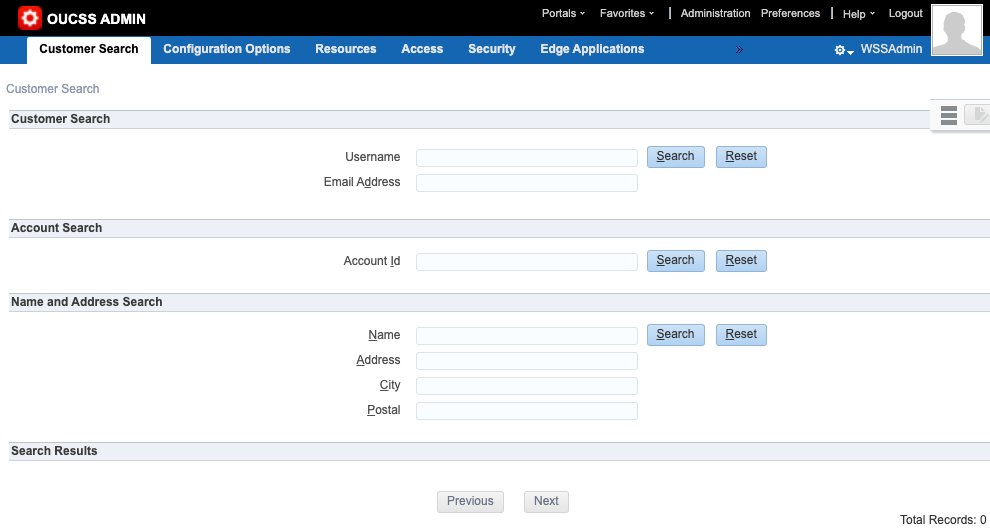
Customer Service Representatives (CSR) can search Oracle Utilities Customer to Meter or Oracle Utilities Customer Care and Billing for accounts associated with a web user based on web login details. The search can be accessed from Digital Self Service - Transactions by logging in as a CSR and then going to the ADMIN menu. The CSR web user search supports the following criteria:
- User name
- Email address
- Account ID
- Name and address
Steps to Enable
You don't need to do anything to enable this feature.
Customer Identity Verification
Customer identity verification is required when connecting to a new account in Digital Self Service - Transactions. Using Oracle Utilities Customer Care and Billing, administrators have the flexibility to configure customer identity verification requirements using AND/OR logic, which are then applied for new customers signing up to view their utility account online.
This allows administrators to create groups of requirements that give customers identity verification options such as providing either a social security number or driver’s license ID. Each group can ensure that customers have enough options to successfully set up their account and that utility requirements are met, such as requiring phone number verification with a phone number included on a customer’s account.
Steps to Enable
Administrators must configure the applicable customer identity verification fields for each line of business to allow customers to assign their web user profiles as the main account holder in Oracle Utilities Customer to Meter or Customer Care and Billing. Multiple identifiers can be included in a group, which an account must have at least one of the identifiers in a group of to verify their account. Each group is required to verify a user account. For example, a customer can be required to enter either their social security number or driver’s license with one group, and also provide a matching phone number from their account with another group.
Role Information
- Administrator
Logging of Self-Service Transactions
Administrators can configure the creation of individual customer contacts in Oracle Utilities Customer to Meter or Customer Care and Billing when customers create these transactions through Digital Self Service - Transactions, including:
- Budget Billing
- Start and Stop Service
- Account Connection
- Multiple Payments
- Autopay Enrollment
- One Time Payment
Steps to Enable
You don't need to do anything to enable this feature.
The Digital Self Service - Transactions contact us form has been enhanced to allow customers to upload files when they submit a contact us request. Files are submitted through WebDAV for integration with your document management system. The files are always referenced to the specific contact us request and are available for customers to review while communicating with a customer service representative.
Customers also have the option to upload subsequent files throughout their conversation with customer service representative as needed until the question is resolved and closed. Each contact us thread keeps a record of all attachments that customers can see from their question details view in Digital Self Service - Transactions.
Steps to Enable
Consult with your Oracle Utilities Delivery Team to complete the file management system integration.
Tips And Considerations
File submission uses WebDAV for integration with the file management system.
Role Information
- Administrator
Scheduled Payment Management Enhancements
Your customers can view and cancel scheduled multi-account and charity payments in the Financial History widget. Customers are presented with a confirmation screen summarizing the scheduled payments that have been canceled.
Steps to Enable
You don't need to do anything to enable this feature.
Multi-Account Credit Card Payments
The following enhancements are available for multi-account credit card payments:
- Customer can pay multiple utility bills with one credit card transaction.
- Utilities using Paymentus as their payment process can enable a customer to pay up to 100 bills with one credit card.
Steps to Enable
You don't need to do anything to enable this feature.
Tips And Considerations
This feature requires Paymentus integration and the functionality may change if a different payment processor is used.
Unenroll in Credit Card Autopay
Customers who are enrolled in automatic payments through a third-party credit card processor are seamlessly redirected to Paymentus to unenroll directly from the Automatic Payments Page.
Steps to Enable
You don't need to do anything to enable this feature.
Third-Party Credit Card Process Wallet Integration
Managing payment methods has been enhanced to seamlessly redirect your customers to a third-party credit card processor’s online wallet. Customers are presented a link to their wallet directly from Digital Self Service -Transactions Billing page. When the customer clicks on the link they are seamlessly redirected to their Paymentus Wallet page where they see and manage their payment methods.
This enhancement is supported for utilities using Paymentus as their credit card payment processor.
Steps to Enable
You don't need to do anything to enable this feature.
Tips And Considerations
This feature requires Paymentus integration.
Account Selector Search Enhancement
The Account Selector supports searching by street address and nickname. Previously, customers can search by street address or nickname. Oracle Utilities Customer to Meter or Oracle Utilities Customer Care and Billing are used as the system of record for web user records.
Steps to Enable
You don't need to do anything to enable this feature.
Tips And Considerations
By default, the search is only available for customers that have five or more accounts.
Start, Stop, and Transfer Service
Utilities can specify stop service transactions to be allowed at the account, premise, or service agreement level. This provides customers more flexibility for their stop service transactions.
Steps to Enable
You don't need to do anything to enable this feature.