
This document will continue to evolve as existing sections change and new information is added. All updates appear in the following table:
| Date | Product | Feature | Notes |
|---|---|---|---|
| 02 DEC 2021 | Created initial document. |
Oracle Utilities Digital Self Service - Transactions includes a suite of digital experiences that empowers customers to perform self-service transactions on any desktop or mobile device and reduces cost to serve. The responsive design allows customers to complete all transactions on any device or screen size and orientation, and ensures a consistent brand experience across access channels.
This guide outlines the information you need to know about new or improved functionality in this update, and describes any tasks you might need to perform for the update. Each section includes a brief description of the feature, the steps you need to take to enable or begin using the feature, any tips or considerations that you should keep in mind, and the resources available to help you.
DISCLAIMER
The information contained in this document may include statements about Oracle’s product development plans. Many factors can materially affect Oracle’s product development plans and the nature and timing of future product releases. Accordingly, this Information is provided to you solely for information only, is not a commitment to deliver any material, code, or functionality, and should not be relied upon in making purchasing decisions. The development, release, and timing of any features or functionality described remains at the sole discretion of Oracle.
This information may not be incorporated into any contractual agreement with Oracle or its subsidiaries or affiliates. Oracle specifically disclaims any liability with respect to this information. Refer to the Legal Notices and Terms of Use for further information.
Column Definitions:
Report = New or modified, Oracle-delivered, ready to run reports.
UI or Process-Based: Small Scale = These UI or process-based features are typically comprised of minor field, validation, or program changes. Therefore, the potential impact to users is minimal.
UI or Process-Based: Larger Scale* = These UI or process-based features have more complex designs. Therefore, the potential impact to users is higher.
Features Delivered Disabled = Action is needed BEFORE these features can be used by END USERS. These features are delivered disabled and you choose if and when to enable them. For example, a) new or expanded BI subject areas need to first be incorporated into reports, b) Integration is required to utilize new web services, or c) features must be assigned to user roles before they can be accessed.
| Ready for Use by End Users Reports plus Small Scale UI or Process-Based new features will have minimal user impact after an update. Therefore, customer acceptance testing should focus on the Larger Scale UI or Process-Based* new features. |
Customer Must Take Action before Use by End Users Not disruptive as action is required to make these features ready to use. As you selectively choose to leverage, you set your test and roll out timing. |
|||||
|---|---|---|---|---|---|---|
| Feature |
Report |
UI or |
UI or |
|
||
Oracle Utilities Opower Rates Engagement in Digital Self Service - Transactions |
||||||
Digital Self Service Transactions
Digital Self Service - Transactions can be configured to give customers that enroll in paperless billing the option to also receive paper copies of their bills through the mail. This feature provides customers with additional flexibility to decide which combination of print and digital bill communications are best suited to their needs.
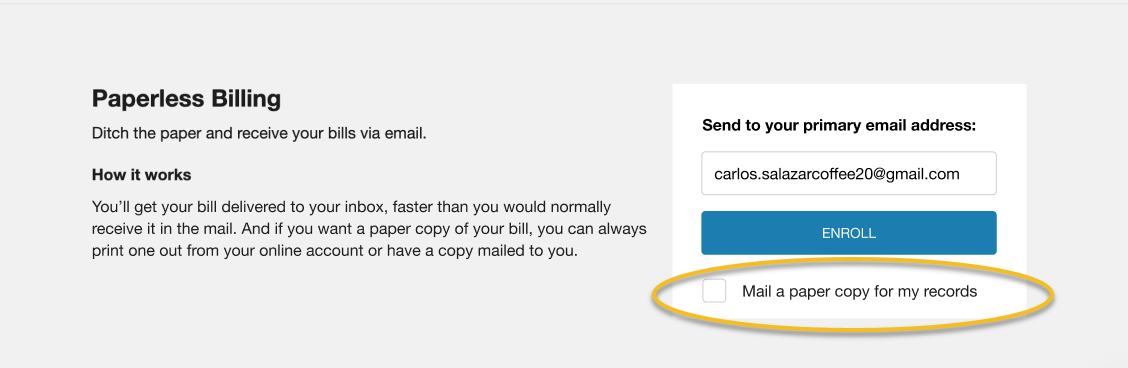
Paper bills and statements still hold value to customers who like the ability to use their paper bills as a reminder to pay their bill, and to track their historical billing without relying on digital communications. This feature ensures that customers who chose to go digital have the option to retain their paper bills if needed.
Steps to Enable
A patch install is required to enable this feature.
To install the patch:
- Locate the applicable patch. See Supported Versions And Required Patches And APIs For Oracle Utilities Opower Digital Self Service for a full list of available patches.
- Install the applicable Customer Care and Billing patch and make the required Customer Care and Billing configuration updates.
Key Resources
- Refer to Supported Versions And Required Patches And APIs For Oracle Utilities Opower Digital Self Service for more information.
Real Time Budget Billing True Up
Budget Billing customers can view their true up amount in real time after each bill. The true up amount represents the amount a customer may owe at the end of a budget billing cycle depending on their usage.
This feature provides customers with real-time knowledge of their overpayment or underpayment amount so that they can plan for possible true up costs.
Steps to Enable
A patch install is required to enable this feature.
To install the patch:
- Locate the applicable patch. See Supported Versions And Required Patches And APIs For Oracle Utilities Opower Digital Self Service for a full list of available patches.
- Install the applicable Customer Care and Billing patch and make the required Customer Care and Billing configuration updates.
Key Resources
- Refer to Supported Versions And Required Patches And APIs For Oracle Utilities Opower Digital Self Service for more information.
NACHA Compliance Update for ACH Payments
Utilities can use the Digital Self Service - Transactions routing and account number validation processes to comply with NACHA regulations.
The latest NACHA rules require all merchants who accept ACH payments to have commercially reasonable processes in place to validate routing numbers and verify that an account is in good standing.
Steps to Enable
A patch install and data integration are required to enable this feature.
To install the patch:
- Locate the applicable patch. See Supported Versions And Required Patches And APIs For Oracle Utilities Opower Digital Self Service for a full list of available patches.
- Install the applicable Customer Care and Billing patch and make the required Customer Care and Billing configuration updates.
To integrate data:
Work with your Service Delivery Manager to complete the required data integration detailed in the Opower Data Transfer Standard.
Key Resources
- Refer to the Opower Data Transfer Standards for more information.
- Refer to the Manage Bank Account with NACHA Validation training.
Utilities can designate which fuel types can support a redirect from the Digital Self Service - Transactions Bill Trends to the Bill Comparison and Data Browser widgets. This feature provides utilities with additional flexibility to support different types of service agreements and simplifies configuration for bill trends redirect links.
This feature provides utilities with additional flexibility to support different types of service agreements and simplifies configuration for bill trends redirect links.
Steps to Enable
Follow the steps provided in the Authentication Configuration Guide to configure notification templates.
Open a Service Request in My Oracle Support to coordinate configuration of the Language Selection feature.
To open a Service Request:
- Go to My Oracle Support (https://suport.oracle.com). Click Cloud Support and log in.
- Click the Create Service Request button and follow the prompts to complete the Service Request.
Key Resources
- Refer to the Digital Self Service - Transactions Configuration Guide for more information.
Oracle Utilities Opower Rates Engagement in Digital Self Service - Transactions
The Oracle Utilities Opower Rates Engagement Cloud Service allows customers to view energy cost insights and trends, learn about available rate plans, and view projected energy cost savings from joining a new rate plan. Utilities who have purchased the Oracle Utilities Opower Rate Engagement Cloud Service can access the Rate Engagement Rate Comparison, Rate Details, and Rate Simulator features through Digital Self Service - Transactions. Utilities can configure Digital Self Service - Transactions to allow broad or limited customer access to these features.
Integrating the Opower Rates Engagement Cloud Service with Digital Self Service - Transactions allows Oracle Utilities to provide enhanced self service features that help customers better understand the cost implications of their energy use.
Steps to Enable
A Cloud configuration and data integration are required to enable this feature.
To open a service request for Cloud configuration:
- Go to My Oracle Support (https://support.oracle.com). Click Cloud Support and log in.
- Click the Create Service Request button and follow the prompts to complete the Service Request.
To complete data integration:
Work with your Service Delivery Manager to complete the required data integration detailed in the Opower Data Transfer Standard.
Key Resources
- Refer to the Opower Data Transfer Standard for more information.
Opower Web Energy Management Disaggregation Updates
The updated disaggregation dashboard experience provides customers with an improved experience designed to give customers a better understanding of how they use energy. Updates include disaggregated energy use that highlights the customer's top three categories of use, as well as insights that provide greater visibility into what contributes to a customer's bill.
Customers can more easily understand their usage and take the steps needed to reduce energy consumption.
Steps to Enable
You don't need to do anything to enable this feature.
Preferred Language Authentication Notifications
Customers can receive notifications in the preferred language they have set in Digital Self Service - Transactions. For example, if the customer were to set their preferred language to Spanish, they will receive their email notifications in Spanish.
Utilities can deliver a unified language experience by providing web and digital authentication notifications in the customer's preferred language.
Steps to Enable
Follow the steps provided in the Digital Self Service - Transactions Authentication Configuration Guide to configure notification templates. Open a Service Request in My Oracle Support to coordinate configuration of the Language Selection feature.
To open a Service Request:
- Go to My Oracle Support (https://suport.oracle.com). Click Cloud Support and log in.
- Click the Create Service Request button and follow the prompts to complete the Service Request.
Tips And Considerations
Utilities must enable language selection to allow customers to select their preferred language in Digital Self Service - Transactions. See the Digital Self Service - Transactions Configuration Guide.
Key Resources
- Refer to the Digital Self Service - Transactions Authentication Configuration Guide for more information.
- Refer to the Digital Self Service - Transactions Configuration Guide for more information.