
- Revision History
- Overview
- Feature Summary
-
- Service Wide
- Meter Solution
- Utilities Application Framework
This document will continue to evolve as existing sections change and new information is added. All updates appear in the following table:
| Date | Feature | Notes |
|---|---|---|
| 20 SEP 2019 | Created initial document. |
Oracle Utilities Meter Solution Cloud Service is used to maintain information about meters and the service points at which they are installed. The solution provides a means of recording measurements and events associated with meters in the field as well as the ability to compute usage for the recorded measurements, and process smart meter commands.
This guide outlines the information you need to know about new or improved functionality in this update, and describes any tasks you might need to perform for the update. Each section includes a brief description of the feature, the steps you need to take to enable or begin using the feature, any tips or considerations that you should keep in mind, and the resources available to help you.
Column Definitions:
Report = New or modified, Oracle-delivered, ready to run reports.
UI or Process-Based: Small Scale = These UI or process-based features are typically comprised of minor field, validation, or program changes. Therefore, the potential impact to users is minimal.
UI or Process-Based: Larger Scale* = These UI or process-based features have more complex designs. Therefore, the potential impact to users is higher.
Features Delivered Disabled = Action is needed BEFORE these features can be used by END USERS. These features are delivered disabled and you choose if and when to enable them. For example, a) new or expanded BI subject areas need to first be incorporated into reports, b) Integration is required to utilize new web services, or c) features must be assigned to user roles before they can be accessed.
| Ready for Use by End Users Reports plus Small Scale UI or Process-Based new features will have minimal user impact after an update. Therefore, customer acceptance testing should focus on the Larger Scale UI or Process-Based* new features. |
Customer Must Take Action before Use by End Users Not disruptive as action is required to make these features ready to use. As you selectively choose to leverage, you set your test and roll out timing. |
|||||
|---|---|---|---|---|---|---|
| Feature |
Report |
UI or |
UI or |
|
||
Smart Grid Gateway Adapter Development Kit Smart Meter Commands |
||||||
REST Web Services Support Parameters and Additional HTTP Methods |
||||||
For customers requiring accessibility updates, we made testing and application updates to improve accessibility and created a Voluntary Product Accessibility Template (VPAT). As of the publication of these release notes, the VPAT is pending approval. Once approved, you can review the details on the solution's accessibility features on the Oracle Accessibility website.
Steps to Enable
You don't need to do anything to enable this feature.
Key Resources
You can review the VPAT on the Oracle Accessibility website.
You can use new data conversion tools. These staging table methods are the same methods used by the Customer Cloud Service for customer-related tables.
Projects can now use staging table-based data conversion tools. These staging table methods are the same methods used for customer-related tables in the Oracle Utilities Customer Cloud Service.
Steps to Enable
When you are ready to convert data from your legacy system, you will use control tables. There are two table owners in the system database. The first owner is staging and the second owner is production. The staging owner is linked to the tables into which you insert your prevalidated data.The production owner is linked to the tables used by your production system.
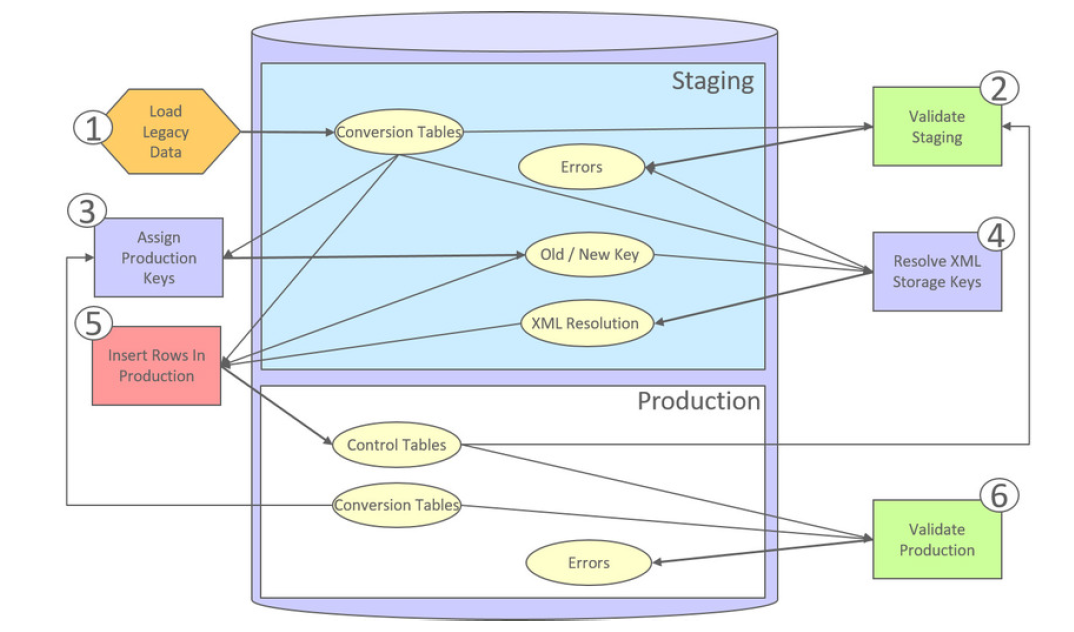
The following points briefly outline each of the above tasks:
- Load Legacy Data: Your legacy data is loaded into the system. You do not migrate this data directly into production. Your rows are loaded into tables that are identical to the production tables with the exception that they have a different owner.
- Validate Staging: The system validates the data you loaded into the staging tables. Validation rules validate your staging data using the control tables that have been set up in production.
- Assign Production Keys: The system allocates random, clustered keys to the rows in the staging database.
- XML Resolution: The system resolves legacy keys that may be mapped to an XML storage field with new values that were assigned in the key assignment step.
- Insert Rows Into Production: The system populates your production tables with rows from staging. When the rows are inserted, their prime keys and foreign keys are reassigned using the data populated in the key assignment and XML resolution steps.
- Validate Production: You rerun the object validation processes against production.
The Oracle Utilities Meter Solution Cloud Service delivers a set of conversion batch controls for key generation, validation, XML resolution, and insertion, that you may use when converting legacy Contact, Service Point, Device, Device Configuration, Measuring Components, and Install Events.
Key Resources
You can refer to the "Conversion" section in the Oracle Utilities Meter Solution Administrative User Guide for more information.
Due to a new Smart Grid Gateway architecture, you can write and edit smart meter commands using only Oracle Utilities Application Framework tools.
Silver Spring Networks Smart Meter Commands
You can now use Silver Spring Networks smart meter commands in the Oracle Utilities Meter Solution Cloud Service. The Smart Grid Gateway architecture, used by the Oracle Utilities Meter Solution Cloud Service, was updated so that you can configure smart meter commands using only Oracle Utilities application components.
Steps to Enable
You can refer to the "Smart Meter Commands" section in the Oracle Utilities Meter Solution Administrative User Guide for examples and implementation steps. This section provides information about implementing Silver Spring Networks smart meter commands with Oracle Utilities cloud services and contains the following:
- Command flows
- Sending outbound communications
- Receiving inbound communications
Smart Grid Gateway Adapter Development Kit Smart Meter Commands
You can configure the Oracle Utilities Smart Grid Gateway Adapter Development Kit to support custom smart meter commands. This includes commands from non-supported head end-systems in the SaaS platform. You can only implement commands with REST APIs. We plan to support SOAP in a future maintenance pack release.
Steps to Enable
You can refer to the "Adapter Development Kit - Creating Custom Commands" section of the Oracle Utilities Meter Solution Administrative User Guide for examples and implementation steps. This document contains the following:
- An overview of the data and objects used by smart meter commands
- Command Activities
- Outbound Communications
- Inbound Communications
- A description and example of synchronous commands
- A description and example of asynchronous commands
In previous releases, asset manufacturer was disabled and you could not assign a manufacturer to an asset specification. This resulted in the manufacturer and model not getting synced from the asset to the device and created an issue when field activity details were sent to the field work system without the meter or item's manufacturer and model. In this release, the asset manufacturer portal has been enabled and is used to jointly maintain manufacturer between asset management and meter data management. The manufacturer portal also includes a new zone for maintaining the device manufacturer models. Since manufacturer is now jointly maintained, the same codes and descriptions are shared by both applications. This eliminates the need for a value mapping. The device manufacturer portal has been disabled in order to make this seamless and easier for you to maintain manufacturers. As a convenience on the asset specification maintenance, you are presented with a drop-down list of the manufacturer's model instead of entering free format text for the model.
Steps to Enable
You can review the list of manufacturers and models after installation. Manufacturers and models that are only defined in the meter portion of the cloud service may need to be added or edited. For upgrading implementations, the asset manufacturer table will not be populated. You will have to re-add the asset manufacturer for device manufacturer codes or run a SQL script to populate the asset manufacturer table from the device manufacturer table.
You can record the linking of a piece of equipment to a service point. Equipment is linked over and, once available, you can install it and remove it from the service point. Each event of installing and removing from the service point is reflected in the equipment's asset disposition history. A piece of "equipment" is a physical device that regulates consumption. It does not measure consumption. Examples of equipment include back flow devices, current transformers, potential transformers, AMI routers and collectors, voltage regulators, pulse initiators, and modems. There is a distinction between a device that is an item and a device that is equipment. An item impacts the usage calculation in some way. A piece of equipment does not impact the calculation. Defining equipment is optional. This optional equipment can be stored at the service point.
Steps to Enable
You don't need to do anything to enable this feature.
Information Lifecycle Management (ILM)
You can recreate new sub-partitions for Activity, Device Event, and IMD tables when the sub-retention days configured in the ILM master configuration is changed. This applies only to current or future sub-partitions that were previously created by the Add Partition batch process (F1-ILMAD).
A new F1-ILMSV batch process was delivered and will be scheduled for adhoc execution when sub-retention days is changed. This batch job evaluates the sub-retention days configured in the ILM master configuration, compares it to the existing current and future sub-partitions, and makes the decision to drop the previous sub-partitions that have become stale and create new sub-partitions based on the current sub-retention days.
Steps to Enable
You are required to do the following steps:
- Set up sub-retention periods using the Master Configuration.
- Run various ILM batch jobs including F1-ILMSV.
Key Resources
You can refer to the full instructions in the Oracle Utilities Cloud Service Foundation Administrative User Guide.
Utilities Application Framework
Oracle Utilities Analytics Visualization
Oracle Utilities Analytics Visualization reports rely on designated calendar and time dimensions to support various hierarchical grouping by date and time. The Calendar Dimension maintenance object (F1-CALENDDMN) was added to support a level-based definition of the standard calendar and fiscal calendar in a flattened representation that is commonly used in data warehouses. This allows you to group by calendar week, months, quarter and fiscal calendar period, quarter and fiscal year, and more.
In a similar manner, the Time Dimension maintenance object (F1-TIMEDMN) was added to support a level-based definition of each minute in a day. This supports reports that group by hours, AM and PM, and more.
Calendar and Time dimension records are generated by designated batch processes and you can review them on a new portal.
Steps to Enable
Make the feature accessible by assigning or updating privileges and/or job roles. Details are provided in the Role section below.
Role Information
Security administrators should add the Analytics Batch (F1-ANALYBATCH) batch control application service to any user group that is authorized to submit the batch processes that generate the calendar and time dimension records.
Security administrators should add the Calendar and Time Dimensions Portal (F1CALTMD) portal application service to any user group that should have access to this portal.
XSLT Storage in the Database - SOAP Services
In previous releases, you had to store eXtensible Stylesheet Language Transformations (XSLTs) files in the file system. The system now supports creating a Managed Content record for any XSLT that you can reference on a SOAP Inbound Web Service (IWS) or External System/Outbound Message Profile record.
Your decision to use Managed Content as the storage mechanism rather than the file system is a system-wide decision. The product does not support some records referring to XSLTs in the file system and managed content. You can control this setting using a Feature Configuration option on the "External Messages" feature type. If you do not define an option, the default value is that the XSLT will be stored in managed content. For new installations, we recommend storing the XSLT records as managed content.
For backward compatibility, you can use an upgrade script to add the XSL Location feature type and set the value to F1FL (file system). If desired, you can see the steps to enable below for information about adopting the new feature.
Be aware that other locations where XSLTs are defined do not support XSL in the database. This includes XAI Inbound Service and any internal functionality, such as zone type configuration, that uses XSLT. Also, be aware that that the business service that supports sending a real-time email supports providing XSLT names as part of the payload. This functionality does not support a XSLT defined in managed content.
Steps to Enable
By default, the system-wide configuration for upgrading clients is set to indicate that XSLTs used for SOAP IWS records and outbound messages are defined in the file system for backward compatibility. In order to support defining these XSLTs as a Managed Content record instead, you should perform the following steps:
- Create a Manage Content record for each unique XSLT. If the existing file is 30 characters or less, set the Managed Content code to the same name as the existing file name.
- Locate the feature configuration record for the "External Messages" feature type and find for the XSLT Location option.
- Change the value to F1MC from F1FL, or you can simply remove the option as F1MC is the default. Since this setting is cached, be sure you flush the cache.
- For each SOAP IWS record or external system or outbound message profile record that references an XSLT, confirm the name. Make any necessary changes to the referenced XSLT to ensure that it is referencing a valid Managed Content recorded for SOAP IWS records and outbound messages are defined in the file system for backward compatibility.
The published API for REST services was updated to the following URL format:
…/rest/apis/{ownerURIComponent}/{resourceCategoryURIComponent}/{iwsURIComponent}/{iwsOperationURIComponent}
The information preceding /rest/ is needed to reference the environment. This part of the URL configuration has not changed and will continue to work like previous releases.
The following provides more information about where the various components:
- Owner URI Component: Configured using a new extendable lookup. Each owner flag will define its URI Component and the URL will be built using the URI Component for the owner of the REST IWS.
- Resource Category URI Component: A new element on the Resource Category extendable lookup. The product delivered resource categories are updated with appropriate values. For any custom Resource Categories, an upgrade script will populate the new URI Component using the extendable lookup value preceded by a slash. You should review these records and make any desired updates to the value.
- IWS URI Component: A new element on the REST IWS record. The product delivered IWS records are updated with appropriate values. For any custom REST IWS records, an upgrade script will populate the new URI Component using the Web Service code preceded by a slash. You should review these records and make any desired updates to the value.
The system will continue to support the REST URL format from previous releases. However, we plan to deprecate that code in a future release. You should plan to review any external REST calls and adjust them to follow the new pattern.
Steps to Enable
Review the REST service definition in the REST API guides, available from the Oracle Help Center > your apps service area of interest > REST API. If you're new to Oracle's REST services you may want to begin with the Quick Start section.
REST Web Services Support Parameters and Additional HTTP Methods
The REST IWS was enhanced to support addition HTTP methods along with path and query parameters. On the IWS operation, the methods GET, PUT and PATCH are now supported. This is in addition to existing support for POST.
The actual actions and functionality that are triggered by a given REST service call are still controlled by the business object, business service, or service script that is configured on the operation. For example, if you configure an operation with the HTTP method of PUT and you reference a service script that is simply reading a record, the system will perform the action of the service script and read the record. The HTTP methods are meant as external documentation.
In addition to supporting additional HTTP methods, the system also supports designing path or query parameters. When using the GET, PUT or PATCH methods, a new child collection for IWS Operation is available for the REST IWS record. The collection is a mapping from the schema element XPath to the text that you want used for that parameter in the URL. In addition, for each parameter, you indicate whether it is a path or query parameter:
- Path parameters: Parameters that are part of the endpoint and required. The Operation's URI Component must declare each path parameter surrounded by curly braces. The API for the Inbound REST Web Service will include this notation so that REST callers will know what needs to be provided.
- Query parameters: Optional. Parameters that are not part of the endpoint. They are included in the endpoint URL after a question mark and followed by name-value pairs.
Steps to Enable
Review the REST service definition in the REST API guides, available from the Oracle Help Center > your apps service area of interest > REST API. If you're new to Oracle's REST services you may want to begin with the Quick Start section.
You can use the following new template batch programs to convert data for enabled maintenance objects:
- Validation (F1-CVVAL): Validates the schema and business rules associated with a maintenance object.
- Key Assignment (F1-CVASG): When the primary key is system generated, generates new keys for legacy keys for a table.
- XML Resolution (F1-CVXML): Resolves converted foreign key references in XML storage fields.
- Insert to Production (F1-CVINS): Inserts data to production while resolving legacy keys across physical fields and XML storage fields.
- Copy to Staging (F1-CVCTS): Allows you to copy data from production back to staging in order to resolve unique conversion situations that may arise when multiple products are installed.
Steps to Enable
You don't need to do anything to enable this feature.
Key Resources
You can refer to your product's online help for more information about the conversion process. You can refer to your product-specific documentation for more information on the specific maintenance objects enabled for conversion.
Oracle JavaScript Extension Toolkit (OJET) was upgraded to accommodate security fixes within JQuery.
Steps to Enable
You don't need to do anything to enable this feature.
Tips And Considerations
The new version of OJet also incorporated newer releases of other included libraries. Knockout, one of these new releases, is used for data binding. Knockout uses a JavaScript function to enable this binding, which resembles the following:
ko.applyBindings(viewModel, document.body);
With the previous OJet and Knockout releases, the applyBindings function only required the view/model parameter. The second parameter, the DOM object, was optional. With the new release, the second parameter is now required. If you have code that omitted this parameter, you will need to add it. If you do not provide it, a message will appear on the console log informing you of the situation. Be aware that while "document.body" is an acceptable parameter, performance may be enhanced if you can provide a smaller portion of the document. For example:
ko.applyBindings(viewModel, document.getElementById('bindContainer'));
With the previous release of OJet v3.2, the elements were included on the page by use of the data-bind format. For example:
<div id="barChart" data-bind="ojComponent: { component: 'ojChart',
type: 'bar',
orientation: orientationValue,
stack: stackValue,
series: barSeriesValue,
groups: barGroupsValue,
hoverBehavior: 'dim' }"
</div>
This format of definition is still supported by the current OJet v7.1 release. However, a new format of definition called Web Component is available in this release. For example:
<oj-chart id="areaChart" type="bar" orientation="[[orientationValue]]" stack="[[stackValue]]" data="[[dataProvider]]">
<template slot="itemTemplate" data-oj-as="item">
<oj-chart-item value="[[item.data.value]]" group-id="[[ [item.data.quarter] ]]" series-id="[[item.data.series]]"></oj-chart-item>
</template>
</oj-chart>
While the structure appears to be different, the actual functionality and parameter usage are almost identical to the "data-bind" format. Since it provides more functionality (if needed) and performance changes to make rendering faster, we recommend using the Web Component format instead of the data-bind format.
Be aware that OJet v8.0 and later will no longer support the deprecated "data-bind" format. Therefore, updating any OJet code now will provide you with immediate benefits as well as reduce or remove future implementation issues. Details and examples of the Web Component format are provided on the website listed below.
Key Resources
You can refer to the OJet website.
Alternate Row Header on Data Explorers
For accessibility, every table in the system should define its row header as the data that uniquely identifies the row. In previous releases, for data explorer results, the first column in the results was automatically designated as the row header. There was no ability for you to designate a different column or multiple columns as the row header. In this release, a new zone column mnemonic has been introduced: rowheader=true. You can use this when designing a data explorer zone if the first column in the results does not uniquely define the row.
Steps to Enable
If you have accessible users and custom zones where the first column does not uniquely define the row, you should consider updating the zone columns to indicate the column(s) that uniquely identify the row.
Alternative Red Text Color Option
There are places in the products where the color red is used for emphasis. The standard red color supported in HTML does not satisfy the accessibility requirement for color contrast minimum when the background is white.
Instead of using color=red or #FF0000 (the RGB color model combination for "red"), we recommend you use the following red shade on a white background: color=#E0292F.
In addition, we provide a new Cascading Style Sheet (CSS) class so that you do not have to remember the code to implement this change. You can use the class textColorRedOnWhite. You can use this UI maps, zone help text, and scripting. For data explorer columns, reference the RGB code.
Steps to Enable
You don't need to do anything to enable this feature.
Tips And Considerations
If implementations are coding their own user interface components and plan to use the color red, we recommend implementing the alternate red color to accommodate any accessible users that may be impacted.
Key Resources
You can reference the new "Accessibility Considerations" section in the Configuration Tools chapter of online help.
Configuration Updates on ILM Enabled Maintenance Objects
We added a missing eligibility algorithm and an ILM crawler batch control to the ILM-enabled Process Flow (F1-PROSTR) and Statistics Snapshot (F1-STSSNPSHT) maintenance objects. As per the recommended settings, several maintenance objects that are ILM enabled and are configured with the base ILM Eligibility algorithm by status were updated to configure maintenance object options related to status.
Steps to Enable
Make the feature accessible by assigning or updating privileges and/or job roles. Details are provided in the Role section below.
Tips And Considerations
If any of the settings do not align with your implementation's business rules, you should take steps to adjust the options.
Role Information
The two new ILM crawler batch jobs include new application services: F1-SSCRL and F1-PFCR. Security administrators should add these application services to any user group that is authorized to run the ILM crawler batch controls.
Market Transaction Management Environment Initialization
If you plan to import market transaction management accelerator metadata, you are required as an initial step to include a new entry in the Installed Products database for the "utility markets" owner flag.
Steps to Enable
You need to submit the F1-IPUM background process. This process has its own F1-IPUM application service that you need to configure for the appropriate user group.
Batch Thread Error Handling Enhancement
Batch jobs may fail because of technical or environmental reasons that are transient in nature, such as an interruption in the availability of the database. With the previous batch implementation, temporary failures would result in the batch thread being marked in Error status and a customer alert. Since these issues cannot always be resolved, batch processing now supports automatic thread resubmission when a failure occurs for technical reasons. The thread will now move to a status of "Interrupted" and the system will attempt a number of retries before moving the thread to "Error."
Steps to Enable
You don't need to do anything to enable this feature.
Date and Time Extracted in XSD Format
By default, date and time fields are retrieved and extracted in an internal "OUA"' format. In this release, various changes were implemented to support indicating that all date and time fields should be converted to standard XSD format:
- The plug-in driven extract batch program supplied by the product was enhanced to include a new parameter to indicate the date format.
- The F1-ConvertXMLToDelimited and F1-ConvertXMLToFileFormat business services were enhanced to include a new parameter to indicate the date format. By default, date and time fields are retrieved and extracted in an internal "OUAF" format. In this release, various changes were implemented to support indicating that all date and time fields should be converted to standard XSD format.
Steps to Enable
You don't need to do anything to enable this feature.
Select Buttons in Debug Support
The following buttons that are only visible in Debug mode are no longer supported: Start Debug, Stop Debug, Clear Trace, and Show Trace.
Schema References in IWS/Outbound Message Profile
The following fields are not supported:
- On the SOAP IWS in the Operation collection, the Request and Response schema elements are not supported. You can still use the Request and Response XSL fields.
- On External System/Outbound Message profile, the Response Schema and the W3C Schema are not supported.
Application Viewer
In a future release, we plan to no longer support a standalone application viewer. The functionality will be incorporated into the application:
- Similar to the data dictionary, we will enhance user interfaces for tables and fields to provide more information at a glance and provide a view of links between tables.
- Information displayed for maintenance objects, batch controls and algorithm types and algorithms are already visible in the application.
- Javadocs and Groovy Javadocs will be viewable from within the application rather than launching a separate application viewer application.
REST IWS - Original REST Servlet
The original URL supplied for invoking IWS-based REST services included the IWS Service name in its makeup. We continue to support this for backward compatibility purposes, but we will deprecate it in a future release. As defined in the documentation, you should adjust your existing integrations to use the currently supported URL.
Maintenance BPA Change Warnings to Popup
Currently, the common maintenance BPA used by most of the system displays warnings as errors. This erroneously allows you to make changes to the record before clicking OK. In this situation, the warning conditions will not be checked again for the new changes. We plan on changing this in the future to show warnings as pop-ups. You will be able to click OK to accept the warning without being able to make any changes. You can click Cancel to adjust the form and resubmit, which will check the warning conditions again.
Append Setting in Pagination
There are several known issues with the functionality of the "append" option in pagination. We do not recommend that you use this pagination setting. We plan to deprecate this functionality in the future.
Support for Master and Subordinate Servers for Web Service Catalog
The Service Catalog Configuration (master configuration) supports defining subordinate servers. This functionality is no longer applicable for the Oracle Integration Cloud and will be removed in a future release.
Selected Functionality of the Batch Run Statistics Portal
The Batch Run Statistics portal provides some additional information about batch runs. However, some of the functionality provided on this page is related to capturing additional information from an external tool. This information is stored in a Fact record. The functionality related to capturing additional information will no longer be supported in a future release. This information will still be available to existing customers, but the functionality will no longer be maintained.
Miscellaneous System Data
- Environment Reference: This administrative maintenance object was related to ConfigLab and Archiving, which are no longer supported. In a future release, the following will be removed:
- Migration Plan F1-EnvironmentRef. Note that no base migration request references this plan. You should ensure that no custom migration request references this plan.
- Business Object F1-EnvironmentRefPhysicalBO
- Maintenance Object ENV REF
- The To Do Type F1-SYNRQ (Sync Request Error) is not in use and will be deleted in a future release. Errors for the Sync Request Monitor (also named F1-SYNR), are reported using the To Do Type F1-SYNTD (Sync Request Monitor Errors).
- The following metadata related to the legacy LDAP import pages will be removed in a future release: Services CILTLDIP, CILTLDIL, CILTLDIS, Application Service: CILTLDIP
- The following algorithm types and algorithms provided for the current LDAP import functionality do not include any logic. They will be removed in a future release.
- Algorithm Type / Algorithm F1-LDAPIMPRT
- Algorithm Type / Algorithm F1-LDAPPREPR
- The lookup value CHAR_ENTITY_FLG / F1SE (Characteristic Entity / Sync Request Inbound Exception) is not in use and will be removed in a future release.
- The zone F1-MGRREQDSP will be removed in a future release.
- The application services F1-PDBBEX and F1-PDBG are not in use and will be removed in a future release.
CMA Migration Requests
The F1-FrameworkAdmin (Framework Admin) and F1-SchemaAdmin (Schema Admin) migration requests are no longer recommended and are not going to be updated with new administration / control tables in future releases. We may deprecate them in a future release.
CMA Import Algorithm
In a future release, we will deprecate the CMA Import algorithm plug-in spot. You should review any existing algorithms and create appropriate Pre-Compare algorithms instead.
BO Read in F1-MainProc When Preprocessing Exists
In the original implementation of the configuration tools, if a preprocessing script was linked to the business object via options, the main framework maintenance BPA (F1-MainProc) would not perform a Read of the BO, leaving it to the responsibility of the preprocessing script.
In a subsequent release, to solve a UI Hints issue related to child business objects, a BO Read was included in F1-MainProc even if a pre-processing script existed. This solution introduced a problem only visible for specific scenarios and a different fix has been introduced. In the meantime, the BO Read is no longer necessary in F1-MainProc. Because there are many pre-processing scripts that are properly performing the Read of the BO, ideally the BO Read should be removed from F1-MainProc so that multiple reads are not performed.
However, there may have been preprocessing scripts introduced after the BO Read was included in F1-MainProc that were coded to not perform a BO Read in the preprocessing script. Due to this situation, the BO Read is still performed as part of the processing of F1-MainProc.
When a preprocessing script exists, we plan to remove the BO Read from F1-MainProc logic. You should check your custom preprocessing scripts that are linked to your business object options to ensure that they properly perform a Read of your BO.