- Revision History
- Overview
- Feature Summary
- Utilities Meter Solution
-
- Meter Solution
- Operational Device
- Analytics Visualization
- Cloud Service Foundation
- Oracle REST Data Services
- Utilities Application Framework
- Utilities Testing Accelerator
This document will continue to evolve as existing sections change and new information is added. All updates appear in the following table:
| Date | Feature | Notes |
|---|---|---|
| 12 JUL 2022 | To Do Supervisor Actions | Updated document. Added additional details to definition and role. |
| 26 MAR 2020 |
Created initial document. |
Oracle Utilities Meter Solution Cloud Service is used to maintain information about meters and the service points at which they are installed. The solution provides a means of recording measurements and events associated with meters in the field as well as the ability to compute usage for the recorded measurements, and process smart meter commands.
This guide outlines the information you need to know about new or improved functionality in this update, and describes any tasks you might need to perform for the update. Each section includes a brief description of the feature, the steps you need to take to enable or begin using the feature, any tips or considerations that you should keep in mind, and the resources available to help you.
Column Definitions:
Features Delivered Enabled
Report = New or modified, Oracle-delivered, ready to run reports.
UI or Process-Based: Small Scale = These UI or process-based features are typically comprised of minor field, validation, or program changes. Therefore, the potential impact to users is minimal.
UI or Process-Based: Larger Scale* = These UI or process-based features have more complex designs. Therefore, the potential impact to users is higher.
Features Delivered Disabled = Action is needed BEFORE these features can be used by END USERS. These features are delivered disabled and you choose if and when to enable them. For example, a) new or expanded BI subject areas need to first be incorporated into reports, b) Integration is required to utilize new web services, or c) features must be assigned to user roles before they can be accessed.
| Ready for Use by End Users Reports plus Small Scale UI or Process-Based new features will have minimal user impact after an update. Therefore, customer acceptance testing should focus on the Larger Scale UI or Process-Based* new features. |
Action is Needed BEFORE Use by End Users Not disruptive as action is required to make these features ready to use. As you selectively choose to leverage, you set your test and roll out timing. |
|||||
|---|---|---|---|---|---|---|
| Feature |
Report |
UI or |
UI or |
|
||
Device Configuration Synchronization from Asset to Meter Objects |
||||||
Asset Replication Includes Asset Attributes for Operational Device Asset Types |
||||||
Enable Questionnaire Service History for Operational Devices and Service Order Management Activities |
||||||
Changes to Questionnaire Service History's Application Service |
||||||
Metadata Extension for Analytics Tables (Oracle Utilities Analytics Visualization) |
||||||
This release includes a business object, algorithms, and batch controls that provide better support for Opower integration.
These DataConnect file extract algorithms allow you to extract usage data and write the results in tab-delimited flat files:
- D2-IDEXTPRDU (Extract Tab-Delimited Initial Load/Ongoing Consumption (with UTC Offset)): Retrieves the consumption of a service point for a given period.
- D2-IDEXTPTUU (Extract Tab-Delimited Initial/Ongoing Consumption and Apply TOU Map (with UTC Offset)): Retrieves the consumption of a service point for a given period and applies a TOU Map to the consumption.
- D2-IDEXTIMDU (Extract Tab-Delimited Historical Correction Consumption (with UTC Offset)): Retrieves historical correction consumption for a service point.
- D2-IDEXTITUU (Extract Tab-Delimited Historical Corrections and Apply TOU Map (with UTC Offset)): Retrieves historical correction consumption for a service point and applies a TOU Map to the consumption.
NOTE: All these algorithms support consumption adjustment based on Daylight Saving Time.
These DataConnect business objects and batch controls provide a new service point data file containing service point, premise, device, and measuring component information:
- Business Object
- D1-ExternalRepositorySPMtrSync (SP/Meter Sync for DataConnect v1 or later): Extracts service point and meter information.
- Batch Controls
- D1-SPMIL (SP/Meter Initial Load for DataConnect v1 or later): Creates initial synchronization requests for service points, device configurations, and devices.
- D1-SPMSR (SP/Meter Extract for DataConnect): Creates extract files containing service point, device configuration, and device information.
Steps to Enable
Refer to DataConnect in the Oracle Utilities Meter Solution Cloud Service Administrative User Guide for more information.
The event bars in the Overlay zones of the 360 Degree View page can now display Oracle Utilities Analytics Insights business flags alongside usage curves. Business flags can be used to highlight issues discovered by the Oracle Utilities Analytics Insights service. For example, Oracle Utilities Analytics Insights uses machine learning-driven workflows to flag cases of loss, tamper, and theft.
In a previous release, the event bars can only show five event types. This release removes the five-event type limit to enable you to view a rich set of events alongside the usage date. The event bar dynamically displays the top event types with data for the selected time period when additional events are shown to ensure that you can easily find key issues. When there are no events for the configured event types, the event bar automatically collapses.
Steps to Enable
- Open D1-360EventBarProfile (360 View Event Bar Profile) in the Extendable Lookup maintenance portal.
- Configure an Extendable Lookup Value with a business flag type by setting Bar Type to Business Flags and selecting the appropriate Business Flag Type.
- Open the Measuring Component Type to which you want to add the updated Extendable Lookup Value.
- Add the Extendable Lookup Value to the Event Bar Profiles list in the Display Configuration section.
Landis+Gyr Smart Meter Commands
Enhancements to the Smart Grid Gateway architecture used by Oracle Utilities Meter Solution Cloud Service allow you to use the Landis+Gyr adapter to issue smart meter commands and configure these commands with Oracle Utilities application components.
Steps to Enable
Refer to Smart Meter Commands under Smart Grid Gateway Adapters and Oracle Utilities Cloud Services in the Oracle Utilities Meter Solution Administrative User Guide for more information.
Enhancements to the Smart Grid Gateway architecture used by Oracle Utilities Meter Solution Cloud Service allow you to use the Sensus adapter to issue smart meter commands and configure these commands with Oracle Utilities application components.
Steps to Enable
Refer to Smart Meter Commands under Smart Grid Gateway Adapters and Oracle Utilities Cloud Services in the Oracle Utilities Meter Solution Administrative User Guide for more information.
Itron OpenWay Adapter Payload Processing
When used with Oracle Utilities Meter Solution Cloud Service, most Smart Grid Gateway adapters use batch processing to process payloads. In this release, the Itron Openway adapter has been enhanced to streamline payload processing by directly streaming usage and event data into the system.
The Itron Openway adapter receives payloads and exceptions from the Itron Openway head end system via inbound web services. These services invoke business components that bypass file writing to object storage locations, and process payloads and exceptions upon receipt.
Steps to Enable
Refer to Itron Openway Payload Processing in the Oracle Utilities Meter Solution Administrative User Guide for more information.
Service History Questionnaires allow you to verify and confirm completed Oracle Utilities Operational Device Management activities that are routed to the field work system through Oracle Utilities Service Order Management.
Within Oracle Utilities Operational Device Management, you can create the questions and group these into a questionnaire using a Service History Type intended for specific asset types, and configure the questionnaire service history type as an Activity Type with asset completion event types that record the questionnaire and responses.
The Service History Questionnaire feature includes the following improvements:
- Oracle Utilities Operational Device Management
- Addition of the Enable Question object
- Automatically sends the questionnaire when Oracle Utilities Meter Data Management or Oracle Utilities Service Order Management dispatches the field activity
- Oracle Utilities Meter Data Management or Oracle Utilities Service Order Management
- Receives and includes the questionnaire with the field activity
- Automatically sends the questionnaire when the field activity is dispatched to the field work system
Steps to Enable
You can add the following administrative data to Asset Management:
- Questionnaires with service history subclasses set to Questionnaire, and possible responses and response styles.
- A Service History Type for the Questionnaire Service History Type business object.
- For Oracle Utilities Operational Device Management activity types where the service history questionnaire is applicable:
- A Create Activity Type's Questionnaire - Fieldwork Integration completion event type
- The Questionnaire Service History Type configured as an Object to Create
Asset activities without a node (service point) and an asset (meter, item, or so on) are eligible for routing to Oracle Utilities Service Order Management if the field task is associated with an asset activity type. An address or geographic coordinates can replace the node to indicate the work site for the field crew.
In addition, a Search By option for pass-through activities without a service point is available in the Activity Query portal. This option uses the address of the field work site to retrieve relevant records.
Steps to Enable
You don't need to do anything to enable this feature.
Pass Additional Data from Service Order Management
Outbound field activity requests can include attributes from Accounts, Persons, Service Agreements, Premises, Service Points, Devices, and user-defined values.
Steps to Enable
Implementations must build a custom business object lifecycle Enter algorithm to include user-defined values in the outbound field activity request. Plug the algorithm into the Awaiting Response state of the D1-FieldActivityOBComm (Field Activity Outbound Communication) business object after the X1-POPCUSTDT (Service Order - Populate Customer Details) algorithm.
The Multi-Equipment Assignment feature allows you to monitor untracked equipment types associated with a service point and link the equipment to one or more service points at any time. With the addition of the Equipment Count attribute, you can easily determine the number of pieces of equipment that are associated with the service point. Note that untracked equipment are created as devices (or items) and as such, are not synchronized when linked to a service point
Steps to Enable
You can configure the Equipment Type or Item Type of the untracked equipment or items as Not Tracked, and link the equipment or item and equipment count to one or more service points.
Device Configuration Synchronization from Asset to Meter Objects
You can expose the asset configuration of an Oracle Utilities Operational Device Management asset to an Oracle Utilities Meter Data Management device. Oracle Utilities Operational Device Management records the changes to a meter configuration by changing the asset configuration to another configuration that references a corresponding template device. The change in the asset configuration results in a synchronization with Oracle Utilities Meter Data Management and the creation of a new device configuration for the meter.
You can also create a new device configuration in Oracle Utilities Meter Data Management to create the meter reconfiguration if your implementation does not require the synchronization of the asset configuration with the device.
Steps to Enable
You don't need to do anything to enable this feature.
The Device Counts zone allows you to view the latest count and percentage of the active interval, manual scalar, and frequent scalar meters.
Steps to Enable
Refer to Capturing Statistics in the Oracle Utilities Meter Data Management Administrative User Guide and the embedded help for the Device Counts zone for information about creating statistics-capturing objects.
Tips And Considerations
To disable the Device Counts zone in cloud installations, clear the D1-DVCCNTS display checkbox in F1PRMUSEM (Product Use Metrics Portal).
The Channel Counts zone allows you to view the latest count and percentage of interval, manual scalar, and frequent scalar measuring components or channels of active meters.
Steps to Enable
Refer to Capturing Statistics in the Oracle Utilities Meter Data Management Administrative User Guide and the embedded help for the Channel Counts zone for information about creating statistics-capturing objects.
Tips And Considerations
To disable the Channels Counts zone in on-premises installations, clear the D1-CHLCNTS display checkbox in F1PRMUSEM (Product Use Metrics Portal).
Shipping Memo provides a comprehensive list of functions to track assets that allow you to monitor and track shipped assets. This feature includes the following portals:
- Shipping Memo Query
- Shipping Memo
Steps to Enable
You don't need to do anything to enable this feature.
Role Information
System administrators should add the custom To Do Role that tracks shipped assets in the W1-ATATD (Approval Type - Adjustment) To Do Type.
Service Order Management Activity Display Enhancements
The Service Order Management Activity portal now includes the following enhancements:
- When creating an activity in Oracle Utilities Operational Device Management, you are no longer transferred to the Activity portal of Oracle Utilities Meter Data Management.
- The Activity ID field is now Activity and displays the following:
- An activity information string
- A hyperlink that opens the Activity portal of Oracle Utilities Meter Data Management
- Editing and deleting activities in these states are not permissible:
- Communication In Progress
- Completion Error
- Completed
- Discarded
Steps to Enable
You don't need to do anything to enable this feature.
Activity Type on Service Order Management Activities
The W1-SOMActivity (Service Order Management Activity) business object now:
- Renders the Service Order Management Activity Type as a hyperlink on activity maintenance portals.
- Displays the Service Order Management Activity Type Description on activity maintenance portals.
- Displays the Service Order Management Activity Type Description as a read-only text in add and edit activity windows.
Steps to Enable
You don't need to do anything to enable this feature.
Support for Asset and Device Configuration Synchronization
Enhancements to the data synchronization business objects enable Oracle Utilities Operational Device Management to send asset measurement configuration and specification changes during initial and ongoing synchronization to Oracle Utilities Meter Data Management devices:
- W2-SmartMeter (Smart Meters)
- W2-ManualMeter (Analog Meter)
- W2-CommunicationComponent (Communication Component)
Previously, Oracle Utilities Operational Device Management only sent asset measurement configuration to Oracle Utilities Meter Data Management during the initial synchronization.
The enhancements include changes to the Settings zone of the Asset portal:
- From Initial Measurement Configuration to Measurement Configuration
- This field label change applies to an asset whose Asset Type is a smart meter, manual meter, analog meter, or communication component.
- New Configuration Effective Date/Time field
- The effective date and time of the measurement configuration.
- If left blank during asset creation, this defaults to the Effective Date/Time of the Asset Disposition Detail zone.
- During an update, the system validates if the new configuration effective date is later than current value of this field.
The enhancements include updates to Asset Sync Requests:
- Audit logs appear in the Asset Sync Requests zone of the Log tab when changes to Specification and/or Measurement Configuration occur.
- Changes to External ID (populated by device synchronization) and Specification and/or Measurement Configuration automatically sends an asset synchronization request to Oracle Utilities Meter Data Management.
Steps to Enable
You don't need to do anything to enable this feature.
Asset Replication Includes Asset Attributes for Operational Device Asset Types
The system automatically copies the asset attributes of the source smart meter, communication relay, or communication component to the new asset when you use Asset Replication. When you duplicate an Oracle Utilities Operational Device Management asset, you will no longer manually enter the asset attributes of the source asset to the duplicated asset if the template asset you used already includes the necessary attributes.
Steps to Enable
You don't need to do anything to enable this feature.
Enable Questionnaire Service History for Operational Devices and Service Order Management Activities
You can now address test and inspection issues in Oracle Utilities Operational Device Management with Questionnaire Service History. This feature also supports Oracle Utilities Operational Device Management and Oracle Utilities Service Order Management integration for device tests and inspections, and pass through field activities.
You can access the service history questionnaire from Menu, then Asset Management, and then Question. Previously, you selected from Menu, then Condition Assessment, and then Condition Assessment Question.
Steps to Enable
You don't need to do anything to enable this feature.
Send Questionnaire Details to Service Order Management
You can now create an Oracle Utilities Operational Data Management activity request that automatically includes the service history questionnaire, which leads to the creation of an Oracle Utilities Service Order Management activity. This feature enables:
- Oracle Utilities Operational Data Management to send questionnaires to field crews
- Oracle Utilities Service Order Management to receive the completed questionnaires
- Oracle Utilities Service Order Management to pass the completed questionnaires to Oracle Utilities Operational Data Management
- Oracle Utilities Operational Data Management to create service histories based on the completed questionnaires
Steps to Enable
You don't need to do anything to enable this feature.
Changes to Questionnaire Service History's Application Service
In order to adhere to the Oracle Utilities standard of one unique application service for one business object, the W1-QuestionnaireSvcHist business object now uses the W1-QSTSVCHISTBOAS application service.
Previously, the W1-QuestionnaireSvcHist (Questionnaire Service History) and W1-ServiceHistoryWAM (General Service History) business objects used the W1-SVCHSTWUBOAS (Service History BO) application service.
This release provides an upgrade script that retains the same Questionnaire Service History access of User Groups with CM Owner Flags that previously accessed the W1-QuestionnaireSvcHist business object that uses the W1-SVCHSTWUBOAS application service.
Steps to Enable
You don't need to do anything to enable this feature.
You can use rich prebuilt analytical data models, metrics, and key performance indicators in Analytics Visualization. You can use Analytics Visualization to create your own calculations, visualizations, and filters to analyze the data exposed by the prebuilt data models.
Device event data models and visualizations allow you to answer questions such as the following:
- How many power outage events came in?
- Which service points have the most events - diagnostics or theft events?
- How many low battery events came in?
Steps to Enable
You don't need to do anything to enable this feature.
Device command activity data models and visualizations allow you to answer questions such as the following:
- Is there a particular time of day when the AMI network is over-saturated?
- How many disconnects are called during a month?
Steps to Enable
You don't need to do anything to enable this feature.
Service order and field work data models and visualizations allow you to answer questions such as the following:
- How many service orders are being performed?
- How long does it take to enable service for a customer?
- How many open field work orders exist?
- How long does field work take by field task type?
Steps to Enable
You don't need to do anything to enable this feature.
Validation, editing, and estimation (VEE) data models and visualizations allow you to answer questions such as the following:
- Which VEE rules generate the most exceptions?
- Which service points or accounts have the most VEE errors?
Steps to Enable
You don't need to do anything to enable this feature.
Usage exception data models and visualizations allow you to answer questions such as the following:
- How many usage (billing determinant) exceptions are there for industrial or commercial customers?
- Which usage (billing determinant) exceptions are holding up billing?
Steps to Enable
You don't need to do anything to enable this feature.
Timeliness count and quality data models and visualizations allow you to answer questions such as the following:
- How many meters are missing data?
- How many meters are late in sending data?
Steps to Enable
You don't need to do anything to enable this feature.
Tips And Considerations
Create measuring component aggregrators (Measuring Component dimensions) by running the Measurement Quantity Scanner Activity Type then run the D2-AGG (Aggregation Monitor) batch control to process all the active master aggregators and linked subaggregators.
Key Resources
- See Creating Aggregators and Base Product Aggregators in the Oracle Utilities Meter Solution Business User Guide for more information.
The Batch Queues portal provides visibility on batch jobs currently in the queue or running on existing thread pools. You can review the details of each batch job by drilling down in to the detailed view of batch threads, corresponding statuses, and record processing information. You can also filter batch jobs by various criteria.
Steps to Enable
You don't need to do anything to enable this feature.
Several batch controls and batch job streams have new level-of-service algorithms that determine and monitor the overall status of running batch jobs and batch job streams. The batch job stream level supports the following level of services:
- Batch Job Stream has not started within ‘X’ minutes
- Batch Job Stream has failed
Steps to Enable
To receive alerts on any active batch job streams:
- Add the appropriate level of service algorithm to the batch job stream definition.
- Specify the batch job stream health check algorithm (F1-HCBLOS) for the “Health Check” System Event on the Algorithms tab in the Installation Options - Framework portal.
- Configure the sample alert probe with application information and email addresses to where alerts will be sent.
Oracle SQL Developer Web and REST APIs
With this release, you can use Oracle REST Data Services with Oracle Utilities cloud services. This includes:
- Oracle SQL Developer Web, a web-based version of Oracle SQL Developer that enables you to connect to a cloud service database to execute read-only queries on various database schema objects.
- REST APIs that can be invoked to connect to a cloud service database to perform operations
Steps to Enable
Refer to the Oracle REST Data Services documentation for more information about setting up and using Oracle SQL Developer Web.
Utilities Application Framework
Query Portals Introduced for Existing Pages
In a previous release, many configuration objects used the fixed page metaphor user interface standard. Fixed pages use popup search windows to locate records. Many of these configuration options now provide query portals instead of popup search windows. Additionally, the Search menu item for these configuration objects will open a query portal rather than a popup search window.
The query portals provide a more intuitive search interface with several criteria fields and a single search button as compared to the popup search window that featured a separate search button for each search criteria group. When selecting a record from the results, the user is brought to the existing maintenance page. The navigation through the menu in Add mode bring the user to the maintenance page with a blank form (as before). The query portal includes an Add button to add a record from there.
The following provides additional detail of where this functionality has been added:
- Algorithm Type
- Batch Control: Besides batch control, description, and category, the query portal includes related batch control information search criteria.
- Business Object: Besides business object code, description, and maintenance object, the query portal include related business object information search criteria.
- Characteristic Type: The query portal provides searching by characteristic type, description, type of characteristic, and characteristic entity.
- Field: Besides field and description the query portal includes related field information search criteria.
- Lookup: The query portal provides field name and related field description search criteria.
- Script: Besides script, description algorithm entity, and script type, the query portal includes related step type information search criteria.
Steps to Enable
You don't need to do anything to enable this feature.
Tips And Considerations
Upgrade scripts ensure that users with Read access to existing application services will have Read access to the new application services associated with the new query portals. The following lists the application services associated with the existing fixed pages and the corresponding application services for the new query portal:
- Object: Algorithm Type
- New Application Service: F1ALGT1
- Access Added to Any User Groups With This Application Service or Read Access: CILTALTP
- Object: Batch Control
- New Application Service: F1BTCHQ
- Access Added to Any User Groups With This Application Service or Read Access: CILTBTCP
- Object: Business Object
- New Application Service: F1BOQ
- Access Added to Any User Groups With This Application Service or Read Access: FWLTBOJP
- Object: Characteristic Type
- New Application Service: F1CHRTYQ
- Access Added to Any User Groups With This Application Service or Read Access: CILTCHTP
- Object: Field
- New Application Service: F1FLDQ
- Access Added to Any User Groups With This Application Service or Read Access: CILEFLDP
- Object: Lookup
- New Application Service: F1LKUPQ
- Access Added to Any User Groups With This Application Service or Read Access: CILTLKFP
- Object: Script
- New Application Service: F1SCRQ
- Access Added to Any User Groups With This Application Service or Read Access: CILZSCRP
Supervisors can now reopen To Do Entries assigned to other users. Previously, only the user currently assigned to the To Do entry could reopen the To Do. Supervisors must be valid users in a To Do Role for the To Do Type to use this feature.
Additionally, in a previous release, a supervisor outside the current To Do Role for a To Do Entry could assign a To Do Entry to another user on the To Do Search page. In this release, only users that are valid users for the entry's current To Do Role can perform actions on a To Do Entry.
Steps to Enable
Make the feature accessible by assigning or updating privileges and/or job roles. Details are provided in the Role section below.
Role Information
A supervisor must be a member of a User Group that has Supervisor Assignment access mode on the To Do Management and To Do Search application services. Additionally, to perform actions on the To Do Search, the user must be in the To Do Entry's current role.
Secured Objects Zone Enhancements
The Secured Objects list may now include the following objects:
- Menu Items: Included if the menu item references the application service.
- UI map: Included if the application service is referenced in the HTML of the UI map using the oraHasSecurity function.
- Schema UI hints: Included if the application service is found in a business object, business service, data area, service script, or UI map schema referencing the oraHasSecurity function.
- Script Step: Included if the application service is found in the Edit Data of the script step with a reference to the F1-CheckApplicationSecurity business service.
An option to filter the list by object code or description replaces the zone's pagination function to provide a more targeted list. An increased zone width accommodates lengthy descriptions and prevents scrolling to view information.
Steps to Enable
You don't need to do anything to enable this feature.
Key Resources
- You can review the HTML or schema of the IU map to understand the objects being secured by the oraHasSecurity function.
- You can review the script to understand the objects being secured by the F1-CheckApplicationSecurity business service.
File Integration Extract Configuration
The application provides the following file integration administrative objects that define the processing needed to create a specific type of extract using a plugin-driven background process:
- File Integration Type: Describes and classifies the extract configuration.
- File Integration Record Type: Captures the sequence, format, and logic for extracting the data required by the extract record.
The File Integration Type defines the record types that make up the extract. Each file integration record uses a data area to define the record's format and a collection of extract algorithms that populate the data area. The file integration types are extendable through the addition of customer record type details or custom file integration records.
A new batch parameter defines the file integration type that is applicable to a batch control. The batch parameter works with the base-package Process Records algorithm that retrieves the file integration type configuration and processes in sequence for each record type of the configuration.
Steps to Enable
Make the feature accessible by assigning or updating privileges and/or job roles. Details are provided in the Role section below.
Key Resources
- You can reference the File Integration Type section in the Background Processes chapter of the online help.
Role Information
Implementers that view and define file integration types must have access to the following application services:
- Secured Entity - Application Service
- File Integration Type MO - F1-FILEINT
- File Integration Record MO - F1-FLINREC
- File Integration Type Query Portal - F1FLINTS
- File Integration Type Portal - F1FLINTP
Ability to Skip Records in Plugin-Driven Extract
The Process Record algorithm can prevent writing empty rows to the extract file using the is skipped parameter.
The recommended best practice when designing plugin-driven batch is to ensure that the SQL in the Select Records algorithm is only selecting the records that are relevant to the process. Previously, the extract plugin-driven batch process expected each call to the Process Records plugin to return at least one schema to write to the extract file. In use cases where the Process Record algorithm checks a condition of the given record and finds that it does not need to be extracted after all, an empty row was written to the extract file. Starting in this release, for this situation, the Process Record algorithm can now configure the is skipped output parameter, which will ensure that no empty row is written.
Steps to Enable
Add logic to the Process Record algorithm that detects a condition where no extract details should be written and set the is skipped parameter to True.
Define Record XML Node for Plugin-Driven Extract
You can define a record XML node when multiple schemas are returned for a plugin-driven extract that should be output in XML format.
The record XML node output parameter resolves issues where:
- The Process Record plugin returns multiple schemas (rows) for a given record.
- The plugin-driven extract batch process (whose output format is XML) is not able to determine which schemas belong together logically.
The output parameter 'record XML node' in the schema collection should be used to indicate the outer XML node to use to group related information together. All schemas returned from a single call to the Process Record plugin that have the same record XML node will grouped in the written output within that XML tag.
Steps to Enable
To take advantage of this functionality, a Process Record algorithm that returns multiple schemas for a given record where all information in the schemas should be grouped within an XML tag should return the same Record XML Node value.
Thread Pool Name Batch Parameter
The Thread Pool Name parameter is available in all base-delivered batch controls. The parameter allows implementations to designate the batches to be run on a thread pool different from the default thread pool.
Steps to Enable
You don't need to do anything to enable this feature.
Tips And Considerations
Implementations with custom batch controls can add the Thread Pool Name parameter to their batch controls.
New inbound REST web services are available. These include:
- F1-BusinessInsights: The Common Business Insights API enables adding business flag records.
- F1-SubmitJob: The Batch Job Submission API allows external batch scheduling systems to submit an adhoc batch submission request.
- F1-SyncRequest: The Master Data Synchronization API enables adding inbound synchronization request records.
- F1-HealthCheckREST: The Health Check API invokes the health check service and returns the health check results.
- F1-Cache: The System Cache Management API invokes the service that flushes the server cache.
Steps to Enable
Make the feature accessible by assigning or updating privileges and/or job roles. Details are provided in the Role section below.
Role Information
The service called by the operation on the REST web service references a specific Application Service. The administrator must grant security access to that application service to the user submitting the REST service.
Support for Tracing REST Inbound Web Services
The REST inbound web service object exposes tracing configuration to enable tracing. Enabling tracing for an inbound web service record creates log information for the record on future REST call executions.
Steps to Enable
You don't need to do anything to enable this feature.
New set of tools are provided that allow customers to export their data to files that can be consumed by downstream applications like Data Lakes or any other system that needs the data.
The application supports the following classes of export methods for a maintenance object:
- Generalized: Applies to maintenance objects with low to medium volume and update activities. Most maintenance objects in the system are eligible for this method. This method involves an initial export of the object's entire data followed by an ongoing export of the changes that occur over time. Not that the ongoing export functionality is only supported in a Cloud installation.
- Specialized: Applies to maintenance objects with high volume or frequent update activities. This method uses a specific batch process for each maintenance object to optimally export data. This type of export involves an initial export of the object's existing data. The initial run of the batch process exports the entity's existing data. Subsequent runs of the batch process exports data incrementally based on a timestamp field.
New batch controls are provided for eligible maintenance objects based on their export method classification.
The Generalize Export Dashboard portal allows you to select eligible entities to export and review their export state and configuration at a glance.
Steps to Enable
Make the feature accessible by assigning or updating privileges and/or job roles. Details are provided in the Role section below.
Tips And Considerations
The ongoing export feature of the Generalized Data Export method is only supported in a Cloud installation.
Key Resources
- Refer to Data Export in the Administrative User Guide for more information.
Role Information
System administrators that handle data export activities must have access to the following application services:
- Secured Entity - Application Service
- Batch Controls - F1-DATAEXPORT (all data export batch controls are associated with this application service)
- Data Export Control Maintenance Object and Business Objects - F1-DATAEXPORTCTRL
- Data Export Control Portal - F1DEXCNT
- Data Export Control Query Portal - F1DEXCNS
- Generalized Export Dashboard Portal - F1GEXDAS
Metadata Extension for Analytics Tables (Oracle Utilities Analytics Visualization)
The metadata describing the product's data model is extended to define tables and views that represent dimension and fact tables in the operational analytics product. New entities and portals are introduced to capture analytics table definitions.
Steps to Enable
Make the feature accessible by assigning or updating privileges and/or job roles. Details are provided in the Role section below.
Tips And Considerations
Support for custom analytics dimensions and facts is currently not available. Extending the definitions of analytics dimensions is available only through characteristics mapping.
Key Resources
- Refer to Operational Analytics in the Administrative User Guide for more information.
Role Information
System administrators must have access to the following application services if implementations integrate with Oracle Utilities Analytics Visualization:
- Secured Entity - Application Service
- Analytics Table Maintenance Object and Business Objects - F1-ANALYTICS
- Analytics Table Query Portal - F1ANLYTS
- Analytics Dimension Portal - F1ANALYT
- Analytics Fact Portal - F1ANFACT
The Characteristics Mapping feature maps characteristics to user-defined fields provided by Oracle Utilities Analytics Visualization for each characteristics table associated with an analytics dimension table. Characteristics mapping records can be directly maintained on the Analytics Dimension portal.
This release renames the ETL Mapping Control menu item to Characteristics Mapping and provides standard query and maintenance portals for the maintenance object. Support for ETL Mapping Control is still available for existing implementations integrated with Oracle Utilities Analytics.
Steps to Enable
Make the feature accessible by assigning or updating privileges and/or job roles. Details are provided in the Role section below.
Tips And Considerations
The Characteristic Mapping Query portal is associated with the new F1CHRMAP application service. Upgrade scripts ensure that users with Read access to the existing Application Service will receive Read access to the new application service.
- Secured Entity: Characteristic Mapping Query Portal
- Application Service: F1CHRMAP
- Access Added to Any User Groups With This Application Service or Read Access: F1ETL
System administrators must have access to this application service if implementations integrate with Oracle Utilities Analytics Visualization:
- Secured Entity - Application Service
- Characteristic Mapping BO - F1-CHARMAPBOAS
Key Resources
- Refer to Operational Analytics and Defining Characteristic Mapping in the Adminsitrative User Guide for more information.
Role Information
System administrators must have access to the F1-CHARMAPBOAS (Characteristic Mapping BO) application service if implementations integrate with Oracle Utilities Analytics Visualization.
Additional Business Flag Configuration Values
The Confidence attribute on Business Flag records now includes a Missed option, which can denote a false negative or a condition missed by the analysis tool.
Additionally, numeric values from 10 to 90 replace the Low, Medium, and High options of the Priority attribute. For backward compatibility, an upgrade step will adjust existing Priority values of Business Flags and Business Flag Types to the following:
- From High to 10
- From Medium to 50
- From Low to 90
Steps to Enable
You don't need to do anything to enable this feature.
Support Health Check Customization
The new Health Check installation-level System Event enables other product layers and implementations to add algorithms to check for additional conditions. The System Event also includes a base algorithm that checks the Batch Control - Level of Service algorithms. Previously, the Health Check portal and web service only supported checking the Batch Control - Level of Service algorithms.
Steps to Enable
Go to the Algorithms tab of the Installation Options - Framework page and find or add the Health Check System Event, then add the algorithms appropriate to your business.
Tips And Considerations
For backward compatibility, the system automatically references the Batch Control - Level of Service algorithm in the Health Check System Event in the installation algorithm collection for upgrading clients.
For implementations providing additional checks for other system components, refer to Introducing Health Check Conditions in the Administrative User Guide for more information.
The new Default User attribute in the Migration Assistant Configuration (Master Configuration) record prevents errors from occurring when the system references a non-existing user ID in the target environment during a data import.
You have the option of defining a Default User. The Configuration Migration Assistant tool uses the defined Default User when a record has constraints on the User table and the referenced user ID is invalid.
Steps to Enable
In the Master Configuration portal, update the Migration Assistance Configuration with a Default User ID.
The default value of the ILM Restrict by Status business object option is set to Y for the following maintenance objects:
- F1-BUSFLG: Business Flag
- F1-MKTMSGIN: Inbound Market Message
- F1-MKTMSGOUT: Outbound Market Message
- F1-MKTPRCEVT: Market Process Event
- F1-MKTPROC: Market Process
- F1-OBJERSCH: Object Erasure Schedule
- F1-PROSTR: Process Flow
- F1-REMOTEMSG: Mobile Remote Message
- F1-STSSNPSHT: Statistics Snapshot
- F1-SVCTASK: Service Task
- F1-SYNC REQ: Sync Request
- F1-SYNCREQIN Inbound Sync Request
Defaulting ILM Restrict by Status to Y allows the Information Lifecycle Management Eligibility algorithm of the maintenance objects to restrict archiving based on the status of the record.
Steps to Enable
You don't need to do anything to enable this feature.
Tips And Considerations
Implementations using Information Lifecycle Management that do not require archiving restrictions based on status should add the ILM Restrict by Status option type, assign it a higher sequence number, and set its value to N.
The implementation tools for reviewing data conversion information include the following:
- Conversion Entity Query: Facilitates the selection of maintenance objects eligible for data conversion.
- Conversion Entity Dashboard: Lists the data conversion settings of the queried maintenance object and the current status of maintenance objects in the overall data conversion process.
Steps to Enable
Make the feature accessible by assigning or updating privileges and/or job roles. Details are provided in the Role section below.
Role Information
System administrators that handle data conversion activities must have access to the following application services:
- Secured Entity - Application Service
- Conversion Entity Dashboard Portal - F1CVENTD
- Conversion Entity Query - F1CVENTQ
Ability to Delay Algorithm Execution
The F1PRFMDELAY algorithm type creates a delay in processes that perform asynchronous actions and continue upon receiving a response.
Implementations can use this Business Object Status - Enter algorithm type to delay (counted in seconds) processes that expect a near immediate response to an asynchronous request. The design of the processes using this algorithm type must also consider responses not arriving in a timely manner.
Steps to Enable
For business objects that include a step that sends a message and expects an asynchronous response, create an algorithm for the F1PRFMDELAY algorithm type. Configure the algorithm with the appropriate number of seconds to delay in the parameter. Configure this new algorithm on a status that includes an algorithm that checks for the receipt of the asynchronous response.
The Defining Algorithms and Defining Script Options chapters of the online help are now under the Configuration Tools chapter. Reorganizing the chapters improves the searchability and usability of the algorithm and script topics as these are highly relevant components of the configuration tools.
Steps to Enable
You don't need to do anything to enable this feature.
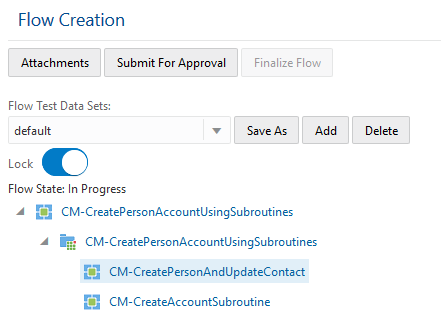
The Subroutine Flow feature reduces the redundancies created by adding the same set of components in multiple flows to perform similar steps. You reduce the redundancies by creating a subroutine flow (test flow) that includes only one instance of the components set and calls the subroutine flow from other Oracle Utilities Testing Accelerator flows to perform the test steps of the subroutine flow.
In addition, you can transfer test data between subroutine flows and the calling flow. For example, in Oracle Utilities Customer Cloud Service test automation flows, many test cases expect a “V” setup to be available before verifying business test cases. You can create a “V” setup flow and call this as a subroutine flow from other test flows.
Steps to Enable
You don't need to do anything to enable this feature.
Tips And Considerations
Subroutine flows use only the default flow test data set for execution.
To use a test flow as a subroutine, you need to define the calling flow interface after you create the subroutine flow. The calling flow interface contains the test data definitions that you need to pass as inputs to the subroutine flow and the data that the subroutine flow outputs. The flow calling the subroutine flow should pass the required input data and handle the output data from the subroutine.
To add a subroutine flow to a larger flow definition, right click any component of the larger flow and select the option to add as flow as subroutine.
This image shows CM-CreatePersonAccountUsingSubroutines using CM-CreatePersonAndUpdateContact and CM-CreateAccountSubroutine as subroutine flows.
Key Resources
- Refer to the Flow Subroutines & Test Data Sets whitepaper on My Oracle Support using Doc ID: 2632033.1.
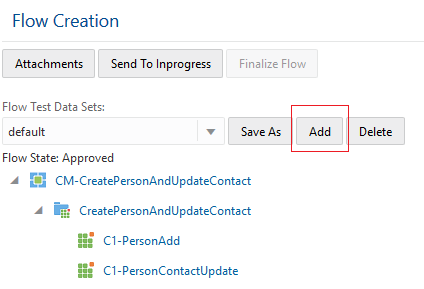
The Flow Test Data Sets feature allows you to define multiple test data sets in a single test flow, and execute the test flow using different test data inputs. With this feature, you do not need to create multiple Oracle UtilitiesTest Accelerator flows to test the same business process with different data sets. For example, you can test the account creation process for a residential premise and commercial premise with the same flow but with varying test data in Oracle Utilities Customer Cloud Service.
The flow test data sets span across the entire length of the flow. For example, all the components in the flow have test data for each flow test data set. The flows in Oracle Utilities Test Accelerator have the test data set to default and you can add flow test data sets by copying an existing test data or creating a new one.
This image shows a flow test data set with the Add option.
Steps to Enable
You don't need to do anything to enable this feature.
Key Resources
- Refer to the Flow Subroutines & Test Data Sets whitepaper on My Oracle Support using Doc ID: 2632033.1.
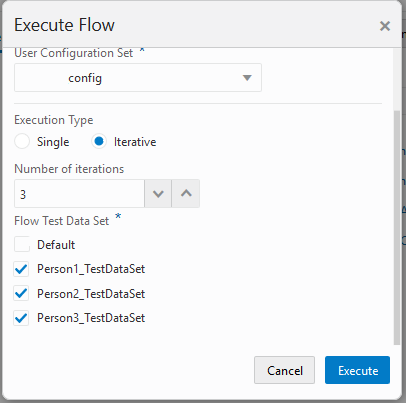
The Iterative Flow Execution feature allows you to simulate test data or test business processes with different test data sets by repeatedly executing a flow within a predetermined number of iterations and using specified flow test data sets.
Steps to Enable
You don't need to do anything to enable this feature.
Tips And Considerations
Iterative Execution is available for browser-based execution of Oracle UtilitiesTesting Accelerator flows. You can find the iterative execution option in the Execute Flow window and configure the following settings:
- Execution Type: Set to Iterative to enable the iterative execution mode.
- Number of iterations: Number of times to execute the same flow.
- Flow Test Data Set: Flow test data sets to use for the flow execution.
This image shows Iterative execution options with selected flow test data sets.
Key Resources
- Refer to the Flow Subroutines & Test Data Sets whitepaper on My Oracle Support using Doc ID: 2632033.1.
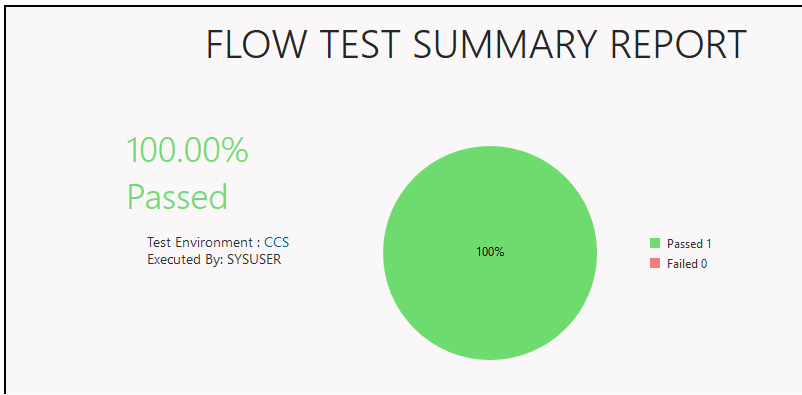
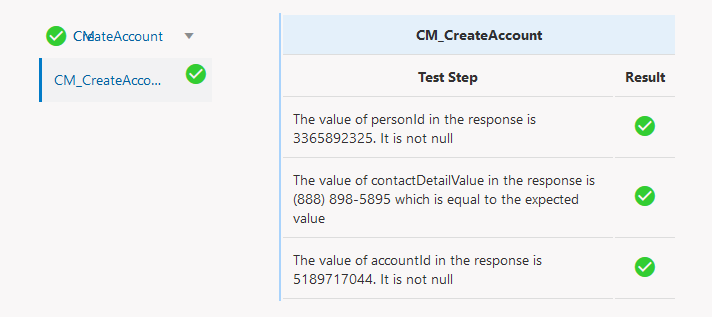
The Execution Summary Report allows you to determine whether a flow or flow set executed from the Oracle UtilitiesTesting Accelerator workbench has passed or failed. The summary report provides you with a holistic view of the flow execution run and an option to send the report via email. In addition, the summary report can provide you with drill-down details of the flow execution steps that include triggered validation on each flow component, test data used, and pass or fail status of a test step.
These images show the Flow Execution Summary Report and the drill-down Execution Summary Report.
Steps to Enable
You don't need to do anything to enable this feature.
Key Resources
- Refer to the Flow Subroutines & Test Data Sets whitepaper on My Oracle Support using Doc ID: 2632033.1.
Custom Groovy Function Library
The Custom Groovy Function Library allows you to develop custom flow definition functions that supplement the base-delivered test data randomizing and validation functions, and use these custom functions with components or flow definitions.
With the library, you can create Groovy scripts and upload these to the Oracle UtilitiesTesting Accelerator workbench. You can also create a new library for a specific component type.
Steps to Enable
You don't need to do anything to enable this feature.
Tips And Considerations
You can use whitelisted-imports and Oracle Utilities Application Framework-approved JAR files from the Groovy library.
To upload Groovy scripts into the Oracle Utility Testing Accelerator workbench, navigate to the Administration tab menu and select the Libraries option.
-
You can plug in a library to specific type of components by clicking Create Library, providing a library name, and entering the appropriate type of component details.
-
You can add function definitions to a library by clicking +Add and specifying the function name (Function), number of input parameters (Parameter Count), parameter definitions (@param1, @param2, and so on), comments, and description.
-
You can create the library using an IDE-like Eclipse or online groovy console but include the function in the file with the same name as the library. For example, to create a function that generates a random social security number as test data for creating a person:
-
The library name is UTATEST and the name of the function is generateSSN. The library takes an input prefix and returns a random set of digits prefixed with the input value.
-
Create the UTATEST.groovy that contains the function definition. The contents of the file are as follows:
-
package uta.oracle;
import java.util.ArrayList;
import java.util.List;
import com.oracle.utilities.core.plugin.FunctionalTestScript;
import com.oracle.utilities.core.lib.WSCOMMONLIB;
import java.util.logging.Logger;import com.oracle.utilities.core.lib.OUTSPCORELIB;
public class UTATEST {
private static final Logger _logger = Logger.getLogger(UTATEST.class.getName());
public String generateSSN(String prefix) throws Exception{
Random random = new Random();
int x = random.nextInt(900) + 100;
int y = random.nextInt(90) + 10;
int z=random.nextInt(9000) + 1000;
String zz = x+"-"+y+"-"+z;
return prefix+zz;
}}
-
The function definition in Oracle Utility Testing Accelerator would be:

-
You can upload the .groovy file by clicking Upload Library File.
-
After you upload the .groovy file, you can plug in the function into any custom component or into the pre-validations and post-validations section of the flow test data definition.
Flow, Flow Set Execution, and Analytics REST APIs
The Flow Execution REST API enables Oracle Utilities Testing Accelerator to support triggering of flows via REST APIs to enable the integration of flow execution from third-party managers.
The API takes the flow or flow set name and configuration as input parameters, triggers the execution of the flow, and returns the execution identifier for that instance. A flow execution result polling API allows you to poll the service for completion of the flow execution by using the execution identifier. The results REST API takes the execution identifier as the input parameter and returns the status of the execution as one of the statuses describing the execution to be in progress, pass, or fail.
Additionally, Oracle Utilities Testing Accelerator provides the following analytics services:
-
Flow Execution Analytics: This service provides analytics for the flows executed in Oracle Utilities Testing Accelerator by a specific user for a given period.
-
Flow Set Execution Analytics: This service provides analytics for the flow sets executed in Oracle Utilities Testing Accelerator by a specific user for a given period.
Steps to Enable
Refer to Oracle Utilities Testing Accelerator User Guide for more information.
Tips And Considerations
All REST services require an authentication token parameter. You can obtain the token by submitting a request to Oracle Utilities Testing Accelerator using the application URL, port, username, and password.
Key Resources
- Refer to Oracle Utilities Testing Accelerator User Guide for more information.
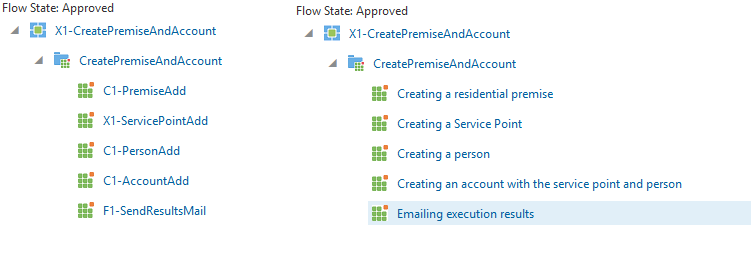
You can add annotations for each component step to describe the purpose of the each step in an Oracle UtilitiesTesting Accelerator test flow.
Steps to Enable
You don't need to do anything to enable this feature.
Tips And Considerations
You can add an annotation by right clicking a component in the flow definition and entering the description. The description replaces the default display of the component name in the flow step.
The image below has a comparison between flow without annotations (left) and with annotations (right).