
This document will continue to evolve as existing sections change and new information is added. All updates appear in the following table:
| Date | Product | Feature | Notes |
|---|---|---|---|
| 27 JUL 2020 | Created initial document. |
Oracle Utilities Meter Solution Cloud Service is used to maintain information about meters and the service points at which they are installed. The solution provides a means of recording measurements and events associated with meters in the field as well as the ability to compute usage for the recorded measurements, and process smart meter commands.
This guide outlines the information you need to know about new or improved functionality in this update, and describes any tasks you might need to perform for the update. Each section includes a brief description of the feature, the steps you need to take to enable or begin using the feature, any tips or considerations that you should keep in mind, and the resources available to help you.
Column Definitions:
Features Delivered Enabled
Report = New or modified, Oracle-delivered, ready to run reports.
UI or Process-Based: Small Scale = These UI or process-based features are typically comprised of minor field, validation, or program changes. Therefore, the potential impact to users is minimal.
UI or Process-Based: Larger Scale* = These UI or process-based features have more complex designs. Therefore, the potential impact to users is higher.
Features Delivered Disabled = Action is needed BEFORE these features can be used by END USERS. These features are delivered disabled and you choose if and when to enable them. For example, a) new or expanded BI subject areas need to first be incorporated into reports, b) Integration is required to utilize new web services, or c) features must be assigned to user roles before they can be accessed.
| Ready for Use by End Users Reports plus Small Scale UI or Process-Based new features will have minimal user impact after an update. Therefore, customer acceptance testing should focus on the Larger Scale UI or Process-Based* new features. |
Action is Needed BEFORE Use by End Users Not disruptive as action is required to make these features ready to use. As you selectively choose to leverage, you set your test and roll out timing. |
|||||
|---|---|---|---|---|---|---|
| Feature |
Report |
UI or |
UI or |
|
||
Support Measuring Component Level ERT (Communication Modules) |
||||||
Configurable Consumption Extract
The Configurable Consumption Extract feature enables you to configure custom measurement exports to reduce project costs and implementation times. This is useful for deregulated market participants that share measurement and consumption data with additional market information on a daily basis. It can also be an alternative when DataConnect and standard maintenance object measurement data exports do not meet your business requirements. The Configurable Consumption Extract design makes it configurable, scalable, and efficient to export current data and historical changes in JSON format.
Steps to Enable
To enable Configurable Consumption Extract, complete the following steps:
- Set up the target location for the export results.
- Identify the master data from which to extract the measurements.
- Create a Consumption Extract Request Type record that will coordinate the daily extract process.
- Define the type of data to extract, including identifiers to include, execution detail, and file parameters by creating a Consumption Extract Type based on the Extract US Consumption to File business object.
- Create Interval Snapshot Mapping records.
- Run the Create Daily Consumption Extract Request batch jobs to start the process of extracting consumption.
The results are JSON files written to Oracle Object Storage or an on-premises file system (refer to the sample below).

Tips And Considerations
- Tune batch jobs by running performance tests and determine the optimum number of threads.
- Schedule the extract during off hours when possible.
- Establish cleanup processes to remove old files, as required.
Key Resources
- Watch Configurable Consumption Extract / Exporting Data Readiness Training
- Refer to the Oracle Utilities Meter Solution Administrative User Guide for more information.
The Measurement Data Export feature enables you to quickly and efficiently export measurement data to data lakes and data warehouses to reduce project costs and implementation times. You can export current data and historical changes in a fixed CSV format.
Steps to Enable
To enable Measurement Data Export, complete the following steps:
- Set up the target location for the export results.
- Create a Specialized Data Export Control record for the Measurement maintenance object.
- Initialize the Export Through Date/Time based on the dates when you want to start exporting measurements.
- Configure the Capture Historical Measurement Changes parameter on key algorithms.
- Submit the Specialized Measurement Extract Current and Specialized Measurement Extract Historical batch jobs to extract the measurement data.
Key Resources
- Refer to the Oracle Utilities Meter Solution Administrative User Guide for more information.
Configuration Migration Assistant (CMA) originally only supported Admin data, but it has been extended to support master and transactional data. This provides you with a flexible, extensible facility for migrating data from one environment to another (for example, from a production environment to a development environment).
Test Data Migration leverages CMA to enable you to migrate master and transactional data for testing purposes from one environment (for example, production) to another environment (for example, development).
Steps to Enable
Refer to the Oracle Utilities Meter Solution Administrative User Guide for more information.
Support Measuring Component Level ERT (Communication Modules)
You can attach communication equipment (such as an Encoder Recorder Transmitter (ERT)) tracked by an Operation Device Management application to a manual meter instead of installing it. By attaching the communication equipment, readings are recorded on the installed manual meter. The following business objects enable the attachment of communication equipment to manual meters:
- D1-DvcCommEquipment (Device Communication Equipment)
- D1-DvcCommEquipmentType (Device Communication Equipment Type)
With Measuring Component Level ERT support, you can:
- Associate manual meter registers to the communication equipment or ERT
- Dispatch and complete specific field tasks related to attaching and detaching equipment to and from a meter
- Load reads and events that reference ERT module identifiers
- Record the load reads and events to the associated physical meter or register
Steps to Enable
Create new device types for the device communication equipment and configure the device types as tracked devices attached to meters.
Smart Grid Gateway Adapters Cloud Service Test Harness
The Smart Grid Gateway Cloud Service Test Harness enables you to simulate a head end system and its associated meters, and test commands from Smart Grid Gateway Adapters. This allows you to reduce costs by finding errors before implementation.
The test harness works with the following Smart Grid Gateway Adapters:
- Sensus
- Landis+Gyr
- Itron OpenWay
- Silver Springs Network
The Smart Grid Gateway Cloud Service Test Harness reduces project issues by determining errors at an earlier stage of the testing.
Steps to Enable
To enable Test Harness, complete the following steps:
- Install and deploy the Smart Grid Gateway Cloud Service Test Harness.
- Configure command message senders to point to the test harness end points.
- Issue commands to the test harness.
Tips And Considerations
Each Smart Grid Gateway Adapter comprises multiple web services that enable the commands.
Key Resources
- Refer to the Oracle Utilities Meter Solution Cloud Service Administrative User Guide for the list of commands that are available for each web service.
Support Operational Device Management Configuration
You can use the Item business object to create assets in Operational Device Management and synchronize the created assets as items in Meter Data Management. Additionally, the Item Asset business object now supports Operational Device Management configuration which provides support for template device mapping in Meter Data Management. This enables the creation of Installation Events on items.
Operational Device Management configuration enables you to view and manage Item Device Configuration Types without accessing Meter Data Management, and synchronize the configuration types between Operational Device Management and Meter Data Management.
Steps to Enable
You don't need to do anything to enable this feature.
Enhanced Asset Portal Including Device Tab
A new Device tab has been added to the Asset portal that allows you to maintain and view asset and device details and information from a single portal. All device navigation for meters, items and equipment that are tracked and have a corresponding asset, are routed to this device tab. Navigation for devices that are not tracked or that do not have a corresponding asset, for example template devices that used for sync, will still be routed to the Device portal.
This tab includes the following zones:
- Device: Defines Displays the basic attributes of the device
- Device Configuration List: Lists the device's configurations
- Device Activities: Lists activities related to the device, sorted by date in descending order
- Device Events: Lists recent device events, sorted by date in descending order
- Device Exceptions: Lists the first 50 VEE exceptions for the device's measuring components, sorted by creation date in descending order
- Device Log: Display log activity for the device
Steps to Enable
You don't need to do anything to enable this feature.
Additional file types are supported for Conversion Data Upload. You can now provide the legacy data extract in compressed and decompressed formats. Supported compressed formats include GZIP and ZIP.
Steps to Enable
You don't need to do anything to enable this feature.
Utilities Application Framework
Date and Time Field Improvements
Date, time, or combined date and time input fields have been enhanced with new and improved icons. In addition, the arrows to move the date or time forward or backward one day or hour have been removed. These changes have been applied to portal-based maintenance pages and query filters. Fixed pages are not impacted by this change.

Steps to Enable
You don't need to do anything to enable this feature.
Tips And Considerations
If you include JavaScript that targets the forward or backward arrows, it should be removed since those icons are no longer included in the generated HTML.
Key Resources
Query Portals Introduced for Existing Pages
Previously, many configuration objects used the fixed page user interface metaphor. Fixed pages use popup search windows to locate records. Many of these configuration objects now provide query portals instead of popup search windows. Additionally, the Search menu item for these configuration objects open a query portal rather than a popup search window.
The query portals provide a more intuitive search interface with several criteria fields and a single search button as compared to a popup search window that featured a separate search button for each search criteria group. When selecting a record from the results, you are brought to the existing maintenance page. The navigation through the menu in Add mode brings you to the maintenance page with a blank form (as before). The query portal includes an Add button to add a record from there.
The following provides additional detail of where this functionality has been added:
- Algorithm: In addition to algorithm and description, the query portal includes algorithm and parameter related search criteria
- Business Service: In addition to business service and description, the query portal includes service and schema related search criteria
- Data Area: In addition to data area and description, the query portal portal include schema related search criteria
- Feature Configuration: In addition to feature name and description, the query portal includes feature option and value related search criteria
- Foreign Key Reference: In addition to foreign key reference code and description, the query portal includes additional search criteria
- Maintenance Object: In addition to maintenance object, description, and table, the query portal includes maintenance object option search criteria
- Managed Content: In addition to managed content, description, and type, the query portal includes managed content related search criteria
- Menu: In addition to menu name, description, and type, the query portal includes menu related search criteria
- Navigation Key: In addition to navigation key and program component identifier, the query portal includes navigation key information related search criteria
- Navigation Option: In addition to navigation option and description, the query portal includes navigation option information related search criteria
- Portal: In addition to portal code and description, the query portal includes portal information related search criteria
- Table: In addition to table and description, the query portal includes related table information search criteria
- UI Map: In addition to map code and description, the query portal includes map information related search criteria
- Zone: In addition to zone, description, and zone type, the query portal includes zone parameter search criteria
Steps to Enable
You don't need to do anything to enable this feature.
Tips And Considerations
Upgrade scripts ensure that users with Read access to existing application services will have access to the new application services associated with the new query portals. This table lists the application services associated with the existing fixed pages and the corresponding application services for the new query portals:
| Object |
New Application Service |
Access Added to Any User Groups with this Application Service/Read Access |
| Algorithm |
F1ALGQ |
CILTALGP |
| Business Service |
F1BSVQ |
FWLTBSVP |
| Data Area |
F1DTARQ |
FWLTDARP |
| Feature Configuration |
F1FCFGQ |
CILTWSDP |
| Foreign Key Reference |
F1FKRFQ |
CILEFKRP |
| Maintenance Object |
F1MOQ |
CILEMOBP |
| Managed Content |
F1MANCQ |
FWLTMGCT |
| Menu |
F1MENUQ |
CILEMNUP |
| Navigation Key |
F1NAVKQ |
CILENAVP |
| Navigation Option |
F1NAVOQ |
CILENVOP |
| Portal |
F1PRTLQ |
CILZPORP |
| Table |
F1TBLQ |
CILETBLP |
| UI Map |
F1UIMPQ |
FWLTUIMP |
| Zone |
F1ZONEQ |
CILZZONP |
The Field page has been converted to a portal, leveraging a more flexible and extendable user interface metaphor.
Steps to Enable
You don't need to do anything to enable this feature.
Tips And Considerations
Upgrade scripts ensure that users with Read access to the existing application service will have access to the new application service associated with the new portal. This table lists the existing and new application service:
| Object |
New Application Service |
Access Added to Any User Groups with this Application Service/Read Access |
| Field |
F1FIELD |
CILEFLDP |
An upgrade script is provided to enable the following FK reference records with the Field search zone (F1-FLDSRCH) as opposed to using the fixed-page style search:
- F1BF-MO
- F1RF-MO
- F1SR-MO
- F1ST-MO
- F1TY-MO
Additional Context Labels for Date and Time Fields
A date/time field has a single label throughout the application, but there are contexts in which a separate label may be needed for its "date" and "time" parts. An example of such context is when the field is used by the operational analytics product.
In the same way, date and time fields are associated with additional elements in the operational analytics product describing their various time aspects such as their month, year, hour, minutes, parts, and so on. These elements share a common part of the field's label as their prefix. For example, for a Creation Date/Time, Creation Date, or Creation Time field, you may provide "Creation" as the field's base context label.
In this release, the definition of a Field is enhanced to support up to three sets of context-related alternate labels and corresponding labels for "Date", "Time", and "Date/Time" field types.
The following is an example of such a configuration:
| Field |
Label |
Context 1 |
Label 1 |
Context 2 |
Label 2 |
Context 3 |
Label 3 |
| START_DTTM |
Start Date/Time |
Date and Time Base |
Start |
Date |
Start Date |
Time |
Start Time |
| END_DTTM |
End Date/Time |
Date and Time Base |
End |
Date |
End Date |
Time |
End Time |
| START_DT |
Start Date |
Date and Time Base |
Start |
||||
| END_DT |
End Date |
Date and Time Base |
End |
In the framework product, the following fields that are currently referenced by operational analytics tables are updated to include the context labels:
- ASSIGNED_DTTM: Assigned Date/Time
- COMPLETE_DTTM: Completion Date/Time
- CRE_DTTM: Create Date/Time
Steps to Enable
You don't need to do anything to enable this feature.
Delete HTTP Method for REST Web Services
The REST Inbound Web Service was enhanced to support the DELETE HTTP method.
The actual actions and functionality that are triggered by a given REST service call are still controlled by the business object, business service, or service script that is configured on the operation. For example, if you configure an operation with the DELETE HTTP method and you reference a service script that is simply reading a record, the system will perform the action of the service script and read the record. The HTTP methods are meant as external documentation.
Steps to Enable
You don't need to do anything to enable this feature.
Key Resources
Submit Job REST Web Service Returns Job ID
The F1-SubmitJob REST Inbound Web Service now returns the resulting Batch Job ID. This allows calling systems to use that ID to get subsequent information about the Batch Job.
Steps to Enable
You don't need to do anything to enable this feature.
The batch framework now supports the ability to request the creation of a manifest file. Batch jobs that support the creation of the manifest file now include a "Manifest Option" batch parameter.
Manifest file information is provided in JSON format and includes information about the batch run, number of files, number of records processed, and details about each file including name, size, and SHA-256 hash value. For example, a manifest file by a batch process that produced three files provides the following information:

The following batch programs supplied by Oracle Utilities Application Framework were enhanced to support the new Manifest option:
- F1-GEXPI: The Generalized Initial Export Initiator batch control includes this new option and defaults to "Y."
- F1-GEEXO: The Generalized Ongoing Export batch control includes this new option and defaults to "Y."
- F1-GEIXP: The Generalized Initial Export Template batch control includes this new option and defaults to "Y." In addition, an upgrade script finds all the batch controls that were created from this template and inserts the new parameter on those records. The value defaults to "Y."
- F1-PDBEX: The Plug-in Driven Extract Template batch control includes this new option and defaults to blank. In addition, an upgrade script finds all the batch controls that were created from this template and inserts the new parameter on those records. The value is set to blank.
Steps to Enable
You don't need to do anything to enable this feature.
Tips And Considerations
If product delivered batch programs include the Manifest Option parameter, set this option to "Y" to produce a manifest file when running the batch job.

If your implementation has any custom background processes that produce extract files and you would like to include a manifest option, add the batch parameter "manifestOption". To set this up, complete the following steps:
- Select Admin, select System, select Batch Control, and select Search.
- Search for and select the Batch Control.
- Add a new batch parameter and set the parameter name to "manifestOption" (it is important to use this value), description to "Manifest Option", and security type to "None."
- Set the sequence to an appropriate value.
- Note that for the detailed description, the recommendation is to follow the pattern of the base delivered options: "If set to 'Y' a manifest file is created with the following name: {batchCode]_{batchNumber}_{rerunNumber}_manifest.json"
Key Resources
Support for File Compression and Decompression
File compression when extracting and decompression when uploading is now supported. Not every batch program that manages extracts or uploads automatically supports this functionality. Each batch program that supports it must explicitly indicate that the functionality is supported.
The following highlights additional information about the functionality:
- The system supports both GZIP compression/decompression and ZIP compression/decompression.
- If an extract program supports file concatenation, ZIP compression is not supported. Only GZIP compression is supported.
- To indicate that an extract file should be compressed, you should simply use .zip or .gz as the suffix of the file name. The system will use the compression method based on the chosen suffix. For example, myFile.gz will produce a GZIP compressed CSV file.
- For upload programs that support decompression, the file name's suffix will similarly trigger the appropriate decompression method.
The following programs provided by Oracle Utilities Application Framework support compression and decompression:
- Batch controls that use the same batch program as F1-PDBEX (Plug-in Driven Extract Template). Note that this batch program supports compression and concatenation. The combination of ZIP compression and concatenation is not supported.
- Batch controls that use the same batch program as F1-PDUPL (Plug-in Driven Upload Template).
Individual products (such as Oracle Utilities Customer Cloud Service or Oracle Utilities Meter Solution Cloud Service) may also include batch upload or extract programs. The batch control will explicitly state that compression or decompression is supported.
- F1-GEEXO: Generalized Ongoing Export
- The various Initial Data Export batch controls for each maintenance object
Steps to Enable
You don't need to do anything to enable this feature.
Key Resources
Bucket Name Prefix for Cloud Object Storage
You can now define a Bucket Name Prefix on the file storage configuration to support defining different Bucket Names for different environments.
Cloud Object Storage does not provide separate configurations for testing versus production. As such, a common practice is to define different buckets to be used for test versus production of the same functionality. For example, if you want a bucket for "payment_files" and another for "data_export", in order to separate testing from production, you need to define test_payment_files, prod_payment_files, test_data_export, and prod_data_export. In the application, the bucket names are defined in configuration, for example as a parameter to a batch control. When copying this configuration from test to production, it is a separate step to change the bucket names.
You can now use the bucket name prefix to define the appropriate prefix, "test_" and "prod_", in the respective regions. Then, the individual file path configuration parameters throughout the system can define the common part of the bucket name (payment_files and data_export for the above two examples), and they will not need to change when copied to a different environment. The prefix is preprended at runtime.
Steps to Enable
You don't need to do anything to enable this feature.
Key Resources
Submission Method and User for Batch Jobs
New fields have been added to batch jobs to capture the submission method for a batch job and the user who submitted the job, if applicable. The Submission User is captured to have an audit of the user that created the submission. This may be different from the batch user (existing field) that is provided to all the processes executed by the batch program. Note that there are some use cases where this field is not applicable. For example, timed batches and batch submission records created by a scheduler do not have a "submission user."
The Submission Method field is a customizable lookup. The base supported values are:
- Online: Populated when a user manually creates a batch job submission
- Generated: Populated by algorithms that submit a batch job and by "initiator" batch jobs that submit other batch jobs
- Scheduled: Populated by the DBMS scheduler. Note that for other schedulers, it is not advised to use this value as there may be logic and validation related to records created with this value that may not apply to other schedulers
- Timed: Populated by the batch daemon that submits timed jobs
- Other: Populated when no other value is provided
NOTE: Existing batch job submission records were not updated to populate either of these two new fields.
Steps to Enable
You don't need to do anything to enable this feature.
Tips And Considerations
If your implementation has any algorithms or "initiator" type batch controls that create a batch job submission record, consider updating your code to populate the Submission Method of "Generated." Otherwise, the value of "Other" will be used.
Key Resources
Support Analytics Dimension Hierarchy Definition
The metadata needed to support hierarchical dimensions can now be captured as part of the definition of an analytics dimension.
Steps to Enable
You don't need to do anything to enable this feature.
DBMS Get Job Details Enhancements
The DBMS Scheduler Job Details (F1-DBMSGetJobDetails) business service now returns the Batch Code, Run Number, and Rerun Number for each step. In addition, the service includes a new input parameter (isInProgress). Callers set this to "true" to return running steps in the output.
The default is the existing behavior, which is that only completed steps of the latest batch run are returned.
Steps to Enable
You don't need to do anything to enable this feature.
Migration Configuration Enhancements
A migration plan has been provided for the Table object, allowing for changes to customizable fields to be copied to another environment. The F1-SystemConfig (Framework System Configuration) migration request has been updated to include the new migration plan.
Steps to Enable
You don't need to do anything to enable this feature.
Root Node Element Optional on Plug-in Driven Extract
The plug-in driven extract batch program now supports configuration to suppress the inclusion of a Root Node Element by entering the word "suppress" in the XML Root Name parameter.
Steps to Enable
You don't need to do anything to enable this feature.
User Documentation Enhancements
The following are highlights of updates to the user documentation (online help):
- The "Database Options" chapter (renamed from "Database Tools") now has an overview section describing relationships of Maintenance Objects, Tables, Fields, and other metadata used to define objects in the system. As part of this update, the Characteristic Type help topics and FK Reference help topics have been moved to the "Database Options" chapter.
- The "Using Groovy Within Scripts" help topic has been updated to clarify best practices for referencing Java classes. The topic indicates that you should reference the class using the fully qualified package name or use an import step type to import the class and declare an alias.
Steps to Enable
You don't need to do anything to enable this feature.
Standard warning processes for business object-driven maintenance show warnings a pop-up dialog boxes, allowing you to click OK or Cancel. OK indicates that the system should proceed with the add, update, or delete operation. Cancel returns you to the maintenance map, allowing you to make changes or to cancel the maintenance dialogue altogether. This is consistent with warning handling for fixed pages. Note that, after cancelling, the warning message continues to display inline.
Previously, warnings were shown as messages in the maintenance dialog, allowing you to make changes before clicking Save again. The warning conditions were not checked again even though you could have changed something that should have triggered an additional check.
Steps to Enable
You don't need to do anything to enable this feature.
Bulk Replace Test Data enables you to update or replace test data in multiple flows all at once in cases where you need to correct or update administrative test data type such as Premise Type, Asset Type, and more.
Bulk Replace Test Data enables you to customize Oracle Utility Reference Model-based test flows to update test data values such as CIS Division, Premise Type, and more to suit the data in your environments. You can select the list of test flows and mass update the test data for a component step instead of updating the test data for each customized test flow.
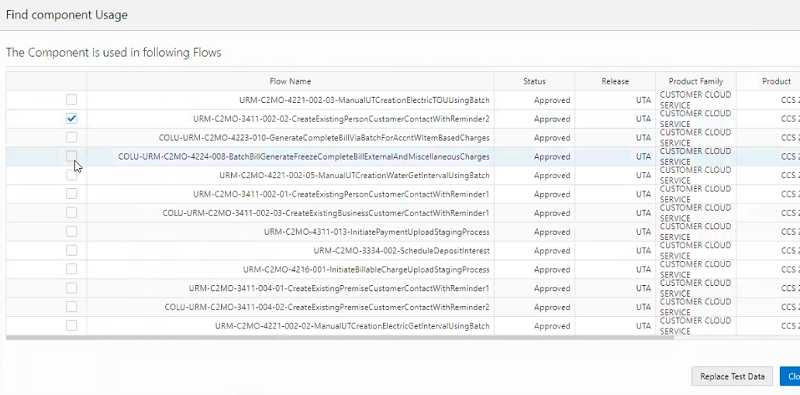
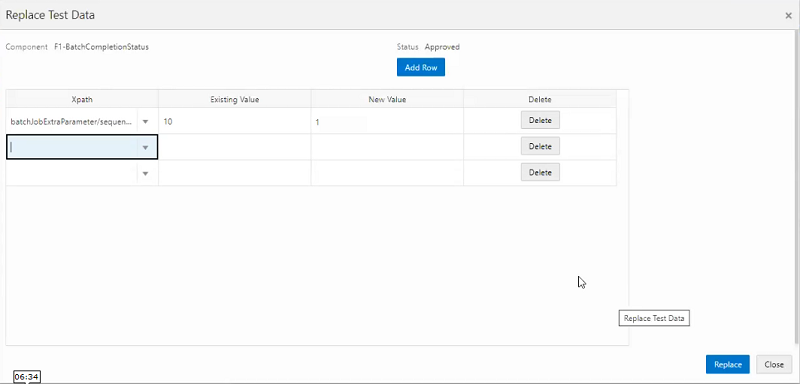
You can access Bulk Replace Test Data through the Component page by right clicking a component, and then selecting Find Component Usage. The Find Component Usage option lists the test flows in which the component has been used. You can then select the test flows containing the test data to update and click Replace Test Data. You can then select the element from which to update the test data and provide the existing and replacement values.
This image shows component usage's test flows and the Replace Test Data button.
This image shows the Replace Test Data screen.
Steps to Enable
You don't need to do anything to enable this feature.
Key Resources
- Watch Test Data Enhancements Readiness Training
- Refer to the Oracle Utilities Testing Accelerator User Guide for more information.
Conversational Test Data Entry
Appropriate test data needs to be setup against each of the component steps, which form the building blocks of a test flow. The validity of the component step's test data values can be determined by unit testing of the flow's component steps. The Conversational Test Data Entry feature enables you to quickly and easily perform unit testing and issue resolution for a given component step in a flow by updating the test data while conversing through web services with the application for which the test flow is being developed.
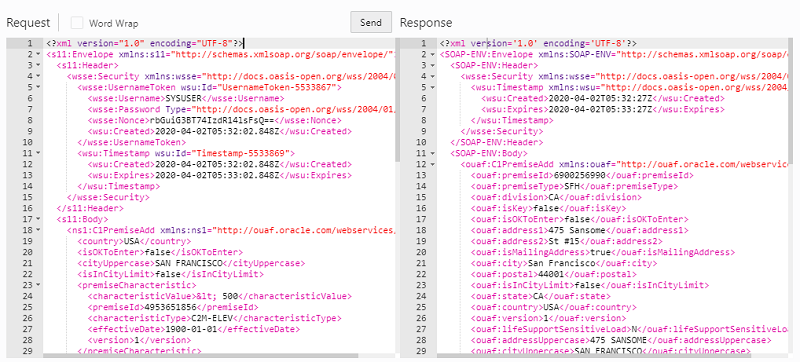
During the development of a test flow and as new component steps are added, you can execute the flow to perform unit test sand validate each component step. The flow execution generates a request XML which is posted to the application that returns a response. Often times, the first few executions result in the identification of missing or incorrect test data values in a component step that requires correction of test data and re-execution. To expedite the unit testing and issue resolution of test data values, you can use the Conversational Test Data Entry's edit request option to update the request XML, repost the updated XML, and verify the response.
Instead of updating the flow test data, you can perform the unit testing-issue resolution of the component step by simply updating the request XML with different test data values and reposting the request multiple times until the desired response is obtained. Upon completion of component step's unit testing, Conversational Test Data Management allows you to directly save the test data provided in the request XML in to the flow test data.
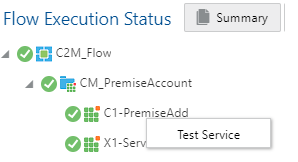
The image shows the Test Service option of Conversational Test Data Entry. You can right-click a component in the Flow Execution Results to display the Test Service option.
This image shows an example of a Conversational Test Data Management screen.
Steps to Enable
You don't need to do anything to enable this feature.
Key Resources
- Watch Test Data Enhancements Readiness Training
- Refer to the Oracle Utilities Testing Accelerator User Guide for more information.
The Product Delete feature enables you to delete older product pack versions from the flow or component tree hierarchy to better manage the tree hierarchy structure in Oracle Utilities Testing Accelerator.
Steps to Enable
You don't need to do anything to enable this feature.
Tips And Considerations
Before deleting a product from the flow or component tree hierarchy, perform the following actions:
- Migrate all custom flows to a new product pack version
- Export the custom flows in the product version to be deleted
Deleting a product permanently deletes all flows and components from the product hierarchy.
Key Resources
- Watch Administration Enhancements Readiness Training
- Refer to the Oracle Utilities Testing Accelerator User Guide for more information.
Role Information
Only system administrators are allowed to delete a product. System administrators can delete the product from administration pages or right-clicking the product pack in the component or tree hierarchy and selecting the delete option.
Stop Flow Execution on Failure
The Stop Flow Execution on Failure feature enables you to configure whether a test flow execution continues on failure or stops at the point of failure when a component step validation within a test flow fails or technical exception results to test flow failure. You can configure the continueExecutionOnFailure property in the user configuration set or flow configuration set with a Boolean value, where "True" (default) continues the test flow execution on failure and "False" stops at the point of failure.
Steps to Enable
You don't need to do anything to enable this feature.
Key Resources
- Watch Flow Enhancements Readiness Training
- Refer to the Oracle Utilities Testing Accelerator User Guide for more information.
Support for Hybrid Integration Test Flows
The Hybrid Integration Test Flow feature enables you to develop and execute automated test flows that span your Oracle Utilities cloud service and Oracle Utilities on-premises integration. The Oracle Utilities Testing Accelerator in the Oracle Utilities cloud service now supports posting of web service requests from Oracle Utilities cloud service to Oracle Utilities on-premises applications, allowing you to develop and execute automated test flow that communicates with your Oracle Utilities cloud service and Oracle Utilities on-premises application. In addition, component generator and fetch test data now support hybrid integration.
Steps to Enable
You don't need to do anything to enable this feature.
Key Resources
- Watch Flow Enhancements Readiness Training
- Refer to the Oracle Utilities Testing Accelerator User Guide for more information.
Database changes introduced in the 20B release of Oracle Utilities Cloud Services can be found in the Oracle Utilities Cloud Services Database Changes Guide.
Steps to Enable
You don't need to do anything to enable this feature.
Microsoft Edge Browser Support
Oracle Utilities Cloud Services now support chromium-based Microsoft Edge Browser (v79+) for Microsoft Windows 10.
Steps to Enable
You don't need to do anything to enable this feature.
IMPORTANT Actions and Considerations
REPLACED OR REMOVED FEATURES
From time to time, Oracle replaces existing Cloud services with new features, or removes existing features. Replaced features may be put on a path to removal. As a best practice, you should use the newer version of a replaced feature as soon as a newer version is available.
This section identifies the features in this Cloud service that have been replaced or removed.
| Product | Removed Feature | Target Removal | Replacement Feature | Replaced In | Additional Information |
|---|---|---|---|---|---|
| Oracle Utilities Application Framework | Mobile Application | 20B | Not applicable | Not applicable | The mobile application built in Oracle Utilities Application Framework is no longer supported and supporting documentation is no longer available. Any issues you report for this feature will not be addressed. |
| Oracle Utilities Application Framework |
Cube Viewer functionality outside of Oracle Utilities Market Settlements Management | 20B | Not applicable | Not applicable | The Cube Viewer functionality is now only supported in the Oracle Utilities Market Settlements Management product. In a future release, it will only be available for that product, but for this release it is still visible and accessible for other products. However, any use of this feature by other products will not be supported in a future release. |
| Oracle Utilities Application Framework |
SQL substring function for query and info data explorer zones | 20B | DB function substr | 20B | The 'substring' function is no longer supported in the SQL for query and info data explorer zones. You should use the DB function 'substr' instead. |
| Oracle Utilities Application Framework |
X1-SPCharacteristicsUpdate and X1- SPCharacteristicsRead components |
20B | Not applicable | Not applicable | The X1-SPCharacteristicsUpdate and X1- SPCharacteristicsRead components have been removed are no longer supported with Oracle Utilities Meter Solution Cloud Service. |
PLAN TO REMOVE UI METADATA RELATED TO CONVERTED PAGES FROM ORACLE UTILITIES APPLICATION FRAMEWORK
The following UI metadata related to fixed pages that were converted to portal will be removed in a future release:
Navigation keys related to the maintenance page:
| Field | Access Group | Application Service |
|---|---|---|
| impFldTabMenu metaDataFieldMainPage metaDataFieldMaint metaDataFieldTableGrid metaDataFieldTablePage Any help keys |
accessGroupMainPage accessGroupMaint accessGroupTabMenu accessGroupDARGrid Any help keys |
applicationServiceMainPage applicationServiceMaintNew Any help keys |
Navigation keys related to search:
| Field | Access Group | Application Service |
|---|---|---|
| metaDataFieldSearchData metaDataFieldSearchPage |
accessGroupSearchData accessGroupSearchPage |
applicationServiceSearchData applicationServiceSearchPage |
In addition, the UI program component metadata related to the Field, Access Group, and Application Service navigation will be cleaned up in a future release.
PLAN TO INCORPORATE APPLICATION VIEWER TO ORACLE UTILITIES APPLICATIONS
The standalone Application Viewer will be incorporated into the application in a future release and similar to the data dictionary, user interfaces for the tables and fields will be enhanced to provide more information at a glance and a view of the links between tables. In addition, Javadocs and Groovy Javadocs will be viewable within the application instead of the standalone Application Viewer. Information about maintenance objects, batch controls and algorithm types, and algorithms are already viewable in the application.
PLAN TO REMOVE REST IWS - ORIGINAL REST SERVLET FROM ORACLE UTILITIES APPLICATION FRAMEWORK
The original URL supplied for calling Inbound Web Service-based REST services includes the Inbound Web Service name in its makeup. Support for this will continue for backward compatibility purposes, but will be deprecated in a future release. You should adjust your existing integrations to use the currently supported URL.
PLAN TO REMOVE APPEND SETTING FROM PAGINATION - ORACLE UTILITIES APPLICATION FRAMEWORK
There are several known issues associated with the pagination's Append option. It is recommended that you defer from using this pagination setting.
PLAN TO REMOVE SUPPORT FOR MASTER/SUBORDINATE SERVERS FOR WEB SERVICE CATALOG IN ORACLE UTILITIES APPLICATION FRAMEWORK
The Service Catalog Configuration (Master Configuration) enables you to define subordinate servers. Defining subordinate servers is no longer applicable to Oracle Integration Cloud.
PLAN TO REMOVE SUPPORT FOR SEVERAL BATCH RUN STATISTICS PORTAL FUNCTIONALITY IN ORACLE UTILITIES APPLICATION FRAMEWORK
The Batch Run Statistics portal provides additional information about batch runs, but some functionality on the portal are related to capturing additional information from an external tool. Additional information captured from the external tool is stored in a Fact record. Support for capturing additional information from an external tool will be discontinued in a future release. The captured additional information would still be available to existing customers.
PLAN TO REMOVE MISCELLANEOUS SYSTEM DATA FROM ORACLE UTILITIES APPLICATION FRAMEWORK
The F1-EnvironmentRef (Migration Plan) administrative maintenance object will be removed in a future release as this is associated with a non-supported ConfigLab and Archive. Note that no base migration request references the plan and you should ensure that no custom migration request references the plan. The F1-EnvironmentRefPhysicalBO business object and ENV REF maintenance object will also be removed in a future release.
The following metadata related to legacy LDAP import pages will be removed in a future release:
| Services | Application Service |
|---|---|
| CILTLDIP CILTLDIL CILTLDIS |
CILTLDIP |
The F1-LDAPIMPRT and F1-LDAPPREPR algorithm types and algorithms for the current LDAP import functionality do not include any logic and will be removed in a future release.
The following unused system data will not be supported and deleted in a future release:
| To Do Type | Lookup Value | Scripts | Zone |
|---|---|---|---|
| F1-SYNRQ (Sync Request Error) Note: F1-SYNR (Sync Request Monitor) errors are reported using F1-SYNTD (Sync Request Monitor Errors) |
CHAR_ENTITY_FLG / F1SE (Characteristic Entity / Sync Request Inbound Exception) |
F1-BundleInf F1-GENPRINFO F1-MgPlnInf |
F1-IWSSCHS F1-IWSSCHS1 F1-IWSSCHS2 F1-IWSSCHS3 |
PLAN TO REMOVE CONFIGURATION MIGRATION ASSISTANT IMPORT REQUESTS FROM ORACLE UTILITIES APPLICATION FRAMEWORK
The F1-FrameworkAdmin (Framework Admin) and F1-SchemaAdmin (Schema Admin) migration requests are no longer recommended and will not be updated with new administration or control table in a future release.
PLAN TO REMOVE CONFIGURATION MIGRATION ASSISTANT IMPORT ALGORITHM FROM ORACLE UTILITIES APPLICATION FRAMEWORK
The Configuration Migration Assistant Import algorithm plugin spot will be deprecated in a future release. It is recommended that you review any existing algorithms and create the appropriate Pre-Compare algorithms instead.
PLAN TO REMOVE BUSINESS OBJECT READ FROM F1-MAINPROC WHEN PRE-PROCESSING EXISTS
In the original implementation of Configuration Tools, the main framework maintenance BPA (F1-MainProc) does not perform a Read of the business object when a pre-processing script is linked to the business object via options. When F1-MainProc does not perform a Read, the pre-processing script performs the Read of the business object.
In a subsequent release, a business object Read was added to F1-MainProc (with an existing pre-processing script) to resolve a UI Hints issue related to child business objects. Adding a business object Read to F1-MainProc introduced an issue visible only to specific scenarios and a different fix was introduced. The new fix made the business object Read unnecessary in F1-MainProc and many pre-processing scripts are properly performing the business object Read. The business object Read should have been removed from F1-MainProc to prevent multiple reads from being performed. However, pre-processing scripts may have been introduced after the addition of the business object Read to F1-MainProc that do not perform a business object Read in the pre-processing script. As such, the business object Read is still performed as part of the F1-MainProc processing.
When a pre-processing script exists, the business object Read will be removed from the F1-MainProc logic. Review your custom pre-processing scripts that are linked to business object options to ensure that the scripts properly perform reads of your business object.
PLAN TO CREATE RELEASE OPTION IN ORACLE UTILITIES TESTING ACCELERATOR
The administration option to create a new release in Oracle Utilities Testing Accelerator is planned to be deprecated. The administration option enables you to create a new release (for example, new root tree node in the component or flow hierarchy) that customer implementations do not create as custom objects are developed under delivered product packs in the component or flow tree hierarchy.
The product family creation option to create a new release in Oracle Utilities Testing Accelerator is planned to be deprecated. The administration option enables you to create a product family in the component or flow hierarchy that customer implementations do not create as custom objects are developed under delivered product packs in the component or flow tree hierarchy.
PLAN TO REMOVE ORACLE UTILITIES TESTING ACCELERATOR ECLIPSE IDE PLUGIN SUPPORT FOR FLOW EXECUTION
The latest flow execution features such as iterative execution, test data sets, and so on are available within the Oracle Utilities Testing Accelerator workbench. You can continue to use the workbench for web service-based test flow execution on the cloud.
PLAN TO REMOVE METADATA FOR CREATING USER INTERFACE-BASED TEST COMPONENTS AND FLOWS
The automated testing of Oracle Utilities cloud services is based on web services and does not use any user interface-based components as user interface-based testing cannot be executed within the Oracle Utilities Testing Accelerator workbench. The user interface-based testing is not an efficient way to test as it can be highly prone to issues across upgrades or updates. The base delivered component packs and Utility Reference Model flows are web service-based and do not use any user interface-based component or flow metadata.