
- Revision History
- Overview
- Feature Summary
- IMPORTANT Actions and Considerations
This document will continue to evolve as existing sections change and new information is added. All updates appear in the following table:
| Date | Product | Feature | Notes |
|---|---|---|---|
| 25 MAR 2021 | Created initial document. |
Oracle Utilities Meter Solution Cloud Service is used to maintain information about meters and the service points at which they are installed. The solution provides a means of recording measurements and events associated with meters in the field as well as the ability to compute usage for the recorded measurements, and process smart meter commands.
This guide outlines the information you need to know about new or improved functionality in this update, and describes any tasks you might need to perform for the update. Each section includes a brief description of the feature, the steps you need to take to enable or begin using the feature, any tips or considerations that you should keep in mind, and the resources available to help you.
Column Definitions:
Report = New or modified, Oracle-delivered, ready to run reports.
UI or Process-Based: Small Scale = These UI or process-based features are typically comprised of minor field, validation, or program changes. Therefore, the potential impact to users is minimal.
UI or Process-Based: Larger Scale* = These UI or process-based features have more complex designs. Therefore, the potential impact to users is higher.
Features Delivered Disabled = Action is needed BEFORE these features can be used by END USERS. These features are delivered disabled and you choose if and when to enable them. For example, a) new or expanded BI subject areas need to first be incorporated into reports, b) Integration is required to utilize new web services, or c) features must be assigned to user roles before they can be accessed.
| Ready for Use by End Users Reports plus Small Scale UI or Process-Based new features will have minimal user impact after an update. Therefore, customer acceptance testing should focus on the Larger Scale UI or Process-Based* new features. |
Customer Must Take Action before Use by End Users Not disruptive as action is required to make these features ready to use. As you selectively choose to leverage, you set your test and roll out timing. |
|||||
|---|---|---|---|---|---|---|
| Feature |
Report |
UI or |
UI or |
|
||
Restrict Service Point and Device Data by Division Code and Access Group |
||||||
Communication of Service Order Appointment Information to the Field Management System |
||||||
Synchronize Administration Data with Oracle Field Service Cloud |
||||||
Oracle Utilities Smart Grid Gateway Command Test Harness Deployment |
||||||
Start Date, End Date, and Time Added to Batch Thread Instance |
||||||
Manually Complete Field Activities
The Field Activity portal provides a new Complete option for field activities in the "Communication in Progress" state that opens the Field Activity Manual Completion page. This page dynamically displays or hides appropriate completion details sections based on the field task type of the field activity being completed. Implementations have the option to override the default settings and show more or fewer sections by supplying a custom service script on the field task type.
The Field Activity Manual Completion page provides an appropriate completion details section that make field activity completion intuitive and more easily performed.
Steps to Enable
You don't need to do anything to enable this feature.
Restrict Service Point and Device Data by Division Code and Access Group
The Service Point Restriction by Division Code and Access Group feature determines the service points that you can access based on your assigned divisions. The conditions by which service points are secured are as follows:
- If the service point has an access group, only users belonging to the access group can access the service point.
- If the service point does not have an access group or division, all users will have access to the service point.
- If the service point does not have an access group, the service point has a division code, and Restrict by Division is set to "Yes" users belonging to the division can access the service point.
The following queries now include security by Division Code:
- 360 Search
- Service Point
- Device
- Device Configuration
- Install Event
- Measuring Component
- Usage Subscription
- Usage Transaction
- Contact
- IMDs
The security feature also applies to devices not installed on a service point. Previously, security was only applied to devices installed on service points. The conditions by which uninstalled devices are secured are as follows:
- If the device has an access group, only users belonging to the group can access the device.
- If the device does not have an access group, all users will have access to the device.
The Service Point Restriction by Division Code and Access Group feature provides another layer of security on the service point and supplements the existing Data Access Group security.
Steps to Enable
To enable this feature in Oracle Utilities Customer Cloud Service:
- Set the Control by CIS Division flag to "Yes" on the Installation Options - Main page.
- Set the Premise/SP Search flag to "Restricted By CIS Division" on the Installations Options - Main page.
- Set the Allow CIS Division flag to "Required" on the Premise Types portal (for applicable premise types).
- Set the Restrict to Account CIS Division flag to "Yes" on the CIS Division portal (for each CIS Division to be used to restrict access).
- Assign an Access Group to each CIS Division on the CIS Division portal (for each CIS Division to be used to restrict access).
- Assign CIS Divisions to users in the User Miscellaneous Information zone on the User - Miscellaneous page.
- Assign division codes to service points. Refer to the X1-PSDPD batch control for the upgrade job that sets the service points' Division Code from the premise.
- Enable the Service Point business object pre-processing algorithm that defaults the data access group (D1-DFSPACGRP) by creating a new version of the algorithm and setting the Perform Defaulting parameter to "Y."
- Enable the Device meter and item business object pre-processing algorithms that default the data access group (D1-DFMTACGRP and D1-DFITACGRP for meter and item respectively) by creating a new version of the algorithm and setting the Perform Defaulting parameter to "Y." This enables security by data access group on devices not installed at a service point.
- To secure standalone measuring components, enable the Measuring Component business object pre-processing algorithm (D1-DFSMCAGFU).
- Enable the Asset business object pre-processing algorithm that updates the device data access group (X1UPDDVDAG) by creating a new version of the algorithm and set the Process parameter to "Y."
To enable this feature on Oracle Utilities Meter Solution Cloud Service:
- Set the Restrict by Division option to "Yes" on the MDM Master Configuration.
- Assign an Access Group to each Division on the Division portal (for each Division to be used to restrict access).
- Assign Divisions to users in the User Miscellaneous Information zone on the User - Miscellaneous page.
- Enable the Service Point business object pre-processing algorithm that defaults the data access group (D1-DFSPACGRP) by creating a new version of the algorithm and setting the Perform Defaulting parameter to "Y."
- Enable the Device meter and item business object pre-processing algorithms that default the data access group (D1-DFMTACGRP and D1-DFITACGRP for meter and item respectively) by creating a new version of the algorithm and setting the Perform Defaulting parameter to "Y." This enables security by data access group on devices not installed at a service point.
- To secure standalone measuring components, enable the Measuring Component business object pre-processing algorithm (D1-DFSMCAFGU).
- Enable the Asset business object pre-processing algorithm that updates the device data access group (X1UPDDVDAG) by creating a new version of the algorithm and set the Process parameter to "Y."
Tips And Considerations
For projects, populate the Service Point Latitude and Longitude.
Unbilled Usage Transactions Cleanup
This feature transitions usage transactions related to regenerated bill segments to the "Final" state. Previously, the state of usage transactions linked to discarded usage requests and deleted bill segments were not transitioned to the "Final" state.
The unbilled usage transactions updates provide you with a better understanding of what was actually billed for discarded usage requests and deleted bill segments.
Steps to Enable
You don't need to do anything to enable this feature.
Oracle Field Service Cloud Integration
Communication of Service Order Appointment Information to the Field Management System
The list of Service Order data attributes passed to field work management systems like Oracle Field Service Cloud has been expanded. The new data attributes that the system captures when an appointment is booked are as follows:
- Taken By
- Taken Date
- Comments
These new Service Order data attributes reduce customizations by capturing appointment information and sending this data to the field management system.
Steps to Enable
Refer to the Oracle Utilities Customer Cloud Service Integration to Oracle Field Service Cloud Configuration Guide and Oracle Field Service Cloud Configurations Setup Guide for more information.
Synchronize Administration Data with Oracle Field Service Cloud
The administration synchronization objects for key data elements reduce the need for manual creation and maintenance of administration data such as meter configuration type, UOM, and device type in Oracle Field Service Cloud.
Synchronizaton reduces the manual creation and maintenance of administration data in Oracle Field Service Cloud, and the occurrence of errors.
Steps to Enable
You don't need to do anything to enable this feature.
Oracle Utilities Smart Grid Gateway Command Test Harness Deployment
The Smart Grid Gateway Cloud Service Test Harness provides the functionality to test Smart Grid Gateway Adapter commands by simulating a head end system and its associated meters. This test tool supports the following Smart Grid Gateway Adapters:
- Sensus
- Landis+Gyr
- Itron OpenWay
- Silver Springs Network
- Adapter Development Kit
The Smart Grid Gateway Cloud Service Test Harness allows you to test smart meter commands when test meters are not available and reduces project issues by determining errors at an earlier stage of the testing.
Steps to Enable
To enable Test Harness, complete the following steps:
- Configure command message senders to point to the test harness end points.
- Issue commands to the test harness.
Reduction of Redundant To Dos for Communication Objects
Updates to the Communication Out and Communication In business objects decrease the number of To Do entries created when the system reprocesses failed transactions. Previously, the retry processes closed outstanding To Do entries associated with errors and recreated redundant To Do entries for the same errors.
The enhancements to exception processing reduce storage requirements, improve operational efficiency, and increase the accuracy of Analytics Visualization To Do counts.
Steps to Enable
You don't need to do anything to enable this feature.
Data Security by Owning Organization
The Compatible Unit and Crew business entities now directly support data security by Owning Organization, and the following business entities indirectly support data security Owning Organization via association:
- Activity Reconciliation (Work Order association)
- Design Element (Work Design association)
- Expedite Purchase Order (Purchase Order Header association)
- Invoice Header (Purchase Order Header association)
- Material Request Header (Storeroom (Node) association)
- Material Return Header (Storeroom (Node) association)
- Measurement (Asset association)
- Physical Inventory Header (Storeroom (Node) association)
- Warranty (Asset association)
The following administrative entities directly support data security by Owning Organization:
- Approval Profile
- Expense Code
- Planner
Data Security By Owning Organization ensures that business users can only access data associated with organizations to which they have been granted access.
Steps to Enable
For upgrades, ensure existing records in the primary tables of the directly secured supported maintenance objects have the correct value in the Owning Organization field. This only applies to the list of directly secured entities. You can update online or through a custom plugin-driven batch process depending on the volume of each table and the number of records that need corrections.
Asset Location Description Search Filter
The Asset Information Search query option provides a new filter to retrieve assets based on asset location descriptions. You can enter part of the asset location description and use upper case or lower case as appropriate.
The Asset Information Search query option provides more efficient data search capabilities.
Steps to Enable
You don't need to do anything to enable this feature.
Unaccounted Losses Identification
The meter data Aggregation engine and Analytics Visualization enable you to identify water leaks and electric revenue protection issues. You can use the engine's standard processes to compare the sum of individual service point's usage with metered usage at a higher level in the distribution network such as a water main or transformer.
The Aggregation engine enables you to identify losses (leaks and thefts), meter providing erroneous reads, and meters assigned to the wrong water main or transformer. These visualizations help you understand where losses are happening and manage losses by area.
Steps to Enable
Refer to Demo Data for examples of setting up Dynamic Aggregations and Data Set, and building map visuals.
Utilities Application Framework
When creating a new portal page in the product, it is common to want to add additional tab portals for the same page. For example, it is common to use a separate Log tab portal for viewing log entries. Previously, it was not possible to create the tab portal and link it to the appropriate standalone portal.
You can insert new tabs when creating a new portal a page without the need to perform programming or coding.
Steps to Enable
You don't need to do anything to enable this feature.
Message Category/Message Portal
The Message page has been converted to a portal, leveraging a more flexible and extendable user interface metaphor. Users may view messages for a message category and perform actions on this page.
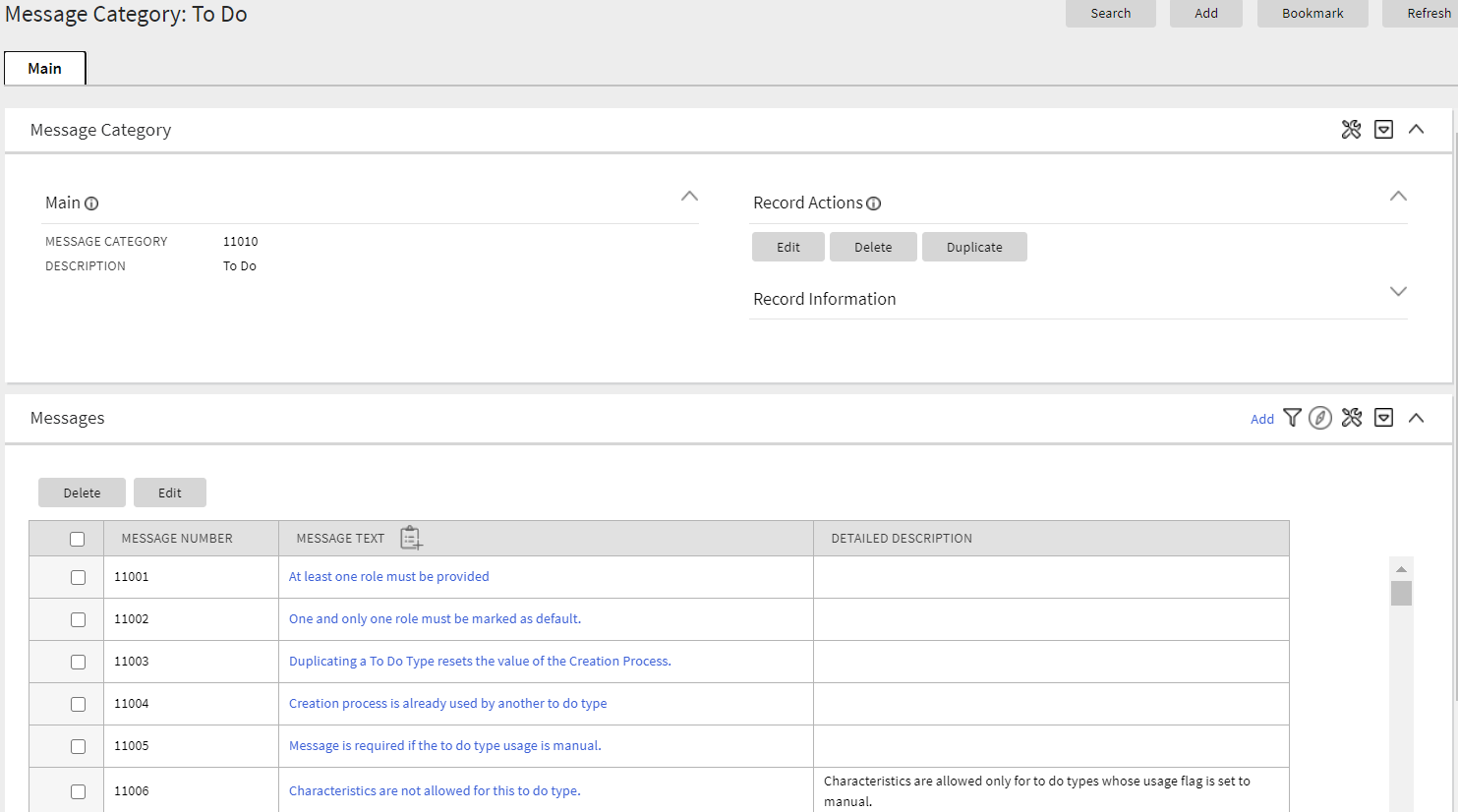
Additionally, a separate Message maintenance portal is provided to view and update an individual message.
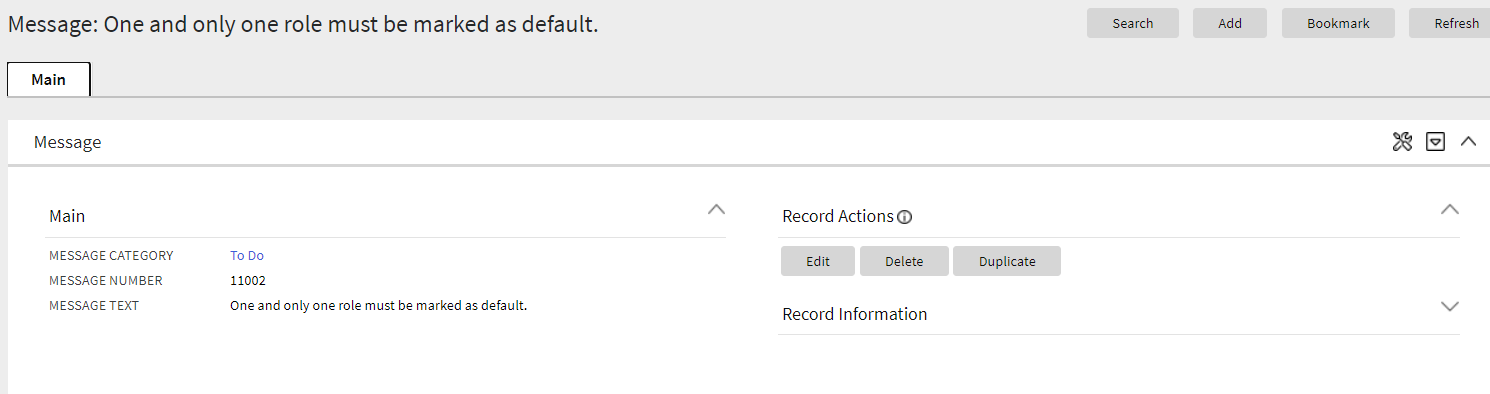
The new user interface pages include improved search criteria including searching by message text.
Steps to Enable
You don't need to do anything to enable this feature.
Tips And Considerations
Upgrade scripts ensure that users with Read access to the existing application service will have access to the new application service associated with the new portal. This table lists the existing and new application services.
| Object | New Application Service | Access Added to Any User Groups with this Application Service/Read Access |
|---|---|---|
| Message Category Query Portal | F1MSGQ | CILTMSGP |
| Message Category Portal | F1MSGC | CILTMSGP |
| Message Portal | F1MSG | CILTMSGP |
Note that any existing bookmarks for this page will take user to the previous version of the page. You need to take the following actions to move the bookmark to the new page:
- Click the bookmark. Take note of the Message Category.
- Navigate to the Message Category portal via the menu.
- Search and select the Message Category from your bookmark. This takes you to the new page.
- Delete the existing bookmark from the Bookmark dashboard zone.
- Click the Bookmark page action button to add a bookmark for this record for the new page.
The Table page has been converted to a portal, leveraging a more flexible and extendable user interface metaphor.
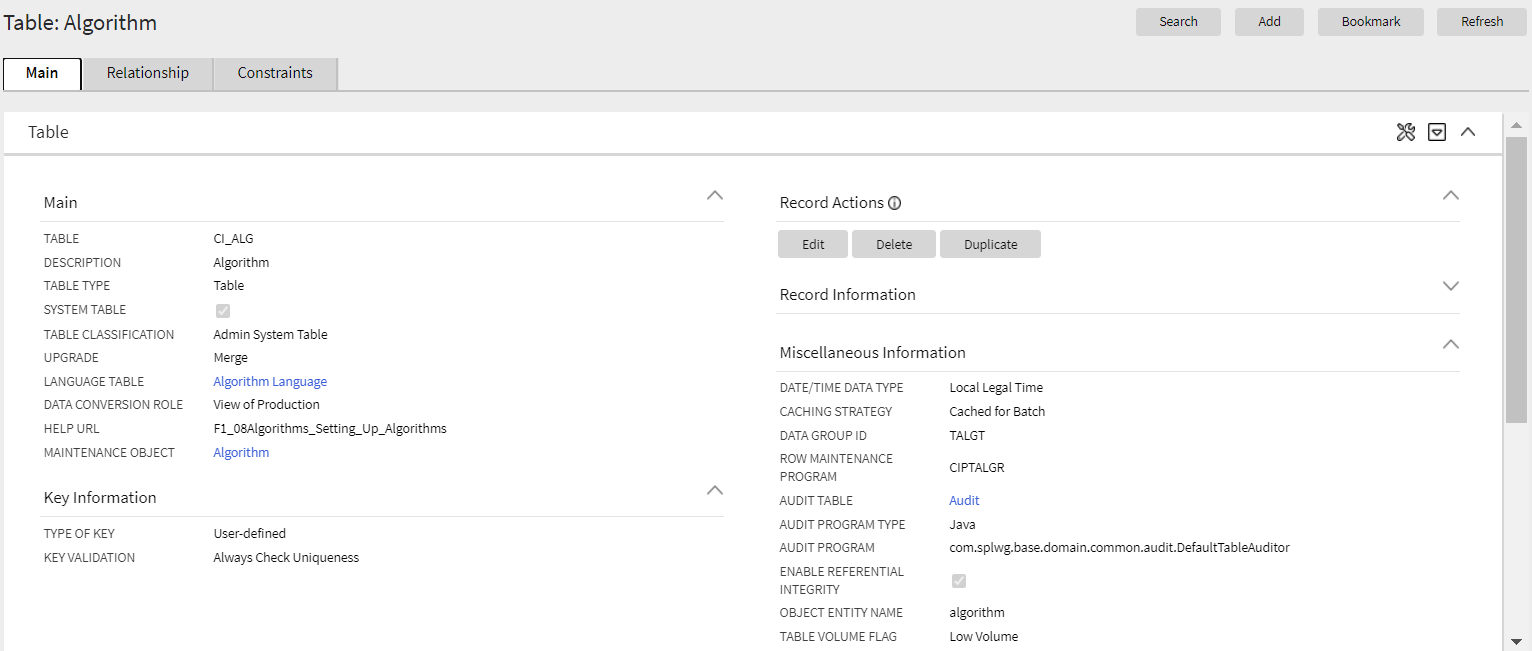
The following highlights some additional features in the new portal:
- The maintenance object(s) associated with the table are included in the display.
- Optional fields that are not populated are not shown for a cleaner view.
- The list of fields for the table is shown in a zone on the main tab. The zone indicates which fields are part of the primary key and which are foreign keys. The label of the field as defined in the Field record is displayed and the user may drill into the fields from this zone.
- The Constraints tab shows the constraints for this table and allows for maintenance of the information. In addition, other tables that have constraints that refer to this table are displayed in this tab.
As part of this enhancement, a new Relationship tab is introduced and includes an Entity Relationship Diagram (ERD). This is similar to what is shown in the Data Dictionary in the Application Viewer so users no longer need to launch the Application Viewer to get this information. Be aware that the Application Viewer is planned for deprecation. The zone highlights which related tables are part of the same maintenance object. A user can drill to the ERD of any of the tables in the diagram. Additionally, a user can navigate to the maintenance object page for any table in the diagram.
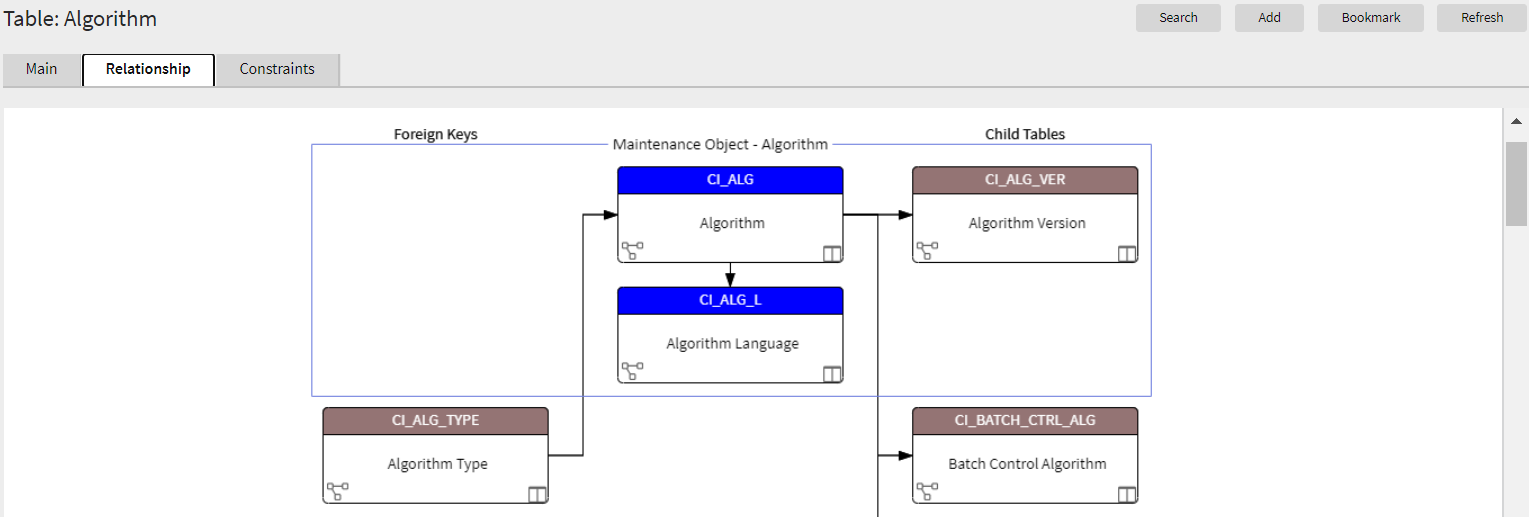
Standardizing the layout of the Table page provides you with a user interface experience that is consistent with other portal-based pages.
Steps to Enable
You don't need to do anything to enable this feature.
Tips And Considerations
Upgrade scripts ensure that users with Read access to the existing application service will have access to the new application service associated with the new portal. This table lists the existing and new application services.
| Object | New Application Service | Access Added to any User Groups with this Application Service/Read Access |
|---|---|---|
| Table Portal | F1TABLE | CILETBLP |
Note that any existing bookmarks for this page will take the user to the previous version of the page. You need to take the following actions to move the bookmark to the new page:
- Click the bookmark. Take note of the Table.
- Navigate to the Table page via the menu.
- Search for and select the Table from your bookmark. This takes you to the new page.
- Delete the existing bookmark from the Bookmark dashboard zone.
- Click the Bookmark page action button to add a bookmark for this record for the new page.
Key Resources
The Time Zone page has been converted to a portal, leveraging a more flexible and extendable user interface metaphor. It uses the All in One page metaphor that includes a list zone and display zone. The list zone includes a filter to narrow the results, if needed.
Standardizing the layout of the Time Zone page provides you with a user interface experience that is consistent with other portal-based pages.
Steps to Enable
You don't need to do anything to enable this feature.
Tips And Considerations
Upgrade scripts ensure that users with Read access to the existing application service will have access to the new application service associated with the new portal. This table lists the existing and new application services.
| Object | New Application Service | Access Added to any User Groups with this Application Service/Read Access |
|---|---|---|
| Time Zone Portal | F1TMZNM | CILTTZNP |
Note that any existing bookmarks for this page will take the user to the previous version of the page. You need to take the following actions to move the bookmark to the new page:
- Click the bookmark. Take note of the Time Zone.
- Navigate to the Time Zone portal via the menu.
- Search for and select the Time Zone from your bookmark. This takes you to the new page.
- Delete the existing bookmark from the Bookmark dashboard zone.
- Click the Bookmark page action button to add a bookmark for this record for the new page.
The To Do Dashboard portal is intended to be used by both supervisor and non-supervisor To Do users. For supervisors, the charts consider To Do entries that are in a role which the supervisor is a member. For non-supervisors, the charts consider open To Do entries that are in a role of which the user is a member or entries currently assigned to the user.
The To Do Dashboard portal provides a high level summary of open To Do entries and To Do entries currently being worked on by various criteria using analytic charts.
Steps to Enable
You don't need to do anything to enable this feature.
Tips And Considerations
Supervisors are those users with security access to the "supervisor" access mode for the To Do Dashboard application service.
Upgrade scripts are provided to automatically allow users with Read access to either of the existing To Do Summary page and Supervisor To Do Summary page application services to have access to the new application service associated with the new portal. Note that the new portal does not replace any existing portal. It is provided as an additional summary portal to assist users with To Do management.
This table list the existing and new application services.
| Object | New Application Service | Access Added to any User Groups with Either of These Application Service/Read Access |
|---|---|---|
| To Do Dashboard | F1TDDASH | CILQTDSP, CILQTSSP In addition, users with access to the Supervisor Summary page will get supervisor access to the Dashboard portal |
Key Resources
The To Do Entry page has been converted to a portal, leveraging a more flexible and extendable user interface metaphor.
The following points highlight some improvements in the new portal functionality:
- In the new page, log entries are visible on the Log tab, which is the product standard for maintenance pages with logs.
- In the new page, there is a "related object" display. The system uses the drill keys associated with the To Do entry and determine the information string of that object and displays it to the user. A user can click this link to drill into the related object. Separately, a Work button is added to the page that performs the following functionality: if the To Do is "open", it gets assigned to the user; the To Do becomes the 'current To Do' and populates that dashboard zone; the user is brought to the target transaction (and if there is a BPA script associated with the To Do message, that script is launched). Previously, the Message Text was clickable and a user used this link to drill into the related key or launch the script.
- In the new page, the sort keys are shown on the main page instead of a separate tab. The drill keys are also shown on the Main tab, but within the Record Information section, which is initially collapsed.
- The characteristics linked to a To Do Entry are shown in a separate zone on the Main tab. However, when editing the To Do Entry, if you are allowed to make changes to the characteristics, they are maintained using the edit dialogue. Since this is a portal/zone based maintenance, foreign key characteristics use the Search Zone metaphor for searching. This is the standard for all maintenance objects going forward. This is an improvement from the previous page where the search was the old fixed page metaphor, causing issues when attempting to reference an object that did not have an old legacy fixed page search. In addition, when maintaining characteristics for an automatic To Do Entry, the new page presents valid characteristic types by first looking for valid characteristic types for the To Do Type and if no values are found, shows all the valid characteristic types for the To Do Entry entity.
- If there are related To Do entries for the To Do being shown, a badge insight is used to highlight the number of related To Dos, using the Contextual Insight feature introduced in this release. In addition, a zone displays a detailed list of the related To Do entries is included on the portal.
The following points highlight functionality that is the same as the previous version of the page:
- The To Do Entry query by To Do Type only shows the To Do Entries that are valid for the user: ones assigned to the user or ones that are Open in a To Do Role that the user is in.
- The To Do Entry query by ID allows the user to view that To Do entry.
- Any user may add a User Log.
- Any user may edit the To Do and change comments.
- Only users that are valid for the To Do (per the criteria in the first bullet) are allowed to change the priority or add or change Characteristic values or are allowed to Forward, Complete or Send Back. Note that as before, Send Back is only enabled if the To Do entry's Assigned By is populated.
- A user completing the To Do entry is able to add comments as part of the action.
Standardizing the layout of the To Do Entry page provides you with a user interface experience that is consistent with other portal-based pages.
Steps to Enable
You don't need to do anything to enable this feature.
Tips And Considerations
If there are any foreign key characteristics that are configured to be valid To Do Entry characteristics and users may manually add a link to one of these types of objects, be sure that there is a Search Zone defined for the FK Reference for this characteristic type.
Upgrade scripts ensure that users with Read access to the existing application service will have access to the new application service associated with the new portal. This table lists the existing and new application services.
| Object | New Application Service | Access Added to any User Groups with this Application Service/Read Access |
|---|---|---|
| To Do Entry Query Portal | F1TODOEQ | CILQTDEP |
| To Do Entry Portal | F1TODO | CILQTDEP |
Note that any existing bookmarks for this page will take the user to the previous version of the page. You need to take the following actions to move the bookmark to the new page:
- Click the bookmark. Take note of the To Do Entry ID.
- Navigate to the To Do Entry portal via the menu.
- Search for and select the To Do Entry from your bookmark. This takes you to the new page.
- Delete the existing bookmark from the Bookmark dashboard zone.
- Click the Bookmark page action button to add a bookmark for this record for the new page.
Key Resources
While using the system, if a user collapses the dashboard, the system retains this setting until the user changes it again. Previously, the collapsed state of the dashboard was only applicable during a user's session. The next time a user logged into the application, the dashboard would reset to the original settings.
While using the system, the user may adjust the width of the dashboard using the slider and the system retains this setting until the user changes it again. Previously, the user could only adjust the width of the dashboard in the user preferences.
Each user may now also choose to locate the dashboard zone on the left of the page rather than the right.
Steps to Enable
You don't need to do anything to enable this feature.
The Work Calendar page has been converted to a portal, leveraging a more flexible and extendable user interface metaphor. The new user interfaces page includes more mass actions, including duplication capabilities for holiday dates.
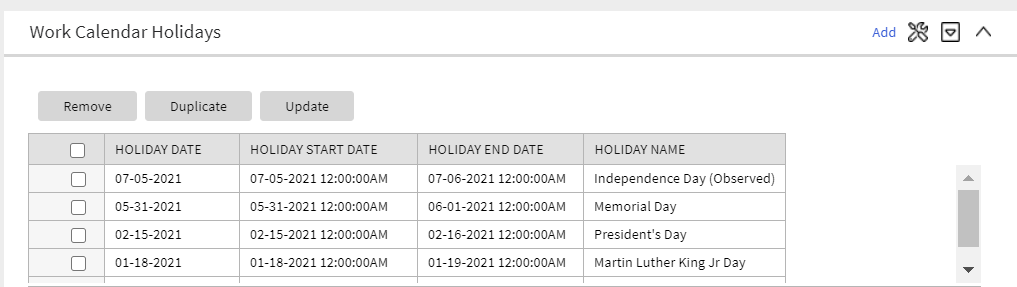
Standardizing the layout of the Work Calendar page provides you with a user interface experience that is consistent with other portal-based pages.
Steps to Enable
You don't need to do anything to enable this feature.
Tips And Considerations
Upgrade scripts ensure that users with Read access to the existing application service will have access to the new application service associated with the new portal. This table lists the existing and new application services.
| Object | New Application Service | Access Added to any User Groups with this Application Service/Read Access |
|---|---|---|
| Work Calendar Query Portal | F1WRKCLQ | CILTCLWP |
| Work Calendar Portal | F1WRKCAL | CILTCLWP |
Note that any existing bookmarks for this page will take the user to the previous version of the page. You need to take the following actions to move the bookmark to the new page:
- Click the bookmark. Take note of the Work Calendar.
- Navigate to the Work Calendar portal via the menu.
- Search for and select the Work Calendar from your bookmark. This takes you to the new page.
- Delete the existing bookmark from the Bookmark dashboard zone.
- Click the Bookmark page action button to add a bookmark for this record for the new page.
Parameters Supported for POST HTTP Method in REST Services
The REST engine supports defining path and query parameters for POST operations. Previously, POST operations did not support parameters. The assumption had been that all information was included in the payload.
Path and query parameters support provides URL parameters for POST HTTP methods.
Steps to Enable
You don't need to do anything to enable this feature.
Support for Interrupting DBMS Job Steps
The system provides support to handle job streams that have been stuck in Running state for too long without progressing to the next subsequent batch process steps. The Batch Operations portal - running option is enhanced to include a new "Interrupt" option for this purpose. When interrupted, the batch job stream is marked as Failed and the underlying batch job status is marked as Error.
Next, the currently available "Restart" option can be used to re-start the job stream so the stream progresses to next set of batch processes.
Steps to Enable
You don't need to do anything to enable this feature.
Support for Sharing Exported Data with Oracle
The batch framework is enhanced to allow customers to request that their exported data is also routed to Oracle's data lake for insight analytic purposes. Batch jobs that support this option now include a batch parameter called "Copy to Oracle" that is set to not share any content by default. Customers must opt in to share their data with Oracle when they submit such a batch process.
The following General Data Export related batch controls are enhanced to include the new "Copy to Oracle" batch parameter set to not share any content by default:
- F1-GEXPI: Generalized Initial Export Initiator
- F1-GEEXO: Generalized Ongoing Export
- F1-GEIXP: Generalized Initial Export Template
- All initial export batch controls that reference the same batch program as F1-GEIXP (Generalized Initial Export Template)
The batch framework enhancement allows the sharing of exported customer data with Oracle applications for analytics purposes.
Steps to Enable
If your implementation opts to share exported data with Oracle, set the Copy to Oracle parameter to "Y" on applicable batch controls.
Start Date, End Date, and Time Added to Batch Thread Instance
The start date/time and end date/time of a batch thread instance are captured. Previously, this information was only available in informational messages linked to batch thread instance. The informational messages are still included but now that start and end date/time stamps are captured directly on the instance record.
Capturing the start date/time and end date/time of batch threads will make it much easier for implementations to do analysis about batch timings at the instance level, if desired.
Steps to Enable
You don't need to do anything to enable this feature.
Tips And Considerations
- For existing batch thread instance records created prior to upgrading to this version, the system does not automatically populate the new columns. There is an upgrade background process provided to upgrade records if an implementation would like to do analysis of older records. The batch control is F1-BTIDT (Upgrade Batch Thread Instance Date / Time). It includes parameters to limit the upgrade to certain batch controls and/or a specific date range so that only the records you plan to include in your analysis are affected. Review the batch control detailed description for more information.
- This batch control has its own application service. In order to run the batch job, you must have privileges to this application service: F1-BTIDT, access mode F1EX.
Environment Information Added to Batch Email
The email sent when a batch program completes now includes information related to the installation configuration for the environment where the batch was run. This will help users that may be working in more than one environment (for example, development and test or two different testing regions), users that are working in more than one version of a product, or users that are working with more than one product.
The email now includes:
- The product name taken from the row in the Installed Products collection on the Installation Options that is marked at the 'display' product. This is the product name visible in the application heading.
- The product version taken from the same installed products row.
- If configured, the Domain Name taken from the Messages collection on the Installation Options. Refer to the description of the new Define an Environment Domain Name feature for more information.
Information related to the installation configuration of the environment that ran the batch job helps users working in more than one environment, in more than one product version, or with more than one product.
Steps to Enable
You don't need to do anything to enable this feature.
Contextual Insights provide a way to surface focused intelligence and alerts to users in the context of the core screens for any applications built on Oracle Utilities Application Framework. There are many useful configuration options for Contextual Insights.
There are a number of visual patterns that are supported:
- Badges Insights have a quick text notice with a solid background that is meant to alert the user to crucial summary information or attributes.

- Inline Insights display a message with an icon that is meant to be more descriptive about the context for crucial information to surface.

- List Insights are intended to exist in a list of insights that provide a message about related data as well as allow user actions to be configured. This type of insight supports an icon and supports primary and secondary text.

- Card Insights are the most information rich with the option for showing both primary and secondary text for an insight, a related large icon to call attention to the insight, as well as user actions that can be configured. Often a Card Insight can be used at the top of a list of insights to call more attention to the most important insights.
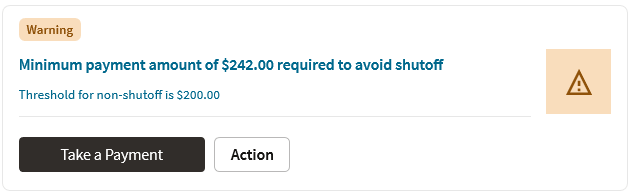
New color palettes are provided for configuration for Contextual Insights that insecure consistency in user interface when surfaced.
Actions that users can perform are defined in the insight algorithm and include additional configuration on the new Insight Type object. Settings allow you to define what should occur when the action is selected, the text to display, and the emphasis that should be placed on the button.
Insight types may be delivered by your base product. Oracle Utilities Application Framework provides a base badge insight that is visible on the new To Do Entry portal if the To Do Entry has related To Dos. Your specific product may include additional insight types for other use cases. In addition, you can introduce your own insight types.
In addition, the product provides the Insight Group object as a convenient way to group multiple insight types together. Insight groups are not delivered by the base product. However, every insight group references a unique insight class (lookup value). The insight class is the reference used when configuring insights to appear on a specific user interface component. Your product may include one or more base insight classes that are ready to use on a user interface component. Your implementation would set up an insight group for this class and choose which insight types to include.
Contextual Insights provide a way to surface focused intelligence and alerts to users in the context of the core screens for any applications built on Oracle Utilities Application Framework.
Steps to Enable
You don't need to do anything to enable this feature.
Tips And Considerations
Users must be granted access to the following new application services in order to use this functionality:
| Secured Object | Application Service | Access Modes |
|---|---|---|
| Insight Type MO | F1INSIGHTTYP | A, C, D, R |
| Insight Type Portal | F1INSTYP | R |
| Insight Group MO | F1INSIGHTGRP | A, C, D, R |
| Insight Group Portal | F1INSTGP | R |
| Color Option MO | F1COLOROPTION | A, C, D, R |
| Color Option Portal | F1COLOPT | R |
New tree metadata allows use of user interface tree structures to display hierarchical data in many of the Oracle Utilities Application Framework products.
The Tree metadata encapsulates a number of visual patterns that are common to tree displays:
- Icons
- Broadcast function
- Configurable text for the tree nodes, with multiple options, including a user override
- Support for navigation via hyperlink and context menus
- Support for auto expansion of a tree node on load
- Support for inclusion of implementation specific nodes in trees supplied out-of-the-box
Previously, a tree could only be defined using HTML within a UI map. The Oracle Utilities Application Framework provides user interface tools and services that work in conjunction with the Tree metadata to perform many of the functions that were formerly in HTML.
Algorithms are responsible for the processing that populates the tree node key data and to allow override of the information text, if needed.
Metadata is provided to define configuration for displaying information in a tree format.
Steps to Enable
You don't need to do anything to enable this feature.
Tips And Considerations
Users must be granted access to the following new application services in order to use this functionality.
| Secured Object | Application Service | Access Modes |
|---|---|---|
| Tree MO | F1TREE | A, C, D, R |
| Tree Query Portal | F1TREEQ | R |
| Tree Portal | F1TREEM | R |
The product now provides support for Scalable Vector Graphic (SVG) images. These images can be scaled without reduction of quality and can take on color. The new Contextual Insight and Tree Metadata features support icons and the recommendation is to use SVG images for these features. The product also provides many base SVG images in the display icon table.
The product provides a Maintenance Object Option to define a default Display Icon for an object. Functionality such as the tree configuration may use this option to retrieve the default icon for an object. An analogous Business Object Option is provided for those maintenance objects that are used for different classes of objects that may warrant different icons at the business object level.
The Icon Configuration Support enables you to use scalable and high resolution SVG images as icons on your product.
Steps to Enable
You don't need to do anything to enable this feature.
Expanded Maintenance Object and Business Object Information
The Maintenance Object Information (MO Info) and Business Object Information (BO Info) plug-in spots now support returning an icon, if requested. The icon may be determined by the algorithm or alternatively, the plug-in drivers return the default Display Icon defined as a maintenance object option or business object option.
In addition, the plug-in spots support alternate detail for the information string itself:
- Short information: The algorithm can optionally return shorter, more concise information.
- Detailed information: The algorithm can optionally return up to four lines of information, allowing the algorithm to return different pieces of information in different lines. This is useful for user interfaces that support displaying information this way. Additionally, the algorithm can return an "overline" text, which is short text that can appear above the primary information text.
Note that the standard user interface metaphor that displays an information string for an object continues to use the standard information string returned by the algorithm. The additionally supported information may be used by specific use cases.
The expanded maintenance object and business object information enable you to request and retrieve short or detailed icon information.
Steps to Enable
You don't need to do anything to enable this feature.
Tips And Considerations
The F1-GetFKReferenceDetails and F1-GetForeignKeyReference business services have been enhanced to return the additional information, if provided by the algorithm. If an icon is requested, it is returned, if provided by the algorithm or found on the Maintenance Object or Business Object option.
Number Format Routine May Suppress Trailing Zeros
The F1-NumberAmountFormatter business service is enhanced to include an input parameter to suppress trailing zeros. For example, if a number has a scale of 5 and the value is 1.12300, depending on the business use case, it may be preferred to show this number as 1.123 instead of 1.12300.
The F1-NumberAmountFormatter business service that formats numbers now suppresses trailing zeros.
Steps to Enable
You don't need to do anything to enable this feature.
Tips And Considerations
Your specific product may already be using this new feature in existing user interface zones to control the display of numbers. If you have any custom code that formats numbers and would like to take advantage of this feature, the call to the above business service can be modified to set the new input parameter to true.
Additional Terms Added to SQL Allowlist
The following terms were added to the SQL Allowlist:
- LEFT JOIN
- RIGHT JOIN
- INNER JOIN
- add_months
The enhancement added commonly used SQL functions to F1-SQLFunctionWhiteList (Managed Content).
Steps to Enable
You don't need to do anything to enable this feature.
Define an Environment Domain Name
A new installation message type was introduced for implementations to label the specific environment with a desired domain name. For example, you can use "DEV" to identify your development region and "Test01" to identify one of your test environments.
Refer to the "Environment Information Added to Batch Email" feature for functionality that uses the new installation message in this release. In the future, other base features may take advantage of this information to help users that work in different environments to easily identify the current environment.
The new installation message type allows you to label environments with more easily recognized domain names.
Steps to Enable
To enable this feature:
- Navigate to the Installation page: select Admin, select General, then select Installation Options - Framework.
- Navigate to the Messages tab.
- Add a new row and choose an Installation Message Type of Domain Name.
- Enter text that identifies the environment. The recommendation is to keep the text short and concise.
Analytics Fact Relationship to a Logical Dimension
The operational analytics visualization tool was enhanced to support drilling from one fact to another for performance reasons when they are indirectly linked via the same logical dimension but at different aggregation levels. In order to support this relationship between analytic fact tables, the aggregated fact table explicitly references the corresponding logical dimension as part of its definition record.
The enhancement improves the performance of the operational analytics visualization tool in drilling from one fact to another fact when indirectly linked through the same logical dimension but at different aggregation levels.
Steps to Enable
You don't need to do anything to enable this feature.
The Apply Objects step in CMA has been enhanced to more efficiently apply master and transaction objects. Less retries are used when applying master and transaction objects. When the process of applying an object results in an error, the system keeps retrying that object for a fixed number of times. Master and transaction data are more likely to be processed in the correct dependency order and therefore require less retries.
An import log record is not added when importing a master or transaction entity. Capturing a log record on the imported maintenance object log table is more relevant when importing configuration entities, especially when the import is to a higher environment like production. When importing master and transaction data it is mainly for testing purposes and usually involves higher data volumes so adding an extra log record to every entity unnecessarily consumes time and resources.
The enhancement to the Apply Objects step in CMA efficiently applies master and transaction objects, which results in less retries and errors.
Steps to Enable
You don't need to do anything to enable this feature.
Conditional Skipping of Components in Flow Run
Oracle Utilities Testing Accelerator now allows you to skip or run one or more components of the flow run by adding conditional statements in a component's pre-validations section. You can base the conditional statements on the output of the previous component step. Alternatively, you can use multiple flow test data sets to skip or run a component.
Conditional Skipping of Components in Flow Run provides the ability to change the behavior of the functional flow based on the Flow Test Data used.
Steps to Enable
You don't need to do anything to enable this feature.
Key Resources
- Refer to the Oracle Utilities Testing Accelerator User's Guide for more information.
Generic Web Service Operation Names
You can provide any one of the operation names ADD, UPD, DEL, CHG, and READ against the WS-SETTRANSACTIONTYPE keyword in the component's test data page in a flow. Previously, you could only provide the actual operation name in the Inbound Web Service (IWS) definition. Oracle Utilities Testing Accelerator finds and replaces the generic operation names with the operation names specified in the IWS definition. Alternatively, you can continue to provide the actual operation name or transaction name specified in the IWS definition against the WS-SETTRANSCTIONTYPE keyword in the component's test data page in a flow.
These updates enhance the usability of Oracle Utilities Testing Accelerator by enabling you to provide a generic set of operation names against the web service transaction or operation name.
Steps to Enable
You don't need to do anything to enable this feature.
Tips And Considerations
For custom inbound web services, ensure that the operation names contain the words ADD, UPD, DEL, CHG, and READ as a prefix or suffix of any string.
Key Resources
- Refer to the Oracle Utilities Testing Accelerator User's Guide for more information.
The stop flow run feature enables you to interrupt long-running test automation flows to correct test data or address environmental issues impacting the flow run without having to wait for the completion of the entire run.
Stopping the flow run provides greater control over a flow run.
Steps to Enable
You don't need to do anything to enable this feature.
Key Resources
- Refer to the Oracle Utilities Testing Accelerator User's Guide for more information.
See a preview of the database changes coming for 21A in the Oracle Utilities Cloud Services Database Changes Guide.
This includes information about databases changes to tables, indexes, views, columns, and more.
Steps to Enable
You don't need to do anything to enable this feature.
Supporting Cloud Service Documentation Consolidation
Several of the "Supporting Cloud Service Guides" have been consolidated to help implementers and administrators find the information they need.
The new Administration Guide includes the following topics:
- Identity and Access Management (previously delivered in the End User Provisioning Guide)
- Object Storage Setup (previously delivered in the Object Storage Setup Guide)
- Cloud Operations (previously delivered in the Cloud Operations Guide)
The new Implementation Guide includes the following topics:
- Implementation Guidelines (new content for 21A)
- Data Upload Support (previously delivered in the Data Upload Support Guide)
- File-Based Integration (previously delivered in the Integration Guide)
- Oracle REST Data Services (previously delivered in the REST Data Services Guide)
- Product-Specific Integrations (previously delivered in the Integration Guide)
Consolidation of implementation and administration documentation helps implementers and administrators find the information they need.
Steps to Enable
You don't need to do anything to enable this feature.
IMPORTANT Actions and Considerations
REPLACED OR REMOVED FEATURES
From time to time, Oracle replaces existing cloud services with new features, or removes existing features. Replaced features may be put on a path to removal. As a best practice, you should use the newer version of a replaced feature as soon as a newer version is available.
Unless otherwise specified below, these notes are for informational purposes and no action is required.
PLAN TO CLEANUP METADATA FROM PAST RELEASES OF ORACLE UTILITIES APPLICATION FRAMEWORK
The following internal system data will be removed from the metadata as the functionality has been replaced with newer improved versions in past releases. This will not affect your configuration or implementation.
Navigation keys related to the maintenance page:
| Field | Access Group | Application Service | Portal | Zone |
|---|---|---|---|---|
| impFldTabMenu metaDataFieldMainPage metaDataFieldMaint metaDataFieldTableGrid metaDataFieldTablePage Any help keys |
accessGroupMainPage accessGroupMaint accessGroupTabMenu accessGroupDARGrid Any help keys |
applicationServiceMainPage applicationServiceMaintNew Any help keys |
portalTabMenu portalMainpage portalmainPopup portalOptsGrid portalOptsPage Any help keys |
portalZoneTabMenu portalZoneMainPage portalZoneGridPage portalZoneParameterGrid portalZonePortalGrid portalZonePortalPage Any help keys |
| To Do Entry | Table | Characteristic Type | Work Calendar | Message | Time Zone |
|---|---|---|---|---|---|
| toDoEntryCharGrid toDoEntryDrillKeyValuesListGrd toDoEntrySortKeyValuesListGrid todoentrykeyvalue todoentrymain toDoEntryMaint toDoEntryPopupAdd toDoEntryPopupForward toDoEntryPopupSendBack Any help navigation keys |
metaDataTableFieldsGrid metaDataTableMainPage metaDataTableCFldsGrid metaDataTableConstPage metaDataTableMaint metaDataTableRefByConstPage metaDataTableFieldPage Any help navigation keys |
charTypeMenu charValuesGrid charValuesPage charEntityGrid charEntitiesPage Any help navigation keys |
workCalendarMaint workCalendarMainPage workCalendarHolidayGrid Any help navigation keys |
msgMaintDetailsPage msgMaintGrid msgMaintPage msgMaintTabMenu Any help navigation keys |
timeZoneMainPage timeZoneTabMenu Any help navigation keys |
In addition, the UI program component metadata related to Field, Access Group, Application Service, Portal, Zone, To Do Entry, Table, Characteristic Type, Work Calendar, Message, and Time Zone navigation will be cleaned up in a future release. Note that metadata related to the search pages will not be removed at this time in case these are used on other fixed pages.
PLAN TO INCORPORATE APPLICATION VIEWER TO ORACLE UTILITIES APPLICATIONS
The dedicated Application Viewer, used by customization developers, has been slowly replaced with inline functionality over the last few releases. The last feature of the viewer to be implemented, Groovy JavaDocs, will be replaced in a future release. Once this occurs the Application Viewer menu option will be removed. This will not affect your configuration or implementation.
PLAN TO REMOVE XSLT MANAGED CONTENT TYPE FROM ORACLE UTILITIES APPLICATION FRAMEWORK
The Managed Content table entries related to XSL should use the XSLTC managed content type instead of the XSLT managed content type. Support for the XSLT managed content type will be deprecated in a future release.
PLAN TO REMOVE REST IWS - ORIGINAL REST SERVLET FROM ORACLE UTILITIES APPLICATION FRAMEWORK
The original URL supplied for calling Inbound Web Service-based REST services includes the Inbound Web Service name in its makeup. Support for this will continue for backward compatibility purposes, but will be deprecated in a future release. You should adjust your existing integrations to use the currently supported URL.
PLAN TO REMOVE APPEND SETTING FROM PAGINATION - ORACLE UTILITIES APPLICATION FRAMEWORK
There are several known issues associated with the pagination's Append option. It is recommended that you defer from using this pagination setting.
PLAN TO REMOVE SUPPORT FOR MASTER/SUBORDINATE SERVERS FOR WEB SERVICE CATALOG IN ORACLE UTILITIES APPLICATION FRAMEWORK
The Service Catalog Configuration (Master Configuration) enables you to define subordinate servers. Defining subordinate servers is no longer applicable to Oracle Integration Cloud.
PLAN TO REMOVE SUPPORT FOR BATCH RUN STATISTICS PORTAL FUNCTIONALITY IN ORACLE UTILITIES APPLICATION FRAMEWORK
The Batch Run Statistics portal provides additional information about batch runs, but some functionality on the portal is related to capturing additional information from an external tool. Additional information captured from the external tool is stored in a Fact record. Support for capturing additional information from an external tool will be discontinued in a future release. The captured additional information would still be available to existing customers.
PLAN TO REMOVE MISCELLANEOUS SYSTEM DATA FROM ORACLE UTILITIES APPLICATION FRAMEWORK
The following metadata is no longer in use and will be removed in a future release:
| Object | Data | Description/Comments |
|---|---|---|
| Maintenance Object |
ENV REF |
Environment Reference |
| Business Object |
F1-EnvironmentRefPhysicalBO |
Physical BO for Environment Reference |
| To Do Type |
F1-SYNRQ |
Sync Request Error Errors for the Sync Request Monitor are reported using the To Do Type F1-SYNTD (Sync Request Monitor Errors). |
| Service Program |
CILTLDIP CILTLDIL CILTLDIS |
Programs are related to legacy LDAP import pages. |
| Application Service |
CILTLDIP |
LDAP Import |
| Algorithm Type/Algorithm |
F1-LDAPIMPRT F1-LDAPPREPR |
Both are algorithms related to LDAP functionality that don't have any logic. |
| Lookup Value |
CHAR_ENTITY_FLG / F1SE |
Characteristic Entity / Sync Request Inbound Exception |
| Zone |
F1-MGRREQDSP |
Migration Request (duplicate value) |
| Zone |
F1-IWSSCHS F1-IWSSCHS1 F1-IWSSCHS2 F1-IWSSCHS3 |
All related to old IWS search functionality. |
| Script |
F1-BundleInf F1-GENPRINFO F1-MgPlnInf |
PLAN TO REMOVE CONFIGURATION MIGRATION ASSISTANT IMPORT REQUESTS FROM ORACLE UTILITIES APPLICATION FRAMEWORK
The F1-FrameworkAdmin (Framework Admin) and F1-SchemaAdmin (Schema Admin) migration requests are no longer recommended and will not be updated with new administration or control table in a future release.
PLAN TO REMOVE CONFIGURATION MIGRATION ASSISTANT IMPORT ALGORITHM FROM ORACLE UTILITIES APPLICATION FRAMEWORK
The Configuration Migration Assistant Import algorithm plug-in spot will be deprecated in a future release. It is recommended that you review any existing algorithms and create the appropriate Pre-Compare algorithms instead.
PLAN TO REMOVE BUSINESS OBJECT READ FROM F1-MAINPROC WHEN PRE-PROCESSING EXISTS
In the original implementation of Configuration Tools, the main framework maintenance BPA (F1-MainProc) does not perform a Read of the business object when a pre-processing script is linked to the business object via options. When F1-MainProc does not perform a Read, the pre-processing script performs the Read of the business object.
In a subsequent release, a business object Read was added to F1-MainProc (with an existing pre-processing script) to resolve a UI Hints issue related to child business objects. Adding a business object Read to F1-MainProc introduced an issue visible only to specific scenarios and a different fix was introduced. The new fix made the business object Read unnecessary in F1-MainProc and many pre-processing scripts are properly performing the business object Read. The business object Read should have been removed from F1-MainProc to prevent multiple reads from being performed. However, pre-processing scripts may have been introduced after the addition of the business object Read to F1-MainProc that do not perform a business object Read in the pre-processing script. As such, the business object Read is still performed as part of the F1-MainProc processing.
When a pre-processing script exists, the business object Read will be removed from the F1-MainProc logic. Review your custom pre-processing scripts that are linked to business object options to ensure that the scripts properly perform reads of your business object.
PLAN TO REMOVE OJET SUPPORT FROM BIND ARCHITECTURE
OJet previously supported a bind architecture for their components and this format is deprecated in OJet V7.
Example
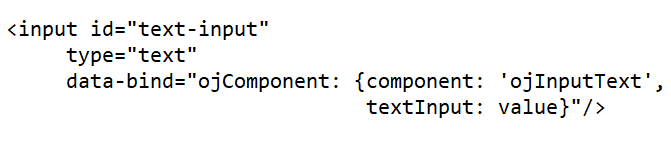
The newer releases of OJet will focus on Web Component architecture.
Example
<oj-input-text value="value text" label-hint="enabled"></oj-input-text>
The Oracle Utilities Application Framework applications are targeting to stay current on OJet upgrades as newer releases incorporate more features, better performance, and high integration with the Redwood Design System. In this release, Oracle Utilities Application Framework uses OJet V9.1 and with each release, an OJet upgrade will be applied when applicable.
As the bind format has been deprecated, support for the format will be removed from up-coming releases. This results in a smaller file size for OJet components but any existing code in Oracle Utilities Application Framework applications using the bind format will completely stop working. It is anticipated that this could happen as soon as OJet V11, but it could also be a later version. For this reason, it is imperative that any existing OJet code that uses the bind format be updated to use the Web Component format. There can be a direct replacement available (as in the above example) but OJet provides different options so there may be a better alternative.