
- Revision History
- Overview
- Feature Summary
- Utilities Common
- Meter Solution
- IMPORTANT Actions and Considerations
This document will continue to evolve as existing sections change and new information is added. All updates appear in the following table:
| Date | Module | Feature | Notes |
|---|---|---|---|
| 04 APR 2023 | System Wide | Oracle Analytics Server Upgrade | Updated document. Delivered feature in 22B. |
| 04 AUG 2022 | Created initial document. |
Oracle Utilities Meter Solution Cloud Service is used to maintain information about meters and the service points at which they are installed. The solution provides a means of recording measurements and events associated with meters in the field as well as the ability to compute usage for the recorded measurements, and process smart meter commands.
This guide outlines the information you need to know about new or improved functionality in this update, and describes any tasks you might need to perform for the update. Each section includes a brief description of the feature, the steps you need to take to enable or begin using the feature, any tips or considerations that you should keep in mind, and the resources available to help you.
 HAVE AN IDEA?
We’re here and we’re listening. If you have a suggestion on how to make our cloud services even better then go ahead and tell us by submitting a service request. Wherever you see this icon after the feature name it means we delivered one of your ideas.
DISCLAIMER
The information contained in this document may include statements about Oracle’s product development plans. Many factors can materially affect Oracle’s product development plans and the nature and timing of future product releases. Accordingly, this Information is provided to you solely for information only, is not a commitment to deliver any material, code, or functionality, and should not be relied upon in making purchasing decisions. The development, release, and timing of any features or functionality described remains at the sole discretion of Oracle.
This information may not be incorporated into any contractual agreement with Oracle or its subsidiaries or affiliates. Oracle specifically disclaims any liability with respect to this information. Refer to the Legal Notices and Terms of Use for further information.
Column Definitions:
Report = New or modified, Oracle-delivered, ready to run reports.
UI or Process-Based: Small Scale = These UI or process-based features are typically comprised of minor field, validation, or program changes. Therefore, the potential impact to users is minimal.
UI or Process-Based: Larger Scale* = These UI or process-based features have more complex designs. Therefore, the potential impact to users is higher.
Features Delivered Disabled = Action is needed BEFORE these features can be used by END USERS. These features are delivered disabled and you choose if and when to enable them. For example, a) new or expanded BI subject areas need to first be incorporated into reports, b) Integration is required to utilize new web services, or c) features must be assigned to user roles before they can be accessed.
| Ready for Use by End Users Reports plus Small Scale UI or Process-Based new features will have minimal user impact after an update. Therefore, customer acceptance testing should focus on the Larger Scale UI or Process-Based* new features. |
Customer Must Take Action before Use by End Users Not disruptive as action is required to make these features ready to use. As you selectively choose to leverage, you set your test and roll out timing. |
|||||
|---|---|---|---|---|---|---|
| Feature |
Report |
UI or |
UI or |
|
||
Oracle Utilities Analytics Visualization Meter - Usage by Customer Classifications |
||||||
Oracle Utilities Analytics Visualization Platform Enhancements |
||||||
New Class Element on Business Flag Standard Name Business Object |
||||||
Test Flow Documentation Support
Oracle Utilities Testing Accelerator enables you to embed documentation within a test flow definition. and provide your users with detailed information about the test flow, which can help them identify prerequisites of the data setup and debug issues. The application saves the embedded documentation as an attachment, providing you with the capability to upload and download directly through the Flow Definition page. This feature supports several image formats and file extensions such as *.DOC, *.XLSX, and *.PDF.
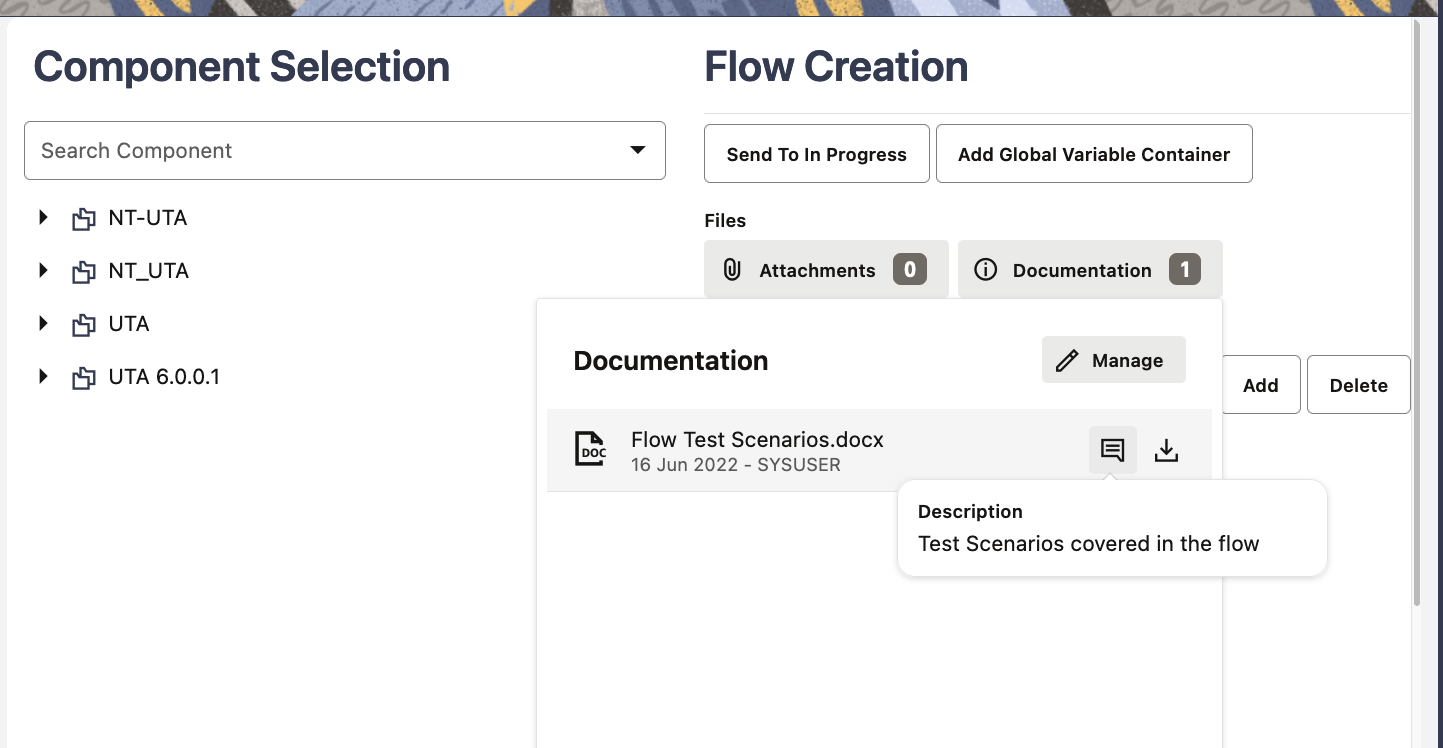
Embedded documentation makes test flows more understandable.
Steps to Enable
You don't need to do anything to enable this feature.
Test flow variable containers allow you to create and store variables, whose values are changeable between flow runs, at the first step of a flow definition and quickly update test data in the flow definition before running a test flow. By defining all the test flow variables in a single container, you can use these variables as test data in subsequent components in the flow and when you need to update the test data, you simply edit the variable values in the container instead of updating the test data in individual components in the flow.
Flow variable containers reduce the effort and time to update test data between flow runs.
Steps to Enable
You don't need to do anything to enable this feature.
Oracle Utilities Testing Accelerator enables you to localize the workbench's timezone, which displays the accurate date and time of operations performed on various objects. This feature also allows you to view dashboard analytics in your timezone for a more intuitive understanding of the flow run data. The selected timezone is user specific, which the application saves and displays the next time you logged in.
The User Timezone feature determines the date/time of operations on various objects in Oracle Utilities Testing Accelerator and provides you with an intuitive understanding of the flow run data.
Steps to Enable
You don't need to do anything to enable this feature.
Initial Measurement Data Monitor Batch Controls
The following Initial Measurement Data (IMD) Monitor batch controls minimize performance issues when adding large numbers of historical or backlog readings. These use the IMD as the processing work unit instead of the Device Configuration. This prevents situations in which an error on an IMD rolls back processing for all of the IMDS for a given device configuration. These include:
- D1-IMDV2 (IMD Monitor - Physical Devices V2): used to process initial measurements related to physical devices.
- D1-IMDD2 (IMD Monitor - Deferred IMDs V2): used to process previously held or deferred IMDs.
- D1-IMDM2 (IMD Monitor - Unattached MCs V2): used to process IMDs for standalone measuring components without a Device Configuration such as weather or price data.
In addition, these batch controls provide more frequent commits that:
- Ensure consistent records per second processing
- Preserve process during a thread shut down
- Isolate failures to a single IMD
They also help minimize restarts and isolate failures when importing a large number of reads with the same Device Configuration.
Steps to Enable
You don't need to do anything to enable this feature.
Tips And Considerations
- The D1-IMDV2 batch control invokes monitoring rules associated with the current state of an Initial Measurement Data (IMD). All monitoring rules throughout the IMD's business object's inheritance chain are considered.
- The D1-IMDV2 batch parameters govern whether the processing is further restricted by batch code, business object, status, and so on.
- The D1-IMDV2 batch process is based on the standard monitor process. However, it does not need to be plugged in on a state of the IMD business objects as a "Monitor Process". You do not need to change your IMD business objects to reference this new batch control.
- The D1-IMDV2 batch parameter "runAsBatchCode" can be used to process records where the current status is governed by "Run as Batch Control" when the parameter is not plugged in as a Monitor Process. For example, if there is an IMD in PENDING where the BO status is configured with a "Monitor Process" of D1-IMD then setting the "Run as Batch Control" to D1-IMD will allow this batch control to transition that record.
- The D1-IMDV2 batch control processes all IMDs for a Measurement Component up to and including that limit and each additional IMD will be held if the optional parameter for Measuring Component IMD Limit is configured. For the held IMDs, there are some optional behaviors:
- A To Do entry can be created for each Measurement Component with more than the configured limit of IMDs. Note that only one To Do entry per Measurement Component is created even if there is more than one IMD over the limit.
- The IMDs over the limit can be transitioned to a new status to remove these from the normal processing flow. This ensures these are not picked up on a subsequent run of the D1-IMDV2 batch control and that these must be processed using the D1-IMDD2 batch control.
In this release, the following zones on the Meter Operational Dashboard allow you to filter data by Division Code:
- Incomplete IMDs by Status
- Incomplete IMDs Trend
- VEE To Dos by Exception Type
- VEE To Dos Trend
- Usage Transaction by Status
- Usage Transaction Trend
- Usage Transaction To Dos by Exception
- Usage Transaction To Dos Trend
The new filter helps reduce clutter and irrelevant data in the dashboards.
Steps to Enable
To enable this feature, turn on Division Security in Master Configuration and set up the users' default divisions.
Key Resources
- Refer to the Dashboard by Division training.
Unit of Measure Filtering for On-Demand Reads
The application provides Unit of Measure (UOM) filtering for on-demand read commands for the following Smart Grid Gateway adapters:
- Landis+Gyr
- Itron AMM (formerly Silver Springs Networks)
- Adapter Development Kit
These UOM filters minimize IMD Seeder errors on devices where UOMs are not configured as measuring components.
UOM filtering for on-demand read commands reduces manual work and prevents IMD Seeder errors from unwanted meter readings.
Steps to Enable
You don't need to do anything to enable this feature.
Oracle Utilities Analytics Visualization Meter - Usage by Customer Classifications
The Oracle Utilities Analytics Visualization Meter - Usage by Customer Classifications enables you to define a customer profile class by using the Usage Subscription Type and populate custom values for the customer profile name.
Defining a customer profile class using the Usage Subscription Type decreases the need to build integration to populate customer values for the customer profile name.
Steps to Enable
You don't need to do anything to enable this feature.
Tips And Considerations
Consumption analytics require pre-aggregation in Oracle Utilities Meter Solution. Perform the following steps to pre-aggregate consumption analytics:
- Configure Dynamic Aggregation.
- Run Dimension Scanning.
- Run Aggregation.
- In Oracle Utilities Analytics Visualization projects, verify the reported data.
NOTE: For performance reasons, only query aggregated measurements.
Key Resources
- Refer to the Configuring Dynamic Aggregation for Consumption Analytics section in the Administrative User Guide for more information.
Oracle Utilities Analytics Visualization Platform Enhancements
Oracle Utilities Analytics Visualization has been upgraded to use the latest version of Oracle Analytics Server. The latest version of Oracle Analytics Server comes with a variety of platform enhancements that simplify the dataset and visualization creation and editing process. The main features and enhancements which are applicable to Oracle Utilities Analytics Visualization are listed below.
Extend Oracle Utilities Analytics Visualization with Data Modeling and Preparation Features
- Analyze the performance of visualization components
- Auto-join option in datasets with multiple tables
- Add multiple tables to a data set
- Add local subject area data sources to datasets that contain multiple tables
- Reload datasets on a schedule
- Projects renamed to workbooks
Exploring, Dashboarding, and Storytelling
- Add notes to canvases and tie notes to specific data points.
- Use conditional formatting to highlight important data events in your visualizations.
- Update the settings for multiple columns of a dataset at the same time.
- Update the shared properties of all visualizations on a canvas at the same time.
- Use improved sort options in Visualizations to clearly see the sort order and any sort conflicts.
- Enter your own tooltip text to display when you hover over a visualization title.
- Oracle Analytics fully adopts the new Oracle Redwood user interface design created over years of research with close attention to usability and accessibility.
The latest version of Oracle Analytics Server includes many other enhancements. See What’s New for Oracle Analytics Server (6.4) for more information. Note that not all of the items listed are applicable to Oracle Utilities Analytics Visualization. Contact your Delivery Team if you have any questions.
These simplify the dataset and visualization creating and editing processes, easily extending the application to meet unique business requirements.
Steps to Enable
You don't need to do anything to enable this feature.
Key Resources
- Refer to the Oracle Utilities Analytics Visualization Guide for more information.
Utilities Application Framework
Support Override of Base Algorithm on Batch Control
The following batch control plug-in spots are single algorithm plug-in spots:
- Select Records
- Process Record
- File Upload
If the product provides batch controls with algorithms for any of the above plug-in spots plugged in, you can now override the base algorithm by plugging in your own custom algorithm using a higher sequence. The system uses the algorithm with the highest sequence.
Previously, if a base product batch control was provided with algorithms for any of the above plug-in spots, you were not able to override the batch control algorithm. You could only clone the entire batch control if you wanted to override any of the provided algorithms.
Customize base product delivered batch controls when implementations want to adjust the algorithms.
Steps to Enable
You don't need to do anything to enable this feature.
Export Content Migration Assistant Data to an Older Version
When performing a Content Migration Assistant (CMA) export, the format of the file is specific and the CMA import step knows how to read the file. There are times when the product makes an enhancement to CMA that requires a change in the structure of the export file at which point the 'version' of the CMA file is incremented. When this happens, the import step is able to detect if you are importing an older version of the CMA file and proceeds accordingly.
The product now provides support for exporting a CMA file using an older version format. For example, the current CMA version is 5. When creating a Data Set Export, you can indicate that you want to export using version 4. This is useful if you have upgraded one of your environments to a version of the product that uses CMA version 5, and you need to export data to an environment that has not yet been upgraded and is therefore still on version 4.
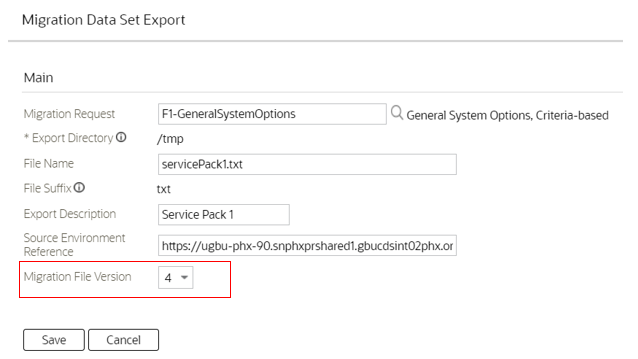
This is analogous to choosing to save a Microsoft Word document using an older version of Word (for example, with the .doc file type) during the period where not all software could consume the newer (.docx) version.
If the Content Migration Assistant (CMA) file format is changed, you can export an an older format to share CMA data to older versions of the product.
Steps to Enable
You don't need to do anything to enable this feature.
Tips And Considerations
Note that this was available in previous releases via patches:
- 21B / 4.4.0.3.1: 34100579
- 21C / 4.4.0.3.2: 34100684
- 22A / 4.5.0.0.0: 34157439
General Data Export - Restrict Initial Export by Time
By default, the initial export batch process exports the entire data for an entity. In some situations, typically around high volume historical data, there is a need to restrict the export to more recent data (for example, the last few months of data).
The initial export batch process now supports an optional batch parameter named "Restrict By Date" that allows utilities to constrain the history they export. The parameter references the date field to use and the requested time frame in terms of number of days prior to business date. Refer to the Generalized Initial Export Template (F1-GEIXP) batch control for more information.
Note that excluding records from export should be carefully considered as this may result in data discrepancies when the excluded data is referenced on other entities. Refer to online documentation for additional considerations when using this option.
The option is only applicable to specific entities that have a qualifying reference date and the time frame for export may vary for each customer. Therefore, the new parameter is not added to any base product Initial Export batch control aside of the template batch control for documentation purposes. Customers can clone the base product batch control for a specific entity and add the parameter to their custom version.
You can restrict the scope of data exported for a specific entity to a configurable, recent period of time.
Steps to Enable
To enable this feature, complete these steps:
- Clone the initial export batch control for the specific maintenance object.
- Add the Restrict By Date parameter as defined on the Generalized Initial Export Template (F1-GEIXP) batch control.
Generalized Export Dashboard Portal Enhancements
When the list of entities to add or edit export settings for is too large, the transaction may time out. This situation often required the user to repeat the update in smaller batches. Now, by default, the application attempts to make the update in smaller batches. This minimizes timeout situations and makes them less problematic.
In addition, in some rare situations, the process to enable an entity for ongoing export may leave the entity not fully configured. Entities that are not fully configured are now explicitly highlighted as not configured, and they are listed at the top of the Export Entities zone. The user can then repeat the enablement action for these entities to resolve the problem.
You can better manage and review configuration issues related to entities set up for export.
Steps to Enable
You don't need to do anything to enable this feature.
Action Provided to MO Audit Plug-In Spot
The action of a record is now provided to the MO Audit plug-in spot. For business use cases where the algorithm should perform different logic based on whether the record is added, changed, or deleted, this information simplifies algorithm code. Previously, algorithms with this requirement had to determine whether the record was new, changed, or deleted themselves.
MO Audit algorithms now receive the action for the impacted object simplifying logic that may differ based on the action.
Steps to Enable
You don't need to do anything to enable this feature.
A "Dropdown Lists" (F1-DropdownLists) REST API retrieves data needed for building one or more drop-downs. Information for a drop-down includes a list of valid codes and their corresponding descriptions.
The web service supports the following types of drop-down data sources:
- Lookup field
- Extendable lookup
- All records in an admin maintenance object (only single prime key field entities are supported)
- Business service/service script computed list of values
User interface applications like Visual Builder (VB) may use a new API for retrieving data displayed as drop-downs.
Steps to Enable
You don't need to do anything to enable this feature.
The new Extensions Dashboard portal provides a high-level summary of all utility-owned entities and extensions made to base product entities. Information is summarized by maintenance object and allows the user to view the specific entities for a specific maintenance object and navigate to the respective page or portal for more information. With this information, utilities can better assess the necessary testing when planning for product upgrades and investigate the removal of extensions when upgrading to reduce costs.
You can better manage and review your product customizations.
Steps to Enable
Make the feature accessible by assigning or updating privileges and/or job roles. Details are provided in the Role section below.
Key Resources
- Refer to the Extensions Dashboard Portal training.
Role And Privileges
- System administrators should set or grant users access to the F1CMEXT application service.
The product already provides a comprehensive infrastructure that supports user interface rendering of various types of insights for specific contexts. For examples, billing insights about an account, person, and more.
A new "Insights" REST API (F1-Insights) allows an external user interface application to retrieve insight information for a specific context based on the same insight configuration. The information provided by the web service focuses on insight content and includes minimal visualization recommendation, allowing the external application to render the insights as per its own configuration and rules. For the same reason, the information does not include action-related settings because they are application specific.
User interface applications like Visual Builder (VB) may use a new API for retrieving insights related content to be presented for a specific context.
Steps to Enable
You don't need to do anything to enable this feature.
Menu Item Configuration for Add Action
Menu items include optional configuration for application service and access mode. For menu items associated with searching, security is controlled by the associated portal or transaction's application service. Therefore, defining an application service on these menu item is only useful to override the base application service, which is not common. However, for many menu items related to the add action, if a users did not have access to that action, they may still see the option on the menu and would only get a security error later after attempting to add. Utilities could override this by configuring an application service for the "add" Menu Item.
Starting in this release, all product menu items handling an 'add' or any other action are configured with an application service or access mode by default.
Menu items for the add action include application security configuration.
Steps to Enable
You don't need to do anything to enable this feature.
Tips And Considerations
If your implementation has associated any base menu item with an application service, this configuration will not be overridden.
User Log Retrieval for a Date Range
This feature builds on existing functionality where a user with administrator access can request the logs of a different user. Previously, a drop-down to the Show User Log button was added, which was only available for a user with administrator access. The drop-down allowed the administrator to select the Show Log option where they could enter the name of a different user.
Now the Show Log option is available for all users that have access to the Show User Log button.
-
If you are not an administrative user, the Show Log option allows you to supply a date/time range for your own logs.
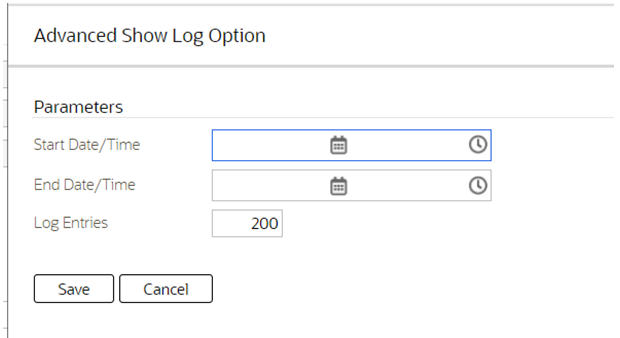
-
If you have administrator access, the Show Log option continues to allow you to choose your logs or the logs of a different user. You can also specify a date/time range.
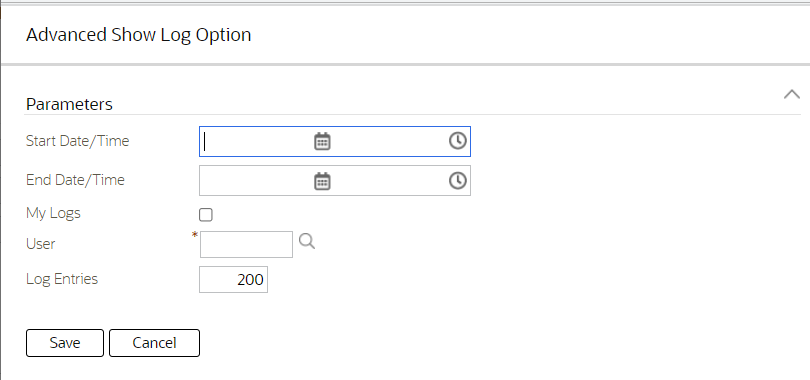
This allows a user or administrator to target the requested log information to a specific date and time range.
Steps to Enable
You don't need to do anything to enable this feature.
To Do Management by Assigned User
Previously, the To Do Management portal restricted queries to a specific To Do Type. Now either a To Do Type or an Assigned User are required. As a result, there is now support for management of entries assigned to a user across multiple to do types.
You can use the To Do Management portal to review and work on all entries assigned to a user.
Steps to Enable
You don't need to do anything to enable this feature.
Key Resources
- Refer to the To Do Processing training.
You can use a new To Do Summary dashboard zone in place of the existing To Do Summary dashboard zone. The new zone provides the same summary information as the existing zone, but it navigates to a more modern To Do Management portal for managing entries assigned to the current user.
NOTE: The existing To Do Summary zone is not deprecated for backward compatibility, but it is no longer included with the dashboard portal by default. For existing customers, an upgrade script is used to link the existing zone back to the dashboard portal as a customization. If users are given security access to the new zone, the new zone appears by default in the dashboard. To avoid confusion, users that see both zones should change their user preferences to select the zone they prefer. See the Tips and Considerations section for more information.
You can use the To Do Management portal to conveniently work on entries assigned to you directly from the To Do Summary dashboard zone.
Steps to Enable
Make the feature accessible by assigning or updating privileges and/or job roles. Details are provided in the Role section below.
Tips And Considerations
If you are upgrading to this release, you should confirm which page your users should use to manage their To Do Entries.
- The To Do Management page is the modern portal provided for managing To Do entries. The new To Do Summary zone drills into the To Do Management page. If your implementation uses the To Do Management page, you should grant users access to the new application service and advise users to remove the old To Do Summary zone from their User Preferences. You may also remove the existing zone from the dashboard altogether if no longer used.
- The To Do List page is the legacy fixed page for managing To Do Entries. The original To Do Summary dashboard zone drills into the To Do List page. If your users continue to use the legacy To Do List page, you should not grant them access to the new To Do Summary zone's application service.
Key Resources
- Refer to the To Do Processing training.
Role And Privileges
- System administrators should set or grant users access to the F1TDSUM application service.
The To Do Dashboard portal is enhanced to provide a detailed list of the entries selected by the charts on a new Details tab.
The new tab supports further filtering and actions a user can take to manage the selected entries. This provides the same functionality supported by the To Do Management portal.
NOTE: With this enhancement to the To Do Dashboard, utilities are strongly encouraged to discontinue the use of the To Do Summary and Supervisor To Do Summary pages. The To Do Dashboard provides the functionality found in the two legacy 'summary' pages, and it also provides additional functionality not found in those pages.
You can use the To Do Dashboard portal to review and work on selected entries.
Steps to Enable
You don't need to do anything to enable this feature.
Key Resources
- Refer to the To Do Processing training.
Maintain display icon information using a standard portal.
The Display Icon Reference page has been converted to a portal to provide you with a more flexible and extendable user experience.
The display icon reference page has been converted from the 'list' maintenance fixed page style to a portal-driven user interface page. It includes a query zone where you can search by the code or the description. The image of the icon is displayed in the results.
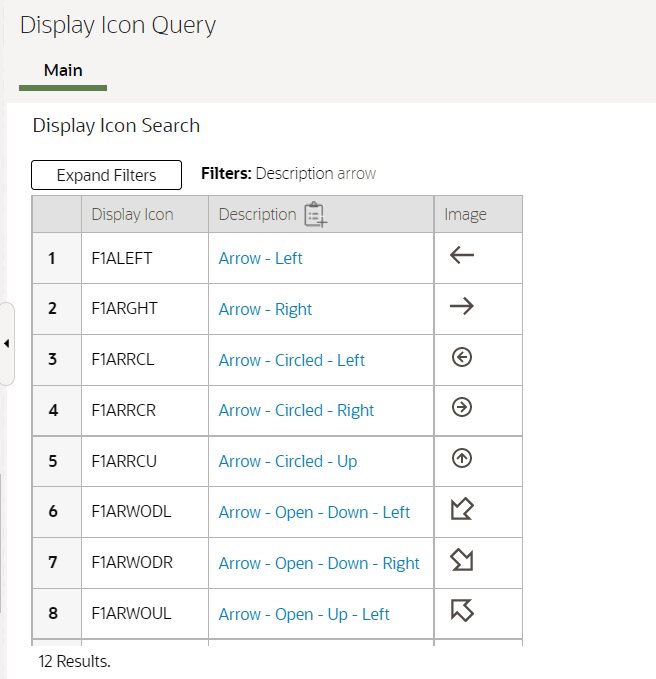
Any page that includes a search for a display icon, such as Tree or Insight Type, uses the same query and also benefits from the enhancement to include the icon's image.
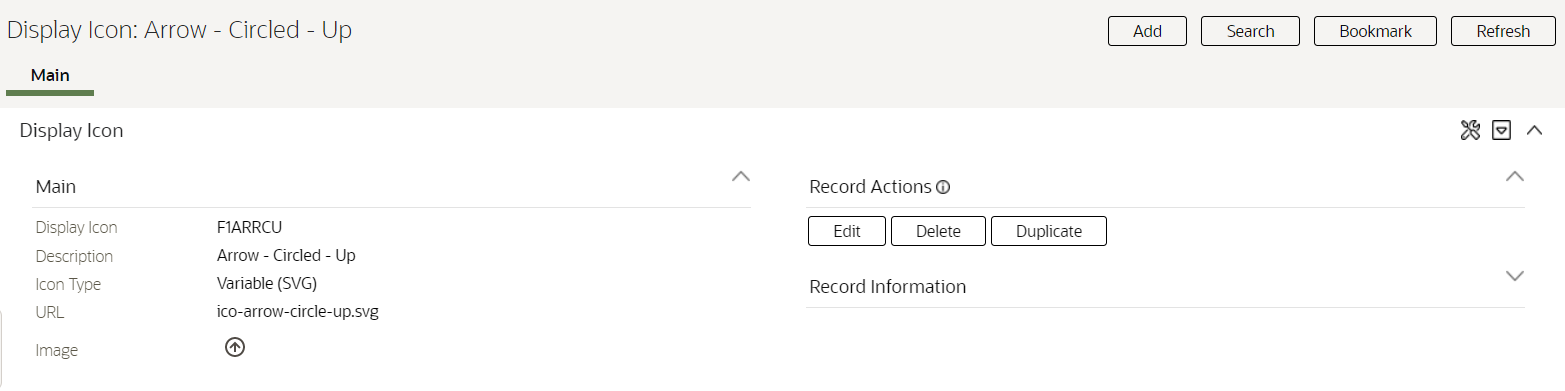
The maintenance portal uses the current standards and also displays the image of the icon.
Steps to Enable
You don't need to do anything to enable this feature.
Tips And Considerations
Upgrade scripts ensure that users with Read access to the existing application service will have access to the new application service associated with the new portal. This table lists the existing and new application services.
| Object | New Application Service | Access added to any user groups with this Application Service / Read Access |
|---|---|---|
| Display Icon Query Portal |
F1ICONQ |
CILTDIRP |
| Display Icon Portal |
F1ICON |
CILTDIRP |
Any existing bookmarks for this page will take the user to the previous version of the page. Since the previous page was a list maintenance, the assumption is that you do not have a specific icon bookmarked, but rather the whole page. You should delete these bookmarks. If you would like to bookmark any specific display icon using the new page, display that record and click Bookmark to add a new bookmark for that record.
The Menu page has been converted from the fixed page style to a portal-driven user interface page.
The Menu portal includes an Application Security tab for reviewing and configuration application security information for any of the menu lines.
This functionality was previously released on a separate Menu Application Security portal that was accessible via a dashboard zone associated with the fixed style menu page. With the conversion of the menu page to a portal, all menu configuration options, including application security setup, are provided in one place.
The Menu page has been converted to a portal to provide you with a more flexible and extendable user experience.
Steps to Enable
You don't need to do anything to enable this feature.
Tips And Considerations
An upgrade script updates all user groups that currently have access to the existing Menu page application service CILEMNUP to have the same access to the new portal application service F1MENU. Note that any existing bookmarks for this page will take the user to the previous version of the page. You should delete thosebookmark sand add them again as needed.
Shortcut Key for Navigating Multiple Tabs Adjusted
The shortcut key for navigating from one tab of a page to the next tab on the same page is now Alt+F2. In the following example, if you are on the Main tab of the User page and wish to go to the To Do Roles tab, you could use Alt+F2 to get there.

To go to the previous tab, use Shift+Alt+F2:

Previously, the shortcut keys for this functionality were F2 and Shift+F2, respectively. OJet uses F2 for some of its keyboard navigation and since the product uses OJet widgets for base functionality like Trees and Insights, the shortcut keys were adjusted to be able to take advantage of the built-in OJet features.
Adjusting shortcut key assignment enables previous key to be used for other purposes.
Steps to Enable
You don't need to do anything to enable this feature.
Previously, the Unified Search supported a single search option for a user. Now a user may switch between search options to which they have access. In addition, information about the current search option, which filters and hints it supports, and a recent search history, are all new features easily available to assist the user.
The unified search is enhanced to provide help on each filter and hint, and allow you to toggle between multiple search options you can access.
Steps to Enable
You don't need to do anything to enable this feature.
Tips And Considerations
- Refer to Unified Search Enhancements training.
Application Service's Application Security Zones
The zones on the Application Service - Application Security tab have the following improvements:
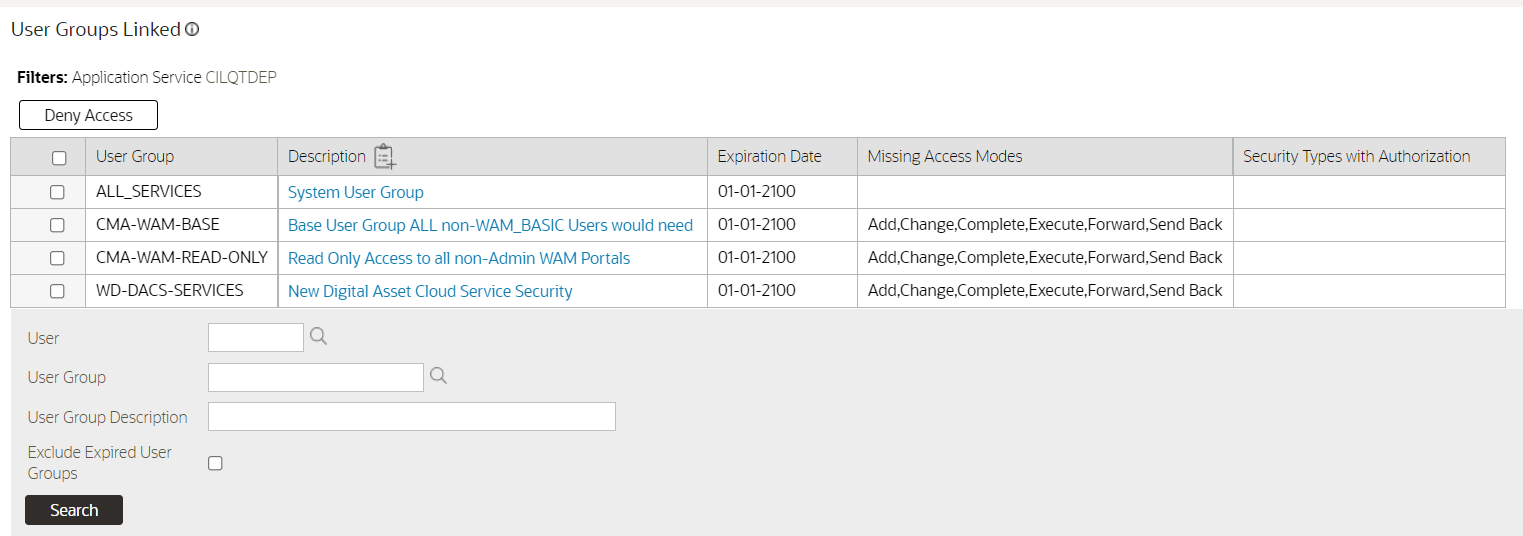
- The Deny Access button in the User Groups Linked zone has been converted to a mass action button, allowing updates to multiple groups with one action. In addition, the search filters have been enhanced to provide a search within search to find a specific user or user group, filter by user group description, and exclude expired links. The Expiration Date column has been enhanced to highlight expired links in bold with red text and an asterisk. The Access Modes column now shows only the application service access codes that are not configured for the user group.
- The Grant Access button on the User Groups Not Linked zone has been converted to a mass action, allowing updates to multiple groups with one action. A pop-up window provides the ability to set the expiration date and remove unwanted access modes. In addition, the search filters have been enhanced to provide a search within search to find a specific user or user group and to filter by user group description.
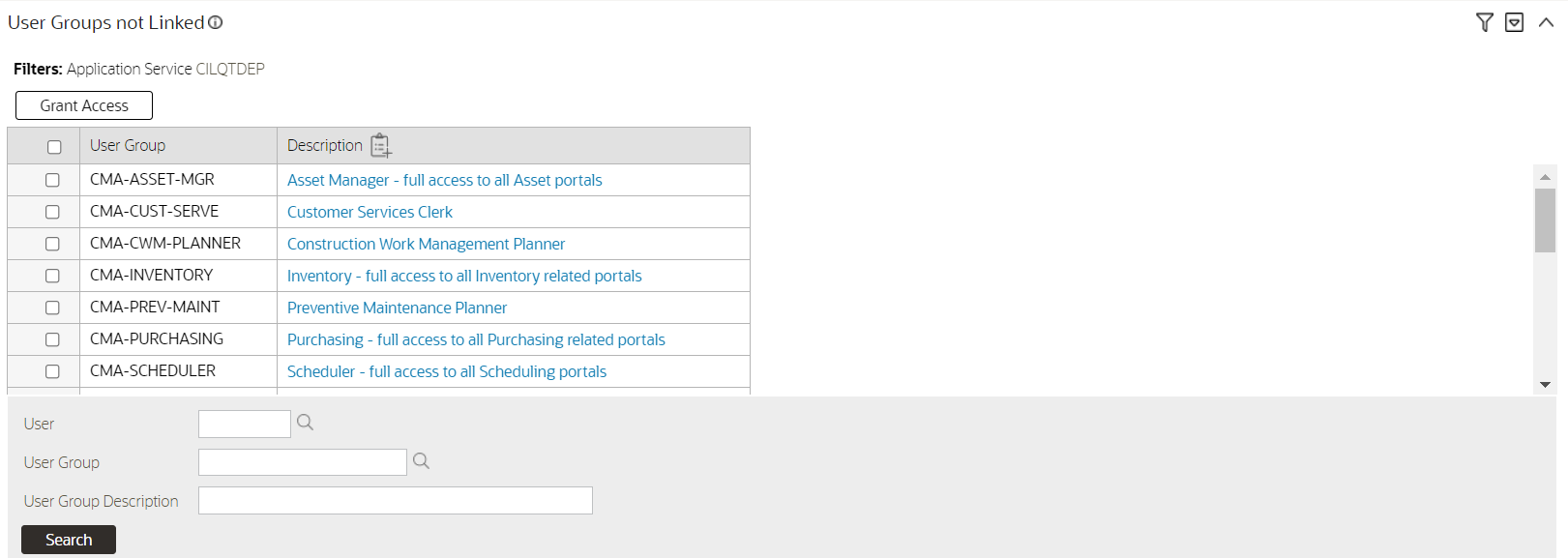
Granting or denying application security to user groups has been enhanced to allow a mass action on selected groups instead of updating each group individually.
Steps to Enable
You don't need to do anything to enable this feature.
HTML Sanitization Improvements
The product uses HTML sanitization logic to protect against HTML injection. In this release, the product has improved how it handles custom attributes. Previously, the sanitization logic would automatically sanitize unrecognized custom attributes. Now the sanitization logic has been adjusted to assess the data referenced by the attribute. If the data appears to pose an HTML injection risk, the attribute is sanitized by adding 'data-' to the attribute, rendering it harmless. If the data is considered safe, the custom attribute is accepted as implemented.
Improvements to the HTML sanitization functionality to better handle custom attributes.
Steps to Enable
You don't need to do anything to enable this feature.
Improved Characteristic Type Referential Integrity
In this release, the logic to check referential integrity for characteristic types and characteristic values is adjusted to be more targeted, and uses the characteristic entity configuration.
Tables that hold characteristic types and values fall into one of the following categories:
-
Characteristic tables that are a child record of a maintenance object and are used to capture additional information about that object.
-
Log tables that use characteristics to reference additional information related to the log.
-
Configuration tables to define valid characteristics for a related master or transaction table. For example, on the To Do Type, you can configure valid characteristic type for To Do Entries of that type.
-
Configuration tables that use characteristic types for eligibility criteria.
-
Staging tables that capture characteristics as part of an integration step.
Most characteristic tables fall into the first two categories. For these two categories, there is a characteristic entity flag value for each table and the table metadata defines its characteristic entity. For example, the To Do Entry Characteristic table defines the To Do Entry characteristic entity flag value. In this release, those tables have been updated to turn off the Enable Referential Integrity switch for the Characteristic Type and Characteristic Value constraints. Instead, explicit deletion validation logic has been added for Characteristic Type and Value. The logic looks at the Characteristic Entity values associated with the Characteristic Type and will only check the tables related to those values for references to the Characteristic Type/Value.
Tables in category 3 do not reference a characteristic entity value. Since these are configuration tables and low volume, the constraints for Characteristic Type and Characteristic Value continue to turn on the generic referential integrity.
Tables in categories 4 and 5 may or may not have an explicit characteristic entity value depending on the use case. For these types of tables, if there is no Characteristic Entity, it is at the discretion of the product that owns that table as to whether or not referential integrity is enabled for that table.
This enhancement ensures that the deletion logic will not spend time checking every characteristic table for a reference the characteristic type/value. It will first explicitly check the tables related to the characteristic entities configured on the Characteristic Type, and then the standard generic referential integrity based on the constraint configuration will be applied.
Note that as part of this change the referential integrity is also checked when removing a Characteristic Entity value from the Characteristic Type. For example, if you have a Characteristic Type that references the To Do Entry characteristic entity and you want to remove that characteristic entity value, the system will check first that there is no To Do Entry that references that Characteristic Type.
Improved referential integrity checking for characteristic type and characteristic value allow for more efficient deletion action.
Steps to Enable
You don't need to do anything to enable this feature.
New Class Element on Business Flag Standard Name Business Object
The F1-BusinessFlagStandardName business object is enhanced to include a new, required element for Class. The class element is mapped to a characteristic of type F1-BSFCL, which has values of Business Flag and Real Time. The description on the F1-BusinessFlagStandardName BO has been changed to External Insight Standard Name to reflect its expansion to a wider set of external insights.
Additional class element added to the External Insight Standard Name (formerly described as Business Flag Standard Name) extendable lookup business object allows developers to restrict the choice of standard name types on a business flag type to specific classes.
Steps to Enable
You don't need to do anything to enable this feature.
New entities for defining data redaction rules as part of a larger future enhancement to support obfuscation of personal information at export time were added.
NOTE: This functionality is not yet ready for use by implementations.
Ability to define rules that specify how different types of personal information details should be redacted when exported out of the system. These rules are not ready for use in this release.
Steps to Enable
Make the feature accessible by assigning or updating privileges and/or job roles. Details are provided in the Role section below.
Role And Privileges
- This functionality is not yet ready for implementation use.
See a preview of the database changes coming for 22B in the Oracle Utilities Cloud Services Database Changes Guide. This guide is also available in PDF.
This includes information about databases changes to tables, indexes, views, columns, and more.
Steps to Enable
You don't need to do anything to enable this feature.
Supported Platforms and Browsers
Oracle Utilities 22B Cloud Services support the following operating system and web browser combinations:
| Operating System |
Web Browsers |
|---|---|
| Windows 10 |
Firefox ESR 91+ Chrome for Enterprise 98+ Microsoft Edge (Chromium-based) 98+ |
| iPad2 iOS 10.x (WACS only) |
Safari (selected flows and portals only) |
Oracle recommends using only supported client platforms and browsers.
Steps to Enable
You don't need to do anything to enable this feature.
New Application Services
The following Application Services were added in the 22B release:
| Application Service |
Description |
|---|---|
| D1DVCINSTMNU |
Device Install Menu Access |
| D1DVCMNU |
Device Menu Access |
| F1CMEXT |
Extensions Dashboard Portal |
| F1-OAUTHADDKEY |
Add OAuth Keys |
| F1-OAUTHKEYBOAS |
OAuth Keys BO |
| F1-REDACTRULE |
Redaction Rule MO |
| F1OBFCFG |
Obfuscation Configuration Portal |
| F1RDCTM |
Redaction Rule Portal |
| F1RDCTQ |
Redaction Rule Query Portal |
| F1TDSUM |
To Do Summary Zone |
Removed Application Services
The following Application Services were removed in the 22B release:
| Application Service |
Description |
|---|---|
| F1-AVALG |
Application Viewer - Extract Algorithms |
| F1-AVBT |
Application Viewer - Extract Batch Control |
| F1-AVMO |
Application Viewer - Extract MOs |
| F1-AVTBL |
Application Viewer - Extract Table data |
| F1-AVTD |
Application Viewer - Extract To Do Types |
| F1-DFLTAPS |
Default Execution (Deprecated - do not use) |
| F1-DTDOM |
Outbound Message Error To Do Entry Cleanup |
| FWLZDEXP |
Data Explorer (Deprecated - do not use) |
Application services provide user access to new features and functions.
Steps to Enable
You don't need to do anything to enable this feature.
Oracle Analytics Server Upgrade
Oracle Analytics Server v.6.4 is supported in this release.
An upgrade is required from the version supported in 22A.
Steps to Enable
You don't need to do anything to enable this feature.
Key Resources
- Refer to the Oracle Analytics Server documentation.
IMPORTANT Actions and Considerations
REPLACED OR REMOVED FEATURES
From time to time, Oracle replaces existing cloud services with new features, or removes existing features. Replaced features may be put on a path to removal. As a best practice, you should use the newer version of a replaced feature as soon as a newer version is available.
This section identifies the features in this Cloud service that have been replaced or removed.
| Product | Removed Feature | Target Removal | Replacement Feature | Replaced In | Additional Information |
|---|---|---|---|---|---|
| Oracle Utilities Application Framework | Support for Migration Requests F1-FrameworkAdmin and F1-SchemaAdmin |
22B | Migration Request F1-FrameworkConfig | 4.3.0.4.0 | These two migration requests have been marked as not recommended for a long time. As of this release, they are no longer delivered in base. For backward compatibility, the two migration requests are updated to have a "CM" owner for upgrading utilities. To avoid confusion, you may remove the records from your installation if they have never been used. |
| Oracle Utilities Application Framework | Work Calendar Legacy Page Metadata |
22B | Portal-based User Interface |
21A | Navigation Keys:
Records in the UI metadata program component tables related to the above navigation keys. |
| Oracle Utilities Application Framework | Time Zone Legacy Page Metadata | 22B | Portal-based User Interface | 21A | Navigation Keys:
Records in the UI metadata program component tables related to the above navigation keys. |
| Oracle Utilities Application Framework |
Application Viewer | 22B | Data dictionary is visible in the Table maintenance portal. Data from the Algorithm viewer, To Do Type viewer and Maintenance Object viewer are all visible in the respective maintenance pages. |
21A | Note that there is currently no replacement for the Javadocs viewer. This is planned to be addressed in the next release. |
| Oracle Utilities Application Framework |
Invite User to Mobile Application Zone |
22B | Not applicable | This zone was implemented as part of the mobile application, which is no longer supported. |
Unless otherwise specified below, these notes are for informational purposes and no action is required.
RELEASE UPDATES
Information about fixed bugs is available in Maintenance Pack and Hotfix release notes at Document ID 2616441.1.
PLANNED REMOVAL
Plan to Remove Support for Previous User Experience from Oracle Utilities Application Framework
In the current release, the product provides an option to Switch UI View. This changes the current user experience for the user for that session. Assuming the user is in the latest user experience (referred to as Redwood), this action switches the user experience to the previous look-and-feel.
In the future, the product plans to remove support for the ability to switch that design that preceded Redwood.
Plan to Remove F1-DFLTAPS and FWLZDEXP Application Services from Oracle Utilities Application Framework
In an effort to consolidate application services, the product is removing all references in base delivered metadata to F1-DFLTAPS and FWLZDEXP. Records will instead reference F1-DFLTS.
You should select Admin > Security > Application Service and view F1-DFLTAPS. Review the Secured Objects zone. Note especially if your implementation uses this application service within HTML or Schemas. Any references should be adjusted to F1-DFLTS or a different application service that is appropriate for the business rule.
Implementations should repeat the above steps for the application service FWLZDEXP.
In addition, if your implementation has any hard-coding of either F1-DFLTAPS and FWLZDEXP in code that is not detectable by the Secured Objects zone, those references should also be updated to use F1-DFLTS or a different application service that is appropriate for the business rule.
Plan to Remove Workflow and Notification Metadata and Database Tables from Oracle Utilities Application Framework
Workflow and notification functionality was an early way to support exchanging messages with an external system (notification) and providing a configurable process for acting on incoming messages (workflow). In more recent years, the functionality for managing external messages is supported using Outbound Message and Inbound Web Service functionality. In addition, there are several features to support processing incoming messages. Service scripts can handle simple use cases. For more complicated processes, the service task or other business object driven objects are available.
The metadata and database tables related to this feature will be removed in a future release. Note that only a portion of the functionality for this feature is managed by Oracle Utilities Application Framework. Most of the functionality is supported in the Oracle Utilities Customer Care and Billing product.
Plan to Remove Mobile Application Framework Metadata from Oracle Utilities Application Framework
Removal of support for the Mobile Application Framework has already been announced in a previous release. However, there is metadata still included in the application related to this functionality.
The metadata will be removed in a future release.
Plan to Remove Key Ring Validation Scripts, Algorithm Types, and Algorithms from Oracle Utilities Application Framework
The product is removing all scripts, algorithm types, and algorithms that performed validation rules on the K1-SignatureKeyRing business object. The algorithms have been removed from the BO configuration. There are requirements to expand the use of a signature key ring beyond the current implementation for object file storage and the existing validations are not applicable to other planned use cases.
The following items will be removed in a future release.
- Algorithm
- K1-KRDCKFS
- K1-KRINCKFS
- Algorithm Type
- KRDCKFS
- K1-KRINCKFS
- Message
- 11009 / 1402
- Plugin Script
- K1-KRDCKFS
- K1-KRINCKFS
- Service Script
- K1-ChkCfgExL
Plan to Remove UI Metadata Related to Converted Pages from Oracle Utilities Application Framework
The UI metadata related to fixed pages that have been converted to portals will be removed in a future release. The tables list the navigation keys related to each maintenance page. The related UI program component data will also be removed. Note that the metadata related to the search pages will not be removed at this time in case they are used on other fixed pages.
| To Do Entry Maintenance |
Table Maintenance |
Work Calendar Maintenance |
Message Maintenance |
|---|---|---|---|
| toDoEntryCharGrid toDoEntryDrillKeyValuesListGrd toDoEntrySortKeyValuesListGrid todoentrykeyvalue todoentrymain toDoEntryMaint toDoEntryPopupAdd toDoEntryPopupForward toDoEntryPopupSendBack Any help navigation keys |
metaDataTableFieldsGrid metaDataTableMainPage metaDataTableCFldsGrid metaDataTableConstPage metaDataTableMaint metaDataTableRefByConstPage metaDataTableFieldPage Any help navigation keys |
workCalendarMaint workCalendarMainPage workCalendarHolidayGrid Any help navigation keys |
msgMaintDetailsPage msgMaintGrid msgMaintPage msgMaintTabMenu Any help navigation keys |
| Time Zone Maintenance |
Application Security Portal | Display Icon Portal |
|---|---|---|
| timeZoneMainPage timeZoneTabMenu Any help navigation keys |
f1appsecTabMenu |
displayIconRefMaint |
Plan to Remove Miscellaneous System Data from Oracle Utilities Application Framework
The following metadata is no longer in use and will be removed in a future release:
| Object | Data | Description/Comments |
|---|---|---|
| Lookup Value |
CHAR_ENTITY_FLG / F1SE |
Characteristic Entity / Sync Request Inbound Exception |
| Script |
F1-TDMgActSS |
To Do Management - Process Actions (Deprecated) / Replaced by F1TDMgActSS |
| Script |
F1AddDebugLg |
Add Log for Monitoring Probe (Deprecated) / Replaced by a BS - F1-MONPRBLOG |
| Zone | F1-BOMOSRCH |
Not in use by base functionality. |
| Zone | F1-CATCHSCH |
Not in use by base functionality. |
| Zone | F1-MONAVKEY |
Not in use by base functionality. |
| Zone | F1-REVCONQRY |
Not in use by base functionality. |
Plan to Remove XSLT Managed Content Type from Oracle Utilities Application Framework
Entries in the Managed Content table related to XSL should be using the XSLTC managed content type and not the XSLT managed content type. In a future release, the XSLT managed content type will no longer be supported.
Plan to Remove REST IWS - Original REST Servlet from Oracle Utilities Application Framework
The original URL supplied for invoking IWS based REST services included the IWS Service name in its makeup. Support for this will continue for backward compatibility purposes, but it will be deprecated in a future release. You should adjust your existing integrations to use the currently supported URL.
Plan to Remove Append Setting from Pagination - Oracle Utilities Application Framework
There are several known issues with the functionality of the "append" option in pagination. It is recommended that you do not use this pagination setting.
Plan to Remove Support for Master/Subordinate Servers for Web Service Catalog in Oracle Utilities Application Framework
The Service Catalog Configuration (master configuration) enables you to define subordinate servers. Defining subordinate servers is no longer applicable for the Oracle Integration Cloud.
Plan to Remove Support for Batch Run Statistics Portal Functionality in Oracle Utilities Application Framework
The Batch Run Statistics portal provides additional information about batch runs, but some functionality on the portal is related to capturing additional information from an external tool. This information is stored in a Fact record. Support for capturing additional information from an external tool will be discontinued in a future release.
Plan to Remove Configuration Migration Assistant Import Algorithm Plugin Spot from Oracle Utilities Application Framework
The Content Migration Assistant Import algorithm plug-in spot will be deprecated. It is recommended that you review any existing algorithms and create appropriate Pre-Compare algorithms instead.
Plan to Remove Business Object Read from F1-MAINPROC When Pre-processing Exists
In the original implementation of configuration tools, the main framework maintenance BPA (F1-MainProc) did not perform a Read of the BO when a pre-processing script was linked to the BO via options. The pre-processing script was responsible for the Read.
In a subsequent release, a BO Read was added in F1-MainProc (even if a pre-processing script existed) to resolve a UI Hint issue related to child business objects. This solution introduced a problem only visible for specific scenarios and a different fix has been introduced. The new fix made the BO Read unnecessary in F1-MainProc. Because there are many pre-processing scripts that are properly performing the Read of the BO, ideally the BO Read should be removed from F1-MainProc so that multiple reads are not performed. However, there may have been pre-processing scripts introduced after the BO Read was included in F1-MainProc that were coded to not perform a BO read in the pre-processing script. Due to this situation, the BO Read is still performed as part of the processing of F1-MainProc.
When a pre-processing script exists, we plan to remove the BO Read from F1-MainProc logic. You should review your custom pre-processing scripts that are linked to your BO options to ensure that they properly perform a Read of your BO.