
- Revision History
- Overview
- Feature Summary
- Utilities Common
- Meter Solution
-
- Meter Solution
- Smart Grid Gateway
- Utilities Application Framework
- Application Security
- Batch Processing
- Content Migration Assistant
- Data Export
- Implementation Tools
-
- Attachment Malware Scan Plug-in
- Base Product Index Data Visible in Table Portal
- Business Object Status Reasons REST API
- Configuration for Report Buckets in Object Cloud Storage
- Expand Tree REST API
- HTML Editor Syntax Highlighted
- HTML Row Header Reference Update
- Javadocs Viewer
- New Base Display Icon Images
- Parameter Update for New Language Batch Program
- Product Usability
- System Wide
- IMPORTANT Actions and Considerations
This document will continue to evolve as existing sections change and new information is added. All updates appear in the following table:
| Date | Module | Feature | Notes |
|---|---|---|---|
| 10 OCT 2023 |
Updated document. Added "BI/Analytics Publisher Menu Item" under the Product Changes section. |
||
| 09 AUG 2023 | Utilities Application Framework | Updated document. Revised feature description. | |
| 04 APR 2023 | System Wide | Oracle Analytics Server | Updated document. Delivered feature in 22C. |
| 01 DEC 2022 | Created initial document. |
Oracle Utilities Meter Solution Cloud Service is used to maintain information about meters and the service points at which they are installed. The solution provides a means of recording measurements and events associated with meters in the field as well as the ability to compute usage for the recorded measurements, and process smart meter commands.
This guide outlines the information you need to know about new or improved functionality in this update, and describes any tasks you might need to perform for the update. Each section includes a brief description of the feature, the steps you need to take to enable or begin using the feature, any tips or considerations that you should keep in mind, and the resources available to help you.
 HAVE AN IDEA?
We’re here and we’re listening. If you have a suggestion on how to make our cloud services even better then go ahead and tell us by submitting a service request. Wherever you see this icon after the feature name it means we delivered one of your ideas.
DISCLAIMER
The information contained in this document may include statements about Oracle’s product development plans. Many factors can materially affect Oracle’s product development plans and the nature and timing of future product releases. Accordingly, this Information is provided to you solely for information only, is not a commitment to deliver any material, code, or functionality, and should not be relied upon in making purchasing decisions. The development, release, and timing of any features or functionality described remains at the sole discretion of Oracle.
This information may not be incorporated into any contractual agreement with Oracle or its subsidiaries or affiliates. Oracle specifically disclaims any liability with respect to this information. Refer to the Legal Notices and Terms of Use for further information.
Column Definitions:
Report = New or modified, Oracle-delivered, ready to run reports.
UI or Process-Based: Small Scale = These UI or process-based features are typically comprised of minor field, validation, or program changes. Therefore, the potential impact to users is minimal.
UI or Process-Based: Larger Scale* = These UI or process-based features have more complex designs. Therefore, the potential impact to users is higher.
Features Delivered Disabled = Action is needed BEFORE these features can be used by END USERS. These features are delivered disabled and you choose if and when to enable them. For example, a) new or expanded BI subject areas need to first be incorporated into reports, b) Integration is required to utilize new web services, or c) features must be assigned to user roles before they can be accessed.
| Ready for Use by End Users Reports plus Small Scale UI or Process-Based new features will have minimal user impact after an update. Therefore, customer acceptance testing should focus on the Larger Scale UI or Process-Based* new features. |
Customer Must Take Action before Use by End Users Not disruptive as action is required to make these features ready to use. As you selectively choose to leverage, you set your test and roll out timing. |
|||||
|---|---|---|---|---|---|---|
| Feature |
Report |
UI or |
UI or |
|
||
Measurement and Initial Measurement Data Header Extract-related Batch Processes |
||||||
Generalized Data Export Support for Lost Ongoing Export Files |
||||||
Characteristic Type Portal - Support Large Number of Characteristic Values |
||||||
Flow Test Data Management by Spreadsheets
Spreadsheets can now be used to add and update test data in Oracle Utilities Testing Accelerator. The supported spreadsheet format is the Microsoft Excel format (.XLSX), which provides a versatile formatting for easier input of test data. Each flow has a download spreadsheet option that allows you to download a template corresponding to the flow definition. Each worksheet in the spreadsheet corresponds to the test data pertaining to an individual component in the flow. Test data can be added and updated for test data sets in the flow. You can also create new test data sets in the spreadsheet. Once the spreadsheet is updated with appropriate test data, you can import the spreadsheet to update the test data in the flow from which it was downloaded.
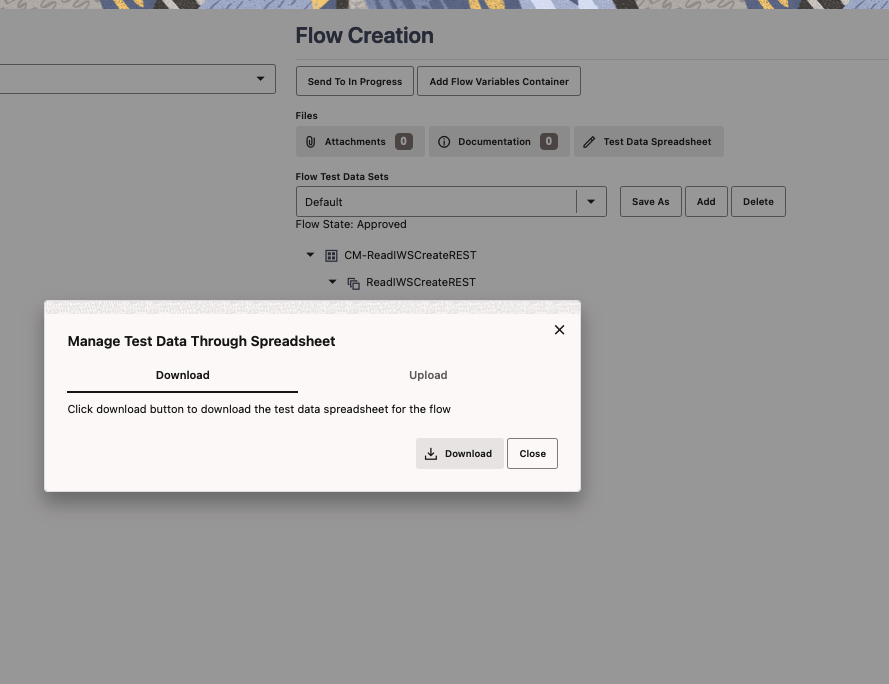
Using spreadsheets can make it easier and quicker to create flow test data sets.
Steps to Enable
You don't need to do anything to enable this feature.
Key Resources
- Refer to the Managing Flow Test Data Using Spreadsheets section of the Oracle Utilities Testing Accelerator User's Guide for more information.
Enhanced Request-Response View for Flow Run Tree
The default view of the component's Request-Response in the Flow Run Tree is now similar to that of the Flow Test Data, which displays data and corresponding keys clearly, providing improved readability. Based on your preference, you can toggle between the XML and the new Request-Response views by simply switching view options on the user interface.
The enhanced view improves the readability and usability of the request and response values in the Flow Run Tree.
Steps to Enable
You don't need to do anything to enable this feature.
Key Resources
- Refer to the Running Test Flows Using a Browser section of the User's Guide for more information.
New Scheduling Engine for Oracle Utilities Cloud Services
The new scheduling engine for Oracle Utilities Cloud Services enables you to define, manage, and schedule batch processing streams to run at periodic intervals using a user-friendly interface.The batch scheduler engine schedules and processes batch processes on a configurable processing loop (by default 10 seconds). It processes the stream of batch processes per scheduled time, within that minute. You can monitor the progress of the streaming steps and required exception handling.
The Scheduler Batch Stream Definition and Batch Scheduler Batch Control system entities were also introduced to support the tool.
The engine solves various challenges associated with using Oracle Scheduler for scheduling and processing streams of batch processes. It provides additional coverage of requirements and features, reliable processing and scheduling, resilient infrastructure not affected by migrations and upgrades, improved troubleshooting, reduced troubleshooting time, complete visibility into streams processing, and more.
Steps to Enable
You don't need to do anything to enable this feature.
Tips And Considerations
Customers are highly encouraged to read the Online Help/Cloud Service Foundation Administrative User Guide to understand and effectively use this feature.
Key Resources
- Refer to the Tips for Setting Up Scheduler Batch Stream Definitions and Transferring Batch Job Stream Definitions sections of the Oracle Utilities Cloud Service Foundation Administrative User Guide for more information.
Measurement and Initial Measurement Data Header Extract-related Batch Processes
These batch controls streamline the initial export of Measurement data and Initial Measurement Data (IMD) header data:
- Specialized IMD Header Initial Extract (D1-SIMDI) - Extracts IMD headers of IMDs whose "To" date/time are later than the Start Date/Time and equal or earlier than the End Date/Time
- Specialized Measurement Initial Extract (D1-SMDIE) - Extracts measurements whose Measurement date/time are later than the Start Date/Time and equal or earlier than the End Date/Time.
Additionally, you can extend the default SQL Timeout value (900 seconds) of the Specialized IMD Header Extract Current (D1-SIMDC) or Specialized Measurement Extract Current (D1-SMDECS) batch control with the "Override SQL Timeout" parameter.
These batch processes reduce project costs, configuration time, and extract timelines resulting in faster exports.
Steps to Enable
You don't need to do anything to enable this feature.
Updated Initiation for Measurement Reprocessing
Measurement Reprocessing is initiated when install event dates change. Previously, measurement reprocessing was only initiated when the installation constant was changed. When the installation and removal dates expand to cover a longer time, this process checks for existing measurements that require a change in multiplier and reprocessing.
This update reduces manual work, project cost, and configuration time. It also increases process automation and customer satisfaction.
Steps to Enable
You don't need to do anything to enable this feature.
Usage Calculation Rule - Demand at Service Point Level
The "Coincident Peak and Individual SP Demand" usage calculation rule enables you to determine demand at the service point level based on:
- Individual Service Points
- Coincident Peaks
- Time-of-Use (TOU) Coincident Peaks
Previously, demand was only calculated at the subscription level.
This usage calculation rule reduces implementation and support costs.
Steps to Enable
To enable this feature, refer to the Usage Calculation Rules section of the Administrative User Guide for more information.
Key Resources
- Refer to the Demand Calculation Rule training.
Generic Common Information Model (CIM) Adapter
The Adapter Development Kit provides you with Common Information Model (CIM) IEC 61968-9, Edition 2.0 interfaces for file-based processing of usage and events, and a real time interface for events.
This provides productized CIM file-based processing of usage and events, and a real-time interface for events. It also reduces project time and costs when working with CIM head-end systems.
Steps to Enable
To enable this feature, complete these steps:
- Add the ADK - Master Configuration and enter the details to support the real-time event interface.
- Add a Usage and Events entries for the SGG Payload Processing Configuration extendable lookup to leverage the com.splwg.d1.domain.sgg.dg.processing.PayloadHandlerViaUserExits payload handler class.
- Add two batch controls using D1-PLPRM (Payload Processing Monitor Template) and associate these with the appropriate SGG Paylaod Processing Configuration extendable lookup values.
- Update the ADK - UOM Code to Standard UOM mapping extendable lookup with the mapping for the ReadingType values. These should map to UOM, TOU, and SQI where applicable.
- Update the ADK - Device Event Mapping extendable lookup with configuration for the event types that will be processed.
- Add an entry to the File Storage Configuration extendable lookup indicating where the real-time event processing will store and receive files.
- Create a head end system with the appropriate processing roles to process initial measurement data and events.
Key Resources
- Refer to Adapter Development Kit Common Information Model (CIM) Payload Processing in the Meter Solution Administrative User Guide for more information.
Utilities Application Framework
Detailed Description Added to Application Service
Detailed Description was added as an optional attribute for application services. For most product delivered application services, the Secured Objects zone, which highlights which metadata objects in the system are linked to the application service, provides enough information to security administrators for them to understand what features are controlled by this record. There are a small number of application services that are referenced from JavaScript or Java, which are not discoverable by the Secured Objects zone. For these types of application services, a detailed description helps provide more information about the purpose and use of the record. For these examples and any other use case where the product has determined that additional information is warranted, the detailed description for such application services includes a detailed description.
This helps implementations to more easily identify the purpose of the record.
Steps to Enable
You don't need to do anything to enable this feature.
Screen Information Hidden on Session Timeout
When a user's session times out, the information on the underlying page is no longer visible. The user sees an alert that the session has timed out and they should click OK to log into the application again.
This ensures that possibly sensitive information is no longer visible.
Steps to Enable
You don't need to do anything to enable this feature.
Batch Submission Parameters Defaulted from Batch Control
When submitting a batch job via any method, the system compares the provided parameters to those defined on the batch control.
- Any parameters that are missing from the request are populated from the batch control. Note that if the parameter is required and a default value is defined on the batch control, that value is used. If the parameter is optional, any default value found on the batch control is ignored. For optional parameters, the default value is only for online defaulting (where the user is able to choose to remove the default).
- In addition to the value, parameters define both a parameter name and sequence. If the parameters in the request only provide parameter name or sequence, the missing field is filled in based on the related batch control's definition. Note that if the request includes both the parameter name and the sequence, the system does not validate that the sequence is correct for the parameter name. The parameter name is the important field for the batch job functionality. The sequence is needed to ensure that the row is unique.
This feature improves the usability of the REST API used to submit a batch job (the 'submit' operation for the F1-SubmitJob inbound web service). Previously, the caller of this API was required to determine the batch parameters from the batch control ahead of time. With this enhancement, callers can submit the request for the batch submission and only supply the parameter name/parameter value for optional parameters where a value is desired or for required parameters when the value differs from the default value on the batch control. Any optional parameters where no value is needed or required parameters where the default value from the batch control is acceptable do not need to be provided.
The processes that submit a batch job via a mechanism other than the online application page no longer need to build the batch parameters themselves.
Steps to Enable
You don't need to do anything to enable this feature.
Tips And Considerations
Any implementation that is calling the REST API for submitting a batch job or submits a batch job in some other manner (besides online) can review their code to reduce steps for setting the batch parameters, if desired.
Manifest File Includes Previous Manifest File Information
When sending the latest data export file using the Generalized Data Extract functionality, the manifest file produced with an extracted file now includes the previous successful batch run number and the previous manifest file name. The receiving systems can use this information to compare with the most recent file received to determine if any expected file is missing.
This allows for quick detection of issues when information is regularly extracted to an external system.
Steps to Enable
You don't need to do anything to enable this feature.
Plug-in Driven Batch Variables
The Plug-in Driven Upload process (template batch control is F1-PDUPL) now supports the following variables in the Processed File Extension parameter in addition to text:
- {RDT} or {runDateTime}
- {RD} or {runDate}
- {RT} or {runTime}
- {BC} or {batchCode}
- {BN} or {batchNumber}
- {RN} or {rerunNumber}
- {TN} or {threadNumber}
- {USR} or {userId}
The parameter must still end with text to streamline the existing system check, which ensures that the name of the file to upload does not include the text included in the Processed File Extension parameter. The User ID used for the parameter is the submission user instead of the "batch user."
Also, the Plug-in Driven Extract process (template batch control is F1-PDBEX) now supports the additional variables {USR} or {userId} as part of the file name. When these variables are specified, the submission user's ID is used.
Using variables in the names help ensure that the processed file has a unique name and adding the submission user id provides another variable option to identify extract file names.
Steps to Enable
You don't need to do anything to enable this feature.
Virtual Folders When Accessing Object Storage
When your implementation integrates with Object Storage, you can now indicate one or more virtual folders in addition to the bucket name when defining a File Path for extract or upload batch processes.
For example, if your Object Storage bucket is 'integrations," there is a virtual folder for 'payments,' and your Extendable Lookup for defining your Object Storage connection is called 'UTIL-SHARED', your file path definition for extract and upload batch controls would be defined as follows:
- file-storage://UTIL_SHARED/integrations/payments
Multiple levels of virtual folders are supported. When writing/exporting to Object Storage, if the virtual folders referenced in the File Path do not yet exist for the referenced Bucket, they are created as part of the export.
The ability to reference virtual folders allows implementations to take advantage of the virtual folder organization capability provided by Object Storage.
Steps to Enable
You don't need to do anything to enable this feature.
CMA Import Performance Improvements
By default, the Content Migration Assistant (CMA) import process creates a migration object for each imported entity. This allows for a granular reporting and error handling at the entity level. When importing a high volume data set of business entities, this granular management has a performance toll.
The CMA import process now supports a Bulk Import option by which a group of entities, of the same maintenance object, is managed as a single migration object. Using this option reduces the migration object management effort throughout the process and results in better performance. Each entity is still individually validated in this mode, as in regular import processing, but if one entity is invalid the entire migration object is not applied (impacting all entities within it). Bulk import mode is useful when importing a large set of data from a validated data source when almost no errors are anticipated.
The indication of whether to use bulk import or not is specified on the migration data set import request.
Another new option, also specified on the migration data set import request, allows you to indicate that all imported entities are assumed to be new additions to the current environment. By indicating that this import is Insert Only, the import process avoids unnecessary steps to determine whether the entity should be added or updated.
These option are only supported for master and transaction maintenance objects. They are not applicable to configuration migrations.
This option enables quicker import for high volume data sets.
Steps to Enable
You don't need to do anything to enable this feature.
Migration Plan Pre-Compare Algorithm Execution Update
When the migration data import process runs the pre-compare algorithms for a given migration plan, the logic now includes the algorithms configured on the migration plan in the target environment as part of the execution. Previously, this step only included the pre-compare algorithms carried over from the source environment.
This ensures that any additional data updates applicable at the target are included.
Steps to Enable
You don't need to do anything to enable this feature.
Personal Identifiable Information (PII) that is not encrypted may require special handling when it is exported out of the application and written to files. Depending on how the export file is used, this type of information may need to be anonymize before being written to the file. Now, Generalized Data Export and Content Migration Assistant (CMA) batch processes support the anonymization of PII data based on customer-defined redaction rules.
A redaction rule defines the type of information that should be redacted, where it resides, and what function to apply to the value to anonymize it. For example, a phone number field may be redacted by applying a function that replaces all digits with 0. A library of common redaction functions is provided as an extendable lookup, and you may extend the list as needed. Sample redaction rules are provided as accelerator data, and you can update the rules as needed.
As a way of tracking and identifying fields that may contain sensitive information, a new searchable PII Class option now appears in the Field record definition.
The export tools were enhanced as follows:
- Content Migration Assistant
- By default, data redaction rules are applied to anonymize sensitive information before it is written to the export file.
- Depending on application security, you may indicate on a specific migration data set export request that data should be exported as it is (non-redacted). This option is only available to if you are provisioned with the "Do Not Apply Redaction Rules (NRDT)" access mode associated with the migration data set export's application service (F1MIGRDEXP).
- Generalized Data Export batch processes
- By default, data redaction rules are applied to anonymize sensitive information before it is written to the export file.
- A new batch parameter "Do Not Apply Redaction Rules" allows data to be exported as it is (non-redacted). The option requires that the user submitting the batch process is provisioned with the "Do Not Apply Redaction Rules (NRDT)" access mode associated with the data export application service (F1-DATAEXPORT).
- Note that Generalized Data Export data export is a single stream of files that may be sent to multiple targets. You should review these integrations to be sure they do not have conflicting redaction requirements.
Once redaction rules are defined in an environment, these processes will automatically anonymize data by default.
A new Obfuscation Configuration portal provides a consolidated view of all masking, encryption, and redaction rules.
This enforces data redaction of sensitive information when data is exported by these methods.
Steps to Enable
Provide the required access before using the feature. Details are in the Access #Requirements section.
Key Resources
- Refer to the Redaction Rules training.
Access Requirements
- System administrators should set/grant users/grant access as follows:
- Redaction Rule - Provide users with access to the following application services:
- F1RDCTM - Redaction Rule portal
- F1RDCTQ - Redaction Rule Query portal
- F1-REDACTRULE - Redaction Rule maintenance object
- Obfuscation Portal - Provide users with access to F1OBFCFG application service.
- CMA - To allow users the option of exporting data as it is (not redacted), provide them with the "Do Not Apply Redaction Rules (NRDT)" access mode associated with the migration data set export's application service (F1MIGRDEXP).
- Generalized Data Export - To allow users the option of exporting data as it is (not redacted), provide them with the "Do Not Apply Redaction Rules (NRDT)" access mode associated with the data export application service (F1-DATAEXPORT).
- Redaction Rule - Provide users with access to the following application services:
Generalized Data Export Support for Entity Log Records
By default, the Generalized Data Export batch process does not export maintenance object log tables due to performance and data volume considerations. Also, log records are omitted from export because they do not usually contain useful business information. However, there are entities for which log records have analytical value. As of this release, a new Export Log Tables maintenance object option allows an entity to be configured to explicitly include its log records when exported.
The log records may provide useful analytical information for some entities.
Steps to Enable
You don't need to do anything to enable this feature.
Generalized Data Export Support for Lost Ongoing Export Files
The Generalized Ongoing Export (F1-GEEXO) batch process now keeps a backup of all entity keys exported by a specific batch run number in a designated backup table. A new Restore Generalized Export Keys (F1-GERST) batch process assists in recovering from such lost file situation. The new process restores the keys of all entities that were exported during a specific batch run, from the backup table back to the ongoing changes queue, causing them to be exported again on the next ongoing export batch run.
Note that this method does not restore the exact content of the original file that was lost. That content cannot be reproduced. Instead, this process ensures that the entities that were included in the lost file would be extracted again.
Previously, the Generalized Ongoing Export (F1-GEEXO) batch process did not keep a record of which entities were exported on a specific batch run. In cases where an export file is lost or damaged, there was no way to identify which entities should be exported again.
This makes ongoing data export more resilient to file loss issues.
Steps to Enable
Provide the required access before using the feature. Details are in the Access #Requirements section.
Access Requirements
- System administrators should set/grant users/grant access to the F1-GERST application service for any user that should be able to run this batch job.
Attachment Malware Scan Plug-in
The system supports a malware scan algorithm that is called when adding an attachment. This uses the "Attachment Malware Scan" System Event for on the Algorithms tab of the Installation Options - Frameworlk portal. If an algorithm is plugged into this spot, it is called every time an attachment is uploaded, regardless of the method. In addition, the product has supplied a base algorithm that calls ClamAV. The ClamAV is not provided. Implementations need to separately install that software. If your implementation prefers to use a different malware scanning software, you can implement your own algorithm and plug it into the Installation Options.
Scanning attachments for malware before they are uploaded allows you to prevent harmful information from getting loaded to the system.
Steps to Enable
You don't need to do anything to enable this feature.
Tips And Considerations
Note that if you use ClamAV, there are properties to configure to indicate the host and port for the software.
Base Product Index Data Visible in Table Portal
The Index tab on the Table portal now shows the base product-owned indexes. This allows for developers and implementers to view the information about the product delivered indexes.
Previously, the index information was only visible in the database. Also, in a previous release, metadata tables were added for defining indexes associated with a Table, however the new index metadata tables were not populated with the based product delivered indexes.
The base product index information for a table is now visible in the Table portal on the Index tab, providing transparency for the product information.
Steps to Enable
You don't need to do anything to enable this feature.
Business Object Status Reasons REST API
A new Status Reasons REST API (F1-StatusReasons) allows an external user interface application to retrieve valid reasons to be presented to a user when they perform an action that transitions an entity to a new status.
User interface applications like Visual Builder can use a new API for presenting valid reasons for transitioning an entity to a new status.
Steps to Enable
You don't need to do anything to enable this feature.
Configuration for Report Buckets in Object Cloud Storage
In the File Storage Configuration extendable lookup, where cloud clients define their Oracle Cloud Object Storage configuration, you are now able to define one or more Delivery Channel Buckets for reporting configuration.

This information is available for an external reporting tool to use for writing reports directly to buckets.
Cloud clients can define the buckets in the cloud object storage where they want reports captured.
Steps to Enable
You don't need to do anything to enable this feature.
Tips And Considerations
Note that the Bucket Prefix is not applicable. You should define the exact bucket name here.
The product provides a comprehensive infrastructure that supports user interface rendering of hierarchical information for a specific context based on configurable tree definitions. For example, it can present a tree view of entities related to an account. Now a new "Expand Tree" REST API (F1-ExpandTree) allows an external user interface application to retrieve hierarchical information for a specific context based on the same tree configuration. The information provided by the web service focuses on presentation content and includes minimal visualization recommendations, allowing the external application to render each tree node as per its own configuration and rules. Since they are application specific, the information also does not include action-related settings.
User interface applications like Visual Builder can use this new API for rendering hierarchical information for a specific context that leverages the existing tree definition and functionality.
Steps to Enable
You don't need to do anything to enable this feature.
HTML Editor Syntax Highlighted
The HTML editor on the UI Map/Schema tab has been updated to use a syntax highlighter to make it easier to review and update HTML.
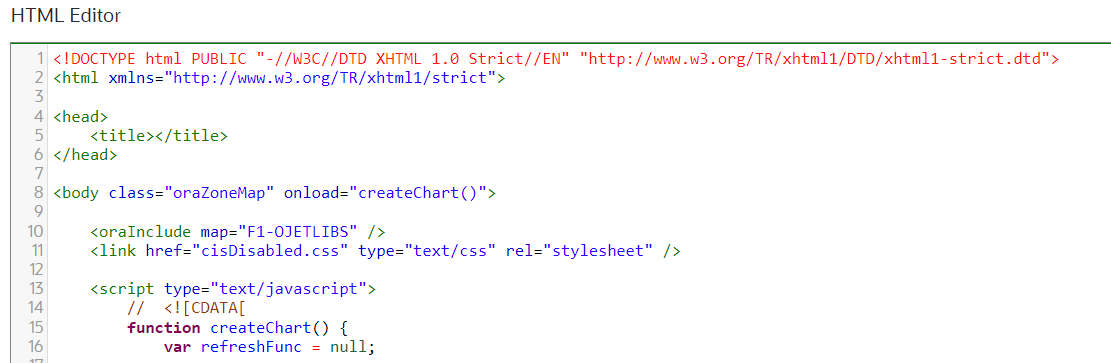
This makes it easier to review and update the HTML.
Steps to Enable
You don't need to do anything to enable this feature.
HTML Row Header Reference Update
The HTML5 standard requires the use of the <TH> element within a table row when it is being used as the row header (<th scope="row"></th>). Previously, these elements were allowed to use a <TD> element for the row header.
For tables that are generated by Oracle Utilities Application Framework (Data Explorers, standard UI Map grids, and more), the HTML is automatically updated to match Oracle standards. If you are creating a table manually, a change is not required but it is recommend you update your HTML for better accessibility.
Using the HTML5 standard for defining the row header of a grid allows accessibility tools to properly identify the information.
Steps to Enable
You don't need to do anything to enable this feature.
Tips And Considerations
While this update will generally not require any changes, there is the possibility that a problem may occur if you have a specific type of code within your product. If you are gathering an array of <TD> elements, then the index may have changed (or not exist any more). For example:
- var myTDs = myRow.getElementsByTagName('td');
This will no longer return the same number of elements, as one of the <TD> elements may now be a <TH>. You will need to adjust any code to account for the new index number. We would recommend not using this technique as referring directly to the column number (myRow.col[3]) or applying a class name query (myRow.querySelector('.specialColumn')) is safer and more "future-proof". Additionally, if you have applied any custom styling to <TD> elements, this may need to be updated to include <TH> elements in a non <THEAD> row.
Javadocs viewer is now available via the Admin > Implementation Tools menu. This launches the Javadocs landing page, which allows you to view information about base delivered Java classes and packages. In addition, when viewing an algorithm type, batch control, or foreign key reference, a 'source viewer' icon is visible when a Java program is displayed. If you click the icon, it launches Javadocs for that particular program.
In the Script page, the Script Tips zone in the dashboard includes a link to View Groovy Javadocs. This allows script writers to view information about methods and classes available for developing Groovy scripts.
Easy access to these viewers provide useful information for implementations that are developing extensions to the product.
NOTE: This feature was released as part of a 22C hotfix.
Steps to Enable
Provide the required access before using the feature. Details are in the Access #Requirements section.
Tips And Considerations
The Javadocs menu entry has an application service described above. For the View Groovy Javadocs link in the script tips zone, no additional security is needed. As long as you have inquire access to the Script page, you have access to view the Groovy Javadocs. Similarly, for launching Javadocs using the 'view source' icon on Algorithm Type, Batch Control or FK Reference, no additional security is required. As long as you have inquire access for the Algorithm Type, Batch Control or FK Reference pages respectively, you are able to view the Javadocs.
Access Requirements
- System administrators should set/grant users/grant access to the F1JAVADOCS application service to grant access to the new Javadocs Viewer menu entry.
The following additional SVG icons are provided for use in contextual insights, trees, and other user interface features that support SVG icons.
| Icon | Description | Image |
|---|---|---|
| F1STAR | Star |  |
| F1STARTS | Star - Solid |  |
| F1VWHD | Hidden from View |  |
Additional icons allow for an enhanced user experience for displayed information.
Steps to Enable
You don't need to do anything to enable this feature.
Parameter Update for New Language Batch Program
The language input parameters in the F1-LANG (New Language) batch program were adjusted to avoid confusion when submitting the batch for deletion of a language.
The two parameters were previously called Source Language and Target Language. Their descriptions have changed to Copy From Language and Action Language. The parameter names were not changed.

The behavior for adding a new language has also not changed. You should continue to put the Language to copy from first, and then the language you are adding as the second parameter. For example, if you are creating German language rows, using English as the Copy From Language, you would populate:
- Action: ADD
- Copy From Language (formerly Source Language): ENG
- Action Language (formerly Target Language): GER
However, the behavior for deleting changes has been updated. Previously, you populated the Source Language for the delete. Now you populate the Action Language. For example:
- Action: DEL
- Copy From Language (formerly Source Language):
- Action Language (formerly Target Language): GER
In addition, the batch program has been updated to prevent you from deleting rows for the ENG language that would result in the product system metadata being deleted.
A minor adjustment to the parameters will help avoid confusion when submitting the batch for deletion of the object.
Steps to Enable
You don't need to do anything to enable this feature.
Characteristic Type Portal - Support Large Number of Characteristic Values
The maintenance of the list of characteristic values for a pre-defined characteristic type has been moved to a separate zone on the portal rather than a list built into the main section. The new zone better handles use cases where a large number of characteristic values exist. The zone includes paging and supports filters for more easily finding and maintaining individual entries.
View and maintain characteristic values for a pre-defined characteristic type in a separate zone with filters and paging support.
Steps to Enable
You don't need to do anything to enable this feature.
The Currency page has been converted from the "list" maintenance fixed page style to a portal-driven user interface page. An "all-in-one" metaphor is used, providing a list of the existing currency codes along with the standard ability to broadcast, edit, delete, duplicate, and add a new record.
The Currency page has been converted to a portal to provide you with a more flexible and extendable user experience.
Steps to Enable
You don't need to do anything to enable this feature.
Tips And Considerations
Upgrade scripts ensure that users with Read access to the existing application service will have access to the new application service associated with the new portal. This table lists the existing and new application services.
| Object | New Application Service | Access Added to any User Groups with this Application Service / Read Access |
|---|---|---|
| Currency Portal | F1CRNCY | CILTCURP |
Dashboard Location Values Adjustment
The dashboard location values were adjusted to reflect the behavior in a right-to-left language. The values are now 'Before' and 'After', which reflect the location of the dashboard relative to the location of the main page display.
- If the user's language is 'left to right', then the value of 'Before' means the dashboard is on the left and the value of 'After' means the dashboard is on the right.
- If the user's language is 'right to left', then the value of 'Before' means the dashboard is on the right and the value of 'After' means the dashboard is on the left.
Previously, the values were 'Left' and 'Right' with the product behavior based on a 'left to right' language. For a user with a 'right to left' language, the product was reversing the order of the page, including the location of the dashboard. The updated values now reflect the behavior for both types of languages.
Dashboard location values are adjusted to better reflect behavior for 'right to left' languages.
Steps to Enable
You don't need to do anything to enable this feature.
The Language page has been converted from a "list" maintenance fixed page style to a portal-driven user interface page. An "all-in-one" metaphor is used, providing a list of the existing language codes along with the standard ability to broadcast, edit, delete, duplicate, and add a new record.
The Language page has been converted to a portal to provide you with a more flexible and extendable user experience.
Steps to Enable
You don't need to do anything to enable this feature.
Tips And Considerations
Upgrade scripts ensure that users with Read access to the existing application service will have access to the new application service associated with the new portal. This table lists the existing and new application services.
| Object | New Application Service | Access Added to any User Groups with this Application Service / Read Access |
|---|---|---|
| Language Portal | F1LANG | CILTLNGP |
Characteristic Mapping Language Genericized
The characteristic mapping maintenance object (MO) is enhanced to allow for future support of mapping identifier values as well. As part of this effort, the maintenance object and the UI portal and many of the related artifacts are renamed to be more generic: Analytics Attribute Mapping.
Characteristic Mapping continues to be a business object for this MO and no changes exist for that functionality.
The newly rebranded Analytics Attribute Mapping table now includes new columns to support mapping of identifier values. There is a new business object visible in this release: F1-IDMapping. This business object captures the data needed to configure mapping of a given identifier type and value defined in a child table of an MO to a user defined field for a target dimension for the parent table of that MO. Note however that the changes to Oracle Utilities Analytics Visualization (OUAV) to support the identifier mapping are not supplied in this release. You may choose to define the metadata for the identifier mapping but they will not be used by OUAV at this time.
This genericizes the language to cover future functionality, but it does not have any impact on the current application.
Steps to Enable
You don't need to do anything to enable this feature.
Tips And Considerations
The new business object uses the same application service as the Characteristic Mapping business object. (F1-CHARMAPBOAS). This application service description is changed to "Operational Analytics Mapping BOs" reflect its broader purpose.
See a preview of the database changes coming for 22C in the Oracle Utilities Cloud Services Database Changes Guide. This guide is also available in PDF.
This includes information about databases changes to tables, indexes, views, columns, and more.
Steps to Enable
You don't need to do anything to enable this feature.
Supported Platforms and Browsers
Oracle Utilities 22C Cloud Services support the following operating system and web browser combinations:
| Operating System |
Web Browsers |
|---|---|
| Windows 10 |
Firefox ESR 102+ Chrome for Enterprise 106+ Microsoft Edge (Chromium-based) 106+ |
| iPad2 iOS 10.x (WACS only) |
Safari (selected flows and portals only) |
Oracle recommends using only supported client platforms and browsers.
Steps to Enable
You don't need to do anything to enable this feature.
New Application Services
The following Application Services were added in the 22C release:
| Application Service |
Description |
|---|---|
| D1USAGEMNU |
Usage Menu Access |
| DG-CIMMRRESPBOAS |
ADK CIM Meter Read Response DR BOAS |
| DG-CIMMTRODRDRBOAS |
ADK CIM Meter On Demand Read DR BO |
| DG-PINGDRBOAS |
ADK CIM Ping DR BO Application Service |
| F1CRNCY | Currency Portal |
| F1LANG | Language Portal |
| F1JAVADOCS | Javadocs Viewer |
| F1-GERST | Restore Generalized Export Keys |
| F1-EXTENCRYPTADDKEY | Add Public Encryption Key |
| F1-EXTENCRYPTKEYBOAS | Public Encryption Key BO |
| F1-INTKEYENCRBOAS | Encryption Key Pair BO |
| F1-BRASNPSHT | Batch Run Analytics Snapshot MO (Reserved for future use) |
| F1-BTASNPSHT | Batch Thread Analytics Snapshot MO (Reserved for future use) |
| K1-SBSTRMDEFBOAS |
Scheduler Batch Stream Definition BO |
| K1SBSD |
Scheduler Batch Stream Definition |
| K1SBSDQ |
Scheduler Batch Stream Definition Query |
| K1SBSOP |
Scheduler Batch Stream Operations |
| K1BSBC |
Batch Scheduler Batch Control |
| K1BSBCQ |
Batch Scheduler Batch Control Query |
Changed Application Services
The following Application Services were changed in the 22C release:
| Application Service | Description | Change Comments |
|---|---|---|
| F1MIGRDEXP |
Migration Data Set Export BO |
New access mode: NRDT - Do Not Apply Redaction Rules |
| F1-DATAEXPORT |
Data Export |
New access mode: NRDT - Do Not Apply Redaction Rules |
Removed Application Services
The following Application Services were removed in the 22C release:
| Application Service |
Description |
|---|---|
| F1BMCOM | Build Mobile Component Package |
| F1DEPTYP | Deployment Type Portal |
| F1DPL | Deployment Portal |
| F1-DPLOY | Create Deployment |
| F1DPLPRT | Deployment Part Portal |
| F1DPLQRY | Deployment Query Portal |
| F1-DPUTD | Deployment Evaluation and Purge |
| F1MDTMNT | MDT Portal |
| F1MDTQRY | MDT Query Portal |
| F1MDTTYP | MDT Type Portal |
| F1MOBCMP | Mobile Component Portal |
| F1MOBCPQ | Mobile Component Query Portal |
| F1REMSG | Mobile Remote Message Portal |
| F1REMSGQ | Mobile Remote Message Query Portal |
| F1-RMCRL | ILM Crawler - Remote Message |
| F1-RMMSG | Remote Message Monitor |
Application services provide user access to new features and functions.
Steps to Enable
You don't need to do anything to enable this feature.
Information about bugs fixed in each release, maintenance packs, and hot fix releases is available on the Oracle Utilities Meter Solution Cloud Service Maintenance Packs page on My Oracle Support (Document ID 2633137.1).
Core Release pages provide an overview and summary of the bug fixes and patches included in a release, and indicate the types of changes and impact each can have when applied.
Maintenance pack pages list bugs fixed in each maintenance pack and hot fix release.
Steps to Enable
You don't need to do anything to enable this feature.
Oracle Analytics Server v.6.4 is supported in this release.
This is the same version supported for 22B.
Steps to Enable
You don't need to do anything to enable this feature.
Key Resources
- Refer to the Oracle Analytics Server documentation.
IMPORTANT Actions and Considerations
REPLACED OR REMOVED FEATURES
From time to time, Oracle replaces existing cloud services with new features, or removes existing features. Replaced features may be put on a path to removal. As a best practice, you should use the newer version of a replaced feature as soon as a newer version is available.
This section identifies the features in this Cloud service that have been replaced or removed.
| Product | Removed Feature | Target Removal | Replacement Feature | Replaced In | Additional Information |
|---|---|---|---|---|---|
| Oracle Utilities Application Framework | Mobile Remote Message Artifacts |
22C | Not applicable | User interface metadata has been removed for this object. This table was originally configured to support ILM, but it is no longer included in ILM partitioning steps. Batch controls related to processing this table are removed if no instance data in the Batch Run table is found. If instance data is found, the batch control metadata is retained with a CM owner flag. |
|
| Oracle Utilities Application Framework | Mobile Data Terminal Artifacts |
22C | Not applicable |
User interface metadata has been removed for this object. |
|
| Oracle Utilities Application Framework | Mobile Component Artifacts | 22C | Not applicable | User interface metadata has been removed for this object. Additionally, its migration plan is removed. |
|
| Oracle Utilities Application Framework |
Mobile Data Terminal Type Artifacts | 22C | Not applicable |
User interface metadata has been removed for this object. Additionally, its migration plan is removed. |
|
| Oracle Utilities Application Framework |
Deployment Part Artifacts |
22C | Not applicable | User interface metadata has been removed for this object. Additionally, its migration plan is removed. |
|
| Oracle Utilities Application Framework |
Deployment Type Artifacts | 22C | Not applicable |
User interface metadata has been removed for this object. Additionally, its migration plan is removed. |
|
| Oracle Utilities Application Framework |
Deployment Artifacts | 22C | Not applicable |
User interface metadata has been removed for this object. |
|
| Oracle Utilities Application Framework |
Master Configuration Business Objects Related to Mobile Application Framework | 22C | Not applicable |
The master configuration business objects F1-MobileConfigurations and F1-MobileIdentityConfiguration are no longer delivered in base. Artifacts related to these BOs are removed if no master configuration records are found for the respective BOs. If there is a master configuration found for either, then the related data remains with a 'CM' owner. The REST service and corresponding script to update the master configuration is deprecated.
|
|
| Oracle Utilities Application Framework |
Migration Plan - Import Algorithms | 22C | Migration Plan - Pre-compare algorithms | 4.1.0 | The Import algorithm plug-in spot for migration plan was flagged for deprecation many years ago and the base product does not deliver algorithms for this plug-in spot. The Pre-Compare plug-in spot is the recommended mechanism for adjusting migration data during import. |
| Oracle Utilities Cloud Service Foundation |
Support for Oracle DBMS Scheduler, Batch Job Stream Definition, Batch Job Stream Operations, Scheduler Programs |
23B |
SaaS Batch Scheduler, Scheduler Batch Stream Definition, Scheduler Batch Stream Operations, Batch Scheduler Batch Control |
22C |
The new SaaS Scheduler replaces the use of Oracle DBMS Scheduler for batch scheduling in all Oracle Utilities Cloud Services. The new SaaS scheduler provides reliable processing and scheduling, resilient infrastructure not affected by migrations and upgrades, improved troubleshooting, enhanced visibility into streams processing. |
Unless otherwise specified below, these notes are for informational purposes and no action is required.
RELEASE UPDATES
Information about fixed bugs is available in Maintenance Pack and Hotfix release notes at Document ID 2633137.1.
PRODUCT CHANGES
BI/Analytics Publisher Menu Item
The "Open BI Publisher" menu item in the Reporting menu has been changed to "Open Analytics Publisher".
PLANNED REMOVAL
Plan to Remove Support for Previous User Experience from Oracle Utilities Application Framework
In the current release, the product provides an option to Switch UI View. This changes the current user experience for the user for that session. Assuming the user is in the latest user experience (referred to as Redwood), this action switches the user experience to the previous look-and-feel.
In the future, the product plans to remove support for the ability to switch that design that preceded Redwood.
Plan to Remove F1-DFLTAPS and FWLZDEXP Application Services from Oracle Utilities Application Framework
In an effort to consolidate application services, the product is removing all references in base delivered metadata to F1-DFLTAPS and FWLZDEXP. Records will instead reference F1-DFLTS.
You should select Admin > Security > Application Service and view F1-DFLTAPS. Review the Secured Objects zone. Note especially if your implementation uses this application service within HTML or Schemas. Any references should be adjusted to F1-DFLTS or a different application service that is appropriate for the business rule.
Implementations should repeat the above steps for the application service FWLZDEXP.
In addition, if your implementation has any hard-coding of either F1-DFLTAPS and FWLZDEXP in code that is not detectable by the Secured Objects zone, those references should also be updated to use F1-DFLTS or a different application service that is appropriate for the business rule.
Plan to Remove Workflow and Notification Metadata and Database Tables from Oracle Utilities Application Framework
Workflow and notification functionality was an early way to support exchanging messages with an external system (notification) and providing a configurable process for acting on incoming messages (workflow). In more recent years, the functionality for managing external messages is supported using Outbound Message and Inbound Web Service functionality. In addition, there are several features to support processing incoming messages. Service scripts can handle simple use cases. For more complicated processes, the service task or other business object driven objects are available.
The metadata and database tables related to this feature will be removed in a future release. Note that only a portion of the functionality for this feature is managed by Oracle Utilities Application Framework. Most of the functionality is supported in the Oracle Utilities Customer Care and Billing product.
Plan to Remove Mobile Application Framework Metadata from Oracle Utilities Application Framework
Removal of support for the Mobile Application Framework has already been announced in a previous release. However, there is metadata still included in the application related to this functionality.
The metadata will be removed in a future release.
Plan to Remove Key Ring Validation Scripts, Algorithm Types, and Algorithms from Oracle Utilities Application Framework
The product is removing all scripts, algorithm types, and algorithms that performed validation rules on the K1-SignatureKeyRing business object. The algorithms have been removed from the BO configuration. There are requirements to expand the use of a signature key ring beyond the current implementation for object file storage and the existing validations are not applicable to other planned use cases.
The following items will be removed in a future release.
- Algorithm
- K1-KRDCKFS
- K1-KRINCKFS
- Algorithm Type
- K1-KRDCKFS
- K1-KRINCKFS
- Message
- 11009 / 1402
- Plugin Script
- K1-KRDCKFS
- K1-KRINCKFS
- Service Script
- K1-ChkCfgExL
Plan to Remove UI Metadata Related to Converted Pages from Oracle Utilities Application Framework
The UI metadata related to fixed pages that have been converted to portals will be removed in a future release. The tables list the navigation keys related to each maintenance page. The related UI program component data will also be removed. Note that the metadata related to the search pages will not be removed at this time in case they are used on other fixed pages.
| To Do Entry Maintenance |
Table Maintenance |
Work Calendar Maintenance |
Message Maintenance |
|---|---|---|---|
|
|
|
|
| Time Zone Maintenance |
Application Security Portal | Display Icon Portal |
|---|---|---|
|
f1appsecTabMenu |
displayIconRefMaint |
Plan to Remove Miscellaneous System Data from Oracle Utilities Application Framework
The following metadata is no longer in use and will be removed in a future release:
| Object | Data | Description/Comments |
|---|---|---|
| Lookup Value |
CHAR_ENTITY_FLG / F1SE |
Characteristic Entity / Sync Request Inbound Exception |
| Script |
F1-TDMgActSS |
To Do Management - Process Actions (Deprecated) / Replaced by F1TDMgActSS |
| Script |
F1AddDebugLg |
Add Log for Monitoring Probe (Deprecated) / Replaced by a BS - F1-MONPRBLOG |
| Zone | F1-BOMOSRCH |
Not in use by base functionality. |
| Zone | F1-CATCHSCH |
Not in use by base functionality. |
| Zone | F1-MONAVKEY |
Not in use by base functionality. |
| Zone | F1-REVCONQRY |
Not in use by base functionality. |
Plan to Remove XSLT Managed Content Type from Oracle Utilities Application Framework
Entries in the Managed Content table related to XSL should be using the XSLTC managed content type and not the XSLT managed content type. In a future release, the XSLT managed content type will no longer be supported.
Plan to Remove REST IWS - Original REST Servlet from Oracle Utilities Application Framework
The original URL supplied for invoking IWS based REST services included the IWS Service name in its makeup. Support for this will continue for backward compatibility purposes, but it will be deprecated in a future release. You should adjust your existing integrations to use the currently supported URL.
Plan to Remove Append Setting from Pagination - Oracle Utilities Application Framework
There are several known issues with the functionality of the "append" option in pagination. It is recommended that you do not use this pagination setting.
Plan to Remove Support for Master/Subordinate Servers for Web Service Catalog in Oracle Utilities Application Framework
The Service Catalog Configuration (master configuration) enables you to define subordinate servers. Defining subordinate servers is no longer applicable for the Oracle Integration Cloud.
Plan to Remove Support for Batch Run Statistics Portal Functionality in Oracle Utilities Application Framework
The Batch Run Statistics portal provides additional information about batch runs, but some functionality on the portal is related to capturing additional information from an external tool. This information is stored in a Fact record. Support for capturing additional information from an external tool will be discontinued in a future release.
Plan to Remove Business Object Read from F1-MAINPROC When Pre-processing Exists
In the original implementation of configuration tools, the main framework maintenance BPA (F1-MainProc) did not perform a Read of the BO when a pre-processing script was linked to the BO via options. The pre-processing script was responsible for the Read.
In a subsequent release, a BO Read was added in F1-MainProc (even if a pre-processing script existed) to resolve a UI Hint issue related to child business objects. This solution introduced a problem only visible for specific scenarios and a different fix has been introduced. The new fix made the BO Read unnecessary in F1-MainProc. Because there are many pre-processing scripts that are properly performing the Read of the BO, ideally the BO Read should be removed from F1-MainProc so that multiple reads are not performed. However, there may have been pre-processing scripts introduced after the BO Read was included in F1-MainProc that were coded to not perform a BO read in the pre-processing script. Due to this situation, the BO Read is still performed as part of the processing of F1-MainProc.
When a pre-processing script exists, we plan to remove the BO Read from F1-MainProc logic. You should review your custom pre-processing scripts that are linked to your BO options to ensure that they properly perform a Read of your BO.