
- Revision History
- Overview
- Feature Summary
- Utilities Common
- Meter Solution
-
- Meter Solution
- Smart Grid Gateway
- Integrations
- Utilities Application Framework
- Batch Processing
- Content Migration Assistant
- Implementation Tools
- Product Usability
-
- Algorithm Portal
- Application Security Query Portal
- Application Service Query Portal - Search by Release Version
- Geographic Type Portal
- Improved Field Portal
- Inbound Web Service Query Portal - Additional Search Options
- Lookup Portal
- Online Help Opens in Oracle Help Center for Oracle Utilities Application Framework-based Applications
- Phone Type Portal
- User Group Portal
- Work List Zone - Improved Item Navigation
- Miscellaneous
- System Wide
- IMPORTANT Actions and Considerations
This document will continue to evolve as existing sections change and new information is added. All updates appear in the following table:
| Date | Module | Feature | Notes |
|---|---|---|---|
| 09 AUG 2023 | Meter Solution | Non-final Initial Measurement Data Self-service Removal Tool |
Updated document. Revised Key Resources to include documentation link. |
| 04 APR 2023 | System Wide | Updated document. Added Known Issues section. | |
| 04 APR 2023 | IMPORTANT Actions and Considerations | Updated document. Added Oracle REST Data Services product in Replaced or Removed Features section. |
|
| 27 MAR 2023 | Created initial document. |
Oracle Utilities Meter Solution Cloud Service is used to maintain information about meters and the service points at which they are installed. The solution provides a means of recording measurements and events associated with meters in the field as well as the ability to compute usage for the recorded measurements, and process smart meter commands.
This guide outlines the information you need to know about new or improved functionality in this update, and describes any tasks you might need to perform for the update. Each section includes a brief description of the feature, the steps you need to take to enable or begin using the feature, any tips or considerations that you should keep in mind, and the resources available to help you.
 HAVE AN IDEA?
We’re here and we’re listening. If you have a suggestion on how to make our cloud services even better then go ahead and tell us by submitting a service request. Wherever you see this icon after the feature name it means we delivered one of your ideas.
DISCLAIMER
The information contained in this document may include statements about Oracle’s product development plans. Many factors can materially affect Oracle’s product development plans and the nature and timing of future product releases. Accordingly, this Information is provided to you solely for information only, is not a commitment to deliver any material, code, or functionality, and should not be relied upon in making purchasing decisions. The development, release, and timing of any features or functionality described remains at the sole discretion of Oracle.
This information may not be incorporated into any contractual agreement with Oracle or its subsidiaries or affiliates. Oracle specifically disclaims any liability with respect to this information. Refer to the Legal Notices and Terms of Use for further information.
Column Definitions:
Report = New or modified, Oracle-delivered, ready to run reports.
UI or Process-Based: Small Scale = These UI or process-based features are typically comprised of minor field, validation, or program changes. Therefore, the potential impact to users is minimal.
UI or Process-Based: Larger Scale* = These UI or process-based features have more complex designs. Therefore, the potential impact to users is higher.
Features Delivered Disabled = Action is needed BEFORE these features can be used by END USERS. These features are delivered disabled and you choose if and when to enable them. For example, a) new or expanded BI subject areas need to first be incorporated into reports, b) Integration is required to utilize new web services, or c) features must be assigned to user roles before they can be accessed.
| Ready for Use by End Users Reports plus Small Scale UI or Process-Based new features will have minimal user impact after an update. Therefore, customer acceptance testing should focus on the Larger Scale UI or Process-Based* new features. |
Customer Must Take Action before Use by End Users Not disruptive as action is required to make these features ready to use. As you selectively choose to leverage, you set your test and roll out timing. |
|||||
|---|---|---|---|---|---|---|
| Feature |
Report |
UI or |
UI or |
|
||
Non-final Initial Measurement Data Self-service Removal Tool |
||||||
Generic CIM AMI Adapter - On-Demand Read and Device Status Check Commands |
||||||
Message Sender Context Type - OAuth Token Request Details in Body |
||||||
Plugin-driven Extract - Support for Writing to Multiple Files and Flexibility in File Names |
||||||
CMA Support for Separate Configuration and Business Data Migrations |
||||||
Application Service Query Portal - Search by Release Version |
||||||
Inbound Web Service Query Portal - Additional Search Options |
||||||
Support for Capturing and Exporting Batch Run Analytics Data |
||||||
Test Flow Run - Conditional Pause and Resume
The Pause and Resume user interface enables you to use one or more components to define conditions to resume a paused test flow. You can also provide a time interval (from a few minutes to a few days) to check for the occurrence of the conditions. A new "Waiting" test flow status was created to provide an indication that the conditions have not been met. This features provides a lot of flexibility to design a condition-bound test flow.
A simple use case supported by the conditional pause and resumption of a test flow is a batch job run in Oracle Utilities application, wherein once the component in the test flow runs the submitted batch job, the test flow automatically pauses the run, resumes the run, and posts the completion of the batch run. A complex use case supported by this feature is an end-to-end integration test flow run, wherein the response from an external application to Oracle Utilities applications could take substantial time, during which the integration test flow pauses and later resumes.
This feature allows you to create test flows that run to completion only after pre-determined conditions are met and provides the flexibility to design time- and condition-based test flows.
Steps to Enable
You don't need to do anything to enable this feature.
The new Flow Run Status field on the Run Flow page provides the following statuses for the current test flow lifecycle:
- Passed - The flow run is complete and passed.
- Failed - The flow run is complete but failed.
- Running - The flow run is still in progress.
- Stopped - The flow run is manually interrupted and stopped before completing.
- Waiting - The flow run is paused and waiting for resumption until a condition has been met.
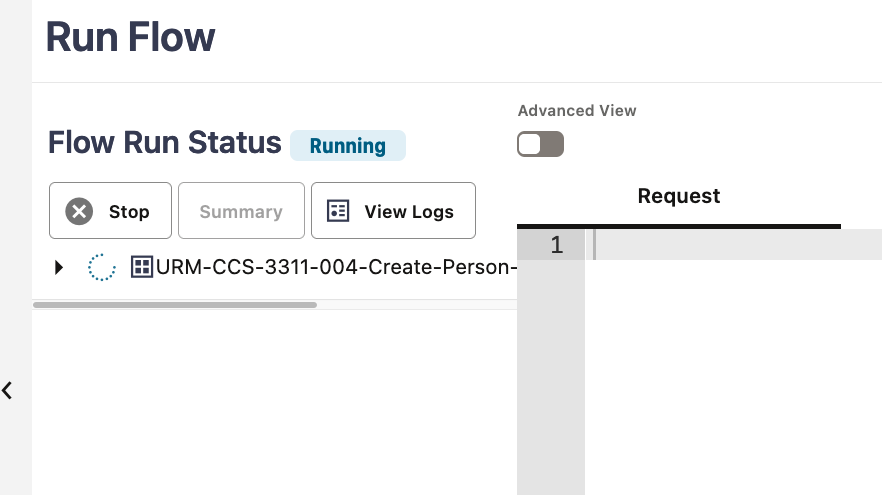
This provides a descriptive lifecycle status for the test flow run in a prominent location.
Steps to Enable
You don't need to do anything to enable this feature.
The Flow Test Summary Report now displays details about the business processes that are tested at each step of the flow run. This provides a clear explanation of the outcome at each step and the completion time of each function in the business process. The report also displays the percentage of the test that passed and failed, allowing you to determine the failure percentage for one or more flow runs.
With the new Redwood user experience, you have greater flexibility to choose between high-level summaries or detailed results for each step. The component test descriptions in the summary report are presented in a structured tree object, enabling you to see a high-level overview or drill-downed to more details from expanded tree nodes.
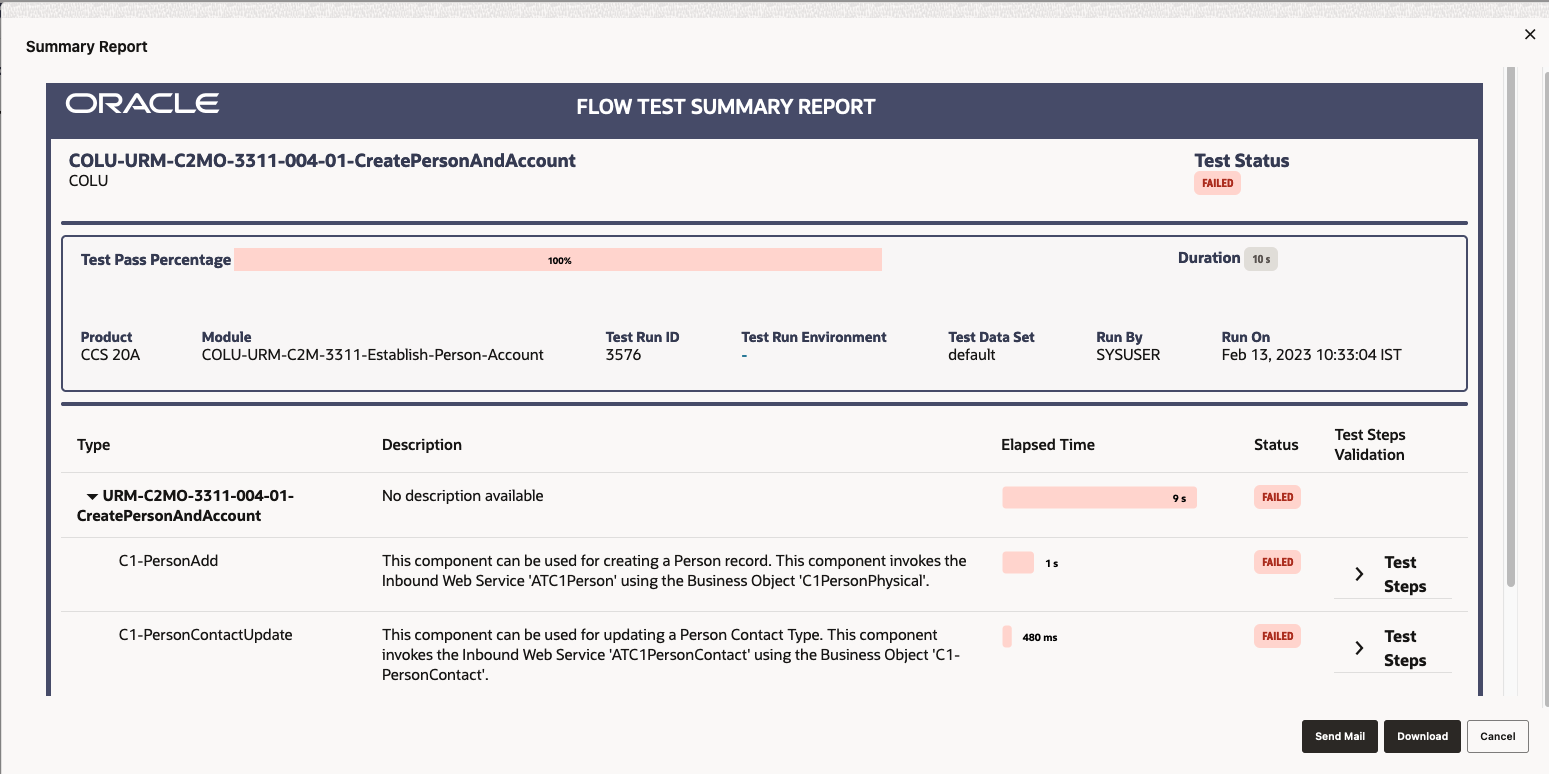
When a failed step occurs, the reason appears under the Test Steps section of the component step.
Steps to Enable
You don't need to do anything to enable this feature.
Test Flow Data - Integration Environment Variable
The Environment field in the Edit Test Data page, enabled by switching on the Integration Environment toggle, enables you to define the environment variable of the web service to use for the integration test flow. Previously, the environment variable was defined in the flow configuration set or user configuration set by prefixing a forward slash to the web service name in the component's test data.
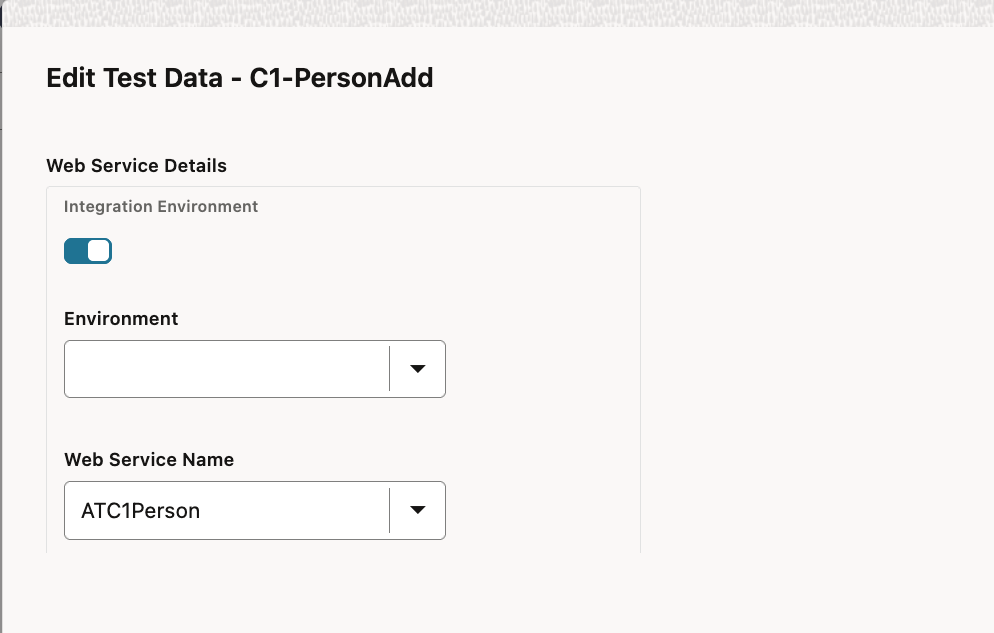
These features improve the readability and usability of the Test Data page during development and management of test flows for end-to-end integration scenarios across applications.
Steps to Enable
You don't need to do anything to enable this feature.
DataConnect Interval AMI Extract - Additional Data
The "Interval AMI" DataConnect data extracts now include the following data:
- Service Quantity Identifier
- Time of Use
- Service Type
- Device Id (meter number (customer-facing))
These extracts can be used for Opower integration or as integration to other energy management systems.
These provide more detailed interval data extracts. It also reduces project cost and configuration time.
Steps to Enable
To enable this feature, refer to the Oracle Utilities Dataconnect / Opower section of the Administrative User Guide for more information.
You can check the health of the system or monitor the state of the environment through accessing the different dimensions of meter data, such as the count of Initial Measurement Data records by:
- Status: Pending, Error etc.
- Type: scalar and interval
- Counts, averages and total
You can collect a set of data points over time to track the health of environment regularly and take appropriate actions. The tool also enables you to export data or results in Microsoft Excel or in printed formatted.
These tools allow you to self-serve when verifying the system's health and performing data trends analysis.
Steps to Enable
To enable this feature, refer to Configuring the Meter Health Check Dashboard section in the Administrative User Guide for more information.
Non-final Initial Measurement Data Self-service Removal Tool
You can identify and remove unnecessary Initial Measurement Data (IMDs) in "non-final" status with a self-service tool that enables you to filter IMDs by date range, business object, business object status, and device configuration.
This allows you to perform quick data cleanup and reduces manual record deletion.
Steps to Enable
You don't need to do anything to enable this feature.
Key Resources
See Removing Unwanted Initial Measurements in the Administrative User Guide for more information about using this feature.
Usage Calculation Rule for Rolling Demand Values
The Rolling Demand usage calculation rule allows you to support meters that record intervals at one interval length (for example, a 15 minute interval) and tariffs that require demand values to be calculated at higher interval lengths (for example, 30 minute intervals).
This allows you to bill rolling demand in a standardized way across various interval rates.
Steps to Enable
You don't need to do anything to enable this feature.
Generic CIM AMI Adapter - On-Demand Read and Device Status Check Commands
In this release, the Adapter Development Kit includes on-demand read and device status check commands based on the Common Information Model (CIM) IEC 61968-9, Edition 2.0 standard.
This provides support for the CIM standard and a framework for other commands. It also reduces project time and costs when working with CIM head-end systems.
Steps to Enable
To enable this feature, refer to Adapter Development Kit - Common Information Model Commands section in the Administrative User Guide for more information.
Message Sender Context Type - OAuth Token Request Details in Body
By default, the authorization token request includes the Client ID and Secret information in the message header. Some token providers expect this information to be sent as part of the request message body. A new Message Sender context type OAuth Token Request Details in Body has been introduced to facilitate integrations with with such providers. This type of context indicates that secret information should be sent in the body of the token request instead of the header.
This allows support for more OAuth token providers. This has no impact on existing customizations.
Steps to Enable
You don't need to do anything to enable this feature.
Utilities Application Framework
Batch Logs for Issues Found Before Thread Execution
The product captures a standard output file for each thread. If there are errors found in any thread, an error file is also produced which is accessible from the Batch Run Tree page. You can now capture log files for steps performed prior to the thread execution, for example in the "get job work" step.
The batch framework writes some basic logging information for the standard output file. The format of the file name produced is batch control + run number + re-run number + date-time.stdout. You will see an 'stdout' file for the batch run as well as one for each thread. Individual batch jobs may now also write log statements to the new stdout file at the batch run level.
If a batch job encounters an error in the steps before the thread execution, for example in the "Select Records" step, an error file is also produced. The format is batch control + run number + re-run number + date-time.stderr.
These files are also accessible from the Batch Run Tree page.

This enables you to detect issues that occur before the initiation of the thread execution.
Steps to Enable
You don't need to do anything to enable this feature.
Plugin-driven Extract - Support for Writing to Multiple Files and Flexibility in File Names
The plug-in driven extract process has been enhanced to allow for the Process Records algorithm to return one or more file names to write the data to. This allows for use cases where the data should be segregated by a business value. It also supports indicating a different file name for each schema returned by the algorithm, allowing for one unit of work to contribute to more than one file. Several use cases informed this enhancement:
- The data being extracted is related to different service providers and a file should be produced for each service provider. In this case, service provider is the unit of work and each unit of work could produce a separate file.
- The implementation has several CIS divisions and when extracting data, for example an asset, the data should be segregated such that each division gets its own file.
- An extract of Person data should result in a file with all the individual person information, a file with all the business person information, and a consolidated file of contact information for all person types. In this case, one call to the Process Records algorithm will result in data written to two different files (individual or business person information and contact information).
If a batch job is multi-threaded, each thread continues to produce its own set of files. For the service provider use case above, a multi-threaded process should still result in a file per service provider. However, for the Division and Person examples, each thread may include files for the same division or person type. The option to concatenate files is still supported and will concatenate files where the file name is the same except for the thread number. The existing limitations for the use of file concatenation still apply. This is documented in the batch control parameter description in the metadata.
The plug-driven extract now supports writing data to different files based on business data, such as CIS division, person type, or service provider. This change has no impact on existing extracts.
Steps to Enable
To enable this feature, refer to the Flexible File Name section in the Extract Record Processing topic of the Oracle Utilities Framework Administrative User Guide within your product's documentation.
Support for Encrypted Files and Digital Signatures
Exchanging and signing encrypted files requires the sender and recipient to share keys. The system needs to record the public keys provided by external parties and generate public/private key pairs so the public keys may be exchanged when encrypting or signing files.
A new public encryption key ring business object (F1-ExtKeyRing) allows the public keys provided by the recipients of encrypted files to be stored. The key ring also captures the external system ID and external reference of the system receiving the encrypted files. A new encryption key pair business object (F1-InternalEncryptionKey) allows private/public key pairs to be generated and stored using standard PGP format. The new internal key pair is classified as 'File Encryption / Signing'. Key rings previously classified as 'Signature' are now referred to as 'RSA Signature'. A new flag has been added to key ring to categorize key rings as external, internal, or OAuth.
The lifecycle of a key ring key has been changed to provide more flexibility when rotating keys. Internal generated keys are created in a status of pending. They may be manually activated when the public key has been shared with the applicable third parties. When a external public key is added, the new key is automatically activated and the previously active key is expired. Expired keys may be manually inactivated. Note that inactive keys can no longer be activated again.
Batch processing has been enhanced to implement file encryption and decryption using PGP standards. Digital signatures are also supported, using the standard 'Sign' option. New batch parameters have been introduced to specify the external and internal keys to be used for encryption and/or signing and the file adapter automatically encrypts, decrypts and signs the file data based on the existence of these parameters.
The batch framework supports encrypting and/or signing outbound files and decrypting and/or verifying the signatures of inbound files. New batch parameters were introduced to define the key rings that store the public or private keys. This has no impact on existing customizations.
Steps to Enable
To enable this feature, refer to the Parameters Supplied To Background Processes section in the Understanding Background Processes topic of the Framework Administrative User Guide within your product's documentation.
Key Resources
- See the Security Enhancements training.
Access Requirements
- System administrators should set/grant users/grant access to the F1-EXTENCRYPTKEYBOAS, F1-EXTENCRYPTADDKEY and F1-INTKEYENCRBOAS application services.
CMA Import Performance Improvements
The import step of the CMA process has been enhanced to execute insert statements more efficiently by leveraging the database's bind variables functionality.
This is transparent to existing in-progress migrations.
Steps to Enable
You don't need to do anything to enable this feature.
CMA Support for Separate Configuration and Business Data Migrations
By default, the same import CMA batch processes manage configuration and business data migrations. Typically, business data migrations involve high volume of records compared to much lighter configuration data sets. Processing them together by the same batch process slows down the performance of configuration migrations, preventing them from completing faster and more frequently. The issue mainly affects test-like environments where mixed data class migrations is more common: configuration data is imported from a lower environment and large test data is imported from a higher environment. Now you can adjust your CMA configuration in such environments to benefit from separating the import processes for configuration and business data.
The need to separate import processes mainly applies to migration objects because of their volume. Migration data set and transaction records are of low volume and as such are still managed by the same batch processes.
New batch processes are provided for importing migration objects containing business data:
- F1-MGOPB - Migration Object Monitor (Business)
- F1-MGOAB - Migration Object Monitor (Business) - Apply
By default, the existing migration object batch processes continue to handle both classes of data. To use the new batch processes for business data, you need to associate the new business data migration object BO provided as part of this enhancement with the new batch processes. See the steps below for details.
This features provides more efficiency for environments with concurrent migrations of configuration and high volume business data.
Steps to Enable
To enable this feature, update the Migration Object Business Data (F1-MigrObjectBus) business object to reference the new batch controls on the following statuses:
- Pending - Migration Object Monitor (Business) (F1-MGOPB)
- Error Applying - Migration Object Monitor (Business) (F1-MGOPB)
- Needs Review - Migration Object Monitor (Business) (F1-MGOPB)
- Approved - Migration Object Monitor (Business) - Apply (F1-MGOAB)
If the customer is using event driven job submissions:
- Add the new submission algorithm F1-MGOPRB-SJ to the Migration Data Set Import business object on specific statuses:
- Ready to Compare
- Retry Objects
- Add the new submission algorithm F1-MGOAPB-SJ to the Migration Data Set Import business object on specific status: Apply Objects
- Add the post processing algorithm F1-MGDIM-NJ to the Migration Object Monitor (Business) - Apply (F1-MGOAB) batch control to submit the data set monitor when the step of applying business migration objects is complete
- Add the post processing algorithm F1-MGTPR-NJ to the Migration Object Monitor (Business) (F1-MGOPB) batch control to submit the transaction monitor when the step of business migration objects monitoring is complete
Debugging Tools - Consolidated into a Single Button
The various debugging tools that are enabled when the URL includes the debug=true parameter have been moved to a slide out panel enabled by a new 'bug' icon. The options visible to you when the debug parameter is turned on depend on whether your implementation is cloud or on-premise and your individual security rights.
This is the view of debug options in the previous version for an on-premise customer with full debugging security access.

View of new debug icon.

When you click the icon, the side panel appears. The panel remains open until you close it yourself.
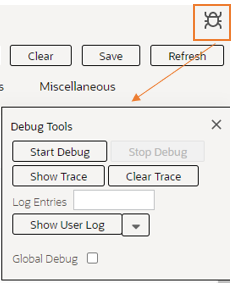
In addition, the product has provided a new menu entry in the Help menu: Enable | Disable Debug. If you have access to the security application service for this menu entry, you can turn on or off debug without changing the URL parameter.
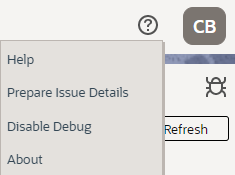
This regains space in the main user interface, allowing for more debugging features to be added without taking away more user interface space from the Main page.
Steps to Enable
Provide the required access before using the feature. Details are in the Access #Requirements section.
Tips And Considerations
Security is only needed for the menu entry. Using the debug=true parameter in the URL functions the same as before with respect to security.
Key Resources
- Refer to the Debug Mode section of the Framework Administrative Guide for more information.
Access Requirements
- System administrators should grant users access to the application service F1OUDBUG.
The following additional SVG icons are provided for use in contextual insights, trees, and other user interface features that support SVG icons.
| Icon | Description | Image |
|---|---|---|
| F1BLANK | Blank | |
| F1BUG | Debug Bug |  |
| F1BULBO | Lightbulb - On |  |
| F1CLPBE | Edit List |  |
| F1EVTC | Event - Custom |  |
| F1FLAG | Flag |  |
| F1FLAGS | Flag - Solid |  |
| F1GAUGE | Gauge - Number |  |
| F1RECYCLE | Recycle |  |
| F1ROBOADP | Robotics Adapter |  |
| F1THRMMTR | Thermometer |  |
| F1USERNO | User - Not Available |  |
| F1USERYES | User - Available |  |
Additional icons allow for an enhanced user experience for displayed information. These have no impact on existing customizations.
Steps to Enable
You don't need to do anything to enable this feature.
The Algorithm page has been converted to a portal, leveraging a more flexible and extendable user interface metaphor. The portal includes a References tab that list all entities associated with an algorithm. Knowing where an algorithm is used provides you with a better view of your custom rules and will help you target your testing.
This portal improves efficiency for building and maintaining algorithms for developers without impacting extensions.
Steps to Enable
You don't need to do anything to enable this feature.
Tips And Considerations
A new business object (BO) for Algorithm and a new Determine BO algorithm linked to the Maintenance Object were introduced. The base BO includes all the user interface behavior designed for the new portal. If your implementation has introduced your own CM business object and CM Determine BO algorithm, you should review your business object's configuration and merge it into the base business object.
Upgrade scripts ensure that users with Read access to the existing application service will have access to the new application service associated with the new portal. The table below lists the existing and new application services.
| Object | New Application Service | Access Added to any User Groups with this Application Service / Read Access |
|---|---|---|
| Algorithm Portal | F1ALG | CILTALGP |
Note that any existing bookmarks for this page will take you to the previous version of the page. You need to take the following actions to move the bookmark to the new page:
- Click the bookmark. Take note of the Algorithm.
- Navigate to the Algorithm portal page via the menu.
- Search for and select the Algorithm you noted from your bookmark. This takes you to the new page.
- Delete the existing bookmark from the Bookmark dashboard zone.
- Click the Bookmark page action button to add a bookmark for this record for the new page.
Application Security Query Portal
While application security can be configured at the granular level of an application service and its access modes, it is more intuitive to review access rights to broader application components such as menu lines, dashboard zones, batch processes, and more. A new Application Security Query portal supports various options for reviewing this configuration across users, user groups, and various types of secured components.
This portal improves efficiency for building and maintaining security without impacting customizations.
Steps to Enable
To enable this feature, provide access to the Application Security Query (F1APSECQ) application service.
Key Resources
- See the Security Enhancements training.
Application Service Query Portal - Search by Release Version
The Application Service Query portal is enhanced to support a new query option that lists application service by the release they were introduced in. The recording of this information is only available from this release going forward, so it is only applicable to new application service going forward.
This makes the uptake step of reviewing new application services easier. This change is transparent to customizations as it improves efficiency for building and maintaining security.
Steps to Enable
You don't need to do anything to enable this feature.
Key Resources
- See the Security Enhancements training.
The Geographic Type page has been converted to a portal to provide you with a more flexible and extendable user experience. An "all-in-one" metaphor is used, providing a list of the existing geographic types along with the standard ability to broadcast, edit, delete, duplicate, and add a new record.
This portal improves productivity for adding and maintaining geographical types without impacting extensions.
Steps to Enable
You don't need to do anything to enable this feature.
Tips And Considerations
Upgrade scripts ensure that users with Read access to the existing application service will have access to the new application service associated with the new portal. The table below lists the existing and new application services.
| Object | New Application Service | Access Added to any User Groups with this Application Service / Read Access |
|---|---|---|
| Geographic Type Portal | F1GEOTYP | CILTGOTP |
Note that any existing bookmarks for this page will take the you to the previous version of the page. Because this was a list-based page previously, the assumption is that you did not have any specific record bookmarked. If desired, you can delete the existing bookmark from the Bookmark dashboard zone and add a new bookmark of a specific geographic type.
The Field page can now add or update the corresponding lookup field record. The only remaining reason to navigate to the Lookup page is for deletion or revision control purposes. Before this release, defining a lookup field involved setting the lookup field itself in the Lookup page and then adding it again in the Field page.
This provides you with a seamless experience to maintain lookup fields. It improves efficiency for developers without impacting customizations.
Steps to Enable
You don't need to do anything to enable this feature.
Inbound Web Service Query Portal - Additional Search Options
The Inbound Web Service Query portal is enhanced to support search by information related to REST operations and help text configuration.
This provides additional query options for searching inbound web services. This is transparent to customizations as it improves efficiency for building and maintaining inbound web services for developers.
Steps to Enable
You don't need to do anything to enable this feature.
The Lookup page has been converted to a portal, leveraging a more flexible and extendable user interface metaphor. The portal supports navigating to the corresponding field associated with the lookup. This makes it easier to access the information.
This portal improves efficiency for building and maintaining lookups for developers without impacting extensions.
Steps to Enable
You don't need to do anything to enable this feature.
Tips And Considerations
A new business object for Lookup and a new Determine BO algorithm linked to the Maintenance Object were introduced. The base BO includes all the user interface behavior designed for the new portal. If your implementation has introduced your own CM business object and CM Determine BO algorithm, you should review your business object's configuration and merge it into the base business object.
Upgrade scripts ensure that users with Read access to the existing application service will have access to the new application service associated with the new portal. The table below lists the existing and new application services.
| Object | New Application Service | Access Added to any User Groups with this Application Service / Read Access |
|---|---|---|
| Lookup Portal | F1LKUP | CILTLKFP |
Note that any existing bookmarks for this page will take the user to the previous version of the page. You need to take the following actions to move the bookmark to the new page:
- Click the bookmark. Take note of the Lookup Field.
- Navigate to the Lookup portal page via the menu.
- Search for and select the Lookup Field you noted from your bookmark. This takes you to the new page.
- Delete the existing bookmark from the Bookmark dashboard zone.
- Click the Bookmark page action button to add a bookmark for this record for the new page.
Online Help Opens in Oracle Help Center for Oracle Utilities Application Framework-based Applications
Opening online help from a Framework-based application now brings you to the relevant documentation page in Oracle Help Center. This removes the need to manage and deploy the help engine used in past releases, and reduces the overall deployment times significantly.
You can use standard browser functions to bookmark pages and page headings, and use your browser's option to open the content in a new tab or open it in a new window. Note that because the help launches as a standard browser window, the default behavior is that it will open in a new tab in the same window. Once the help is launched, you can set in your browser to move the tab location or separate it to its own window as desired going forward. There were also some enhancements to the online help to make navigating the content easier.
This removes the need to manage and deploy the help engine used in past releases of the application without any loss of functionality or content. It also reduces overall deployment times significantly and adds convenient functionality for the user, such as the ability to bookmark individual help pages.
Steps to Enable
You don't need to do anything to enable this feature.
Tips And Considerations
If you delete the part of the URL following the product name, you will be taken to the page that contains all the documentation for that product. For example, removing 22C/ccs-user-guides/ from https://docs.oracle.com/en/industries/energy-water/customer-cloud-service/22c/ccs-user-guides/ takes you to the main documentation page for the Oracle Utilities Customer Cloud Service where you can access release readiness materials, cloud service guides, video training, and more.
The Phone Type page has been converted to a portal to provide you with a more flexible and extendable user experience.. An "all-in-one" metaphor is used, providing a list of the existing phone types along with the standard ability to broadcast, edit, delete, duplicate, and add a new record.
This portal improves productivity when adding or maintaining phone types without impacting extensions.
Steps to Enable
You don't need to do anything to enable this feature.
Tips And Considerations
Upgrade scripts ensure that users with Read access to the existing application service will have access to the new application service associated with the new portal. The table below lists the existing and new application services.
| Object | New Application Service | Access Added to any User Groups with this Application Service / Read Access |
|---|---|---|
| Phone Type Portal | F1PHNTYP | CILTPHTP |
Note that any existing bookmarks for this page will take the user to the previous version of the page. Because this was a list-based page previously, the assumption is that you did not have any specific record bookmarked. If desired, you can delete the existing bookmark from the Bookmark dashboard zone and add a new bookmark of a specific phone type.
The User Group page was replaced with a standard query portal that supports additional search filters by application service and user.
The User Group Maintenance page was replaced with a standard portal with the ability to use mass actions to:
- Add and remove application services, both at the service and access mode levels.
- Add and remove users.
- Set the expiration data for application services and users.
- Configure security type authorization information.
You can also review application components that are secured by the user group. This is similar to the Application Security Query portal which was also introduced in this release.
NOTE: The User Group Services Manager portal is deprecated now that its functionality is fully incorporated into the Service Manager tab on the User Group portal.
This improves efficiency for building and maintaining security without impacting customizations.
Steps to Enable
You don't need to do anything to enable this feature.
Tips And Considerations
A new business object for User Group and a new Determine BO algorithm linked to the Maintenance Object were introduced. The base BO includes all the user interface behavior designed for the new portal. If your implementation has introduced your own CM business object and CM Determine BO algorithm, you should review your business object's configuration and merge it into the base business object.
Upgrade scripts ensure that users with Read access to the existing application service will have access to the new application service associated with the new portal. The table below lists the existing and new application services.
| Object | New Application Service | Access Added to any User Groups with this Application Service / Read Access |
|---|---|---|
| User Group Portal | F1UGRP | CILTUSGP |
| User Group Query Portal | F1UGRPQ | CILTUSGP |
Note that any existing bookmarks for this page will take the user to the previous version of the page. You need to take the following actions to move the bookmark to the new page:
- Click the bookmark. Take note of the User Group.
- Navigate to the User Group portal page via the menu.
- Search for and select the User Group you noted from your bookmark. This takes you to the new page.
- Delete the existing bookmark from the Bookmark dashboard zone.
- Click the Bookmark page action button to add a bookmark for this record for the new page.
Key Resources
- See the Security Enhancements training.
Work List Zone - Improved Item Navigation
The Work List zone is populated whenever you click the Work List ( ) icon in the header of a data explorer results list.
The following enhancements were made to the Work List zone:
- The entry that you are currently working on is marked with a star. Previously, a check was used for both the current entry and entries already visited. Now the check is only for the previously visited entries.

- Previous and Next buttons allow you to move through the list without having to find the next entry to click.

- You may actively mark a row to ignore when using the Previous and Next buttons. You can do this by clicking the column adjacent to that entry. Clicking this icon removes the indication and allows the entry to be included in the next/previous processing again.

- If you have a long list, the zone keeps the current entry position in view even after refreshing the dashboard. Previously, any refresh of the zone would reposition the list to the top requiring you to scroll to find your current entry.
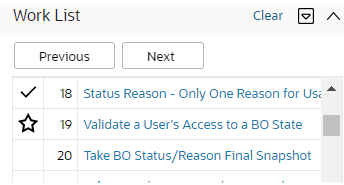
These enhancements allow you to navigate through the list more efficiently.
Steps to Enable
You don't need to do anything to enable this feature.
Key Resources
- See the Enhanced Work List Zone training.
Support for Capturing and Exporting Batch Run Analytics Data
There is a high volume of batch run data in the operational system that changes frequently and is recorded in a complex set of relationships. This is not well suited for analytics that run directly off the operational data or for being exported for use in other environments. The previous release introduced new tables to support snapshots containing only the batch run and batch thread data applicable to analytics. This release introduces new batch processes designed to populate and export from these tables in increments.
The Batch Run Analytics Snapshot Update and the Batch Thread Analytics Snapshot Update processes are used to add data to the snapshot tables on an ongoing basis. Each snapshot update selects only the batch runs and threads not already in the snapshot. In order to support the initial population of the tables, parameters are provided to limit the records selected to a range of months. Refer to batch controls F1BRANSN and F1BTANSN for more information.
The Batch Run Analytics Snapshot Data Export and the Batch Thread Analytics Data Export processes are used to extract data from the snapshot tables on an ongoing basis. These processes assume that a Data Export Control exists for each of the snapshot maintenance objects to capture the date of the previous extract as a reference point for selecting the next set of records. Refer to batch controls F1BRANEX and F1BTANEX for more information.
The analytics views have not been amended to reference the batch snapshot tables in this release. The batch processes are provided to allow the tables to be populated ahead of the introduction of new batch views in future.
These processes populate and export batch run analytics data for upload to external analytics environments and for future use in Oracle Utilities Analytics Visualization.
Steps to Enable
Provide the required access before using the feature. Details are in the Access #Requirements section.
Access Requirements
- System administrators should grant access to the F1-BTCHSN application service for any user that should be able to run this batch job.
See a preview of the database changes coming for 23A in the Oracle Utilities Cloud Services Database Changes Guide. This guide is also available in PDF.
This includes information about databases changes to tables, indexes, views, columns, and more.
Steps to Enable
You don't need to do anything to enable this feature.
Supported Platforms and Browsers
Oracle Utilities 23A Cloud Services support the following operating system and web browser combinations:
| Operating System |
Web Browsers |
|---|---|
| Windows 10 |
Firefox ESR 102+ Chrome for Enterprise 106+ Microsoft Edge (Chromium-based) 106+ |
| iPad2 iOS 10.x (WACS only) |
Safari (selected flows and portals only) |
Oracle recommends using only supported client platforms and browsers.
Steps to Enable
You don't need to do anything to enable this feature.
New Application Services
The following Application Services were added in the 23A release:
| Application Service |
Description |
|---|---|
| F1ALG | Algorithm Portal |
| F1APSECQ | Application Security Query Portal |
| F1GEOTYP | Geographic Type Portal |
| F1LKUP | Lookup Portal |
| F1PHNTYP | Phone Type Portal |
| F1OUDBUG | Switch On/Switch Off Debug |
| F1UGRPQ | User Group Query Portal |
| F1UGRP | User Group Portal |
| F1-BTCHSN | Batch Snapshot Details |
| F1BCHJOB |
Reserved for future use |
| F1BJSRCH |
Reserved for future use |
Removed Application Services
The following Application Services were removed in the 23A release:
| Application Service |
Description |
|---|---|
| F1UGAPSV | This applied to the User Group Services Management portal whose function has been incorporated into the User Group portal. |
| F1INVMOBAPP | This applied to the mobile application framework, which was deprecated from a previous release. |
| CILTUSCP | This has not been in use and is being cleaned up. |
Application services provide user access to new features and functions.
Steps to Enable
You don't need to do anything to enable this feature.
Information about bugs fixed in each release, maintenance packs, and hot fix releases is available on the Oracle Utilities Meter Solution Cloud Service Maintenance Packs page on My Oracle Support (Document ID 2633137.1).
Core Release pages provide an overview and summary of the bug fixes and patches included in a release, and indicate the types of changes and impact each can have when applied.
Maintenance pack pages list bugs fixed in each maintenance pack and hot fix release.
Steps to Enable
You don't need to do anything to enable this feature.
Oracle Analytics Server v.6.4 is supported in this release.
This is the same version supported for 22C.
Steps to Enable
Upgrade using the directions in the Oracle Analytics Server documentation.
Information about known issues in this release is available on the Oracle Utilities Cloud Services - Known Issues page on My Oracle Support (Document ID 2936102.1).
Known Issues pages list known issues and bugs in this release, as well as workarounds related to each issue.
Steps to Enable
You don't need to do anything to enable this feature.
IMPORTANT Actions and Considerations
REPLACED OR REMOVED FEATURES
From time to time, Oracle replaces existing cloud services with new features, or removes existing features. Replaced features may be put on a path to removal. As a best practice, you should use the newer version of a replaced feature as soon as a newer version is available.
This section identifies the features in this Cloud service that have been replaced or removed.
| Product | Removed Feature | Target Removal | Replacement Feature | Replaced In | Additional Information |
|---|---|---|---|---|---|
| Oracle REST Data Services | SQL Developer Web | 23A | Database Actions | 23A | Customers upgrading to 23A will lose any saved SQL Developer Web worksheets.
For more information, please refer to: https://docs.oracle.com/en/database/oracle/sql-developer-web/21.4/sdweb/sql-page.html#GUID-88D1B5D3-88A7-4269-BE7A-C286B1E663DE In case "Oracle Database Actions" is not displayed correctly after the upgrade, please try to press "Ctrl + F5" to refresh browser's cache. |
| Oracle Utilities Application Framework | User Group Service Management Portal |
23A | Service Manager tab on User Group portal | 23A | This functionality was moved entirely from the User Group Service Management portal to the Service Manager tab on the new User Group portal. |
| Oracle Utilities Meter Solution Cloud Service | F1-ILMAR - ILM Automation - Archive and Drop Batch Program |
23A | None | This batch job doesn't actually drop partitions. The current process calls for the Oracle Utilities Cloud Operations team to drop partitions directly. A future feature will be provided to enable self-service partition dropping. |
Unless otherwise specified below, these notes are for informational purposes and no action is required.
PLANNED REMOVAL
Plan to Remove Support for Previous User Experience from Oracle Utilities Application Framework
In the current release, the product provides an option to Switch UI View. This changes the current user experience for the user for that session. Assuming the user is in the latest user experience (referred to as Redwood), this action switches the user experience to the previous look-and-feel.
In the future, the product plans to remove support for the ability to switch that design that preceded Redwood.
Plan to Remove F1-DFLTAPS and FWLZDEXP Application Services from Oracle Utilities Application Framework
In an effort to consolidate application services, the product is removing all references in base delivered metadata to F1-DFLTAPS and FWLZDEXP. Records will instead reference F1-DFLTS.
You should select Admin > Security > Application Service and view F1-DFLTAPS. Review the Secured Objects zone. Note especially if your implementation uses this application service within HTML or Schemas. Any references should be adjusted to F1-DFLTS or a different application service that is appropriate for the business rule.
Implementations should repeat the above steps for the application service FWLZDEXP.
In addition, if your implementation has any hard-coding of either F1-DFLTAPS and FWLZDEXP in code that is not detectable by the Secured Objects zone, those references should also be updated to use F1-DFLTS or a different application service that is appropriate for the business rule.
Plan to Remove Workflow and Notification Metadata and Database Tables from Oracle Utilities Application Framework
Workflow and notification functionality was an early way to support exchanging messages with an external system (notification) and providing a configurable process for acting on incoming messages (workflow). In more recent years, the functionality for managing external messages is supported using Outbound Message and Inbound Web Service functionality. In addition, there are several features to support processing incoming messages. Service scripts can handle simple use cases. For more complicated processes, the service task or other business object driven objects are available.
The metadata and database tables related to this feature will be removed in a future release. Note that only a portion of the functionality for this feature is managed by Oracle Utilities Application Framework. Most of the functionality is supported in the Oracle Utilities Customer Care and Billing product.
Plan to Remove Mobile Application Framework Metadata from Oracle Utilities Application Framework
Removal of support for the Mobile Application Framework has already been announced in a previous release. However, there is metadata still included in the application related to this functionality.
The metadata will be removed in a future release.
Plan to Remove Key Ring Validation Scripts, Algorithm Types, and Algorithms from Oracle Utilities Application Framework
The product is removing all scripts, algorithm types, and algorithms that performed validation rules on the K1-SignatureKeyRing business object. The algorithms have been removed from the BO configuration. There are requirements to expand the use of a signature key ring beyond the current implementation for object file storage and the existing validations are not applicable to other planned use cases.
The following items will be removed in a future release.
- Algorithm
- K1-KRDCKFS
- K1-KRINCKFS
- Algorithm Type
- K1-KRDCKFS
- K1-KRINCKFS
- Message
- 11009 / 1402
- Plugin Script
- K1-KRDCKFS
- K1-KRINCKFS
- Service Script
- K1-ChkCfgExL
Plan to Remove UI Metadata Related to Converted Pages from Oracle Utilities Application Framework
The UI metadata related to fixed pages that have been converted to portals will be removed in a future release. The tables list the navigation keys related to each maintenance page. The related UI program component data will also be removed. Note that the metadata related to the search pages will not be removed at this time in case they are used on other fixed pages.
| To Do Entry Maintenance |
Table Maintenance |
Work Calendar Maintenance |
Message Maintenance |
|---|---|---|---|
|
|
|
|
| Time Zone Maintenance |
Application Security Portal | Display Icon Portal |
|---|---|---|
|
f1appsecTabMenu |
displayIconRefMaint |
Plan to Remove Miscellaneous System Data from Oracle Utilities Application Framework
The following metadata is no longer in use and will be removed in a future release:
| Object | Data | Description/Comments |
|---|---|---|
| Lookup Value |
CHAR_ENTITY_FLG / F1SE |
Characteristic Entity / Sync Request Inbound Exception |
| Script |
F1-TDMgActSS |
To Do Management - Process Actions (Deprecated) / Replaced by F1TDMgActSS |
| Script |
F1AddDebugLg |
Add Log for Monitoring Probe (Deprecated) / Replaced by a BS - F1-MONPRBLOG |
| Zone | F1-BOMOSRCH |
Not in use by base functionality. |
| Zone | F1-CATCHSCH |
Not in use by base functionality. |
| Zone | F1-MONAVKEY |
Not in use by base functionality. |
| Zone | F1-REVCONQRY |
Not in use by base functionality. |
Plan to Remove XSLT Managed Content Type from Oracle Utilities Application Framework
Entries in the Managed Content table related to XSL should be using the XSLTC managed content type and not the XSLT managed content type. In a future release, the XSLT managed content type will no longer be supported.
Plan to Remove REST IWS - Original REST Servlet from Oracle Utilities Application Framework
The original URL supplied for invoking IWS based REST services included the IWS Service name in its makeup. Support for this will continue for backward compatibility purposes, but it will be deprecated in a future release. You should adjust your existing integrations to use the currently supported URL.
Plan to Remove Append Setting from Pagination - Oracle Utilities Application Framework
There are several known issues with the functionality of the "append" option in pagination. It is recommended that you do not use this pagination setting.
Plan to Remove Support for Master/Subordinate Servers for Web Service Catalog in Oracle Utilities Application Framework
The Service Catalog Configuration (master configuration) enables you to define subordinate servers. Defining subordinate servers is no longer applicable for the Oracle Integration Cloud.
Plan to Remove Support for Batch Run Statistics Portal Functionality in Oracle Utilities Application Framework
The Batch Run Statistics portal provides additional information about batch runs, but some functionality on the portal is related to capturing additional information from an external tool. This information is stored in a Fact record. Support for capturing additional information from an external tool will be discontinued in a future release.
Plan to Remove Business Object Read from F1-MAINPROC When Pre-processing Exists
In the original implementation of configuration tools, the main framework maintenance BPA (F1-MainProc) did not perform a Read of the BO when a pre-processing script was linked to the BO via options. The pre-processing script was responsible for the Read.
In a subsequent release, a BO Read was added in F1-MainProc (even if a pre-processing script existed) to resolve a UI Hint issue related to child business objects. This solution introduced a problem only visible for specific scenarios and a different fix has been introduced. The new fix made the BO Read unnecessary in F1-MainProc. Because there are many pre-processing scripts that are properly performing the Read of the BO, ideally the BO Read should be removed from F1-MainProc so that multiple reads are not performed. However, there may have been pre-processing scripts introduced after the BO Read was included in F1-MainProc that were coded to not perform a BO read in the pre-processing script. Due to this situation, the BO Read is still performed as part of the processing of F1-MainProc.
When a pre-processing script exists, we plan to remove the BO Read from F1-MainProc logic. You should review your custom pre-processing scripts that are linked to your BO options to ensure that they properly perform a Read of your BO.