
This document will continue to evolve as existing sections change and new information is added. All updates appear in the following table:
| Date | Product | Feature | Notes |
|---|---|---|---|
| 29 JUL 2021 | Created initial document. |
Oracle Utilities Opower provides a range of data-driven solutions, software products, and personalized insights to utility customers about their energy use.
This guide outlines the information you need to know about new or improved functionality in this update, and describes any tasks you might need to perform for the update. Each section includes a brief description of the feature, the steps you need to take to enable or begin using the feature, any tips or considerations that you should keep in mind, and the resources available to help you.
Column Definitions:
Report = New or modified, Oracle-delivered, ready to run reports.
UI or Process-Based: Small Scale = These UI or process-based features are typically comprised of minor field, validation, or program changes. Therefore, the potential impact to users is minimal.
UI or Process-Based: Larger Scale* = These UI or process-based features have more complex designs. Therefore, the potential impact to users is higher.
Features Delivered Disabled = Action is needed BEFORE these features can be used by END USERS. These features are delivered disabled and you choose if and when to enable them. For example, a) new or expanded BI subject areas need to first be incorporated into reports, b) Integration is required to utilize new web services, or c) features must be assigned to user roles before they can be accessed.
| Ready for Use by End Users Reports plus Small Scale UI or Process-Based new features will have minimal user impact after an update. Therefore, customer acceptance testing should focus on the Larger Scale UI or Process-Based* new features. |
Customer Must Take Action before Use by End Users Not disruptive as action is required to make these features ready to use. As you selectively choose to leverage, you set your test and roll out timing. |
|||||
|---|---|---|---|---|---|---|
| Feature |
Report |
UI or |
UI or |
|
||
Post Bill Report with Appliance Detection and Disaggregation Insights for Weekly Energy Updates |
||||||
The following updates apply to paper Home Energy Reports that are delivered by mail.
Welcome and Announcement Report for Home Energy Reports v3
The Welcome and Announcement Report is a dual-purpose report type that can be used to introduce customers to the Home Energy Report v3 experience or customized to share an important announcement or update with existing customers.
Welcome Report: The Welcome Report is the first report a new or legacy customer receives as part of their Home Energy Report v3 program experience. The front of the report features a Welcome Quadrant that includes standardized copy designed to educate customers about the key features and focuses on orienting customers to the four parts of the report experience: normative comparison, tips, variable insights, and how to get started.
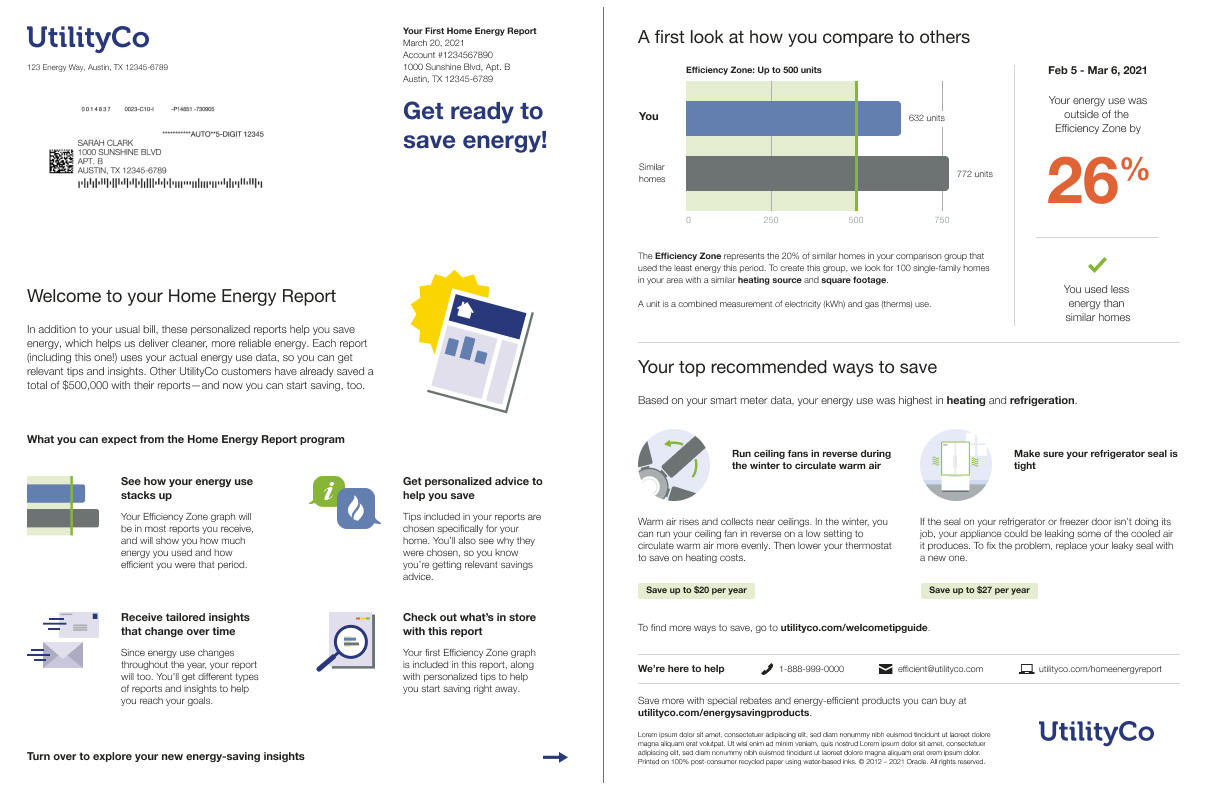
Welcome Report
Announcement Report: The Announcement Report highlights an announcement or update that has an impact on the customer’s energy use and relates them to the insights presented in the rest of the report. For example, the report could be used to make limited-moderate income customers aware of bill assistance programs or to prepare customers for fire season. A fully customized Announcement Quadrant on the front of the report echoes the selected announcement theme, and provides the customer with context and rationale for the personalized insights included in the report.
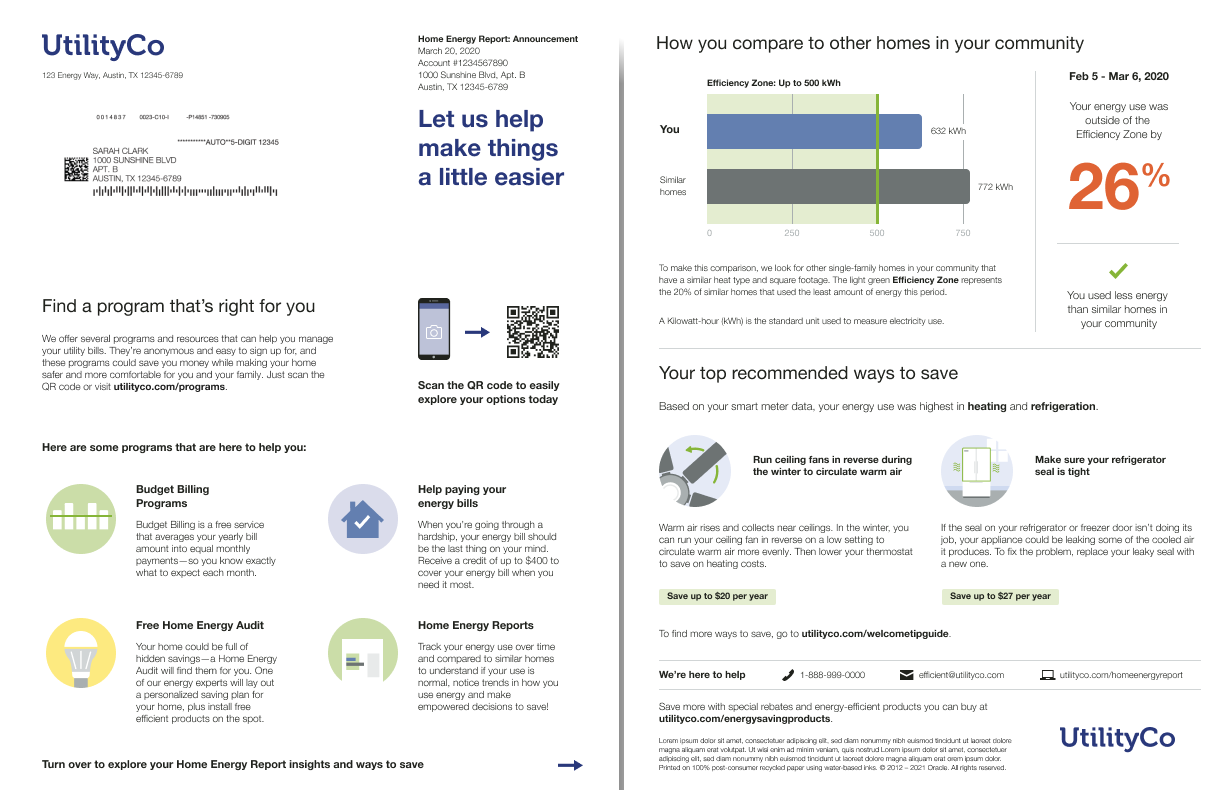
Announcement Report
Utilities can use the Welcome and Announcement Report to introduce new and existing Home Energy Report recipients to the v3 experience or to share an important announcement or update with existing customers.
Steps to Enable
Contact your Service Delivery Manager to coordinate configuration of the module.
To contact your Service Delivery Manager:
- Log in to Inside Opower (https://inside.opower.com). This is your portal for questions and information related to your program.
- Go to the Community tab and contact the Service Delivery Manager using the information provided.
Key Resources
- Refer to the Energy Efficiency Cloud Service Overview for more information.
Summer Seasonal Report for Home Energy Reports v3
The Summer Seasonal Report educates customers about their cooling costs and encourages them to reduce their energy use leading up to summer weather conditions. The reports are sent before the start of the summer to help the customer plan for the season ahead.
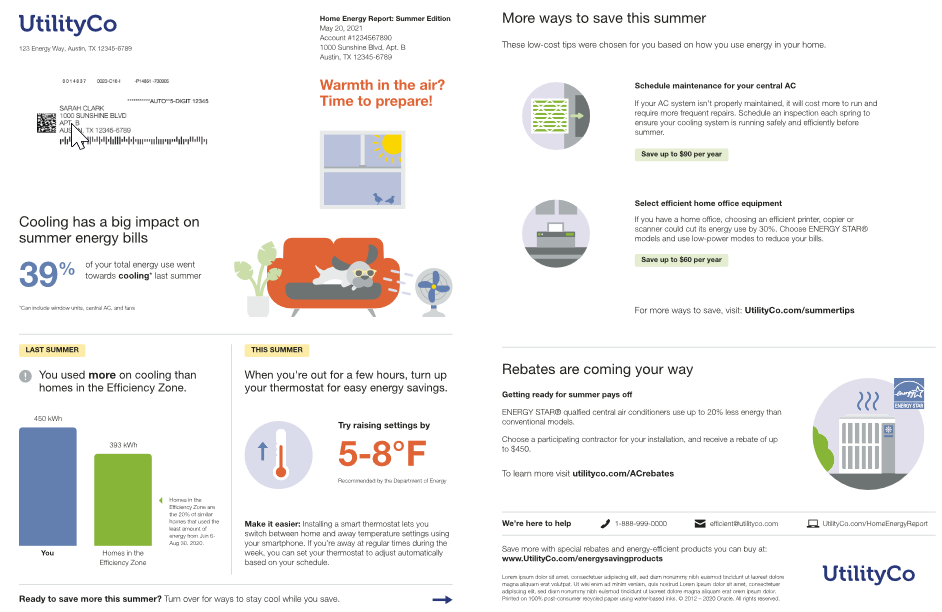
Summer Seasonal Report
The report has several unique features, including:
-
Seasonal Breakout: Informs the customer what percentage of their energy use the previous summer or winter went toward cooling or heating.
-
Seasonal Normative Comparison: Shows the customer’s aggregated total energy use from the previous summer season compared to either similar homes or homes in the efficiency zone. The goal of this module is to create realistic savings goal the customer can strive for.
-
Thermostat Adjustment: Provides customers with a recommended thermostat adjustment for the season and creates trust by including a citation to a credible source, such as the U.S. Department of Energy.
-
Seasonal Tips: Provides tips designed to help customers lower their summer cooling usage.
The Summer Seasonal Report helps utilities reduce strain on their electric grids and infrastructure during the summer months by helping customers understand how they perform during summer and what they can do to save energy and money on their bill.
Steps to Enable
Contact your Service Delivery Manager to coordinate configuration of the module.
To contact your Service Delivery Manager:
- Log in to Inside Opower (https://inside.opower.com). This is your portal for questions and information related to your program.
- Go to the Community tab and contact the Service Delivery Manager using the information provided.
High Bill Alerts AMI Bill Period Display
The customer’s current bill period was added to the High Bill Alerts AMI Bill Forecast module. This update makes it easier for customers to understand how the forecast applies to the billing period.
High Bill Alerts are meant to help customers prepare for their next bill. Including the dates of the current Bill Period reminds customers of their Bill Period dates since they often change slightly every month. This feature increases customer satisfaction with their utility by helping manage their bills.
Steps to Enable
Contact your Service Delivery Manager to coordinate configuration of the module.
To contact your Service Delivery Manager:
- Log in to Inside Opower (https://inside.opower.com). This is your portal for questions and information related to your program.
- Go to the Community tab and contact the Service Delivery Manager using the information provided.
Digital Self Service - Energy Management
Home Energy Analysis Enhancements
Several enhancements were made to the Home Energy Analysis feature to provide customers with a better understanding of how they use energy, including:
-
Disaggregated energy use that highlights the top three categories of usage.
-
New insights that provide greater visibility into what contributes to a customer’s bill. For example, with sufficient data, the breakdown can show of how much energy is used by individual appliances and devices that are always on.
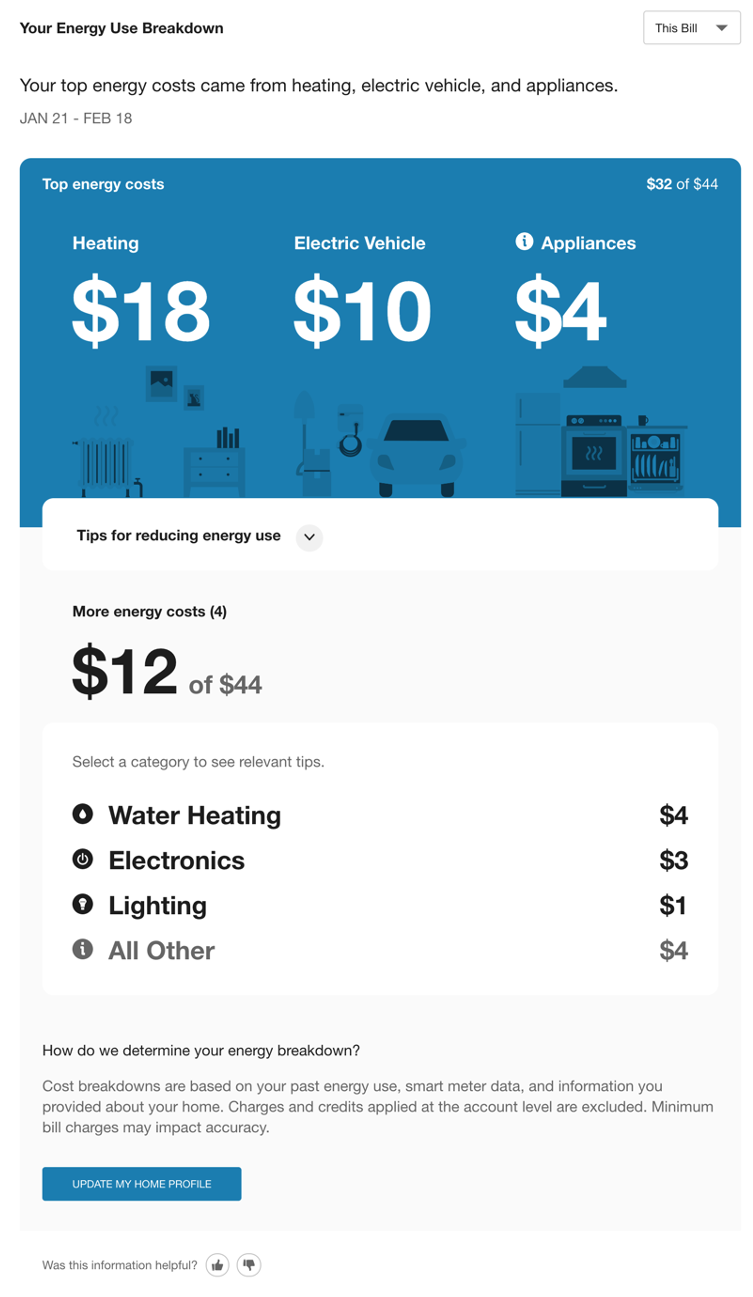
Home Energy Analysis
- An enhanced Home Energy Analysis Light widget that can be placed on the Smart Dashboard or embedded on other web pages as a promotion of the full Home Energy Analysis experience. This widget encourages customers to complete the Home Energy Analysis survey. If they have already completed the survey, it displays a breakdown of the customer’s top three categories of energy use during the last bill period. New energy insights, such as a customer’s usage with individual appliances, can be included in the breakdown.
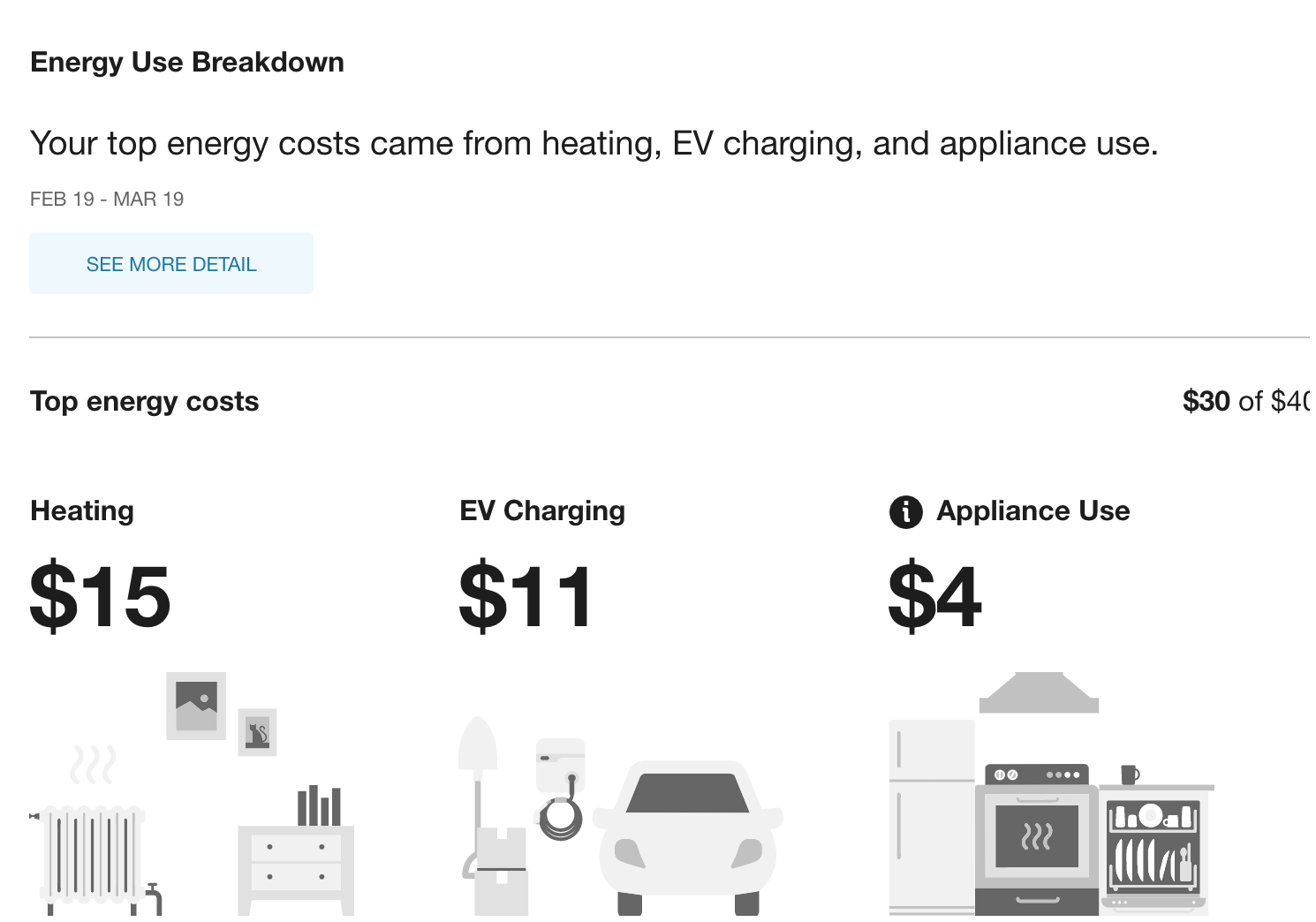
Home Energy Analysis Light
This feature provides a number of new features with an enhanced look and feel to help customers better understand their energy use and encourage ways to save.
Steps to Enable
Contact your Service Delivery Manager to coordinate configuration of the module.
To contact your Service Delivery Manager:
- Log in to Inside Opower (https://inside.opower.com). This is your portal for questions and information related to your program.
- Go to the Community tab and contact the Service Delivery Manager using the information provided.
The Energy Disaggregation API provides annual and bill breakdowns of a customer's energy use categories. The breakdowns are available as a percentage for the annual time period, and as either a cost or percentage for a bill period. Personalized disaggregation insights can be used to create custom web and mobile experiences that provide customers with visibility into where they use the most energy and enable utilities to explore new engagement opportunities with customers. Possible disaggregation categories include: Appliances, Clothes Washer, Cooling, Dishwasher, Dryer, Electric Vehicle, Electronics, Heating, Lighting, Other, Oven, Pool, Refrigerator, and Water Heating. An additional Always-On endpoint is available to provide a customer's always-on electricity use for a bill period. Always-on use represents the small amount of power that appliances, electronics, and other equipment draw when they are plugged in. A kWh value and percentage based on the total electricity use for the bill period are available.
The Energy Disaggregation API is the newest addition to the suite of REST APIs in Digital Self Service - Energy Management. Personalized disaggregation insights can be used to create custom web and mobile experiences that provide customers with visibility into where they use the most energy and enable utilities to explore new engagement opportunities with customers.
Steps to Enable
See the Disaggregation REST API for enablement instructions.
Post Bill Report with Appliance Detection and Disaggregation Insights for Weekly Energy Updates
The Post Bill Report is sent to Weekly Energy Update customers the week after their bill period has ended. The report includes the new Post Bill Comparison, Post Bill End Use, and Post Bill Always On modules, and can also include existing modules such as the Personalized Tips and the Easy Open to Home Energy Analysis modules. The Post Bill End Uses module shows customers how much each end use contributed to their bill and helps customers understand which appliances contribute to their bill amounts. The report is available for electricity, gas, and dual fuel customers.
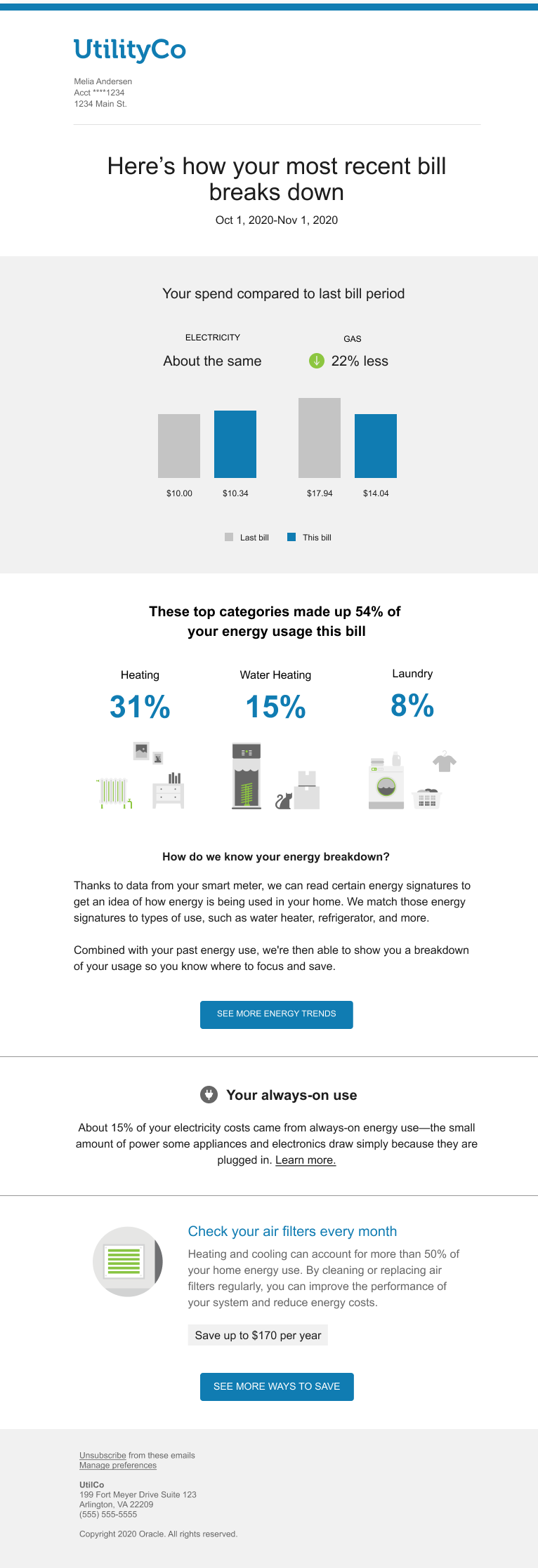
Post Bill Report
The Post Bill Report uses artificial intelligence to offer a high personalized experience by informing customers how much each appliance contributed to their bill. Customers often suffer from "usage amnesia," where they forget that they used a certain appliance a lot that month, and are shocked when they have to pay their bill. The Top End Use insight solves this problem by educating customers about which appliances drive their energy bill and how much each appliance contributed to their bill amount. Similar to the Weekly Email, the Post Bill Report includes a comparison of usage charges between the last two bill periods. Self comparison is a strong behavioral motivator that leads customers towards taking action. An Always On insight is also included to inform customers how much of their usage comes from devices that are Always On. For example, televisions, computers, security systems, and more. Finally, customers are provided with an energy saving tip based on the attributes we have about their home.
Steps to Enable
Contact your Service Delivery Manager to coordinate configuration of the module.
To contact your Service Delivery Manager:
- Log in to Inside Opower (https://inside.opower.com). This is your portal for questions and information related to your program.
- Go to the Community tab and contact the Service Delivery Manager using the information provided.
Key Resources
- Refer to the Oracle Utilities Opower Proactive Alerts Cloud Service Overview for more information.
The following updates apply to Home Energy Reports that are delivered by email.
Summer Seasonal Report for Email Home Energy Reports v3
The Summer Seasonal Report educates customers about their cooling costs and encourages them to reduce their energy use leading up to summer weather conditions. The reports are sent before the start of the summer to help the customer plan for the season ahead.
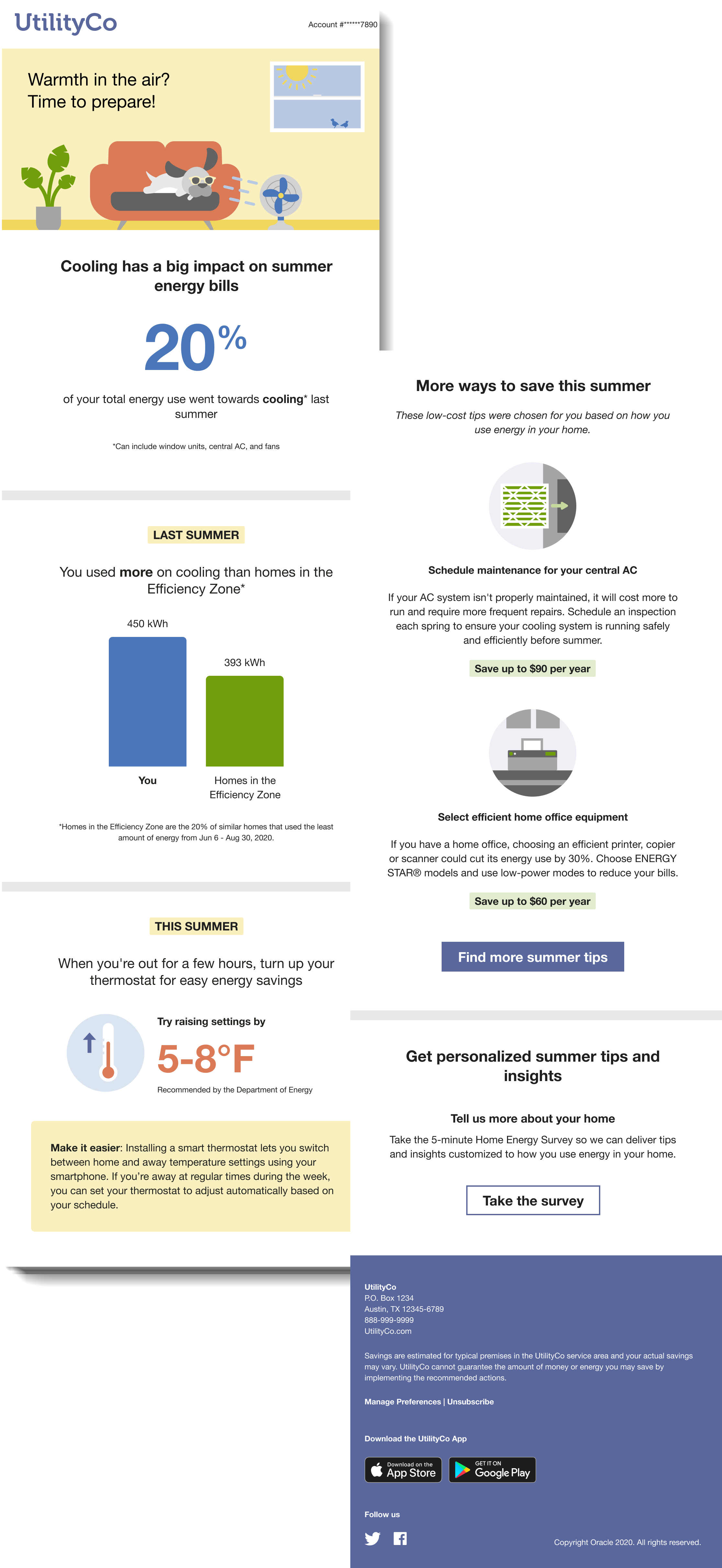
Summer Seasonal Report
The report has several unique features, including:
-
Seasonal Breakout: Informs the customer what percentage of their energy use the previous summer or winter went toward cooling or heating.
-
Seasonal Normative Comparison: Shows the customer’s aggregated total energy use from the previous summer season compared to either similar homes or homes in the efficiency zone. The goal of this module is to create realistic savings goal the customer can strive for.
-
Thermostat Adjustment: Provides customers with a recommended thermostat adjustment for the season and creates trust by including a citation to a credible source, such as the U.S. Department of Energy.
-
Seasonal Tips: Provides tips designed to help customers lower their summer cooling usage.
The Summer Seasonal Report helps utilities reduce strain on their electric grids and infrastructure during the summer months by helping customers understand how they perform during summer and what they can do to save energy and money on their bill.
Steps to Enable
Contact your Service Delivery Manager to coordinate configuration of the module.
To contact your Service Delivery Manager:
- Log in to Inside Opower (https://inside.opower.com). This is your portal for questions and information related to your program.
- Go to the Community tab and contact the Service Delivery Manager using the information provided.