
This document will continue to evolve as existing sections change and new information is added. All updates appear in the following table:
| Date | Product | Feature | Notes |
|---|---|---|---|
| 04 AUG 2022 | Created initial document. |
Oracle Utilities Opower provides a range of data-driven solutions, software products, and personalized insights to utility customers about their energy use.
This guide outlines the information you need to know about new or improved functionality in this update, and describes any tasks you might need to perform for the update. Each section includes a brief description of the feature, the steps you need to take to enable or begin using the feature, any tips or considerations that you should keep in mind, and the resources available to help you.
 HAVE AN IDEA?
We’re here and we’re listening. If you have a suggestion on how to make our cloud services even better then go ahead and tell us by submitting a service request. Wherever you see this icon after the feature name it means we delivered one of your ideas.
DISCLAIMER
The information contained in this document may include statements about Oracle’s product development plans. Many factors can materially affect Oracle’s product development plans and the nature and timing of future product releases. Accordingly, this Information is provided to you solely for information only, is not a commitment to deliver any material, code, or functionality, and should not be relied upon in making purchasing decisions. The development, release, and timing of any features or functionality described remains at the sole discretion of Oracle.
This information may not be incorporated into any contractual agreement with Oracle or its subsidiaries or affiliates. Oracle specifically disclaims any liability with respect to this information. Refer to the Legal Notices and Terms of Use for further information.
Column Definitions:
Report = New or modified, Oracle-delivered, ready to run reports.
UI or Process-Based: Small Scale = These UI or process-based features are typically comprised of minor field, validation, or program changes. Therefore, the potential impact to users is minimal.
UI or Process-Based: Larger Scale* = These UI or process-based features have more complex designs. Therefore, the potential impact to users is higher.
Features Delivered Disabled = Action is needed BEFORE these features can be used by END USERS. These features are delivered disabled and you choose if and when to enable them. For example, a) new or expanded BI subject areas need to first be incorporated into reports, b) Integration is required to utilize new web services, or c) features must be assigned to user roles before they can be accessed.
| Ready for Use by End Users Reports plus Small Scale UI or Process-Based new features will have minimal user impact after an update. Therefore, customer acceptance testing should focus on the Larger Scale UI or Process-Based* new features. |
Customer Must Take Action before Use by End Users Not disruptive as action is required to make these features ready to use. As you selectively choose to leverage, you set your test and roll out timing. |
|||||
|---|---|---|---|---|---|---|
| Feature |
Report |
UI or |
UI or |
|
||
Ways to Save Tip Filters for Digital Self Service - Energy Management |
||||||
Time of Use Report for Print Home Energy Reports v3
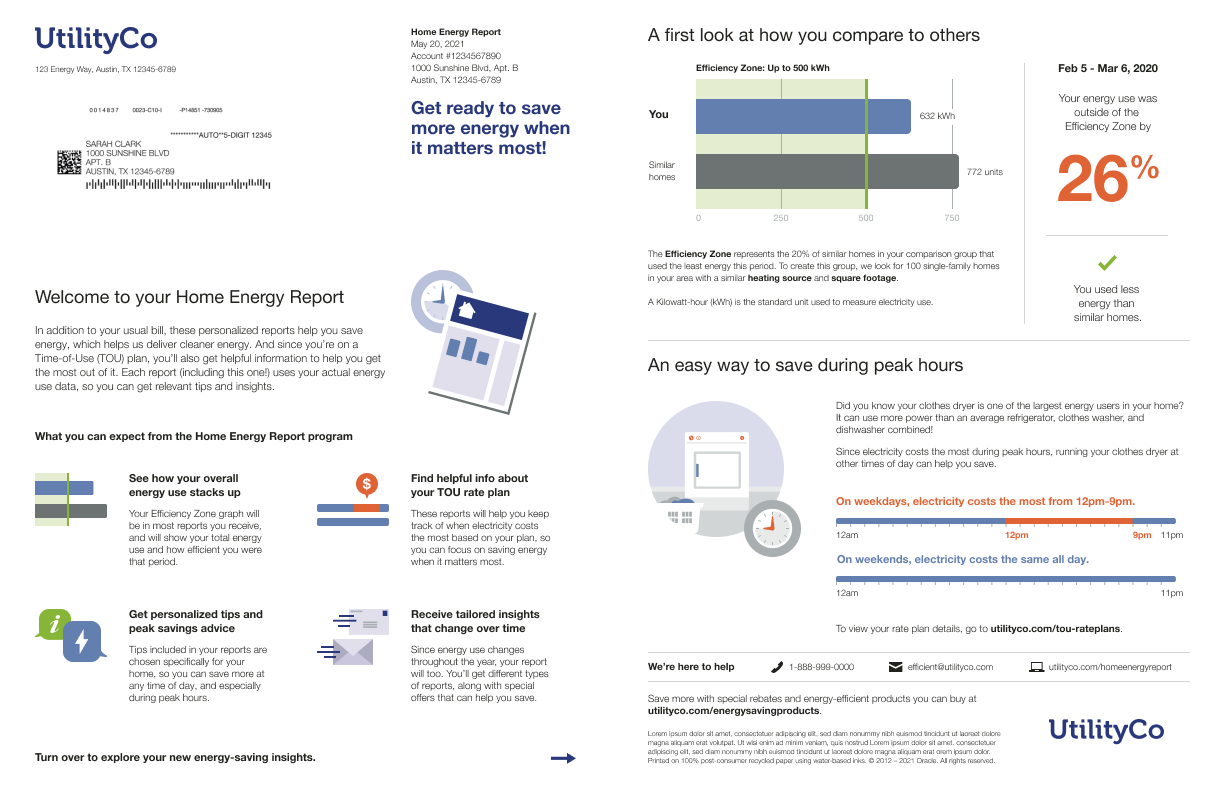
The Time of Use Report provides customers on a time of use energy plan with a print report experience that is focused on overall energy savings and rate education. There are two types of reports:
-
Time of Use Welcome Report: This report is the first report a new customer on a time of use plan receives. It is focused on introducing the customer to their report experience.
- Time of Use Progress Report: This report is the first report a customer receives after starting service on a time of use energy program. It is focused on introducing the customer to their report experience.
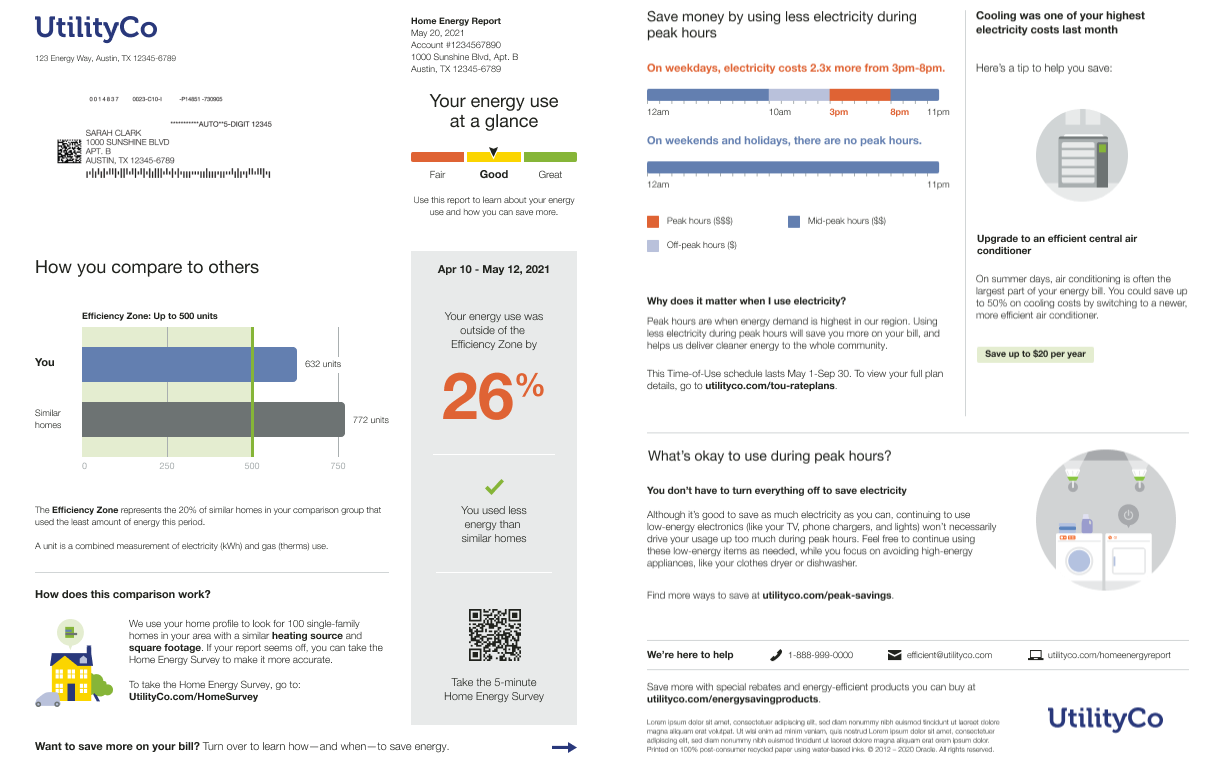
The reports includes several unique features:
-
Time of Use Announcement and Quadrant (Welcome Report Only): Educates customers about what to expect in their successive reports, and includes ways to save during peak hours.
-
Time of Use 101: Educates customers about when electricity is most expensive based on their time of use rate plan. In the Time of Use Welcome Report, the module helps customers understand how much more electricity costs during peak hours on weekdays and weekends and encourages them to save more during peak hours. In the Time of Use Progress Report, the module educates customers about their specific rate plan at the specific time the report is generated and provides educational information about why saving during peak hours is important.
- Tip Actions: Provides rotating, dynamic tips designed to educate time of use customers about the actions they can take to save energy and reduce their bills. Tips can include information such as:
- How to save energy anytime and during peak hours
- Which appliances that use the most energy each season
- Top energy uses
Utilities can provide customers on a time of use energy plan with a print or email report experience that is focused on overall energy savings and rate education.
Steps to Enable
Contact your Service Delivery Manager to coordinate configuration of the module.
To contact your Service Delivery Manager:
- Log in to Inside Opower (https://inside.opower.com). This is your portal for questions and information related to your program.
- Go to the Community tab and contact the Service Delivery Manager using the information provided.
Key Resources
- Refer to the Energy Efficiency Cloud Service Overview.
Time of Use Report for Email Home Energy Reports v3
The Time of Use Report provides customers on a time of use energy plan with an email report experience that is focused on overall energy savings and rate education. There are two types of reports:
-
Time of Use Welcome Report: This report is the first report a new customer on a time of use plan receives. It is focused on introducing the customer to their report experience.

-
Time of Use Progress Report: This report is the first report the first report a customer receives after starting service on a time of use energy program. It is focused on introducing the customer to their report experience.

The reports includes several unique features:
-
Time of Use Announcement and Quadrant (Welcome Report Only): Educates customers about what to expect in their successive reports, and includes ways to save during peak hours.
-
Time of Use 101: Educates customers about when electricity is most expensive based on their time of use rate plan. In the Time of Use Welcome Report, the module helps customers understand how much more electricity costs during peak hours on weekdays and weekends and encourages them to save more during peak hours. In the Time of Use Progress Report, the module educates customers about their specific rate plan at the specific time the report is generated and provides educational information about why saving during peak hours is important.
- Tip Actions: Provides rotating, dynamic tips designed to educate time of use customers about the actions they can take to save energy and reduce their bills. Tips can include information such as:
- How to save energy anytime and during peak hours
- Which appliances that use the most energy each season
- Top energy uses
Utilities can provide customers on a time of use energy plan with an email report experience that is focused on overall energy savings and rate education.
Steps to Enable
Contact your Service Delivery Manager to coordinate configuration of the module.
To contact your Service Delivery Manager:
- Log in to Inside Opower (https://inside.opower.com). This is your portal for questions and information related to your program.
- Go to the Community tab and contact the Service Delivery Manager using the information provided.
Key Resources
- Refer to the Energy Efficiency Cloud Service Overview.
Solar Report for Email Home Energy Reports v3
The Solar Report provides solar customers with an email report experience that is focused on improving energy savings behaviors and customer satisfaction. The report takes into account the impact of their solar energy use and acknowledges how the customer's solar use contributes to the public good.
There are two types of reports:
- Solar Welcome Report: The welcome report is the first report a customer on a solar plan receives. It introduces the customer to their new solar-only neighbor comparison and tells them what they can expect from subsequent reports.

- Solar Progress Report: The report is focused on general energy efficiency and money saving goals for solar customers.

The reports includes several unique features:
-
Solar Benchmark: Provides a dynamic and personalized, at-a-glance interpretation of the customer’s net energy use.
-
Solar Three-bar Neighbor Comparison: Educates customers about their net energy use compared to other homes with solar. The comparison groups include only other homes with solar. The three-bar neighbor comparison is paired with solar insights that describe whether a customer used more energy (net positive) or less energy (net negative) than their solar panels produced.
-
Solar Tips: Provides up to three tip modules that highlight personalized aspects of the tip experience.
Utilities can provide solar customers with an email report experience that is focused on solar net usage and savings.
Steps to Enable
Contact your Service Delivery Manager to coordinate configuration of the module.
To contact your Service Delivery Manager:
- Log in to Inside Opower (https://inside.opower.com). This is your portal for questions and information related to your program.
- Go to the Community tab and contact the Service Delivery Manager using the information provided.
Key Resources
- Refer to Energy Efficiency Cloud Service Overview.
- Refer to the Solar Reports training.
Disaggregation Insights for Opower Analytics Visualization
Utilities can purchase Disaggregation Insights as an add-on to their Opower Analytics Visualization license. Disaggregation Insights includes presence discovery model data for the following categories:
- Electric Heater
- L1 and L2 Electric Vehicle Chargers
Customer-level data for these categories is derived from a proprietary presence discovery model that detects whether or not an appliance exists at a customer's home.
Utilities can use this feature to better understand their customers, create targeted marketing campaigns, and improve their energy efficiency programs.
Steps to Enable
You don't need to do anything to enable this feature.
Key Resources
- Refer to the Opower Analytics Visualization User Guide.
Digital Self Service - Energy Management
Ways to Save Tip Filters for Digital Self Service - Energy Management
Customers can use tip filters and sub-filters to find the tip recommendations that are most relevant to in Ways to Save. Filter categories include:
- Easy Tips: Easy to Do
- Cost Type: Free Tips, Low Cost Tips, Great Investments, and Rebates
- Seasons: Spring, Summer, Fall, and Winter
- Appliances and More: Heating, Cooling, Water Heating, EV Charging, Pool Energy Use, Laundry, Dishwasher Use, Oven Use, Refrigeration, Electronics, and Lighting
Filters can be combined to create a selection of tips. For example, the Free Tips and Summer filters could be combined to view only free seasonal tips for the summer. When the filters are cleared, the Tip Guides are available for the customer to view.
Customers can use tip filters and sub-filters to easily identify the tip recommendations that are most relevant to them.
Steps to Enable
Contact your Service Delivery Manager to coordinate configuration of the module.
To contact your Service Delivery Manager:
- Log in to Inside Opower (https://inside.opower.com). This is your portal for questions and information related to your program.
- Go to the Community tab and contact the Service Delivery Manager using the information provided.
Key Resources