
This document will continue to evolve as existing sections change and new information is added. All updates appear in the following table:
| Date | Module | Feature | Notes |
|---|---|---|---|
| 04 AUG 2023 | Created initial document. |
Oracle Utilities Opower provides a range of data-driven solutions, software products, and personalized insights to utility customers about their energy use.
This guide outlines the information you need to know about new or improved functionality in this update, and describes any tasks you might need to perform for the update. Each section includes a brief description of the feature, the steps you need to take to enable or begin using the feature, any tips or considerations that you should keep in mind, and the resources available to help you.
 HAVE AN IDEA?
We’re here and we’re listening. If you have a suggestion on how to make our cloud services even better, let us know by entering your idea in Oracle Forums. Wherever you see this icon after the feature name it means we delivered one of your ideas.
DISCLAIMER
The information contained in this document may include statements about Oracle’s product development plans. Many factors can materially affect Oracle’s product development plans and the nature and timing of future product releases. Accordingly, this Information is provided to you solely for information only, is not a commitment to deliver any material, code, or functionality, and should not be relied upon in making purchasing decisions. The development, release, and timing of any features or functionality described remains at the sole discretion of Oracle.
This information may not be incorporated into any contractual agreement with Oracle or its subsidiaries or affiliates. Oracle specifically disclaims any liability with respect to this information. Refer to the Legal Notices and Terms of Use for further information.
Column Definitions:
Report = New or modified, Oracle-delivered, ready to run reports.
UI or Process-Based: Small Scale = These UI or process-based features are typically comprised of minor field, validation, or program changes. Therefore, the potential impact to users is minimal.
UI or Process-Based: Larger Scale* = These UI or process-based features have more complex designs. Therefore, the potential impact to users is higher.
Features Delivered Disabled = Action is needed BEFORE these features can be used by END USERS. These features are delivered disabled and you choose if and when to enable them. For example, a) new or expanded BI subject areas need to first be incorporated into reports, b) Integration is required to utilize new web services, or c) features must be assigned to user roles before they can be accessed.
| Ready for Use by End Users Reports plus Small Scale UI or Process-Based new features will have minimal user impact after an update. Therefore, customer acceptance testing should focus on the Larger Scale UI or Process-Based* new features. |
Customer Must Take Action before Use by End Users Not disruptive as action is required to make these features ready to use. As you selectively choose to leverage, you set your test and roll out timing. |
|||||
|---|---|---|---|---|---|---|
| Feature |
Report |
UI or |
UI or |
|
||
Behavioral Load Shaping Time of Use Rate Coach Email with Peak Period Disaggregation |
||||||
Behavioral Load Shaping for Tiered Time of Use Rates Customers |
||||||
Oracle Utilities Opower data science models were optimized for more accurate predictions with enhanced weather data and confirmation of end-use presence. For example, to detect whether an appliance is present at a location.
This update provides more reliable and precise disaggregation insights to Oracle Utilities Opower products. This helps utilities make better business decisions and helps customers better understand how they are using energy.
Steps to Enable
You don't need to do anything to enable this feature.
Key Resources
- Refer to the Opower Platform Documentation Library.
Event-Driven Pipeline for Behavioral Demand Response
Behavioral Demand Response is available on the Event-Driven Pipeline.
The Event-Driven Pipeline generates communications faster for delivery, and enables more flexible timing for when events can be called.
Steps to Enable
Contact your Service Delivery Manager to coordinate configuration of the module. To contact your Service Delivery Manager:
- Log in to Inside Opower (https://inside.opower.com). This is your portal for questions and information related to your program.
- Go to the Community tab and contact the Service Delivery Manager using the information provided.
Key Resources
SMS Pre-Event and Post-Event Notifications
Behavioral Demand Response SMS pre-event and post-event notifications use text messages to contact customers by telephone. The pre-event text message informs the customer of upcoming events so that they can take actions to potentially save energy and money. The content of the messages varies based on the day of the peak event, and tells customers when a peak day event is about to start, while encouraging them to join their community to help save energy. After the event, a post-event message is sent to tell the customer how they did during the last peak event compared to their neighbors.
This feature provides utilities with an additional channel through which pre-event and post-event notifications can be sent to customers.
Steps to Enable
Contact your Service Delivery Manager to coordinate configuration of the module. To contact your Service Delivery Manager:
- Log in to Inside Opower (https://inside.opower.com). This is your portal for questions and information related to your program.
- Go to the Community tab and contact the Service Delivery Manager using the information provided.
Key Resources
- Refer to the Behavioral Demand Response Cloud Service Overview.
Behavioral Demand Response pre-event and post-event email, SMS, and interactive voice recognition messages are available in Spanish.
This update allows utilities to provide a consistent Spanish language experience to customers who have selected Spanish as their preferred language.
Steps to Enable
Contact your Service Delivery Manager to coordinate configuration of the module. To contact your Service Delivery Manager:
- Log in to Inside Opower (https://inside.opower.com). This is your portal for questions and information related to your program.
- Go to the Community tab and contact the Service Delivery Manager using the information provided.
Key Resources
-
Refer to the Behavioral Demand Response Cloud Service Overview.
The Home Profile highlights the status of the customer's Home Energy Analysis survey and reminds them that completing the survey improves their report insights.
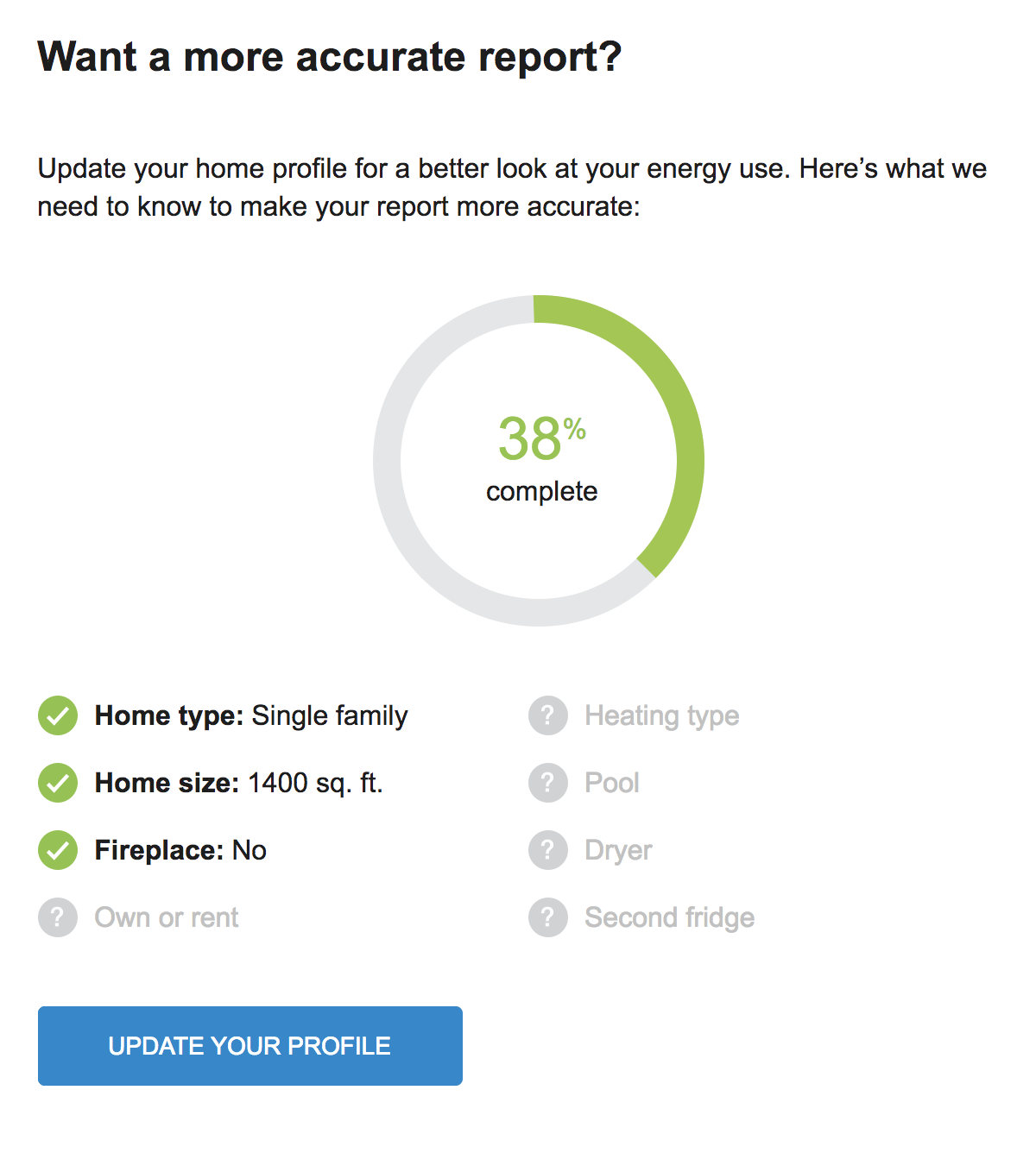
Module features include:
- Status wheel: The status wheel indicates the percentage of the Home Energy Analysis that the customer has completed.
- Key characteristics: A list of Home Energy Analysis characteristics and their completion status.
- Home Energy Analysis Access: A button provides the customer with direct access to their Home Energy Analysis.
Utilities can use this module to boost Home Energy Analysis completion rates, and improve energy efficiency program savings.
Steps to Enable
Contact your Service Delivery Manager to coordinate configuration of the module. To contact your Service Delivery Manager:
- Log in to Inside Opower (https://inside.opower.com). This is your portal for questions and information related to your program.
- Go to the Community tab and contact the Service Delivery Manager using the information provided.
Key Resources
- Refer to the Energy Efficiency Cloud Service Overview.
The Home Profile highlights the status of the customer's Home Energy Analysis survey and reminds them that completing the survey improves their report insights.
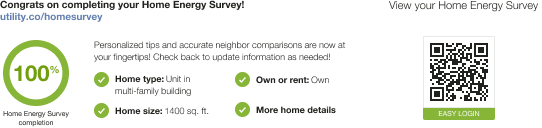
Module features include:
- Status wheel: The status wheel indicates the percentage of the Home Energy Analysis that the customer has completed.
- Key characteristics: A list of Home Energy Analysis characteristics and their completion status.
- Home Energy Analysis Access: A print QR code provides the customer with direct access to their Home Energy Analysis.
Utilities can use this module to boost Home Energy Analysis completion rates, and improve energy efficiency program savings.
Steps to Enable
Contact your Service Delivery Manager to coordinate configuration of the module. To contact your Service Delivery Manager:
- Log in to Inside Opower (https://inside.opower.com). This is your portal for questions and information related to your program.
- Go to the Community tab and contact the Service Delivery Manager using the information provided.
Key Resources
- Refer to the Energy Efficiency Cloud Service Overview.
Behavioral Load Shaping Time of Use Rate Coach Email with Peak Period Disaggregation
A peak period disaggregation experience is available for the Behavioral Load Shaping Time of Use Rate Coach Email program. The peak period disaggregation experience educates customers about their energy use during the peak hours and about which appliances (EV charging, cooling, water heating, and dryer use) they used most during peak hours. The Time of Use Coach Email with Peak Period Disaggregation experience includes three email communication types:
Introduction Email: The Introduction email is provided to customers as part of the standard and peak period disaggregation experiences and is the first weekly email customers receive as part of the program. This email is designed to welcome customers to the program, provide peak hour energy use insights, and offer tips on how to reduce energy use during peak hours. The email also encourages customers to use less during peak hours by including information about the average savings of other utility customers who have shifted their use to off-peak hours.
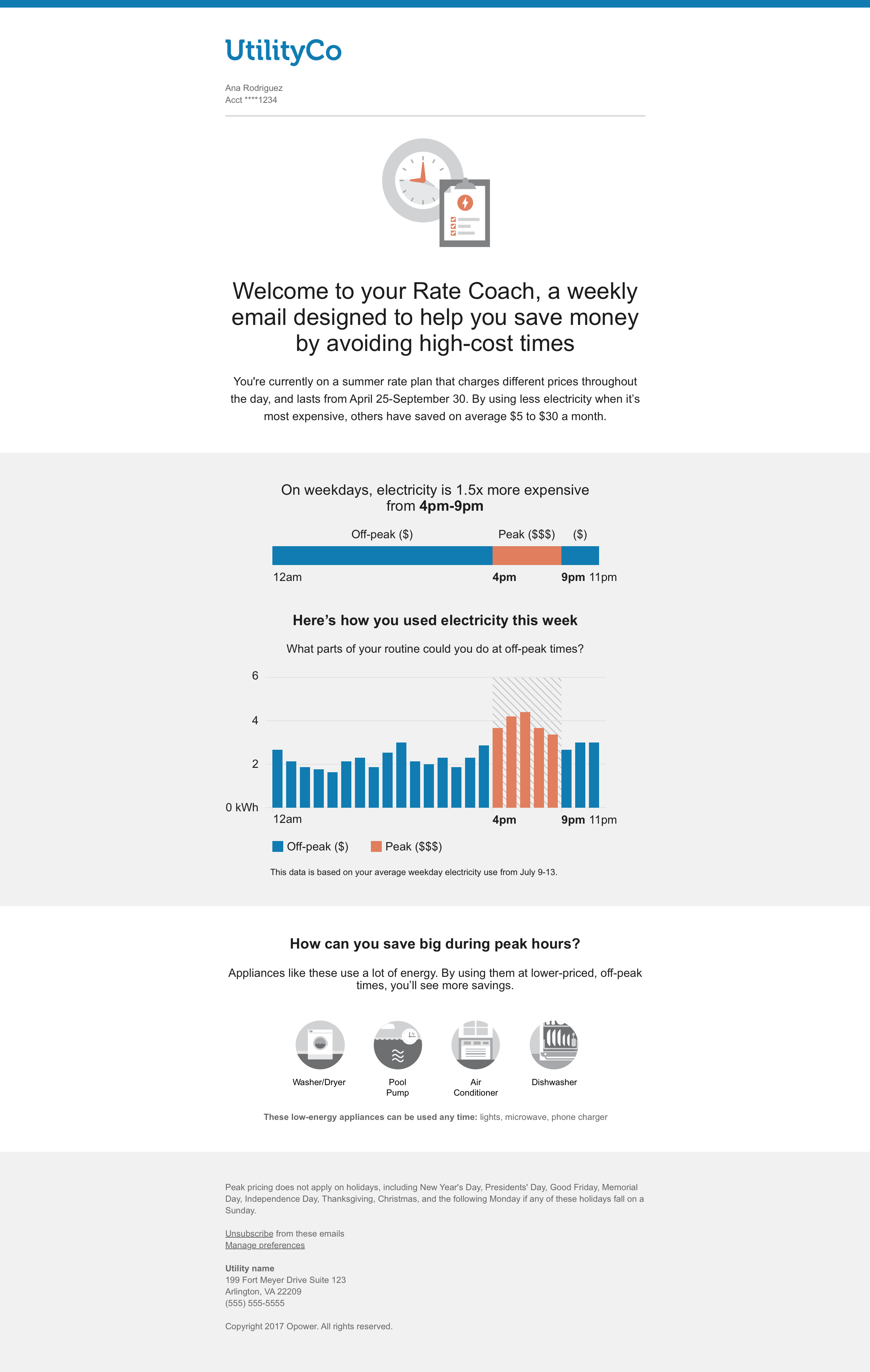
Weekly Coach Email with Peak Period Disaggregation: The Weekly Coach email with peak period disaggregation provides customers with peak hour energy use insights, a comparison between peak hour electricity spending during the current week and the previous week, and insights about what appliances they use the most during peak hours each week. Customers begin receiving the Weekly Coach email after they receive their Introduction email, and do not receive the Weekly Coach email in weeks when they receive the Post-Bill Report Email.
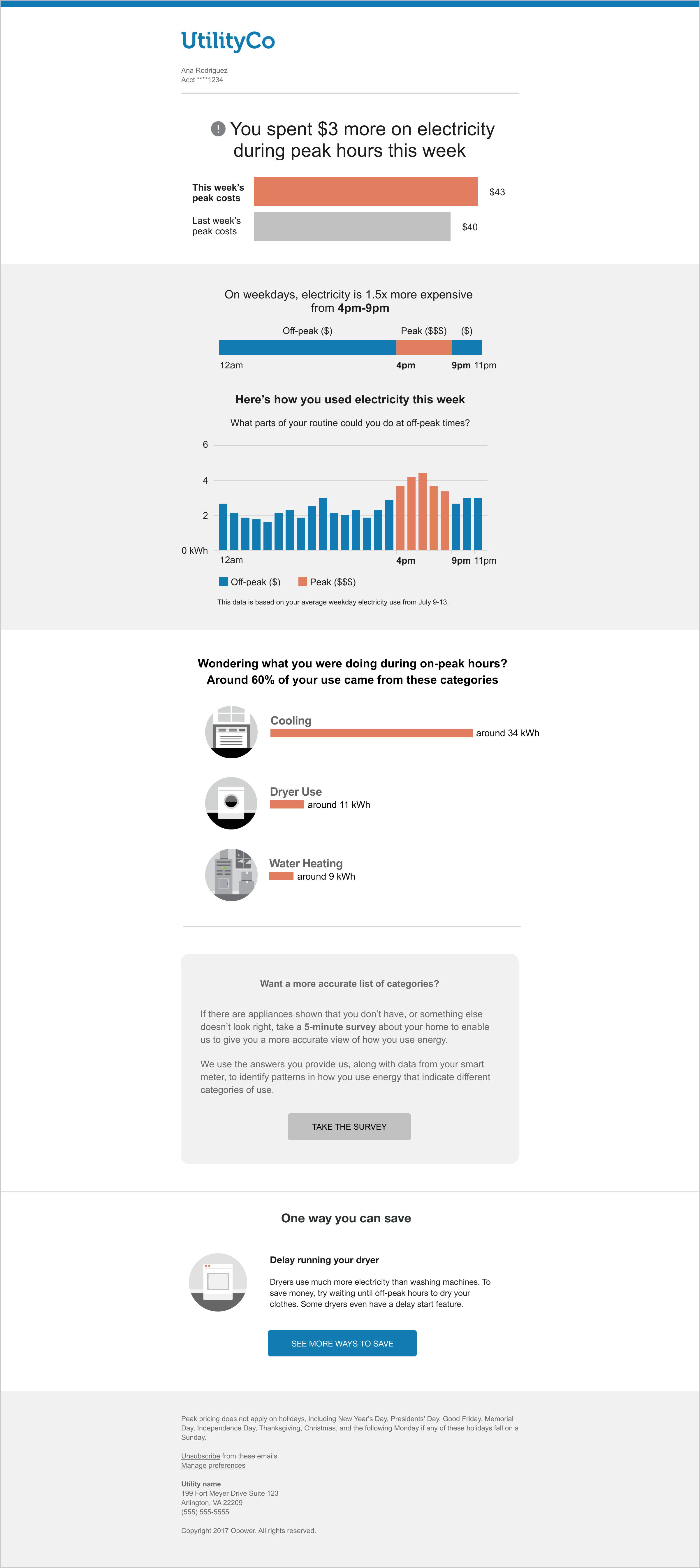
- Weekly Comparison: Compares the customer's electricity costs during peak hours in the current week to their spending during peak hours in the previous week, and provides varying feedback based on how the customer's costs in the week compare to those of the previous week.
- TOU 101 Module: Educates customers about when electricity is most expensive based on their Time of Use rate plan.
- Hourly Usage Module: Educates customers about how much electricity they use during peak hours and encourages them to shift tasks to off-peak hours to save money.
- Weekly Peak Period Disaggregation: Provides insights about what appliances the customer uses the most during peak hours each week. It highlights up to three of the possible customer use categories (Cooling, EV Charging, Water Heating, Dryer Use), and encourages the customer to improve their report insights by updating their Home Energy Analysis.
- Tips: Provides dynamic personalized tips
Post-Bill Report Email: The Post-Bill Report email is delivered to peak disaggregation experience customers in place of the standard Peak Usage Summary email. The email is delivered seven days after a customer's bill period ends. In order to increase their motivation to save, it helps customers understand which appliances they used during peak hours and how that usage contributes to their energy charges under a Time of Use rate plan.

- Post-Bill Bill Period Comparison: Provides a comparison of the customer's costs or usage during peak hours in the current bill period to their spending during peak hours in the previous bill. It provides feedback based on how the customer's costs in the current bill period compare to those of the previous bill.
- Post-Bill Peak Period Disaggregation: Provides a comparison of the customer's costs or usage during peak hours in the current bill period to their spending during peak hours in the previous bill. It provides feedback based on how the customer's costs in the current bill period compare to those of the previous bill.
- Tips: Provides dynamic personalized tips that are relevant to a customer's unique needs.
Utilities can use this feature to provide a peak period disaggregation experience for their Behavioral Load Shaping Time of Use Rate Coach email program.
Steps to Enable
Contact your Service Delivery Manager to coordinate deployment of Behavioral Load Shaping for Tiered Time of Use rates. To contact your Service Delivery Manager:
- Log in to Inside Opower (https://inside.opower.com). This is your portal for questions and information related to your program.
- Go to the Community tab and contact the Service Delivery Manager using the information provided.
Key Resources
- Refer to the Behavioral Load Shaping Cloud Service Product Overview.
Behavioral Load Shaping for Tiered Time of Use Rates Customers
Behavioral Load Shaping is available for customers on tiered Time of Use rate plans. Customers on a tiered Time of Use rate plan receive a lower rate each billing period when they keep their energy use under a preset energy allowance. While the Behavioral Load Shaping user experience is unchanged, this update ensures that customers on a tiered Time of Use rate plan receive accurate insights about their energy use and are able to increase their peak savings.
Key updates include:
- Enabling Report Experience: Tiered Time of Use customers are eligible to receive the Behavioral Load Shaping Time of Use Coach report experience.
- Behavioral Load Shaping Time of Use 101: The Behavioral Load Shaping Time of Use 101 module was updated to show tiered Time of Use customers the price ratio between on-peak and off-peak for the first tier in the rate
This update ensures that customers on a tiered Time of Use rate plan receive accurate insights about their energy use and are able to increase their peak savings.
Steps to Enable
Contact your Service Delivery Manager to coordinate configuration of the module. To contact your Service Delivery Manager:
- Log in to Inside Opower (https://inside.opower.com). This is your portal for questions and information related to your program.
- Go to the Community tab and contact the Service Delivery Manager using the information provided.
Key Resources
- Refer to the Behavioral Load Shaping Cloud Service Overview.