
- Revision History
- Overview
- Feature Summary
-
- Work and Asset Management
- Analytics Visualization
- Utilities Application Framework
- Utilities Testing Accelerator
- System Wide
- IMPORTANT Actions and Considerations
This document will continue to evolve as existing sections change and new information is added. All updates appear in the following table:
| Date | Product | Feature | Notes |
|---|---|---|---|
| 25 MAR 2021 | Created initial document. |
Oracle Utilities Work and Asset Cloud Service is used to maintain information about assets and various features and functions around managing those assets. The solutions provide a means of recording asset acquisition, maintenance, procurement, installation and removal, and more.
This guide outlines the information you need to know about new or improved functionality in this update, and describes any tasks you might need to perform for the update. Each section includes a brief description of the feature, the steps you need to take to enable or begin using the feature, any tips or considerations that you should keep in mind, and the resources available to help you.
Column Definitions:
Report = New or modified, Oracle-delivered, ready to run reports.
UI or Process-Based: Small Scale = These UI or process-based features are typically comprised of minor field, validation, or program changes. Therefore, the potential impact to users is minimal.
UI or Process-Based: Larger Scale* = These UI or process-based features have more complex designs. Therefore, the potential impact to users is higher.
Features Delivered Disabled = Action is needed BEFORE these features can be used by END USERS. These features are delivered disabled and you choose if and when to enable them. For example, a) new or expanded BI subject areas need to first be incorporated into reports, b) Integration is required to utilize new web services, or c) features must be assigned to user roles before they can be accessed.
| Ready for Use by End Users Reports plus Small Scale UI or Process-Based new features will have minimal user impact after an update. Therefore, customer acceptance testing should focus on the Larger Scale UI or Process-Based* new features. |
Customer Must Take Action before Use by End Users Not disruptive as action is required to make these features ready to use. As you selectively choose to leverage, you set your test and roll out timing. |
|||||
|---|---|---|---|---|---|---|
| Feature |
Report |
UI or |
UI or |
|
||
Purchase Requisition Outbound Synchronization Support for Oracle Fusion Procurement Cloud |
||||||
Automatically Create Timesheets Based on Employee Record Configurations |
||||||
Mobile Storeroom and Material Issue Integration Flow Support |
||||||
Work Activity, Work Request, and Service Order Search Filters |
||||||
Mobile Storeroom Details Synchronization with Oracle Field Service Cloud Mobile Application |
||||||
Asset and Asset Location Dimension in Work Order Subject Area |
||||||
Start Date, End Date, and Time Added to Batch Thread Instance |
||||||
Data Security by Owning Organization
The Compatible Unit and Crew business entities now directly support data security by Owning Organization, and the following business entities indirectly support data security Owning Organization via association:
- Activity Reconciliation (Work Order association)
- Design Element (Work Design association)
- Expedite Purchase Order (Purchase Order Header association)
- Invoice Header (Purchase Order Header association)
- Material Request Header (Storeroom (Node) association)
- Material Return Header (Storeroom (Node) association)
- Measurement (Asset association)
- Physical Inventory Header (Storeroom (Node) association)
- Warranty (Asset association)
The following administrative entities directly support data security by Owning Organization:
- Approval Profile
- Expense Code
- Planner
Data Security By Owning Organization ensures that business users can only access data associated with organizations to which they have been granted access.
Steps to Enable
For upgrades, ensure existing records in the primary tables of the directly secured supported maintenance objects have the correct value in the Owning Organization field. This only applies to the list of directly secured entities. You can update online or through a custom plugin-driven batch process depending on the volume of each table and the number of records that need corrections.
Asset Location Description Search Filter
The Asset Information Search query option provides a new filter to retrieve assets based on asset location descriptions. You can enter part of the asset location description and use upper case or lower case as appropriate.
The Asset Information Search query option provides more efficient data search capabilities.
Steps to Enable
You don't need to do anything to enable this feature.
Connect To - Nonlinear Asset Location
The "Connect To" function now supports nonlinear asset location connections, enabling you to connect the source asset location to the target asset location as long as the target's Location Type is defined in the Valid Connect To Location Types list of the source location. For example, a pipe can connect to a plant asset. Previously, "Connect To" only supported connections between linear asset locations.
Connect To - Nonlinear Asset Location provides additional flexibility for connecting assets and asset locations.
Steps to Enable
You don't need to do anything to enable this feature.
Functional Process Zone with Multi-select Option
A new zone in the Functional Process portal allows you to search and add multiple asset locations to a functional process. The new zone only appears in the portal when the functional process is in the "Created" status and the search results exclude asset locations that are already included in the functional process.
The new zone provides an improved and streamlined workflow for functional processes.
Steps to Enable
You don't need to do anything to enable this feature.
Receipt Outbound Synchronization
This release now supports outbound synchronization for receipts for integrations with ERP systems where Oracle Utilities Work and Asset Cloud Service owns inventory and the ERP system owns purchasing.
The system creates an outbound synchronization request that sends an outbound message after the Oracle Utilities Work and Asset Cloud Service completes a receipt.
Steps to Enable
For new implementations, refer to the Oracle Utilities Work and Asset Cloud Service Integration to Oracle Procurement Cloud Configuration Guide for more information.
For upgrading and disabling this feature, deactivate the W1RCPTOUTSYN algorithm on the "COMPLETED" status of the W1-ReceiptHeader business object.
Material Request Demands and Pending Returns
The Material Request Demands feature allows you to configure the system to tag inventory stock items as "Pending Demand" or "On Demand" for material requests unrelated to an activity. Previously, only activity resource requirements could be used to tag inventory stock items. The system tags the inventory stock item as "Pending Demand" when the status of the material request is "Created", and "On Demand" when the status is "Ready To Issue."
The Pending Returns feature provides visibility to pending return quantities and the option to include pending return quantities in Available Quantities calculations after the system determines to automatically reorder stock items.
The Material Request Demands and Pending Returns provide the option to assign a "Pending Demand" or "On Demand" status on a material request not related to the activity, and gives visibility to Pending Return quantities.
Steps to Enable
To enable this feature, complete the following steps:
- Select Admin, select General, select Master Configuration, and then select Master Configuration.
- Populate the Include Pending Return and Include Non-Work Material Requests As Demand parameters.
Tips And Considerations
Enable this feature if material requests are not created in advance (like when at the storeroom) or are short lived (created and quickly issued).
Search and Create Receipts from Purchase Order
This feature enables you to create a receipt from a purchase order using the Add Receipt context menu or by performing a search using the PO Number as a filter.
You can search and retrieve a Purchase Order ID using a system-generated, sequential purchase order number and a created receipt's Purchase Order ID is automatically populated.
Steps to Enable
You don't need to do anything to enable this feature.
Import to Blanket Contract for Vendor Bid Enhancements
The new Upload Lines From File link in the Blanket Contract Header portal enables you to upload a properly formatted vendor bid file. The portal also displays a new link that allows you to check the progress of the upload or view errors. Previously, the system provided a generic loading tool that required you to copy-paste data from the file with the downloaded format in the format required by the tool and submit two batch jobs to load the data.
The Upload Lines From File link improves the process for uploading vendor bid information.
Steps to Enable
To enable this feature, complete the following steps:
- Select Admin, select General, select Request Type, and then select Add.
- Set BO to Blanket Contract Line Upload Request Type.
- Select Admin, select General, select Master Configuration, and then select Purchasing.
- Populate the Blanket Contract Upload parameters and set Blanket Contract Line Upload Request Type to the record created in Step 2.
Purchase Requisition Outbound Synchronization Support for Oracle Fusion Procurement Cloud
The Purchase Requisition outbound message includes more information to provide support for integration with Oracle Procurement Cloud.
You can now synchronize purchase requisition information between Oracle Utilities Work and Asset Cloud Service and Oracle Procurement Cloud.
Steps to Enable
For upgrading customers who have implemented such a flow:
- If you created your own own outbound message type and have overridden the algorithm parameter with your own outbound message type code by adding a new entry with a later effective date to the algorithm, you may choose to do nothing as the feature only updates the parameter value with the old effective date and the system still uses your value.
- If you created an outbound message type with the code "ZZ-ERP-PR," the feature ignores the code as the algorithm parameter value is not this value anymore. If you want to keep your existing value, you need to override the outbound message type parameter of algorithm "W1-INTCPRMSG" by adding a new entry with a later effective date than ours and specify your value there.
Additional Project Portal Zones
New Project portal zones provide additional information such as work activities, timesheets, purchase orders, and so on which enable you to understand the project's overall progress. The zones also allows you to select and send multiple activities to an external system when the projects are integrated with an external project management system. Previously, the portal sent activities separately from each of the activity's portals.
The new zones provide improved and streamlined access to project data.
Steps to Enable
You don't need to do anything to enable this feature.
Key Resources
Automatically Create Timesheets Based on Employee Record Configurations
This feature enables the automatic creation of timesheets based on configurations of an individual employee record, which is most applicable to an employee performing the same tasks for an extended period of time. The configurations include an optional work calendar that allows the system to skip timesheet creation for non-working days and holidays.
Employee record configurations make creating employee timesheets more efficient.
Steps to Enable
You don't need to do anything to enable this feature.
Key Resources
Mobile Storeroom and Material Issue Integration Flow Support
This release provides the following web services to support integration flows:
- Mobile Storeroom Synchronization: A synchronous web service that returns basic information about all active mobile storerooms. For example, provided trucks can be used by the external system to synchronize truck entities.
- Truck Inventory Query: A synchronous web services that returns truck inventory information.
- Activity Material Usage: A web service that reports material usage for an activity for material issued from mobile storerooms.
The following integration flows are also supported in this release:
- Tracked Asset Installation: Install tracked assets directly from a mobile storeroom such as a truck.
- Asset Installation in Offline Mode: Install an asset while in offline mode and include information about assets issued to an activity, and send the information to an external system as part of the activity details. When offline, the crew cannot validate the badge number to be installed, and this feature provides the list of assets issued to an activity that the crew can store in their mobile device. This feature also enables the crew to request to refresh the activity details on their mobile devices to include the assets issued after receiving the assets for an activity and while still connected to the storeroom area.
These web services provide improved data synchronization between Oracle Utilities Work and Asset Cloud Service and external systems.
Steps to Enable
You don't need to do anything to enable this feature.
Work Activity, Work Request, and Service Order Search Filters
The Work Activity Location Search provides new address filters including "Building," "Room," and "Position." The system also checks these address filters against the Work Location defined on Work Activity, Work Request, and Service Call records.
The Work Activity Location Search provides more efficient data search capabilities.
Steps to Enable
You don't need to do anything to enable this feature.
Oracle Field Service Cloud Integration
Mobile Storeroom Details Synchronization with Oracle Field Service Cloud Mobile Application
Use the Oracle Field Service Cloud mobile application to perform Oracle Utilities Work and Asset Cloud Service activities such as the following:
- Synchronizing truck inventories with Work and Asset Cloud Service-managed mobile storerooms
- Managing truck inventories
- Reporting inventories used for activities to Oracle Utilities Work and Asset Cloud Service
You can use this feature to synchronize mobile storeroom details between Oracle Field Service Cloud and Oracle Utilities Work and Asset Cloud Service.
Steps to Enable
Refer to the Oracle Utilities Work and Asset Management Integration to Oracle Field Service Cloud Configuration Guide and Oracle Field Service Cloud Configurations Setup Guide for more information.
Oracle Procurement Cloud Integration
You can create purchase orders in Oracle Procurement Cloud and send these to the Oracle Utilities Work and Asset Cloud Service.
Purchase Orders allows you to synchronize purchase orders between Oracle Procurement Cloud and Oracle Utilities Work and Asset Cloud Service.
Steps to Enable
Refer to the Oracle Utilities Work and Asset Management Integration to Oracle Procurement Cloud Configuration Guide for more information.
You can create purchase order receipts in Oracle Utilities Work and Asset Cloud Service and send these to Oracle Procurement Cloud for purchase order receipt creation.
The Purchase Order Receipts allows you to synchronize purchase order receipts between Oracle Utilities Work and Asset Cloud Service and Oracle Procurement Cloud.
Steps to Enable
Refer to the Oracle Utilities Work and Asset Management Integration to Oracle Procurement Cloud Configuration Guide for more information.
You can create purchase requisitions in Oracle Utilities Work and Asset Cloud Service and send these to Oracle Procurement Cloud for processing and purchase order creation.
Purchase Requisitions allows you to synchronize purchase requisitions between Oracle Utilities Work and Asset Cloud Service and Oracle Procurement Cloud.
Steps to Enable
Refer to the Oracle Utilities Work and Asset Management Integration to Oracle Procurement Cloud Configuration Guide for more information.
Vendor or Vendor Location Synchronization
The integration with Oracle Procurement Cloud enables you to maintain Vendor-related or Vendor Location-related data in Oracle Procurement Cloud and synchronize the data with Oracle Utilities Work and Asset Cloud Service employee records. The integration also supports initial bulk upload of vendors and vendor locations to Oracle Utilities Work and Asset Cloud Service, as well as incremental updates.
You can synchronize vendor and vendor location data between Oracle Procurement Cloud and Oracle Utilities Work and Asset Cloud Service.
Steps to Enable
Refer to the Oracle Utilities Work and Asset Management Integration to Oracle Procurement Cloud Configuration Guide for more information.
Integration Inbound Web Services
Activity Material Usage Report
The W1-ActivityMaterialUsage (Material Usage) SOAP inbound web service allows an external system to report truck materials used for an activity.
This SOAP inbound web service provides activity material usage information to external systems.
Steps to Enable
You don't need to do anything to enable this feature.
Mobile Storeroom Details Synchronization
The W1-SynchronizeMobileStoreroomDetails (Synchronize Mobile Storeroom Details) SOAP inbound web service enables an external system to get basic details for all active mobile storerooms and synchronize the list with the external system.
This SOAP inbound web service synchronizes mobile storeroom information with external systems.
Steps to Enable
You don't need to do anything to enable this feature.
The W1-MobileStoreroomInventory (Mobile Storeroom Inventory) SOAP inbound web service returns stock item inventory, which include tracked assets and non-tracked stock items, for a mobile storeroom.
This SOAP inbound web service provides mobile storeroom inventory details to external systems.
Steps to Enable
You don't need to do anything to enable this feature.
Purchase Order Synchronization
The W1-PurchaseOrderSynchronization REST inbound web service enables an ERP system to send or update purchase orders to Oracle Utilities Work and Asset Cloud Service for purchase requisitions initiated from Oracle Utilities Work and Asset Cloud Service.
This REST inbound web service synchronizes purchase order information between Oracle Utilities Work and Asset Cloud Service and ERP systems.
Steps to Enable
You don't need to do anything to enable this feature.
Validate Asset Installation in Offline Mode
The W1GAstDtlBNo (Get Asset Details By Badge Number) web service allows an external system's mobile application to find an asset by badge number and confirm that the asset is valid for installation. For tracked assets, the validation ensures that the status of the asset is "Pending Disposition" and its related activity includes a material issue. The material issue would not exist at the time of the validation if the asset is issued from the crew's truck. The validation also accepts assets with an "In Store" status if the asset resides in the crew's truck storeroom.
This web service provides seamless integration with external applications.
Steps to Enable
You don't need to do anything to enable this feature.
Work Order Activity Details Include Issued Assets
The W1-WOActivityDetails (Work Order Activity Details) SOAP inbound web service enables an external system to request the latest details of a previously interfaced activity. This service also returns information about assets issued for the work activity, which can be used to support mobile application flows where crews need to install an asset issued for the activity offline.
This SOAP inbound web service provides work order activity details to external systems.
Steps to Enable
You don't need to do anything to enable this feature.
Integration Outbound Web Services
Purchase Requisition Outbound Message
The Purchase Requisition outbound message with the W1-PREQIMSG outbound message type now includes information that supports integration with Oracle Procurement Cloud.
This outbound message and outbound message type provide seamless integration with Oracle Procurement Cloud.
Steps to Enable
Refer to the Oracle Utilities Work and Asset Cloud Service Integration to Oracle Procurement Cloud Configuration Guide for more information.
The W1-RCPTOUTMS outbound message type supports sending of receipts to external systems. For example, when sending a message to an ERP system where Oracle Utilities Work and Asset Cloud Service owns the inventory and another system owns purchasing.
This outbound message type provides seamless integration with ERP systems.
Steps to Enable
Refer to the Oracle Utilities Work and Asset Cloud Service Integration to Oracle Procurement Cloud Configuration Guide for more information.
Work Order Activity Message Include Issued Assets
The Work Order Activity outbound message now includes information about assets issued for the work activity that can be used to support mobile application flows where the crew needs to install an asset issued for the activity offline.
This outbound message provides seamless integration with external applications.
Steps to Enable
You don't need to do anything to enable this feature.
You can use prebuilt analytical data models, metrics, and key performance indicators in Analytics Visualization. You can use Analytics Visualization to create your own calculations, visualizations, and filters to analyze the data exposed by the prebuilt data models.
Within the Oracle Utilities Work and Asset Cloud Service, the Analytics Visualization application can be used to assess the performance of utility assets. For example, you can use the data model to identify failures happening in a location and assess them by number, asset type, and cost of failure. You can then identify possible replacements. You can also analyze how assets are failing to either confirm replacement or recommend alternate maintenance strategies to mitigate future failures. To support the different levels of sophistication that users have with their data, the Asset Availability metric offers different ways to derive key metrics such as Mean Time between Failures (MTBD) and Mean Time to Repair (MTTR).
Asset and Asset Location Dimension in Work Order Subject Area
The Asset - Work Orders subject area has been modified to facilitate analysis of asset and asset locations by including Asset and Asset Location/Organization (Node) dimensions.
Enhancements to subject areas improve calculations to better facilitate work analysis.
Steps to Enable
You don't need to do anything to enable this feature.
Inventory Analytics - Metrics and Dimensions
These new subject areas facilitate analysis of stock item details and stock transactions:
- Asset - Stock Item Details: Monitors and analyzes inventory by providing visibility of the Stock Item key attributes like on-hand inventory in each storeroom, out of stock item identification, and so on.
- Asset - Stock Transactions: Provides insights on stock transactions such as stock transfer, receipts, order, reserve, and so on.
Enhancements to subject areas improve calculations to better facilitate work analysis.
Steps to Enable
You don't need to do anything to enable this feature.
Work Order and Activity Element Names Update
These subject areas have been modified to avoid collisions when cross-drilling is enabled:
- Asset - Work Orders: "Work Order" subject area element name updated to "Work Orders"
- Asset - Activities: "Activity" subject area element name updated to "Activities"
Enhancements to subject areas improve calculations to better facilitate work analysis.
Steps to Enable
You don't need to do anything to enable this feature.
Utilities Application Framework
When creating a new portal page in the product, it is common to want to add additional tab portals for the same page. For example, it is common to use a separate Log tab portal for viewing log entries. Previously, it was not possible to create the tab portal and link it to the appropriate standalone portal.
You can insert new tabs when creating a new portal a page without the need to perform programming or coding.
Steps to Enable
You don't need to do anything to enable this feature.
Message Category/Message Portal
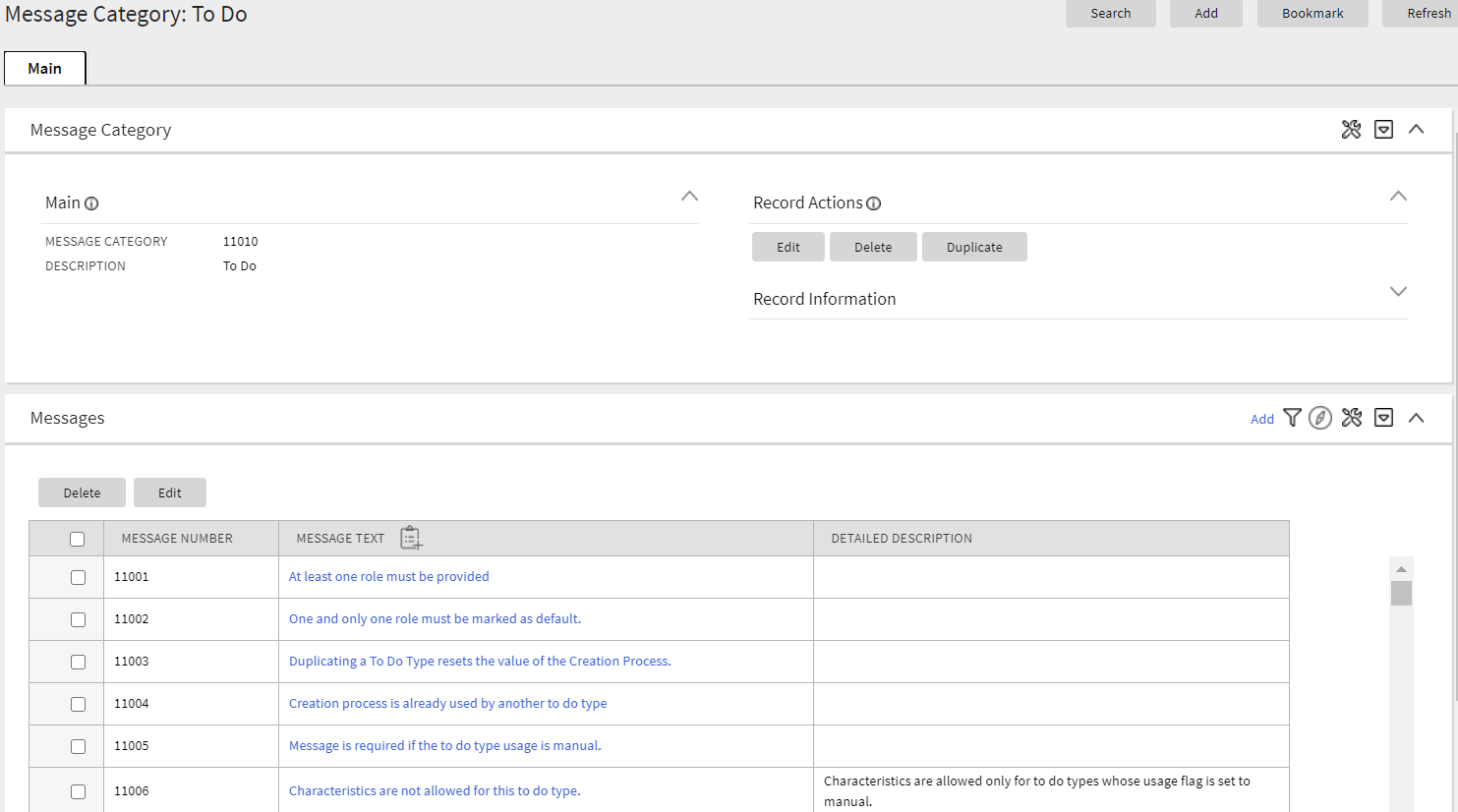
The Message page has been converted to a portal, leveraging a more flexible and extendable user interface metaphor. Users may view messages for a message category and perform actions on this page.
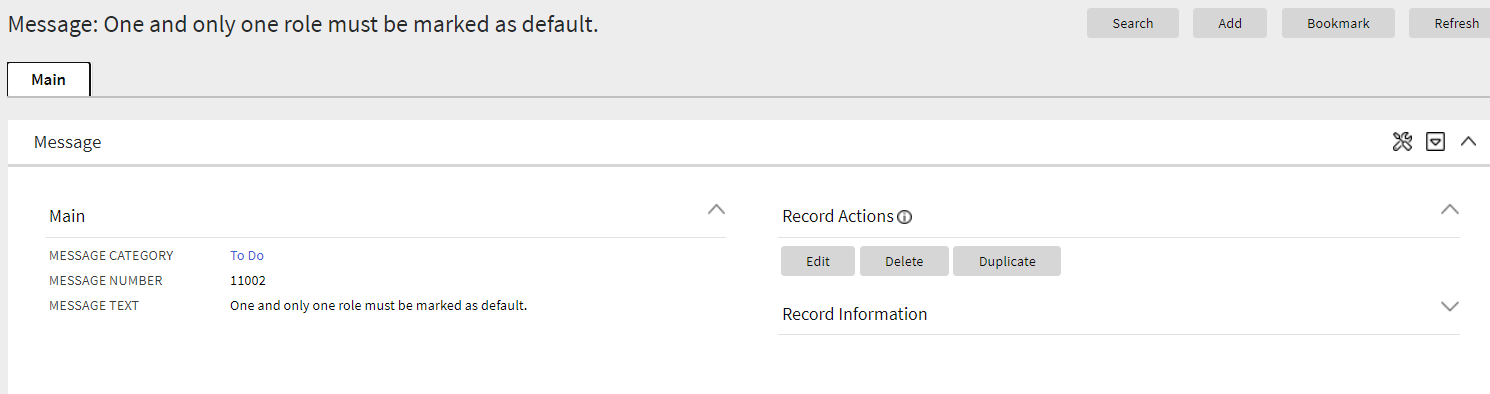
Additionally, a separate Message maintenance portal is provided to view and update an individual message.
The new user interface pages include improved search criteria including searching by message text.
Steps to Enable
You don't need to do anything to enable this feature.
Tips And Considerations
Upgrade scripts ensure that users with Read access to the existing application service will have access to the new application service associated with the new portal. This table lists the existing and new application services.
| Object | New Application Service | Access Added to Any User Groups with this Application Service/Read Access |
|---|---|---|
| Message Category Query Portal | F1MSGQ | CILTMSGP |
| Message Category Portal | F1MSGC | CILTMSGP |
| Message Portal | F1MSG | CILTMSGP |
Note that any existing bookmarks for this page will take user to the previous version of the page. You need to take the following actions to move the bookmark to the new page:
- Click the bookmark. Take note of the Message Category.
- Navigate to the Message Category portal via the menu.
- Search and select the Message Category from your bookmark. This takes you to the new page.
- Delete the existing bookmark from the Bookmark dashboard zone.
- Click the Bookmark page action button to add a bookmark for this record for the new page.
The Table page has been converted to a portal, leveraging a more flexible and extendable user interface metaphor.
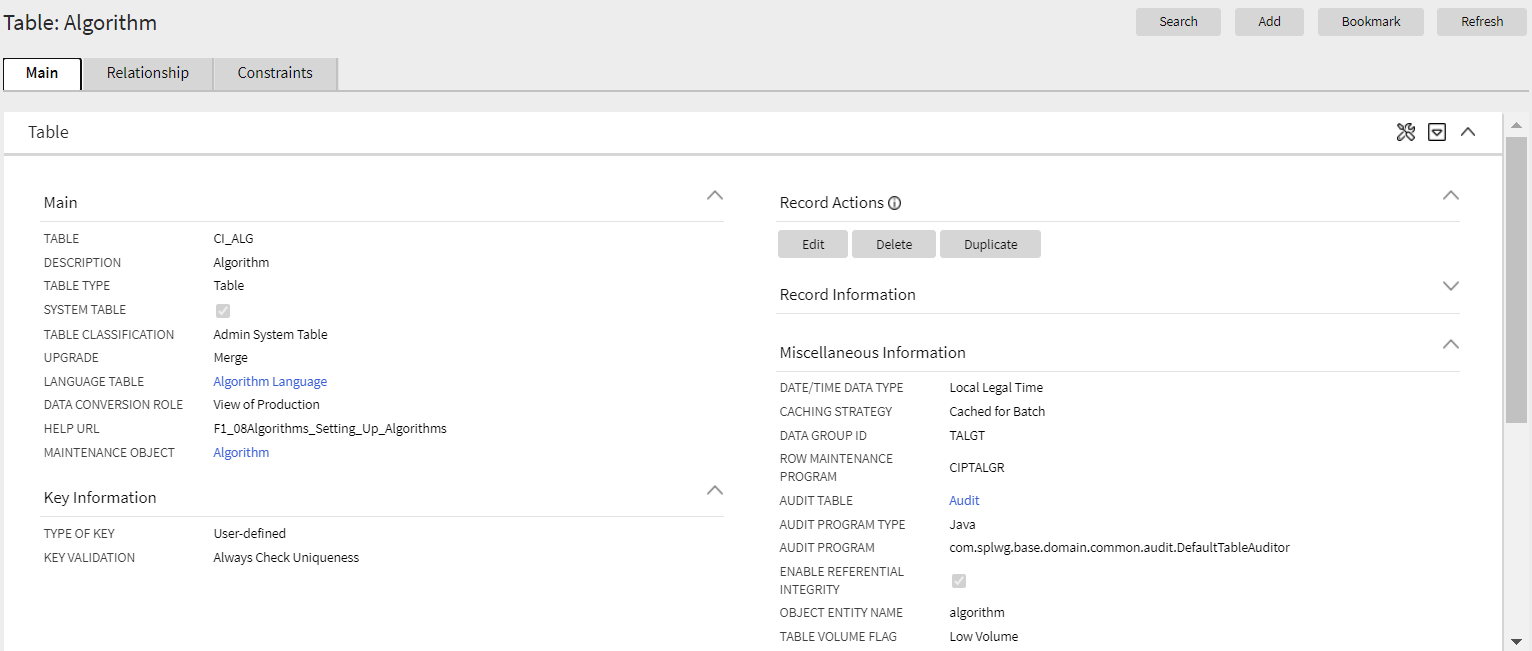
The following highlights some additional features in the new portal:
- The maintenance object(s) associated with the table are included in the display.
- Optional fields that are not populated are not shown for a cleaner view.
- The list of fields for the table is shown in a zone on the main tab. The zone indicates which fields are part of the primary key and which are foreign keys. The label of the field as defined in the Field record is displayed and the user may drill into the fields from this zone.
- The Constraints tab shows the constraints for this table and allows for maintenance of the information. In addition, other tables that have constraints that refer to this table are displayed in this tab.
As part of this enhancement, a new Relationship tab is introduced and includes an Entity Relationship Diagram (ERD). This is similar to what is shown in the Data Dictionary in the Application Viewer so users no longer need to launch the Application Viewer to get this information. Be aware that the Application Viewer is planned for deprecation. The zone highlights which related tables are part of the same maintenance object. A user can drill to the ERD of any of the tables in the diagram. Additionally, a user can navigate to the maintenance object page for any table in the diagram.
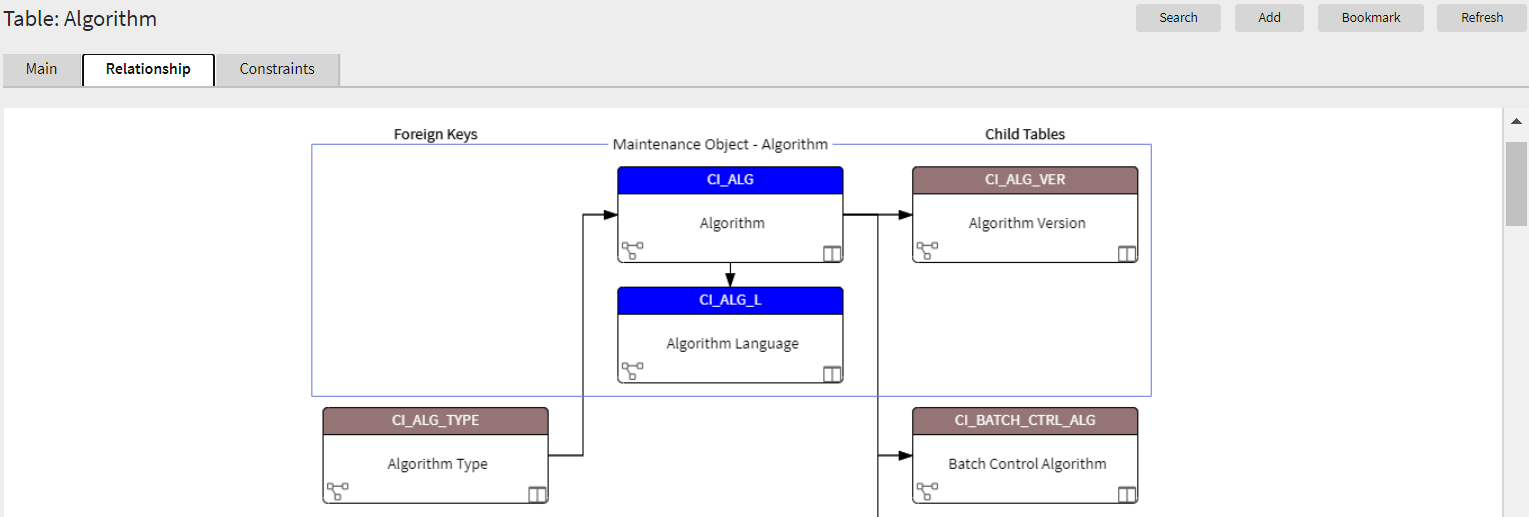
Standardizing the layout of the Table page provides you with a user interface experience that is consistent with other portal-based pages.
Steps to Enable
You don't need to do anything to enable this feature.
Tips And Considerations
Upgrade scripts ensure that users with Read access to the existing application service will have access to the new application service associated with the new portal. This table lists the existing and new application services.
| Object | New Application Service | Access Added to any User Groups with this Application Service/Read Access |
|---|---|---|
| Table Portal | F1TABLE | CILETBLP |
Note that any existing bookmarks for this page will take the user to the previous version of the page. You need to take the following actions to move the bookmark to the new page:
- Click the bookmark. Take note of the Table.
- Navigate to the Table page via the menu.
- Search for and select the Table from your bookmark. This takes you to the new page.
- Delete the existing bookmark from the Bookmark dashboard zone.
- Click the Bookmark page action button to add a bookmark for this record for the new page.
Key Resources
The Time Zone page has been converted to a portal, leveraging a more flexible and extendable user interface metaphor. It uses the All in One page metaphor that includes a list zone and display zone. The list zone includes a filter to narrow the results, if needed.
Standardizing the layout of the Time Zone page provides you with a user interface experience that is consistent with other portal-based pages.
Steps to Enable
You don't need to do anything to enable this feature.
Tips And Considerations
Upgrade scripts ensure that users with Read access to the existing application service will have access to the new application service associated with the new portal. This table lists the existing and new application services.
| Object | New Application Service | Access Added to any User Groups with this Application Service/Read Access |
|---|---|---|
| Time Zone Portal | F1TMZNM | CILTTZNP |
Note that any existing bookmarks for this page will take the user to the previous version of the page. You need to take the following actions to move the bookmark to the new page:
- Click the bookmark. Take note of the Time Zone.
- Navigate to the Time Zone portal via the menu.
- Search for and select the Time Zone from your bookmark. This takes you to the new page.
- Delete the existing bookmark from the Bookmark dashboard zone.
- Click the Bookmark page action button to add a bookmark for this record for the new page.
The To Do Dashboard portal is intended to be used by both supervisor and non-supervisor To Do users. For supervisors, the charts consider To Do entries that are in a role which the supervisor is a member. For non-supervisors, the charts consider open To Do entries that are in a role of which the user is a member or entries currently assigned to the user.
The To Do Dashboard portal provides a high level summary of open To Do entries and To Do entries currently being worked on by various criteria using analytic charts.
Steps to Enable
You don't need to do anything to enable this feature.
Tips And Considerations
Supervisors are those users with security access to the "supervisor" access mode for the To Do Dashboard application service.
Upgrade scripts are provided to automatically allow users with Read access to either of the existing To Do Summary page and Supervisor To Do Summary page application services to have access to the new application service associated with the new portal. Note that the new portal does not replace any existing portal. It is provided as an additional summary portal to assist users with To Do management.
This table list the existing and new application services.
| Object | New Application Service | Access Added to any User Groups with Either of These Application Service/Read Access |
|---|---|---|
| To Do Dashboard | F1TDDASH | CILQTDSP, CILQTSSP In addition, users with access to the Supervisor Summary page will get supervisor access to the Dashboard portal |
Key Resources
The To Do Entry page has been converted to a portal, leveraging a more flexible and extendable user interface metaphor.
The following points highlight some improvements in the new portal functionality:
- In the new page, log entries are visible on the Log tab, which is the product standard for maintenance pages with logs.
- In the new page, there is a "related object" display. The system uses the drill keys associated with the To Do entry and determine the information string of that object and displays it to the user. A user can click this link to drill into the related object. Separately, a Work button is added to the page that performs the following functionality: if the To Do is "open", it gets assigned to the user; the To Do becomes the 'current To Do' and populates that dashboard zone; the user is brought to the target transaction (and if there is a BPA script associated with the To Do message, that script is launched). Previously, the Message Text was clickable and a user used this link to drill into the related key or launch the script.
- In the new page, the sort keys are shown on the main page instead of a separate tab. The drill keys are also shown on the Main tab, but within the Record Information section, which is initially collapsed.
- The characteristics linked to a To Do Entry are shown in a separate zone on the Main tab. However, when editing the To Do Entry, if you are allowed to make changes to the characteristics, they are maintained using the edit dialogue. Since this is a portal/zone based maintenance, foreign key characteristics use the Search Zone metaphor for searching. This is the standard for all maintenance objects going forward. This is an improvement from the previous page where the search was the old fixed page metaphor, causing issues when attempting to reference an object that did not have an old legacy fixed page search. In addition, when maintaining characteristics for an automatic To Do Entry, the new page presents valid characteristic types by first looking for valid characteristic types for the To Do Type and if no values are found, shows all the valid characteristic types for the To Do Entry entity.
- If there are related To Do entries for the To Do being shown, a badge insight is used to highlight the number of related To Dos, using the Contextual Insight feature introduced in this release. In addition, a zone displays a detailed list of the related To Do entries is included on the portal.
The following points highlight functionality that is the same as the previous version of the page:
- The To Do Entry query by To Do Type only shows the To Do Entries that are valid for the user: ones assigned to the user or ones that are Open in a To Do Role that the user is in.
- The To Do Entry query by ID allows the user to view that To Do entry.
- Any user may add a User Log.
- Any user may edit the To Do and change comments.
- Only users that are valid for the To Do (per the criteria in the first bullet) are allowed to change the priority or add or change Characteristic values or are allowed to Forward, Complete or Send Back. Note that as before, Send Back is only enabled if the To Do entry's Assigned By is populated.
- A user completing the To Do entry is able to add comments as part of the action.
Standardizing the layout of the To Do Entry page provides you with a user interface experience that is consistent with other portal-based pages.
Steps to Enable
You don't need to do anything to enable this feature.
Tips And Considerations
If there are any foreign key characteristics that are configured to be valid To Do Entry characteristics and users may manually add a link to one of these types of objects, be sure that there is a Search Zone defined for the FK Reference for this characteristic type.
Upgrade scripts ensure that users with Read access to the existing application service will have access to the new application service associated with the new portal. This table lists the existing and new application services.
| Object | New Application Service | Access Added to any User Groups with this Application Service/Read Access |
|---|---|---|
| To Do Entry Query Portal | F1TODOEQ | CILQTDEP |
| To Do Entry Portal | F1TODO | CILQTDEP |
Note that any existing bookmarks for this page will take the user to the previous version of the page. You need to take the following actions to move the bookmark to the new page:
- Click the bookmark. Take note of the To Do Entry ID.
- Navigate to the To Do Entry portal via the menu.
- Search for and select the To Do Entry from your bookmark. This takes you to the new page.
- Delete the existing bookmark from the Bookmark dashboard zone.
- Click the Bookmark page action button to add a bookmark for this record for the new page.
Key Resources
While using the system, if a user collapses the dashboard, the system retains this setting until the user changes it again. Previously, the collapsed state of the dashboard was only applicable during a user's session. The next time a user logged into the application, the dashboard would reset to the original settings.
While using the system, the user may adjust the width of the dashboard using the slider and the system retains this setting until the user changes it again. Previously, the user could only adjust the width of the dashboard in the user preferences.
Each user may now also choose to locate the dashboard zone on the left of the page rather than the right.
Steps to Enable
You don't need to do anything to enable this feature.
The Work Calendar page has been converted to a portal, leveraging a more flexible and extendable user interface metaphor. The new user interfaces page includes more mass actions, including duplication capabilities for holiday dates.
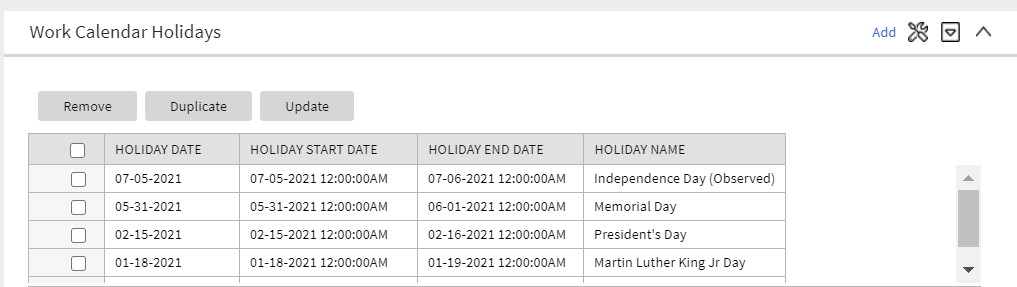
Standardizing the layout of the Work Calendar page provides you with a user interface experience that is consistent with other portal-based pages.
Steps to Enable
You don't need to do anything to enable this feature.
Tips And Considerations
Upgrade scripts ensure that users with Read access to the existing application service will have access to the new application service associated with the new portal. This table lists the existing and new application services.
| Object | New Application Service | Access Added to any User Groups with this Application Service/Read Access |
|---|---|---|
| Work Calendar Query Portal | F1WRKCLQ | CILTCLWP |
| Work Calendar Portal | F1WRKCAL | CILTCLWP |
Note that any existing bookmarks for this page will take the user to the previous version of the page. You need to take the following actions to move the bookmark to the new page:
- Click the bookmark. Take note of the Work Calendar.
- Navigate to the Work Calendar portal via the menu.
- Search for and select the Work Calendar from your bookmark. This takes you to the new page.
- Delete the existing bookmark from the Bookmark dashboard zone.
- Click the Bookmark page action button to add a bookmark for this record for the new page.
Parameters Supported for POST HTTP Method in REST Services
The REST engine supports defining path and query parameters for POST operations. Previously, POST operations did not support parameters. The assumption had been that all information was included in the payload.
Path and query parameters support provides URL parameters for POST HTTP methods.
Steps to Enable
You don't need to do anything to enable this feature.
Support for Interrupting DBMS Job Steps
The system provides support to handle job streams that have been stuck in Running state for too long without progressing to the next subsequent batch process steps. The Batch Operations portal - running option is enhanced to include a new "Interrupt" option for this purpose. When interrupted, the batch job stream is marked as Failed and the underlying batch job status is marked as Error.
Next, the currently available "Restart" option can be used to re-start the job stream so the stream progresses to next set of batch processes.
Steps to Enable
You don't need to do anything to enable this feature.
Support for Sharing Exported Data with Oracle
The batch framework is enhanced to allow customers to request that their exported data is also routed to Oracle's data lake for insight analytic purposes. Batch jobs that support this option now include a batch parameter called "Copy to Oracle" that is set to not share any content by default. Customers must opt in to share their data with Oracle when they submit such a batch process.
The following General Data Export related batch controls are enhanced to include the new "Copy to Oracle" batch parameter set to not share any content by default:
- F1-GEXPI: Generalized Initial Export Initiator
- F1-GEEXO: Generalized Ongoing Export
- F1-GEIXP: Generalized Initial Export Template
- All initial export batch controls that reference the same batch program as F1-GEIXP (Generalized Initial Export Template)
The batch framework enhancement allows the sharing of exported customer data with Oracle applications for analytics purposes.
Steps to Enable
If your implementation opts to share exported data with Oracle, set the Copy to Oracle parameter to "Y" on applicable batch controls.
Start Date, End Date, and Time Added to Batch Thread Instance
The start date/time and end date/time of a batch thread instance are captured. Previously, this information was only available in informational messages linked to batch thread instance. The informational messages are still included but now that start and end date/time stamps are captured directly on the instance record.
Capturing the start date/time and end date/time of batch threads will make it much easier for implementations to do analysis about batch timings at the instance level, if desired.
Steps to Enable
You don't need to do anything to enable this feature.
Tips And Considerations
- For existing batch thread instance records created prior to upgrading to this version, the system does not automatically populate the new columns. There is an upgrade background process provided to upgrade records if an implementation would like to do analysis of older records. The batch control is F1-BTIDT (Upgrade Batch Thread Instance Date / Time). It includes parameters to limit the upgrade to certain batch controls and/or a specific date range so that only the records you plan to include in your analysis are affected. Review the batch control detailed description for more information.
- This batch control has its own application service. In order to run the batch job, you must have privileges to this application service: F1-BTIDT, access mode F1EX.
Environment Information Added to Batch Email
The email sent when a batch program completes now includes information related to the installation configuration for the environment where the batch was run. This will help users that may be working in more than one environment (for example, development and test or two different testing regions), users that are working in more than one version of a product, or users that are working with more than one product.
The email now includes:
- The product name taken from the row in the Installed Products collection on the Installation Options that is marked at the 'display' product. This is the product name visible in the application heading.
- The product version taken from the same installed products row.
- If configured, the Domain Name taken from the Messages collection on the Installation Options. Refer to the description of the new Define an Environment Domain Name feature for more information.
Information related to the installation configuration of the environment that ran the batch job helps users working in more than one environment, in more than one product version, or with more than one product.
Steps to Enable
You don't need to do anything to enable this feature.
Contextual Insights provide a way to surface focused intelligence and alerts to users in the context of the core screens for any applications built on Oracle Utilities Application Framework. There are many useful configuration options for Contextual Insights.
There are a number of visual patterns that are supported:
- Badges Insights have a quick text notice with a solid background that is meant to alert the user to crucial summary information or attributes.

- Inline Insights display a message with an icon that is meant to be more descriptive about the context for crucial information to surface.

- List Insights are intended to exist in a list of insights that provide a message about related data as well as allow user actions to be configured. This type of insight supports an icon and supports primary and secondary text.

- Card Insights are the most information rich with the option for showing both primary and secondary text for an insight, a related large icon to call attention to the insight, as well as user actions that can be configured. Often a Card Insight can be used at the top of a list of insights to call more attention to the most important insights.
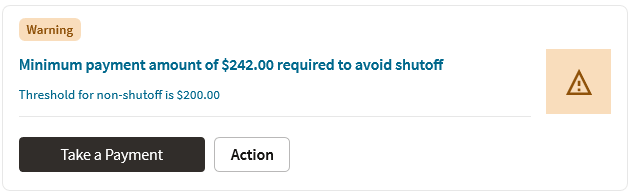
New color palettes are provided for configuration for Contextual Insights that insecure consistency in user interface when surfaced.
Actions that users can perform are defined in the insight algorithm and include additional configuration on the new Insight Type object. Settings allow you to define what should occur when the action is selected, the text to display, and the emphasis that should be placed on the button.
Insight types may be delivered by your base product. Oracle Utilities Application Framework provides a base badge insight that is visible on the new To Do Entry portal if the To Do Entry has related To Dos. Your specific product may include additional insight types for other use cases. In addition, you can introduce your own insight types.
In addition, the product provides the Insight Group object as a convenient way to group multiple insight types together. Insight groups are not delivered by the base product. However, every insight group references a unique insight class (lookup value). The insight class is the reference used when configuring insights to appear on a specific user interface component. Your product may include one or more base insight classes that are ready to use on a user interface component. Your implementation would set up an insight group for this class and choose which insight types to include.
Contextual Insights provide a way to surface focused intelligence and alerts to users in the context of the core screens for any applications built on Oracle Utilities Application Framework.
Steps to Enable
You don't need to do anything to enable this feature.
Tips And Considerations
Users must be granted access to the following new application services in order to use this functionality:
| Secured Object | Application Service | Access Modes |
|---|---|---|
| Insight Type MO | F1INSIGHTTYP | A, C, D, R |
| Insight Type Portal | F1INSTYP | R |
| Insight Group MO | F1INSIGHTGRP | A, C, D, R |
| Insight Group Portal | F1INSTGP | R |
| Color Option MO | F1COLOROPTION | A, C, D, R |
| Color Option Portal | F1COLOPT | R |
New tree metadata allows use of user interface tree structures to display hierarchical data in many of the Oracle Utilities Application Framework products.
The Tree metadata encapsulates a number of visual patterns that are common to tree displays:
- Icons
- Broadcast function
- Configurable text for the tree nodes, with multiple options, including a user override
- Support for navigation via hyperlink and context menus
- Support for auto expansion of a tree node on load
- Support for inclusion of implementation specific nodes in trees supplied out-of-the-box
Previously, a tree could only be defined using HTML within a UI map. The Oracle Utilities Application Framework provides user interface tools and services that work in conjunction with the Tree metadata to perform many of the functions that were formerly in HTML.
Algorithms are responsible for the processing that populates the tree node key data and to allow override of the information text, if needed.
Metadata is provided to define configuration for displaying information in a tree format.
Steps to Enable
You don't need to do anything to enable this feature.
Tips And Considerations
Users must be granted access to the following new application services in order to use this functionality.
| Secured Object | Application Service | Access Modes |
|---|---|---|
| Tree MO | F1TREE | A, C, D, R |
| Tree Query Portal | F1TREEQ | R |
| Tree Portal | F1TREEM | R |
The product now provides support for Scalable Vector Graphic (SVG) images. These images can be scaled without reduction of quality and can take on color. The new Contextual Insight and Tree Metadata features support icons and the recommendation is to use SVG images for these features. The product also provides many base SVG images in the display icon table.
The product provides a Maintenance Object Option to define a default Display Icon for an object. Functionality such as the tree configuration may use this option to retrieve the default icon for an object. An analogous Business Object Option is provided for those maintenance objects that are used for different classes of objects that may warrant different icons at the business object level.
The Icon Configuration Support enables you to use scalable and high resolution SVG images as icons on your product.
Steps to Enable
You don't need to do anything to enable this feature.
Expanded Maintenance Object and Business Object Information
The Maintenance Object Information (MO Info) and Business Object Information (BO Info) plug-in spots now support returning an icon, if requested. The icon may be determined by the algorithm or alternatively, the plug-in drivers return the default Display Icon defined as a maintenance object option or business object option.
In addition, the plug-in spots support alternate detail for the information string itself:
- Short information: The algorithm can optionally return shorter, more concise information.
- Detailed information: The algorithm can optionally return up to four lines of information, allowing the algorithm to return different pieces of information in different lines. This is useful for user interfaces that support displaying information this way. Additionally, the algorithm can return an "overline" text, which is short text that can appear above the primary information text.
Note that the standard user interface metaphor that displays an information string for an object continues to use the standard information string returned by the algorithm. The additionally supported information may be used by specific use cases.
The expanded maintenance object and business object information enable you to request and retrieve short or detailed icon information.
Steps to Enable
You don't need to do anything to enable this feature.
Tips And Considerations
The F1-GetFKReferenceDetails and F1-GetForeignKeyReference business services have been enhanced to return the additional information, if provided by the algorithm. If an icon is requested, it is returned, if provided by the algorithm or found on the Maintenance Object or Business Object option.
Number Format Routine May Suppress Trailing Zeros
The F1-NumberAmountFormatter business service is enhanced to include an input parameter to suppress trailing zeros. For example, if a number has a scale of 5 and the value is 1.12300, depending on the business use case, it may be preferred to show this number as 1.123 instead of 1.12300.
The F1-NumberAmountFormatter business service that formats numbers now suppresses trailing zeros.
Steps to Enable
You don't need to do anything to enable this feature.
Tips And Considerations
Your specific product may already be using this new feature in existing user interface zones to control the display of numbers. If you have any custom code that formats numbers and would like to take advantage of this feature, the call to the above business service can be modified to set the new input parameter to true.
Additional Terms Added to SQL Allowlist
The following terms were added to the SQL Allowlist:
- LEFT JOIN
- RIGHT JOIN
- INNER JOIN
- add_months
The enhancement added commonly used SQL functions to F1-SQLFunctionWhiteList (Managed Content).
Steps to Enable
You don't need to do anything to enable this feature.
Define an Environment Domain Name
A new installation message type was introduced for implementations to label the specific environment with a desired domain name. For example, you can use "DEV" to identify your development region and "Test01" to identify one of your test environments.
Refer to the "Environment Information Added to Batch Email" feature for functionality that uses the new installation message in this release. In the future, other base features may take advantage of this information to help users that work in different environments to easily identify the current environment.
The new installation message type allows you to label environments with more easily recognized domain names.
Steps to Enable
To enable this feature:
- Navigate to the Installation page: select Admin, select General, then select Installation Options - Framework.
- Navigate to the Messages tab.
- Add a new row and choose an Installation Message Type of Domain Name.
- Enter text that identifies the environment. The recommendation is to keep the text short and concise.
Analytics Fact Relationship to a Logical Dimension
The operational analytics visualization tool was enhanced to support drilling from one fact to another for performance reasons when they are indirectly linked via the same logical dimension but at different aggregation levels. In order to support this relationship between analytic fact tables, the aggregated fact table explicitly references the corresponding logical dimension as part of its definition record.
The enhancement improves the performance of the operational analytics visualization tool in drilling from one fact to another fact when indirectly linked through the same logical dimension but at different aggregation levels.
Steps to Enable
You don't need to do anything to enable this feature.
The Apply Objects step in CMA has been enhanced to more efficiently apply master and transaction objects. Less retries are used when applying master and transaction objects. When the process of applying an object results in an error, the system keeps retrying that object for a fixed number of times. Master and transaction data are more likely to be processed in the correct dependency order and therefore require less retries.
An import log record is not added when importing a master or transaction entity. Capturing a log record on the imported maintenance object log table is more relevant when importing configuration entities, especially when the import is to a higher environment like production. When importing master and transaction data it is mainly for testing purposes and usually involves higher data volumes so adding an extra log record to every entity unnecessarily consumes time and resources.
The enhancement to the Apply Objects step in CMA efficiently applies master and transaction objects, which results in less retries and errors.
Steps to Enable
You don't need to do anything to enable this feature.
Conditional Skipping of Components in Flow Run
Oracle Utilities Testing Accelerator now allows you to skip or run one or more components of the flow run by adding conditional statements in a component's pre-validations section. You can base the conditional statements on the output of the previous component step. Alternatively, you can use multiple flow test data sets to skip or run a component.
Conditional Skipping of Components in Flow Run provides the ability to change the behavior of the functional flow based on the Flow Test Data used.
Steps to Enable
You don't need to do anything to enable this feature.
Key Resources
- Refer to the Oracle Utilities Testing Accelerator User's Guide for more information.
Generic Web Service Operation Names
You can provide any one of the operation names ADD, UPD, DEL, CHG, and READ against the WS-SETTRANSACTIONTYPE keyword in the component's test data page in a flow. Previously, you could only provide the actual operation name in the Inbound Web Service (IWS) definition. Oracle Utilities Testing Accelerator finds and replaces the generic operation names with the operation names specified in the IWS definition. Alternatively, you can continue to provide the actual operation name or transaction name specified in the IWS definition against the WS-SETTRANSCTIONTYPE keyword in the component's test data page in a flow.
These updates enhance the usability of Oracle Utilities Testing Accelerator by enabling you to provide a generic set of operation names against the web service transaction or operation name.
Steps to Enable
You don't need to do anything to enable this feature.
Tips And Considerations
For custom inbound web services, ensure that the operation names contain the words ADD, UPD, DEL, CHG, and READ as a prefix or suffix of any string.
Key Resources
- Refer to the Oracle Utilities Testing Accelerator User's Guide for more information.
The stop flow run feature enables you to interrupt long-running test automation flows to correct test data or address environmental issues impacting the flow run without having to wait for the completion of the entire run.
Stopping the flow run provides greater control over a flow run.
Steps to Enable
You don't need to do anything to enable this feature.
Key Resources
- Refer to the Oracle Utilities Testing Accelerator User's Guide for more information.
See a preview of the database changes coming for 21A in the Oracle Utilities Cloud Services Database Changes Guide.
This includes information about databases changes to tables, indexes, views, columns, and more.
Steps to Enable
You don't need to do anything to enable this feature.
Supporting Cloud Service Documentation Consolidation
Several of the "Supporting Cloud Service Guides" have been consolidated to help implementers and administrators find the information they need.
The new Administration Guide includes the following topics:
- Identity and Access Management (previously delivered in the End User Provisioning Guide)
- Object Storage Setup (previously delivered in the Object Storage Setup Guide)
- Cloud Operations (previously delivered in the Cloud Operations Guide)
The new Implementation Guide includes the following topics:
- Implementation Guidelines (new content for 21A)
- Data Upload Support (previously delivered in the Data Upload Support Guide)
- File-Based Integration (previously delivered in the Integration Guide)
- Oracle REST Data Services (previously delivered in the REST Data Services Guide)
- Product-Specific Integrations (previously delivered in the Integration Guide)
Consolidation of implementation and administration documentation helps implementers and administrators find the information they need.
Steps to Enable
You don't need to do anything to enable this feature.
IMPORTANT Actions and Considerations
REPLACED OR REMOVED FEATURES
From time to time, Oracle replaces existing cloud services with new features, or removes existing features. Replaced features may be put on a path to removal. As a best practice, you should use the newer version of a replaced feature as soon as a newer version is available.
Unless otherwise specified below, these notes are for informational purposes and no action is required.
PLAN TO CLEANUP METADATA FROM PAST RELEASES OF ORACLE UTILITIES APPLICATION FRAMEWORK
The following internal system data will be removed from the metadata as the functionality has been replaced with newer improved versions in past releases. This will not affect your configuration or implementation.
Navigation keys related to the maintenance page:
| Field | Access Group | Application Service | Portal | Zone |
|---|---|---|---|---|
| impFldTabMenu metaDataFieldMainPage metaDataFieldMaint metaDataFieldTableGrid metaDataFieldTablePage Any help keys |
accessGroupMainPage accessGroupMaint accessGroupTabMenu accessGroupDARGrid Any help keys |
applicationServiceMainPage applicationServiceMaintNew Any help keys |
portalTabMenu portalMainpage portalmainPopup portalOptsGrid portalOptsPage Any help keys |
portalZoneTabMenu portalZoneMainPage portalZoneGridPage portalZoneParameterGrid portalZonePortalGrid portalZonePortalPage Any help keys |
| To Do Entry | Table | Characteristic Type | Work Calendar | Message | Time Zone |
|---|---|---|---|---|---|
| toDoEntryCharGrid toDoEntryDrillKeyValuesListGrd toDoEntrySortKeyValuesListGrid todoentrykeyvalue todoentrymain toDoEntryMaint toDoEntryPopupAdd toDoEntryPopupForward toDoEntryPopupSendBack Any help navigation keys |
metaDataTableFieldsGrid metaDataTableMainPage metaDataTableCFldsGrid metaDataTableConstPage metaDataTableMaint metaDataTableRefByConstPage metaDataTableFieldPage Any help navigation keys |
charTypeMenu charValuesGrid charValuesPage charEntityGrid charEntitiesPage Any help navigation keys |
workCalendarMaint workCalendarMainPage workCalendarHolidayGrid Any help navigation keys |
msgMaintDetailsPage msgMaintGrid msgMaintPage msgMaintTabMenu Any help navigation keys |
timeZoneMainPage timeZoneTabMenu Any help navigation keys |
In addition, the UI program component metadata related to Field, Access Group, Application Service, Portal, Zone, To Do Entry, Table, Characteristic Type, Work Calendar, Message, and Time Zone navigation will be cleaned up in a future release. Note that metadata related to the search pages will not be removed at this time in case these are used on other fixed pages.
PLAN TO INCORPORATE APPLICATION VIEWER TO ORACLE UTILITIES APPLICATIONS
The dedicated Application Viewer, used by customization developers, has been slowly replaced with inline functionality over the last few releases. The last feature of the viewer to be implemented, Groovy JavaDocs, will be replaced in a future release. Once this occurs the Application Viewer menu option will be removed. This will not affect your configuration or implementation.
PLAN TO REMOVE XSLT MANAGED CONTENT TYPE FROM ORACLE UTILITIES APPLICATION FRAMEWORK
The Managed Content table entries related to XSL should use the XSLTC managed content type instead of the XSLT managed content type. Support for the XSLT managed content type will be deprecated in a future release.
PLAN TO REMOVE REST IWS - ORIGINAL REST SERVLET FROM ORACLE UTILITIES APPLICATION FRAMEWORK
The original URL supplied for calling Inbound Web Service-based REST services includes the Inbound Web Service name in its makeup. Support for this will continue for backward compatibility purposes, but will be deprecated in a future release. You should adjust your existing integrations to use the currently supported URL.
PLAN TO REMOVE APPEND SETTING FROM PAGINATION - ORACLE UTILITIES APPLICATION FRAMEWORK
There are several known issues associated with the pagination's Append option. It is recommended that you defer from using this pagination setting.
PLAN TO REMOVE SUPPORT FOR MASTER/SUBORDINATE SERVERS FOR WEB SERVICE CATALOG IN ORACLE UTILITIES APPLICATION FRAMEWORK
The Service Catalog Configuration (Master Configuration) enables you to define subordinate servers. Defining subordinate servers is no longer applicable to Oracle Integration Cloud.
PLAN TO REMOVE SUPPORT FOR BATCH RUN STATISTICS PORTAL FUNCTIONALITY IN ORACLE UTILITIES APPLICATION FRAMEWORK
The Batch Run Statistics portal provides additional information about batch runs, but some functionality on the portal is related to capturing additional information from an external tool. Additional information captured from the external tool is stored in a Fact record. Support for capturing additional information from an external tool will be discontinued in a future release. The captured additional information would still be available to existing customers.
PLAN TO REMOVE MISCELLANEOUS SYSTEM DATA FROM ORACLE UTILITIES APPLICATION FRAMEWORK
The following metadata is no longer in use and will be removed in a future release:
| Object | Data | Description/Comments |
|---|---|---|
| Maintenance Object |
ENV REF |
Environment Reference |
| Business Object |
F1-EnvironmentRefPhysicalBO |
Physical BO for Environment Reference |
| To Do Type |
F1-SYNRQ |
Sync Request Error Errors for the Sync Request Monitor are reported using the To Do Type F1-SYNTD (Sync Request Monitor Errors). |
| Service Program |
CILTLDIP CILTLDIL CILTLDIS |
Programs are related to legacy LDAP import pages. |
| Application Service |
CILTLDIP |
LDAP Import |
| Algorithm Type/Algorithm |
F1-LDAPIMPRT F1-LDAPPREPR |
Both are algorithms related to LDAP functionality that don't have any logic. |
| Lookup Value |
CHAR_ENTITY_FLG / F1SE |
Characteristic Entity / Sync Request Inbound Exception |
| Zone |
F1-MGRREQDSP |
Migration Request (duplicate value) |
| Zone |
F1-IWSSCHS F1-IWSSCHS1 F1-IWSSCHS2 F1-IWSSCHS3 |
All related to old IWS search functionality. |
| Script |
F1-BundleInf F1-GENPRINFO F1-MgPlnInf |
PLAN TO REMOVE CONFIGURATION MIGRATION ASSISTANT IMPORT REQUESTS FROM ORACLE UTILITIES APPLICATION FRAMEWORK
The F1-FrameworkAdmin (Framework Admin) and F1-SchemaAdmin (Schema Admin) migration requests are no longer recommended and will not be updated with new administration or control table in a future release.
PLAN TO REMOVE CONFIGURATION MIGRATION ASSISTANT IMPORT ALGORITHM FROM ORACLE UTILITIES APPLICATION FRAMEWORK
The Configuration Migration Assistant Import algorithm plug-in spot will be deprecated in a future release. It is recommended that you review any existing algorithms and create the appropriate Pre-Compare algorithms instead.
PLAN TO REMOVE BUSINESS OBJECT READ FROM F1-MAINPROC WHEN PRE-PROCESSING EXISTS
In the original implementation of Configuration Tools, the main framework maintenance BPA (F1-MainProc) does not perform a Read of the business object when a pre-processing script is linked to the business object via options. When F1-MainProc does not perform a Read, the pre-processing script performs the Read of the business object.
In a subsequent release, a business object Read was added to F1-MainProc (with an existing pre-processing script) to resolve a UI Hints issue related to child business objects. Adding a business object Read to F1-MainProc introduced an issue visible only to specific scenarios and a different fix was introduced. The new fix made the business object Read unnecessary in F1-MainProc and many pre-processing scripts are properly performing the business object Read. The business object Read should have been removed from F1-MainProc to prevent multiple reads from being performed. However, pre-processing scripts may have been introduced after the addition of the business object Read to F1-MainProc that do not perform a business object Read in the pre-processing script. As such, the business object Read is still performed as part of the F1-MainProc processing.
When a pre-processing script exists, the business object Read will be removed from the F1-MainProc logic. Review your custom pre-processing scripts that are linked to business object options to ensure that the scripts properly perform reads of your business object.
PLAN TO REMOVE OJET SUPPORT FROM BIND ARCHITECTURE
OJet previously supported a bind architecture for their components and this format is deprecated in OJet V7.
Example
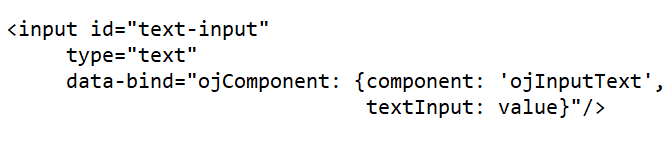
The newer releases of OJet will focus on Web Component architecture.
Example
<oj-input-text value="value text" label-hint="enabled"></oj-input-text>
The Oracle Utilities Application Framework applications are targeting to stay current on OJet upgrades as newer releases incorporate more features, better performance, and high integration with the Redwood Design System. In this release, Oracle Utilities Application Framework uses OJet V9.1 and with each release, an OJet upgrade will be applied when applicable.
As the bind format has been deprecated, support for the format will be removed from up-coming releases. This results in a smaller file size for OJet components but any existing code in Oracle Utilities Application Framework applications using the bind format will completely stop working. It is anticipated that this could happen as soon as OJet V11, but it could also be a later version. For this reason, it is imperative that any existing OJet code that uses the bind format be updated to use the Web Component format. There can be a direct replacement available (as in the above example) but OJet provides different options so there may be a better alternative.