
- Revision History
- Overview
- Feature Summary
- Utilities Common
- Work and Asset
-
- Work and Asset Management
- Utilities Application Framework
- System Wide
- IMPORTANT Actions and Considerations
This document will continue to evolve as existing sections change and new information is added. All updates appear in the following table:
| Date | Product | Feature | Notes |
|---|---|---|---|
| 02 DEC 2021 | Created initial document. |
Oracle Utilities Work and Asset Cloud Service is used to maintain information about assets and various features and functions around managing those assets. The solutions provide a means of recording asset acquisition, maintenance, procurement, installation and removal, and more.
This guide outlines the information you need to know about new or improved functionality in this update, and describes any tasks you might need to perform for the update. Each section includes a brief description of the feature, the steps you need to take to enable or begin using the feature, any tips or considerations that you should keep in mind, and the resources available to help you.
DISCLAIMER
The information contained in this document may include statements about Oracle’s product development plans. Many factors can materially affect Oracle’s product development plans and the nature and timing of future product releases. Accordingly, this Information is provided to you solely for information only, is not a commitment to deliver any material, code, or functionality, and should not be relied upon in making purchasing decisions. The development, release, and timing of any features or functionality described remains at the sole discretion of Oracle.
This information may not be incorporated into any contractual agreement with Oracle or its subsidiaries or affiliates. Oracle specifically disclaims any liability with respect to this information. Refer to the Legal Notices and Terms of Use for further information.
Column Definitions:
Report = New or modified, Oracle-delivered, ready to run reports.
UI or Process-Based: Small Scale = These UI or process-based features are typically comprised of minor field, validation, or program changes. Therefore, the potential impact to users is minimal.
UI or Process-Based: Larger Scale* = These UI or process-based features have more complex designs. Therefore, the potential impact to users is higher.
Features Delivered Disabled = Action is needed BEFORE these features can be used by END USERS. These features are delivered disabled and you choose if and when to enable them. For example, a) new or expanded BI subject areas need to first be incorporated into reports, b) Integration is required to utilize new web services, or c) features must be assigned to user roles before they can be accessed.
| Ready for Use by End Users Reports plus Small Scale UI or Process-Based new features will have minimal user impact after an update. Therefore, customer acceptance testing should focus on the Larger Scale UI or Process-Based* new features. |
Customer Must Take Action before Use by End Users Not disruptive as action is required to make these features ready to use. As you selectively choose to leverage, you set your test and roll out timing. |
|||||
|---|---|---|---|---|---|---|
| Feature |
Report |
UI or |
UI or |
|
||
OAuth Credentials Authorization Support for Oracle Utilities Cloud Service REST API |
||||||
More Efficient Creation of Work Orders or Work Activities from Work Requests |
||||||
New Facility for Invoking Service Scripts or Business Services |
||||||
OAuth Credentials Authorization Support for Oracle Utilities Cloud Service REST API
OAuth-based authorization for utility credentials is now supported and provides an industry-standard integration mechanism for inbound web services of Oracle Utilities Cloud Services REST API. OAuth utility credential authorization is the most used mechanism for server-to-server web service communication.
This feature provides seamless integration with other Oracle and non-Oracle products and simplifies the implementation of the integration.
Steps to Enable
To enable this feature, raise a service request to create or manage the integration of the OAuth Client to your Identity Cloud Service tenancy. Upon receiving the client credentials from the Identity Cloud Service administration console, complete the integration configuration in the Oracle Utilities Cloud Service application.
Key Resources
- Refer to the Setting Up an OAuth Client for REST/SOAP Web Services section of the Oracle Utilities Cloud Services Administration Guide for more information.
Single Submitter Option for Batch Job Submission
The Single Submitter program option on a scheduler program allows you to create a single batch job submission for all of the threads on a batch control. This is particularly useful for implementations that use large numbers of threads in a batch stream.
This option reduces lock contention on the Batch Control table for a multi-threaded batch job.
Steps to Enable
To enable this feature, raise a service request to create or manage the integration of the OAuth Client to your Identity Cloud Service tenancy. Upon receiving the client credentials from the Identity Cloud Service administration console, complete the integration configuration in the Oracle Utilities Cloud Service application.
Key Resources
- Refer to the Setting Up an OAuth Client for REST/SOAP Web Services section of the Oracle Utilities Cloud Services Administration Guide for more information.
Intuitive Test Data User Interfaces
The Test Data user interface holds information for the test automation flow. You can now link test data across components in the flow based on conditions through intuitive screens, prevalidations, and post validations. The updated screens enable you to develop a test flow in a short period and reduce the upfront design time for planning the test data elements to expose through the component's functions.

Enhanced Test Data GUI

GUI-based Conditional Movement of Test Data Between Components
Previously, test data are passed across component steps through base functions of Oracle Utilities Testing Accelerator that involved spending a significant amount of time using the screens to add test data to a flow.
These intuitive user interfaces reduce the test automation design and development periods, and shortens the time spent to automate tests.
Steps to Enable
You don't need to do anything to enable this feature.
Key Resources
-
Refer to the Creating Test Flows section of the Oracle Utilities Testing Accelerator User Guide for more information.
-
Refer to the Test Data Enhancements training.
Java Script Support for Custom Functions
Oracle Utilities Testing Accelerator provides support for the creation of custom function libraries with JavaScript. This enables you to write custom routines for a custom function and use the function as a plugin for component steps in a flow. Additionally, a rich editor is available for developing your custom JavaScript functions.

JavaScript-based Custom Function Library Code Editor
Previously, validation of test data results from custom calculation or formatting of web service response was not supported by Oracle Utilities Testing Accelerator's base libraries.
This feature allows you to implement custom test data generation or verification routines when such routines are unavailable in the Oracle Utilities Testing Accelerator's base set of functions.
Steps to Enable
You don't need to do anything to enable this feature.
Tips And Considerations
Creation of Groovy-based custom function libraries is no longer supported. Existing Groovy libraries are still supported.
Key Resources
-
Refer to the Custom Libraries section of the Oracle Utilities Testing Accelerator User Guide for more information.
You can review and analyze asset information through the Asset Disposition tab of Assets portal. This tab displays the Disposition History zone, previously displayed in the Main tab, and provides a new Components History zone that enables you to review components attached to assets.
This tab provides a more complete and intuitive view of the asset's information.
Steps to Enable
You don't need to do anything to enable this feature.
Key Resources
-
Refer to the Maintaining Assets section of the Business User Guide for more information.
Contextual Insights in Assets Portal
The Assets portal enhances your user experience through new Badge Contextual Insights for asset condition rating and asset location criticality.
Contextual insights enhance the user experience by drawing attention to specific asset conditions.
Steps to Enable
To enable this feature, complete these steps:
-
Add and configure the W1-AssetConditionScoreBuckets (Asset Condition Score Bucket Configuration) business object by selecting Admin then B and the Bucket Configuration menu item.
-
Add and configure the W1-AssetCriticalityBuckets (Asset Criticality Bucket Configuration) business object by by selecting Admin then B and the Bucket Configuration menu item.
-
Configure W1ASCNLOCCRT (Asset Condition and Location Criticality) and related badge Insights and Insight Types algorithms.
-
Add an Insight Group to the asset condition by selecting Admin, then I, select Insight Group then Add. Set the Insight Class to "W1AC (Asset Condition)" and Valid Visual Structure to "Badge Insight". Add the created Asset Condition Insight Type to the Insight Type list of the insight group.
-
Add another Insight Group to the asset condition. Set the Insight Class to "W1LC (Asset Location Criticality) and Valid Visual Structure to "Badge Insight". Add the created Asset Criticality Insight Type to the Insight Type list of the insight group
Key Resources
- Refer to the Contextual Insights Configuration section of the Administrative User Guide for more information.
Blanket Contract Synchronization
The W1-BlanketContractSynchronization REST API enables your ERP system to send or update blanket purchase and contract agreements to Work and Asset Management contracts, which are then used by purchase requisitions in Work and Asset Management.
This provides a new, seamless integration flow.
Steps to Enable
You don't need to do anything to enable this feature.
Invoice Tax Line Synchronization
In this release, the updates to the W1-InvoiceSynchronization REST inbound web service allows you to synchronize invoice tax lines from an external system. In addition, the REST service provides the following processes:
- When the invoice line is specific to a purchase order line, the service charges the cost associated to the line to the cost centers of the purchase order line.
- When the cost allocation is set to General, the service checks the corresponding tax cost allocation in the Purchasing Master Configuration.
- When the cost allocation is set to Line, the service prorates the tax amount across all normal and credit memo lines belonging to the same invoice.
- When the Add Tax to Cost of Inventory parameter is set to "Yes" in the Inventory Master Configuration, the service includes the tax amount in the calculation of the average unit price.
This provides an improved, seamless integration flow.
Steps to Enable
You don't need to do anything to enable this feature.
The Activity Material Usage API enables an external system:
- To send send material issues for a tracked asset outside of the activity completion message. The system can process materials issued from a mobile storeroom before the activity is completed. Previously, the materials issued from a mobile storeroom are processed when the activity completion is processed.
- To specify the time the system issued the material. The external system can specify the material issue time in the API. When viewed in Work and Asset Management, the material issue reflects the actual time the material was issued from the external system. Previously, a material issued from an external system is associated to the time these are processed in Work and Asset Management. For example, the material was issued in the external system in the morning but processed in Work and Asset Management in the afternoon.
This API removes timing-related limitations from materials issued by the external system.
Steps to Enable
You don't need to do anything to enable this feature.
Integration - Inbound Communication
Date and Time Sensitive Validations
The system bypasses redundant date/time validations to prevent unnecessary validation failures from occurring in the integration flows. With integration flows, date/time validation errors occur when a slight time difference exists between the external system and Work and Asset Management. When the external system sends the material issued to Work and Asset Management for processing, the system already confirmed the material issue time is valid and a validation is no longer necessary.
This provides an improved, seamless integration flow.
Steps to Enable
You don't need to do anything to enable this feature.
Days Since Last Inventory Option
The Days Since Last Inventory option enables you to generate Stock Item Details based on the last inventory date or on the creation date for new items, and sort these in ascending order. This is useful for jurisdictions that require the counting of all items every X number of months. For example, if you set the Items To Count on a Physical Inventory Header to "100" then the system select the 100 oldest items.
This features enhances the capability to generate physical inventory records for inventory count purposes.
Steps to Enable
You don't need to do anything to enable this feature.
Key Resources
- Refer to the Physical Inventory section of the Business User Guide for more information.
Oracle Procurement Cloud Integration
Blanket Purchase and Contract Agreements
You can create blanket purchase and contract agreements in Oracle Procurement Cloud Service and send these to Oracle Utilities Work and Asset Cloud Service.
This supports the procurement lifecycle in both Oracle Procurement Cloud and Oracle Utilities Work and Asset Cloud Service.
Steps to Enable
To enable this feature, refer to the Oracle Utilities Work and Asset Cloud Service Integration to Oracle Fusion Procurement Cloud Configuration Guide for more information.
You can send invoice taxes created in Oracle Procurement Cloud Service to Oracle Utilities Work and Asset Cloud Service.
This supports the procurement lifecycle in both Oracle Procurement Cloud and Oracle Utilities Work and Asset Cloud Service.
Steps to Enable
To enable this feature, refer to the Oracle Utilities Work and Asset Cloud Service Integration to Oracle Fusion Procurement Cloud Configuration Guide for more information.
Invoices, Taxes, and Write-offs
Financial transaction General Ledgers for vendors whose Pay Tax to Vendor parameter is set to "No" reverses tax financial transactions posted during accept and return and posts invoice tax financial transactions for the full tax amount when changes occur to the tax liability account. Otherwise, the general ledgers posts the invoice tax financial transaction for tax adjustment only, which is the difference between the invoice taxes and accept/return taxes.
In addition, the new Create Reversal Invoice function in Work and Asset Management allows you to reverse invoices that were cancelled in the external system. This function is only available in hybrid ERP integrations. The system also posts write-offs calculated during invoice to a new Financial Transaction Type.
This feature enhances invoice processing.
Steps to Enable
You don't need to do anything to enable this feature.
Crew, Asset, and Asset Location Search Enhancements
Crew-related search fields now appear as drop-downs throughout the application. In addition, asset-related search fields support badge numbers as alternate keys for asset IDs and asset location-related search fields support tag numbers as alternate keys for location IDs.
This feature reduces the number of steps to perform when searching for crews, assets, and asset locations.
Steps to Enable
You don't need to do anything to enable this feature.
More Efficient Creation of Work Orders or Work Activities from Work Requests
You can create work orders and work activities from an approved Work Request without navigating to the Work Order or Work Activity portal. Previously, you needed to click the Save button of the Work Order screen to open the Work Order or Work Activity portal, and then you needed to select Add Activity and click the Save button to completely create the work order or work activity.
The removal of unnecessary steps accelerates the creation of work orders or work activities from work requests.
Steps to Enable
You don't need to do anything to enable this feature.
Key Resources
- Refer to the More Efficient Creation of Work Orders and Work Activities from Work Requests training.
Unified Search provides support for finding asset and asset locations. You can use the filter rules and hints provided by the table in the unified search box:
| Filter | Filter Rule | Hint | Comments |
|---|---|---|---|
| Badge Number | Minimum five characters excluding whitespaces | bn: | BN: |
Applicable to asset search only |
| Serial Number | Minimum five characters excluding whitespaces | sn: | SN: |
Applicable to asset search only |
| Tag Number | Minimum five characters excluding whitespaces | tn: | TN: |
|
| Building | Minimum two alphanumeric characters excluding whitespaces | bl: | BL: |
|
| Address 1 | One ore more numeric characters followed by a space and an alphanumeric character | ad: | AD: |
|
| Description | Minimum five characters excluding whitespaces | ds: | DS: |
Unified search results display a maximum of 20 records.
These improvements allow you to quickly find asset and asset locations without leaving the current page.
Steps to Enable
To use the unified search for assets and asset locations, add users to a group with access to the following applications:
- W1-ASSETUNISRCH (Asset Unified Search)
- W1-ASTLOCUNISRCH (Asset Location Unified Search)
Tips And Considerations
By default, Unified Search only uses asset search. If you prefer asset location search, deactivate asset search by completing these steps:
- Navigate to Extendable Lookup.
- Search and navigate to the F1-UnifiedSearch business object.
- Set the status of W1-AssetUnifiedSearch (Asset Unified Search) to "Inactive."
- Save the changes.
- Log off and log in to the application.
Allow Activity-related Records Against Completed Activities
Integrate with Work and Asset Management without running into errors regarding activity-related records created by external systems.. The system bypasses redundant validations against completed activities when external systems create the activity-related records such as timesheets, other direct charges, material issues, and more. Previously, errors occurred on integrations when activity completion messages are processed before activity-related records that were manually created online.
This feature prevents unnecessary validation failures on integration flows.
Steps to Enable
You don't need to do anything to enable this feature.
Send Updated Activity Details to External System
Synchronize the updated activity details of your Work and Asset Management and external systems. Previously, Work and Asset Management did not notify external systems of any updates made to the activities that the external system created.
This feature synchronizes the activity details between the external system and Work and Asset Management.
Steps to Enable
You don't need to do anything to enable this feature.
Utilities Application Framework
REST Service to Get Batch Job Details
The F1-SubmitJob Inbound Web Service is enhanced to have a new operation to Get the details of the batch job. It uses a new business service: F1-GetBatchJobDetails (Batch Job / Batch Run Details).
If the batch job does not have a batch run associated with it, the service returns information about the batch job only. If there is an associated batch run, the service also returns information about the batch run and its threads and instances.
For cases where an external system, such as an external scheduler, requires information about a batch job, you can use this REST service to return the detail of a given batch job ID.
Steps to Enable
You don't need to do anything to enable this feature.
Tips And Considerations
The security for this new operation is the same security for other operations for this inbound web service. Users must have the Execute action for the CILZRBPP (Batch Job Submission) application service.
Key Resources
-
Refer to the Open API Specification for the F1-SubmitJob inbound web service for more information.
When a user encounters an error with the product and submits a service request, information about the environment, release, and configuration of the user is often very helpful in understanding the cause of the problem. The issue collector script can be used to capture the environment details and issue description for reporting purposes. The script is accessed via the Prepare Issue Details item in the Main - Tools submenu. A popup window is provided to display the details that are being captured and allows the user to add additional text describing the specific issue.
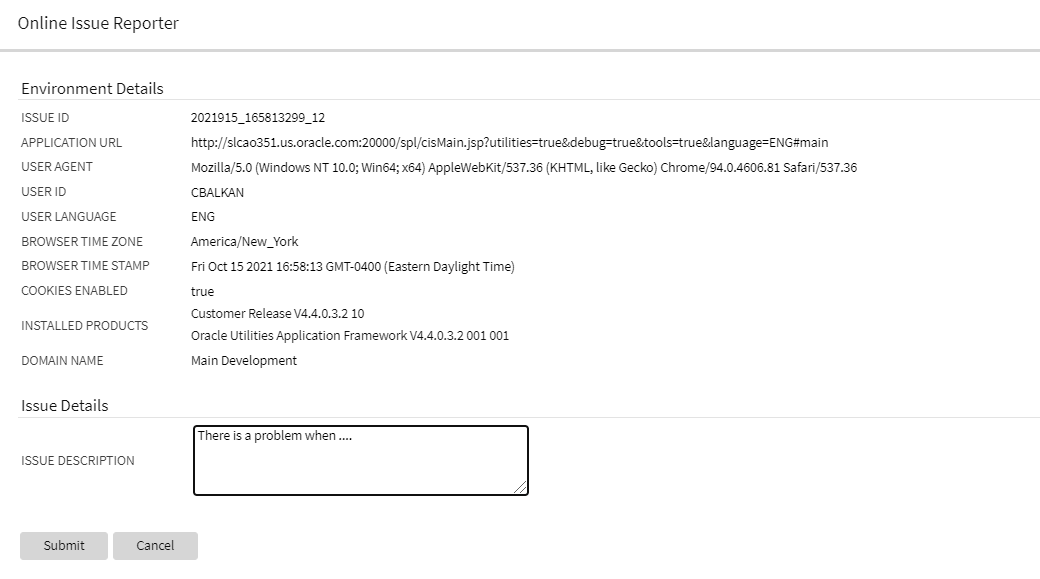
Online Issue Reporter
When the details are submitted, they are added to the system log, together with a unique identifier, so the information can be searched when investigating the problem.
The menu item is secured so that implementations may choose which users have access to this capability.
Redwood Only: Note that for the Redwood user interface, the help menu on the toolbar includes a menu item for launching this window. If you are able to access this option through the Main - Tools submenu, you will also see the option in the Help menu.
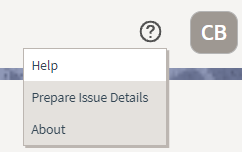
Help Menu
This saves you time from manually collecting information about your environment and standardizes the information in log files for Oracle Support to analyze.
Steps to Enable
Make the feature accessible by assigning or updating privileges and/or job roles. Details are provided in the Role section below.
Role Information
System administrators should set grant users or grant access to the F1-PREPISSUEDTLS application service for the Prepare Issue Details menu item.
The User menu now includes a Switch UI View option that allows users to switch the user interface between the standard look and feel and the Redwood User Experience introduced in a previous release.
The Switch UI View option in the User menu can also be secured using the F1UIVIEW application service.
This option provides an easier method to switch between user experiences than manually changing the environment URL. Implementations may now control which users, if any, have the ability to toggle between the new Redwood look and feel and the standard look and feel.
Steps to Enable
Make the feature accessible by assigning or updating privileges and/or job roles. Details are provided in the Role section below.
Role Information
System administrators should grant access to the F1UIVIEW application service for those users who will be allowed to switch between user experiences.
User Search Shows Enabled Users by Default
The zone-based user search that is used for any portal-based user interface where a user record needs to be selected now shows only enabled users in the result by default. Enabled users are those whose User Enable flag is set to "Enabled". If you want to include inactive users in your search criteria (users whose User Enable flag is set to "Disabled"), you can check the new "Include Inactive Users" filter.
The zone-based search for users shows enabled users by default, helping you to select the user from a more relevant list. If you need to include inactive (disabled) users, that option is still available.
Steps to Enable
You don't need to do anything to enable this feature.
Based Delivered External Systems and Message Senders
In order to support pre-configured integration flows, the External System and Message Sender records are enhanced to be system-owned entities.
The base product can provide fully configured integrations.
Steps to Enable
You don't need to do anything to enable this feature.
Support for Generic Data Synchronization Functionality
There is a new generic mechanism by which an entity can be synchronized with an external system in an ongoing fashion. The solution supports base product fully configured integrations that may be customized and new custom integrations.
The following points describe the new functionality:
- A new Data Synchronization Control extendable lookup defines a data synchronization configuration for a maintenance object and an external system.
- If the status of the record is active the synchronization is enabled.
- A synchronization script is referenced on the record to manage the integration business rules. The script is called in Check mode to determine whether the entity needs to be synchronized upon a change data capture event and it is also called in Process mode to prepare the data and send the outbound message to the external system.
- There could be multiple configuration records for an entity and external system, allowing override by other products and customer where the configuration with the highest sequence is in effect.
- When an entity is changed, a designated Maintenance Object Audit rule consults all enabled integrations for the entity, as defined by the Data Synchronization Control extendable lookup, to determine whether the change should be synchronized or not. If the change should be synchronized, a generic data synchronization request process for each external system is initiated accordingly.
- The processing of a request to synchronize an entity with an external message is managed by a Generic Data Synchronization request business object that is processed later by batch.
Data synchronization integration with external systems is made simpler to implement and configure.
Steps to Enable
Make the feature accessible by assigning or updating privileges and/or job roles. Details are provided in the Role section below.
Tips And Considerations
With this mechanism, introducing a new entity data synchronization involves the following artifacts:
- Implementing a synchronization script.
- Defining standard outbound message configuration including external system and message sender.
- Adding an entry in the Data Synchronization extendable lookup referencing the Maintenance Object, External System and corresponding Synchronization Script. When applicable, use a higher sequence number to override a base product configuration for the same entity and external system.
- Plugging-in the FW generic MO audit to initiate the generic data synchronization request if not already plugged in.
Role Information
System administrators should set grant users or grant access to the F1-GENDATSYNCBOAS application service for the generic synchronization request business object.
New Facility for Invoking Service Scripts or Business Services
The new service invocation function allows a developer to detail specific pieces of a data schema to be sent to the server when invoking a service. It also allows the definition of what needs to be handled when the service is returned. This can greatly reduce the amount of data being handled and therefore can provide a performance boost.
This invocation is also "asynchronous" and therefore will allow other JavaScript processes to continue while the server is processing the request.
This allows you to send only a portion of a data schema in a service request. This streamlines the server calls and improves execution performance.
Steps to Enable
You don't need to do anything to enable this feature.
Tips And Considerations
This is a new function and does not affect any existing service calls. It is only available for use inside a UI Map.
Key Resources
-
Refer to the Oracle JET Developer Cookbook.
This is an Oracle standard JavaScript library that provides many user interface components. It is updated regularly to include new and updated components inline with updated Oracle user interface standards (Redwood).
This upgrade allows access to new components and updated Oracle Redwood user experience standards.
Steps to Enable
You don't need to do anything to enable this feature.
Tips And Considerations
With this release, the former "ojcomponent" bind format is no longer valid. Any usage must be replaced with the newer OJet component code.
Key Resources
-
Refer to the Oracle JET Developer Cookbook.
Script Syntax for Marking Lists in Error
The Edit Data 'terminate with error' syntax is enhanced to support marking an element in a list in error by referencing the variable used to loop through the list.
-
terminate with error( xxxx, yyyy element='$listVar/element_name')
In this case, the $listVar represents the variable used in the 'for' loop. For example, this validation includes a 'for' loop and uses the variable '$key' to keep track of the list entry:
for ($key in "parm/hard/newBusinessObject/relatedBatches/relatedBatch")
if ("string($key/perfRelObjType) != 'F1PB'")
terminate with error (11022, 12104 element='$key/perfRelObjType');
end-if;
end-for;
The syntax resolves an issue with marking an entry in a list that is in error.
Steps to Enable
You don't need to do anything to enable this feature.
Tips And Considerations
Note that in previous releases, the suggested mechanism for marking an element in a list in error was to concatenate the XPath with the list entry, as follows:
move "concat('list[',$count,']/elementName')" to $elementReference;
terminate with error (11000, 11000 element=$elementReference);
However this technique was found to have limitations in certain use cases. As such, it is no longer the recommended technique.
Any scripts that are using the previous technique for marking a list entry in error should be updated to use the new syntax.
Key Resources
- Refer to the Edit Data Syntax section of the Oracle Utilities Application Framework Administrative User Guide for more information.
Additional Elements Added to Installation Options BO
The F1-Installation business object is enhanced to retrieve all the elements on the main table of the Installation Options maintenance object. This provides a performance benefit for any code that needs information from the main table, such as the default currency, but does not require any of the data in the collections linked to the Installation Options maintenance object. Previously, this business object only included the owner flag element.
Additional elements added to the business object for Installation Options allow developers to use this artifact when they need main information from the installation option record.
Steps to Enable
You don't need to do anything to enable this feature.
Bundle Export Copy Feature Improvement
In the Bundle Export object, when you have bundled your metadata, use the Copy to Clipboard action to copy the bundle detail properly, retaining spacing for text like the HTML for a UI map.
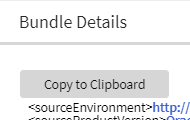
Copy to Clipboard
In previous releases, the Bundle Details zone on the Bundle Export portal provided a "Select All" action to select the bundle details. You then needed to separately use the computer's generic copy function (Ctrl+C) to copy the information to your clipboard. The generic select and copy functionality was not able to retain spacing in objects like the HTML for a UI map. The new Copy to Clipboard action uses specific code to copy the information to the clipboard, retaining spaces.
As part of this feature, the Select All and Deselect All actions were removed. You can still manually select the bundle details manually, if desired.
Action to copy bundle export details retains proper spacing in copied artefacts.
Steps to Enable
You don't need to do anything to enable this feature.
REST Service to Maintain Customer Release Details
The F1-InstallationOptions Inbound Web Service is introduced to provide operations to Get and Patch the release, build number and patch number details on the Customer Release record in the Installation Options installed products list. It uses an existing service script: F1CustRelMSS (F1CustRelMSS).
For cases where an implementation wants to track the version of the custom extensions, you can use this REST service to retrieve and update the Customer Release details. This is particularly useful for Oracle partners and utilities who want to update the customer version from CI/CD tools via curl commands.
Steps to Enable
You don't need to do anything to enable this feature.
Tips And Considerations
The security for these new operations is the same security for the Installation Options - Framework transaction. Users must have the Execute action for the CILTINSP (Installation Options) application service.
Key Resources
-
Refer to the Open API Specification for the F1-SubmitJob inbound web service for more information.
See the database changes coming for 21C in the Oracle Utilities Cloud Services Database Changes Guide. This guide is also available in PDF.
This includes information about databases changes to tables, indexes, views, columns, and more.
Steps to Enable
You don't need to do anything to enable this feature.
HTML Help on Oracle Help Center
Oracle Utilities cloud service documentation is now available in HTML on Oracle Help Center. Previously, only PDF versions of the product documentation was available on Oracle Help Center. As of this release, PDF versions also continue to be available from the "Guides" link on the left side of each product's Oracle Help Center page.
HTML documentation makes it easier for you to search for and navigate to the information you need about Oracle Utilities cloud services.
Steps to Enable
You don't need to do anything to enable this feature.
Key Resources
- Refer to the Oracle Utilities Oracle Help Center page and select a product name to view the HTML documentation for that product.
IMPORTANT Actions and Considerations
REPLACED OR REMOVED FEATURES
From time to time, Oracle replaces existing cloud services with new features, or removes existing features. Replaced features may be put on a path to removal. As a best practice, you should use the newer version of a replaced feature as soon as a newer version is available.
This section identifies the features in this Cloud service that have been replaced or removed.
| Product | Removed Feature | Target Removal | Replacement Feature | Replaced In | Additional Information |
|---|---|---|---|---|---|
| Oracle Utilities Application Framework | OJet Support for Bind Architecture |
21C | Web component architecture | Not applicable | OJet previously supported a "bind" architecture for their components. Example:
The OJet team announced the deprecation of this format in OJet V7 and continued to support it until OJet V11. The newer releases of OJet have been focused on a "Web Component" architecture. Example:
This release of Oracle Utilities Application Framework now uses OJet V11 where the bind architecture is no longer supported. |
| Oracle Utilities Testing Accelerator | Groovy language-based custom function library creation |
21C | JavaScript language-based custom function library creation |
21C | Starting in release 21C, you can only create custom function libraries through JavaScript. Existing Groovy language-based custom function libraries will continue to work in the 21C release. |


Unless otherwise specified below, these notes are for informational purposes and no action is required.
PLANNED REMOVAL
Plan to Remove UI Metadata Related to Converted Pages from Oracle Utilities Application Framework
The UI metadata related to fixed pages that have been converted to portals will be removed in a future release. The tables list the navigation keys related to each maintenance page. The related UI program component data will also be removed. Note that the metadata related to the search pages will not be removed at this time in case these are used on other fixed pages.
| Field Maintenance | Portal Maintenance | Zone Maintenance | To Do Entry Maintenance |
|---|---|---|---|
| impFldTabMenu metaDataFieldMainPage metaDataFieldMaint metaDataFieldTableGrid metaDataFieldTablePage Any help navigation keys |
portalTabMenu portalMainPage portalMainPopup portalOptsGrid portalOptsPage Any help navigation keys |
portalZoneTabMenu portalZoneMainPage portalZoneGridPage portalZoneParameterGrid portalZonePortalGrid portalZonePortalPage Any help navigation keys |
toDoEntryCharGrid toDoEntryDrillKeyValuesListGrd toDoEntrySortKeyValuesListGrid todoentrykeyvalue todoentrymain toDoEntryMaint toDoEntryPopupAdd toDoEntryPopupForward toDoEntryPopupSendBack Any help navigation keys |
| Table Maintenance | Work Calendar Maintenance | Message Maintenance | Time Zone Maintenance |
|---|---|---|---|
| metaDataTableFieldsGrid metaDataTableMainPage metaDataTableCFldsGrid metaDataTableConstPage metaDataTableMaint metaDataTableRefByConstPage metaDataTableFieldPage Any help navigation keys |
workCalendarMaint workCalendarMainPage workCalendarHolidayGrid Any help navigation keys |
msgMaintDetailsPage msgMaintGrid msgMaintPage msgMaintTabMenu Any help navigation keys |
timeZoneMainPage timeZoneTabMenu Any help navigation keys |
Plan to Remove Miscellaneous System Data from Oracle Utilities Application Framework
The following metadata is no longer in use and will be removed in a future release:
| Object | Data | Description/Comments |
|---|---|---|
| Lookup Value |
CHAR_ENTITY_FLG / F1SE |
Characteristic Entity / Sync Request Inbound Exception |
| Script |
F1-TDMgActSS |
To Do Management - Process Actions (Deprecated) / Replaced by F1TDMgActSS |
| Script |
F1AddDebugLg |
Add Log for Monitoring Probe (Deprecated) / Replaced by a BS - F1-MONPRBLOG |
Plan to Incorporate Application Viewer to Oracle Utilities Applications
Many aspects of the Application Viewer are incorporated into the application, including the data dictionary. The user interfaces for the tables and fields have been enhanced to provide more information at a glance and a view of the links between tables. Information about algorithms, batch controls, and maintenance objects are also visible directly in the application. In a future release, Javadocs and Groovy Javadocs will be viewable within the application at which point the standalone Application Viewer will no longer be delivered.
Plan to Remove XSLT Managed Content Type from Oracle Utilities Application Framework
The Managed Content table entries related to XSL should use the XSLTC managed content type instead of the XSLT managed content type. Support for the XSLT managed content type will be deprecated in a future release.
Plan to Remove REST IWS - Original REST Servlet from Oracle Utilities Application Framework
The original URL supplied for calling Inbound Web Service-based REST services includes the Inbound Web Service name in its makeup. Support for this will continue for backward compatibility purposes, but will be deprecated in a future release. You should adjust your existing integrations to use the currently supported URL.
Plan to Remove Append Setting from Pagination - Oracle Utilities Application Framework
There are several known issues associated with the pagination's Append option. It is recommended that you defer from using this pagination setting.
Plan to Remove Support for Master/Subordinate Servers for Web Service Catalog in Oracle Utilities Application Framework
The Service Catalog Configuration (Master Configuration) enables you to define subordinate servers. Defining subordinate servers is no longer applicable to Oracle Integration Cloud.
Plan to Remove Support for Batch Run Statistics Portal Functionality in Oracle Utilities Application Framework
The Batch Run Statistics portal provides additional information about batch runs, but some functionality on the portal is related to capturing additional information from an external tool. Additional information captured from the external tool is stored in a Fact record. Support for capturing additional information from an external tool will be discontinued in a future release. The captured additional information would still be available to existing customers.
Plan to Remove Configuration Migration Assistant Import Requests from Oracle Utilities Application Framework
The F1-FrameworkAdmin (Framework Admin) and F1-SchemaAdmin (Schema Admin) migration requests are no longer recommended and will not be updated with new administration or control table in a future release.
Plan to Remove Configuration Migration Assistant Import Algorithm from Oracle Utilities Application Framework
The Configuration Migration Assistant Import algorithm plug-in spot will be deprecated in a future release. It is recommended that you review any existing algorithms and create the appropriate Pre-Compare algorithms instead.
Plan to Remove Business Object Read from F1-MAINPROC When Pre-processing Exists
In the original implementation of Configuration Tools, the main framework maintenance BPA (F1-MainProc) does not perform a Read of the business object when a pre-processing script is linked to the business object via options. When F1-MainProc does not perform a Read, the pre-processing script performs the Read of the business object.
In a subsequent release, a business object Read was added to F1-MainProc (with an existing pre-processing script) to resolve a UI Hints issue related to child business objects. Adding a business object Read to F1-MainProc introduced an issue visible only to specific scenarios and a different fix was introduced. The new fix made the business object Read unnecessary in F1-MainProc and many pre-processing scripts are properly performing the business object Read. The business object Read should have been removed from F1-MainProc to prevent multiple reads from being performed. However, pre-processing scripts may have been introduced after the addition of the business object Read to F1-MainProc that do not perform a business object Read in the pre-processing script. As such, the business object Read is still performed as part of the F1-MainProc processing.
When a pre-processing script exists, the business object Read will be removed from the F1-MainProc logic. Review your custom pre-processing scripts that are linked to business object options to ensure that the scripts properly perform reads of your business object.
Plan to Remove Custom Groovy Function Support from Oracle Utilities Testing Accelerator
In Release 22A, Groovy language support for custom function libraries will no longer be supported. Custom function libraries written in Groovy language should be re-written using JavaScript.