
This document will continue to evolve as existing sections change and new information is added. All updates appear in the following table:
| Date | Module | Feature | Notes |
|---|---|---|---|
| 26 JAN 2024 |
Workforce Scheduling Controlled Availability |
Generate Workforce Schedule Introduction | Updated document. Revised feature information. |
| 26 JAN 2024 |
Workforce Scheduling Controlled Availability |
Manage Workforce Schedules | Updated document. Revised feature information. |
| 26 JAN 2024 |
Workforce Scheduling Controlled Availability |
Schedule Generation Profile Introduction | Updated document. Revised feature information. |
| 26 JAN 2024 |
Workforce Scheduling Controlled Availability |
Workload Consolidation | Updated document. Revised feature information. |
| 26 JAN 2024 | Workforce Scheduling Controlled Availability |
Workload Plan Import | Updated document. Revised feature information. |
| 22 NOV 2023 | Workforce Scheduling | Employee Calendar | This feature was moved to Time and Labor for Update 23D. |
| 22 NOV 2023 | Workforce Scheduling / Controlled Availability | Team Schedule Navigation Change and Schedules Quick Action Group Renamed | This feature was moved from 23D Time and Labor to Workforce Scheduling / Controlled Availability 23D. |
| 22 NOV 2023 |
Workforce Scheduling /Controlled Availability | All these features were moved to Controlled Availability. | |
| 01 SEP 2023 | Created initial document. |
HCM Cloud applications have two types of patches you can receive that are documented in this What’s New:
- Release Updates (23A, 23B, 23C, and 23D)
- Optional Monthly Maintenance Packs to each update
It is important for you to know what Release Update your environment is on. You can find this in your Cloud Portal.
____________________
 HAVE AN IDEA?
We’re here and we’re listening. If you have a suggestion on how to make our products better, please let us know. To enter an idea go to the Ideas Lab on Oracle Customer Connect. In this document wherever you see the light bulb icon after the feature name it means we delivered one of your ideas.
____________________
Suggested Reading for all HCM Products:
- HCM Common What's New - In this What's New you will find feature that are used across applications.
- Human Resources What’s New – In the Global Human Resources section you will find features on the base application in which other application are built upon.
NOTE: Not all Global Human Resource features are available for Talent and Compensation products.
- Oracle Human Capital Management Cloud Functional Known Issues and Maintenance Packs (Document ID 1554838.1). These documents identify bug fixes and possible known issues. You will also need to review these documents based in the release update version you are currently on or will be moving to.
- Oracle Help Center – Here you will find guides, videos and searchable help.
- Release Readiness – New Feature Summary, What’s New, Feature Listing Spreadsheet, Spotlights and Release Training.
GIVE US FEEDBACK
We welcome your comments and suggestions to improve the content. Please send us your feedback at oracle_fusion_applications_help_ww_grp@oracle.com. Indicate you are inquiring or providing feedback regarding the HCM Cloud What’s New in the body or title of the email.
Column Definitions:
Report = New or modified, Oracle-delivered, ready to run reports.
UI or Process-Based: Small Scale = These UI or process-based features are typically comprised of minor field, validation, or program changes. Therefore, the potential impact to users is minimal.
UI or Process-Based: Larger Scale* = These UI or process-based features have more complex designs. Therefore, the potential impact to users is higher.
Features Delivered Disabled = Action is needed BEFORE these features can be used by END USERS. These features are delivered disabled and you choose if and when to enable them. For example, a) new or expanded BI subject areas need to first be incorporated into reports, b) Integration is required to utilize new web services, or c) features must be assigned to user roles before they can be accessed.
| Ready for Use by End Users Reports plus Small Scale UI or Process-Based new features will have minimal user impact after an update. Therefore, customer acceptance testing should focus on the Larger Scale UI or Process-Based* new features. |
Customer Must Take Action before Use by End Users Not disruptive as action is required to make these features ready to use. As you selectively choose to leverage, you set your test and roll out timing. |
|||||
|---|---|---|---|---|---|---|
| Feature |
Report |
UI or |
UI or |
|
||
Team Schedule Navigation Change and Schedules Quick Action Group Renamed |
||||||
IMPORTANT: Contact your customer success manager or salesperson to uptake this controlled availability product because it has additional licensing requirements.
Workforce Scheduling manages the process of establishing when and where employees will work over the coming days, weeks, and months. Workforce Scheduling assists employees and managers in planning and defining schedules. Managers can plan schedules in advance with visibility into employees’ availability, approved absences and their preferences. Workforce Scheduling is integrated with the other Workforce Management products and has optimized scheduling, which leverages AI to define schedules, manage labor costs, and manage compliance. Workforce Scheduling helps drive employee satisfaction by allowing employees to participate early-on in the scheduling process by allowing them to self-schedule to claim shifts of their choice or trade shifts with their colleagues. Since scheduling is simplified, companies can publish schedules earlier, which allows employees to make plans around their schedule.
Controlled Availability for Workforce Scheduling
The following is a list of Controlled Availability features that are being offered by our Controlled Availability Program.
NOTE: These features are not generally available for all customers at this time. These are only available through the Controlled Availability Program and will require approval to become a part of the features program. To be a part of these programs you will be required to participate in testing and providing feedback. Some programs may require other participation as well.
Not to worry if you don't have to time to be a part of these early stage programs. You can uptake this feature when it is generally available for all customers. When these features are available for all customers you will see the features under their product headings as usual.
We invite you all to browse through the list of features to see if there are any features you are interested in implementing in advance of the features scheduled release. The table below will provide information on signing up for features. Please sign up soon, as these programs have limited availability and some are designed for specific types of customers.
The table below gives you a brief description of the features available and how to sign up. Some features are bigger than others, so for more information there may be a What's New describing the feature in more detail below this table.
We look forward to hearing your thoughts and ideas as you participate the Controlled Availability programs!
| Product | Feature Name | Feature Description | Type of Customer Needed to Test | How to Sign Up | Controlled Availability Release | Is the Program Still Open |
|---|---|---|---|---|---|---|
| Workforce Scheduling | Manage Workforce Schedules | Manage the generated schedules for a department using the Workforce Schedules page. This page displays a list of available schedules. Schedule managers can review the status, view notes, manage shifts, and publish the schedules |
Licensed Workforce Scheduling customer | You must log a Service Request (SR) through My Oracle Support (MOS) requesting to be in the program. | 23D | Open |
| Workforce Scheduling |
Schedule Generation Profile Introduction | Let schedule administrators create schedule generation profiles by defining the staffing departments and policies governing the scheduling process. Schedule managers use these profiles to establish the workforce schedule for their workers. |
Licensed Workforce Scheduling customer |
You must log a Service Request (SR) through My Oracle Support (MOS) requesting to be in the program. |
23D | Open |
| Workforce Scheduling |
Generate Workforce Schedule Introduction | Generate workforce schedules for workers in the specified staffing departments. Schedule managers can generate only fixed-time work patterns, open shifts matching the workload and fixed-time work patterns, or automatically assigned schedules for all workers in the staffing department. |
Licensed Workforce Scheduling customer |
You must log a Service Request (SR) through My Oracle Support (MOS) requesting to be in the program. |
23D | Open |
| Workforce Scheduling |
Workload Plan Import | Create and manage the Workload Plans which form the basis for setting the requirement for schedules in Oracle Fusion HCM Cloud. Workload Plans define the date ranges and times of the workload requirement for scheduling. The Workload types define the Baseline, Adjusted or Actual type of workload plan for budgeting, forecasting or real time updates to the workload. |
Licensed Workforce Scheduling customer |
You must log a Service Request (SR) through My Oracle Support (MOS) requesting to be in the program. |
23D |
Open |
| Workforce Scheduling |
Workload Consolidation | Let Workforce Scheduling align work schedules with required demand by providing a detailed data set of workload data by date and time using the Workload Consolidation process. The process retains the Baseline value provided by the workload import and identifies a current value by using the most recent Actual, Adjusted, or Baseline value, respectively. |
Licensed Workforce Scheduling customer |
You must log a Service Request (SR) through My Oracle Support (MOS) requesting to be in the program. |
23D |
Open |
| Transactional Business Intelligence for Workforce Scheduling | New Subject Area - Workload Real Time | Augment your reporting on workload data, using the new subject area Workforce Scheduling - Workload Real Time. The workload data is used for staffing requirements or workload hours. |
Licensed Workforce Scheduling customer |
You must log a Service Request (SR) through My Oracle Support (MOS) requesting to be in the program. |
23D |
Open |
Workforce Scheduling Controlled Availability
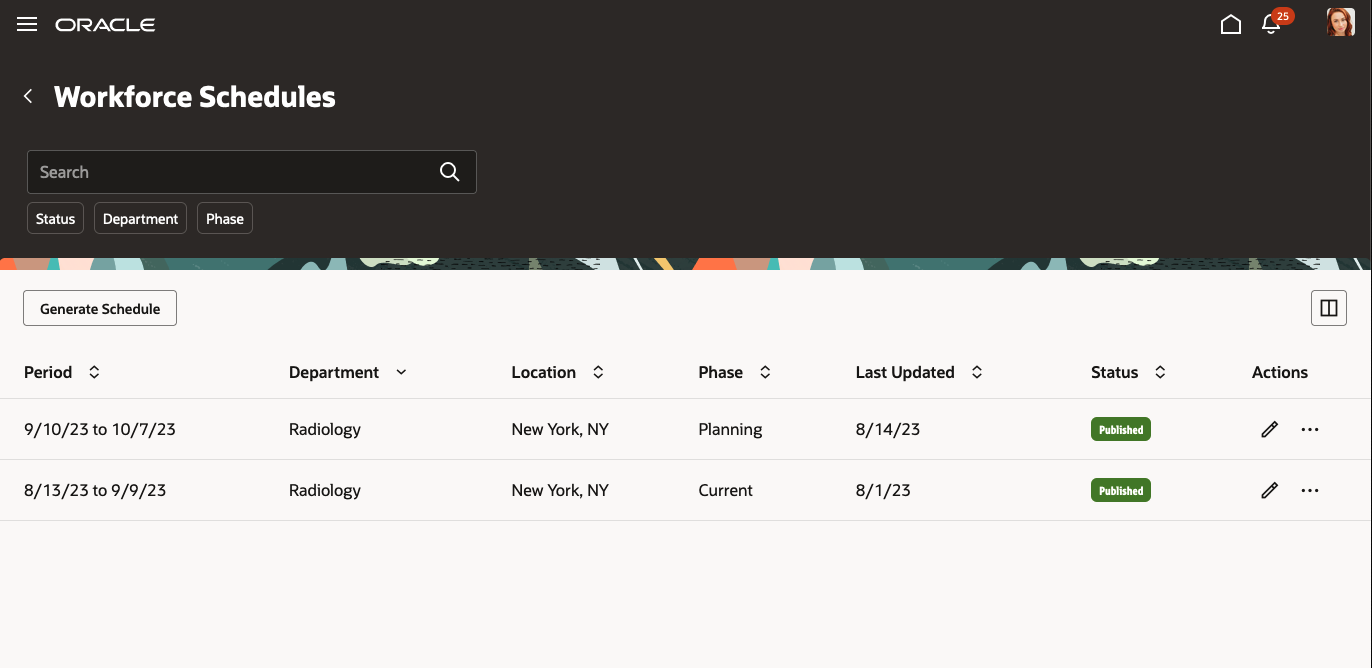
As a schedule manager, you can now generate and manage schedules for your staffing departments using the Workforce Schedules quick action under My Client Groups > Workforce Scheduling.
Workforce Schedules Page
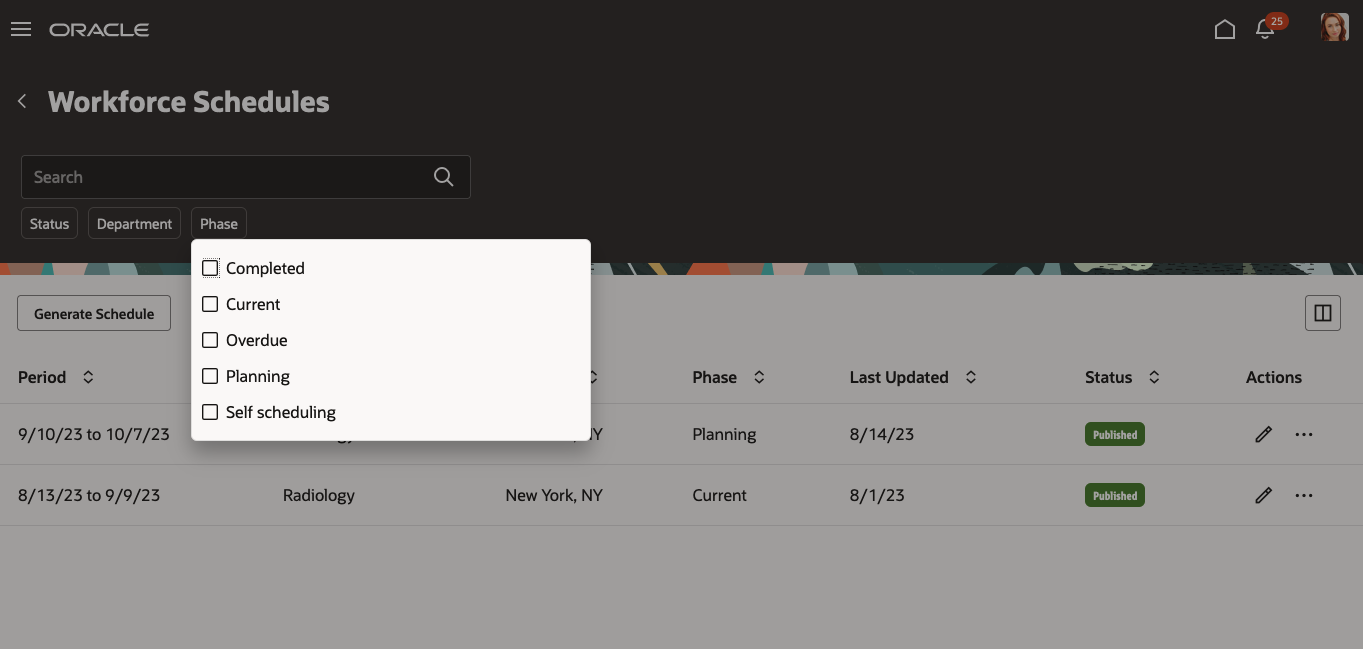
You can filter the listed schedules by status, such as Generated or Published, department, and phase, such as Current, Completed, Completed, Planning, Overdue, or Self-scheduling.
Available Phase Filter Options on the Workforce Schedules Page

Workforce Schedules Page Filtered to Show Only Schedules in the Planning Phase
You can view a schedule and any associated notes. You can also unpublish any published future schedules.

Row-Level Actions Available on the Workforce Schedules Page
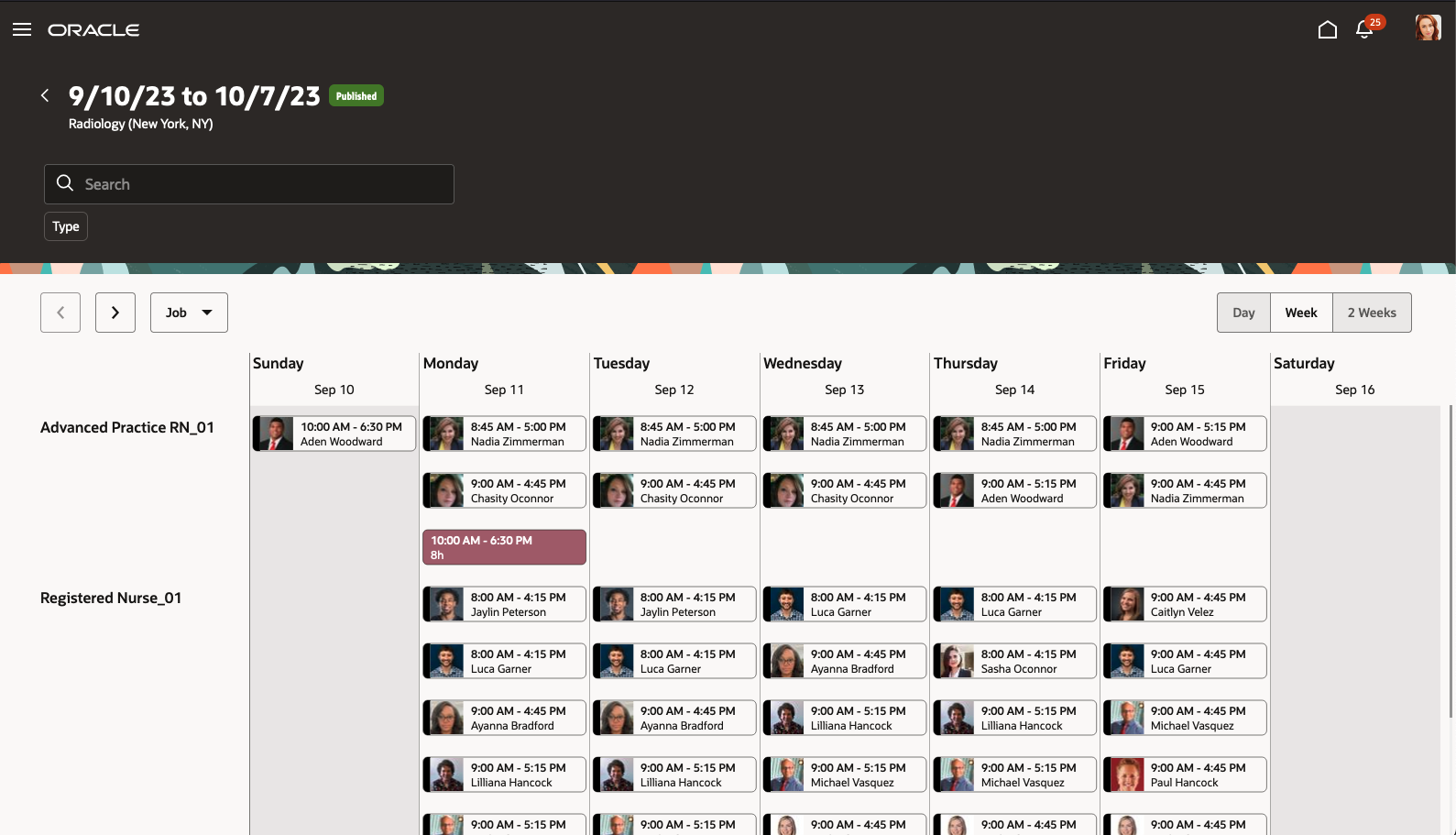
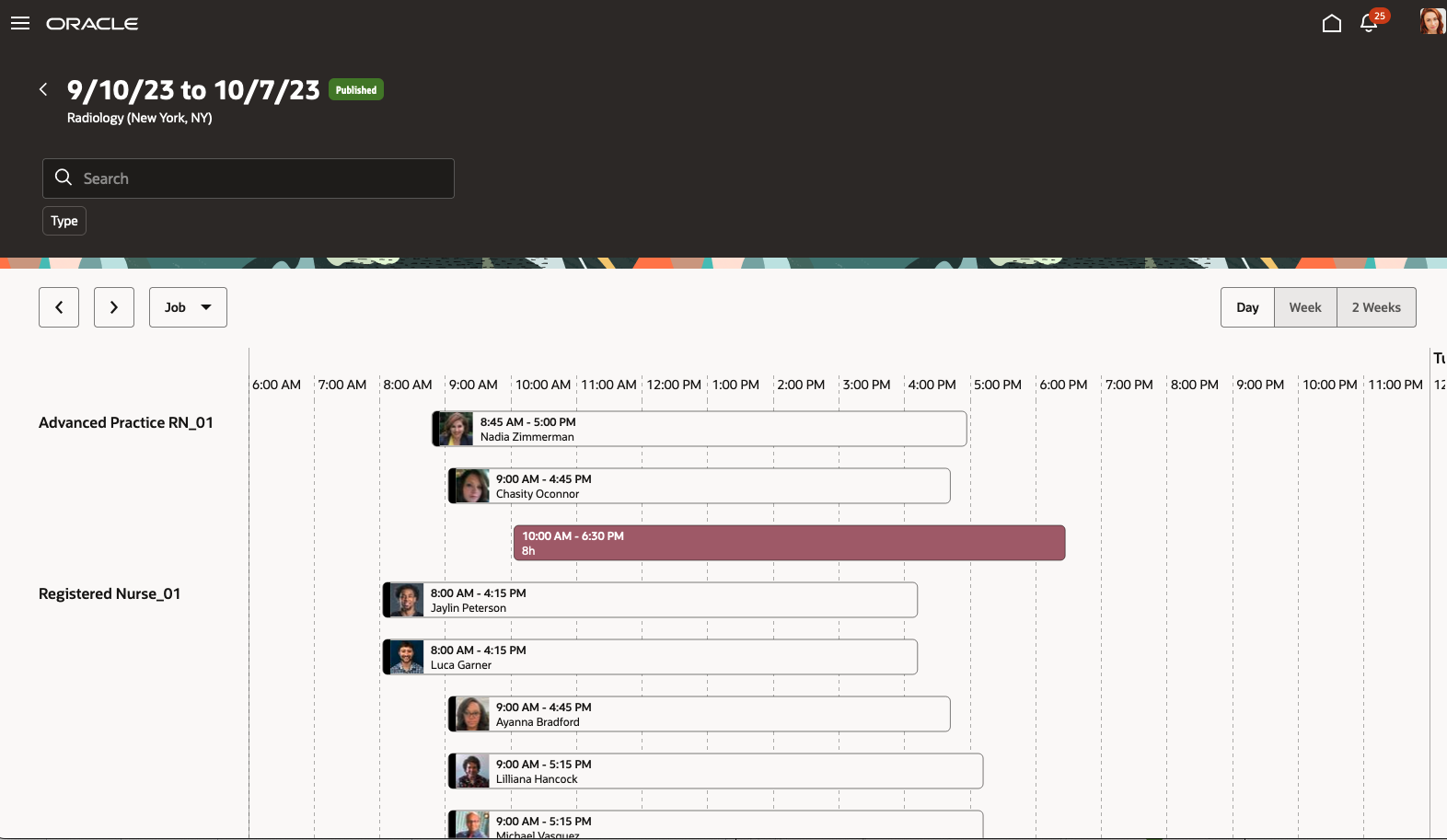
On the schedule page, you can see the shifts organized by job or worker, for the day, week, or 2 weeks.
Schedule Page with Shifts Organized by Job, for the Week
Schedule Page with Shifts Organized by Job, for the Day

Schedule Page with Shifts Organized by Worker, for the Day

Schedule Page with Shifts Organized by Worker, for the Week

Schedule Page with Shifts Organized by Worker, for the 2 Weeks
You can view critical information when you hover your mouse over a shift. You can also right-click and select shift details to open the shift details drawer.

Schedule Page Showing Shift Details on Mouse Hover

Schedule Page with the Shift Details Drawer Open
On the schedule page, you can add open shifts, assign shifts, and publish the schedule.
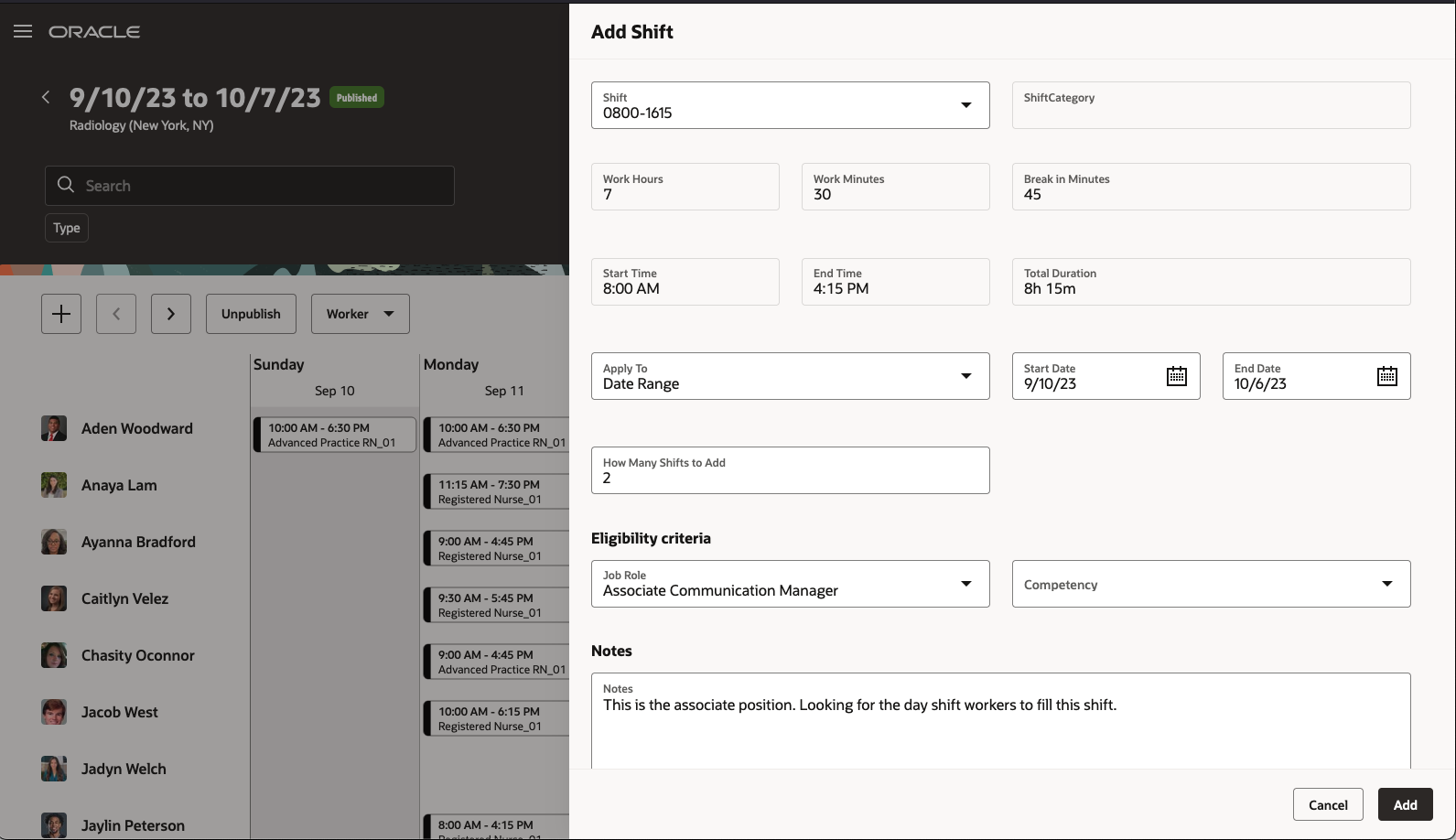
Schedule Page with the Add Shift Drawer Open

Schedule Page Updated to Include the New Open Shift

Schedule Page with the Assign Shift Drawer Open and Listing Workers Who Match the Shift Eligibility Criteria

Schedule Page with the Publish Schedule Drawer Open
This new feature lets schedule managers efficiently generate, plan, publish, track and monitor the worker schedules for their departments.
Steps to Enable
Contact your customer success manager or salesperson to uptake this controlled availability product because it has additional licensing requirements.
Key Resources
- For more information about shifts, work pattern types, and work patterns, see the Workforce Scheduling chapter of the Implementing Global Human Resources guide in Oracle Help Center.
- For more information about scheduler generation profiles, see this update 23D What's New feature: Schedule Generation Profile Introduction
- For information about generating workforce schedules, see this update 23D What's New feature: Generate Workforce Schedule Introduction
As an HCM integration specialist, you can import workload requirement data that provides the demand requirement for Workforce Scheduling using HCM Data Loader. The workload data import lets you import data over any date range and times within those ranges to establish a daily workload requirement to use as a goal for scheduling activities.
The workload data import has several attributes that describe the type of imported data to delineate:
- Baseline: A longer-term requirement for several months, quarters, or year, such as a budget.
- Adjusted: A medium-term requirement for a user-defined duration, such as a forecast, or a plan update to use in place of the budgeted value.
- Actual: A shorter-term requirement used from a-real time information collection system, such as an electronic medical records or point-of-sale system, to provide actual information. You use this attribute in place of the adjusted value.
Workforce Scheduling will retain each record and apply logic in the Workload Consolidation process to keep all the baseline requirements and identify the best current value to use. The process looks for the most recent actual, then the adjusted, and finally the baseline workload import record. It stops looking as soon as it finds the appropriate import record.
The workload plan import supports get, create, update, and delete actions on the workload plan information. Each new record in the workload import for the date and times overlapping previous records will be used for the workload requirement in Workforce Scheduling. Thus, you can simply create a record for the date range and times to update and those new records are used as the demand requirement. You can also edit and delete existing workload records by providing the surrogate, user, or primary keys when using HCM Data Loader.
This feature lets people set requirements for Workforce Scheduling to align schedules with business demand. They can set workload for a baseline budget, update with a forecast, and send real-time actual workload so Workforce Scheduling can align longer-range scheduling with up-to-the-minute workload changes.
Steps to Enable
Contact your customer success manager or salesperson to uptake this controlled availability product because it has additional licensing requirements.
Workload Consolidation processing creates the detail necessary to define the workload requirement for each date and time. The process retains the unit of measure provided in the workload import, but divides every day down by hour for each change to the workload requirement.
The initial Workload Consolidation process runs when the schedule generation period opens to establish the consolidation data set for the duration of the schedule period, plus one day to cover overnight shifts. Each subsequent import of the workload data updates active and past schedule periods.
The consolidation process retains two types of workload requirements from the workload plan import.
- The Baseline import type is retained for comparison against an original requirement such as a budget. The baseline is decided by using the most recent record received for each date and time interval.
- The Current import type consists of the most recent Actual, then Adjusted, then Baseline type in that respective order.
This feature provides valuable insight into the hourly workload requirement used to generate schedules, display coverage information, and identify open shifts.
Steps to Enable
Contact your customer success manager or salesperson to uptake this controlled availability product because it has additional licensing requirements.
Schedule Generation Profile Introduction
As a schedule administrator, you can define schedule generation profiles that identify the staffing departments and policies governing specific scheduling processes. Schedule managers use their profiles to generate the workforce schedule for their workers according to their work patterns. Manage these profiles using the Schedule Generation Profiles quick action under My Client Groups > Workforce Scheduling.
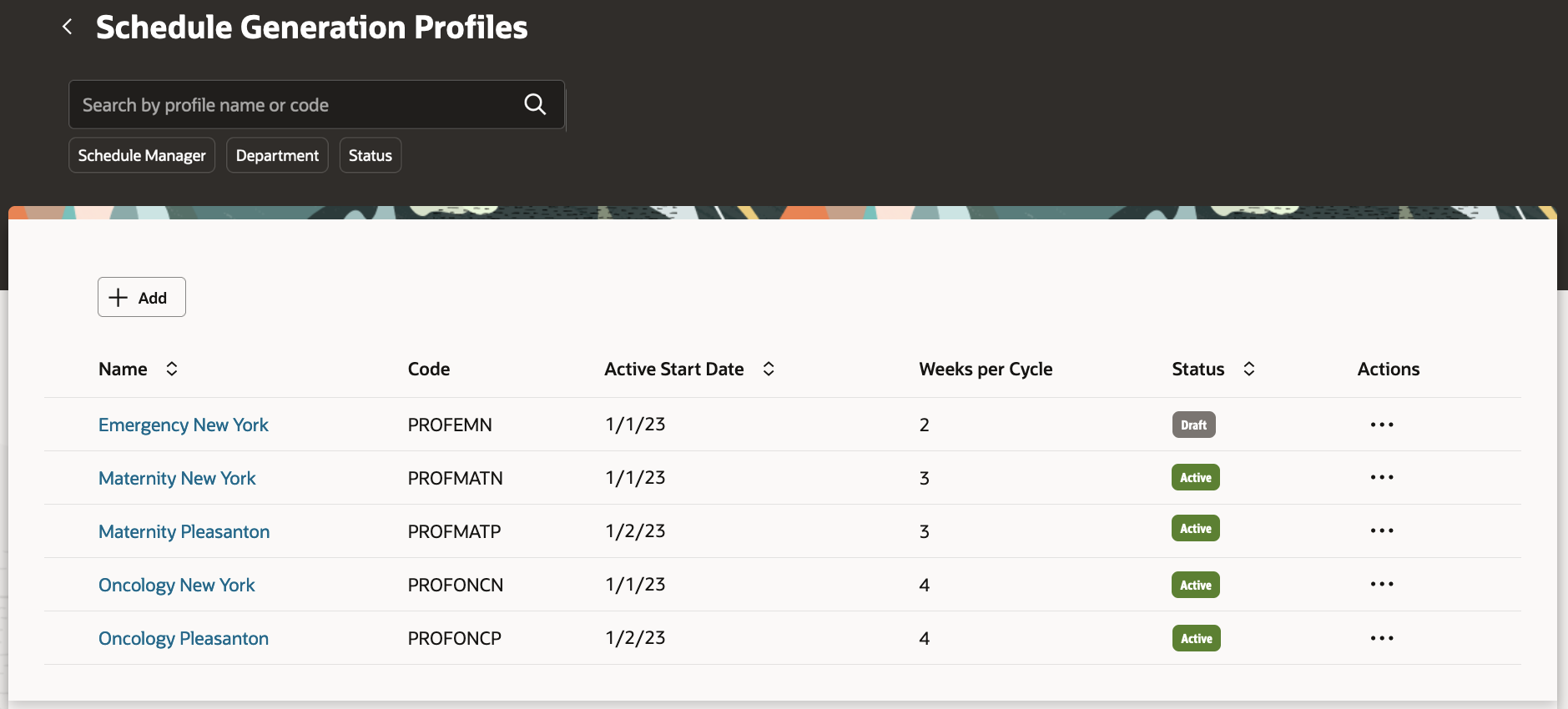
Schedule Generation Profiles Page
When you create a schedule generation profile, you enter basic details, such as the name, identifying code, active start and end dates, and a description. You also define the schedule periods, including how many weeks are in the schedule cycle and which 2 consecutive days to consider as the weekend.
And you define the schedule generation window and the self-scheduling window contained within it. Schedule managers start working on their schedules when the schedule generation window opens and publish them to their workers before the schedule generation window closes. Workers can claim open shifts during the self-scheduling window, and scheduling managers can assign them.
You define the schedule generation and self-scheduling windows by specifying how many days before the cycle starts to open and close each window. For example, you create a profile where the schedule generation window opens 90 days and closes 30 days before the cycle starts. Then you specify that the self-scheduling window opens 60 days and closes 45 days before the cycle starts. The self-scheduling window start and end dates have to be inside the schedule generation window start and end dates.
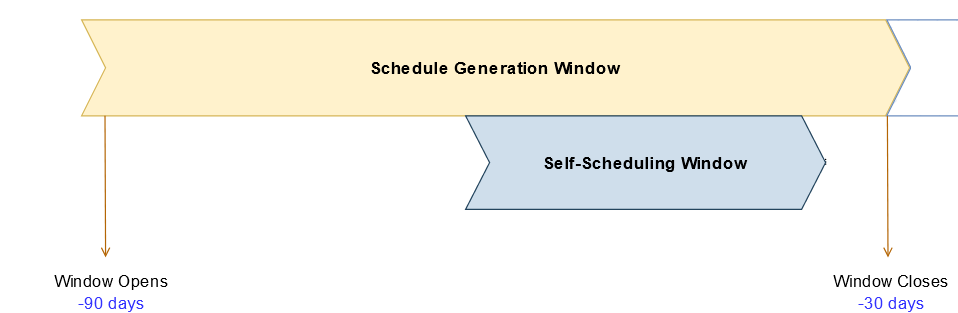
Schedule Generation and Self-Scheduling Windows
You can optionally remind schedulers to finalize their schedules a specific number of days before the schedule generation window closes.
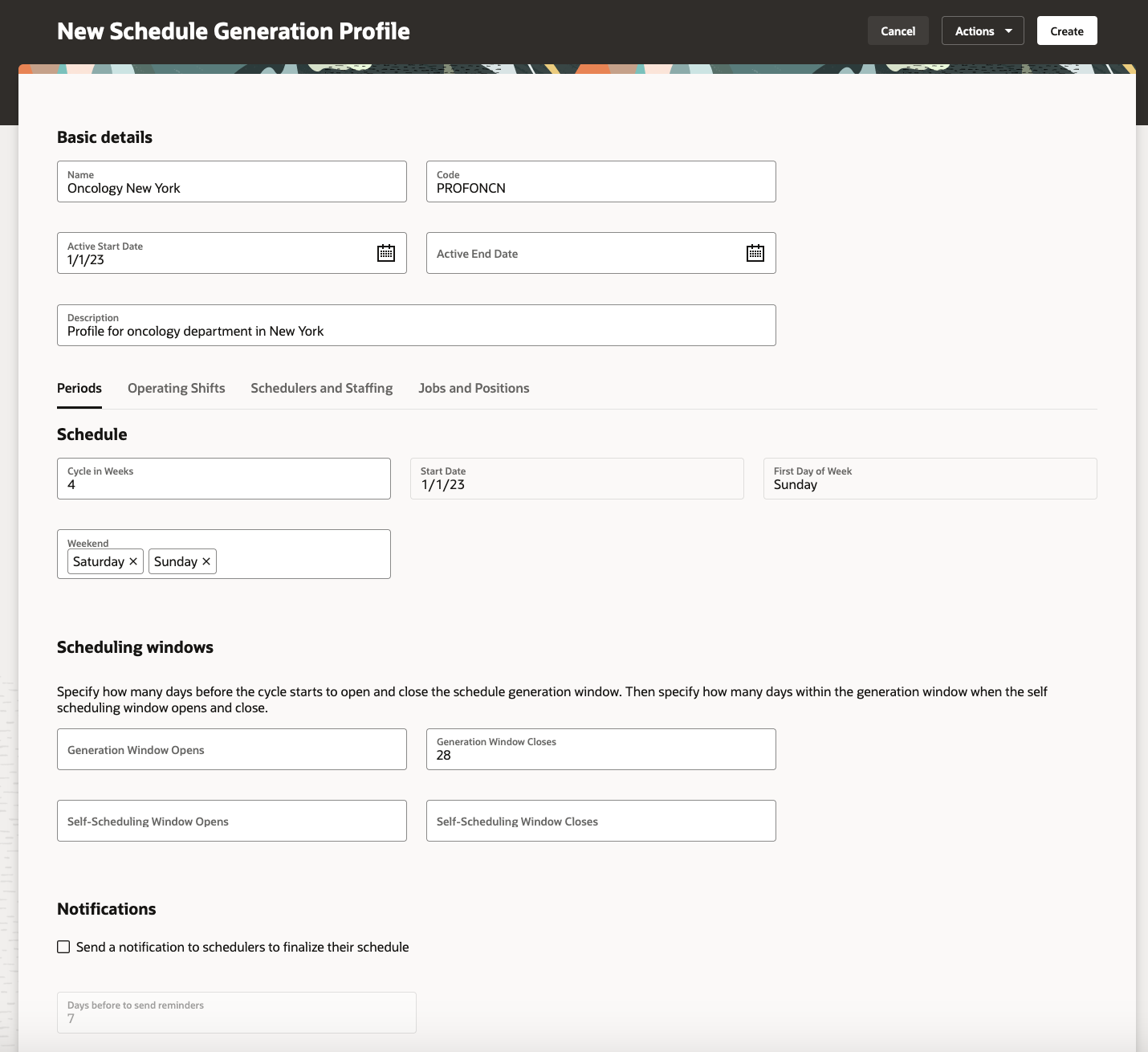
New Schedule Generation Profile Showing the Periods Tab
On the Operating Shifts tab, you add the shifts from the shifts library to use when generating the open shifts and the worker schedules.
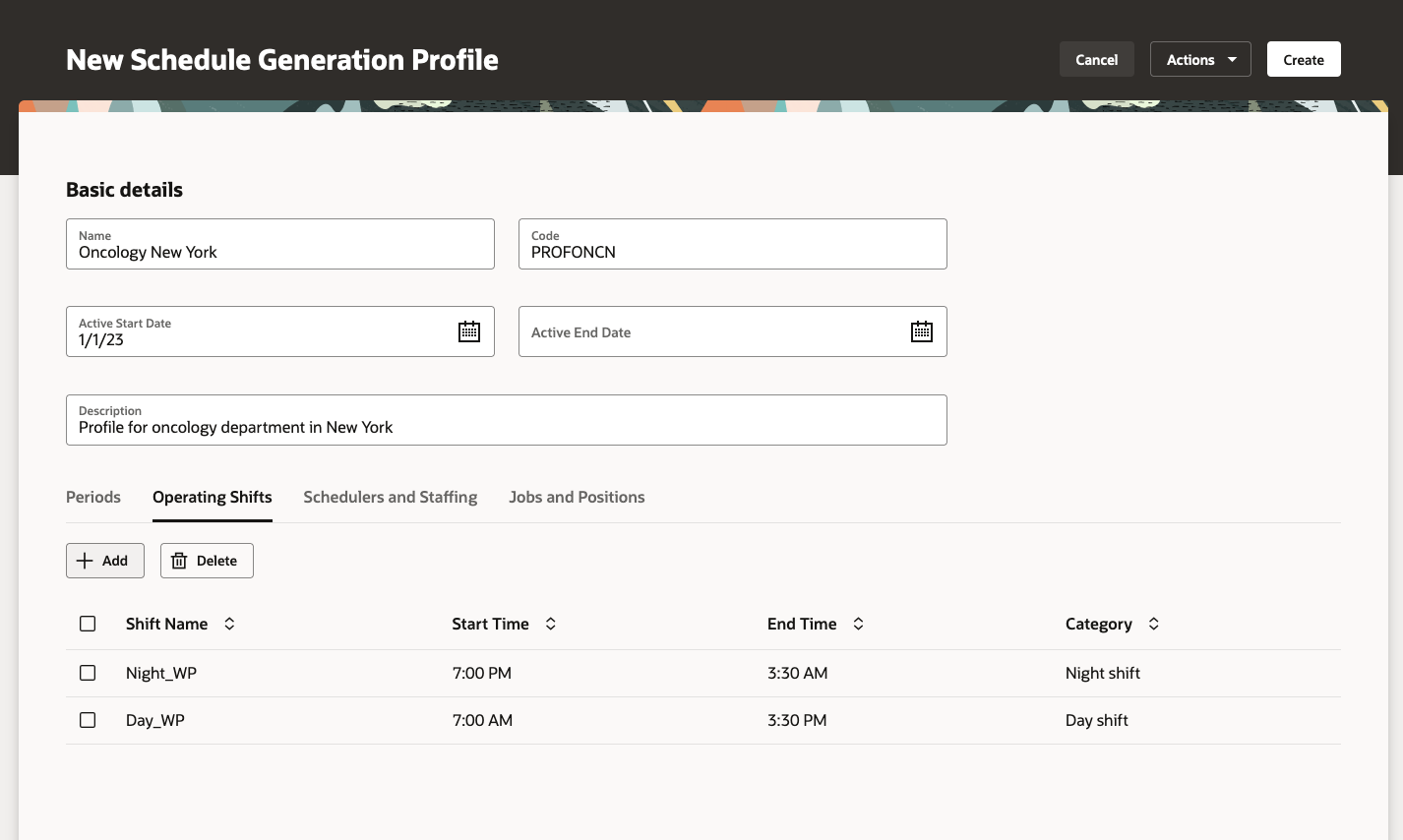
New Schedule Generation Profile Showing the Operating Shifts Tab
On the Schedulers and Staffing tab, you add the people who will use the profile to generate and publish schedules for the added staffing departments.

New Schedule Generation Profile Showing the Schedulers and Staffing Tab
On the Jobs and Positions tab, you can optionally identify specific jobs and positions to include or exclude when generating schedules for the specified staffing departments. You can't include some jobs and positions and exclude others, you can only include or exclude all. If you don't add any jobs or positions, the profile can be used to generate schedules for all jobs and positions.

New Schedule Generation Profile Showing the Jobs and Positions Tab
You can save a draft of the schedule generation profile and work on finalizing it over time. When you're ready, you can create the profile so that schedulers can use it as soon as it becomes active.

New Schedule Generation Profile Showing the Actions Menu Save Options and Create Action
You can create additional profiles by duplicating an existing profile, and you can edit and delete profiles as long as no schedule was generated using it.

Schedule Generation Profiles Page Showing the Possible Row-Level Actions
As soon as a profile is used to generate schedules, you can't change or delete existing staffing departments. But, you can add more staffing departments.
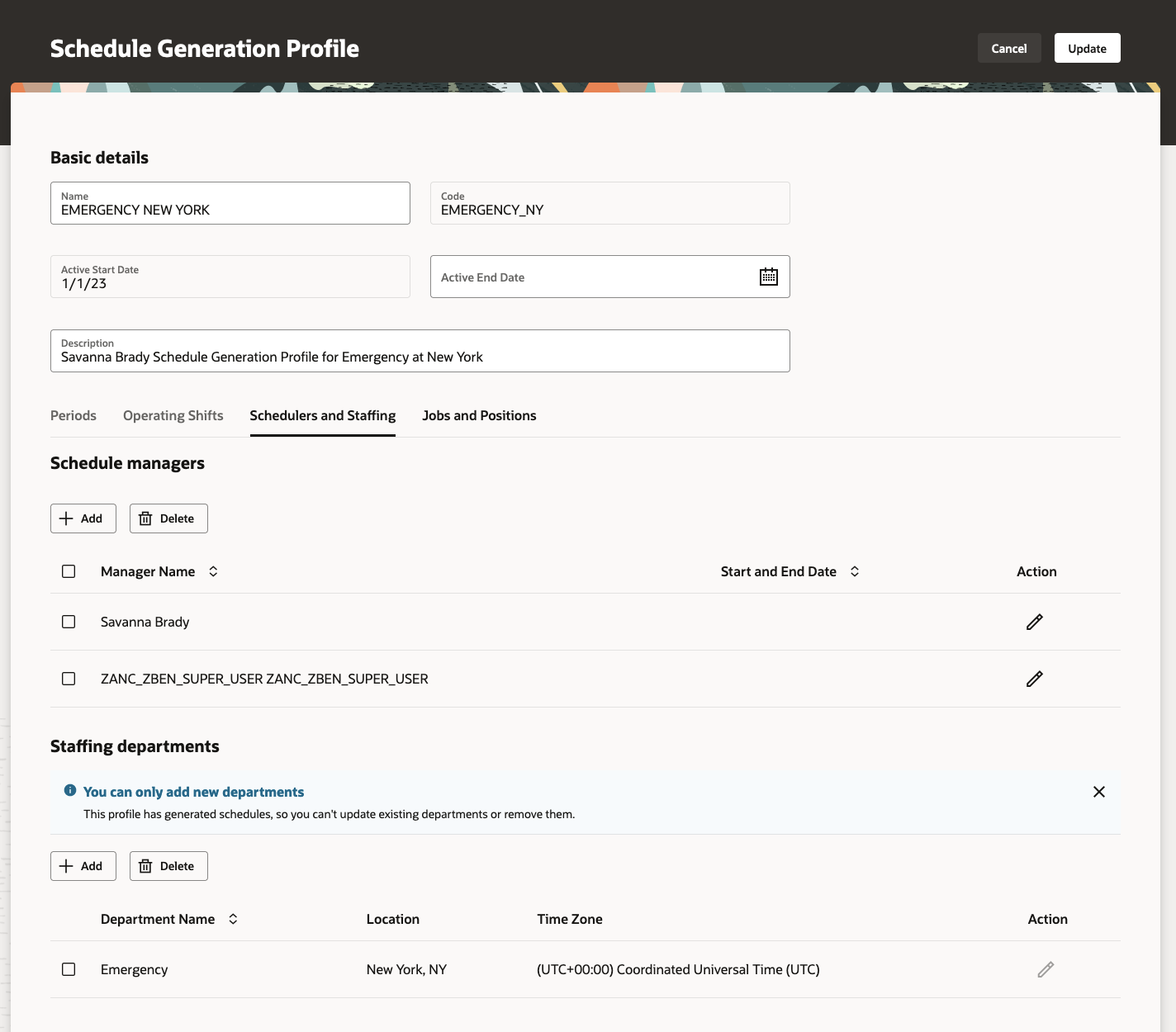
Information Message on the Schedulers and Staffing Tab Letting You Know That You Can Only Add Departments
This enhancement lets you easily specify how to schedule shifts for a set of staffing departments by using a centralized configuration.
Steps to Enable
Contact your customer success manager or salesperson to uptake this controlled availability product because it has additional licensing requirements.
Tips And Considerations
While you can enable reminder notification to schedulers to finalize their schedules, the actual notification functionality is coming in a future release.
Key Resources
For information about shifts, work pattern types, and work patterns, see the Workforce Scheduling chapter of the Implementing Global Human Resources guide in Oracle Help Center.
For information about generating workforce schedules, see the Workforce Scheduling in this Update 23D What's New feature: Generate Workforce Schedule Introduction.
Generate Workforce Schedule Introduction
As a schedule manager, you can generate workforce schedules for workers in the specified staffing departments that you support. Generate schedules for only fixed-time work patterns, open shifts matching the workload and fixed-time work patterns, or automatically assigned schedules for all workers in the staffing department.

Workforce Schedules Page with the Generate Schedule Button
The Generate Schedule button opens the Generate schedule drawer where you select the appropriate schedule generation profile, staffing departments, scheduling period, and schedules.
| Generate Schedule Option | Description |
|---|---|
| Profile | Choice list with all of the schedule generation profiles where you're listed as a schedule manager. |
| Staffing departments | List of staffing departments associated with the selected schedule generation profile. |
| Schedule period | List of schedule periods that you can generate schedules for. The process won't generate schedules for periods that already have published schedules. |
| What schedules do you want to generate? |
|
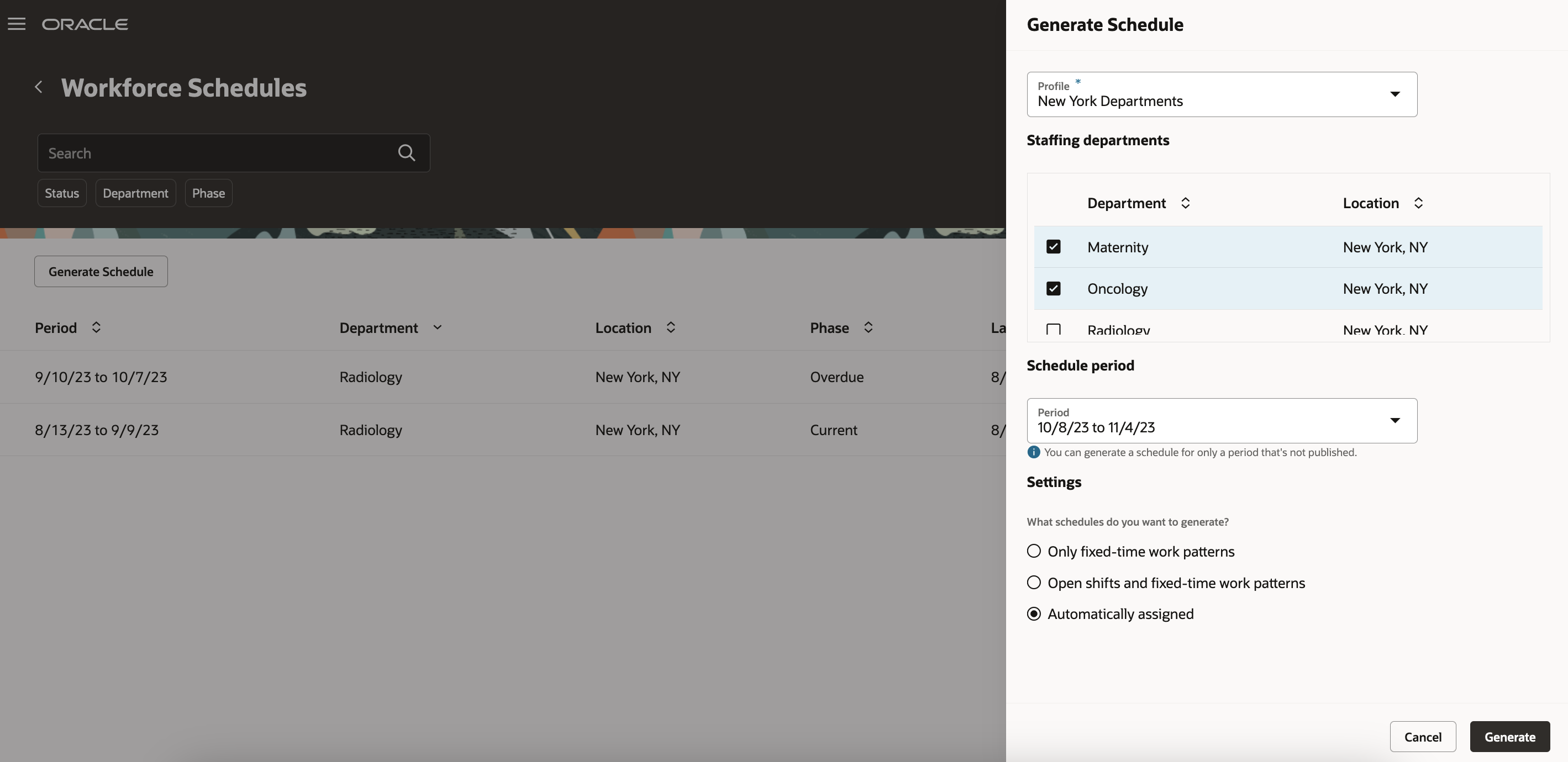
Generate Schedule Drawer Opened from the Workforce Schedules Page
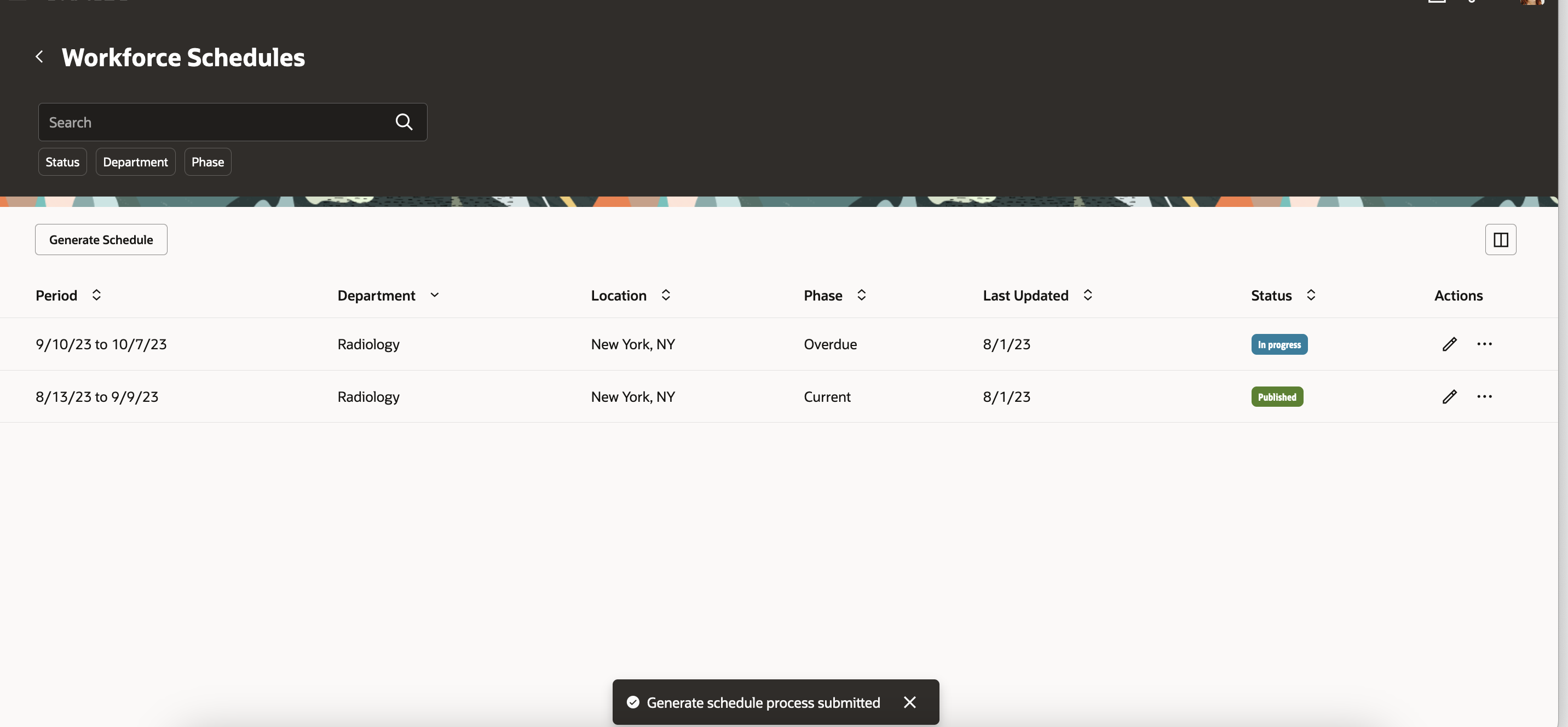
Generate Schedule Process Submitted Confirmation Message
This enhancement lets you more effectively schedule workers to provide appropriate coverage for staffing departments while balancing workload.
Steps to Enable
Contact your customer success manager or salesperson to uptake this controlled availability product because it has additional licensing requirements.
Key Resources
For more information about shifts, work pattern types, and work patterns, see the Workforce Scheduling chapter of the Implementing Global Human Resources guide in Oracle Help Center.
For more information about schedule generation profiles, see the Update 23D Workforce Scheduling What's New feature: Schedule Generation Profile Introduction.
Team Schedule Navigation Change and Schedules Quick Action Group Renamed
The Team Schedule quick actions navigation paths have changed:
- Employee
- Was: Me > Schedules > Team Schedule
- Now: Me > Time and Absences > Team Schedule

- Line manager
- Was: My Team > Schedules > Team Schedule
- Now: My Team > Time > Team Schedule

Also the Schedules quick action group under Me, My Team, and My Client Groups was renamed to Workforce Scheduling.
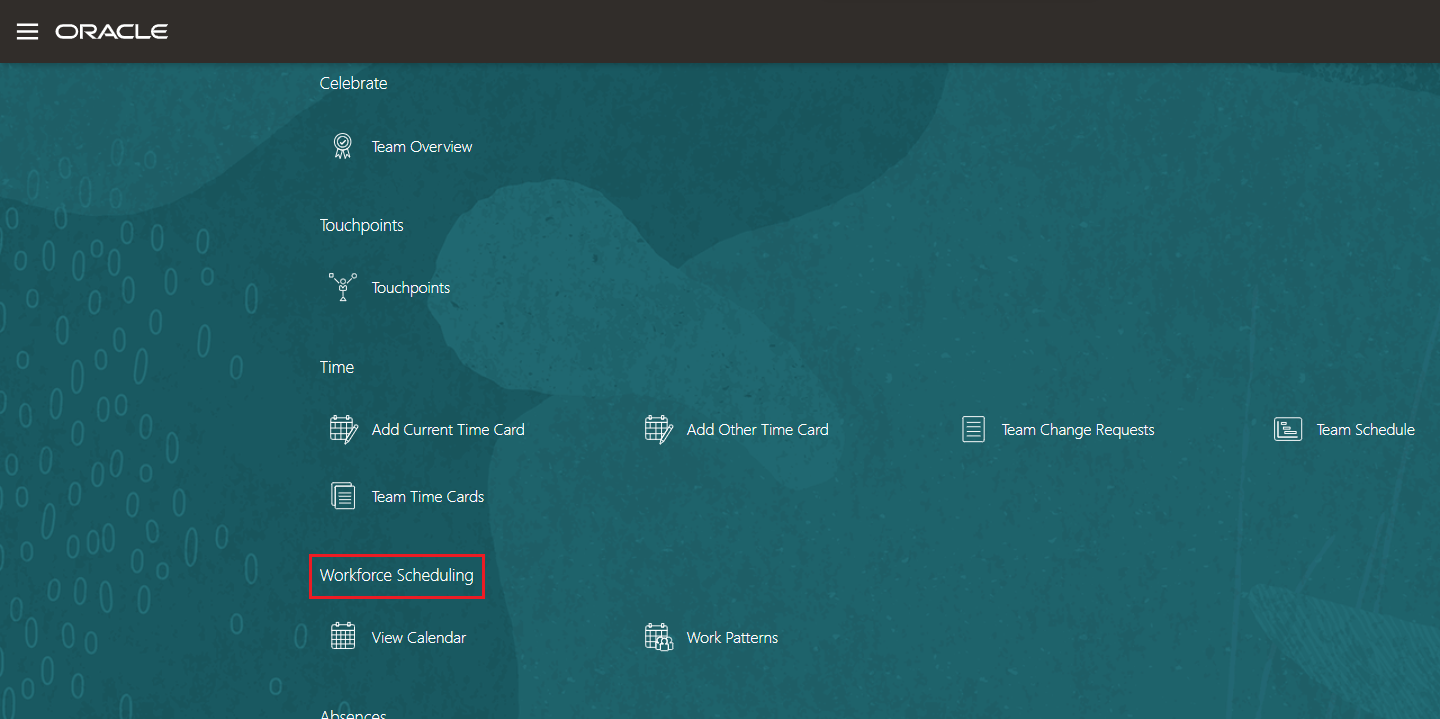
Please take note of the changes to the quick actions.
Steps to Enable
You don't need to do anything to enable this feature.
New Subject Area - Workload Real Time
You can now report on the workload data that is used for staffing requirements or workload hours, using the new subject area Workforce Scheduling - Workload Real Time.
This subject area provides information on the workload data imports for the raw imports and condensed values for each workload type. The condensed values help to report on which value is being utilized in the case of multiple imports overlapping the time period for each workload type.
This subject area helps answering the business questions such as:
- What is the baseline value provided for my scheduling period so I can see my budget?
- What are the raw values of all my imports impacting my scheduling system? I will know which value is used for my scheduling system.
- What is the plan value for my scheduling period?
A sample report is as below.
| Workload Type Name |
Workload Plan Code |
Start Date |
Start Time Offset (HH:MM) |
Workload Quantity |
UOM |
Department Name |
|---|---|---|---|---|---|---|
| Baseline |
WLBA001 |
04/01/2023 |
7:0 |
5 | FTE | Human Resources |
| Adjusted |
WLAD006 |
06/01/2023 |
8:0 | 16 | FTE | Human Resources |
| Actual |
WLAC005 |
08/01/2023 |
7:0 | 5 | FTE |
Human Resources |
Augment your reporting on workload data, using the new subject area Workforce Scheduling - Workload Real Time. The workload data is used for staffing requirements or workload hours.
Steps to Enable
To enable this feature you need to log a Service Request (SR).
To be a part of this Controlled Availability Program you must procure the license and log a Service Request asking to be part of the program.