
February Maintenance Pack for 24A
This document will continue to evolve as existing sections change and new information is added. All updates appear in the following table:
| Date | Module | Feature | Notes |
|---|---|---|---|
| 26 JAN 2024 | Created initial document. |
 HAVE AN IDEA?
We’re here and we’re listening. If you have a suggestion on how to make our cloud services even better then go ahead and tell us. There are several ways to submit your ideas, for example, through the Ideas Lab on Oracle Customer Connect. Wherever you see this icon after the feature name it means we delivered one of your ideas.
GIVE US FEEDBACK
We welcome your comments and suggestions to improve the content. Please send us your feedback at oracle_fusion_applications_help_ww_grp@oracle.com.
DISCLAIMER
The information contained in this document may include statements about Oracle’s product development plans. Many factors can materially affect Oracle’s product development plans and the nature and timing of future product releases. Accordingly, this Information is provided to you solely for information only, is not a commitment to deliver any material, code, or functionality, and should not be relied upon in making purchasing decisions. The development, release, and timing of any features or functionality described remains at the sole discretion of Oracle.
This information may not be incorporated into any contractual agreement with Oracle or its subsidiaries or affiliates. Oracle specifically disclaims any liability with respect to this information. Refer to the Legal Notices and Terms of Use for further information.
Column Definitions:
Report = New or modified, Oracle-delivered, ready to run reports.
UI or Process-Based: Small Scale = These UI or process-based features are typically comprised of minor field, validation, or program changes. Therefore, the potential impact to users is minimal.
UI or Process-Based: Larger Scale* = These UI or process-based features have more complex designs. Therefore, the potential impact to users is higher.
Features Delivered Disabled = Action is needed BEFORE these features can be used by END USERS. These features are delivered disabled and you choose if and when to enable them. For example, a) new or expanded BI subject areas need to first be incorporated into reports, b) Integration is required to utilize new web services, or c) features must be assigned to user roles before they can be accessed.
| Ready for Use by End Users Reports plus Small Scale UI or Process-Based new features will have minimal user impact after an update. Therefore, customer acceptance testing should focus on the Larger Scale UI or Process-Based* new features. |
Customer Must Take Action before Use by End Users Not disruptive as action is required to make these features ready to use. As you selectively choose to leverage, you set your test and roll out timing. |
|||||
|---|---|---|---|---|---|---|
| Feature |
Report |
UI or |
UI or |
|
||
Workforce Scheduling Controlled Availability
Configure Self-Scheduling Alert Notifications
You can now configure self-scheduling alert notifications that keep workers and schedule managers informed about the self-scheduling process. Here are the available alerts:
- Self-Scheduling Period Opening Soon (HTS_SS_SCHEDULED_TO_OPEN)
- Self-Scheduling Period Closing (HTS_SS_SCHEDULED_TO_CLOSE)
- Self-Scheduling Period Open (HTS_SS_OPEN)
- Self-Scheduling Period Closed (HTS_SS_CLOSED)
- Self-Scheduling Period Officially Closed (HTS_SS_CLOSED_SCHEDULER)
This feature ensures timely communication to workers and schedule managers throughout the self-scheduling process.
Steps to Enable
Contact your customer success manager or salesperson to uptake this controlled availability product because it has additional licensing requirements.
Tips And Considerations
You can change the standard notification template for each of the self-scheduling alerts using Tools > Alerts Composer.
This document will continue to evolve as existing sections change and new information is added. All updates appear in the following table:
| Date | Module | Feature | Notes |
|---|---|---|---|
| 26 JAN 2024 | Workforce Scheduling Controlled Availability | Worker Self-Scheduling | Updated document. Revised feature information. |
| 26 JAN 2024 | Workforce Scheduling Controlled Availability | Updated document. Revised feature information. |
|
| 26 JAN 2024 | Workforce Scheduling Controlled Availability |
Updated document. Revised feature information. |
|
| 26 JAN 2024 |
Workforce Scheduling Controlled Availability |
Updated document. Revised feature information. |
|
| 26 JAN 2024 |
Workforce Scheduling Controlled Availability |
Updated document. Revised feature information. |
|
| 26 JAN 2024 |
Workforce Scheduling Controlled Availability |
Updated document. Revised feature information. |
|
| 26 JAN 2024 |
Workforce Scheduling Controlled Availability |
Updated document. Revised feature information. |
|
| 26 JAN 2024 | Workforce Scheduling Controlled Availability |
Updated document. Revised feature information. |
|
| 26 JAN 2024 |
Workforce Scheduling Controlled Availability |
Updated document. Revised feature information. |
|
| 01 DEC 2023 | Created initial document. |
HCM Cloud applications have two types of patches you can receive that are documented in this What’s New:
- Release Updates (24A, 24B, 24C, and 24D)
- Optional Monthly Maintenance Packs to each update
It is important for you to know what Release Update your environment is on. You can find this in your Cloud Portal.
____________________
HAVE AN IDEA?
We’re here and we’re listening. If you have a suggestion on how to make our products better, please let us know. To enter an idea go to the Ideas Lab on Oracle Customer Connect. In this document wherever you see the light bulb icon after the feature name it means we delivered one of your ideas.
____________________
Suggested Reading for all HCM Products:
- HCM Common What's New - In this What's New you will find feature that are used across applications.
- Human Resources What’s New – In the Global Human Resources section you will find features on the base application in which other application are built upon.
NOTE: Not all Global Human Resource features are available for Talent and Compensation products.
- Oracle Human Capital Management Cloud Functional Known Issues and Maintenance Packs (Document ID 1554838.1). These documents identify bug fixes and possible known issues. You will also need to review these documents based in the release update version you are currently on or will be moving to.
- Oracle Help Center – Here you will find guides, videos and searchable help.
- Release Readiness – New Feature Summary, What’s New, Feature Listing Spreadsheet, Spotlights and Release Training.
GIVE US FEEDBACK
We welcome your comments and suggestions to improve the content. Please send us your feedback at oracle_fusion_applications_help_ww_grp@oracle.com. Indicate you are inquiring or providing feedback regarding the HCM Cloud What’s New in the body or title of the email.
Column Definitions:
Report = New or modified, Oracle-delivered, ready to run reports.
UI or Process-Based: Small Scale = These UI or process-based features are typically comprised of minor field, validation, or program changes. Therefore, the potential impact to users is minimal.
UI or Process-Based: Larger Scale* = These UI or process-based features have more complex designs. Therefore, the potential impact to users is higher.
Features Delivered Disabled = Action is needed BEFORE these features can be used by END USERS. These features are delivered disabled and you choose if and when to enable them. For example, a) new or expanded BI subject areas need to first be incorporated into reports, b) Integration is required to utilize new web services, or c) features must be assigned to user roles before they can be accessed.
| Ready for Use by End Users Reports plus Small Scale UI or Process-Based new features will have minimal user impact after an update. Therefore, customer acceptance testing should focus on the Larger Scale UI or Process-Based* new features. |
Customer Must Take Action before Use by End Users Not disruptive as action is required to make these features ready to use. As you selectively choose to leverage, you set your test and roll out timing. |
|||||
|---|---|---|---|---|---|---|
| Feature |
Report |
UI or |
UI or |
|
||
Transactional Business Intelligence for Workforce Scheduling |
||||||
IMPORTANT Actions and Considerations for Workforce Scheduling |
||||||
NOTE: Contact your customer success manager or salesperson to uptake this controlled availability product because it has additional licensing requirements.
Workforce Scheduling manages the process of establishing when and where employees will work over the coming days, weeks, and months. Workforce Scheduling assists employees and managers in planning and defining schedules. Managers can plan schedules in advance with visibility into employees’ availability, approved absences and their preferences. Workforce Scheduling is integrated with the other Workforce Management products and has optimized scheduling, which leverages AI to define schedules, manage labor costs, and manage compliance.
Workforce Scheduling helps drive employee satisfaction by allowing employees to participate early-on in the scheduling process by allowing them to self-schedule to claim shifts of their choice or trade shifts with their colleagues. Since scheduling is simplified, companies can publish schedules earlier, which allows employees to make plans around their schedule.
Controlled Availability for Workforce Scheduling
The following is a list of Controlled Availability features that are being offered by our Controlled Availability Program.
NOTE: These features are not generally available for all customers at this time. These are only available through the Controlled Availability Program and will require approval to become a part of the features program. To be a part of these programs you will be required to participate in testing and providing feedback. Some programs may require other participation as well.
Not to worry if you don't have to time to be a part of these early stage programs. You can uptake this feature when it is generally available for all customers. When these features are available for all customers you will see the features under their product headings as usual.
We invite you all to browse through the list of features to see if there are any features you are interested in implementing in advance of the features scheduled release. The table below will provide information on signing up for features. Please sign up soon, as these programs have limited availability and some are designed for specific types of customers.
The table below gives you a brief description of the features available and how to sign up. Some features are bigger than others, so for more information there may be a What's New describing the feature in more detail below this table.
We look forward to hearing your thoughts and ideas as you participate the Controlled Availability programs!
| Product | Feature Name | Feature Description | Type of Customer Needed to Test | How to Sign Up | Controlled Availability Release | Is the Program Still Open |
|---|---|---|---|---|---|---|
| Workforce Scheduling | Manage Workforce Schedules | Manage the generated schedules for a department using the Workforce Schedules page. This page displays a list of available schedules. Schedule managers can review the status, view notes, manage shifts, and publish the schedules |
Licensed Workforce Scheduling customer | You must log a Service Request (SR) through My Oracle Support (MOS) requesting to be in the program. | 23D | Open |
| Workforce Scheduling |
Schedule Generation Profile Introduction | Let schedule administrators create schedule generation profiles by defining the staffing departments and policies governing the scheduling process. Schedule managers use these profiles to establish the workforce schedule for their workers. |
Licensed Workforce Scheduling customer |
You must log a Service Request (SR) through My Oracle Support (MOS) requesting to be in the program. |
23D | Open |
| Workforce Scheduling |
Generate Workforce Schedule Introduction | Generate workforce schedules for workers in the specified staffing departments. Schedule managers can generate only fixed-time work patterns, open shifts matching the workload and fixed-time work patterns, or automatically assigned schedules for all workers in the staffing department. |
Licensed Workforce Scheduling customer |
You must log a Service Request (SR) through My Oracle Support (MOS) requesting to be in the program. |
23D | Open |
| Workforce Scheduling |
Workload Plan Import | Create and manage the Workload Plans which form the basis for setting the requirement for schedules in Oracle Fusion HCM Cloud. Workload Plans define the date ranges and times of the workload requirement for scheduling. The Workload types define the Baseline, Adjusted or Actual type of workload plan for budgeting, forecasting or real time updates to the workload. |
Licensed Workforce Scheduling customer |
You must log a Service Request (SR) through My Oracle Support (MOS) requesting to be in the program. |
23D |
Open |
| Workforce Scheduling |
Workload Consolidation | Let Workforce Scheduling align work schedules with required demand by providing a detailed data set of workload data by date and time using the Workload Consolidation process. The process retains the Baseline value provided by the workload import and identifies a current value by using the most recent Actual, Adjusted, or Baseline value, respectively. |
Licensed Workforce Scheduling customer |
You must log a Service Request (SR) through My Oracle Support (MOS) requesting to be in the program. |
23D |
Open |
| Transactional Business Intelligence for Workforce Scheduling | New Subject Area - Workload Real Time | Augment your reporting on workload data, using the new subject area Workforce Scheduling - Workload Real Time. The workload data is used for staffing requirements or workload hours. |
Licensed Workforce Scheduling customer |
You must log a Service Request (SR) through My Oracle Support (MOS) requesting to be in the program. |
23D |
Open |
| Workforce Scheduling |
Worker Self-Scheduling | Empower workers to control their work schedules. They can claim shifts during the designated self-scheduling access period, which promotes a sense of autonomy and work-life balance. |
Licensed Workforce Scheduling customer |
You must log a Service Request (SR) through My Oracle Support (MOS) requesting to be in the program. |
24A | Open |
| Workforce Scheduling |
Schedule Generation Profile Enhancement | Let schedule administrators enable notifications to schedule managers that remind them to finalize and publish their schedules. Also define the operating shifts to use while generating on-call schedules. Finally, enable scheduling rules to apply when generating and validating schedules for the staffing departments. |
Licensed Workforce Scheduling customer |
You must log a Service Request (SR) through My Oracle Support (MOS) requesting to be in the program. |
24A |
Open |
| Workforce Scheduling |
Workforce Schedule Access | Define how schedule managers and administrators access their workforce schedules based on their schedule generation profile and area of responsibility. |
Licensed Workforce Scheduling customer |
You must log a Service Request (SR) through My Oracle Support (MOS) requesting to be in the program. |
24A |
Open |
| Workforce Scheduling |
Generate and Validate Workforce Schedule Enhancement | Generate workforce schedules using the scheduling rules defined for the worker staffing departments. Also validate schedule changes when a schedule manager or worker edits a shift. |
Licensed Workforce Scheduling customer |
You must log a Service Request (SR) through My Oracle Support (MOS) requesting to be in the program. |
24A |
Open |
| Workforce Scheduling |
Shift Types in Workforce Schedules | Ensure workforce schedule accuracy by defining and managing shift types for your workloads and shifts. Shift types can be on-call or work, and work shift types also have productivity percentages. |
Licensed Workforce Scheduling customer |
You must log a Service Request (SR) through My Oracle Support (MOS) requesting to be in the program. |
24A |
Open |
| Workforce Scheduling |
Workload Management | Review the detailed workload requirements by day, for up to a week, on the new read-only Workload Management page for schedule managers. See the consolidated workload data for the baseline and current real-time workload requirements for each job, competency, and shift type. |
Licensed Workforce Scheduling customer |
You must log a Service Request (SR) through My Oracle Support (MOS) requesting to be in the program. |
24A |
Open |
| Workforce Scheduling |
View Schedule Coverage Variance | Provide schedule managers an option to review the coverage variance between the workload demand requirements and assigned shifts for a scheduling period. By default, the schedule coverage variance is displayed in 4-hour intervals and calculated in 15-minute increments. The coverage information helps schedule managers make necessary schedule updates to avoid overstaffing and understaffing issues. |
Licensed Workforce Scheduling customer |
You must log a Service Request (SR) through My Oracle Support (MOS) requesting to be in the program. |
24A |
Open |
| Workforce Scheduling |
Schedule Manager Gantt Enhancements | Note that department schedule Gantt views have a self-scheduling banner during self-scheduling windows. Schedulers can’t publish the schedule during this period or make changes to worker-claimed shifts. Shifts now include shift types, which can be on-call or work, and work shift types also have productivity percentages. And shift actions, such as Assign, Edit, Unassign, and Delete now also run rule validations. Schedulers can override warnings, but not errors, as appropriate. |
Licensed Workforce Scheduling customer |
You must log a Service Request (SR) through My Oracle Support (MOS) requesting to be in the program. |
24A |
Open |
| Workforce Scheduling |
New Subject Area to Report on Workload Consolidation | Augment your reporting capabilities with the new subject area Workforce Scheduling - Workload Consolidation Real Time. This new subject area allows you to report on the consolidated workload in order to determine the staffing requirements for the scheduling system. |
Licensed Workforce Scheduling customer |
You must log a Service Request (SR) through My Oracle Support (MOS) requesting to be in the program. |
24A |
Open |
Workforce Scheduling Controlled Availability
You can now proactively manage your work schedules by selecting available regular and on-call shifts that align with your preferences and availability. When a self-scheduling window opens, you get an email notification and a banner message on your calendar. Click the link provided in the notification or message to open the Self-Scheduling page. You can also click the Self-Schedule button in the page header. If you have multiple assignments or schedule periods, you can choose the self-scheduling page you want to open based on the business title, scheduling period, and department and location.

Employee Calendar with the Self-Scheduling Information Banner and Self-Schedule Button
You can see the available shifts for each week of the schedule period and when the self-scheduling window closes for the period.

Desktop Self-Scheduling Page Showing the Available Shifts for Week 2 of the Schedule Period, Scheduled and Contracted Hours, and Shift Conflicts
When you claim shifts, the rules for your schedules validate your claims to confirm eligibility and identify conflicts. For example, you're contracted to work 33 hours, but currently scheduled for only 18 hours. You can see that you need to find 15 more hours of work to meet your contracted hours. You can also see if available shifts conflict, for example, with an overlapping scheduled shift or approved absence.
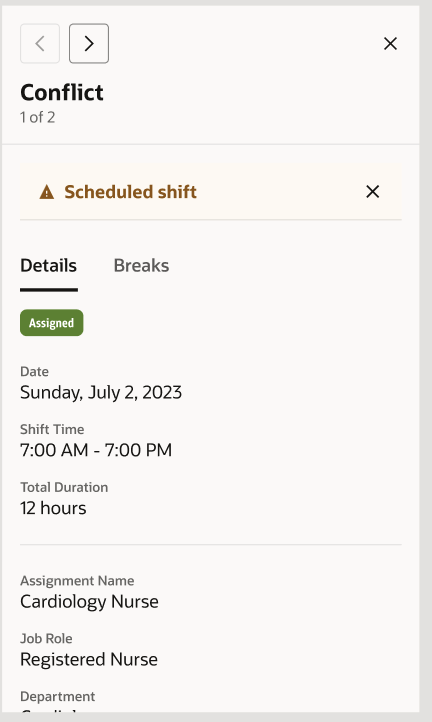
Mobile Conflict Panel Showing the Details of an Overlapping Scheduled Shift
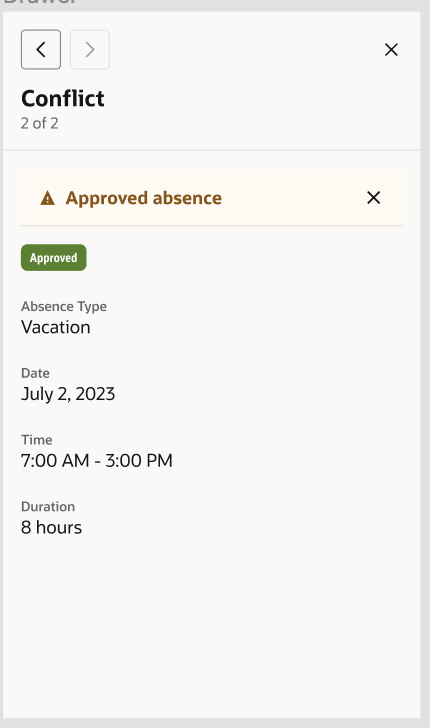
Mobile Conflict Panel Showing the Details of an Overlapping Approved Absence
The shift details drawer lets you know if you claimed a shift but your scheduler hasn't yet assigned it to you. And while that self-scheduling window is open, you can withdraw shift claims, as needed.
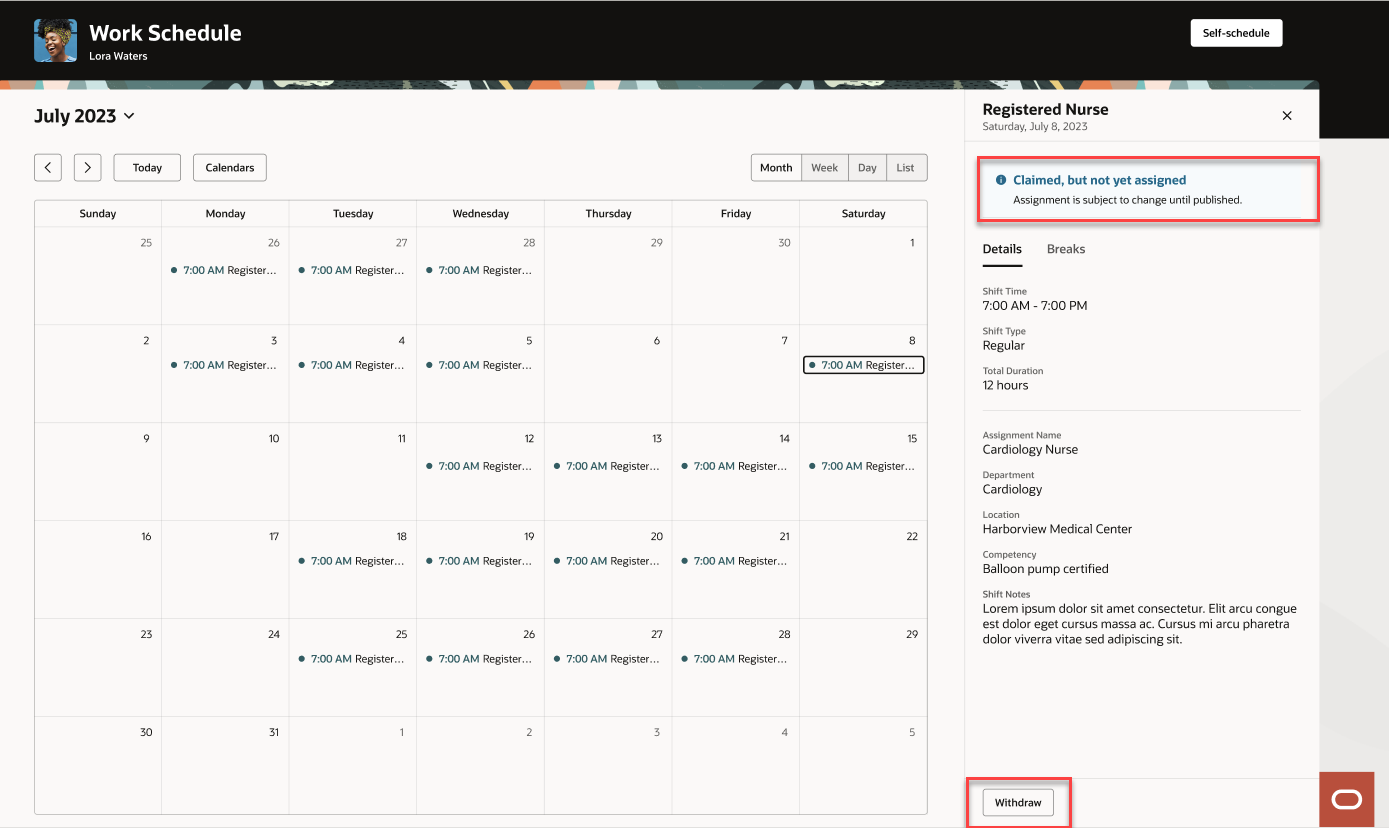
Desktop Shift Details Drawer Showing an Information Banner about the Shift Being Claimed But Not Yet Assigned
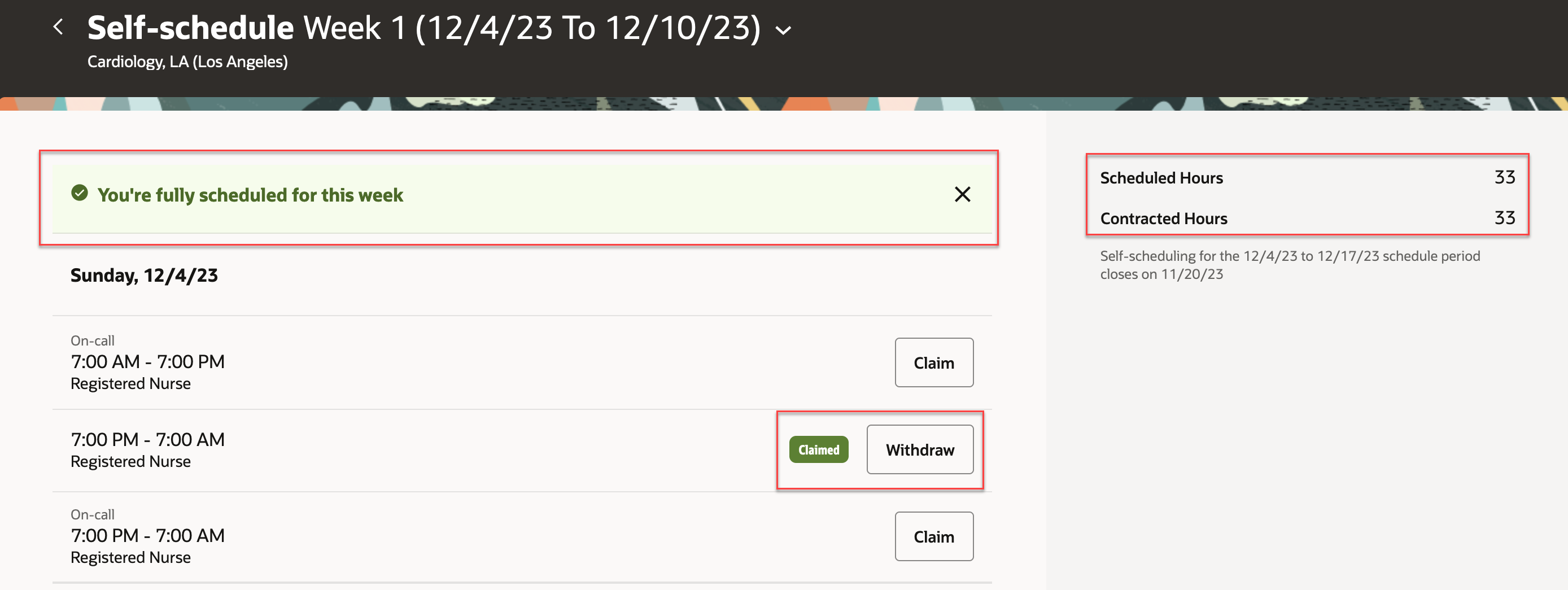
Desktop Self-Scheduling Page Showing the Claimed Badge and Withdraw Button
To keep you informed during different phases of the self-scheduling process, you get alerts when a self-scheduling period is about to open, is open, is closing soon, and has closed. These alerts ensure that you can better manage your calendar and claim the shifts you want for the schedule period.
This feature improves worker satisfaction by providing scheduling flexibility, and streamlines the scheduling process for workers and schedulers.
Steps to Enable
Contact your customer success manager or salesperson to uptake this controlled availability product because it has additional licensing requirements.
Schedule Generation Profile Enhancement
You can now specify on schedule generation profiles whether to send schedulers alerts notifications to finalize and publish their schedules. When sending alerts notifications, you also specify how many days before they have to publish their schedules to notify the schedulers.
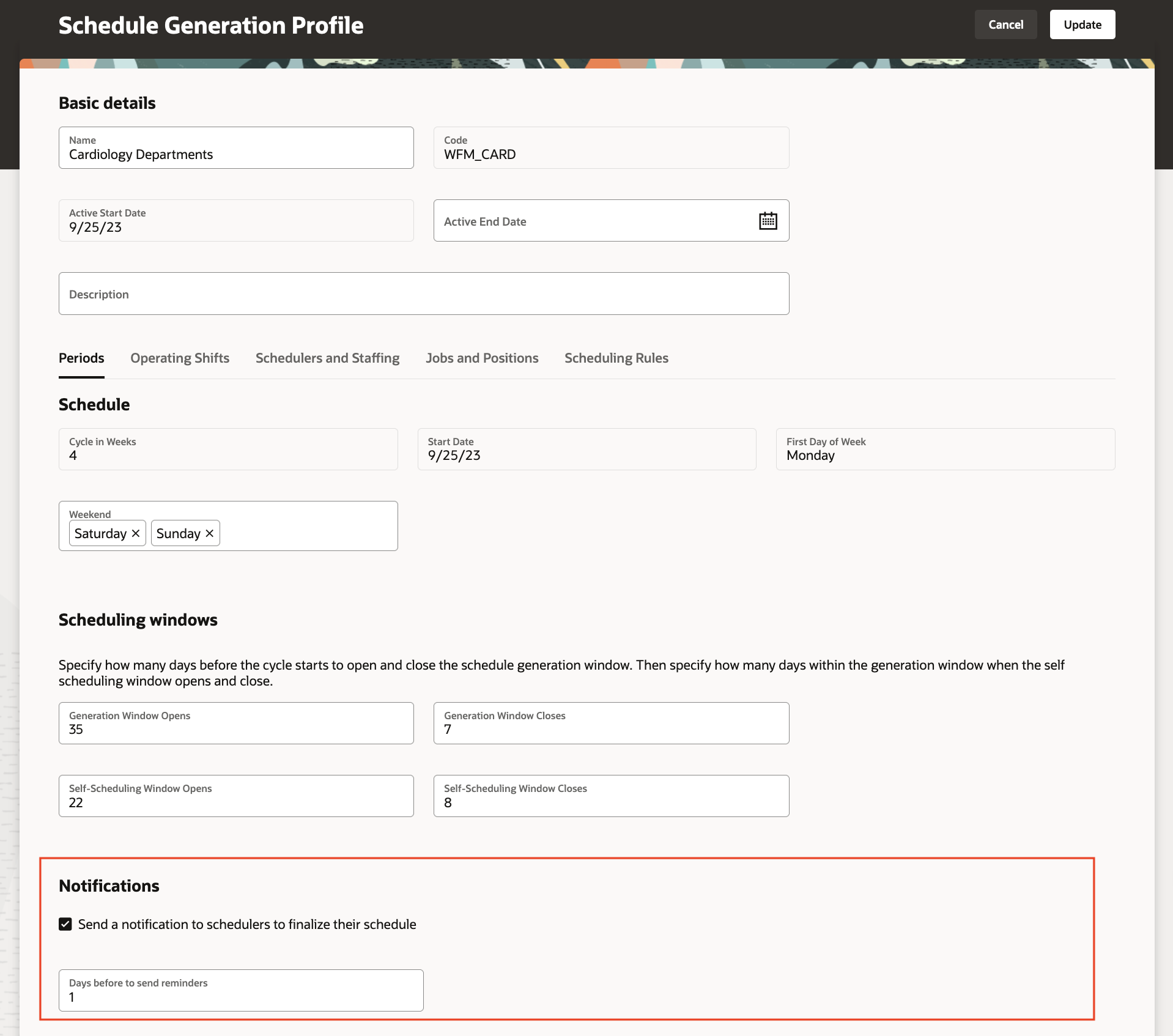
Schedule Generation Profile Showing the Notifications Section
You can also enable scheduling rules to apply when generating and validating schedules for the staffing departments. The rules validate maximum consecutive work days and weekends to work, as well as a minimum rest duration between shifts. The rules apply to everyone who's scheduled through the schedule generation profile.

Schedule Generation Profile Showing the Scheduling Rules
And you can identify which operating shifts to use when generating on-call schedules. You use shifts with an On-Call of No to generate all other work schedules.

Schedule Generation Profile Showing the On-Call Column on the Operating Shifts Tab
These enhancements let schedulers more efficiently and effectively manage the schedules for their staffing departments and ensure the schedules comply with regulatory requirements.
Steps to Enable
Contact your customer success manager or salesperson to uptake this controlled availability product because it has additional licensing requirements.
The workforce schedules that schedulers can access depends on the staffing departments for their schedule generation profiles and their area of responsibility. The responsibility type needs to be Schedule Manager and their responsibility scope needs to include the departments and locations that correspond to the staffing departments in their schedule generation profiles. For example, a scheduler's profile and responsibility scope both have the Cardiology department for LA and New York, but not Chicago. Thus they can't manage the Cardiology, Chicago schedule.

Schedule Generation Profile Showing the Schedule Manager and Staffing Departments
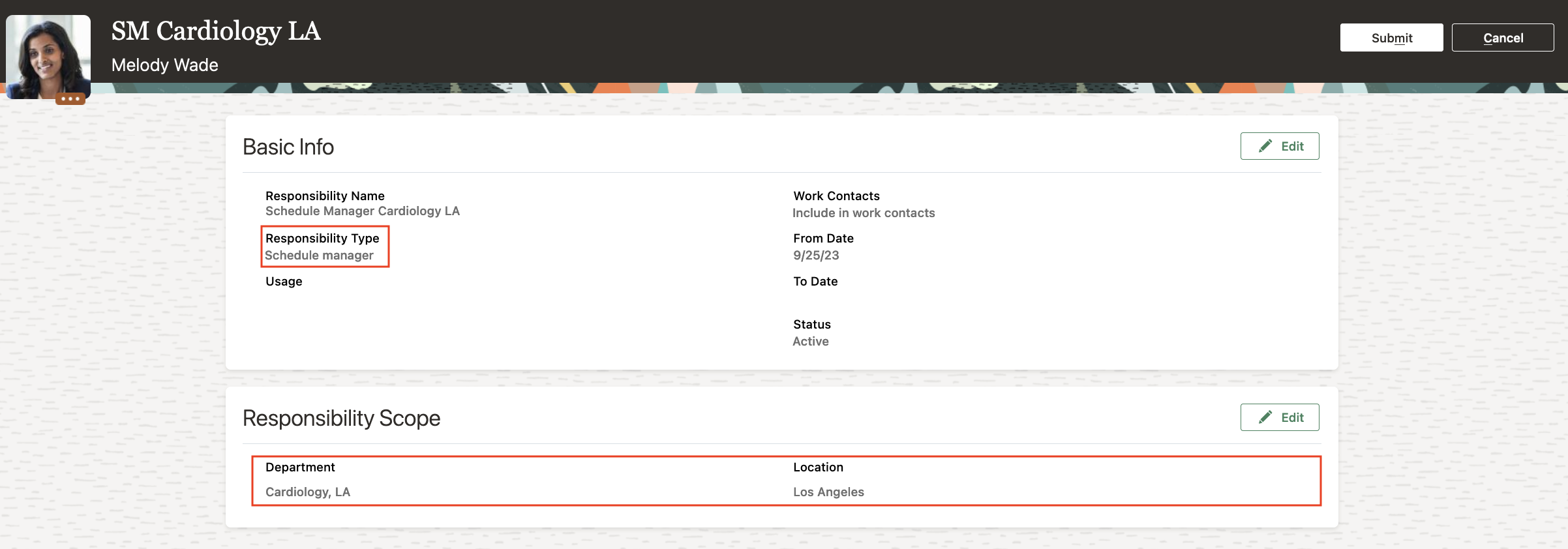
Area of Responsibility for the Schedule Manager Showing the Responsibility Type and Scope
This feature lets you limit scheduler access to only the schedules they manage.
Steps to Enable
Contact your customer success manager or salesperson to uptake this controlled availability product because it has additional licensing requirements.
Key Resources
For more information about areas of responsibility, see these topics in the Securing HCM guide in Oracle Help Center:
- How You Secure Person Records by Area of Responsibility
- Secure Person Records by Area of Responsibility
Generate and Validate Workforce Schedule Enhancement
While generating automatically assigned schedules, the process matches the workload for all workers according to their work patterns and their weekly FTE hours, and applies the configured scheduling rules. These are the rules that you can configure
- Maximum consecutive working days
- Minimum rest duration between shifts
- Maximum weekends worked over the schedule period, applies when the worker works both weekend days
When schedulers edit schedules, the scheduling rules and the FTE weekly hours also validate their changes. Schedulers can review the validation warnings and fix the issue or decide to ignore the warnings and apply their changes.

Edit Shift Drawer Showing a List of Validation Warnings
When a worker tries to claim a shift that breaks any of their schedule validation rules, they see an error message about the conflict and can't claim the shift until they fix the conflict.
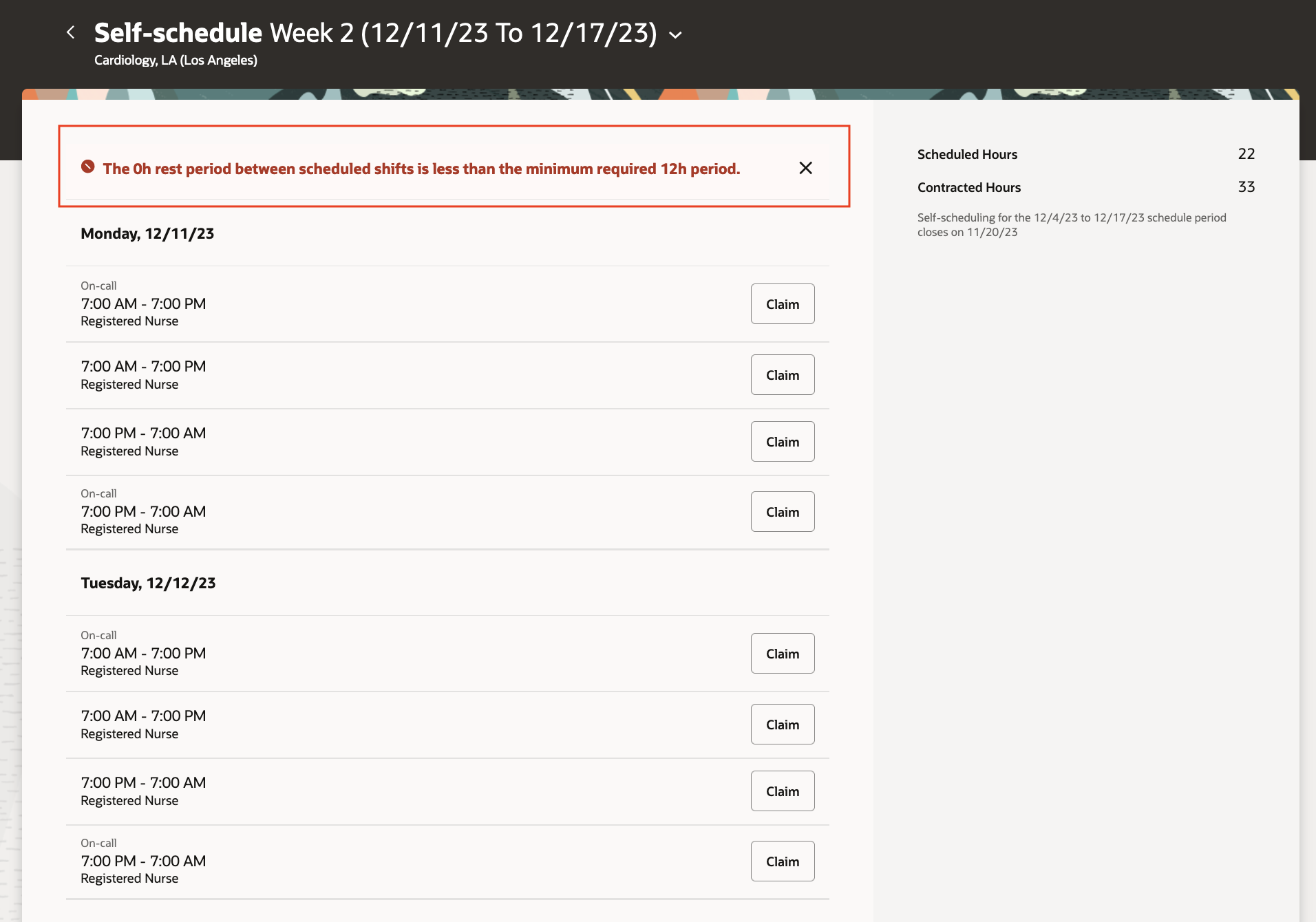
Self-Scheduling Page Showing an Error Banner Preventing the Person from Claiming a Shift.
This feature ensures that automatically generated schedules comply with organizational policies and regulatory requirements.
Steps to Enable
Contact your customer success manager or salesperson to uptake this controlled availability product because it has additional licensing requirements.
Shift Types in Workforce Schedules
You can ensure the accuracy of your workforce schedules by defining and managing shift types for your workloads and shifts. Shift types can be on-call or work, and work shift types also have productivity percentages.
- HCM integration specialists can import workload with shift types.
- Schedulers can generate schedules based on shift type, for example, generating on-call schedules that have only shifts with the On-Call shift type. Schedulers can see and edit the shift type.
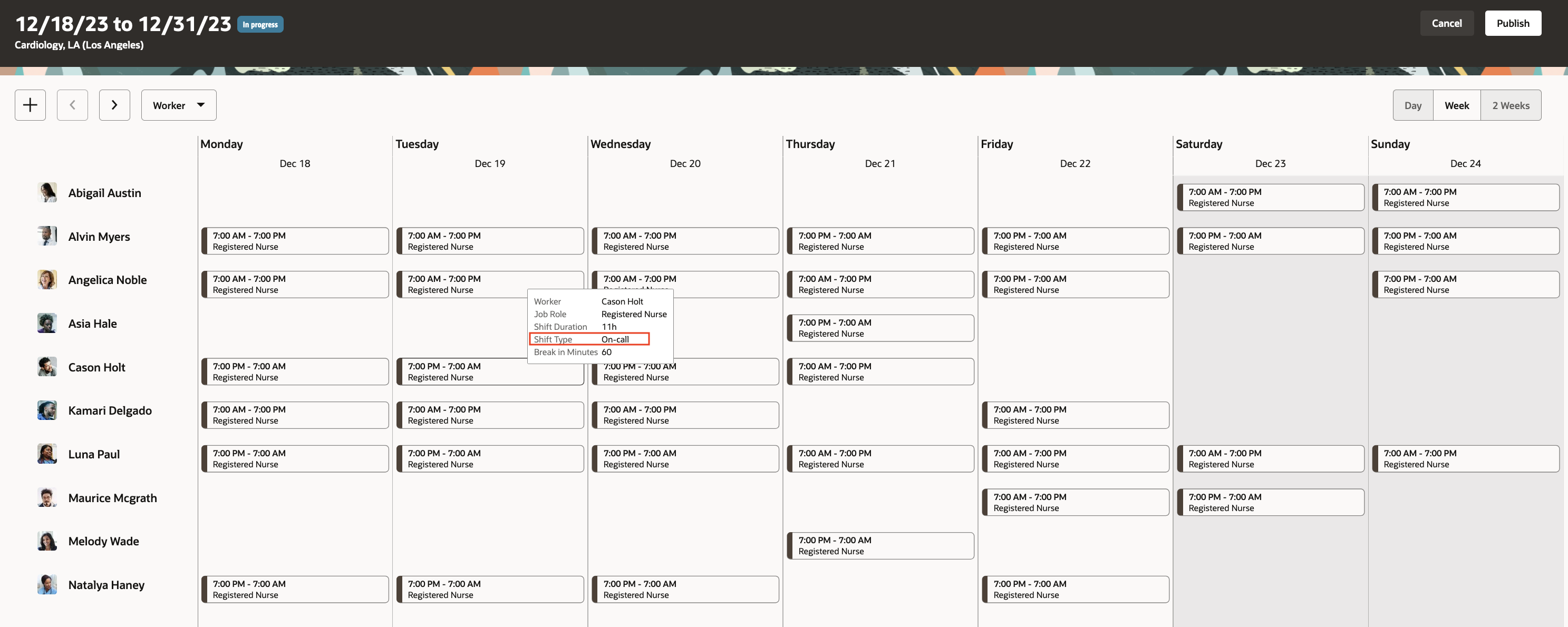
Desktop Schedule Showing the Shift Type in the Hover Shift Details

Edit Shift Panel Drawer Showing the Shift Types Drop-Down List
Coverage variances account for the scheduled shift productivity set with the shift type.
This feature helps schedulers generate and maintain accurate workforce schedules.
Steps to Enable
Contact your customer success manager or salesperson to uptake this controlled availability product because it has additional licensing requirements.
As a schedule manager, you can now review the detailed workload requirements on the new read-only workload management page. You can see the consolidated workload data for the baseline and current real-time workload requirements for each job, competency, and shift type. For more focused review, you can filter by job role.
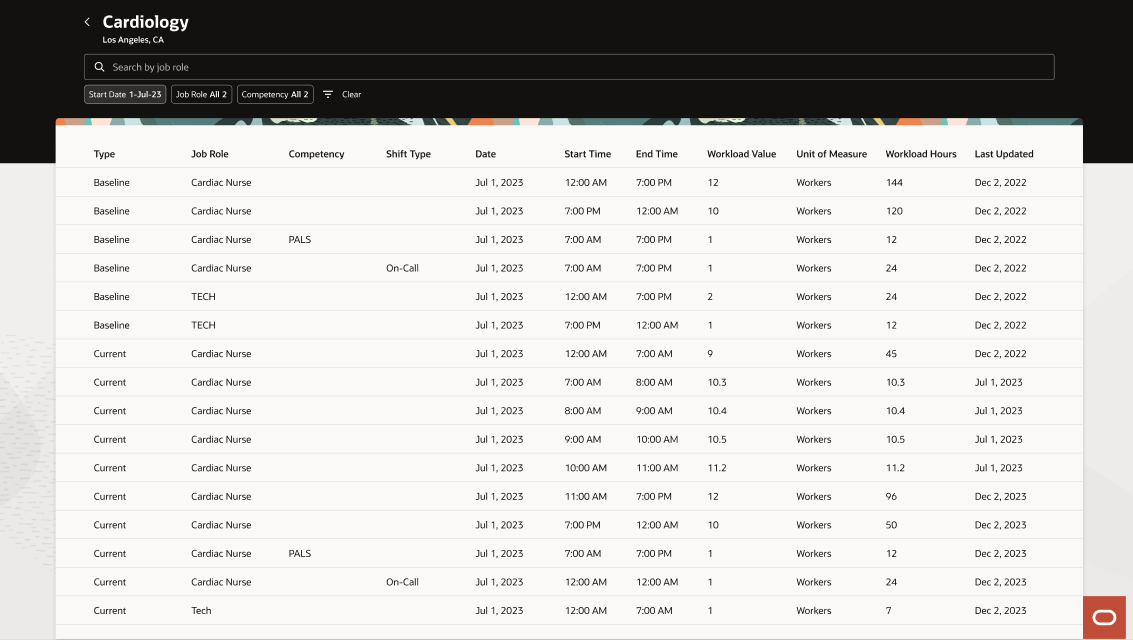
Sample Workload Management Page with Consolidated Baseline and Current Requirements
When you open the workload management page, the date defaults to the current date. You can click the Filters icon to open the Filters panel drawer where you can select start and end dates to show up to one week of results.
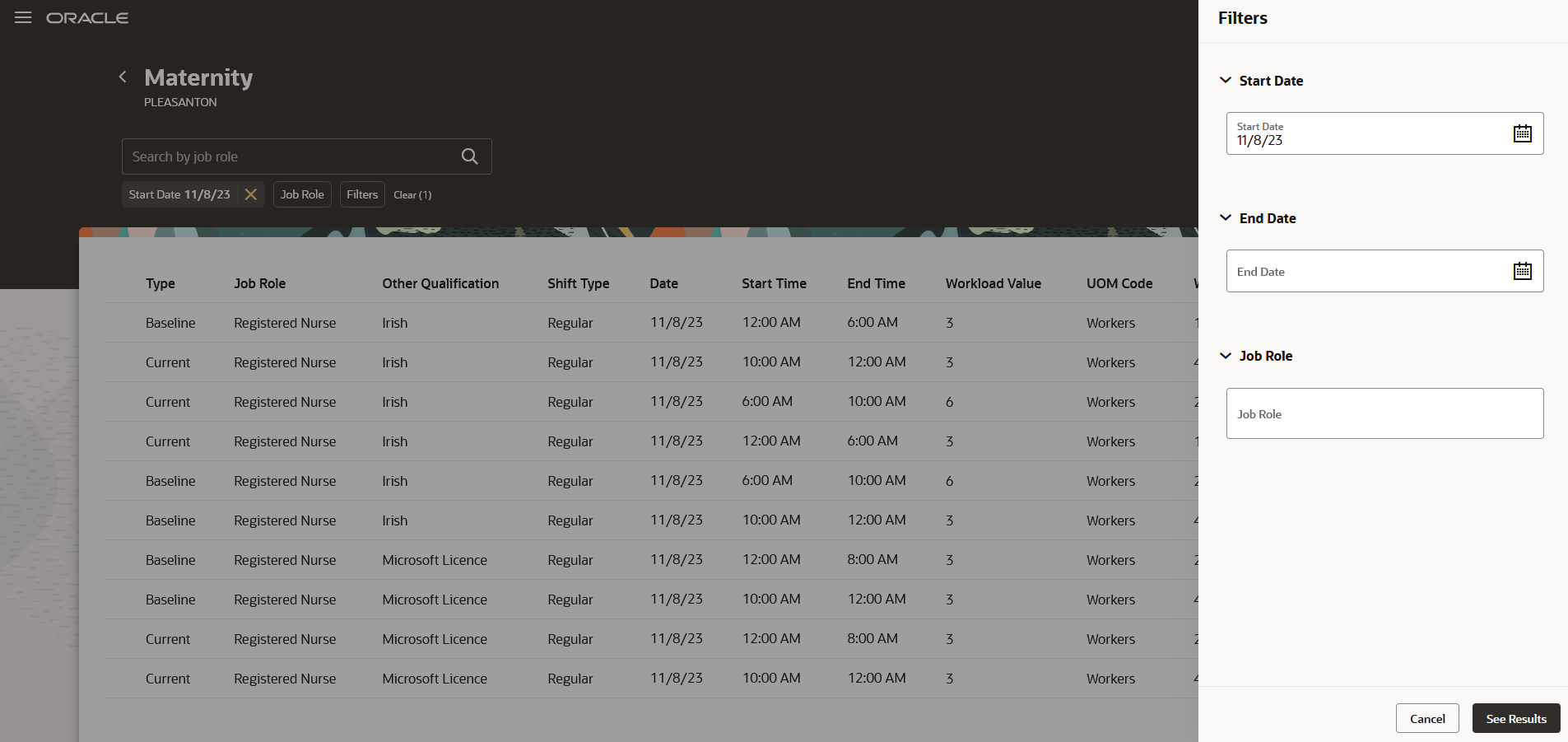
Sample Workload Management Page Showing the Filters Panel Drawer
This feature helps schedule managers appropriately staff their departments.
Steps to Enable
Contact your customer success manager or salesperson to uptake this controlled availability product because it has additional licensing requirements.
View Schedule Coverage Variance
As a schedule manager, you can now review coverage variances between the workload demand requirements and scheduled shifts directly from the workforce schedule pages. To access the coverage variances, select a job view. You can then see a summary of required versus scheduled hours for each listed job, for every day of the week or 2 weeks, depending on the schedule timeline you select.

2-Week Schedule Showing the First Week of Shifts Grouped by Job
To review coverage variance details for each day, open coverage variance panel at the bottom of the schedule Gantt in both 1 week and 2 weeks timelines. The coverage variance shows as the number of hours you're overstaffed or understaffed for each given day interval, in a day for each job listed. Overstaffing and understaffing variance hours appear in red to help you identify schedule gaps.
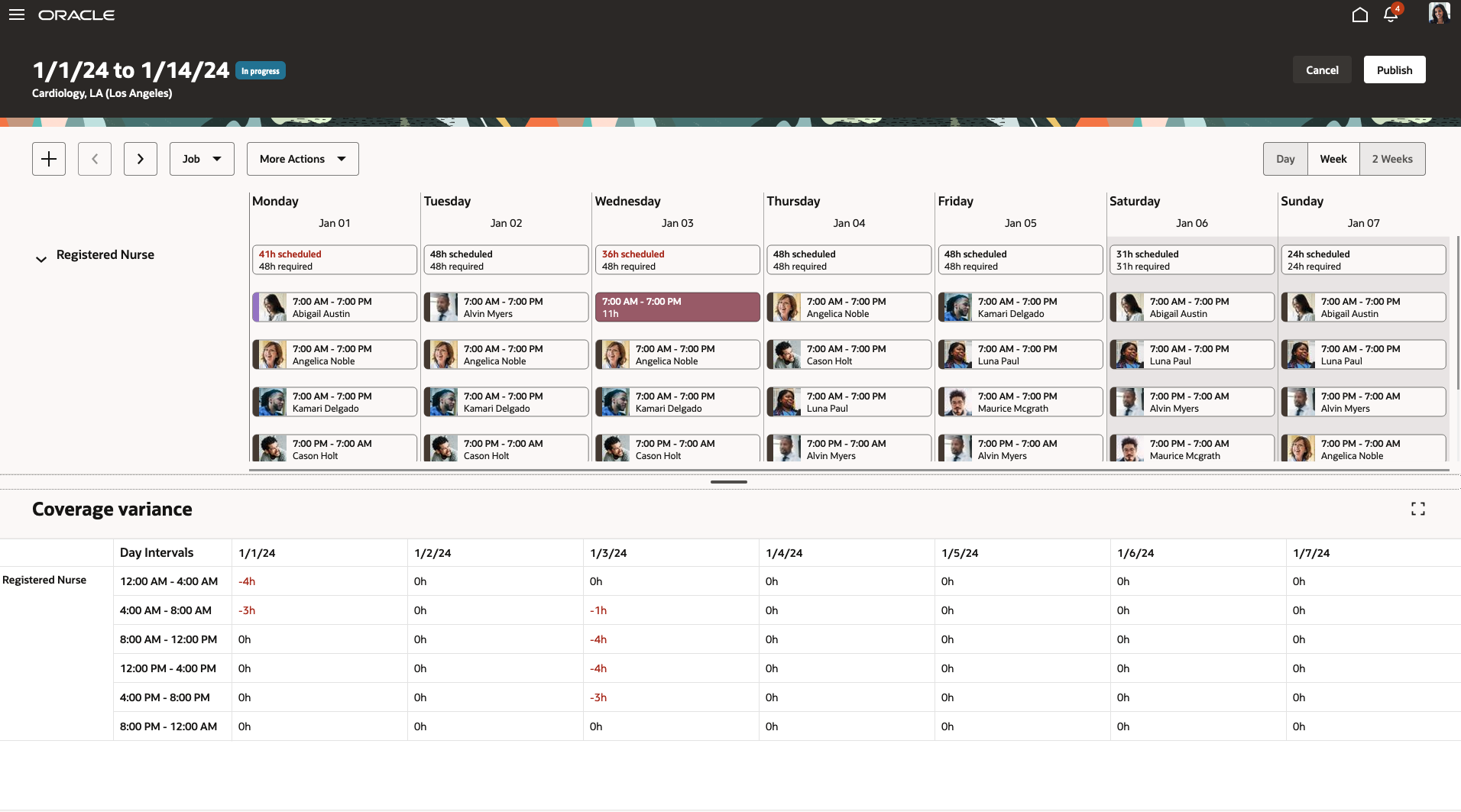
2-Week Schedule Showing the Coverage Variance Panel Drawer
When you click a daily summary at the top of the schedule Gantt, the corresponding variance hours the coverage panel are highlighted to help you easily identify critical staffing gaps for each interval of that day.

2-Week Schedule with the Monday Coverage Summary Selected and the Coverage Variance Column Highlighted
You can also review coverage variance in hourly increments when you show the schedule in the Day view. You see the number of required, scheduled, and variance hours for each hour of that day.

2-Week Schedule Showing the Week-1 Wednesday Day Shifts in Hourly Intervals and a Summary Coverage Variance
This feature helps schedule manager respond more efficiently to the scheduling gaps and make necessary schedule updates to avoid overstaffing or understaffing their departments.
Steps to Enable
Contact your customer success manager or salesperson to uptake this controlled availability product because it has additional licensing requirements.
Schedule Manager Gantt Enhancements
Department schedule Gantt views now have an information banner during self-scheduling periods to let schedulers know that they can't publish the schedule or change claimed shifts during that period.

Department Gantt Schedule View Showing the Self-Scheduling Information Banner
Shifts now include shift types, which can be on-call or work, and work shift types also have productivity percentages. And shift actions, such as Assign, Edit, Unassign, and Delete now also run rule validations.
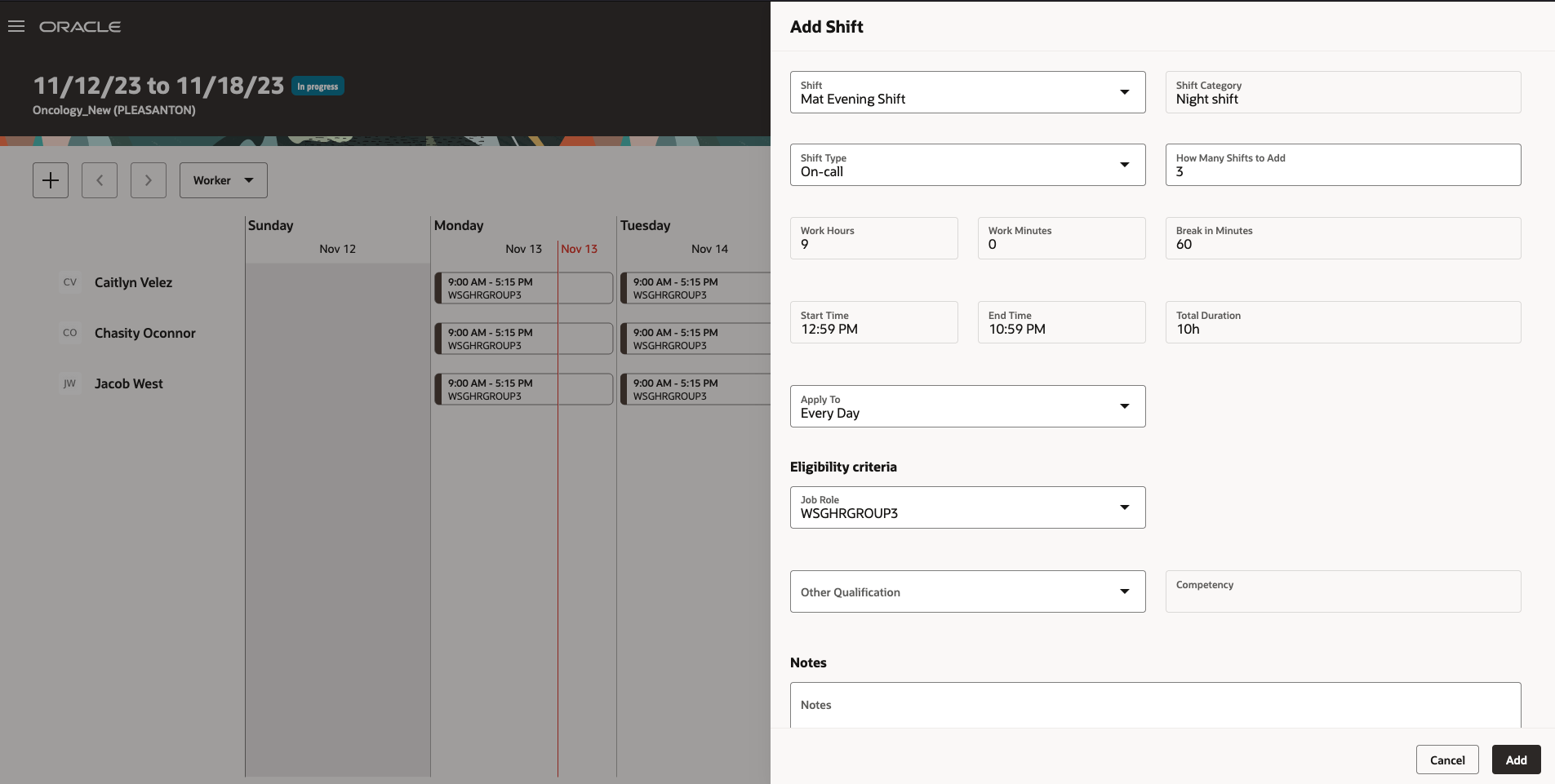
Add Shift Panel Drawer Showing the On-call Shift Type

Shift Details Panel Drawer Showing the On-Call Shift Type and 0 Productivity Percentage
Schedulers can override warnings, but not errors, as appropriate.

Example Error Message After Trying to Assign a Shift

Example Warning Message While Trying to Assign a Shift
These enhancements let schedulers more effectively manage the schedules for the departments they support.
Steps to Enable
Contact your customer success manager or salesperson to uptake this controlled availability product because it has additional licensing requirements.
Transactional Business Intelligence for Workforce Scheduling
New Subject Area to Report on Workload Consolidation
The new subject area Workforce Scheduling - Workload Consolidation Real Time provides real time information on the consolidated workload in order to determine the staffing requirements for the scheduling system. This allows the user to see the baseline and current values of Consolidated Workload Type data and the calculated plan information stored in the Workloads table.
This subject area helps answering business questions like below:
- What is the baseline value provided for a time period so I can see my budget?
- What is the current value for my scheduling period so I can see adjusted or actual workload?
- How does the baseline value of my workload compare to current workload required from forecasts and real time imports?
This enhancement allows you to report on consolidated workload data.
Steps to Enable
Contact your customer success manager or salesperson to uptake this functionally because it's part of the controlled availability Oracle Fusion Cloud Workforce Scheduling product, which has additional licensing requirements.
Tips And Considerations
Note: This subject area cannot be used in cross subject area reporting.
Access Requirements
This subject area is secured by the duty role FBI_ADVANCED_WORKFORCE_SCHEDULING_TRANSACTION_ANALYSIS_DUTY.
By default, the following job roles inherit this duty role:
- Schedule Administrator
- Schedule Manager.
IMPORTANT Actions and Considerations for Workforce Scheduling
REPLACED OR REMOVED FEATURES
From time to time, Oracle replaces existing Cloud service features with new features or removes existing features. When a feature is replaced the older version may be removed immediately or at a future time. As a best practice, you should use the newer version of a replaced feature as soon as the newer version is available.
| Product |
Removed Feature |
Target Removal |
Replacement Feature |
Replaced In |
Additional Information |
|---|---|---|---|---|---|
| None at this time. |
_________________________
KNOWN ISSUES / MAINTENANCE PACK SPREADSHEETS
Oracle publishes a Known Issues document for every Update to make customers are aware of potential problems they could run into and the document provides workarounds if they are available.
Oracle also publishes Maintenance Pack and Statutory Maintenance Pack documentation of bugs that are fixed in the monthly or statutory patching.
To review these documents you must have access to My Oracle Support:
Oracle Human Capital Management Cloud Functional Known Issues and Maintenance Packs (Document ID 1554838.1)