Thematic Map
dvtm:thematicMap
The Thematic Map is used for displaying spatial trends or patterns in data layers that can appear on a map. Elements include: Selection, Isolate, Area/Marker and Zooming.
This component is commonly used on tablets and phones.
Appearance
Appearance characteristics for this component.
- Legend: Legend and theme colors for maps are customizable.
- Isolate: A thematic map may 'isolate' a selected area of a larger map displaying only that area.
- Area: An area is an object on the map that has a boundary around it for selecting.
- Marker: A marker is an object on the map that marks a particular area for selecting.
- Graphics: The Legend shows graphics and a labels for each theme shown on a map.
- Tool Tips: Display as small pop ups that usually display data about the selected area.
Behavior
Common behaviors for this component.
- Zoom: Maps can have multiple zoom levels available and will have a center point.
- Zoom In: Zooming in on a map can be done by the user pressing the map and spreading their fingers apart.
- Zoom Out: Zooming out on a map can be done by the user pressing the map and pinch their fingers to together.
- Pan: One finger drag allows the user to pan around the map.
- Fade: A fade animated transition is optional when initially displaying the map.
- Animation: Multiple animated transitions are available on a change in the map.
- Tool Tips: Press and hold on an area on the map may display a popup.
- Isolate: When isolate map is used, only one areas maybe displayed at a time.
Usage
Usage guidelines for this component.
- It is recommended to show a title above each map on the page that clearly describes its content.
- Product teams decide the themes that appear on the map.
- Performance tends to decline as more themes are displayed at the same time. It is recommended to display no more than two themes at one time.
- The recommended size of the map is to be close to full page on the Phone and a majority of the page on the tablet. However, it is recommended that an application dedicate as much space as possible to the Map component so that users can see and work with the map easily.
- It is not recommended to display two or more maps on a page. If users need to compare more than two sets of data, use a Chart instead.
- It is recommended to show the Legend by default when the page loads and Themes are visible on the map.
Sample
DVTM sample code for this component.
 <dvtm:thematicMap id="maximizeDemo"
    animationOnDisplay="#{pageFlowScope.animationOnDisplay}"
    animationOnMapChange="#{pageFlowScope.animationOnMapChange}"
    animationDuration="#{pageFlowScope.animationDuration}"
    basemap="#{pageFlowScope.basemap}"
    tooltipDisplay="#{pageFlowScope.tooltipDisplay}"
    inlineStyle="#{pageFlowScope.inlineStyle}"
    zooming="#{pageFlowScope.zooming}"
    panning="#{pageFlowScope.panning}"
    initialZooming="#{pageFlowScope.initialZooming}">

    <dvtm:areaLayer id="areaLayer1"
    layer="#{pageFlowScope.layer}"
    animationOnLayerChange="#{pageFlowScope.animationOnLayerChange}"
    areaLabelDisplay="#{pageFlowScope.areaLabelDisplay}"
    labelType="#{pageFlowScope.labelType}"
    rendered="#{pageFlowScope.rendered}">

    <dvtm:areaDataLayer id="areaDataLayer1"
    animationOnDataChange="#{pageFlowScope.dataAnimationOnDataChange}"
    animationDuration="#{pageFlowScope.dataAnimationDuration}"
    dataSelection="#{pageFlowScope.dataSelection}"
    var="row"
    value="#{bindings.thematicMapData.collectionModel}"
    selectionListener="#{PropertyBean.ThematicMapSelectionHandler}">

    <dvtm:areaLocation id="areaLoc1"
    name="#{row.name}">

    <dvtm:area id="area1"
    shortDesc="#{row.name}">

    <dvtm:attributeGroups id="ag1"
    type="color"
    value="#{row.cat1}" />

    </dvtm:area>

    </dvtm:areaLocation>

    </dvtm:areaDataLayer>

    </dvtm:areaLayer>

    <dvtm:legend position="end"
    id="l1">

    <dvtm:legendSection source="ag1"
    id="ls1"/>

    </dvtm:legend>

    </dvtm:thematicMap>
Related
- Used On: Phone, Tablet
- Also Called: TMap
- Related Components: Geographic Map, Tree Map
- Resources: None
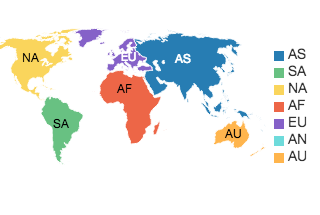
Fig 1. iOS and Android - Thematic Map