Mobile Task Flow
Overview
This guideline is intended to provide information that will direct the identification and documentation of mobile application task flows.
It includes information about:
- Identifying the mobile use case
- Identifying the scope of the mobile application task flows
- Illustrating the task flow
Identifying the Mobile Use Case
The way users work while they are mobile is very different from how they typically work when they’re at their desk. Simply shifting content from a desktop or laptop application to a mobile application won’t address the needs of the mobile user. It is critical to identify the mobile use case for your target users. A use case (or user scenario) is a description of how users perform tasks within a specified context. A use case typically includes a goal that the user is trying to accomplish and the steps that the user will take to accomplish that goal. Use cases focus the design process on the most important end-user tasks and allow for a more objective ranking of interface priorities.
As an example, a use case for logging into an application might look like the following:
- The system prompts the user to log on,
- The user enters his name and password,
- The system verifies the signin information,
- The system logs user on to system.
Day in the life scenarios, an important part of the mobile persona, might contain a number of use different use cases.
A good mobile use case should identify and provide examples of the following items:
- How mobile users work in and out of the field (see introduction guideline)
- What the critical field tasks are
- What information the mobile worker needs to capture and the point at which they capture it
- Where mobile users get their information (for example, is it system generated? What information is getting pushed to the mobile user? Are there any alerts?)
Identifying the Scope of the Mobile Use Case
the scope of the mobile application task flow. Mobile applications and tasks are commonly simpler and shorter than desktop or laptop applications and task flows, and are often extremely simplified. Many mobile applications allow users to execute only one task, such as searching for the cheapest gas station or searching for a colleague. Take careful consideration of the mobile user and mobile use case to determine which tasks should be included or excluded. When selecting the scope, product teams should take into account:
- Would mobile users actually use their mobile device to complete the task? Some tasks or task components supported by a full desktop or laptop application are executed almost exclusively in those environments. Limitations of the mobile device or mobile environment often drive mobile users to avoid particular tasks on their mobile device (for example, entering large amounts of data). You should remove such tasks or components from the scope of the mobile task flows.
- Is the task simple enough to be completed on a mobile device in a turbulent mobile environment? You should eliminate tasks that are too complicated or complex for users in a mobile environment from scope. Consider the top 10 mobile design principles.
- Can subtasks be pulled out? Often task flows include smaller flows or the flow is a series of connected flows. Separate smaller standalone task flows whenever possible.
- Can any interdependencies be eliminated? Often the point at which tasks are interdependent is the point at which they can be separated. For instance, while working on a service order a field technician may need to find a part. Avoid making finding this part a dependency for other tasks associated with the service order, such as updating the status of a service. It may be that simply finding and ordering a part is its own mobile task flow or even its own mobile application.
- Can the task be accomplished intermittently? Mobile users are frequently interrupted by incoming calls, alerts on their mobile device, or by their tumultuous mobile environment. Mobile tasks need to support frequent interruptions; if users are performing a task and have to answer the phone, they need to be able to return to their task quickly and easily, without losing any information or having to start their task over.
- Does the task require extensive data entry? You should avoid tasks that require the user to enter a lot of data. Typing data into a mobile device is a much harder and slower process than entering data using a typical desktop or laptop device and application.
- Must data be responded to within the application or does it only need to be viewed? Tasks may be simplified in situations where server-side data can be pushed to a mobile user, but doesn’t need to be acted upon. For example, users might be able to view the score of an opportunity on their mobile device, but not be able to actually do the scoring of the opportunity on their mobile device (because scoring is time consuming, requires data extensive entry, and is typically done while in the office). Some examples of good mobile tasks are:
- Approving an expense report for a manager.
- Closing a service order for a field service technician.
- Viewing daily appointments for a field sales representative.
- Tracking the amount of product in a store display for a retail merchandiser.
Illustrating the Task Flow
Once you have clearly identified the scope of the application task flows and have simplified tasks to the fullest extent possible, you should illustrate the complete task flow, the users, and those they interact with within that task flow. This document depicts what will be designed and built, so it is important to include all key information and include all the key stakeholders in the discussions. Most commonly, wireframes (see Figure 1 – Example Task Flow) are created (with tools such as Visio) to illustrate and document the flow. The steps taken to accomplish the user’s end goal are laid out from start to finish.
In the case of the mobile task flow, it’s particularly important to document:
- All steps and tasks within the flow
- Any points in the flow where it might diverge based on the outcome of an action or a decision to be made (for example, whether or not an issue in a service request was resolved)
- Where the data is coming from and where it is being sent
- Where mobile tasks must support interruptions
- Any interdependencies that the mobile task flow has (for example, with other users or tasks)
- Any tools, computer based or otherwise, (for example, service equipment, notepad) used to accomplish the task
- Any other constraints placed on the user or application (for example, environmental constraints, application or device memory capacity)
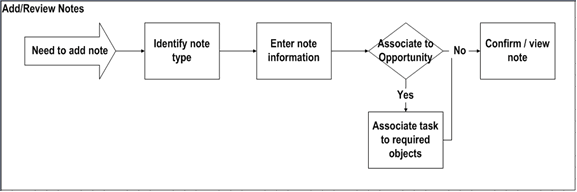
Fig. 1: Portion of an Example Task Flow