Using RMAN to Migrate On-Premises Databases to DBaaS Databases
Overview
Purpose
This tutorial covers the RMAN method to convert and migrate on-premises Oracle Database 12c databases to an Oracle Database 12c DBaaS that run on different platforms.Time to Complete
Approximately 30 minutes.
Introduction
In this tutorial, you learn how to convert the data files of an on-premises Oracle Database 12c PDB or PDB tablespaces to restore them into the Oracle Database 12c DBaaS database using various modes.
Prerequisites
Before starting this tutorial, it may be helpful to have followed the Signing Up for a Database Cloud Service, Connecting to a Database Cloud Service (DBaaS) Instance Through an SSH Tunnel and Creating a Database Cloud Service (DBaaS) Instance tutorials.Migrate On-premises Tablespaces to DBaaS Database Using Cross-Platform Tablespace Transport
This section explains how to transport tablespaces of an on-premises database that runs on one platform into the DBaaS database that runs on a different platform. The section therefore explains how to backup tablespaces of the on-premises database, convert the data files and restore them into the existing
PDB1
PDB of the DBaaS ORCL CDB. - To backup the on-premises tablespaces of the
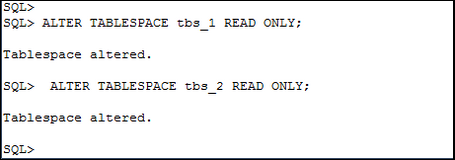
PREM_PDBPDB in cross-platform tablespace transport mode, you must set the tablespaces toREAD ONLYmode.

- Retrieve the platform name of the DBaaS database.
Connect to the DBaaS database.

- Backup the
TBS_1andTBS_2tablespaces of the on-premisesPREM_PDBPDB.
BACKUP TO PLATFORM 'Linux x86 64-bit'

                                FORMAT '/u04/tbs_n.bck'


                                DATAPUMP FORMAT
                          '/bkp/test.dmp' TABLESPACE tbs_1, tbs_2;


- Restore the
TBS_1andTBS_2tablespaces of the on-premisesPREM_PDBPDB into the DBaaSPDB1PDB.

RESTORE FOREIGN TABLESPACE tbs_1, tbs_2
FORMAT '/u03/test_%U_%n.dbf' FROM BACKUPSET '/u03/tbs_n.bck'
DUMP FILE FROM BACKUPSET '/u03/tbs_n.dmp' ;

- Display the names of the data files of the transported
tablespaces into the DBaaS PDB.

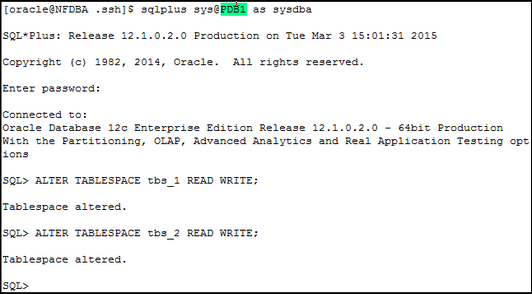
- Set the transported tablespaces read write in the DBaaS
PDB.
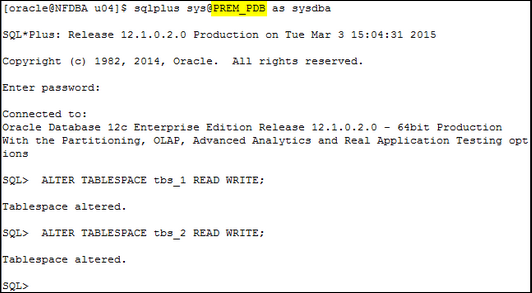
- If you intend to work with the on-premises tablespaces,
set them back to read write.
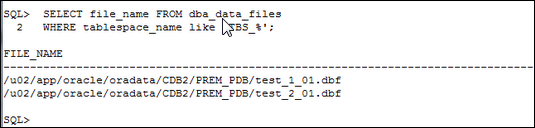
- Display the names of the data files of the transported
tablespaces from the on-premises PDB.
Backup the On-premises PDB Tablespaces
Note: The
TO PLATFORM clause converts the
data files on the on-premises platform. When you will have
transferred the files, they will be ready to be plugged
into the DBaaS PDB.
Transfer the Files of the On-premises Platform to the DBaaS VM
-
Use SCP to transfer the backup set and dump file securely
from the on-premises platform (
/on-premises
directory) to the DBaaS VM (/DBaaS directory).scp -i your_identify_file oracle@IP_address:/on-premise/dumpfile.dmp
/DBaaS/dumpfile.dmp
      scp -i your_identify_file
                    oracle@IP_address:/on-premise/backupset.bck
                    /DBaaS/
backupset.bck

Remark: The grayed out refer to the IP address of the source platform.
Restore the Files into the DBaaS PDB
Migrate On-premises PDBs to DBaaS CDB Using Cross-Platform PDB Transport
This section explains how to transport an on-premises database that runs on one platform into the DBaaS database that runs on a different platform. The section therefore explains how to backup the on-premises database, convert the data files and restore it into the existing DBaaS ORCL CDB.
Performing cross-platform data transport of one or more PDBs by using the CONVERT command is not supported. This is the reason why you use the
BACKUP TO TRANSPORT or BACKUP FOR
TRANSPORT RMAN command. Nevertheless the on-premises
platform and DBaaS platform must use the same endian format.The PDB needs to be in
ARCHIVELOG mode which requires
the on-premises CDB to be in ARCHIVELOG mode.
- Before transporting and converting data files of the
PDB, the on-premises PDB must be unplugged to retrieve
the structure of the PDB that will be recreated in the
DBaaS CDB.

- Retrieve the platform name of the DBaaS database.
Connect to the DBaaS database.
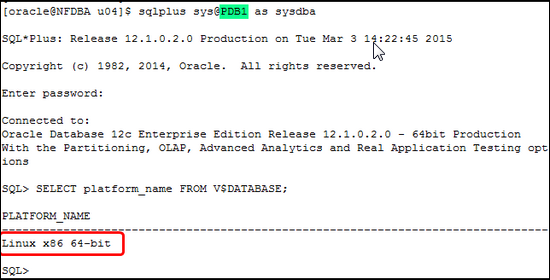
- Backup the on-premises
PREM_PDBPDB. Connect to the CDB to backup the whole PDB.
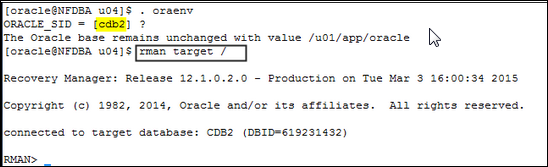
BACKUP

                             TO PLATFORM 'Linux x86 64-bit'

                             FORMAT '/tmp/pdb_prem.bck'

                             PLUGGABLE DATABASE prem_pdb;

- Restore the on-premises
PREM_PDBPDB into the DBaaSORCLCDB.
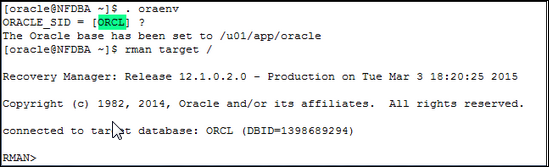
RESTORE ALL FOREIGN DATAFILES

                              FORMAT
                        '/u01/test_%U_%n.dbf'

                              FROM BACKUPSET
                        '/u03/pdb_prem.bck';

- Plug the on-premises
PDB_PREMPDB whose data files are now converted and transferred to the DBaaS VM into the DBaaSORCLCDB.
- Unset the Oracle Managed Files (OMF).
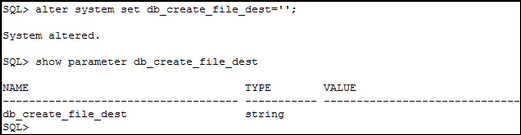
- Retrieve the names of the on-premises data files
from the XML file in order to define them in the
CREATE PLUGGABLE DATABASE as the source data files.

- Execute the following statement to create the
PDB_PREMPDB into the DBaaSORCLCDB using the converted data files from the on-premisesPDB_PREMPDB.

Observe that the - Open the DBaaS
PDB_PREMPDB.

Notice that there are some warnings about memory settings. This will not impact your work in the PDB. You can change the parameters values later.
/u03/temp01.dbftempfile was not included in the backup set. The creation of the new PDB will automatically create it.
- Unset the Oracle Managed Files (OMF).
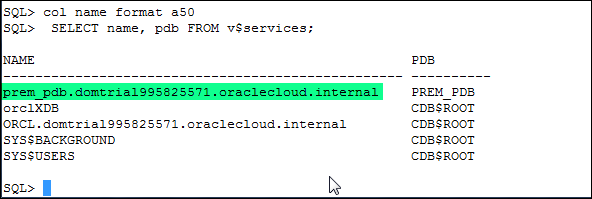
- Retrieve the service name of the new DBaaS
PDB.
- Add the new service name in the
tnsnames.orafile and reload the listener.


- Display the data files of the new DBaaS
PREM_PDBPDB.

Unplug and Backup the On-premises PDB
Note: The
TO PLATFORM clause converts the
data files on the on-premises platform. When you will have
transferred the files, they will be ready to be plugged
into the DBaaS PDB.
Transfer the Files of the On-premises Platform to the DBaaS VM
-
Use SCP to transfer the backup set and the XML file securely
from the on-premises platform (
/on-premises
directory) to the DBaaS VM (/DBaaS directory).scp -i your_identify_file oracle@IP_address:/on-premise/backupset.bck
/DBaaS/backupset.bck
Restore the Files into the DBaaS CDB and Plug the PDB
Summary
-
You can convert and migrate on-premises non-CDBs and PDBs before
migrating them into the DBaaS database that run on different
platforms.
- Transport tablespaces of an on-premises PDB that runs on one platform into the DBaaS CDB that runs on a different platform
- Transport a PDB of an on-premises CDB that runs on one platform into the DBaaS CDB that runs on a different platform
In this tutorial, you learned to:
- For more detailed information about connecting to Oracle Database instances in the Oracle Database Cloud Service (DBaaS), see the documentation.
- To learn more about Oracle Database Cloud Service, visit the Database Cloud Service.
- For training on the Oracle Cloud platform-as-a-service (PaaS) Services, visit the Oracle Learning Library
- Look at these Oracle By Examples on working with the Oracle Database Cloud Service:
- Creating a Database Instance in the Oracle Database Cloud Service
- Connecting to a Database Instance in the Oracle Database Cloud Service
- Limitations During Migration From on-premises Databases to DBaaS Databases
- Exporting an on-premises PDB and Importing into the DBaaS Database
- Unplugging and Plugging non-CDBs and PDBs into DBaaS CDB
- Remote Cloning Method to Migrate on-premises Databases to the Cloud
- Lead Curriculum Developer: Dominique Jeunot
- Other Contributors: James Spiller
Resources
Credits
To navigate this Oracle by Example tutorial, note the following:
- Topic List:
- Click a topic to navigate to that section.
- Expand All Topics:
- Click the button to show or hide the details for the sections. By default, all topics are collapsed.
- Hide All Images:
- Click the button to show or hide the screenshots. By default, all images are displayed.
- Print:
- Click the button to print the content. The content that is currently displayed or hidden is printed.
To navigate to a particular section in this tutorial, select the topic from the list.