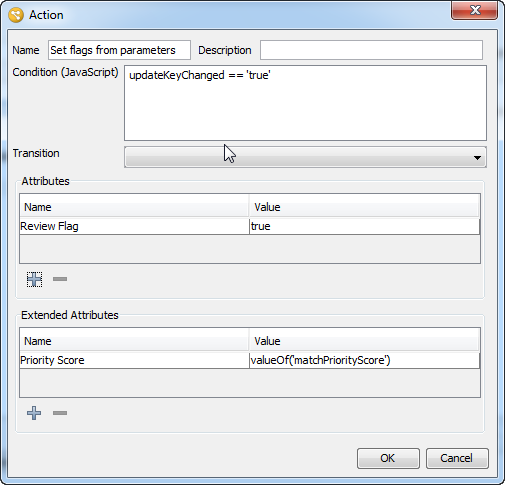
Actions are defined in the Action dialog, which can be accessed from the Reception tab on the Workflow Editor, within Case Management Administration. Open the dialog by pressing the 'Add...' button under the Actions list to create a new action, or by clicking on an existing action and pressing the 'Edit...' button to edit it.
The action dialog contains the following fields:
The changes that will be made to the attribute and extended attribute values when the action is applied are displayed in the Attribute and Extended Attribute lists.
To add an action to either list, press on the '+' button below it. To edit an existing action, double-click on it. To delete an action, click on it in the list and press the '-' button under the list.
The dialog for adding or editing an action of either kind is requires only that the attribute, or extended attribute, and its new value is specified. The control used to enter the new value for the attribute will change, according to the attribute type:
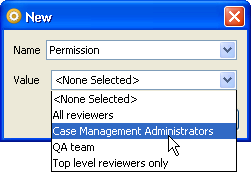
Press 'OK' when you have set the attribute and value you require.
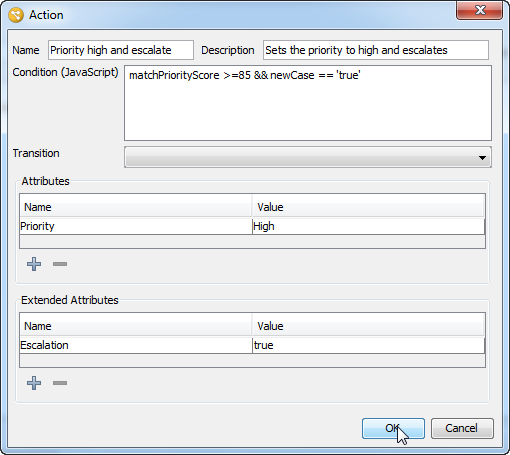
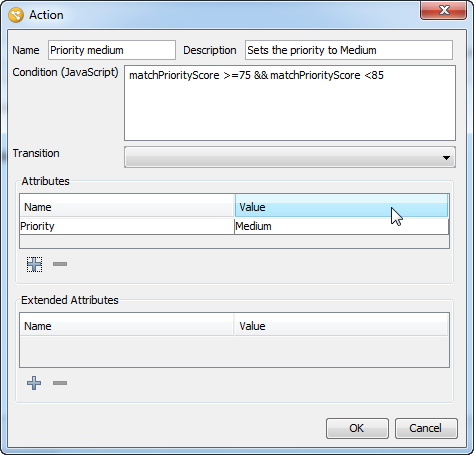
Suppose that a business requirement has been identified such that the most likely matches should be handled first. Alerts with a match priority score of 85 or above should be treated as high priority, and will also have the escalation flag set. Alerts with a match priority score between 75 and 84 are of medium priority.
The following screenshot shows the configuration of a reception rule which sets the Priority to 'High' and sets the escalation flag to 'true' for new cases if the value of matchPriorityScore is greater than, or equal to, 85:
Possible matches with a matchPriorityScore is between 75-84 should have their priority set to 'Medium', and need not be escalated:
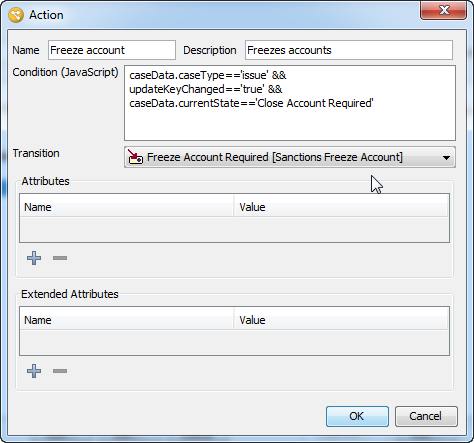
The following action imposes an automatic 'freeze account' transition on any items that trigger the condition. The condition is specific to alerts only, and detects alerts which were already in the state 'Close Account Required' and where a change has occurred in the update key:
Oracle ® Enterprise Data Quality Help version 9.0
Copyright ©
2006,2011 Oracle and/or its affiliates. All rights reserved.