Open topic with navigation
Defining parameters
Parameters are defined in the Parameter dialog, which can be accessed from the Parameters tab on the Workflow Editor, within Case Management Administration. Open the dialog by pressing the '+' button to create a new parameter or by double-clicking on an existing parameter to edit it.
The parameter dialog consists of only three fields:
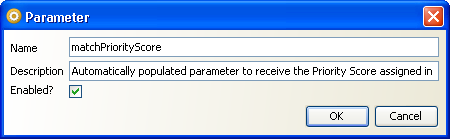
- The name is mandatory. The value provided for Name will be used when selecting parameters to be populated by the match processor in OEDQ, and when specifying how parameter values should be used by transitions and state expiries. It should therefore be populated with a recognizable, memorable and meaningful value for future use.
- The description is optional. This field can be used to provide more verbose information detailing the parameter's use.
- The 'enabled' checkbox controls whether or not the parameter is available to other systems. Parameters which are not enabled (that is, the checkbox is unchecked), are not available in OEDQ or elsewhere. Parameters are enabled by default.
Press 'OK' when you have supplied the necessary values, or 'Cancel' to discard your changes.
Oracle ® Enterprise Data Quality Help version 9.0
Copyright ©
2006,2011 Oracle and/or its affiliates. All rights reserved.