
To configure the options for the comparison, click the Configure button in the toolbar:
Or select Analysis -> Configuration from the menu:
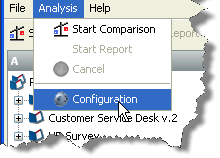
Either of these actions will launch the configuration dialog, which appears as follows:
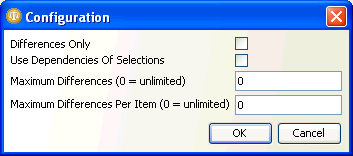
The options offered in the dialog are explained below:
|
Differences Only |
If this option is checked, the comparison report will only contain rows which describe differences between the two components. Rows which are the same in both selections will be omitted. |
|
Use Dependencies of Selections |
If this option is checked, the report will include a comparison of the components upstream of the selected component in the dependency tree, as well as the selected components themselves. This allows the user to detect cases where, for example, no changes have been made to a process, but the configuration of some reference data used by the process has changed. |
|
Maximum Differences |
This option is designed to allow termination of analysis where the selected items are very different. If a non-zero number is specified for this option, the report will be terminated if more than the specified number of differences are detected. |
|
Maximum Differences Per Item |
This option allows the user to specify how many differences should be logged per item examined before the analysis moves on to the next item in the report. If this number is exceeded for an item, the analysis is not terminated; it just continues to the next item. This option allows users to record that items are different, without expending large amounts of computing resource in determining exactly how the items differ. Specifying a relatively low number for this setting can allow a quick evaluation report to be run, and the differences detected this way can later be examined more closely. |
Oracle ® Enterprise Data Quality Help version 9.0
Copyright ©
2006,2011 Oracle and/or its affiliates. All rights reserved.