Configuration comparisons are often performed in order to resolve configuration differences between projects, processes or other components.
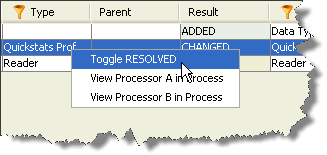
Configuration Analysis provides a mechanism for you to manually mark differences as resolved. To resolve a difference, right click on it in the results pane and select 'Toggle RESOLVED':
The result of the comparison will change from its original value to RESOLVED:
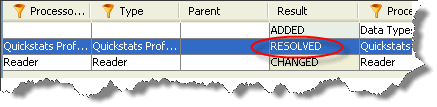
If you accidentally mark a change as resolved, or realize that further work is required to resolve the difference, you can toggle the RESOLVED flag a second time, and the result will return to its original value.
You can use the Comparison Filter to exclude or include resolved rows from your results pane.
|
Note: The Resolved flag is provided as a means of tracking your own resolution work. It has no meaning to the rest of the OEDQ suite, and there is no way to perform automated difference resolution from Configuration Analysis. |
Oracle ® Enterprise Data Quality Help version 9.0
Copyright ©
2006,2011 Oracle and/or its affiliates. All rights reserved.