Cross-attribute Check |
The Cross-attribute Check processor allows you to compare the values in two attributes in order to check the consistent application of a business rule.
Note that you can only compare attributes of the same Data Type; that is, a String attribute must be compared with another String attribute, a DATE with another DATE, and a Number with another Number.
Use Cross-attribute Check to check that the data for two related attributes is correct. For example, you may wish to check that Date_Of_Death values are later dates than Date_Of_Birth values.
Two attributes that you want to compare. The attributes must be of the same data type.
|
Option |
Type |
Purpose |
Default Value |
|
Selection (Is less than, Is less than or equal to, Is equal to, Is not equal to, Is greater than, Is greater than or equal to, Starts with, Ends with) See note below |
Drives how to compare the two attributes |
Is equal to |
|
|
Ignore case? |
Yes/No |
Determines whether or not case differences should be ignored when comparing attribute values, for example, whether or not 'LONDON' is considered as the same as 'London' |
Yes |
|
Note:The Starts with and Ends with options may only be used when comparing two String attributes. |
None
|
Flag attribute |
Purpose |
Possible Values |
|
CrossAttributeCheck
|
Indicates which records pass the Cross Attribute Check. A value of '-' means that the outcome was unknown, meaning that one of the attributes contained a Null value. |
Y/N/- |
A Cross-attribute Check's results may be published to the Dashboard.
The following interpretation of results is used by default:
|
Result |
|
|
Passed comparison |
Pass |
|
Null comparison |
Pass |
|
Failed comparison |
Alert |
|
Execution Mode |
Supported |
|
Batch |
Yes |
|
Real time Monitoring |
Yes |
|
Real time Response |
Yes |
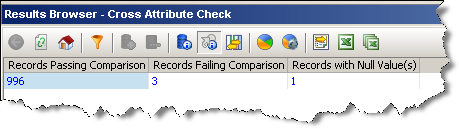
The Cross-attribute Check produces a summary view of its results, showing the following statistics:
|
Statistic |
Meaning |
|
Records passing comparison |
The number of records that passed the comparison |
|
Records failing comparison |
The number of records that failed the comparison |
|
Records with null value(s) |
The number of records where either, or both, values being compared were null |
The following output filters are available from a Cross-attribute Check:
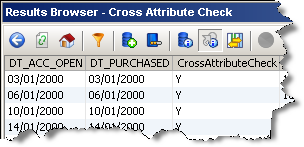
In this example, two attributes are compared: DT_ACC_OPEN and DT_PURCHASED, to see how many have repeated data:
Summary View
Drilldown on Records passing comparison
Oracle ® Enterprise Data Quality Help version 9.0
Copyright ©
2006,2011 Oracle and/or its affiliates. All rights reserved.
