
|
|
Invalid Character Check |
The Invalid Character Check processor provides a quick and easy way to find values that contain odd characters.
Use the Invalid Character Check to check for unusual characters. This is particularly useful when analyzing free text fields, which may have 'data cheats' in them, where data entry users have worked round mandatory fields by entering dummy characters such as #. The Invalid Character Check is also useful for finding typos.
If the invalid characters do not signify anything, they can simply be removed by adding a Denoise processor.
A single attribute to analyze for invalid characters
None
|
Flag attribute |
Purpose |
Possible Values |
|
CharValid |
Indicates which data passes the Invalid Character Check; that is, does the value consist only of valid characters? |
Y/N |
An Invalid Character Check's results may be published to the Dashboard.
The following interpretation of results is used by default:
|
Result |
|
|
Valid |
Pass |
|
Invalid |
Alert |
|
Execution Mode |
Supported |
|
Batch |
Yes |
|
Real time Monitoring |
Yes |
|
Real time Response |
Yes |
The Invalid Character Check produces a summary view of its results, showing the following statistics:
|
Statistic |
Meaning |
|
Valid records |
The records that were categorized as Valid by the Invalid Character Check. |
|
Invalid records |
The records that were categorized as Invalid by the Invalid Character Check. |
The following output filters are available from an Invalid Character Check:
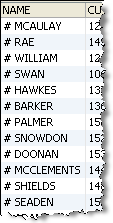
In this example, a NAME attribute is checked for invalid characters such as ()#%^*$£"!
A number of records are found containing the # character.
Summary View

Drilldown on Invalid Records
Oracle ® Enterprise Data Quality Help version 9.0
Copyright ©
2006,2011 Oracle and/or its affiliates. All rights reserved.