Value Check |
The Value Check processor compares the data in an attribute against a single value.
There are a number of options for performing the comparison:
Use Value Check as a simple way of filtering records according to the value of a single attribute. This might be to concentrate analysis on an area of interest, or to check values against a threshold value.
One attribute only (any type)
|
Note 1:It is possible to compare a Number attribute against a numeric value, a DATE attribute against a valid date value - entered in the format specified by the hint (dd-MMM-yyyy HH:mm) - and a String attribute against any value. Invalid comparisons will cause the process to fail. |
|
Note 2: For String attributes, alphabetic sorting is used when interpreting what the 'greater than' and 'less than' operators mean. So 'Michael' is greater than 'Matthew' etc. For date values, later dates are 'greater than' earlier dates. |
None
|
Flag attribute |
Purpose |
Possible Values |
|
ValueValid |
Indicates which data meets the Value check: Passes, Fails and Nulls |
Y/N/- |
A Value Check's results may be published to the Dashboard.
The following interpretation of results is used by default:
|
Result |
|
|
Valid |
Pass |
|
Null |
Pass |
|
Invalid |
Alert |
|
Execution Mode |
Supported |
|
Batch |
Yes |
|
Real time Monitoring |
Yes |
|
Real time Response |
Yes |
The Value Check produces a summary view of its results, showing the following statistics:
|
Statistic |
Meaning |
|
Records that passed the value check |
|
|
Records that failed the value check |
|
|
Null Records |
Null records (if the option was used to classify these separately) |
The following output filters are available from a Value Check:
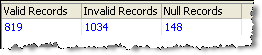
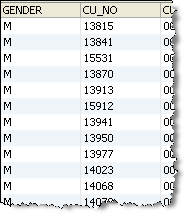
In this example, records are filtered by a Gender attribute, using a value check of 'is equal to M':
Summary View
Drill-down on Valid Records
Oracle ® Enterprise Data Quality Help version 9.0
Copyright ©
2006,2011 Oracle and/or its affiliates. All rights reserved.
