
|
|
Multiply |
The Multiply processor multiplies values from numeric attributes.
Use Multiply to multiply numeric values.
The multiplied value may be used to check business rules. For example, you might multiply values from a Quantity attribute and a UnitPrice attribute in order to check that the value in an OrderValue attribute is correct.
Any numeric attributes that you want to multiply together, or an array of numeric attributes, in which case all the elements will be multiplied.
None
|
Data attribute |
Type |
Purpose |
Value |
|
MultipliedValue |
Added |
A new Number attribute with the product of the multiplication of the input attribute values |
The product of multiplying all input attribute values |
None
|
Execution Mode |
Supported |
|
Batch |
Yes |
|
Real time Monitoring |
Yes |
|
Real time Response |
Yes |
The Multiply processor presents no summary statistics on its processing.
In the Data view, each input attribute is shown with the new MultipliedValue to the right.
None
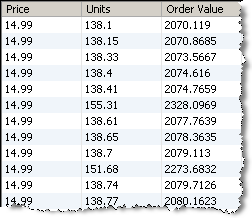
In this example, a Units attribute is multiplied by a Price attribute to form a new attribute (Order Value) giving the total Order Value. The default added Attribute name (MultipliedValue) is renamed to Order Value in the processor configuration.
This new attribute can be checked to see if it is equal to the Value of the Order stored in the system:
Oracle ® Enterprise Data Quality Help version 9.0
Copyright ©
2006,2011 Oracle and/or its affiliates. All rights reserved.