
|
|
Subtract |
The Subtract processor subtracts one numeric value from another. Both numeric values are input from attributes.
Use Subtract to subtract one numeric value from another.
One numeric attribute to subtract from, and one numeric attribute to subtract.
None
|
Data attribute |
Type |
Purpose |
Value |
|
SubtractedValue |
Added value |
A new Number attribute with the result of the subtraction |
The numeric result of the subtraction operation. |
None
|
Execution Mode |
Supported |
|
Batch |
Yes |
|
Real time Monitoring |
Yes |
|
Real time Response |
Yes |
The Subtract processor presents no summary statistics on its processing.
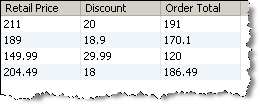
In the Data view, the input attributes are shown with the new SubtractedValue to the right.
None
In this example, a Discount attribute is subtracted from a Retail Price attribute to give the final order total. The new attribute is named SubtractedValue by default, but in this example has been renamed to 'Order Total'.
Oracle ® Enterprise Data Quality Help version 9.0
Copyright ©
2006,2011 Oracle and/or its affiliates. All rights reserved.