Address Verification |
The Address Verification processor (AV) is used to verify and standardize address data from any country. It also provides geocoding.
To use the Address Verification processor, you must first install the Address Verification Server and Data Packs. See Installing and Configuring Address Verification for further information.
Use the Address Verification processor:
|
Note: This processor always appears with a re-run marker, indicating that it will be completely re-executed each time the process is run, regardless of whether or not its configuration has changed. This will also mean that processors that are downstream of the processor will need to be rerun. This is because there may be changes made outside of the OEDQ application that could lead to different results on subsequent executions. |
|
Note: The Country input must be populated with a country name or code. Without it, Address Verification cannot verify an address or produce an Accuracy Code. |
| Option | Description | Settings |
|---|---|---|
| Processing mode | Whether to verify the input address or search all installed data and return multiple results. |
Verify: 1 to 1 - Checks the reference data and returns the best match Search: 1 to Many - Checks the reference data and returns multiple matches. Allows searching across countries, for example. |
| Geocode | Whether matching geocodes are to be returned. |
Yes No |
| Output address separator | The symbol used to separate the address elements. | Selection of punctuation symbols and special characters. |
|
Flag name |
Details |
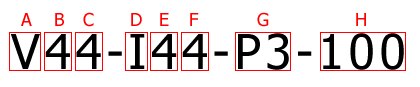
| AccuracyCode | A code that indicates how accurately each address has been identified and matched. |
| ResultCount | Number of addresses returned. Always "1" for Verify mode. |
| MatchScore | The match between the input and the closest reference match, expressed as a percentage. This is extracted from the Accuracy code. |
| GeoAccuracy | A code that indicates whether one or more Geocodes associated with the address have been identified. |
Also known as the Geocode, this flag consists of two values:
| Value | Description | Settings |
|---|---|---|
| Geocoding Status | Indicates whether a Geocode for the address has been found. |
P: Point - A single geocode was found matching the input address I: Interpolated - A geocode was able to be interpolated from the input addresses location in a range A: Average Multiple - Candidate geocodes were found to match the input address, and an average of these was returned U: Unable to geocode - A geocode was not able to be generated for the input address |
| Geocoding Level | Indicates the geographical accuracy of the Geocode. |
5: Delivery Point (PostBox or SubBuilding) 4: Premise (Premise or Building) 3: Thoroughfare 2: Locality 1: Administrative Area 0: None |
|
Execution Mode |
Supported |
| Batch | Yes |
| Real-Time Monitoring | Yes |
| Real-Time Response | Yes |
The Address Verification processor presents no summary statistics on its processing.
In the Data view, each input attribute is shown with the output attributes to the right.
None.
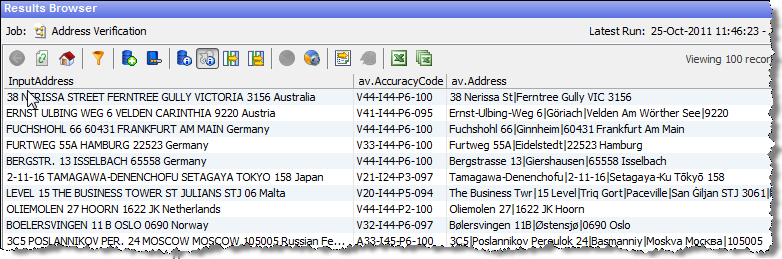
The below screenshot shows the output of the Address Verification processor on some sample addresses. In this case, the Results Browser has chosen to Show flags in order to see the output AccuracyCode and other flags:
Oracle ® Enterprise Data Quality Help version 9.0
Copyright ©
2006,2011 Oracle and/or its affiliates. All rights reserved.

 Outputs