
|
|
Add Date Attribute |
The Add Date Attribute processor adds a new DATE attribute with a given value to all records input to it.
Note that in OEDQ all DATE values have time components, though the time component may not always be used in processing.
The primary use of the Add Date Attribute processor is to create a test DATE value for another processor to handle. You may also use it to tag a set of records with a specific Date and Time, though note that this value is fixed in the configuration. To add a Date and Time stamp when the record is processed, use Add Current Date.
This processor does not require any inputs, as it adds an attribute to all records input to it.
|
Option |
Type |
Purpose |
Default Value |
|
New Attribute Value |
Date |
Allows you to specify a Date and Time to add to all records |
Defaults to the current date and time when the processor is configured |
|
Time zone |
Date |
Sets the time zone to use for the new Date value. |
Director Time Zone |
|
Data attribute |
Type |
Purpose |
Value |
|
NewDate |
Added |
The new DATE attribute that you are adding |
The value specified in the Option above. |
None
|
Execution Mode |
Supported |
|
Batch |
Yes |
|
Real time Monitoring |
Yes |
|
Real time Response |
Yes |
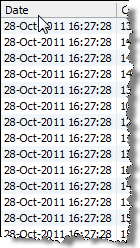
The Add Date Attribute processor does not output any summary data. The new attribute is shown to the left of all other attributes in the data view.
None
In this example, Add Date Attribute is used to add a test date value for use in a downstream processor:
Oracle ® Enterprise Data Quality Help version 9.0
Copyright ©
2006,2011 Oracle and/or its affiliates. All rights reserved.